How do I play an entire album in WMP

mborner

New member
Guru
Local time
4:48 PM
Messages
330
Location
Coral Springs, Florida
I listen to MP3 files through WMP. I have over 200 CD's ripped to my HDD. How can I play more than just one song at a time on an album? I'd like to select the album and play the whole thing, non-stop, in order, without creating a play list. Is there anyway to do that?
do you use the library feature in explorer and do your tunes load into WMP as normal.
Everything about the library and the player is normal except for the issue described above.
 
Last edited:

My Computer My Computer

At a glance

Windows 7 Pro/32 Academic. Build 7600Intel 2.3 Duo core4 GB DDRNvidia GeForce 9500 GT
Computer Manufacturer/Model Number
Custom Build
OS
Windows 7 Pro/32 Academic. Build 7600
CPU
Intel 2.3 Duo core
Motherboard
EliteGroup G31T-M
Memory
4 GB DDR
Graphics Card(s)
Nvidia GeForce 9500 GT
Sound Card
Built in
Monitor(s) Displays
Viewsonic 15" 4:3
Screen Resolution
1280 x 1024
Hard Drives
WD Caviar Black 750 GB
WD 250 GB External
PSU
Antec 450w
Keyboard
Standard windows
Mouse
Logitech USB
Internet Speed
Bellsouth DSL 6.0
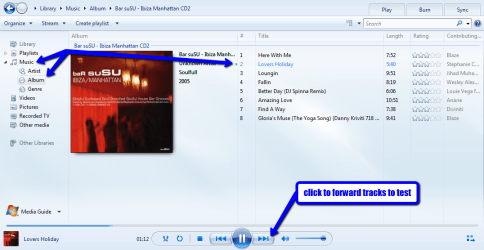
when you open wmp and on the left side select music thenclick album then your albums should show choose an album,
double click it it will open with track list select the 1st track by clicking it and it should play, the whole album ought to play through
 

My Computer My Computer

At a glance

Microsoft Windows 7 Home Premium 64-bit 7600IIx4 amd athelon 635 processor2x2gbati radeon HD 5450
Computer Manufacturer/Model Number
Hewlett packard/p6512uk
OS
Microsoft Windows 7 Home Premium 64-bit 7600
CPU
IIx4 amd athelon 635 processor
Motherboard
FOXCONN 2AA9
Memory
2x2gb
Graphics Card(s)
ati radeon HD 5450
Sound Card
(1) Realtek High Definition Audio (2) AMD High Definition
Monitor(s) Displays
samsung lcd tv 32"
Screen Resolution
1360x 768
Hard Drives
(1) WDC WD10 01FAES-60Z2A0 SATA Disk Device (2) Maxtor OneTouch USB Device (3) ST310003 33AS USB Device (4) WD My Book 1111 USB Device
PSU
?
Cooling
air!
Keyboard
wireless hp
Mouse
wireless Hp,optical
Internet Speed
1.10mb/s
Antivirus
MSE
Browser
Firefox
example!

2010-11-02_1327.png
 

My Computer My Computer

At a glance

Microsoft Windows 7 Home Premium 64-bit 7600IIx4 amd athelon 635 processor2x2gbati radeon HD 5450
Computer Manufacturer/Model Number
Hewlett packard/p6512uk
OS
Microsoft Windows 7 Home Premium 64-bit 7600
CPU
IIx4 amd athelon 635 processor
Motherboard
FOXCONN 2AA9
Memory
2x2gb
Graphics Card(s)
ati radeon HD 5450
Sound Card
(1) Realtek High Definition Audio (2) AMD High Definition
Monitor(s) Displays
samsung lcd tv 32"
Screen Resolution
1360x 768
Hard Drives
(1) WDC WD10 01FAES-60Z2A0 SATA Disk Device (2) Maxtor OneTouch USB Device (3) ST310003 33AS USB Device (4) WD My Book 1111 USB Device
PSU
?
Cooling
air!
Keyboard
wireless hp
Mouse
wireless Hp,optical
Internet Speed
1.10mb/s
Antivirus
MSE
Browser
Firefox
Thanks, boohbah, but that's how I normally play music and it stops after the first song and then you have to select another to play. Also, the Forward Track button only works when it's playing a CD, it won't work when playing a file from the HDD.
 

My Computer My Computer

At a glance

Windows 7 Pro/32 Academic. Build 7600Intel 2.3 Duo core4 GB DDRNvidia GeForce 9500 GT
Computer Manufacturer/Model Number
Custom Build
OS
Windows 7 Pro/32 Academic. Build 7600
CPU
Intel 2.3 Duo core
Motherboard
EliteGroup G31T-M
Memory
4 GB DDR
Graphics Card(s)
Nvidia GeForce 9500 GT
Sound Card
Built in
Monitor(s) Displays
Viewsonic 15" 4:3
Screen Resolution
1280 x 1024
Hard Drives
WD Caviar Black 750 GB
WD 250 GB External
PSU
Antec 450w
Keyboard
Standard windows
Mouse
Logitech USB
Internet Speed
Bellsouth DSL 6.0
The easiest way would be to either use the "play all" button in explorer or simply create a playlist.

-DG
 

My Computer My Computer

At a glance

Windows 7 Ultimate x86DualCore AMD Athlon 64 X2, 2600 MHz 5200+Samsung 2GB DDR2Onboard NVIDIA GeForce 6150SE nForce 430
Computer Manufacturer/Model Number
HP m8000n
OS
Windows 7 Ultimate x86
CPU
DualCore AMD Athlon 64 X2, 2600 MHz 5200+
Motherboard
Asus M2N68-LA (Narra)
Memory
Samsung 2GB DDR2
Graphics Card(s)
Onboard NVIDIA GeForce 6150SE nForce 430
Sound Card
Onboard nVIDIA nForce 6100-430 (MCP61P)
Monitor(s) Displays
Westinghouse 19" LED
Screen Resolution
1280x1024
Hard Drives
SATA II Seagate Barracuda 500GB
USB II WD Elements 500GB
USB II WD My Book 1TB
USB II WD My Book 2TB
PSU
Stock (HP)
Case
Stock (HP)
Cooling
Stock
Keyboard
Logitech Classic KB 200
Mouse
Standard HP opticle USB mouse
Make sure you add all the songs you want to play in the lists pane. Most likely you are playing a file from the details pane because of which it stops after playing the file you selected. To add all of your files in the list pane, go to the music library and select the files you want to play. Now drag items from the details pane to the list pane.

This is a nice tut on wmp12.

How to Play Music in Windows Media Player 12 | Windows 7 Tutorials

It also links to many other tuts on wmp12.
 

My Computer My Computer

At a glance

Windows 7 x64 pro/ Windows 7 x86 Pro/ XP SP3 x86
Computer Manufacturer/Model Number
Too many to describe...
OS
Windows 7 x64 pro/ Windows 7 x86 Pro/ XP SP3 x86
Make sure you add all the songs you want to play in the lists pane. Most likely you are playing a file from the details pane because of which it stops after playing the file you selected. To add all of your files in the list pane, go to the music library and select the files you want to play. Now drag items from the details pane to the list pane.

This is a nice tut on wmp12.

How to Play Music in Windows Media Player 12 | Windows 7 Tutorials

It also links to many other tuts on wmp12.
Thanks, Bill2, great tutorial.
 

My Computer My Computer

At a glance

Windows 7 Pro/32 Academic. Build 7600Intel 2.3 Duo core4 GB DDRNvidia GeForce 9500 GT
Computer Manufacturer/Model Number
Custom Build
OS
Windows 7 Pro/32 Academic. Build 7600
CPU
Intel 2.3 Duo core
Motherboard
EliteGroup G31T-M
Memory
4 GB DDR
Graphics Card(s)
Nvidia GeForce 9500 GT
Sound Card
Built in
Monitor(s) Displays
Viewsonic 15" 4:3
Screen Resolution
1280 x 1024
Hard Drives
WD Caviar Black 750 GB
WD 250 GB External
PSU
Antec 450w
Keyboard
Standard windows
Mouse
Logitech USB
Internet Speed
Bellsouth DSL 6.0
Thanks, boohbah, but that's how I normally play music and it stops after the first song and then you have to select another to play. Also, the Forward Track button only works when it's playing a CD, it won't work when playing a file from the HDD.
Thats really odd all my music is on an external and is my default music library,
WMP loads and watches the music folder on my external, i have no problem with the library loading the music or playing in the way i described above,
i cant understand why it wont work with yours. do you use the library feature in explorer and do your tunes load into WMP as normal.
 

My Computer My Computer

At a glance

Microsoft Windows 7 Home Premium 64-bit 7600IIx4 amd athelon 635 processor2x2gbati radeon HD 5450
Computer Manufacturer/Model Number
Hewlett packard/p6512uk
OS
Microsoft Windows 7 Home Premium 64-bit 7600
CPU
IIx4 amd athelon 635 processor
Motherboard
FOXCONN 2AA9
Memory
2x2gb
Graphics Card(s)
ati radeon HD 5450
Sound Card
(1) Realtek High Definition Audio (2) AMD High Definition
Monitor(s) Displays
samsung lcd tv 32"
Screen Resolution
1360x 768
Hard Drives
(1) WDC WD10 01FAES-60Z2A0 SATA Disk Device (2) Maxtor OneTouch USB Device (3) ST310003 33AS USB Device (4) WD My Book 1111 USB Device
PSU
?
Cooling
air!
Keyboard
wireless hp
Mouse
wireless Hp,optical
Internet Speed
1.10mb/s
Antivirus
MSE
Browser
Firefox
Usually, I just click Start/music to pull up my library, navigate to an album, and select the first song. It'll open WMP and the first song will play, but it ends there. I'll then navigate to an album within WMP, select a song, and the same thing happens. The album won't continue playing the next track. I'm wondering if this is a feature only available for playlists. Also, the "previous" and "next" buttons only work with a CD.
 

My Computer My Computer

At a glance

Windows 7 Pro/32 Academic. Build 7600Intel 2.3 Duo core4 GB DDRNvidia GeForce 9500 GT
Computer Manufacturer/Model Number
Custom Build
OS
Windows 7 Pro/32 Academic. Build 7600
CPU
Intel 2.3 Duo core
Motherboard
EliteGroup G31T-M
Memory
4 GB DDR
Graphics Card(s)
Nvidia GeForce 9500 GT
Sound Card
Built in
Monitor(s) Displays
Viewsonic 15" 4:3
Screen Resolution
1280 x 1024
Hard Drives
WD Caviar Black 750 GB
WD 250 GB External
PSU
Antec 450w
Keyboard
Standard windows
Mouse
Logitech USB
Internet Speed
Bellsouth DSL 6.0
Thanks, boohbah, but that's how I normally play music and it stops after the first song and then you have to select another to play. Also, the Forward Track button only works when it's playing a CD, it won't work when playing a file from the HDD.
Thats really odd all my music is on an external and is my default music library,
WMP loads and watches the music folder on my external, i have no problem with the library loading the music or playing in the way i described above,
i cant understand why it wont work with yours. do you use the library feature in explorer and do your tunes load into WMP as normal.
do you use the library feature in explorer and do your tunes load into WMP as normal.
Everything about the library and the player is normal except for the issue described above.
 

My Computer My Computer

At a glance

Windows 7 Pro/32 Academic. Build 7600Intel 2.3 Duo core4 GB DDRNvidia GeForce 9500 GT
Computer Manufacturer/Model Number
Custom Build
OS
Windows 7 Pro/32 Academic. Build 7600
CPU
Intel 2.3 Duo core
Motherboard
EliteGroup G31T-M
Memory
4 GB DDR
Graphics Card(s)
Nvidia GeForce 9500 GT
Sound Card
Built in
Monitor(s) Displays
Viewsonic 15" 4:3
Screen Resolution
1280 x 1024
Hard Drives
WD Caviar Black 750 GB
WD 250 GB External
PSU
Antec 450w
Keyboard
Standard windows
Mouse
Logitech USB
Internet Speed
Bellsouth DSL 6.0
The easiest way would be to either use the "play all" button in explorer or simply create a playlist.

-DG
Thanks, SledgeDG, I'll give this a try. I was hoping I could do it without creating a playlist.
 

My Computer My Computer

At a glance

Windows 7 Pro/32 Academic. Build 7600Intel 2.3 Duo core4 GB DDRNvidia GeForce 9500 GT
Computer Manufacturer/Model Number
Custom Build
OS
Windows 7 Pro/32 Academic. Build 7600
CPU
Intel 2.3 Duo core
Motherboard
EliteGroup G31T-M
Memory
4 GB DDR
Graphics Card(s)
Nvidia GeForce 9500 GT
Sound Card
Built in
Monitor(s) Displays
Viewsonic 15" 4:3
Screen Resolution
1280 x 1024
Hard Drives
WD Caviar Black 750 GB
WD 250 GB External
PSU
Antec 450w
Keyboard
Standard windows
Mouse
Logitech USB
Internet Speed
Bellsouth DSL 6.0
when you open WMP without going to my music. what do you see, could you post a screen shot.
and a screenshot after you select Music then album as i showed in pic in my previous post

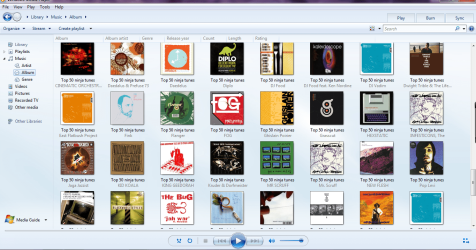
this is what mine looks like,
2010-11-02_2119.png

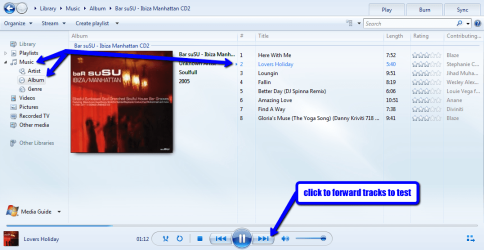
i then click on an album and see the details

2010-11-02_1327.png
 

My Computer My Computer

At a glance

Microsoft Windows 7 Home Premium 64-bit 7600IIx4 amd athelon 635 processor2x2gbati radeon HD 5450
Computer Manufacturer/Model Number
Hewlett packard/p6512uk
OS
Microsoft Windows 7 Home Premium 64-bit 7600
CPU
IIx4 amd athelon 635 processor
Motherboard
FOXCONN 2AA9
Memory
2x2gb
Graphics Card(s)
ati radeon HD 5450
Sound Card
(1) Realtek High Definition Audio (2) AMD High Definition
Monitor(s) Displays
samsung lcd tv 32"
Screen Resolution
1360x 768
Hard Drives
(1) WDC WD10 01FAES-60Z2A0 SATA Disk Device (2) Maxtor OneTouch USB Device (3) ST310003 33AS USB Device (4) WD My Book 1111 USB Device
PSU
?
Cooling
air!
Keyboard
wireless hp
Mouse
wireless Hp,optical
Internet Speed
1.10mb/s
Antivirus
MSE
Browser
Firefox
Well, you don't have to make a playlist (and if you happen to make one, you sure don't have to save it)

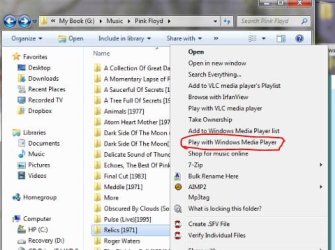
I always play out of explorer...the media center/library I only open for movies/TV Shows:

To play the whole Album, just mark it, right click and pick Play with Windows Media Player.

Capture.JPG gives me this: Capture2.JPG
It cues up the whole Album and plays it all through.

If you prefer a different player, I could tell you how to create such a context menu entry ;)

-DG
 

My Computer My Computer

At a glance

Windows 7 Ultimate x86DualCore AMD Athlon 64 X2, 2600 MHz 5200+Samsung 2GB DDR2Onboard NVIDIA GeForce 6150SE nForce 430
Computer Manufacturer/Model Number
HP m8000n
OS
Windows 7 Ultimate x86
CPU
DualCore AMD Athlon 64 X2, 2600 MHz 5200+
Motherboard
Asus M2N68-LA (Narra)
Memory
Samsung 2GB DDR2
Graphics Card(s)
Onboard NVIDIA GeForce 6150SE nForce 430
Sound Card
Onboard nVIDIA nForce 6100-430 (MCP61P)
Monitor(s) Displays
Westinghouse 19" LED
Screen Resolution
1280x1024
Hard Drives
SATA II Seagate Barracuda 500GB
USB II WD Elements 500GB
USB II WD My Book 1TB
USB II WD My Book 2TB
PSU
Stock (HP)
Case
Stock (HP)
Cooling
Stock
Keyboard
Logitech Classic KB 200
Mouse
Standard HP opticle USB mouse
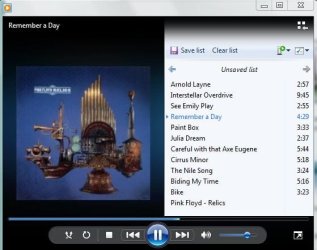
When I open a music file from the library, it opens like this in WMP. When it opens like this it will not play the next song title automatically.

1075175432_uy7L3-L.jpg


When I open the file from within WMP, it looks loke this:

1075175521_ayzVs-L.jpg


I've discovered that when I open an album from within WMP it works perfectly. All songs play on the album.
Hmm.. Go figure.

Thanks to all for your help. I now know that I need to open files from within WMP.
 

My Computer My Computer

At a glance

Windows 7 Pro/32 Academic. Build 7600Intel 2.3 Duo core4 GB DDRNvidia GeForce 9500 GT
Computer Manufacturer/Model Number
Custom Build
OS
Windows 7 Pro/32 Academic. Build 7600
CPU
Intel 2.3 Duo core
Motherboard
EliteGroup G31T-M
Memory
4 GB DDR
Graphics Card(s)
Nvidia GeForce 9500 GT
Sound Card
Built in
Monitor(s) Displays
Viewsonic 15" 4:3
Screen Resolution
1280 x 1024
Hard Drives
WD Caviar Black 750 GB
WD 250 GB External
PSU
Antec 450w
Keyboard
Standard windows
Mouse
Logitech USB
Internet Speed
Bellsouth DSL 6.0
Well i did say in my 1st post when you OPEN wmp it would work i rarely play a file straight from the root folder my Windows Media Player is neatly set up and does everything i need it to (most of the time)
Glad you sussed it in the end.
 

My Computer My Computer

At a glance

Microsoft Windows 7 Home Premium 64-bit 7600IIx4 amd athelon 635 processor2x2gbati radeon HD 5450
Computer Manufacturer/Model Number
Hewlett packard/p6512uk
OS
Microsoft Windows 7 Home Premium 64-bit 7600
CPU
IIx4 amd athelon 635 processor
Motherboard
FOXCONN 2AA9
Memory
2x2gb
Graphics Card(s)
ati radeon HD 5450
Sound Card
(1) Realtek High Definition Audio (2) AMD High Definition
Monitor(s) Displays
samsung lcd tv 32"
Screen Resolution
1360x 768
Hard Drives
(1) WDC WD10 01FAES-60Z2A0 SATA Disk Device (2) Maxtor OneTouch USB Device (3) ST310003 33AS USB Device (4) WD My Book 1111 USB Device
PSU
?
Cooling
air!
Keyboard
wireless hp
Mouse
wireless Hp,optical
Internet Speed
1.10mb/s
Antivirus
MSE
Browser
Firefox
m are all your music files in the music folder in the start menu? If they are click on the icon up on the right and turn them into medium icons.
You can then just right click on the album icon and you will get a drop down menu with play in media player in it. If you have any other media players such as winamp or vlc they will also be there.
 

My Computer My Computer

At a glance

Windows 7 Home Premium 64 biti7 [email protected]2x4GB Corsair Vegeance DDR3XFX GTX 260 Black Edition
Computer Manufacturer/Model Number
The Monolith. 3.1
OS
Windows 7 Home Premium 64 bit
CPU
i7 [email protected]
Motherboard
Gigabyte Z77-D3H
Memory
2x4GB Corsair Vegeance DDR3
Graphics Card(s)
XFX GTX 260 Black Edition
Sound Card
none-through large stereo hi fi
Monitor(s) Displays
Croosover 27MDP LED IPS Dell 2408 WFP
Screen Resolution
2560x1440 1920x1200
Hard Drives
1x Samsung 840Pro 128GB SSD
1x Samsung Spinpoint F1 1TB
PSU
Corsair AX 850 Watt
Case
Cooler Master ACTS 840
Cooling
Be Quiet! Dark Rock Pro
Keyboard
Enermax Aurora
Mouse
Logitech Ballmouse
Internet Speed
20MBPS
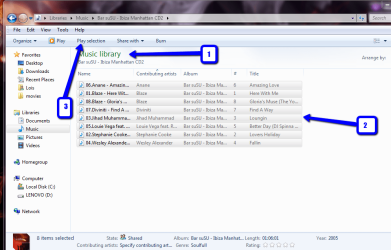
ok soloution for playing from library and continuing playback

2010-11-02_2340.png

1- open library (music)

2- open folder and highlight all the tracks

3-click play selection
bobs yer uncle.
also in music library if you choose,select arrange by album not folder and you will see all albums with albumart. and resize the folder view to large icons.
 

My Computer My Computer

At a glance

Microsoft Windows 7 Home Premium 64-bit 7600IIx4 amd athelon 635 processor2x2gbati radeon HD 5450
Computer Manufacturer/Model Number
Hewlett packard/p6512uk
OS
Microsoft Windows 7 Home Premium 64-bit 7600
CPU
IIx4 amd athelon 635 processor
Motherboard
FOXCONN 2AA9
Memory
2x2gb
Graphics Card(s)
ati radeon HD 5450
Sound Card
(1) Realtek High Definition Audio (2) AMD High Definition
Monitor(s) Displays
samsung lcd tv 32"
Screen Resolution
1360x 768
Hard Drives
(1) WDC WD10 01FAES-60Z2A0 SATA Disk Device (2) Maxtor OneTouch USB Device (3) ST310003 33AS USB Device (4) WD My Book 1111 USB Device
PSU
?
Cooling
air!
Keyboard
wireless hp
Mouse
wireless Hp,optical
Internet Speed
1.10mb/s
Antivirus
MSE
Browser
Firefox
I do the same as above except for step 2 instead I click Organize then select all
 

My Computer My Computer

At a glance

Windows 10 Pro x64i7-4770K16Gig DDR3-2400Gigabyte GT740
Computer type
PC/Desktop
Computer Manufacturer/Model Number
Self Built Custom Computer.
OS
Windows 10 Pro x64
CPU
i7-4770K
Motherboard
Asus Z87 Sabertooth
Memory
16Gig DDR3-2400
Graphics Card(s)
Gigabyte GT740
Sound Card
Onboard
Monitor(s) Displays
Benq 27" - Dell 23' - Benq 22"
Screen Resolution
1680x1050
Hard Drives
Samsung 840 Pro 128g SSD
1xWestern Digital Caviar Green 1tb
2xWestern Digital Caviar Green 2 tb
PSU
Seasonic 760 watt Platinum
Case
Coolermaster Haf - X
Cooling
Noctua NH-C12P CPU Cooler
Keyboard
Logitech illuminated keyboard
Mouse
Logitech Perfomance MX
Internet Speed
Cable = speeds to 20Mbps downsteam and 512kbps upsteam
Antivirus
Avast Internet Security
Browser
Firefox
thats right kodi , i would have put that but it would have messed up my screenshot , :p
 

My Computer My Computer

At a glance

Microsoft Windows 7 Home Premium 64-bit 7600IIx4 amd athelon 635 processor2x2gbati radeon HD 5450
Computer Manufacturer/Model Number
Hewlett packard/p6512uk
OS
Microsoft Windows 7 Home Premium 64-bit 7600
CPU
IIx4 amd athelon 635 processor
Motherboard
FOXCONN 2AA9
Memory
2x2gb
Graphics Card(s)
ati radeon HD 5450
Sound Card
(1) Realtek High Definition Audio (2) AMD High Definition
Monitor(s) Displays
samsung lcd tv 32"
Screen Resolution
1360x 768
Hard Drives
(1) WDC WD10 01FAES-60Z2A0 SATA Disk Device (2) Maxtor OneTouch USB Device (3) ST310003 33AS USB Device (4) WD My Book 1111 USB Device
PSU
?
Cooling
air!
Keyboard
wireless hp
Mouse
wireless Hp,optical
Internet Speed
1.10mb/s
Antivirus
MSE
Browser
Firefox
Great tips everybody, thank you.
 

My Computer My Computer

At a glance

Windows 7 Pro/32 Academic. Build 7600Intel 2.3 Duo core4 GB DDRNvidia GeForce 9500 GT
Computer Manufacturer/Model Number
Custom Build
OS
Windows 7 Pro/32 Academic. Build 7600
CPU
Intel 2.3 Duo core
Motherboard
EliteGroup G31T-M
Memory
4 GB DDR
Graphics Card(s)
Nvidia GeForce 9500 GT
Sound Card
Built in
Monitor(s) Displays
Viewsonic 15" 4:3
Screen Resolution
1280 x 1024
Hard Drives
WD Caviar Black 750 GB
WD 250 GB External
PSU
Antec 450w
Keyboard
Standard windows
Mouse
Logitech USB
Internet Speed
Bellsouth DSL 6.0
Back
Top