Solved Windows 7 x64 suddenly slow to startup

RAWhitelock

New member
Local time
6:48 AM
Messages
40
Location
SF Bay Area, CA
All of a sudden today when I went to start up my computer, it took way longer than normal to boot up (three mionutes as opposed to the usual 30sec or less). I have turned it off and reset it and each time I turn it on, the same thing happens.

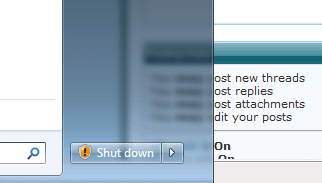
Something of note: The 'Shut Down' button in the windows tab shows the indication that there are updates to apply, but I've shut down my machine more than once and it says that it's installing the updates, yet when I turn the computer back on, the indicator is still there next to the shut down button. I have attached a snippet of what I'm reffering to just to be clear.

What could this be?

my specs:
System Manufacturer/Model Number Custom OS Windows 7 64bit CPU AMD Phenom II X4 925 Motherboard Gigabyte 890GPA-UD3H Memory 4GB KIT (2X2GB) DDR3 PATRIOT PVS34G1600LLK
 

Attachments

  • Capture.PNG
    Capture.PNG
    7.5 KB · Views: 3,773

My Computer My Computer

At a glance

Windows 7 64bitAMD Phenom II X4 9254GB KIT (2X2GB) DDR3 PATRIOT PVS34G1600LLK
Computer Manufacturer/Model Number
Custom
OS
Windows 7 64bit
CPU
AMD Phenom II X4 925
Motherboard
Gigabyte 890GPA-UD3H
Memory
4GB KIT (2X2GB) DDR3 PATRIOT PVS34G1600LLK
Hard Drives
500GB seagate
Case
Cooler master 310
Make a clean boot to help determine the problem
http://support.microsoft.com/kb/929135

It is most likely updates that have not been fully installed
If clean boot does not show anything make a system restore from a few days ago.
Then install updates manually, turn off automatic update.
 

My Computer My Computer

At a glance

Windows 10, Home Clean InstallIntel Core2 processsor Q8200(2.33Ghz 1333FSB)...6 gbATI Radeon 256MB HD3650
Computer type
PC/Desktop
Computer Manufacturer/Model Number
Dell XPS 420
OS
Windows 10, Home Clean Install
CPU
Intel Core2 processsor Q8200(2.33Ghz 1333FSB) Quad Core Tech
Motherboard
Dell
Memory
6 gb
Graphics Card(s)
ATI Radeon 256MB HD3650
Sound Card
Intergrated 7.1 Channel Audio
Monitor(s) Displays
Dell SP2009W 20"
Hard Drives
640 GB Serial ATA Hard drive
Cooling
Fan
Keyboard
Dell USB Keyboard
Mouse
Dell Premium Optical USB
Internet Speed
DSL 2.85
Firstly check your boot up options in the bios... Most of the time the settings is just set a little slow..Make all the waiting options under boot up options as low as possible."IF 10 make it 1" Example
 

My Computer My Computer

At a glance

Windows 7 Ultimate 32bitINTEL Pentium4 3.2ghz(QuadCore MonthEnd!!!)2gb kingston DDR2 800hd powercolour 5570 512MB
Computer Manufacturer/Model Number
Custom
OS
Windows 7 Ultimate 32bit
CPU
INTEL Pentium4 3.2ghz(QuadCore MonthEnd!!!)
Motherboard
Asus P5QL-EM
Memory
2gb kingston DDR2 800
Graphics Card(s)
hd powercolour 5570 512MB
Sound Card
8ch onboard
Monitor(s) Displays
21" Samsung
Screen Resolution
Change alot
Hard Drives
samsung 500GB 7200rpm
PSU
Sparta 500w
Case
Alienware
Cooling
Aero cooling
Keyboard
Microsoft Multi-Media
Mouse
Scorpion 3000dpi
Internet Speed
none
Other Info
Xforce-5 5.1 Surround
All of a sudden today when I went to start up my computer, it took way longer than normal to boot up. What could this be?

I must not be as curious as you are because a while back my Win 7 x64 computer started about 20 seconds slower than usual and I immediately shut it down and did a 4 minute 40 second Macrium Reflect Image Restore from a week earlier. I guess I've become accustomed to taking the easy way out of situations like this.

~Maxx~

LaCie100.png
 

My Computer My Computer

At a glance

Windows 7 x64 Home PremiumIntel Core i7 930 @ 2.8 Ghz Socket 1366 LGA8 GB 1366 Mhz DDR3 (PC3-10700) RAMATI Radeon 5770 1 GB DDR5 RAM
Computer Manufacturer/Model Number
HP HPE 270f
OS
Windows 7 x64 Home Premium
CPU
Intel Core i7 930 @ 2.8 Ghz Socket 1366 LGA
Motherboard
Pegatron Truckee v1.04E41
Memory
8 GB 1366 Mhz DDR3 (PC3-10700) RAM
Graphics Card(s)
ATI Radeon 5770 1 GB DDR5 RAM
Sound Card
Realtech High Definition
Monitor(s) Displays
32" Sony Bravia
Screen Resolution
1366 X 768
Hard Drives
Intel 25nm 120 GB Series 320 SSD HD Tune- 265 MBps Read/ 130 MBps Write

LaCie 1TB + 1TB RAID 0 eSATA Drive HD Tune- 160 MBps Read/ 90 MBps Write
Keyboard
Logitech Illuminated
Mouse
Logitech MX Revolution
Internet Speed
36.4 Mbps Maximum on a 37 Mbps Motorola SB501 Modem

My Computer My Computer

At a glance

windows 7 ultimate 64bitIntel Core2 Extreme x9000 2.8GHZ4Gig2 NVidia GeForce 8800M GTX (SLi)
Computer Manufacturer/Model Number
Alienware AREA-51 M17x
OS
windows 7 ultimate 64bit
CPU
Intel Core2 Extreme x9000 2.8GHZ
Motherboard
Asus P965 Intel chipset
Memory
4Gig
Graphics Card(s)
2 NVidia GeForce 8800M GTX (SLi)
Sound Card
onboard
Monitor(s) Displays
17in. built-in, 47in JVC LCD
Screen Resolution
1080p
Hard Drives
2 250Gig Hitachi (RAID 0) @ 7200RPM
Case
17in. laptop
Mouse
touchpad, Logitech Anywhere Mouse cordless laser
Internet Speed
cable
All of a sudden today when I went to start up my computer, it took way longer than normal to boot up (three mionutes as opposed to the usual 30sec or less). I have turned it off and reset it and each time I turn it on, the same thing happens.

Something of note: The 'Shut Down' button in the windows tab shows the indication that there are updates to apply, but I've shut down my machine more than once and it says that it's installing the updates, yet when I turn the computer back on, the indicator is still there next to the shut down button. I have attached a snippet of what I'm reffering to just to be clear.

What could this be?

my specs:
System Manufacturer/Model Number Custom OS Windows 7 64bit CPU AMD Phenom II X4 925 Motherboard Gigabyte 890GPA-UD3H Memory 4GB KIT (2X2GB) DDR3 PATRIOT PVS34G1600LLK

It often does take much longer to boot if windows has to install updates. Have you tried rebooting to see if the problem exists?

Does it do the same thing when you boot in safe mode (f8)?
 

My Computer My Computer

At a glance

Win 8 Release candidate 8400[email protected]4 gigsNvidia 9600M
Computer Manufacturer/Model Number
HP Pavillion dv-7 1005 Tx
OS
Win 8 Release candidate 8400
CPU
[email protected]
Memory
4 gigs
Graphics Card(s)
Nvidia 9600M
Sound Card
HD built-in
Monitor(s) Displays
17" Wxga
Screen Resolution
1440x900
Cooling
none
Internet Speed
45Mb down 5Mb up
Could be that Windows is installing/configuring some updates at startup, causing slower than normal startup. This happens to me from time to time. I would suggest to either disable automatic updates (could be dangerous though if we are talking about security updates) or install updates manually, and see if problem persists.
 

My Computer My Computer

At a glance

Windows 7 Home Premium x64 SP1Intel Core i3 M330 @ 2.13GHz4 GBNVidia GeForce 310M
Computer Manufacturer/Model Number
Toshiba Satellite U500
OS
Windows 7 Home Premium x64 SP1
CPU
Intel Core i3 M330 @ 2.13GHz
Memory
4 GB
Graphics Card(s)
NVidia GeForce 310M
Screen Resolution
1280x800
Okay, guys. So far I have tried clean-boot, and I have restored my system to a week ago to no avail. I'm still having the same problem. I'm also seeing the "!" indication on my shutdown button as if to indicate that there are updates to install. When I shut down the computer, it goes thru the updating proces. This happens every single time I shut it off. It's as if the update is never fully successful. Strange, no? I will try Kword88's suggestion next. Any other suggestions would be great. Thanks, all!
 

My Computer My Computer

At a glance

Windows 7 64bitAMD Phenom II X4 9254GB KIT (2X2GB) DDR3 PATRIOT PVS34G1600LLK
Computer Manufacturer/Model Number
Custom
OS
Windows 7 64bit
CPU
AMD Phenom II X4 925
Motherboard
Gigabyte 890GPA-UD3H
Memory
4GB KIT (2X2GB) DDR3 PATRIOT PVS34G1600LLK
Hard Drives
500GB seagate
Case
Cooler master 310
Hey guys. Quick thought - could this have anything to do with a problem with Norton AV? I'm getting an error message from them that I've never seen since I've had this machine.
 

Attachments

  • NOrton.PNG
    NOrton.PNG
    17.5 KB · Views: 49

My Computer My Computer

At a glance

Windows 7 64bitAMD Phenom II X4 9254GB KIT (2X2GB) DDR3 PATRIOT PVS34G1600LLK
Computer Manufacturer/Model Number
Custom
OS
Windows 7 64bit
CPU
AMD Phenom II X4 925
Motherboard
Gigabyte 890GPA-UD3H
Memory
4GB KIT (2X2GB) DDR3 PATRIOT PVS34G1600LLK
Hard Drives
500GB seagate
Case
Cooler master 310
i had huge slow start with norton ,installed MSE and it completely cured it
 

My Computer My Computer

At a glance

Microsoft Windows 7 Home Premium 64-bit 7600IIx4 amd athelon 635 processor2x2gbati radeon HD 5450
Computer Manufacturer/Model Number
Hewlett packard/p6512uk
OS
Microsoft Windows 7 Home Premium 64-bit 7600
CPU
IIx4 amd athelon 635 processor
Motherboard
FOXCONN 2AA9
Memory
2x2gb
Graphics Card(s)
ati radeon HD 5450
Sound Card
(1) Realtek High Definition Audio (2) AMD High Definition
Monitor(s) Displays
samsung lcd tv 32"
Screen Resolution
1360x 768
Hard Drives
(1) WDC WD10 01FAES-60Z2A0 SATA Disk Device (2) Maxtor OneTouch USB Device (3) ST310003 33AS USB Device (4) WD My Book 1111 USB Device
PSU
?
Cooling
air!
Keyboard
wireless hp
Mouse
wireless Hp,optical
Internet Speed
1.10mb/s
Antivirus
MSE
Browser
Firefox
i had huge slow start with norton ,installed MSE and it completely cured it

Did it happen to you out of the blue? Or was your machine always slow on startup? Because I've been running norton AV since march with no issues until now. I tried uninstalling norton and reloading it and nothing has changed.
 

My Computer My Computer

At a glance

Windows 7 64bitAMD Phenom II X4 9254GB KIT (2X2GB) DDR3 PATRIOT PVS34G1600LLK
Computer Manufacturer/Model Number
Custom
OS
Windows 7 64bit
CPU
AMD Phenom II X4 925
Motherboard
Gigabyte 890GPA-UD3H
Memory
4GB KIT (2X2GB) DDR3 PATRIOT PVS34G1600LLK
Hard Drives
500GB seagate
Case
Cooler master 310
Temporary disable Norton AV ...run Wds update 3 time ...make sure nothing else is waiting to install ..
 

My Computer My Computer

At a glance

WDS 7 Home Pre.x64Intel Core i5 2450M @ 2.50GHz8GB Kingston[2x4] Dual-Channel DDR3 @ 1333MHzAMD Radeon(TM) HD 6470M + Intel(R) HD Graph 3000
Computer type
Laptop
Computer Manufacturer/Model Number
Sony Vaio VPC-SE23FXS
OS
WDS 7 Home Pre.x64
CPU
Intel Core i5 2450M @ 2.50GHz
Memory
8GB Kingston[2x4] Dual-Channel DDR3 @ 1333MHz
Graphics Card(s)
AMD Radeon(TM) HD 6470M + Intel(R) HD Graph 3000
Hard Drives
TOSHIBA MK6459GSXP 600GB x 5400RPM (SATA)
Temporary disable Norton AV ...run Wds update 3 time ...make sure nothing else is waiting to install ..

I tried that. Also a no-go. Windows update wants to update something for Microsoft office 2010 which is a free trial version that I downloaded, but for some reason it is not able to complete the update each time. I get an error code 646. I tried to uninstall Microsoft Office 2010 and the computer in unable to do so. Strange, no?
 

My Computer My Computer

At a glance

Windows 7 64bitAMD Phenom II X4 9254GB KIT (2X2GB) DDR3 PATRIOT PVS34G1600LLK
Computer Manufacturer/Model Number
Custom
OS
Windows 7 64bit
CPU
AMD Phenom II X4 925
Motherboard
Gigabyte 890GPA-UD3H
Memory
4GB KIT (2X2GB) DDR3 PATRIOT PVS34G1600LLK
Hard Drives
500GB seagate
Case
Cooler master 310

My Computer My Computer

At a glance

Windows 7 64bitAMD Phenom II X4 9254GB KIT (2X2GB) DDR3 PATRIOT PVS34G1600LLK
Computer Manufacturer/Model Number
Custom
OS
Windows 7 64bit
CPU
AMD Phenom II X4 925
Motherboard
Gigabyte 890GPA-UD3H
Memory
4GB KIT (2X2GB) DDR3 PATRIOT PVS34G1600LLK
Hard Drives
500GB seagate
Case
Cooler master 310
Back
Top