Sound Forge with Windows 7 Not Recording

Fivenails

New member
Local time
7:17 PM
Messages
6
I have Sound Forge 9 installed on my desktop computer and it works fine.

I realise there’s doubt over compatibility of Sound Forge 9 with Windows 7 but I’ve installed it on my new Windows 7 laptop (Acer 1410 64 bit) and it works as normal - except it won’t Record.
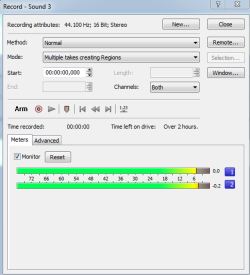
I can send a music file to it OK. Waveform displayed and I play with it, etc. However when I ask it to Record, all I see on the monitor is noise at around -60dB, just as if the recorder has an open-circuit input, which it probably has! It will record and playback this noise so it’s running but not connected to a sound source.
The source would usually be an internet source eg. streaming radio.

So to check things I’ve downloaded Sound Forge Audio Studio 10 (trial version) which is compatible with Windows 7 but I get the same results, -60dB noise only!
I’ve also tried Audacity 1.3 Beta, the same!

So somewhere I guess, I need to tick a box or change a setting to let audio through. I’ve tried all the various sound settings I know about in Sound Forge and via Control Panel.

Grateful for any idea?
Thanks
 

My Computer My Computer

OS
Windows Vista 32
What or where are you trying to record from? If it's streaming audio from the Internet you need the "System Mixer" function. On some new PC's it's not there and on some others it's there but not enabled.

If the System Mixer is what you need, go to the Sound Panel. Control Panel/Hardware and Sound/Sound. In the Sound Panel click on the Recording tab. If the System Mixer is listed, make it the default recording device. If it's not listed, RIGHT click in an empty area in the panel and check both boxes to display both Disabled and Disconnected Devices. If the System Mixer now shows up you can select it and make it the default playback device. If it still does not show up, if you are lucky the PC vendor will have updated drivers that enable the System Mixer.
 

My Computer My Computer

Computer type
PC/Desktop
Computer Manufacturer/Model Number
My Own Build
OS
Windows 10 64 bit
CPU
Intel i7 6700K
Motherboard
ASUS ROG Maximus VIII Hero
Memory
16GB Corsair Dominator
Graphics Card(s)
Intel CPU Graphics
Sound Card
RealTek
Monitor(s) Displays
27" Dell S2719dgf
Screen Resolution
2560X1440
Hard Drives
1 TB Samsung 850 EVO SSD for Win 10 Pro
500GB Samsung 850 EVO SSD for Win 10 Insider
2 TB drive for backup
PSU
EVGA Supernova 750G2
Case
BeQuiet Silent Base 600
Cooling
Deepcool Captain 120EX
Keyboard
Microsoft Wireless 2000
Mouse
Microsoft wireless
Internet Speed
100 MB/sec (Cable)
Antivirus
Microsoft Defender and Malwarebytes
Browser
Edge/Firefox
Other Info
Cakewalk (Sonar) by BandLab and Studio One 4.1 Pro recording studio software. MOTU 896Mk3 Hybrid recording interface, Frontier Tranzport wireless control unit, Behringer X-Touch Control Surface.
Five USB connected optical drives for CD Audio production using Nero BurningROM
Unfortunately this doesn't fix it!
But thanks for trying.
 

My Computer My Computer

OS
Windows Vista 32
Unfortunately this doesn't fix it!
But thanks for trying.

1. Have you set Sound Forge's recording device. It sounds like it's defaulting to Line In.

2. Have you set Windows default recording device, whether it be Line In, Stereo Mix, Mic....etc

By the way, SF9 works perfectly well in Windows 7

Ap
 

My Computer My Computer

Computer Manufacturer/Model Number
Assembled in my workshop
OS
Windows 7 Home Premium
CPU
Intel Core 2 Duo @ 3.00gHz
Motherboard
Gigabyte GA-P35-S3G
Memory
4 GB
Graphics Card(s)
ATI Radeon HD 2600 XT
Sound Card
RME 24/96 Card, Realtek Internal Audio PreSonus FireStudio
Monitor(s) Displays
Acer 1917 (x2)
Screen Resolution
1280 x 1024 on both monitors
Hard Drives
Three 250GB Seagate SATA Barracuda 7200rpm
PSU
Rosewill 500-watt
Case
Rosewill mid-tower
Cooling
Noctua NH-U9B (CPU), PwrSupply fan + single large case Fan
Keyboard
Macally w/2/USB ports.
Mouse
Trackman Wheel
Other Info
Event 20/20 bas studio monitors, Yamaha sub.
Rackmount Korg/Roland/Yamaha synthesizers,
Cubase MIDI/audio recording. Sony Soundforge audio/mastering software. CD Architect Mastering. RME & Presonus audio interfaces.
Sound Forge via Preference & Audio tabs gives three options Micro Sound Mapper, Direct Sound Surround & Windows Classic Wave Driver.
Windows Classic Wave gets me to Stereo Mix High Definition which I thought would be right.
Tried all these options – still same!
Windows default Recording device set to Stereo Mix but still same!
Thanks but please keep up the suggestions.
 

My Computer My Computer

OS
Windows Vista 32
Perhaps the record level isn't set.
You're trying to record streaming audio correct?

Right click the microsoft speaker icon in the taskbar, select Recording devices, single left click stereo mix then select the properties button.

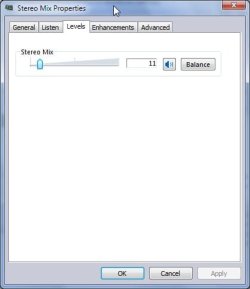
Do you have a "levels" tab? This level will adjust your recording level.
Also, make sure none of your devices are muted while testing, although... to reduce noise I would mute all inputs and reduce levels of inputs -not- being used.

Ap
 

My Computer My Computer

Computer Manufacturer/Model Number
Assembled in my workshop
OS
Windows 7 Home Premium
CPU
Intel Core 2 Duo @ 3.00gHz
Motherboard
Gigabyte GA-P35-S3G
Memory
4 GB
Graphics Card(s)
ATI Radeon HD 2600 XT
Sound Card
RME 24/96 Card, Realtek Internal Audio PreSonus FireStudio
Monitor(s) Displays
Acer 1917 (x2)
Screen Resolution
1280 x 1024 on both monitors
Hard Drives
Three 250GB Seagate SATA Barracuda 7200rpm
PSU
Rosewill 500-watt
Case
Rosewill mid-tower
Cooling
Noctua NH-U9B (CPU), PwrSupply fan + single large case Fan
Keyboard
Macally w/2/USB ports.
Mouse
Trackman Wheel
Other Info
Event 20/20 bas studio monitors, Yamaha sub.
Rackmount Korg/Roland/Yamaha synthesizers,
Cubase MIDI/audio recording. Sony Soundforge audio/mastering software. CD Architect Mastering. RME & Presonus audio interfaces.
Thanks Aphhelion but even with all inputs set at zero or muted, there's still only the noise (fluctuating around -60dB)
 

My Computer My Computer

OS
Windows Vista 32
Thanks Aphhelion but even with all inputs set at zero or muted, there's still only the noise (fluctuating around -60dB)


Sorry I couldn't be of help, if you get recording and/or input signal going with windows all of the audio programs you mentioned should start receiving input.

Here's what my Stereo Mix "Properties" look like.

StMix.jpg

You might make sure the advanced tab is using 16-bit, 44.1 kHz and also try disabling all enhancements.

Ap
 

My Computer My Computer

Computer Manufacturer/Model Number
Assembled in my workshop
OS
Windows 7 Home Premium
CPU
Intel Core 2 Duo @ 3.00gHz
Motherboard
Gigabyte GA-P35-S3G
Memory
4 GB
Graphics Card(s)
ATI Radeon HD 2600 XT
Sound Card
RME 24/96 Card, Realtek Internal Audio PreSonus FireStudio
Monitor(s) Displays
Acer 1917 (x2)
Screen Resolution
1280 x 1024 on both monitors
Hard Drives
Three 250GB Seagate SATA Barracuda 7200rpm
PSU
Rosewill 500-watt
Case
Rosewill mid-tower
Cooling
Noctua NH-U9B (CPU), PwrSupply fan + single large case Fan
Keyboard
Macally w/2/USB ports.
Mouse
Trackman Wheel
Other Info
Event 20/20 bas studio monitors, Yamaha sub.
Rackmount Korg/Roland/Yamaha synthesizers,
Cubase MIDI/audio recording. Sony Soundforge audio/mastering software. CD Architect Mastering. RME & Presonus audio interfaces.
Don't be sorry, I'm pleased to have your interest.
Sadly though, again no change!
Reducing level at Stereo Mix reduces noise as I would expect as it's the only input poor old Sound Force is seeing. Still no input signal though.
In the old world of audio recording it's as if I haven't plugged the mics into the recorder - as open circuit!
Regards
5nails
 

My Computer My Computer

OS
Windows Vista 32
Don't be sorry, I'm pleased to have your interest.
Sadly though, again no change!
Reducing level at Stereo Mix reduces noise as I would expect as it's the only input poor old Sound Force is seeing. Still no input signal though.
In the old world of audio recording it's as if I haven't plugged the mics into the recorder - as open circuit!
Regards
5nails


Ok, I wasn't really sorry.. hahaha..

Each recording device, whether it's the default or not can be selected and it's properties adjusted, so, if you have Line In and Mic enabled select each one and see where it's record level is set then try recording via Line In or Mic.

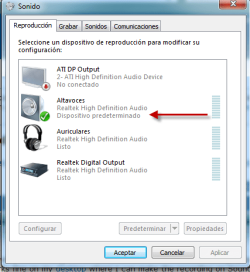
You have Playback Output set to Speakers?

Ap
 

My Computer My Computer

Computer Manufacturer/Model Number
Assembled in my workshop
OS
Windows 7 Home Premium
CPU
Intel Core 2 Duo @ 3.00gHz
Motherboard
Gigabyte GA-P35-S3G
Memory
4 GB
Graphics Card(s)
ATI Radeon HD 2600 XT
Sound Card
RME 24/96 Card, Realtek Internal Audio PreSonus FireStudio
Monitor(s) Displays
Acer 1917 (x2)
Screen Resolution
1280 x 1024 on both monitors
Hard Drives
Three 250GB Seagate SATA Barracuda 7200rpm
PSU
Rosewill 500-watt
Case
Rosewill mid-tower
Cooling
Noctua NH-U9B (CPU), PwrSupply fan + single large case Fan
Keyboard
Macally w/2/USB ports.
Mouse
Trackman Wheel
Other Info
Event 20/20 bas studio monitors, Yamaha sub.
Rackmount Korg/Roland/Yamaha synthesizers,
Cubase MIDI/audio recording. Sony Soundforge audio/mastering software. CD Architect Mastering. RME & Presonus audio interfaces.
I only use my laptop (on which I'm having the trouble) to record from internet and playback via a DAC into my Hi Fi gear. All this works fine on my desktop where I can make the recording on Sound Forge (edit if neccesary) and copy to the laptop via USB flash pen.
I would like to record directly on the laptop.
Do you think it's possible that a link within the computer (Acer 1410) isn't working?
Thanks
5nails
 

My Computer My Computer

OS
Windows Vista 32
I found the way to record in Sound Forge

Hi Fivenails,

I don't know if by know you managed to solve your problem, but I did find a work around after touching all possible settings.

Appart from activating the Stereo Mix in the recording devices, you need to go to the first sound tab in playing devices (my W7 is in Spanish don't know exactly original version in English). There you will have to set SPEAKERS as the default device. In my case I had 'headphones' and that was preventing Sound Forge from picking up the sound from the mix, now everything works smoothly.

I hope this helps.
 

Attachments

  • audioforum1.png
    audioforum1.png
    19 KB · Views: 33
  • audioforum2.png
    audioforum2.png
    12.5 KB · Views: 24

My Computer My Computer

OS
w7
No solution for me in this thread

I'm being driven mad by the problem described in the OP. Even if I set stereo mix as the default sound input, Windows 7 seems somehow to disable it on some reboots. And when I enable stereo mix, set it to default, ensure loudspeakers are my default output setting and all the other good things that are advised in this (and many other forums) for Windows 7, still my Sony Sound Forge Audio Studio 9 often gives absolutely no signal when I try to record streaming material.
My Sound Forge record preferences are set to Classic Wave Driver and input device to stereo mix, exactly as should be required to produce results. I just don't understand (a) why Windows is (sometimes) able to shut down my default device and (b) why Sound Forge won't record even when everything is set up just fine. The only reliable solution I have found to the problem is to uninstall and reinstall Sound Forge. I shouldn't have to do this every time I try to run the software!!
Any helpful thoughts or insights will be gratefully welcomed.
 

My Computer My Computer

OS
Windows 7 Home Premium 64bit
CPU
Intel Core 2 Duo E6600
Motherboard
ASRock P43ME
Memory
DDR2 4096 megabytes
Graphics Card(s)
NVIDIA Quadro FX 3800
To: Fireberd
Following your directions, I was able to start recording with Sound Forge on windows 7. Thanks so much
 

My Computer My Computer

OS
Windows Home Premium

My Computer My Computer

OS
Windows 7 Home Premium 64bit
Sound Forge with Windows 7 Not Recording Reply to Thread...SOLVED!

Sound Forge with Windows 7 Not Recording Reply to Thread...SOLVED!

I couldn't record what I was hearing either...and let me begin with...I am not in any way Tech literate...but I am determined...and somewhere..I learned that the right codecs are important fro any audio or video program. I went to the Realtek site below, looked for, found and downloaded the codecs. Basically...when you try to run it, it tells you that it will remove your Realtek Audio and replace it with...Realtek Audio. Go figure. Evidently, when Microsoft includes Realtek in windows 7...it doesn't include ALL of Realtek's components.

Go to Realtek home page: Realtek
Click on Downloads Button. Choose High Definition Audio Codecs*(Software) .
Then click on “I accept the above” box.
Under Description...choose (Your Operating System) either 32 bit or 64 bit. Mine is 64...and off line...if that's important...so I downloaded that one by clicking on “Global” at the end.

You must make sure, of course, that you have enabled the stereo mix in audio...and there are plenty of YouTube videos to tell you how to do that better that I could. This worked for me. It should work for you. Good luck.
 

My Computer My Computer

Computer type
PC/Desktop
Computer Manufacturer/Model Number
Hp
OS
Widows 7 Professional 64 bit
Memory
8G
Hard Drives
2T
Back
Top