
ATI Radeon x1950 pro Windows 7 Driver?

Kerrybiantulip

New member
Member
Local time
5:40 AM
Messages
31
Hi,
I seem to be having issues with my display driver. The default one that installed when I installed Win7 was causing graphics glitches, and when I visit AMD and install this driver: ATI Catalyst software applications tell me that my driver is out of date and to update via that site. The search is for the graphics card from my title. I look in desktop graphics, Radeon X series, X1xxx series, Windows 7 32 bit. The only one supported is a vista driver apparently? Is there another one someone can suggest to use?

I already tried uninstalling the card and restarting to reload the default Windows 7 driver. Neither of these drivers seem to work just right.

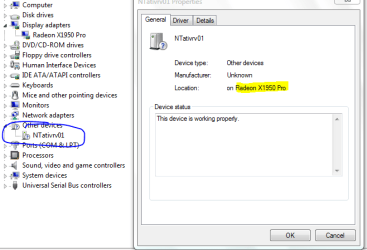
Oh, and when I look in my device manager, there's something called NTAtivrv01 that's properties say it's something to do with my video card. Further investigation leads me to believe it's a WDM capture device...? But apparently there's no driver for it, so I can't update it or use it if I were ever so inclined. I just disabled it due to not knowing what it does. I'm including a picture of it.

Any input is appreciated, I'm new to windows 7 and drowning in constant issues. 5 + years in windows XP and I never had any trouble at all, now I can't stay connected to the internet, having graphics issues, BSOD'd once, Black screen crashed about an hour ago, monitor just shut off when it occured.
 

Attachments
  • driverissues.PNG
    driverissues.PNG
    16.7 KB · Views: 686

My Computer My Computer

OS
Windows 7 Professional 32bit
CPU
AMD Athlon 64 x2 Dual Core Processor 2.6Ghz
Motherboard
Asus M3A78-CM
Memory
4G
Graphics Card(s)
ATI Radeon x1950 Pro
Sound Card
VIA HD Audio
PSU
Fatality 550Watt
Hi,
I seem to be having issues with my display driver. The default one that installed when I installed Win7 was causing graphics glitches, and when I visit AMD and install this driver: ATI Catalyst software applications tell me that my driver is out of date and to update via that site. The search is for the graphics card from my title. I look in desktop graphics, Radeon X series, X1xxx series, Windows 7 32 bit. The only one supported is a vista driver apparently? Is there another one someone can suggest to use?

I already tried uninstalling the card and restarting to reload the default Windows 7 driver. Neither of these drivers seem to work just right.

Oh, and when I look in my device manager, there's something called NTAtivrv01 that's properties say it's something to do with my video card. Further investigation leads me to believe it's a WDM capture device...? But apparently there's no driver for it, so I can't update it or use it if I were ever so inclined. I just disabled it due to not knowing what it does. I'm including a picture of it.

Any input is appreciated, I'm new to windows 7 and drowning in constant issues. 5 + years in windows XP and I never had any trouble at all, now I can't stay connected to the internet, having graphics issues, BSOD'd once, Black screen crashed about an hour ago, monitor just shut off when it occured.

You can use the vista driver if it is installed in compatibility mode. To do that you need to

Right click the installer>properties>compatibility>choose OS


Ken J
 

My Computer My Computer

Computer Manufacturer/Model Number
HP Pavillion dv-7 1005 Tx
OS
Win 8 Release candidate 8400
CPU
[email protected]
Memory
4 gigs
Graphics Card(s)
Nvidia 9600M
Sound Card
HD built-in
Monitor(s) Displays
17" Wxga
Screen Resolution
1440x900
Cooling
none
Internet Speed
45Mb down 5Mb up
Windows 7 is not in the compatability mode drop down menu.
 

My Computer My Computer

OS
Windows 7 Professional 32bit
CPU
AMD Athlon 64 x2 Dual Core Processor 2.6Ghz
Motherboard
Asus M3A78-CM
Memory
4G
Graphics Card(s)
ATI Radeon x1950 Pro
Sound Card
VIA HD Audio
PSU
Fatality 550Watt
You can use the vista driver if it is installed in compatibility mode. To do that you need to

Right click the installer>properties>compatibility>choose OS

Ken J

Windows 7 is not in the compatability mode drop down menu.

He's talking about choosing Vista from the drop down menu for comaptibility if you decide to use the Vista drivers.

Yes, Windows 7 wouldn't be in the menu since you're already on it.

Hope that clearifies things.
 

My Computer My Computer

Computer type
PC/Desktop
Computer Manufacturer/Model Number
Custom built by me.
OS
Windows 10 Pro
CPU
Intel Core i7-4770K (3.5Ghz)
Motherboard
Gigabyte G1 Sniper 5 (F10 Bios)
Memory
32 gig Corsair Dominator Platinum (4x8Gig)
Graphics Card(s)
Sapphire Tri-X R9 Fury
Sound Card
Soundblaster ZXR
Monitor(s) Displays
NEC PA242W 24" LCD Monitor
Screen Resolution
1920 x 1200
Hard Drives
Primary - Samsung 850 Pro (512gig), Samsung 840 Pro (256gig), 2TB WD Caviar Black.
PSU
EVGA Supernova 1000 G2
Case
Cooler Master HAF X
Cooling
Corsair H100i with Corsair Air Series SP120 Quiet Fans
Keyboard
Logitech Wireless Wave
Mouse
Logitech Performance MX
Internet Speed
High Speed Cable
Antivirus
Norton Security
Browser
IE11
Other Info
Memory Timings - 1866MHz @ 9-9-9-27-1T @ 1.5 volts
I've never ran something in compatibility mode, so yes, that did clear things up.

I'm still getting some graphical issues at times, BSODs now that seem related to my graphics card resetting and failing to start up again? The last one said something to that effect. I'm still assuming that my driver is incorrect.
 

My Computer My Computer

OS
Windows 7 Professional 32bit
CPU
AMD Athlon 64 x2 Dual Core Processor 2.6Ghz
Motherboard
Asus M3A78-CM
Memory
4G
Graphics Card(s)
ATI Radeon x1950 Pro
Sound Card
VIA HD Audio
PSU
Fatality 550Watt
Still having issues with the graphics driver I have installed. I have uninstalled and reinstalled the Windows Vista driver that I'm suggested to use, but whenever I do, it doesn't update the version. I have a feeling that this is ATI's issue and not Windows 7, but I'm curious if anyone has a suggestion. I still get errors in my action center that says "Address issue with ATI Graphics Driver" then when I click on it, it tells me I'm not connected to the internet, which I most certainly am. That problem has been occurring for about 2 months now.
 

My Computer My Computer

OS
Windows 7 Professional 32bit
CPU
AMD Athlon 64 x2 Dual Core Processor 2.6Ghz
Motherboard
Asus M3A78-CM
Memory
4G
Graphics Card(s)
ATI Radeon x1950 Pro
Sound Card
VIA HD Audio
PSU
Fatality 550Watt
To be honest you're looking at a card that's at least 5/6 years old so there could be an issue with the card as well.

Anyway you might want to got through some of these to see if you can find something that helps - Search AMD

Have a look at this as well for drivers. BTW when I plug in Windows 7 this is the page I get - ATI Catalyst.
 

My Computer My Computer

Computer type
PC/Desktop
Computer Manufacturer/Model Number
Custom built by me.
OS
Windows 10 Pro
CPU
Intel Core i7-4770K (3.5Ghz)
Motherboard
Gigabyte G1 Sniper 5 (F10 Bios)
Memory
32 gig Corsair Dominator Platinum (4x8Gig)
Graphics Card(s)
Sapphire Tri-X R9 Fury
Sound Card
Soundblaster ZXR
Monitor(s) Displays
NEC PA242W 24" LCD Monitor
Screen Resolution
1920 x 1200
Hard Drives
Primary - Samsung 850 Pro (512gig), Samsung 840 Pro (256gig), 2TB WD Caviar Black.
PSU
EVGA Supernova 1000 G2
Case
Cooler Master HAF X
Cooling
Corsair H100i with Corsair Air Series SP120 Quiet Fans
Keyboard
Logitech Wireless Wave
Mouse
Logitech Performance MX
Internet Speed
High Speed Cable
Antivirus
Norton Security
Browser
IE11
Other Info
Memory Timings - 1866MHz @ 9-9-9-27-1T @ 1.5 volts
Back
Top