Failed to connect to a windows service

you know what Trollsplatterer the only best option is to have a fresh install it will make this error go away and you are right about slow boot time..what i am wondering is what is the root of the problem...if i can get what file is missing or causing this error the problem can be solved....netsh winsock repair is not working on all OS especially win7 ultimate i am assuming you are using win7 ultimate?....hope you can find error and solve it...do post here your experience....


Well, I'm having the same issue, here. In fact, I've been plagued by it for several months, now. I thought that, because other people seem to have the same issue, Microsoft would eventually solve this problem, so it was only a matter of time.
In the mean time, a combination of netsh winsock reset and rebooting once or twice (first time forced) would solve the problem.

But these last few days it seems to be getting worse, it's almost happening to me on a daily basis, now, and I only boot my notebook once or twice every day...

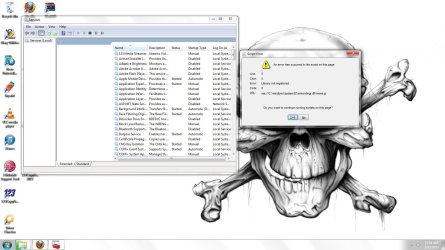
Only with me, it looks like something's a bit more messed up. If this error occurs, the layout of my Windows 7 is different. There's no more semi-transparency, everything looks different.
Sometimes, after the first reboot, the error does show up, but the transparency is OK.
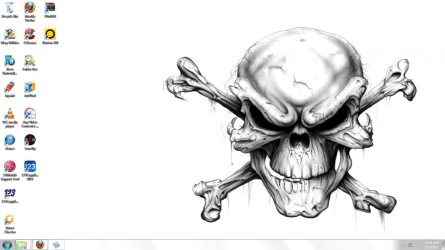
Here are some screenshots:
no problem
error and no transparency
error and transparency
This error also slows down the boot-process (both the "Please wait" and the "Welcome" window take a lot longer to finish).

I tried the following "solutions", with no permanent result:
- netsh winsock reset (catalog) (seems to cause the shutdown to hang on an empty desktop, though)
- reboot
- manually set a value from 0 to 1 in the registry (don't remember exactly what that was, but it didn't change anything)

Last test (just thought of that option):
- Check if the System Event Notification Service can be set as automatic in the services (System, now, which isn't even an option in the startup-type-combo-box)
I'll try it now and let you know if this solved my problem (don't expect it to).

Wish me luck!
 

My Computer My Computer

At a glance

windows 7 64bitAMD ATHLON II X2 245 (REGOR 45nm TECHNOLOGY)2.0GB SINGLE-CHANNEL DDR3 @ 534MHz 7-7-7-20DELL IN1910N @ 1366x768 [ATI VIDEO (GIGABYTE)]
OS
windows 7 64bit
CPU
AMD ATHLON II X2 245 (REGOR 45nm TECHNOLOGY)
Motherboard
GIGABYTE TECHNOLOGY Co., Ltd. GA-MA74GMT-S2(SOCKET M2)
Memory
2.0GB SINGLE-CHANNEL DDR3 @ 534MHz 7-7-7-20
Graphics Card(s)
DELL IN1910N @ 1366x768 [ATI VIDEO (GIGABYTE)]
Sound Card
REALTEK HIGH DEFINATION AUDIO
Monitor(s) Displays
DELL IN1910N @ 1366x768
Screen Resolution
1366x768
Hard Drives
488.39GB SEAGATE ST3500418AS ATA DEVICE (UNKNOWN INTERFACE)
sorry, I have windows 7 home premium. I have had this problem before and I did everything:
1. netsh winsock reset
2. boot in safe mode
3. Scanned my computer for viruses and spyware

I did everything but the problem kept occuring everytime the laptop boot up.
So try my way

1. Go to services
2. scroll down to Presentation Font Cache and disable it.

See if that works.
 

My Computer My Computer

At a glance

Windows 7 Home PremiumIntel Core n2 Duo processlr T55503GB DDR2Up to 358MB MOBILE INTEL GRAPHICS MEDIA ACCEL...
Computer Manufacturer/Model Number
Acer Extensa 5620-6419
OS
Windows 7 Home Premium
CPU
Intel Core n2 Duo processlr T5550
Memory
3GB DDR2
Graphics Card(s)
Up to 358MB MOBILE INTEL GRAPHICS MEDIA ACCELERATOR X3100
Monitor(s) Displays
15.4 "WXGA ACER CRYSTALBRITE" LCD
Hard Drives
160 GB HDD
Internet Speed
802.11a/b/g WLAN
javelin009 you may be right but its not always working.....
thnx for th tip...but i formated my pc so no errors now :D

sorry, I have windows 7 home premium. I have had this problem before and I did everything:
1. netsh winsock reset
2. boot in safe mode
3. Scanned my computer for viruses and spyware

I did everything but the problem kept occuring everytime the laptop boot up.
So try my way

1. Go to services
2. scroll down to Presentation Font Cache and disable it.

See if that works.
 

My Computer My Computer

At a glance

windows 7 64bitAMD ATHLON II X2 245 (REGOR 45nm TECHNOLOGY)2.0GB SINGLE-CHANNEL DDR3 @ 534MHz 7-7-7-20DELL IN1910N @ 1366x768 [ATI VIDEO (GIGABYTE)]
OS
windows 7 64bit
CPU
AMD ATHLON II X2 245 (REGOR 45nm TECHNOLOGY)
Motherboard
GIGABYTE TECHNOLOGY Co., Ltd. GA-MA74GMT-S2(SOCKET M2)
Memory
2.0GB SINGLE-CHANNEL DDR3 @ 534MHz 7-7-7-20
Graphics Card(s)
DELL IN1910N @ 1366x768 [ATI VIDEO (GIGABYTE)]
Sound Card
REALTEK HIGH DEFINATION AUDIO
Monitor(s) Displays
DELL IN1910N @ 1366x768
Screen Resolution
1366x768
Hard Drives
488.39GB SEAGATE ST3500418AS ATA DEVICE (UNKNOWN INTERFACE)
That service (Presentation Font Cache) isn't even present in my services list, so it can't be causing the problem.
As I wrote in my profile, I have Windows 7 Professional, so it's obviously not related to your version of Windows. From what I found on the internet, this issue started occurring with Windows Vista and just didn't get fixed in Windows 7.

I had this issue again, today, so setting the named service to Automatic didn't help anything.
The sequence I followed today;
- First boot: error + no transparency in the windows
- Reboot: Shutdown got stuck => forced shutdown by pressing the on/off button for a few seconds
- Second boot: same error, same transparency issue
- "netsh winsock reset catalog"
- Reboot: same shutdown issue
- Third boot: same error, no more transparency issue
- Reboot: got a few errors, but it did reboot properly
- After reboot: everything's fine


Thanks for the suggestion about re-installing Windows 7, but I really don't like the thought of that. I've got a few licenses on this laptop which can't easily be reactivated. Besides, I've even read about people who used a restore point, only to find their problem reoccurring a few weeks later. Installing the same version of Windows on the same system might trigger the same problem anyway.
So I'd rather find a permanent solution than to risk reinstalling my Windows.

Does anyone else have this problem with the modified Windows layout (different transparency, see screenshots 1 and 2)?

Should I contact Microsoft about this? I've taken a look at the ways to contact them, but it looks like it's going to cost me money. That's not the kind of support one would expect for software with a price like this.
 

My Computer My Computer

At a glance

Windows 7 Professional 64bitIntel Core2 duo P7450 @ 2.13GHz4GB DDR3NVIDEA GeForce 9400 G (Hybrid) 2GB
Computer Manufacturer/Model Number
Dell XPS13 notebook
OS
Windows 7 Professional 64bit
CPU
Intel Core2 duo P7450 @ 2.13GHz
Memory
4GB DDR3
Graphics Card(s)
NVIDEA GeForce 9400 G (Hybrid) 2GB
Monitor(s) Displays
Generic PnP monitor (1280 x 800, 60Hz)
Screen Resolution
1280 x 800
Hard Drives
Samsung SSD 256GB
Internet Speed
Broadband (2Mbps)
Thanks, gregrocker, I guess I'll be trying those options. Not tonight, though, it's late and I'd like to take a backup before trying this ;)
 

My Computer My Computer

At a glance

Windows 7 Professional 64bitIntel Core2 duo P7450 @ 2.13GHz4GB DDR3NVIDEA GeForce 9400 G (Hybrid) 2GB
Computer Manufacturer/Model Number
Dell XPS13 notebook
OS
Windows 7 Professional 64bit
CPU
Intel Core2 duo P7450 @ 2.13GHz
Memory
4GB DDR3
Graphics Card(s)
NVIDEA GeForce 9400 G (Hybrid) 2GB
Monitor(s) Displays
Generic PnP monitor (1280 x 800, 60Hz)
Screen Resolution
1280 x 800
Hard Drives
Samsung SSD 256GB
Internet Speed
Broadband (2Mbps)
hey i found one thing suspicious and i doubt that it could be a problem.
go to device manager and see if ther a "?" or "!".also go to view and click on show hidden devices.I hope if you can figure out something.


Thanks, gregrocker, I guess I'll be trying those options. Not tonight, though, it's late and I'd like to take a backup before trying this ;)
 

My Computer My Computer

At a glance

windows 7 64bitAMD ATHLON II X2 245 (REGOR 45nm TECHNOLOGY)2.0GB SINGLE-CHANNEL DDR3 @ 534MHz 7-7-7-20DELL IN1910N @ 1366x768 [ATI VIDEO (GIGABYTE)]
OS
windows 7 64bit
CPU
AMD ATHLON II X2 245 (REGOR 45nm TECHNOLOGY)
Motherboard
GIGABYTE TECHNOLOGY Co., Ltd. GA-MA74GMT-S2(SOCKET M2)
Memory
2.0GB SINGLE-CHANNEL DDR3 @ 534MHz 7-7-7-20
Graphics Card(s)
DELL IN1910N @ 1366x768 [ATI VIDEO (GIGABYTE)]
Sound Card
REALTEK HIGH DEFINATION AUDIO
Monitor(s) Displays
DELL IN1910N @ 1366x768
Screen Resolution
1366x768
Hard Drives
488.39GB SEAGATE ST3500418AS ATA DEVICE (UNKNOWN INTERFACE)
hey i found one thing suspicious and i doubt that it could be a problem.
go to device manager and see if ther a "?" or "!".also go to view and click on show hidden devices.I hope if you can figure out something.


Thanks, gregrocker, I guess I'll be trying those options. Not tonight, though, it's late and I'd like to take a backup before trying this ;)

There's also this tutorial at the link below.

Device Manager : Hidden Devices
 

My Computer My Computer

At a glance

W 7 64-bit UltimateIntel Q9550 Yorkfield8GB Dominator 8500C5DATI : XFX 5870
Computer Manufacturer/Model Number
* BFK Customs *
OS
W 7 64-bit Ultimate
CPU
Intel Q9550 Yorkfield
Motherboard
ASUS P5Q Pro
Memory
8GB Dominator 8500C5D
Graphics Card(s)
ATI : XFX 5870
Sound Card
Realtek HD Audio 7-1
Monitor(s) Displays
1x 47" LCD HDMI & 3x 26" LCD HDMI
Screen Resolution
1920x1080P & 1920x1200
Hard Drives
1x 80GB Intel X25-M G2 SSD : 1x 500GB & 1x 640GB WD Caviar Black(s)
PSU
Corsair 620HX
Case
Cooler Master RC-690
Cooling
Tuniq Tower 120, 2x 140mm and 3x 120mm case fans
Keyboard
Microsoft 500
Mouse
Razer Diamondback 3G
Internet Speed
14 Mb/s
Other Info
1x Koutech 3Gb/s SATA HDD Hot Swap Rack
Hi Soapy here,its my first reply so wish me luck!, itried the trick of turning Windows Presentation Foundation Font Cache to manual setting and that stopped the System event notification service service problem and my PC is back to normal startup time, so thanks a million for the info you brainy geezers.
 

My Computer My Computer

At a glance

Windows 7 Home Premium 64 bitIntel I3 5306GB OCZ 1600 DDR3aSUS EAH 5770
Computer Manufacturer/Model Number
Self Build
OS
Windows 7 Home Premium 64 bit
CPU
Intel I3 530
Motherboard
Gigabyte H55m UD2H
Memory
6GB OCZ 1600 DDR3
Graphics Card(s)
aSUS EAH 5770
Sound Card
ONBOARD
Monitor(s) Displays
Samsung 22" 1080
Hard Drives
2x Seagate Barracuda 500Gb
PSU
OCZ Modxtreme Pro 800
Case
Coolermaster Elite 335
Cooling
Arctic cooling Freezer 7 Pro
I have follow both command and dint do anything on my PC
Toshiba Qosmio X505-Q894 Laptop Hardware Information:
toshiba Qosmio X505 Q894
Software Image Attached:
Image Attached By Using: services.msc
1) Make sure the system event notification service is running. Click Start button, then type "services.msc" without quotes in the Search or Run box, hit Enter. Scroll down to that service, set it to "Automatic" I dint see SERVICE
startup type. If the service is not running, start it.
2) Run an sfc scan.
Thank you for Helping me out here.
Art M
Note: I have look in Computer Management (Device Manager), And I dint see anything


Attachments

  • Desktop Software 3-13-2013 11-45-38 AM.jpg
    Desktop Software 3-13-2013 11-45-38 AM.jpg
    92.8 KB · Views: 2
  • services.msc 3-13-2013 11-54-52 AM.jpg
    services.msc 3-13-2013 11-54-52 AM.jpg
    150.2 KB · Views: 9
Last edited:

My Computer My Computer

At a glance

Windows 10 Pro Version 22H2 64-bit EditionIntel(R) Core(TM) i7-10875H CPU @ 2.30GHz 2.3...2.0 GB (31.8 GB usable)
Computer type
Laptop
Computer Manufacturer/Model Number
Azure Blade 15.6
OS
Windows 10 Pro Version 22H2 64-bit Edition
CPU
Intel(R) Core(TM) i7-10875H CPU @ 2.30GHz 2.30 GHz
Memory
2.0 GB (31.8 GB usable)
Monitor(s) Displays
4K UHD OLED TOUCH
Screen Resolution
3840 x 2160
Hard Drives
1 TB
Mouse
Logitech MX Master 3S
Antivirus
Windows Security
Browser
Google Chrome
Other Info
______________________________________________


______________________________________________
Thank you for you post. Right now im am doing hard driver diagnostic. From bestbuy. I will keep you posted
again thank you.

Windows has being Activate.
What I need to do is check If windows is being instilled and register. can I do this task by commands, with out using MGA Diagnostic tool?

Thank you
 
Last edited:

My Computer My Computer

At a glance

Windows 10 Pro Version 22H2 64-bit EditionIntel(R) Core(TM) i7-10875H CPU @ 2.30GHz 2.3...2.0 GB (31.8 GB usable)
Computer type
Laptop
Computer Manufacturer/Model Number
Azure Blade 15.6
OS
Windows 10 Pro Version 22H2 64-bit Edition
CPU
Intel(R) Core(TM) i7-10875H CPU @ 2.30GHz 2.30 GHz
Memory
2.0 GB (31.8 GB usable)
Monitor(s) Displays
4K UHD OLED TOUCH
Screen Resolution
3840 x 2160
Hard Drives
1 TB
Mouse
Logitech MX Master 3S
Antivirus
Windows Security
Browser
Google Chrome
Other Info
______________________________________________


______________________________________________
Back
Top