Solved Internet suddenly stopped working

dejarnjc

New member
Local time
11:46 AM
Messages
7
So just to preface I'm completely new to these forums and I'm at best only an intermediate level in terms of being tech savvy so I'm hoping that someone here will be able to help.

I run Windows 7 64bit and my network adapter is a 'Realtek PCIe GBE Family Controller"
Never had internet problems before last night


So last night the internet on my desktop stopped working while I was watching a youtube video. There were (to my knowledge) no software updates or anything else taking place. The internet just suddenly stopped. So naturally I went and turned my router on and off a few times and when I realized that didn't work I checked the internet on my laptop and found out that it was still working and figured the problem is obviously with my desktop.

So far I've tried,
1) opening cmd.exe and typing ipconfig /release then ipconfig /renew
2) Disabling and re-enabling my network adapter
3) Downloading and installing the latest driver for my network adapter from the Realtek website.
4) Running the trouble shoot through windows. All this tells me is that "the default gateway is not available"
5) I ran a system restore to a point about a month ago and the problem was still there.
6) I ran my computer in safemode with the network enabled and the problem was still there.
7) The ethernet cable I'm using for my desktop is fine I tried it with my laptop and it worked and plugged in a usb wireless card to my desktop and the problem persisted (just without a wire)

I have McAfee as my virus program and it is reporting no problems
I don't have bonjour or any similar programs installed on my computer (In some other posts I read that that has caused similar problems).

And so in conclusion, I am out of ideas on what to try so any help would be appreciated!!! Let me know if you need any further information and I'll provide it as quickly as possible.


*EDIT*
Oh and also, here are my ipconfig settings. I imagine that'll be what's asked for first (wish I could post a screen shot but my flash drive is missing)

Connection-specific DNS Suffix :home
Link-local IPv6 Address :fe80::15ee:ada7:4568:f9e%15
IPv4 Address :192.168.1.3
Subnet Mask :255.255.255.0
Default Gateway :192.168.1.1

Tunnel adapter Teredo Tunneling Pseudo-Interface:
Media State :Media disconnected
Connection-specific DNS Suffix :
Tunnel adapter isatap.home:
Media State :media disconnected
Connection-specific DNS Suffix :home
 

My Computer

Computer Manufacturer/Model Number
iBUYPOWER Computers
OS
Windows 7 64 bit
CPU
Intel(R) Core(TM) i7 CPU 930 @ 2.80GHZ 2.83GHZ
Memory
6.00 GB
Graphics Card(s)
ATI Radeon HD 5700 Series
Sound Card
ATI High Definition Audio Device
I suspect your LAN card has fried. If you are able to, try running diagnostics on the device itself (there's probably an ability to do this from "Device Manager"). If you can't, then I don't know how you could test for it being dead other than if when you plug in an Ethernet cord the clear connector doesn't light up green (mine does on our Dell Dimension 3000 XP Desktop to communicate to me that it IS working, IS plugged in and IS receiving proper connection from and to the Modem/Router).

If yours does have an LED as described and it DOESN'T turn the clear plastic connector of the LAN cable green, then it's dead and there's no bringing it back.

And if/when you confirm it is fried, you need to replace it. They're generally inexpensive if you don't want it to be WiFi or anything other than your standard 802.11g 10/100/1000 Gigabit LAN. You can probably pick one up without the "bells and whistles" for $30 or less online these days. They work just as good as the $100 ones, just without some "extras".

The other thing to suspect would be your MOBO. Bridges/connections on them can and sometimes do fry out, effecting other components they distribute the power too. Hopefully that's not the problem because they're in the $100+ range to replace.


EDIT: The "Default Gateway" is obtained by your Modem/Router. The fact you are getting "not available" means that there is no communication between the computer and the Modem/Router. Since your LAN cable is functional, I stand by what I said. It's most likely your LAN card and it's very highly likely that it has fried.
 

My Computer

Computer Manufacturer/Model Number
Acer Aspire 5738PG-6306
OS
7 Ultimate x64 SP1
CPU
Core 2 Duo T6600 @ 2.20GHz
Motherboard
Acer JV50 | Intel PM45 Chipset | BIOS Phoenix v1.21
Memory
4GB SDRAM DDR2 667
Graphics Card(s)
ATI Mobility Radeon 4570HD 512MB VDDR3 (2.25GB HyperMemory)
Sound Card
Integrated Dolby Home Theater HD Audio Support
Monitor(s) Displays
15.6" LED backlight HD/WS CineCrystal w/ Multi-Touch
Screen Resolution
Notebook: 1366x768 | Syncmaster P2370HD: 1920x1080
Hard Drives
Primary internal: 320GB WD3200BEVT-22ZCT0 @ 5400 RPM | Secondary external 1: 2TB Cavalry CAXB3702T0 @7200 RPM (USB 2.0) | Secondary external 2: 500GB Calvary CAUM @7200 RPM (USB 2.0).
PSU
AC Adapter
Case
Blue Clam shell
Cooling
OEM Bult-in.
Keyboard
Microsoft Wireless 3000 (USB)
Mouse
Logitech V220 (USB)
Internet Speed
31Mbps DL/25Mbps UL - Verizon fiOs/Netgear WNDR37AV
Other Info
EXTERNAL DISPLAY: 23" Samsung Syncmaster P2370HD | EXTERNAL SOUND: 300 Watt MX-KB30 JVC Stereo (AUX) | ROUTER: Netgear WNDR37AV 802.11a/b/g/n Dual-Band Gigabit | Satechi 12-Port USB 2.0 Hub | GAME PAD: SteelSeries 3GC USB 2.0 (JoyToKey Mapping) | DETAILED SYSTEM SPECIFICATIONS: http://www.tigerdirect.com/applications/SearchTools/item-details.asp?EdpNo=5265887&CatId=4938
Have you tried this? netsh winsock reset in the Command Prompt (run Command Prompt as Administrator)

1. Click on Start button.
2. Type Cmd in the Start Search text box.
3. Right click cmd in search results and click run as Administrator
4. Type netsh winsock reset in the Command Prompt shell, and then press the Enter key.
5. Restart the computer.
 

My Computer

Computer Manufacturer/Model Number
packard bell IXTREME M5722
OS
Operating System : Windows 7 Home Premium Edition 6.01.7600 SP1 (x64)
CPU
Processor : Intel Core 2 Quad Q8300 @ 2500 MHz
Motherboard
Mainboard : Packard Bell (Acer EG43M )
Memory
Physical Memory :8GB Corsair4x 2GB 800MHz C5 DDR2
Graphics Card(s)
Video Card : XFX 6700 AMD
Monitor(s) Displays
Maestro 234DL - BenQ V2220 - BenQ VW2420H
Screen Resolution
Current Display :1920x1080p pixels at 60 Hz in HD LED
Hard Drives
Hard Disks : WDC (1000 GB)
Drive C: (Hard Disk) : 428 GB available on 491 GB
Drive D: (Hard Disk) : 426 GB available on 492 GB
SAMSUNG spinpoint HD103SJ 1000.2 GB
(X 2) KINGSTON SSD NOW V 30GB
PSU
XFX ProSeries 550W PSU
Case
PACKARD BELL IXTREME
Cooling
System Blower Current: 150mA Air Flow16CFM ;Akasa 90mm rear
Keyboard
Gigabyte Aivia K8100
Mouse
TRUST-Wireless Laser Mouse - Carbon edition MI-7770C
Internet Speed
TP-LINK > TL-WN951N / AV500 Gigabit Powerline Adapters
Browser
chrome dev
Other Info
EXTRA COOLING>(FAN CONTROLLER) PC Bay Cooler 3 x 40mm fans; Akasa AK-HD-BL Blue hard drive cooler 2 x 40 mm fan 4500 rpm 29.7 dBA
Bios> American Megatrends Inc.
Version : P01-A1
Date : 08/31/2009
@EDIT: The "Default Gateway" is obtained by your Modem/Router. The fact you are getting "not available" means that there is no communication between the computer and the Modem/Router. Since your LAN cable is functional, I stand by what I said. It's most likely your LAN card and it's very highly likely that it has fried.

this can be a setting configuration needing resetting not just a broken component
reset hub/router and the adapter so windows can re-configure the settings again will help (mine sometimes take 3-4 attempts its a common problem)\:)
 

My Computer

Computer Manufacturer/Model Number
packard bell IXTREME M5722
OS
Operating System : Windows 7 Home Premium Edition 6.01.7600 SP1 (x64)
CPU
Processor : Intel Core 2 Quad Q8300 @ 2500 MHz
Motherboard
Mainboard : Packard Bell (Acer EG43M )
Memory
Physical Memory :8GB Corsair4x 2GB 800MHz C5 DDR2
Graphics Card(s)
Video Card : XFX 6700 AMD
Monitor(s) Displays
Maestro 234DL - BenQ V2220 - BenQ VW2420H
Screen Resolution
Current Display :1920x1080p pixels at 60 Hz in HD LED
Hard Drives
Hard Disks : WDC (1000 GB)
Drive C: (Hard Disk) : 428 GB available on 491 GB
Drive D: (Hard Disk) : 426 GB available on 492 GB
SAMSUNG spinpoint HD103SJ 1000.2 GB
(X 2) KINGSTON SSD NOW V 30GB
PSU
XFX ProSeries 550W PSU
Case
PACKARD BELL IXTREME
Cooling
System Blower Current: 150mA Air Flow16CFM ;Akasa 90mm rear
Keyboard
Gigabyte Aivia K8100
Mouse
TRUST-Wireless Laser Mouse - Carbon edition MI-7770C
Internet Speed
TP-LINK > TL-WN951N / AV500 Gigabit Powerline Adapters
Browser
chrome dev
Other Info
EXTRA COOLING>(FAN CONTROLLER) PC Bay Cooler 3 x 40mm fans; Akasa AK-HD-BL Blue hard drive cooler 2 x 40 mm fan 4500 rpm 29.7 dBA
Bios> American Megatrends Inc.
Version : P01-A1
Date : 08/31/2009
Brianzion:
I'll tried to do the netsh winsock reset but received an error about needing to be an administrator DESPITE the fact that I was logged into windows as the admin already (note: I could still make other admin changes to my computer). Is there some specific way to load or enter the command prompt that I'm missing? Regardless, I'll try this again when I get home from work.

Also, how can I reset hub/router and the adapter so windows can re-configure the settings? If that just means turning my router off and on and disabling / re-enabling my network adapter then I've done that multiple times already albeit not at the same time.

EvilOzzmess:
My Ethernet cord lights up as green on both ends. I have a pretty good cooling system, not sure if that affects how likely it is that my LAN card has fried. Is there any way to tell from my device manager whether or not it is functioning properly (because I checked last night and was pretty sure windows gave it the green light)? If a hardware component has fried shouldn't the device manager indicate a problem?


Also, thank you both very much for your help
 

My Computer

Computer Manufacturer/Model Number
iBUYPOWER Computers
OS
Windows 7 64 bit
CPU
Intel(R) Core(TM) i7 CPU 930 @ 2.80GHZ 2.83GHZ
Memory
6.00 GB
Graphics Card(s)
ATI Radeon HD 5700 Series
Sound Card
ATI High Definition Audio Device
Brianzion:
I'll tried to do the netsh winsock reset but received an error about needing to be an administrator DESPITE the fact that I was logged into windows as the admin already (note: I could still make other admin changes to my computer). Is there some specific way to load or enter the command prompt that I'm missing? Regardless, I'll try this again when I get home from work.

Also, how can I reset hub/router and the adapter so windows can re-configure the settings? If that just means turning my router off and on and disabling / re-enabling my network adapter then I've done that multiple times already albeit not at the same time.

EvilOzzmess:
My Ethernet cord lights up as green on both ends. I have a pretty good cooling system, not sure if that affects how likely it is that my LAN card has fried. Is there any way to tell from my device manager whether or not it is functioning properly (because I checked last night and was pretty sure windows gave it the green light)? If a hardware component has fried shouldn't the device manager indicate a problem?


Also, thank you both very much for your help

To run the command prompt as admin simply type cmd at the start search "don't click it yet" then right click the little dos icon you see in the context menu and choose "run as admin".

An actual router reset involves pushing the little hidden button which resides in a small hole on the side of your router. It's a hidden button which you need to depress for about 30 seconds until the lights on the router change. You may want to look up the official reset procedure for your particular router.

After resetting the router if you are still having problems run the batch file in the link.
Try running this batch file which will reset winsock, reset the TCP/IP stack and release renew your IP.


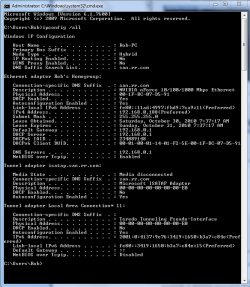
After that can you please post a screen shot of your ipconfig /all. Use the snipping tool in Windows for this. It should look like the picture below.
 

Attachments

  • My ipconfig all.PNG
    My ipconfig all.PNG
    21.9 KB · Views: 69

My Computer

Computer type
PC/Desktop
Computer Manufacturer/Model Number
Home built
OS
Windows 7 Ult, Windows 8.1 Pro,
CPU
Q9650-4.275GHz, E8600 4.5GHz, E6750-3.8GHz
Motherboard
Evga 780i FTW
Memory
G.Skill PC2 9600 1200Mhz 5 5 5 15 2T
Graphics Card(s)
GTX480
Sound Card
Asus Xonar D2
Monitor(s) Displays
HannsG
Screen Resolution
1680X1050
Hard Drives
GSkill Phoenix Pro 120GB SSD
PSU
ThermalTake Toughpower 1000Watt modular
Case
ThermalTake XaserV
Cooling
Xigmatek S1283
Keyboard
Logitech G15
Mouse
Logitech G9
Internet Speed
T1
Hi your not alone, again last night must of been round the same time as you my internet went down and wont come back im running exactley the same system as you I've tried updating the realtek drivers, system restore, setting the IP address for both IPv6 and v4 myself as stated on other websites, disabling the connection to the unknown network im now on and reconnnecting, I've pinged by defeault gateway 1 timed out the other 3 said they couldn't connect, I've tried the solution above and been on the phone to dell allday they are going to set my machine back to factory settings tomorrow and as I cant afford an external hard drive I'm going to lose all my work and game saves and they aren't even sure if it will work I cant find bonjour or an ID string to disable which some people said would work in services.msc in cmd im completely stummped and as my only knowledge of computers comes from sites like this I have no idea what to do. None of this is helpful but I thought I'd let you know I share your pain
 

My Computer

Computer Manufacturer/Model Number
Dell insperon
OS
Windows 7 Home premium 64 bit
Brianzion:
I'll tried to do the netsh winsock reset but received an error about needing to be an administrator DESPITE the fact that I was logged into windows as the admin already (note: I could still make other admin changes to my computer). Is there some specific way to load or enter the command prompt that I'm missing? Regardless, I'll try this again when I get home from work.

Also, how can I reset hub/router and the adapter so windows can re-configure the settings? If that just means turning my router off and on and disabling / re-enabling my network adapter then I've done that multiple times already albeit not at the same time.

EvilOzzmess:
My Ethernet cord lights up as green on both ends. I have a pretty good cooling system, not sure if that affects how likely it is that my LAN card has fried. Is there any way to tell from my device manager whether or not it is functioning properly (because I checked last night and was pretty sure windows gave it the green light)? If a hardware component has fried shouldn't the device manager indicate a problem?


Also, thank you both very much for your help

To run the command prompt as admin simply type cmd at the start search "don't click it yet" then right click the little dos icon you see in the context menu and choose "run as admin".

An actual router reset involves pushing the little hidden button which resides in a small hole on the side of your router. It's a hidden button which you need to depress for about 30 seconds until the lights on the router change. You may want to look up the official reset procedure for your particular router.

After resetting the router if you are still having problems run the batch file in the link.
Try running this batch file which will reset winsock, reset the TCP/IP stack and release renew your IP.


After that can you please post a screen shot of your ipconfig /all. Use the snipping tool in Windows for this. It should look like the picture below.

thanks for the follow up :D
 

My Computer

Computer Manufacturer/Model Number
packard bell IXTREME M5722
OS
Operating System : Windows 7 Home Premium Edition 6.01.7600 SP1 (x64)
CPU
Processor : Intel Core 2 Quad Q8300 @ 2500 MHz
Motherboard
Mainboard : Packard Bell (Acer EG43M )
Memory
Physical Memory :8GB Corsair4x 2GB 800MHz C5 DDR2
Graphics Card(s)
Video Card : XFX 6700 AMD
Monitor(s) Displays
Maestro 234DL - BenQ V2220 - BenQ VW2420H
Screen Resolution
Current Display :1920x1080p pixels at 60 Hz in HD LED
Hard Drives
Hard Disks : WDC (1000 GB)
Drive C: (Hard Disk) : 428 GB available on 491 GB
Drive D: (Hard Disk) : 426 GB available on 492 GB
SAMSUNG spinpoint HD103SJ 1000.2 GB
(X 2) KINGSTON SSD NOW V 30GB
PSU
XFX ProSeries 550W PSU
Case
PACKARD BELL IXTREME
Cooling
System Blower Current: 150mA Air Flow16CFM ;Akasa 90mm rear
Keyboard
Gigabyte Aivia K8100
Mouse
TRUST-Wireless Laser Mouse - Carbon edition MI-7770C
Internet Speed
TP-LINK > TL-WN951N / AV500 Gigabit Powerline Adapters
Browser
chrome dev
Other Info
EXTRA COOLING>(FAN CONTROLLER) PC Bay Cooler 3 x 40mm fans; Akasa AK-HD-BL Blue hard drive cooler 2 x 40 mm fan 4500 rpm 29.7 dBA
Bios> American Megatrends Inc.
Version : P01-A1
Date : 08/31/2009
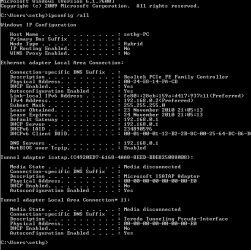
Hi I used the link ran the file then reset my pc nothing changed but here is the ipconfig,Many thanks
 

Attachments

  • Capture.PNG
    Capture.PNG
    9.8 KB · Views: 29

My Computer

Computer Manufacturer/Model Number
Dell insperon
OS
Windows 7 Home premium 64 bit
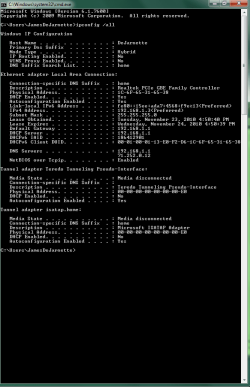
Ok so I tried the netsh winsock reset, didn't work. I then reset my router using the hidden button, didn't work. And I now downloaded that file and ran it and it didn't work. My ipconfig looks exactly the same as before (I posted it here too).

So I'm guess this means I have a hardware problem? But I'm still wondering why the device manager says my network adapter is working properly.

So I'm stuck on things to try from here. Any more ideas or should I lug my desktop into the shop for an examination?
 

Attachments

  • Capture.PNG
    Capture.PNG
    18.9 KB · Views: 67

My Computer

Computer Manufacturer/Model Number
iBUYPOWER Computers
OS
Windows 7 64 bit
CPU
Intel(R) Core(TM) i7 CPU 930 @ 2.80GHZ 2.83GHZ
Memory
6.00 GB
Graphics Card(s)
ATI Radeon HD 5700 Series
Sound Card
ATI High Definition Audio Device
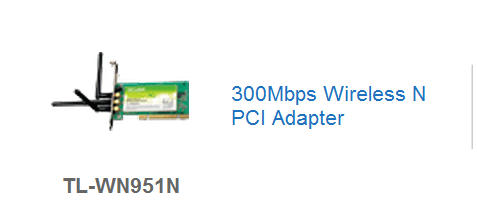
sorry you have had no luck maybe buying a new card would be a investment or a usb dongle ? you could just fit it yourself and save service charge in a shop would you like some advise on a new card or usb wireless stick? tp-link are a great brand.
 

My Computer

Computer Manufacturer/Model Number
packard bell IXTREME M5722
OS
Operating System : Windows 7 Home Premium Edition 6.01.7600 SP1 (x64)
CPU
Processor : Intel Core 2 Quad Q8300 @ 2500 MHz
Motherboard
Mainboard : Packard Bell (Acer EG43M )
Memory
Physical Memory :8GB Corsair4x 2GB 800MHz C5 DDR2
Graphics Card(s)
Video Card : XFX 6700 AMD
Monitor(s) Displays
Maestro 234DL - BenQ V2220 - BenQ VW2420H
Screen Resolution
Current Display :1920x1080p pixels at 60 Hz in HD LED
Hard Drives
Hard Disks : WDC (1000 GB)
Drive C: (Hard Disk) : 428 GB available on 491 GB
Drive D: (Hard Disk) : 426 GB available on 492 GB
SAMSUNG spinpoint HD103SJ 1000.2 GB
(X 2) KINGSTON SSD NOW V 30GB
PSU
XFX ProSeries 550W PSU
Case
PACKARD BELL IXTREME
Cooling
System Blower Current: 150mA Air Flow16CFM ;Akasa 90mm rear
Keyboard
Gigabyte Aivia K8100
Mouse
TRUST-Wireless Laser Mouse - Carbon edition MI-7770C
Internet Speed
TP-LINK > TL-WN951N / AV500 Gigabit Powerline Adapters
Browser
chrome dev
Other Info
EXTRA COOLING>(FAN CONTROLLER) PC Bay Cooler 3 x 40mm fans; Akasa AK-HD-BL Blue hard drive cooler 2 x 40 mm fan 4500 rpm 29.7 dBA
Bios> American Megatrends Inc.
Version : P01-A1
Date : 08/31/2009
I have a usb wireless stick and that doesn't work either.

I'd be fine with buying a new part as well and replacing it myself but I have no idea what part needs to be replaced. How can I determine what to replace and if it even needs to be replaced?
 

My Computer

Computer Manufacturer/Model Number
iBUYPOWER Computers
OS
Windows 7 64 bit
CPU
Intel(R) Core(TM) i7 CPU 930 @ 2.80GHZ 2.83GHZ
Memory
6.00 GB
Graphics Card(s)
ATI Radeon HD 5700 Series
Sound Card
ATI High Definition Audio Device

Attachments

  • tplink.PNG
    tplink.PNG
    6 KB · Views: 6
  • tplink4.PNG
    tplink4.PNG
    68 KB · Views: 4

My Computer

Computer Manufacturer/Model Number
packard bell IXTREME M5722
OS
Operating System : Windows 7 Home Premium Edition 6.01.7600 SP1 (x64)
CPU
Processor : Intel Core 2 Quad Q8300 @ 2500 MHz
Motherboard
Mainboard : Packard Bell (Acer EG43M )
Memory
Physical Memory :8GB Corsair4x 2GB 800MHz C5 DDR2
Graphics Card(s)
Video Card : XFX 6700 AMD
Monitor(s) Displays
Maestro 234DL - BenQ V2220 - BenQ VW2420H
Screen Resolution
Current Display :1920x1080p pixels at 60 Hz in HD LED
Hard Drives
Hard Disks : WDC (1000 GB)
Drive C: (Hard Disk) : 428 GB available on 491 GB
Drive D: (Hard Disk) : 426 GB available on 492 GB
SAMSUNG spinpoint HD103SJ 1000.2 GB
(X 2) KINGSTON SSD NOW V 30GB
PSU
XFX ProSeries 550W PSU
Case
PACKARD BELL IXTREME
Cooling
System Blower Current: 150mA Air Flow16CFM ;Akasa 90mm rear
Keyboard
Gigabyte Aivia K8100
Mouse
TRUST-Wireless Laser Mouse - Carbon edition MI-7770C
Internet Speed
TP-LINK > TL-WN951N / AV500 Gigabit Powerline Adapters
Browser
chrome dev
Other Info
EXTRA COOLING>(FAN CONTROLLER) PC Bay Cooler 3 x 40mm fans; Akasa AK-HD-BL Blue hard drive cooler 2 x 40 mm fan 4500 rpm 29.7 dBA
Bios> American Megatrends Inc.
Version : P01-A1
Date : 08/31/2009
I have a usb wireless stick and that doesn't work either
your quote here suggests something needs to be more investigated, in windows 7 you can use as many wireless adapters as your machine permits so if your wireless usb stick is not recognized by windows and fails to install the driver? have you got your windows set up to install drivers for third party devices? instructions at this link:ar: http://www.itechtalk.com/thread3598.html
or use brinks excellent tutorial How to Change the Device Driver and Information Installation Settings in Windows 7:ar:
http://www.sevenforums.com/tutorials/2803-device-installation-settings.html?filter[2]=Hardware%20and%20Drivers
 

My Computer

Computer Manufacturer/Model Number
packard bell IXTREME M5722
OS
Operating System : Windows 7 Home Premium Edition 6.01.7600 SP1 (x64)
CPU
Processor : Intel Core 2 Quad Q8300 @ 2500 MHz
Motherboard
Mainboard : Packard Bell (Acer EG43M )
Memory
Physical Memory :8GB Corsair4x 2GB 800MHz C5 DDR2
Graphics Card(s)
Video Card : XFX 6700 AMD
Monitor(s) Displays
Maestro 234DL - BenQ V2220 - BenQ VW2420H
Screen Resolution
Current Display :1920x1080p pixels at 60 Hz in HD LED
Hard Drives
Hard Disks : WDC (1000 GB)
Drive C: (Hard Disk) : 428 GB available on 491 GB
Drive D: (Hard Disk) : 426 GB available on 492 GB
SAMSUNG spinpoint HD103SJ 1000.2 GB
(X 2) KINGSTON SSD NOW V 30GB
PSU
XFX ProSeries 550W PSU
Case
PACKARD BELL IXTREME
Cooling
System Blower Current: 150mA Air Flow16CFM ;Akasa 90mm rear
Keyboard
Gigabyte Aivia K8100
Mouse
TRUST-Wireless Laser Mouse - Carbon edition MI-7770C
Internet Speed
TP-LINK > TL-WN951N / AV500 Gigabit Powerline Adapters
Browser
chrome dev
Other Info
EXTRA COOLING>(FAN CONTROLLER) PC Bay Cooler 3 x 40mm fans; Akasa AK-HD-BL Blue hard drive cooler 2 x 40 mm fan 4500 rpm 29.7 dBA
Bios> American Megatrends Inc.
Version : P01-A1
Date : 08/31/2009
Hi quick update, I reset my PC to factory settings and its working fine nowit's going to take ages to download all my steam apps but it's a small price to pay to have the net back, thanks for the help all.
 

My Computer

Computer Manufacturer/Model Number
Dell insperon
OS
Windows 7 Home premium 64 bit
Hi quick update, I reset my PC to factory settings and its working fine nowit's going to take ages to download all my steam apps but it's a small price to pay to have the net back, thanks for the help all.

okey dokey keep all the info on this thread for reference, im always about if you need anything ok :D
 

My Computer

Computer Manufacturer/Model Number
packard bell IXTREME M5722
OS
Operating System : Windows 7 Home Premium Edition 6.01.7600 SP1 (x64)
CPU
Processor : Intel Core 2 Quad Q8300 @ 2500 MHz
Motherboard
Mainboard : Packard Bell (Acer EG43M )
Memory
Physical Memory :8GB Corsair4x 2GB 800MHz C5 DDR2
Graphics Card(s)
Video Card : XFX 6700 AMD
Monitor(s) Displays
Maestro 234DL - BenQ V2220 - BenQ VW2420H
Screen Resolution
Current Display :1920x1080p pixels at 60 Hz in HD LED
Hard Drives
Hard Disks : WDC (1000 GB)
Drive C: (Hard Disk) : 428 GB available on 491 GB
Drive D: (Hard Disk) : 426 GB available on 492 GB
SAMSUNG spinpoint HD103SJ 1000.2 GB
(X 2) KINGSTON SSD NOW V 30GB
PSU
XFX ProSeries 550W PSU
Case
PACKARD BELL IXTREME
Cooling
System Blower Current: 150mA Air Flow16CFM ;Akasa 90mm rear
Keyboard
Gigabyte Aivia K8100
Mouse
TRUST-Wireless Laser Mouse - Carbon edition MI-7770C
Internet Speed
TP-LINK > TL-WN951N / AV500 Gigabit Powerline Adapters
Browser
chrome dev
Other Info
EXTRA COOLING>(FAN CONTROLLER) PC Bay Cooler 3 x 40mm fans; Akasa AK-HD-BL Blue hard drive cooler 2 x 40 mm fan 4500 rpm 29.7 dBA
Bios> American Megatrends Inc.
Version : P01-A1
Date : 08/31/2009
Ok so I tried the netsh winsock reset, didn't work. I then reset my router using the hidden button, didn't work. And I now downloaded that file and ran it and it didn't work. My ipconfig looks exactly the same as before (I posted it here too).

So I'm guess this means I have a hardware problem? But I'm still wondering why the device manager says my network adapter is working properly.

So I'm stuck on things to try from here. Any more ideas or should I lug my desktop into the shop for an examination?

Ok I see a problem with your ipconfig, somebody has set a secondary DNS server in your IPv4 properties. I can tell this because your default gateway shows up for your DNS and also I can see a secondary DNS of 72.752.0.12 where it should not be. I have seen this cause problems in the past.

It will work best if the DNS comes from the router only not both places. If you need to use another DNS then designate the one you need in your routers settings, not IPv4 properties.

Go into your IPv4 properties and remove the DNS server then reboot the machine and see if anything changes. :)
 

My Computer

Computer type
PC/Desktop
Computer Manufacturer/Model Number
Home built
OS
Windows 7 Ult, Windows 8.1 Pro,
CPU
Q9650-4.275GHz, E8600 4.5GHz, E6750-3.8GHz
Motherboard
Evga 780i FTW
Memory
G.Skill PC2 9600 1200Mhz 5 5 5 15 2T
Graphics Card(s)
GTX480
Sound Card
Asus Xonar D2
Monitor(s) Displays
HannsG
Screen Resolution
1680X1050
Hard Drives
GSkill Phoenix Pro 120GB SSD
PSU
ThermalTake Toughpower 1000Watt modular
Case
ThermalTake XaserV
Cooling
Xigmatek S1283
Keyboard
Logitech G15
Mouse
Logitech G9
Internet Speed
T1
Brianzion: My computer recognizes the usb stick and detects the signal strength and seemingly connects to the router but my system still gives me the same error where it says "unidentified network" and it won't connect to the internet. When I first got my desktop I actually used my wireless stick all the time and it worked fine but I eventually switched to an ethernet cord so I could play some online games and not lag :P


Chev65: I noticed that too but didn't think anything of it. Unfortunately I'm away from my home at the moment for thanksgiving but I'm going to try you suggestion as soon as I get a chance and I'll post the results on here.
 

My Computer

Computer Manufacturer/Model Number
iBUYPOWER Computers
OS
Windows 7 64 bit
CPU
Intel(R) Core(TM) i7 CPU 930 @ 2.80GHZ 2.83GHZ
Memory
6.00 GB
Graphics Card(s)
ATI Radeon HD 5700 Series
Sound Card
ATI High Definition Audio Device
Chev65: I noticed that too but didn't think anything of it. Unfortunately I'm away from my home at the moment for thanksgiving but I'm going to try you suggestion as soon as I get a chance and I'll post the results on here.

Sounds good dejarnjc, I've seen this same thing cause problems in the past so it's worth a try I think. :)

Still waiting on confirmation of the secondary DNS which I'm pretty sure is causing dejarnjc's problems. Notice the secondary DNS address of 72.752.0.12 under the correct default gateway...This will cause problems everytime. That DNS address needs to be removed from the IPv4 properties.

I'm also going to disagree that this is a modem problem or a fried lancard although guessing at these problems isn't my expertise, I perfer to solve problems with facts rather than guess work.


Last edited:

My Computer

Computer type
PC/Desktop
Computer Manufacturer/Model Number
Home built
OS
Windows 7 Ult, Windows 8.1 Pro,
CPU
Q9650-4.275GHz, E8600 4.5GHz, E6750-3.8GHz
Motherboard
Evga 780i FTW
Memory
G.Skill PC2 9600 1200Mhz 5 5 5 15 2T
Graphics Card(s)
GTX480
Sound Card
Asus Xonar D2
Monitor(s) Displays
HannsG
Screen Resolution
1680X1050
Hard Drives
GSkill Phoenix Pro 120GB SSD
PSU
ThermalTake Toughpower 1000Watt modular
Case
ThermalTake XaserV
Cooling
Xigmatek S1283
Keyboard
Logitech G15
Mouse
Logitech G9
Internet Speed
T1
Did you try setting up a new LAN connection in the "network and sharing center"? Go ahead and give that a try. Could be something got screwed up in your current settings and setting it up again might solve the problem as the new ISP information is automatically obtained on setup. It won't hurt your current LAN access point and can be deleted if it doesn't work.

Also, you might want to check your ISP's Modem. They are of very cheap, crappy quality and don't last very long (every single one of them are "refurbished" and reused constantly). That's the hardware I would suspect more than your LAN card, as you've said it is working perfectly. Just call your ISP and they can run their tests remotely or else have one of their people come out to either fix it or issue another one.

The last thing I would say is a possibility is that there is something wrong with the Server your computer's connection is being hosted on (the DNS). Again, I'd recommend calling your ISP.

Hope it gets sorted out soon and let us know how it goes. =]
 

My Computer

Computer Manufacturer/Model Number
Acer Aspire 5738PG-6306
OS
7 Ultimate x64 SP1
CPU
Core 2 Duo T6600 @ 2.20GHz
Motherboard
Acer JV50 | Intel PM45 Chipset | BIOS Phoenix v1.21
Memory
4GB SDRAM DDR2 667
Graphics Card(s)
ATI Mobility Radeon 4570HD 512MB VDDR3 (2.25GB HyperMemory)
Sound Card
Integrated Dolby Home Theater HD Audio Support
Monitor(s) Displays
15.6" LED backlight HD/WS CineCrystal w/ Multi-Touch
Screen Resolution
Notebook: 1366x768 | Syncmaster P2370HD: 1920x1080
Hard Drives
Primary internal: 320GB WD3200BEVT-22ZCT0 @ 5400 RPM | Secondary external 1: 2TB Cavalry CAXB3702T0 @7200 RPM (USB 2.0) | Secondary external 2: 500GB Calvary CAUM @7200 RPM (USB 2.0).
PSU
AC Adapter
Case
Blue Clam shell
Cooling
OEM Bult-in.
Keyboard
Microsoft Wireless 3000 (USB)
Mouse
Logitech V220 (USB)
Internet Speed
31Mbps DL/25Mbps UL - Verizon fiOs/Netgear WNDR37AV
Other Info
EXTERNAL DISPLAY: 23" Samsung Syncmaster P2370HD | EXTERNAL SOUND: 300 Watt MX-KB30 JVC Stereo (AUX) | ROUTER: Netgear WNDR37AV 802.11a/b/g/n Dual-Band Gigabit | Satechi 12-Port USB 2.0 Hub | GAME PAD: SteelSeries 3GC USB 2.0 (JoyToKey Mapping) | DETAILED SYSTEM SPECIFICATIONS: http://www.tigerdirect.com/applications/SearchTools/item-details.asp?EdpNo=5265887&CatId=4938
Back
Top