
ddr2 pc2 6400 u running at 333?

lecky2009

New member
Local time
12:53 AM
Messages
11
HI there newbie here i have just installed 3gb of ddr2 800mhz. it originally had 1gb pc2 5300u. but is showing speed in cpuid as 266 mhz i checked in bios and my dram freq was showing 532 mhz double what it showed in cpuid so i set it to 800mhz in bios and windows wouldn't start so i rebooted and dropped it to 666mhz giving me 333mhz in cpuid is this correct as i thought it should show as 400mhz? my mobo is a original acer with flashed modded bios so i could adjust cpu and ram freq

any advice would be much appreciated
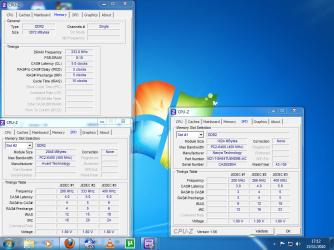
ram.png
 
Last edited by a moderator:

My Computer My Computer

At a glance

windows 7 ultimate x64intel pentium dual cpu e2160@1800 oc to 2.40 ghz4gb pc2 6400u (800mhz)ati radeon hd 5500
Computer Manufacturer/Model Number
acer aspire m1610
OS
windows 7 ultimate x64
CPU
intel pentium dual cpu e2160@1800 oc to 2.40 ghz
Motherboard
acer f672cr with unlocked award bios
Memory
4gb pc2 6400u (800mhz)
Graphics Card(s)
ati radeon hd 5500
Sound Card
creative sb audigy 2
Monitor(s) Displays
emprex 19"
Hard Drives
hitachi sata 160gb
PSU
cit 600w
Case
standard
Cooling
standard + silent case fan
When you are dealing with DDR ram, it's double data rate. Thus....DDR2-800Mhz is RAM that "when doubled' runs at 800mhz....but it's standard front side bus speed is 400mhz.

With PC's, the CPU's run at a certain front side bus speed and then have a multiplier. Therefore, a chip like an Intel Core 2 Quad Q9550 runs stock with a 333mhz front side bus and an 8.5x multiplier. Thus, true speed is 333 x 8.5 or 2.83ghz. In a case like this, the default speed the RAM would run is 333 x 2 (since it's DDR)....so RAM would run at 667mhz. It doesn't matter whether you install DDR2-800, DDR2-1000, or DDR2-1200....it's going to run at 667mhz because it's effectively 2x the speed of your front side bus.

So, with an Intel Q9550...if you wanted your RAM to truly run at 800mhz...you would HAVE to increase the FSB speed of your CPU to 400mhz......but be aware when you do this, your CPU now runs at 400 x 8.5 or 3.4ghz. You are now overclocking and have to worry about heat and stability.
 

My Computer My Computer

At a glance

Windows 7 Ultimate x64Intel Q9550 2.83Ghz OC'd to 3.40Ghz8GB G.Skill PI DDR2-800, 4-4-4-12 timingsEVGA 1280MB Nvidia GeForce GTX570
Computer Manufacturer/Model Number
Self-Built in July 2009
OS
Windows 7 Ultimate x64
CPU
Intel Q9550 2.83Ghz OC'd to 3.40Ghz
Motherboard
Gigabyte GA-EP45-UD3R rev. 1.1, F12 BIOS
Memory
8GB G.Skill PI DDR2-800, 4-4-4-12 timings
Graphics Card(s)
EVGA 1280MB Nvidia GeForce GTX570
Sound Card
Realtek ALC899A 8 channel onboard audio
Monitor(s) Displays
23" Acer x233H
Screen Resolution
1920x1080
Hard Drives
Intel X25-M 80GB Gen 2 SSD
Western Digital 1TB Caviar Black, 32MB cache. WD1001FALS
PSU
Corsair 620HX modular
Case
Antec P182
Cooling
stock
Keyboard
ABS M1 Mechanical
Mouse
Logitech G9 Laser Mouse
Internet Speed
15/2 cable modem
Other Info
Windows and Linux enthusiast. Logitech G35 Headset.
Thanks for the advise m8 i get it now :o Ive ordered another 2gb of ram the same brand as the 2g installed so it should run dual channel do you think that will make a difference to the performance?
 

My Computer My Computer

At a glance

windows 7 ultimate x64intel pentium dual cpu e2160@1800 oc to 2.40 ghz4gb pc2 6400u (800mhz)ati radeon hd 5500
Computer Manufacturer/Model Number
acer aspire m1610
OS
windows 7 ultimate x64
CPU
intel pentium dual cpu e2160@1800 oc to 2.40 ghz
Motherboard
acer f672cr with unlocked award bios
Memory
4gb pc2 6400u (800mhz)
Graphics Card(s)
ati radeon hd 5500
Sound Card
creative sb audigy 2
Monitor(s) Displays
emprex 19"
Hard Drives
hitachi sata 160gb
PSU
cit 600w
Case
standard
Cooling
standard + silent case fan
HI there newbie here i have just installed 3gb of ddr2 800mhz. it originally had 1gb pc2 5300u. but is showing speed in cpuid as 266 mhz i checked in bios and my dram freq was showing 532 mhz double what it showed in cpuid so i set it to 800mhz in bios and windows wouldn't start so i rebooted and dropped it to 666mhz giving me 333mhz in cpuid is this correct as i thought it should show as 400mhz? my mobo is a original acer with flashed modded bios so i could adjust cpu and ram freq

any advice would be much appreciated

View attachment 116948

Actually you do not need to overclock your CPU in order to run the memory at a higher or even the default Mhz. You only need to change the divider ratio between the FSB and memory. I think that pparks forgot that most boards with overclocking bios have many dividers to choose from.

You normally would need to change the memory from Optimal to Expert settings in order to get the divider ratio list" this setting is a bit different for all boards". You should have more options for dividers then.

On some boards bios you can also set the memory speed to where you want it and the board will set up a divider automatically. The problem is that certain dividers are more stable than others so it's best to use the dividers the board already has.

As it stands you are using the 8:10 divider which would need to be changed.
A Memory divider is a ratio which is used to determine the operating clock frequency of computer memory in accordance with Front Side Bus frequency, if memory system is dependent on FSB clock speed. Along with memory latency timings, memory dividers are extensively used in overclocking memory sub-system to find stable, working memory states at higher FSB frequencies. Memory Divider is also commonly referred as "DRAM:FSB Ratio".

I see that your E2160 is already overclocked from 1.8Ghz to 2.4GHz. The default FSB for your CPU was already at 800MHz before you overclocked the FSB. Because you overclocked that all changed and so did the required divider to put your memory at 800Mhz.

Your bios should have a stable divider that will put your memory at 800MHz without having to change your FSB overclock setting.

So basically you need to look for a divider that gets your memory back to 800MHz. Remember the bus runs at 1/2 the memory speed so it will show up as 400Mhz in CPU-Z.

Info on your CPU > http://ark.intel.com/Product.aspx?id=29739&processor=E2160&spec-codes=SLA3H,SLA8Z
 

My Computer My Computer

At a glance

Windows 7 Ult, Windows 8.1 Pro,Q9650-4.275GHz, E8600 4.5GHz, E6750-3.8GHzG.Skill PC2 9600 1200Mhz 5 5 5 15 2TGTX480
Computer type
PC/Desktop
Computer Manufacturer/Model Number
Home built
OS
Windows 7 Ult, Windows 8.1 Pro,
CPU
Q9650-4.275GHz, E8600 4.5GHz, E6750-3.8GHz
Motherboard
Evga 780i FTW
Memory
G.Skill PC2 9600 1200Mhz 5 5 5 15 2T
Graphics Card(s)
GTX480
Sound Card
Asus Xonar D2
Monitor(s) Displays
HannsG
Screen Resolution
1680X1050
Hard Drives
GSkill Phoenix Pro 120GB SSD
PSU
ThermalTake Toughpower 1000Watt modular
Case
ThermalTake XaserV
Cooling
Xigmatek S1283
Keyboard
Logitech G15
Mouse
Logitech G9
Internet Speed
T1
To add to the great information above, if you have memory DIMMs of different frequency - say PC2-5300 and PC2-6400, then the system will perform at the lowest frequency, in this example at 333 MHz - or data rate 667, as explained by pparks already.
 

My Computer My Computer

At a glance

Windows 7 Ultimate (x64)Q66008 GBATI Radeon HD 2600 XT
Computer Manufacturer/Model Number
Dell Inspiron 530
OS
Windows 7 Ultimate (x64)
CPU
Q6600
Memory
8 GB
Graphics Card(s)
ATI Radeon HD 2600 XT
Monitor(s) Displays
Samsung Syncmaster P2450
Screen Resolution
1920x1080
Hard Drives
Samsung HD103UJ
Samsung HD501LJ
Internet Speed
25 Mb/s
thanks for the advice ppl i cannot find a divider option in my bios possibly because its unlocked acer bios it doesnt have some of the options of retail boards i think iam going to run 4gb of same make ddr2 at 666mhz seams to run fine
 

My Computer My Computer

At a glance

windows 7 ultimate x64intel pentium dual cpu e2160@1800 oc to 2.40 ghz4gb pc2 6400u (800mhz)ati radeon hd 5500
Computer Manufacturer/Model Number
acer aspire m1610
OS
windows 7 ultimate x64
CPU
intel pentium dual cpu e2160@1800 oc to 2.40 ghz
Motherboard
acer f672cr with unlocked award bios
Memory
4gb pc2 6400u (800mhz)
Graphics Card(s)
ati radeon hd 5500
Sound Card
creative sb audigy 2
Monitor(s) Displays
emprex 19"
Hard Drives
hitachi sata 160gb
PSU
cit 600w
Case
standard
Cooling
standard + silent case fan
I think that pparks forgot that most boards with overclocking bios have many dividers to choose from.
I didn't forget it....but I always like to keep a 1:1 ratio on my CPU and memory. I would prefer to run the RAM slower at a 1:1 ratio that faster at say a 4:5 memory divider. For fairness, I should have mentioned that to let the other person decide what they were comfortable with.

As it stands, with an Acer board...you aren't going to be able to overclock or change these settings. The mfg usually locks all this stuff down so that you cannot blow up the machine or components that they warranty.
 

My Computer My Computer

At a glance

Windows 7 Ultimate x64Intel Q9550 2.83Ghz OC'd to 3.40Ghz8GB G.Skill PI DDR2-800, 4-4-4-12 timingsEVGA 1280MB Nvidia GeForce GTX570
Computer Manufacturer/Model Number
Self-Built in July 2009
OS
Windows 7 Ultimate x64
CPU
Intel Q9550 2.83Ghz OC'd to 3.40Ghz
Motherboard
Gigabyte GA-EP45-UD3R rev. 1.1, F12 BIOS
Memory
8GB G.Skill PI DDR2-800, 4-4-4-12 timings
Graphics Card(s)
EVGA 1280MB Nvidia GeForce GTX570
Sound Card
Realtek ALC899A 8 channel onboard audio
Monitor(s) Displays
23" Acer x233H
Screen Resolution
1920x1080
Hard Drives
Intel X25-M 80GB Gen 2 SSD
Western Digital 1TB Caviar Black, 32MB cache. WD1001FALS
PSU
Corsair 620HX modular
Case
Antec P182
Cooling
stock
Keyboard
ABS M1 Mechanical
Mouse
Logitech G9 Laser Mouse
Internet Speed
15/2 cable modem
Other Info
Windows and Linux enthusiast. Logitech G35 Headset.
Back
Top