windows fax and scan status pending

Guill2222

New member
Local time
7:10 AM
Messages
2
Hi, is anybody could help me with this issue? i am running windws 7 x 64 ultimate, when i trry to send fax i have satus pending all the time, what i think is happening is that my modem it is not being detected, i would like to know if anybody already had the same issue and then give some advise how to fix this problem, thanks.
 

My Computer My Computer

Computer Manufacturer/Model Number
Dell Studio XPS
OS
windows 7 ultimate x64
CPU
intel core i7
Graphics Card(s)
ATI radeon 4800 series
Fax

check in the drafts area may be one saved in there..oK
 

My Computer My Computer

Computer type
PC/Desktop
Computer Manufacturer/Model Number
Compaq Presario
OS
Windows 7 64 bit
This a copy of the help supplied with W7 and some extra it maybe of some use.

If you're planning to send and receive faxes at home, you first need to outfit your PC with a fax modem.
A fax modem is a relatively inexpensive piece of add-on hardware that allows your computer to communicate with a fax machine over a standard phone line. The devices are sold at major computer stores and come in two varieties: internal and external.
Internal fax modems plug directly into your computer motherboard, similar to a video or sound card. External fax modems are small devices that connect to the serial or USB ports.
If you're at work, another option is to see if your employer has a fax server—a dedicated computer equipped with multiple fax modems. Sending a fax using a fax server doesn't require you to add any special hardware to your PC. You just set up a connection with the fax server and go.
How to Fax Over Broadband | eHow.com
Step1 Make sure your broadband is ready to go. Check your connections and your firewall setting and ensure that everything is working properly. More often than not, broadband Internet issues can be traced to a bad connection.
Step 2 Download the appropriate software. You'll need to pick the software that works for you, such as FaxBin or MyFax. For my faxing needs I use eFax, which allows for some free fax services, lets you receive faxes in an email, and offers expanded options for a monthly fee.
Step 3 Install the software. Follow the instructions as outlined in the software's installation guide.
Step 4 Select your document. Most fax software services will let you fax any of the typical document types, such as PDF and DOC files. If you have a scanner, some software will even let you fax your document directly from the machine.
Step 5 Fax away. Try to send a test fax first, to make sure everything is working properly, either to a friend or even to your job.

Once you've picked up a fax modem or found a fax server, you still need to do a little setting up.
To set up a fax modem
Before you begin, make sure that you've properly installed your fax modem, and that it's plugged in to a standard analog phone line.
Click the Start button , click All Programs, and then click Windows Fax and Scan.
At the bottom of the left pane, click Fax, and then click New Fax on the toolbar to launch the Fax Setup wizard.
Click Connect to a fax modem and follow the instructions.
Note
To set up your computer to send faxes only, click I'll choose later; I want to create a fax now in the Fax Setup wizard. Keep in mind that by choosing this option, you'll be able to send faxes but not receive them.
To set up a fax server
Before you begin, make sure your computer is connected to the network and you know the network address of the fax server (for example, \\mycompanyfaxserver).
Click the Start button , click All Programs, and then click Windows Fax and Scan.
To use Fax view, click Fax at the bottom of the left pane.
Click the Tools menu, and then click Fax Accounts.
Click Add, and then, in the Fax Setup wizard, click Connect to a fax server on my network and follow the instructions.
Note
To connect to a fax server, you might need permission from the system administrator.

 

My Computer My Computer

OS
XP, Vista, W7 64bit Home Premium
CPU
Intel Core Duo 6850 3.0 ghz @ 3.7 ghz
Motherboard
Asus P5E
Memory
4GB Corsair DDR 2 PC-6400
Graphics Card(s)
Ati 4870 1ghz
Sound Card
Supreme FX 11
Monitor(s) Displays
View Sonic VX1962wm
Screen Resolution
1680 X1050
Hard Drives
3 Seagate Sata Drives 160gb 250gb 500gb
PSU
Thermaltake 600 watt
Case
NZXT Alpha
Cooling
3X120cm Fans
Keyboard
Microsoft Digital Media Pro Keyboard
Mouse
Microsoft Wheel Mouse Optical
Internet Speed
1.5Mb to 8Mb/384k
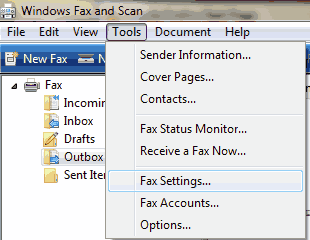
I had this problem too until I realized I had selected the wrong modem in Windows Fax. (Tools, Fax Settings, Select Fax Device) Then I had to delete and resend the fax, and it worked well.
 

My Computer My Computer

OS
Windows 7
Fax in win7

I have the same problem and thanks to the info provided. I will try the solution provided, install a different modem as my system doesn't see my Dragon fax modem.
 

My Computer My Computer

Computer Manufacturer/Model Number
Clone I built it
OS
Windows 7
CPU
Intel P4 3.0 ghz
Motherboard
P4M 800
Memory
2 Gig
Graphics Card(s)
on board
Sound Card
on board
Monitor(s) Displays
19" acer
Hard Drives
1TB
PSU
What is this?
Case
Big Black
Cooling
CPU fan plus 1 side mount.
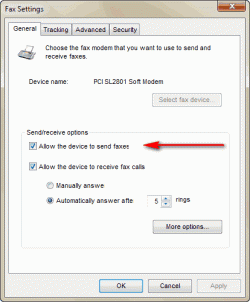
I had the same problem and resolved it by going to tools->Fax Settings and checking the box that says 'allow the device to send faxes'.

Not sure why this isn't checked by default, maybe it's a security issue.
 

My Computer My Computer

OS
Win 7 Enterprise 32bit at work and Win 7 Ultimate x64 at home
I have this problem with Windows 7 using ENCORE USB FAX modem... only after the FAX hangs up as "pending" and I restart Windows 7 does the FAX status open and the FAX get sent... obviously it works, but something is interfering with it working all of the time. I should not have to restart my Windows 7 each time that I want a FAX to be sent...
 

My Computer My Computer

Computer Manufacturer/Model Number
HP Pavilion Dv6
OS
Windows 7 Home Premium
In Tools, Fax Settings
the General Tab is completely grayed out and won't let me select the 'send fax now' option. Any one know why?
 

My Computer My Computer

OS
windows 7
I have the same problem

Originally it installed and displayed "all fax accounts are accessible".But when I try and send, it says "pending" on the outbox.
The modem is an "USB ADSL ALE 070"
Maybe I should uninstall or do a system restore and go through the set-up again?
 

My Computer My Computer

OS
windows 7
Downloaded the latest driver for the modem but still not recognized.
Then I realized this is an antique, 2001.The latest ones can be obtained from $8.Which considering the cost of efax at $12.95/month probably makes it worthwhile.
 

My Computer My Computer

OS
windows 7
Allow the device to send faxes

Click the Start button , click All Programs, and then click Windows Fax and Scan.

Tools > Fax Settings...>Allow the device to send faxes
 

Attachments

  • Fax settings.gif
    Fax settings.gif
    8.4 KB · Views: 269
  • send.gif
    send.gif
    13.3 KB · Views: 5

My Computer My Computer

OS
Windows 7 Ultimate x64
I had this same issue, until I realized that the restart was disconnecting me from the internet; thus freeing my phone line for the fax modem to dial out.


I have this problem with Windows 7 using ENCORE USB FAX modem... only after the FAX hangs up as "pending" and I restart Windows 7 does the FAX status open and the FAX get sent... obviously it works, but something is interfering with it working all of the time. I should not have to restart my Windows 7 each time that I want a FAX to be sent...
 

My Computer My Computer

OS
Windows 7 Home Premium 64bit
You may need to activate the "send fax option" and "receive fax option" tick boxes.
 

My Computer My Computer

OS
Windows XP Home Edition 32
Thank you for your replies.

All the MS solutions have been tried with no change.

The fax modem will not "pick up" the line for sending or receiving.
 

My Computer My Computer

OS
Windows XP Home Edition 32
Back
Top