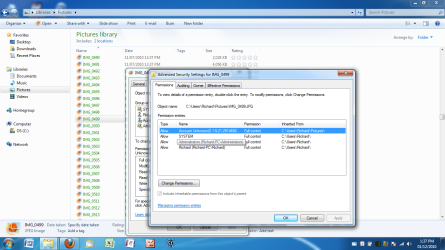
ridiculous...can someone help

Hey Deacon.

Sorry should have stated, I have followed that guide and still nothing. I have granted permission, taken ownership, just like that guide says and nothing.

Just frustrating is all

What about associating them to another program? I mean, if you right click on a picture and chose to open it with another program rather than your current one (e.g. picas, or even in your web browser) ? Try it and see what happens.
 

My Computer My Computer

At a glance

Windows 7
OS
Windows 7
All I have is a little 5mb flash drive stick I use for school documents.

- Cant move them on to it as it says I dont have permission to move them


Can't open them with another program, just tells me the same thing.

It really it weird...

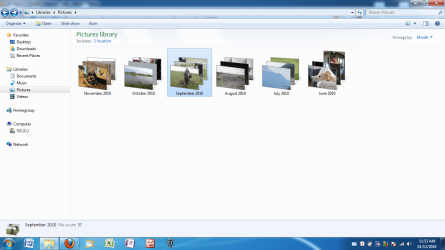
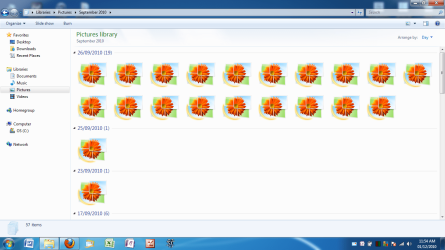
If you look at the "Library" you can see it shows the folders by month, and shows a picture from within the folder.... but when I open it they are all blocked...
 

Attachments

  • 1.png
    1.png
    86.7 KB · Views: 14
  • 2.png
    2.png
    73.5 KB · Views: 17

My Computer My Computer

At a glance

windows 7
OS
windows 7
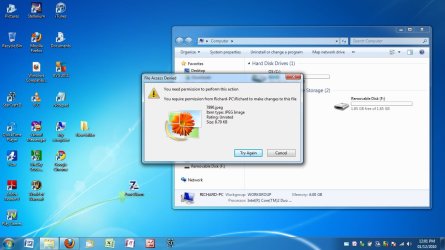
Here is what I get when I try to move or edit one of them
 

Attachments

  • 1.jpg
    1.jpg
    103.4 KB · Views: 34

My Computer My Computer

At a glance

windows 7
OS
windows 7
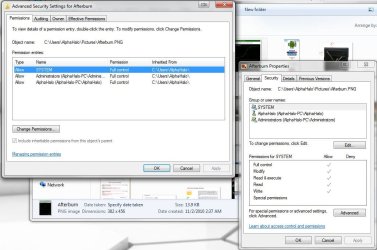
Right click and select properties. Then select the security tab, then advanced, underneath permissions. Take a screenshot or a snip, it should look like this:
permiss.JPG
 

My Computer My Computer

At a glance

W7 Professional x64AMD Athlon II X3 445 Rana 3.10 GHzPNY XLR DDR3 1600 4x2GBNVIDIA GeForce GTS 450 (fermi) 1GB GDDR5
Computer Manufacturer/Model Number
Pugh Technologies
OS
W7 Professional x64
CPU
AMD Athlon II X3 445 Rana 3.10 GHz
Motherboard
MSI 870A-G54
Memory
PNY XLR DDR3 1600 4x2GB
Graphics Card(s)
NVIDIA GeForce GTS 450 (fermi) 1GB GDDR5
Sound Card
Realtek ALC892 onboard
Monitor(s) Displays
ASUS VE205t, Viewsonic VX2035WM
Screen Resolution
1600x900, 1600x1050
Hard Drives
977GB Hitachi Hitachi HDS721010CLA332
244GB Western Digital WDC WD2500AAJS-65B4A0
488GB Western Digital WDC WD5000AAJS-00A8B0
488GB Western Digital WDC WD5000AAKS-00UU3A0
PSU
Antec EarthWatts EA650 650W
Case
ThermalTake Armor A90 Mid Tower
Cooling
3x 120mm in, 1x 120mm & 200mm out, self built hydro-cooler
Keyboard
Logitec 55
Mouse
Razer Deathadder
Internet Speed
20 Mbps D/L, 9 Mbps U/L
Cant move them on to it as it says I dont have permission to move them
That's why I suggested moving them by booting into a BartPE disc or something outside the OS. How did you get them over to your computer from your wife's laptop? If you did it through the network, try the steps in reverse.
 

My Computer My Computer

At a glance

Windows 7 Ultimate x64 SP1Intel Core i7-260012 GB Patriot Extreme DDR3-1333Nvidia GTX 470
OS
Windows 7 Ultimate x64 SP1
CPU
Intel Core i7-2600
Motherboard
Gigabyte GA-P67A-UD3P-B3
Memory
12 GB Patriot Extreme DDR3-1333
Graphics Card(s)
Nvidia GTX 470
Monitor(s) Displays
Dell UltraSharp 2209WA
Hard Drives
OCZ Agility3 240 GB, WD5001AALS, WD7501AALS
PSU
OCZ ModStream 700W
Case
CoolerMaster HAF 912 Advanced
Cooling
CoolerMaster Hyper 212 Plus
Here is what I get when I try to move or edit one of them

I see that the size of this image is ~ 8 Ko ! Is it a true picture?
Maybe these pictures are parts of the windows system pictures/icon...etc. and you may confuse your pictures!
There are many questions they might worth to check:
Did you change the location of your files/folders?
Do you have folder/file lock program?
Did you set a password to access any folder?
Did you try to completely deactivate the administrator account and reset its password?
 

My Computer My Computer

At a glance

Windows 7
OS
Windows 7
-sigh-

Honestly I don't know if I did any of that. I really am not that computer savvy, I just know the basics. This is all I know.

My wife wanted me to store our family photos on my laptop, not her macbook. So I stuck my little 2GB flash drive in the usb port, dropped them on the flash drive, put the flash drive in here, then dropped them onto my photos

Now I am here...

That really is all I know I did, and now, if i have lost our family photos, she is going to MAD at me big time.

And yes in my stupidity, I removed them off her mac after I put them on here, so the only copy I have of them are on here, being unable to view them
 

Attachments

  • 1.png
    1.png
    90.7 KB · Views: 19

My Computer My Computer

At a glance

windows 7
OS
windows 7
I see a couple of things that could be causing issues. First, the file size in your one screenshot of 8 KB is very very lower for a picture file. Second, the extensions are .jpeg. If you are able to rename the files, try .jpg.
 

My Computer My Computer

At a glance

Windows 7 Ultimate x64 SP1Intel Core i7-260012 GB Patriot Extreme DDR3-1333Nvidia GTX 470
OS
Windows 7 Ultimate x64 SP1
CPU
Intel Core i7-2600
Motherboard
Gigabyte GA-P67A-UD3P-B3
Memory
12 GB Patriot Extreme DDR3-1333
Graphics Card(s)
Nvidia GTX 470
Monitor(s) Displays
Dell UltraSharp 2209WA
Hard Drives
OCZ Agility3 240 GB, WD5001AALS, WD7501AALS
PSU
OCZ ModStream 700W
Case
CoolerMaster HAF 912 Advanced
Cooling
CoolerMaster Hyper 212 Plus
There's another possibility, i noticed you are useing Workgroup, you may need to change that to Home Group, that might give you different permissions. When you moved them to the flash drive, did you do copy the whole folder and paste it to the flash drive, because as others have said for a folder with 57 pic's in it 8 kilabits is way to small.
 

My Computer My Computer

At a glance

Windows 7 Home Premium 64 bitIntel Core 2 quad Extreme Q9770 @ 3.2 GHz4x2 GB Muskin 1600 MHz ramNVidia GTX 250
Computer Manufacturer/Model Number
Dell XPS 730
OS
Windows 7 Home Premium 64 bit
CPU
Intel Core 2 quad Extreme Q9770 @ 3.2 GHz
Memory
4x2 GB Muskin 1600 MHz ram
Graphics Card(s)
NVidia GTX 250
Sound Card
Soundblaster X-Fi Fatality Champion
Monitor(s) Displays
2 Dell 2007WFP Ultrascans
Screen Resolution
3360 x 1050
Hard Drives
WD Black 1TB sata, 2-WD Black 500 sata, 2-Seagate 500 Go external
PSU
1000 Watt
Cooling
air
Keyboard
MS Natrual Keyboard Pro
Mouse
Logitech Wireless Trackball
Internet Speed
DSL Elite
I literally "cut" the folder/pictures and pasted them onto my little mem stick.

How to I change from a work group to home group?
 

My Computer My Computer

At a glance

windows 7
OS
windows 7
I really should note: SORRY - This is a new thing which has only happened over the last few days. These photos used to be fine
 

My Computer My Computer

At a glance

windows 7
OS
windows 7
The thing that stands out to me is the "unknown account" above system. Usually only added permissions are above system in that list. If you click change permissions, and then is that a deletable permission?
 

My Computer My Computer

At a glance

W7 Professional x64AMD Athlon II X3 445 Rana 3.10 GHzPNY XLR DDR3 1600 4x2GBNVIDIA GeForce GTS 450 (fermi) 1GB GDDR5
Computer Manufacturer/Model Number
Pugh Technologies
OS
W7 Professional x64
CPU
AMD Athlon II X3 445 Rana 3.10 GHz
Motherboard
MSI 870A-G54
Memory
PNY XLR DDR3 1600 4x2GB
Graphics Card(s)
NVIDIA GeForce GTS 450 (fermi) 1GB GDDR5
Sound Card
Realtek ALC892 onboard
Monitor(s) Displays
ASUS VE205t, Viewsonic VX2035WM
Screen Resolution
1600x900, 1600x1050
Hard Drives
977GB Hitachi Hitachi HDS721010CLA332
244GB Western Digital WDC WD2500AAJS-65B4A0
488GB Western Digital WDC WD5000AAJS-00A8B0
488GB Western Digital WDC WD5000AAKS-00UU3A0
PSU
Antec EarthWatts EA650 650W
Case
ThermalTake Armor A90 Mid Tower
Cooling
3x 120mm in, 1x 120mm & 200mm out, self built hydro-cooler
Keyboard
Logitec 55
Mouse
Razer Deathadder
Internet Speed
20 Mbps D/L, 9 Mbps U/L
Try copying the pictures again. It is not possible to Cut and Paste the Files, you need to Copy and Paste or left click drag them to disk or flash stick.

Use the Take Ownership Shortcut you now have on your rightclick context menu (you did add it, right?) to take ownership of the files.

You will also see better performance and less issues if you use the Windows 7 Firewall with one of the lightweight free AV's such as MS Security Essentials or Avast - AVG is no longer preferred as such.
 
I literally "cut" the folder/pictures and pasted them onto my little mem stick.
?

As you used Mac and PC, this maybe a compatibility issue. Which version of Mac?

Secondly, here is an error made: you use "cut" instead of copy! This is a dangerous task! I don't use it any more.
It is much more cautious to use COPY/PASTE than CUT/PASTE. It is risky as nobody knows if the system will crash or shutdown before the copying finishes. If so, you will lose files you have cut but not copied yet.
Doing this way, once I lost many important files and folders. Since, I never use cut/paste.
Anyway, this is part of the past now. For the future, my advice is to avoid using "cut". You can copy and delete. It is safer.
Back to your pictures, I think they are still here, as we can see picture previews on your folders. This is good sign!
The question now is, are the overall size of your folders reflect the real image sizes contained in? Right click on a folder and check out the size. If it is bulky and propotionnal to the number of images there, that means the pictures are still readable. If sizes are about ~ Ko, this might mean you lose your pictures!
You said that you cut them onto a flash drive of 5 mb ? This size, 5 mb, seems very low capacity drive. You can't put no more than 5 pictures (1Mo/pic) or 10 pic (500 Ko/image), 15 images maximum with a minimum quality (<300 Ko).
Do you still have the drive and the pictures stored on?
Did you try this:
- Rename your images or folders containing images and try to transfer them.
- Plugin your flash drive back and copy whatever folder to see if you still have the same error message.
- Use any sync program and let it to transfer your pictures between two devices (source>target).
- Disconnect you from the admin account and connect with another account with restricted rights (e.g. guest) and try to copy. You will have, of course, the same error message. Now, shut down the guest account and reconnect with your admin account. Retry to open/copy your pictures and tell us what you got.

Hope this helps.
Good luck

 
Last edited:

My Computer My Computer

At a glance

Windows 7
OS
Windows 7
I appreciate all the help...but still...nothing.


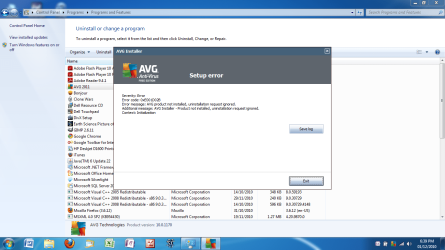
and now to top it all off this. I thought I would get rid of AVG free. So i uninstall it, restart, and on boot up, the symbol is still there, and the program is still running.

Go back to uninstall to try again and I get this!


This laptop (Dell Inspirion) is only 9 months old, and right now it feels like I'm hitting my head against a brick wall
 

Attachments

  • 1.png
    1.png
    82.5 KB · Views: 18

My Computer My Computer

At a glance

windows 7
OS
windows 7
The first thing I would do is try to recover the files that you deleted on the Macbook. I have no idea what's available, but would think there are freebies out there that would do that, like is available for Windows. If you've not copied anything to your HD there should be a good chance you can recover them.

This doesn't help with viewing on your laptop, but it could go a long way to easing your wife's mind. :D

Check around, see if there are utilities available that will do that.
 

My Computer My Computer

At a glance

Windows 10 HomeIntel Core i5 3550Corsair Vengeance DDR3 16GBNvidia GEForce GTX 970 SSC
Computer type
PC/Desktop
Computer Manufacturer/Model Number
Self build
OS
Windows 10 Home
CPU
Intel Core i5 3550
Motherboard
ASUS P8Z77-V LX (LGA1155)
Memory
Corsair Vengeance DDR3 16GB
Graphics Card(s)
Nvidia GEForce GTX 970 SSC
Monitor(s) Displays
Hanns-G 23.6", Acer 17"
Screen Resolution
1920x1080, 1440x900
Hard Drives
Sandisk SSD 256 GB
WD500GB
WD640GB
Seagage Ultra + 1TB ext.
BWD 800GB
WD 1TB ext
PSU
Antec 650w
Case
Cooler Master Centurion 534
Cooling
COOLER MASTER GeminII S524, 3 120 mm case fans.
Keyboard
Logitech MK300
Mouse
Logitech MK300
Internet Speed
Cable
Antivirus
MSSE, Malwarebytes
Browser
IE 10, Chrome
Install Revo Uninstaller, click on AVG, choose Advanced Mode, it will first run Windows Uninstaller but don't restart when prompted, instead click Next to delete all bolded leftover Registry keys and Files.

If AVG is stuck in uninstall, then reinstall it to start over with Uninstall.

This is the best regarded free AV around here now: http://www.microsoft.com/security_essentials/

Do you have other performance issues with your Dell?
 
It's really strange but calm down please, you don't need to hit your head against any thing. :) This will not solve the problem.
I am "sure" that the solution would be simple and we pass just near or over !

By the way, did you try to run the Action Center (labeled with the flag on your down-right screen corner, near the clock)?
I noticed on a previous screenshot you posted that it was a red cross indicating the existence of potential problems need to be solved. So try to troubleshoot them by right clicking on the Flaged Action Center and let it do son job automatically. Who knows, this might solve your issue.
As Cato pointed, if you didn't empty your trash on Mac, you may still able to recover your deleted pictures
Check how to recover deleted file on Mac.
On windows there are softwares to recover deleted files. There should be comparable or better utilities for Mac.
 

My Computer My Computer

At a glance

Windows 7
OS
Windows 7
-sigh-

Honestly I don't know if I did any of that. I really am not that computer savvy, I just know the basics. This is all I know.

My wife wanted me to store our family photos on my laptop, not her macbook. So I stuck my little 2GB flash drive in the usb port, dropped them on the flash drive, put the flash drive in here, then dropped them onto my photos

Now I am here...

That really is all I know I did, and now, if i have lost our family photos, she is going to MAD at me big time.

And yes in my stupidity, I removed them off her mac after I put them on here, so the only copy I have of them are on here, being unable to view them

Now I'm beginning to understand what's happening.

You see, in your screenshot, the filenames are displayed in green (if in blue, it means they are compressed), which means that they are encrypted, and can only be used on the computer that originally performed the encryption. No amount of changing permissions here is going to work, I'm afraid.

You'll have to go to the computer on which the file where originally located, unencrypt them, then copy them back.
 

My Computer My Computer

At a glance

Windows 7 Professional 32-bit SP1AMD A4/A63.00GB EDOVMware SVGA 3D
Computer type
PC/Desktop
Computer Manufacturer/Model Number
Virtual Machine
OS
Windows 7 Professional 32-bit SP1
CPU
AMD A4/A6
Motherboard
Intel Corporation 440BX Desktop Reference Platform
Memory
3.00GB EDO
Graphics Card(s)
VMware SVGA 3D
Sound Card
High Definition Audio Device
Monitor(s) Displays
Generic Non-PnP Monitor on VMware SVGA 3D
Screen Resolution
1440x900
Hard Drives
1 x 60GB VMware Virtual SATA Hard Drive ATA Device
Antivirus
Kaspersky Total Security
Usually when encrypted files are being copied to external media, windows (or the OS) always asks that doing so would remove the encryption. Probably this was not considered and in the cut/paste, presumably only the file name would then be cut/pasted, resulting in your 8 kb files. No amount of permissions is going to get them back if so or if they are corrupted.

As an earlier poster commented, I would try and find recovery tools to get the files back on the Mac without delay and avoid using the Mac till such time.

Otherwise, sorry to say, it appears that you would lose the data permanently.
 

My Computer My Computer

At a glance

Windows 7 x64
OS
Windows 7 x64
Back
Top