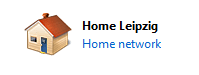
OK, this is not a critical matter or anything, but it annoys us obsessive-compulsive types!
I just upgraded my router and now my wired connection icon in the taskbar, and the Home Network in Network and Sharing Center says "Network 2".
There is only one network. On my XP computer it is "Local Area Network 4".
Can that be changed? Where? How?
I just upgraded my router and now my wired connection icon in the taskbar, and the Home Network in Network and Sharing Center says "Network 2".
There is only one network. On my XP computer it is "Local Area Network 4".
Can that be changed? Where? How?
My Computer
- Computer type
- PC/Desktop
- Computer Manufacturer/Model Number
- Home Built - Jan 2013
- OS
- Windows 7 64 Bit Home Premium SP1
- CPU
- i7-3820
- Motherboard
- Asus P9X79-PRO - Bios 4608
- Memory
- GSkill F3-14900CL9Q - 16GB
- Graphics Card(s)
- EVGA GeForce GTX660 - Driver 352.86
- Sound Card
- On board Realtek ALC898
- Monitor(s) Displays
- Acer S271HL
- Screen Resolution
- 1920 x 1080
- Hard Drives
- #1- Samsung 840 Pro Series
#2- Western Digital WD1002FAEX Sata3 Black
#3- Western Digital WD1002FAEX Sata3 Black
- PSU
- Corsair CMPSU-850TX-V2 - 850 watt (by Seasonic)
- Case
- Corsair Obsidian 550D
- Cooling
- Standard 3 120mm case fans, Cooler Master Hyper 212 EVO
- Keyboard
- MS KC-0405
- Mouse
- Intellimouse 5-button
- Internet Speed
- 56 Mbits/Sec (on a good day)
- Antivirus
- Avast & Malwarebytes
- Browser
- Firefox
- Other Info
- Asus DVD - DRW-24B1ST 24X

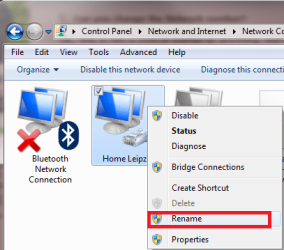

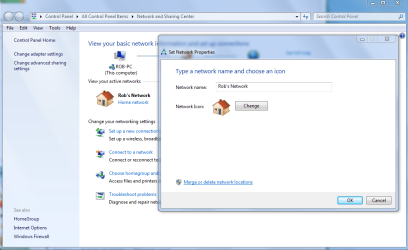
 Way too easy