Solved The properties for this item are not available

sikm

New member
Member
Local time
6:39 PM
Messages
38
Location
Melbourne
Not sure when I lost this facility but lost it I have. In Windows 7, 32 bit, when I go to Computer and then right click on any hard/DVD drive I get the above message - from Desktop. I just can't get any details of any drive. I actually now use Defraggler to find out how full my disks are.

I've scoured the Internet but just can't find any suggestions - apart from Malware which I've checked and re-checked.

Any suggestions will be welcomed.

Simon
 

My Computer My Computer

At a glance

windows7
OS
windows7
Not sure when I lost this facility but lost it I have. In Windows 7, 32 bit, when I go to Computer and then right click on any hard/DVD drive I get the above message - from Desktop. I just can't get any details of any drive. I actually now use Defraggler to find out how full my disks are.

I've scoured the Internet but just can't find any suggestions - apart from Malware which I've checked and re-checked.

Any suggestions will be welcomed.

Simon


Hi Simon and welcome

1- run system file check to repair system files. if this doesnt fix it or if it says could not fix the files

2- use the win 7dvd to run a repair install


Ken J
 

My Computer My Computer

At a glance

Win 8 Release candidate 8400[email protected]4 gigsNvidia 9600M
Computer Manufacturer/Model Number
HP Pavillion dv-7 1005 Tx
OS
Win 8 Release candidate 8400
CPU
[email protected]
Memory
4 gigs
Graphics Card(s)
Nvidia 9600M
Sound Card
HD built-in
Monitor(s) Displays
17" Wxga
Screen Resolution
1440x900
Cooling
none
Internet Speed
45Mb down 5Mb up
Thanks Ken

The sfc didn't come up with anything so I guess I'll try a repair install. Might wait a whiles on that though, it's an inconvenience at the moment but no more.

Simon
 

My Computer My Computer

At a glance

windows7
OS
windows7
I had the same problem. As usual I had to figure this out myself. You are missing registry entries under
HKEY_CLASSES_ROOT. Copy and paste the below into a txt file and change the extension to .reg then
double click and enter it into the registry and this should fix the problem.


Windows Registry Editor Version 5.00

[HKEY_CLASSES_ROOT\Drive\shellex]

[HKEY_CLASSES_ROOT\Drive\shellex\ContextMenuHandlers]

[HKEY_CLASSES_ROOT\Drive\shellex\ContextMenuHandlers\EnhancedStorageShell]
@="{2854F705-3548-414C-A113-93E27C808C85}"

[HKEY_CLASSES_ROOT\Drive\shellex\ContextMenuHandlers\Sharing]
@="{f81e9010-6ea4-11ce-a7ff-00aa003ca9f6}"

[HKEY_CLASSES_ROOT\Drive\shellex\ContextMenuHandlers\{078C597B-DCDD-4D0F-AA16-6EE672D1110B}]

[HKEY_CLASSES_ROOT\Drive\shellex\ContextMenuHandlers\{59099400-57FF-11CE-BD94-0020AF85B590}]
@=""

[HKEY_CLASSES_ROOT\Drive\shellex\ContextMenuHandlers\{596AB062-B4D2-4215-9F74-E9109B0A8153}]

[HKEY_CLASSES_ROOT\Drive\shellex\ContextMenuHandlers\{D6791A63-E7E2-4fee-BF52-5DED8E86E9B8}]
"{D6791A63-E7E2-4fee-BF52-5DED8E86E9B8}"="Portable Devices Menu"

[HKEY_CLASSES_ROOT\Drive\shellex\ContextMenuHandlers\{fbeb8a05-beee-4442-804e-409d6c4515e9}]
@=""

[HKEY_CLASSES_ROOT\Drive\shellex\FolderExtensions]

[HKEY_CLASSES_ROOT\Drive\shellex\FolderExtensions\{fbeb8a05-beee-4442-804e-409d6c4515e9}]
"DriveMask"=dword:00000020

[HKEY_CLASSES_ROOT\Drive\shellex\PropertySheetHandlers]
@="{5F5295E0-429F-1069-A2E2-08002B30309D}"

[HKEY_CLASSES_ROOT\Drive\shellex\PropertySheetHandlers\Sharing]
@="{f81e9010-6ea4-11ce-a7ff-00aa003ca9f6}"

[HKEY_CLASSES_ROOT\Drive\shellex\PropertySheetHandlers\{1f2e5c40-9550-11ce-99d2-00aa006e086c}]

[HKEY_CLASSES_ROOT\Drive\shellex\PropertySheetHandlers\{4a7ded0a-ad25-11d0-98a8-0800361b1103}]

[HKEY_CLASSES_ROOT\Drive\shellex\PropertySheetHandlers\{55B3A0BD-4D28-42fe-8CFB-FA3EDFF969B8}]

[HKEY_CLASSES_ROOT\Drive\shellex\PropertySheetHandlers\{596AB062-B4D2-4215-9F74-E9109B0A8153}]

[HKEY_CLASSES_ROOT\Drive\shellex\PropertySheetHandlers\{5F5295E0-429F-1069-A2E2-08002B30309D}]

[HKEY_CLASSES_ROOT\Drive\shellex\PropertySheetHandlers\{7988B573-EC89-11cf-9C00-00AA00A14F56}]
@=""

[HKEY_CLASSES_ROOT\Drive\shellex\PropertySheetHandlers\{D12267B4-252D-409A-86F9-81BACD3DCBB2}]

[HKEY_CLASSES_ROOT\Drive\shellex\PropertySheetHandlers\{ECCDF543-45CC-11CE-B9BF-0080C87CDBA6}]

[HKEY_CLASSES_ROOT\Drive\shellex\PropertySheetHandlers\{ef43ecfe-2ab9-4632-bf21-58909dd177f0}]
@=""

[HKEY_CLASSES_ROOT\Drive\shellex\PropertySheetHandlers\{fbeb8a05-beee-4442-804e-409d6c4515e9}]
@=""
 

My Computer My Computer

At a glance

Win 7 32 bit
OS
Win 7 32 bit
@ AbeBee you are a genius, I added those keys and it worked perfectly, thanks
 

My Computer My Computer

At a glance

Windows 7 Ultimate x64
OS
Windows 7 Ultimate x64
Thanks, AbeBee, this solved the issue for me, too. I share your annoyance that nobody from Microsoft can figure any of the support issues out.
 

My Computer My Computer

At a glance

Win7 Enterprise x64/WinXP x32 Professional
OS
Win7 Enterprise x64/WinXP x32 Professional
I am having the exact same issue. I also tried adding those registry settings, restarted. I tried cc cleaner, glary utilities, got all updates and nothing... its so annoying.
 

My Computer My Computer

At a glance

Windows 7 64bit
OS
Windows 7 64bit
Anybody have any information on this???
 

My Computer My Computer

At a glance

Windows 7 64bit
OS
Windows 7 64bit
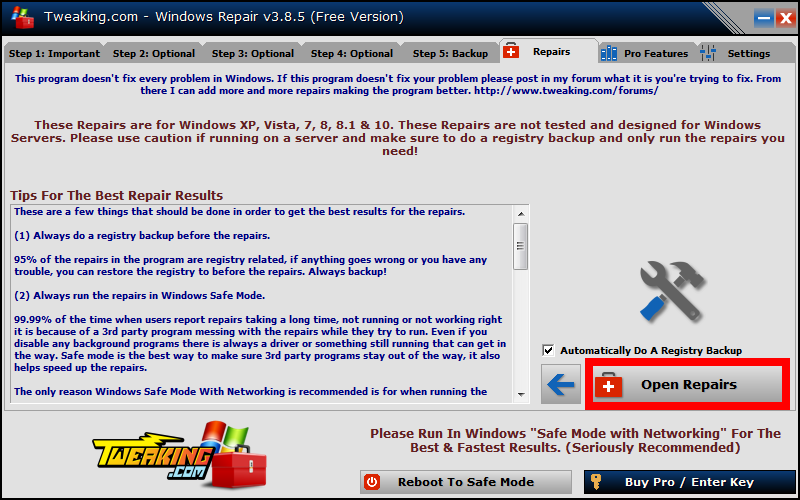
This problem also occurred to me, and finally managed to solve it with the help of this tool
Tweaking.com - Windows Repair Free/Pro
TDid0XM.png
 

My Computer My Computer

At a glance

win 7 x64
Computer type
Laptop
OS
win 7 x64
Back
Top