Two questions on a new Toshiba Computer

Brayton

New member
Member
Local time
11:45 PM
Messages
33
I have a new Toshiba M645-S4061 laptop that I just got working today and when I open internet explorer I get two screens that open: Windows internet explorer with google search and Start.toshiba.com. Can someone tell me how to stop the start.toshiba.com from opening. And also, how do I get the file, edit view, etc. to show on the toolbar in internet explorer. I did it once before but have forgotten how. Sorry for such novice questions, but I know I can save some time by asking.

Brayton
 

My Computer My Computer

At a glance

windows 7 home premium 64-bit2.2 GHZ Intel Core 2 Duo processor T66004 GB DDR2 800MHzIntel Graphica Media Accelerator 4500MHD
Computer Manufacturer/Model Number
Toshiba A505-S6980
OS
windows 7 home premium 64-bit
CPU
2.2 GHZ Intel Core 2 Duo processor T6600
Memory
4 GB DDR2 800MHz
Graphics Card(s)
Intel Graphica Media Accelerator 4500MHD
Monitor(s) Displays
16"
Hard Drives
500GB 5400 rpm Serial ATA
Hello Brayton. Try right clicking in an empty space next to your tabs or where the menu bar (File, Edit, View, etc.) would normally appear. You should get a drop down menu showing Menu Bar, Favorites Bar, Status Bar, etc. Left click on Menu Bar and you should see a check mark appear and the menu bar should also appear.

Now that you have the menu bar, click on Tools > Internet Options. On the General tab > Home page, see if Start.Toshiba.com is listed. If it is, delete it.
 

My Computer My Computer

At a glance

Win 7 Pro 64-bitIntel i5 2.4 Ghz8GB DDR3Intel HD 3000
Computer type
Laptop
Computer Manufacturer/Model Number
Sony Vaio VPCEB47GM Laptop
OS
Win 7 Pro 64-bit
CPU
Intel i5 2.4 Ghz
Memory
8GB DDR3
Graphics Card(s)
Intel HD 3000
Sound Card
IDT High Definition
Monitor(s) Displays
15.6 WGXA Anti-Glare LED
Screen Resolution
1280x800
Hard Drives
640Gb 7200rpm
Antivirus
MSE
Browser
Opera (primary) with IE9 backup
That worked, thank you very much. Can you also tell me how I get the file, edit, view etc to show up in that area.
 

My Computer My Computer

At a glance

windows 7 home premium 64-bit2.2 GHZ Intel Core 2 Duo processor T66004 GB DDR2 800MHzIntel Graphica Media Accelerator 4500MHD
Computer Manufacturer/Model Number
Toshiba A505-S6980
OS
windows 7 home premium 64-bit
CPU
2.2 GHZ Intel Core 2 Duo processor T6600
Memory
4 GB DDR2 800MHz
Graphics Card(s)
Intel Graphica Media Accelerator 4500MHD
Monitor(s) Displays
16"
Hard Drives
500GB 5400 rpm Serial ATA
Last edited:

My Computer My Computer

At a glance

Win 7 Pro 64-bitIntel i5 2.4 Ghz8GB DDR3Intel HD 3000
Computer type
Laptop
Computer Manufacturer/Model Number
Sony Vaio VPCEB47GM Laptop
OS
Win 7 Pro 64-bit
CPU
Intel i5 2.4 Ghz
Memory
8GB DDR3
Graphics Card(s)
Intel HD 3000
Sound Card
IDT High Definition
Monitor(s) Displays
15.6 WGXA Anti-Glare LED
Screen Resolution
1280x800
Hard Drives
640Gb 7200rpm
Antivirus
MSE
Browser
Opera (primary) with IE9 backup
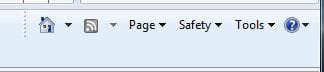
The old Menu bar has been replaced since IE7 with Page, Safety and Tools at the right side of the Tabs bar. Only really old people still need the Menu bar.

If you have some of the useless Toshiba bloatware and utilities starting up and getting in your way, they can be turned off to default to the much better versions built into Win7. The only Startup Programs I allow are AV and gadgets. Here's how to turn everything else off except what you absolutely have to have start with Windows, as all others are freeloaders on your Startup time, CPU/RAM and spy on you. http://www.sevenforums.com/tutorials/1401-startup-programs-change.html

Here are some other tips to clean up the bloatware which comes with a new computer today, which often makes up the profit margin for the manufacturer: http://www.sevenforums.com/installa...p-all-four-primary-partitions.html#post952573

And here's how to clean reinstall to overcome the corruption of a factory bloatware install so that it's truly "Better than new:" http://www.sevenforums.com/installation-setup/125874-re-install-windows-7-a.html#post1086729
 
Sorry for the extra post and question. I got it with a little more effort. thanks again.
 

My Computer My Computer

At a glance

windows 7 home premium 64-bit2.2 GHZ Intel Core 2 Duo processor T66004 GB DDR2 800MHzIntel Graphica Media Accelerator 4500MHD
Computer Manufacturer/Model Number
Toshiba A505-S6980
OS
windows 7 home premium 64-bit
CPU
2.2 GHZ Intel Core 2 Duo processor T6600
Memory
4 GB DDR2 800MHz
Graphics Card(s)
Intel Graphica Media Accelerator 4500MHD
Monitor(s) Displays
16"
Hard Drives
500GB 5400 rpm Serial ATA
The old Menu bar has been replaced since IE7 with Page, Safety and Tools at the right side of the Tabs bar. Only really old people still need the Menu bar.

I resemble that, Greg!! :roflmao::roflmao:
 

My Computer My Computer

At a glance

Win 7 Pro 64-bitIntel i5 2.4 Ghz8GB DDR3Intel HD 3000
Computer type
Laptop
Computer Manufacturer/Model Number
Sony Vaio VPCEB47GM Laptop
OS
Win 7 Pro 64-bit
CPU
Intel i5 2.4 Ghz
Memory
8GB DDR3
Graphics Card(s)
Intel HD 3000
Sound Card
IDT High Definition
Monitor(s) Displays
15.6 WGXA Anti-Glare LED
Screen Resolution
1280x800
Hard Drives
640Gb 7200rpm
Antivirus
MSE
Browser
Opera (primary) with IE9 backup

My Computer My Computer

At a glance

Win 7 Pro 64-bitIntel i5 2.4 Ghz8GB DDR3Intel HD 3000
Computer type
Laptop
Computer Manufacturer/Model Number
Sony Vaio VPCEB47GM Laptop
OS
Win 7 Pro 64-bit
CPU
Intel i5 2.4 Ghz
Memory
8GB DDR3
Graphics Card(s)
Intel HD 3000
Sound Card
IDT High Definition
Monitor(s) Displays
15.6 WGXA Anti-Glare LED
Screen Resolution
1280x800
Hard Drives
640Gb 7200rpm
Antivirus
MSE
Browser
Opera (primary) with IE9 backup
Greg, how do you do things like Save as and Print Preview without the Menu bar?
 

My Computer My Computer

At a glance

Windows 10 Pro X64Intel Quad Core i7-4770 @ 3.4Ghz16.0GB PC3-12800 DDR3 SDRAM 1600 MHzIntel Integrated HD Graphics
Computer type
PC/Desktop
Computer Manufacturer/Model Number
Lenovo IdeaCenter 450
OS
Windows 10 Pro X64
CPU
Intel Quad Core i7-4770 @ 3.4Ghz
Memory
16.0GB PC3-12800 DDR3 SDRAM 1600 MHz
Graphics Card(s)
Intel Integrated HD Graphics
Sound Card
Realtek HD Audio
Monitor(s) Displays
HP 22" LCD
Screen Resolution
1680 x 1050
Hard Drives
250GB Samsung EVO SATA-3 SSD
2TB Seagate ST2000DM001 SATA-2
1.5TB Seagate ST3150041AS SATA
Keyboard
Dell USB
Mouse
Lenovo USB
Internet Speed
Cable via Road Runner 3MB Upload, 30MB Download
Antivirus
Windows Defender, MBAM Pro, MBAE
Browser
Seamonkey
Other Info
UEFI/GPT
PLDS DVD-RW DH16AERSH
Greg, how do you do things like Save as and Print Preview without the Menu bar?

Hi Rich -

Print Preview is on the little drop down arrow beside Printer icon in between Home and Page menus.

Save As is on the Page menu.
 
Anytime you want to temporarily display the menu bar you can press the Alt key. It will disappear after you use it.
 

My Computer My Computer

At a glance

Windows 7 Professional x64
OS
Windows 7 Professional x64
Thanks Greg. Found Save as but I don't show a Printer icon.

Ie8frame.jpg

I must have done something to disable it but i don't remember what. A quick Google search did not turn up any answer on how to get it back. Any suggestions? WOuld be nice to get rid of the menu bar and have that space available for the page I'm looking at.
 

My Computer My Computer

At a glance

Windows 10 Pro X64Intel Quad Core i7-4770 @ 3.4Ghz16.0GB PC3-12800 DDR3 SDRAM 1600 MHzIntel Integrated HD Graphics
Computer type
PC/Desktop
Computer Manufacturer/Model Number
Lenovo IdeaCenter 450
OS
Windows 10 Pro X64
CPU
Intel Quad Core i7-4770 @ 3.4Ghz
Memory
16.0GB PC3-12800 DDR3 SDRAM 1600 MHz
Graphics Card(s)
Intel Integrated HD Graphics
Sound Card
Realtek HD Audio
Monitor(s) Displays
HP 22" LCD
Screen Resolution
1680 x 1050
Hard Drives
250GB Samsung EVO SATA-3 SSD
2TB Seagate ST2000DM001 SATA-2
1.5TB Seagate ST3150041AS SATA
Keyboard
Dell USB
Mouse
Lenovo USB
Internet Speed
Cable via Road Runner 3MB Upload, 30MB Download
Antivirus
Windows Defender, MBAM Pro, MBAE
Browser
Seamonkey
Other Info
UEFI/GPT
PLDS DVD-RW DH16AERSH
Rightclick on the tabs bar to Customize>Add or Remove commands, then highlight Print from list on left and Add it (along with anything else desired) to Current list on right, Close:

Capture.PNG

Likewise you can remove anything from the list on right. Then adjust the number of icons showing on bar using slider which is showing at their left on your screenshot, rightclick to Lock the Taskbar when you have them as you wish.
 
Yup, I removed it when I initially installed Win 7
banghead.gif


Put it back now and got rid of the Menu bar.

Thanks again Greg.
 

My Computer My Computer

At a glance

Windows 10 Pro X64Intel Quad Core i7-4770 @ 3.4Ghz16.0GB PC3-12800 DDR3 SDRAM 1600 MHzIntel Integrated HD Graphics
Computer type
PC/Desktop
Computer Manufacturer/Model Number
Lenovo IdeaCenter 450
OS
Windows 10 Pro X64
CPU
Intel Quad Core i7-4770 @ 3.4Ghz
Memory
16.0GB PC3-12800 DDR3 SDRAM 1600 MHz
Graphics Card(s)
Intel Integrated HD Graphics
Sound Card
Realtek HD Audio
Monitor(s) Displays
HP 22" LCD
Screen Resolution
1680 x 1050
Hard Drives
250GB Samsung EVO SATA-3 SSD
2TB Seagate ST2000DM001 SATA-2
1.5TB Seagate ST3150041AS SATA
Keyboard
Dell USB
Mouse
Lenovo USB
Internet Speed
Cable via Road Runner 3MB Upload, 30MB Download
Antivirus
Windows Defender, MBAM Pro, MBAE
Browser
Seamonkey
Other Info
UEFI/GPT
PLDS DVD-RW DH16AERSH
Glad to help, Rich.

I was just kidding when I said Menu Bar is only used by really old people. I tell my Dad that to razz him.
 
Back
Top