UI changes from Windows 7 beta to Windows 7 RC

Thanks for the link :P

Enzo.
 

My Computer My Computer

Computer Manufacturer/Model Number
Custom Build
OS
W7 RTM Ultimate x64
CPU
Intel Q8400 @ 2.66GHZ
Motherboard
Gigabyte GA-EG45M-UD2H
Memory
4GB DDR2-800
Graphics Card(s)
Gainward GTS 450 GLH 1GB Edition
Sound Card
Integrated 8 Channel
Monitor(s) Displays
AOC 23.6 Inch Widescreen LCD
Screen Resolution
1920x1080
Hard Drives
Seagate 500GB Internal
Western Digital 1TB Internal

Hitachi 1TB External
PSU
Apevia Java Power 500W
Case
Cooler Master HAF 922 Black
Cooling
Stock Intel CPU Fan
Keyboard
HP SK-2960 Multimedia Keyboard
Mouse
Logitech M350 Wireless Gaming Mouse
Internet Speed
1.5MB
thanks for the story :)
 

My Computer My Computer

Computer Manufacturer/Model Number
Dell Vostro 1000
OS
Windows 7 Ultimate x86
CPU
AMD Sempron 3600+
Graphics Card(s)
ATI Radeon Xpress 1150
Monitor(s) Displays
Generic PnP Monitor
Screen Resolution
1200 x 800
Hard Drives
WD Scorpio Blue 500 GB (WD5000BEVT)
Mouse
Logitech V320 Cordless Optical Mouse
This is pretty comprehensive and obviously a lot of work. I've read through half a dozen pages and thought it was anecdotal. The question hit me, does it really matter? We get what we're going to get.

Unless of course we (ahem) tweak it ourselves. ;)
 

Attachments

  • TM.png
    TM.png
    17.4 KB · Views: 255

My Computer My Computer

Computer type
PC/Desktop
Computer Manufacturer/Model Number
Custom Build/Mod
OS
Windows 7 Home Premium x64
CPU
Intel QX9650 Extreme 4.0 GHz
Motherboard
ASUS Rampage Extreme Rev2
Memory
8GB (4x2) Corsair Dominator DDR3
Graphics Card(s)
2x Radeon R390X [8GB]
Sound Card
SupremeFX X-Fi
Monitor(s) Displays
Dell 2408WFP 26" Panel
Screen Resolution
1920x1200
Hard Drives
4x WD 2TB (8TB+ Total)
2x Crucial SSD 128GB (RAID-0)
1x LG Blu-ray read/write
1x Phillips LightScribe DVD read/write
PSU
Corsair HX1000
Case
CoolerMaster - Cosmos S
Cooling
Custom Liquid - 320mm rad w/ 3x 80mm fans, CPU/NB/SB Blocks
Keyboard
Logitech Illuminater Pro
Mouse
Logitech
Internet Speed
Fractional T1 - 125Mbps
Antivirus
ESET Security Suite / Microsoft Security Essentials
Browser
Cyberfox Intel x64
Other Info
OC'd to 5.0GHz @ 44c under full load
:O how did u get blue instead of green?!?!?!
 

My Computer My Computer

Computer Manufacturer/Model Number
Custom Build
OS
W7 RTM Ultimate x64
CPU
Intel Q8400 @ 2.66GHZ
Motherboard
Gigabyte GA-EG45M-UD2H
Memory
4GB DDR2-800
Graphics Card(s)
Gainward GTS 450 GLH 1GB Edition
Sound Card
Integrated 8 Channel
Monitor(s) Displays
AOC 23.6 Inch Widescreen LCD
Screen Resolution
1920x1080
Hard Drives
Seagate 500GB Internal
Western Digital 1TB Internal

Hitachi 1TB External
PSU
Apevia Java Power 500W
Case
Cooler Master HAF 922 Black
Cooling
Stock Intel CPU Fan
Keyboard
HP SK-2960 Multimedia Keyboard
Mouse
Logitech M350 Wireless Gaming Mouse
Internet Speed
1.5MB

My Computer My Computer

Computer Manufacturer/Model Number
Dell Vostro 1000
OS
Windows 7 Ultimate x86
CPU
AMD Sempron 3600+
Graphics Card(s)
ATI Radeon Xpress 1150
Monitor(s) Displays
Generic PnP Monitor
Screen Resolution
1200 x 800
Hard Drives
WD Scorpio Blue 500 GB (WD5000BEVT)
Mouse
Logitech V320 Cordless Optical Mouse
Thanks very much :P

Enzo.
 

My Computer My Computer

Computer Manufacturer/Model Number
Custom Build
OS
W7 RTM Ultimate x64
CPU
Intel Q8400 @ 2.66GHZ
Motherboard
Gigabyte GA-EG45M-UD2H
Memory
4GB DDR2-800
Graphics Card(s)
Gainward GTS 450 GLH 1GB Edition
Sound Card
Integrated 8 Channel
Monitor(s) Displays
AOC 23.6 Inch Widescreen LCD
Screen Resolution
1920x1080
Hard Drives
Seagate 500GB Internal
Western Digital 1TB Internal

Hitachi 1TB External
PSU
Apevia Java Power 500W
Case
Cooler Master HAF 922 Black
Cooling
Stock Intel CPU Fan
Keyboard
HP SK-2960 Multimedia Keyboard
Mouse
Logitech M350 Wireless Gaming Mouse
Internet Speed
1.5MB
Nice! It's good to see just those little differences sometimes, subtle ;)

During the upgrade of builds, some things change and it's frustrating sometimes when it just stops working teh way you expect it.
 

My Computer My Computer

OS
Windows7 7229 x64
CPU
Q6600
Motherboard
Gigabyte G33M-DS2R
Memory
4GB DDR2
Graphics Card(s)
ATi Radeon 4850
Sound Card
Realtek ALC889
Monitor(s) Displays
2x Dell 2209WA
Screen Resolution
3360x1050
Hard Drives
Samsung FlashSSD 64GB SLC
WD Caviar Green 1TB
PSU
Enermax Modu82+
Case
Antec Mini P180
Cooling
Scythe Ninja (passive)
Keyboard
Logitech diNovo Media Desktop
Mouse
Logitech MX1000
Internet Speed
ADSL2+ at 16Mbit
Wow...who does this? Great info though!
 

My Computer My Computer

Computer Manufacturer/Model Number
Dell Inspiron 1520 (Laptop)/ Home (Desktop)
OS
Windows 7 x64 / Same
CPU
Intel Core 2 Duo T7250 / Intel Core i7 930
Motherboard
Intel 945 / Asus P6X58D-E
Memory
4GB / 6GB
Graphics Card(s)
NVIDIA GeForce 8400M GS / ASUS 1GB
Sound Card
Whatever Dell gave me :-( / Onboard
Monitor(s) Displays
15.4" LCD / Crappy CRT
Hard Drives
Seagate 500GB SATA; 7200 RPM / Seagate 1TB SATA; 7200 RPM
PSU
N/A / OCZ Fatal1ty 550W Modular
Case
N/A / Antec 900
Cooling
Air
Mouse
Microsoft Presenter (Bluetooth)
Too bad it (the blue tskmgr mod) doesn't seem to work on x64... :(
 

My Computer My Computer

OS
Dual Boot: Vista HP x86 SP2 + W7 x64 RC 7100
At least I know changes since beta to RC.
I don't even remeber when I have installed beta 1 (b 7000) that was really long time ago ;)
MS go in right direction :D
 

My Computer My Computer

OS
Seven build 7127 x86
CPU
C2D E8200
Memory
4 GB DDR2
Graphics Card(s)
HD 4850
Screen Resolution
1680x1050
Internet Speed
1mbps
Too bad it (the blue tskmgr mod) doesn't seem to work on x64... :(

Glad I didn't waste my time trying it. The green doesn't bother me anyway.
 

My Computer My Computer

Computer Manufacturer/Model Number
Dell Inspiron 1520 (Laptop)/ Home (Desktop)
OS
Windows 7 x64 / Same
CPU
Intel Core 2 Duo T7250 / Intel Core i7 930
Motherboard
Intel 945 / Asus P6X58D-E
Memory
4GB / 6GB
Graphics Card(s)
NVIDIA GeForce 8400M GS / ASUS 1GB
Sound Card
Whatever Dell gave me :-( / Onboard
Monitor(s) Displays
15.4" LCD / Crappy CRT
Hard Drives
Seagate 500GB SATA; 7200 RPM / Seagate 1TB SATA; 7200 RPM
PSU
N/A / OCZ Fatal1ty 550W Modular
Case
N/A / Antec 900
Cooling
Air
Mouse
Microsoft Presenter (Bluetooth)
Thanks for the information ,very interesting.
 

My Computer My Computer

Computer Manufacturer/Model Number
Self Build 64bit
OS
Vista Ult64, Win7600
CPU
Intel Core 2 Quad Q6600 @ 2400 MHz 64bit OS
Motherboard
Asus P5E3 Deluxe WiFi @p 64 bit OS
Memory
4096 MB DDR3-SDRAM
Graphics Card(s)
ATI Radeon HD 3870 Series x2 Crossfired
Sound Card
Realtek on board
Monitor(s) Displays
Samsung SyncMaster - 23 inches
Screen Resolution
1680x1050 pixels at 60 Hz in True Colors
Hard Drives
Hitachi (250 GB)/Samsung 750 GB. /Barracuda 160 GB.
My Book 1 TB external..
PSU
Cooler Master 1000w
Case
Cooler Master Cosmos 1000.
Cooling
Fans and fresh air,
Keyboard
Wireless
Mouse
Wireless
Internet Speed
Never fast enough
Other Info
I use a Magnum.
Wow!...

...thats a lot of changes from a beta to rc.
 

My Computer My Computer

Computer Manufacturer/Model Number
POS
OS
OS3.5
CPU
celery
Motherboard
Good Question ...Unknown
Memory
memory never forgets
Graphics Card(s)
OB
Sound Card
OB
Monitor(s) Displays
HUGE
Screen Resolution
168000000x105000000
Hard Drives
full
PSU
OEM 65watt
Case
N/A
Cooling
OB
Keyboard
OB
Mouse
mouse
Internet Speed
1 Trillion MBps
Other Info
Still An Awesome Forum!
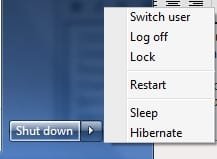
Didn't read it from that article but I have noticed (maybe it's due to the tweak for 7 I installed in another thread from this forum) now with the 7100 version when you want to shut down from Start>Log Off, the down arrow next to Log Off doesn't have an option to SHUT DOWN. Only options it gives are Switch User and Lock. If you click switch user then the screen goes black for a few seconds then comes back on and then there is a power off switch. I don't want this extra step to shut down my PC. Is there a way to get back the original Beta versions log off/shut down button?
 

My Computer My Computer

OS
Windows: 7100 RC1 & Vista SP2
Didn't read it from that article but I have noticed (maybe it's due to the tweak for 7 I installed in another thread from this forum) now with the 7100 version when you want to shut down from Start>Log Off, the down arrow next to Log Off doesn't have an option to SHUT DOWN. Only options it gives are Switch User and Lock. If you click switch user then the screen goes black for a few seconds then comes back on and then there is a power off switch. I don't want this extra step to shut down my PC. Is there a way to get back the original Beta versions log off/shut down button?

This is how mine appears, it is the default for RC (7100).
 

Attachments

  • temp.jpg
    temp.jpg
    5.4 KB · Views: 276

My Computer My Computer

Computer Manufacturer/Model Number
Dell Inspiron 1520 (Laptop)/ Home (Desktop)
OS
Windows 7 x64 / Same
CPU
Intel Core 2 Duo T7250 / Intel Core i7 930
Motherboard
Intel 945 / Asus P6X58D-E
Memory
4GB / 6GB
Graphics Card(s)
NVIDIA GeForce 8400M GS / ASUS 1GB
Sound Card
Whatever Dell gave me :-( / Onboard
Monitor(s) Displays
15.4" LCD / Crappy CRT
Hard Drives
Seagate 500GB SATA; 7200 RPM / Seagate 1TB SATA; 7200 RPM
PSU
N/A / OCZ Fatal1ty 550W Modular
Case
N/A / Antec 900
Cooling
Air
Mouse
Microsoft Presenter (Bluetooth)
Didn't read it from that article but I have noticed (maybe it's due to the tweak for 7 I installed in another thread from this forum) now with the 7100 version when you want to shut down from Start>Log Off, the down arrow next to Log Off doesn't have an option to SHUT DOWN. Only options it gives are Switch User and Lock. If you click switch user then the screen goes black for a few seconds then comes back on and then there is a power off switch. I don't want this extra step to shut down my PC. Is there a way to get back the original Beta versions log off/shut down button?
right click start orb , select properties, start menu tab , I have theese options using 7100x64 then I select which one displays.
View attachment 12702
 
Last edited:

My Computer My Computer

Computer Manufacturer/Model Number
Gateway GT5692
OS
Windows 7 Ulti. x64
CPU
AMD Phenom 8450 triple-core 2.10 ghz
Memory
4GB
Graphics Card(s)
ATI Radion HD 3200
Monitor(s) Displays
Gateway FPD1775W
Screen Resolution
1280x720
Hard Drives
465.6613 Gibibytes
jfar2e.jpg


That's all I see on mine. Is there a setting that switched my default setting once I installed EnhanceMySe7ven? I should have upgraded before installing that program. If I uninstall it will all settings go back to normal?
 

My Computer My Computer

OS
Windows: 7100 RC1 & Vista SP2
jfar2e.jpg


That's all I see on mine. Is there a setting that switched my default setting once I installed EnhanceMySe7ven? I should have upgraded before installing that program. If I uninstall it will all settings go back to normal?

Wow...that looks FUBAR'd. May need to reinstall unless there is some registry setting. OR perhaps a repair using the DVD.
 

My Computer My Computer

Computer Manufacturer/Model Number
Dell Inspiron 1520 (Laptop)/ Home (Desktop)
OS
Windows 7 x64 / Same
CPU
Intel Core 2 Duo T7250 / Intel Core i7 930
Motherboard
Intel 945 / Asus P6X58D-E
Memory
4GB / 6GB
Graphics Card(s)
NVIDIA GeForce 8400M GS / ASUS 1GB
Sound Card
Whatever Dell gave me :-( / Onboard
Monitor(s) Displays
15.4" LCD / Crappy CRT
Hard Drives
Seagate 500GB SATA; 7200 RPM / Seagate 1TB SATA; 7200 RPM
PSU
N/A / OCZ Fatal1ty 550W Modular
Case
N/A / Antec 900
Cooling
Air
Mouse
Microsoft Presenter (Bluetooth)
Weird thing is other than that there are no issues with Win 7.
 

My Computer My Computer

OS
Windows: 7100 RC1 & Vista SP2
Back
Top