Best temperature ranges?

M R

New member
Member
Local time
1:26 PM
Messages
31
Hello,


I have a question regarding temperature:


What are the appropriate temperature ranges for the following machine:


CPU: Intel Core 2 Quad
RAM: 4GB
Motherboard: Intel DG31PR
HD: 500GB

According to Speccy, the motherboard is at 72ºC. That is worrying me a bit.

Also, I notice that it has only 1 extra fan (aside from the one inside the power source and the processor's cooler). Besides, all the fans are placed so that they take air out, none of them is taking air in. Is it OK? Could that be the reason why it's so hot in there?


Thanks in advance.
 

My Computer My Computer

At a glance

Windows 7 Ultimate 32 bit
OS
Windows 7 Ultimate 32 bit
Hello,


I have a question regarding temperature:


What are the appropriate temperature ranges for the following machine:


CPU: Intel Core 2 Quad
RAM: 4GB
Motherboard: Intel DG31PR
HD: 500GB

According to Speccy, the motherboard is at 72ºC. That is worrying me a bit.

Also, I notice that it has only 1 extra fan (aside from the one inside the power source and the processor's cooler). Besides, all the fans are placed so that they take air out, none of them is taking air in. Is it OK? Could that be the reason why it's so hot in there?


Thanks in advance.


Motherboard or CPU is at 72? In the final analysis go to the mfr and find out what the design temp range is.

Also need to know what load the CPU was under at the time and what the ambient temp was.

Ken J
 

My Computer My Computer

At a glance

Win 8 Release candidate 8400[email protected]4 gigsNvidia 9600M
Computer Manufacturer/Model Number
HP Pavillion dv-7 1005 Tx
OS
Win 8 Release candidate 8400
CPU
[email protected]
Memory
4 gigs
Graphics Card(s)
Nvidia 9600M
Sound Card
HD built-in
Monitor(s) Displays
17" Wxga
Screen Resolution
1440x900
Cooling
none
Internet Speed
45Mb down 5Mb up
Yep, need a lot more info to answer

stock OEM cooler??

Case model, number and size of fans, intake and exhaust??

72 at Idle or running heavy processes such as Video Editing etc....?

You could start by filling in your system specs the rest of the way.
 

My Computer My Computer

At a glance

win7 Ult 64i7 3930K & 3960X16GB G-Skill 2133MHzSapphire HD 7970
Computer Manufacturer/Model Number
My Build
OS
win7 Ult 64
CPU
i7 3930K & 3960X
Motherboard
ASUS P9X79 Deluxe
Memory
16GB G-Skill 2133MHz
Graphics Card(s)
Sapphire HD 7970
Sound Card
On-board
Monitor(s) Displays
ASUS 27 inch
Screen Resolution
1920X1080
Hard Drives
Crucial M4 256GB, 1.5TB WD Black for Data/Images
PSU
Corsair AX1200
Case
NZXT 810
Cooling
Custom Loop, Swiftech HDBlock
Keyboard
Mionix
Mouse
Mionix
Internet Speed
Cable
Umm I'm a little lost here. Here goes:


I'm using a program called speccy to monitor hardaware temperature.

It goes like this:


CPU 39ºC (I'm only running firefox and downloading files from the internet. It ranges from 2% to 8%. ALso it stay at 72 most of the time, even if I'm running many programs)


HD 41ºC


Motherboard 72ºC


Please explain a little these terms as I'm not very familiar with that kind of hardware:

What is intake? The fans sucking in air (so to speak)?
Exhaust? The fans blowing air out?


What is stock OEM cooler?


I have only one fan which is connected directly to the power source, unlike the CPU fan, which is connected to the motherboard. The computer is custom made so the case is from a local company tat manufactures them. I can describe it: the most interesting thing I find is that the power source is located at the botton, when most models have it at the top. Also there is space only for one fan at the back, and perhaps another one at the bottom, next to the power source.


The temperature here is 23ºC.


Also, if I open the case and place it on the floor, the temp goes down to 60ºC.
 

My Computer My Computer

At a glance

Windows 7 Ultimate 32 bit
OS
Windows 7 Ultimate 32 bit
PSU (power supply unit) on the bottom of the case are quite common. How many fans are at the front of the case? Are they drawing air into the case, or blowing air out of the case?
 

My Computer My Computer

At a glance

Windows 10 Pro x64 ; Xubuntu x64Intel i7 860 @ 2.80 GHz O/C'ed to 4.0GHz16GB Corsair Vengance DDR3 @ 661 MHz Dual Cha...EVGA NVidia GTX 560 1024MB
Computer type
PC/Desktop
Computer Manufacturer/Model Number
Golden Mk. I.4
OS
Windows 10 Pro x64 ; Xubuntu x64
CPU
Intel i7 860 @ 2.80 GHz O/C'ed to 4.0GHz
Motherboard
Gigabyte P55A-UD3R Rev.1. Award BIOS F13
Memory
16GB Corsair Vengance DDR3 @ 661 MHz Dual Channel (9-9-9-24)
Graphics Card(s)
EVGA NVidia GTX 560 1024MB
Sound Card
Realtek Integrated
Monitor(s) Displays
Dual Samsung SyncMaster 2494HS
Screen Resolution
1920*1080 and 1920*1080
Hard Drives
1*Samsung 840 EVO 120GB SSD;
1*OCZ Vertex 2 60GB SSD;
2*Samsung F3 SpinPoint 1TB in RAID0;
1*Samsung F1 SpinPoint 1TB;
2*Western Digital 1TB External USB 3.0
1*Western Digital 500GB External USB 3.0
1*Seagate 500GB External USB 2.0
PSU
Thermaltake ToughPower QFan 750W
Case
Thermaltake Element S VK60001W2Z
Cooling
Corsair H60 Water Cooling, 2*230mm and 2*80mm case fans
Keyboard
Logitech G110
Mouse
Logitech MX518
60deg C is still very hot for a motherboard chipset temp :confused:

please can you download and run the 32 bit version of blackbox just to verify the reading from speccy is correct ?

If your temperature is true as everyone has already advised your fans blowing into and out of the box are likely not doing the job and its also likely the heatsink on the motherboard chip has slipped and or needs re-seating ?

looking at your motherboard the northbridge chipset is the one just to the left of the CPU with a huge aluminum heatsink with fins and this may need re-seating ?
 

My Computer My Computer

At a glance

win7 ultimate / virtual boxIntel Core i7 3770K,1155, Ivy BridgeGSkill Ripjaws Z Series 1600 CL 9.0 16GBKFA2 GeForce GTX 670 EX OC 2048MB GDDR5 PCI-E...
Computer Manufacturer/Model Number
built my own
OS
win7 ultimate / virtual box
CPU
Intel Core i7 3770K,1155, Ivy Bridge
Motherboard
MSI Z77A-G43
Memory
GSkill Ripjaws Z Series 1600 CL 9.0 16GB
Graphics Card(s)
KFA2 GeForce GTX 670 EX OC 2048MB GDDR5 PCI-E gfx card
Sound Card
onboard Nvidia HDMI audio
Monitor(s) Displays
ASUS VK222H 22" widescreen LCD monitor
Screen Resolution
1680x1050
Hard Drives
Kingston 128gb SSD
OCZ Vertex 90gb SSD
500GB WDCaviar 16mb 5000KS
320GB WDCaviar 16mb 3200AAKS sata 2
1TB Samsung 16mb HD103SJ sata 2
PSU
Corsair HX 750W ATX2.2 Modular
Cooling
Antec 25 Kuhler H2O 620
Keyboard
logitech
Mouse
logitech MX518
Internet Speed
7mb adsl
Umm I'm a little lost here. Here goes:


I'm using a program called speccy to monitor hardaware temperature.

It goes like this:


CPU 39ºC

A tad warm, but still within the safe zone.


ALso it stay at 72 most of the time, even if I'm running many programs)

If that's the CPU - then that is far from good. Far too hot. It sounds like the HSF is not properly seated.


That's fine. Some hard drives simply run hotter than others. In my experience, Western Digitals tend to run warmer than others.


Motherboard 72ºC

For an ambient 'in case temp' - that is very hot indeed.


What is intake? The fans sucking in air (so to speak)?

Correct. Most common placements are in the front (in front of the HDD cage) or side intakes (side of the case in line with CPU area)


Exhaust? The fans blowing air out?

Correct again.

The general rule of thumb is, cool air in (intake) - hot air out (exhaust)


What is stock OEM cooler?

The stock OEM cooler is the particular CPU manufacturers cooler. Also commonly refereed to as a heat sink fan.


I have only one fan which is connected directly to the power source,

The PSU fan? ie, it's part of the PSU? That's normal.


the most interesting thing I find is that the power source is located at the botton, when most models have it at the top.

Bottom mounted PSU's are also normal.


Also there is space only for one fan at the back, and perhaps another one at the bottom, next to the power source.

On the bottom of the case, near the middle? Best used as an intake fan.


The temperature here is 23ºC.


Also, if I open the case and place it on the floor, the temp goes down to 60ºC.

Without knowing the proper case etc - it's hard to say. But at any rate, that PC of yours is running far hotter than it should be.

Especially with those ambient temps.


Another thing to consider is that the BIOS is reporting inaccurate temps to Speccy.
 

My Computer My Computer

At a glance

8 Pro x64i7 3770K 4.6GHz16GB G.Skill Trident X 2666mhzx2 EVGA 780 Ti Superclocked SLI
Computer type
PC/Desktop
Computer Manufacturer/Model Number
Systems by SmartEyeball
OS
8 Pro x64
CPU
i7 3770K 4.6GHz
Motherboard
ASUS P8Z77 WS
Memory
16GB G.Skill Trident X 2666mhz
Graphics Card(s)
x2 EVGA 780 Ti Superclocked SLI
Sound Card
SB X-FI Surround 5.1 PRO USB / ATH-AD900 Headphones
Monitor(s) Displays
x3 Dell U2410 / 58" Samsung
Screen Resolution
5760*1200/ 1920*1200
Hard Drives
2x Intel 520 240GB (RAID 0) * 2x WD Caviar Blacks 2TB (RAID 0) * 2TB WD Caviar Black * Sony Optirac DVD
PSU
Silverstone Strider Evolution 1200W
Case
Thermaltake Level 10 GT Snow Edition
Cooling
Noctua NH-D14
Keyboard
Topre Realforce // Ducky Shine MX Black // Filco Ninja TKL
Mouse
Thermaltake Theron (Highly Recommended) + Razer Imperator
Antivirus
MSE
Browser
IE, FF, WaterFox
Other Info
GT Extreme V2 Sim Racing Cockpit + 40" LCD and K/B Mouse stand ▼
Fanatec CSR Elite Wheel + Clubsport V1 Pedals + CSR shifter/7G-H ▼Saitek X52 Pro ▼ TrackIR 5 Pro
Buttkicker v2 Seat Rumbler with Dedicated 5.1 and Sub Woofer attached to frame ▼
=
Bloody Big Grin
I'm going to take some pictures of the open case so you can take a better look. Batteries are dead so it'll take a while.


With my scarce knowledge in this matter I presume that fan placement might be wrong as there is no intake at all. All the fans I have are taking air out.


I'm going to try changing their position to have some intake. Now, what is the rule for that? I have the following fans:


The PSU fan (exhaust)
The stock OEM cooler (for Intel core 2 Quad processors) (exhaust)
One fan placed in the front of the case (what I call the back, it's where you connect other cables) (exhaust)

That is all. There is only one remaining place where I could place a fan, it would be a the bottom, near the center as you said.

Another question: what about dust? Is it not a problem to have intake fans taking dust inside the machine? I onserve that all coputers sold in this region have no intake, could thi be the reason or is it just mistake on themanufacturers' part?
 
Last edited:

My Computer My Computer

At a glance

Windows 7 Ultimate 32 bit
OS
Windows 7 Ultimate 32 bit
Most intake fans have a little grill lined with foam in-front of them to trap most of the larger dust particles - unfortunately some always gets through which is why its a good idea to clean-out the PC once in a while.

I think we definately need some pictures of this case - I find it suprising that there isn't a fan drawing air into the case.

Don't muck around with the fans yet : lets first see the pictures of your case.
 

My Computer My Computer

At a glance

Windows 10 Pro x64 ; Xubuntu x64Intel i7 860 @ 2.80 GHz O/C'ed to 4.0GHz16GB Corsair Vengance DDR3 @ 661 MHz Dual Cha...EVGA NVidia GTX 560 1024MB
Computer type
PC/Desktop
Computer Manufacturer/Model Number
Golden Mk. I.4
OS
Windows 10 Pro x64 ; Xubuntu x64
CPU
Intel i7 860 @ 2.80 GHz O/C'ed to 4.0GHz
Motherboard
Gigabyte P55A-UD3R Rev.1. Award BIOS F13
Memory
16GB Corsair Vengance DDR3 @ 661 MHz Dual Channel (9-9-9-24)
Graphics Card(s)
EVGA NVidia GTX 560 1024MB
Sound Card
Realtek Integrated
Monitor(s) Displays
Dual Samsung SyncMaster 2494HS
Screen Resolution
1920*1080 and 1920*1080
Hard Drives
1*Samsung 840 EVO 120GB SSD;
1*OCZ Vertex 2 60GB SSD;
2*Samsung F3 SpinPoint 1TB in RAID0;
1*Samsung F1 SpinPoint 1TB;
2*Western Digital 1TB External USB 3.0
1*Western Digital 500GB External USB 3.0
1*Seagate 500GB External USB 2.0
PSU
Thermaltake ToughPower QFan 750W
Case
Thermaltake Element S VK60001W2Z
Cooling
Corsair H60 Water Cooling, 2*230mm and 2*80mm case fans
Keyboard
Logitech G110
Mouse
Logitech MX518
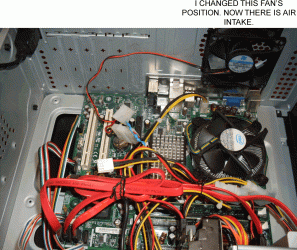
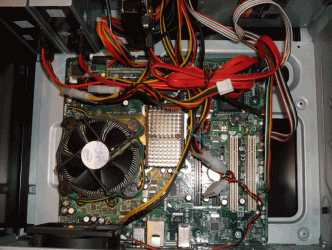
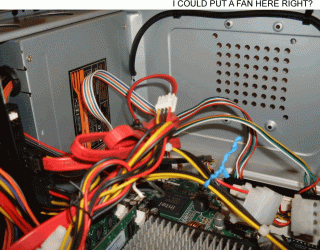
Ok Here are the pictures.

The camera is right here next to me, so tell me if you need something specific.


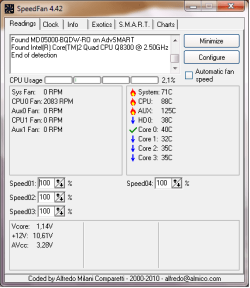
I also attached the infor provided by another program. It's more detailed but I don't understand it very well (Aux?)
 

Attachments

  • 1.gif
    1.gif
    371.5 KB · Views: 18
  • 2.gif
    2.gif
    364.9 KB · Views: 13
  • 3.gif
    3.gif
    289.3 KB · Views: 13
  • Info.png
    Info.png
    10.7 KB · Views: 9

My Computer My Computer

At a glance

Windows 7 Ultimate 32 bit
OS
Windows 7 Ultimate 32 bit
Mmmm....in the picture with the two fans, the CPU fan and the one you turned around are blowing air against each other, and now you don't have a fan exhausting air from inside the case to outside the case. Are your temperatures higher now?

In the 3rd picture I dont think you can put a fan there, isnce you need to turn the PC back up onto its side and the fan wont be able to draw enough air between the table and the bottom of the case? Do you only have 2 fans on this computer - one on the CPU, and then the one near it as per your photo?

A typical PC case has a minimum of 3 fans :
1 on the CPU
1 drawing fresh air into the PC
1 exhausting warm air from inside the PC, to the outside

Please take another picture of the FRONT of the PC, when it is standing upright.
 

My Computer My Computer

At a glance

Windows 10 Pro x64 ; Xubuntu x64Intel i7 860 @ 2.80 GHz O/C'ed to 4.0GHz16GB Corsair Vengance DDR3 @ 661 MHz Dual Cha...EVGA NVidia GTX 560 1024MB
Computer type
PC/Desktop
Computer Manufacturer/Model Number
Golden Mk. I.4
OS
Windows 10 Pro x64 ; Xubuntu x64
CPU
Intel i7 860 @ 2.80 GHz O/C'ed to 4.0GHz
Motherboard
Gigabyte P55A-UD3R Rev.1. Award BIOS F13
Memory
16GB Corsair Vengance DDR3 @ 661 MHz Dual Channel (9-9-9-24)
Graphics Card(s)
EVGA NVidia GTX 560 1024MB
Sound Card
Realtek Integrated
Monitor(s) Displays
Dual Samsung SyncMaster 2494HS
Screen Resolution
1920*1080 and 1920*1080
Hard Drives
1*Samsung 840 EVO 120GB SSD;
1*OCZ Vertex 2 60GB SSD;
2*Samsung F3 SpinPoint 1TB in RAID0;
1*Samsung F1 SpinPoint 1TB;
2*Western Digital 1TB External USB 3.0
1*Western Digital 500GB External USB 3.0
1*Seagate 500GB External USB 2.0
PSU
Thermaltake ToughPower QFan 750W
Case
Thermaltake Element S VK60001W2Z
Cooling
Corsair H60 Water Cooling, 2*230mm and 2*80mm case fans
Keyboard
Logitech G110
Mouse
Logitech MX518
Mmmm....in the picture with the two fans, the CPU fan and the one you turned around are blowing air against each other, and now you don't have a fan exhausting air from inside the case to outside the case. Are your temperatures higher now?

In the 3rd picture I dont think you can put a fan there, isnce you need to turn the PC back up onto its side and the fan wont be able to draw enough air between the table and the bottom of the case? Do you only have 2 fans on this computer - one on the CPU, and then the one near it as per your photo?

Please take another picture of the FRONT of the PC, when it is standing upright.

Yes I realized that those two would blow air against each other so I turned the fan around. I placed another one down there and it's like you say, temperature went down like 2 degrees. I lifted it up and it went further doen, but just a little.

I'm afraid there is no more room for extra coolers.


I'll take the other picture.
 

My Computer My Computer

At a glance

Windows 7 Ultimate 32 bit
OS
Windows 7 Ultimate 32 bit

Yes I realized that those two would blow air against each other so I turned the fan around.[/QUOTE]

Ok, so just to clarify, the fan is no longer turned around....its exhausting warm air from inside the case???
 

My Computer My Computer

At a glance

Windows 10 Pro x64 ; Xubuntu x64Intel i7 860 @ 2.80 GHz O/C'ed to 4.0GHz16GB Corsair Vengance DDR3 @ 661 MHz Dual Cha...EVGA NVidia GTX 560 1024MB
Computer type
PC/Desktop
Computer Manufacturer/Model Number
Golden Mk. I.4
OS
Windows 10 Pro x64 ; Xubuntu x64
CPU
Intel i7 860 @ 2.80 GHz O/C'ed to 4.0GHz
Motherboard
Gigabyte P55A-UD3R Rev.1. Award BIOS F13
Memory
16GB Corsair Vengance DDR3 @ 661 MHz Dual Channel (9-9-9-24)
Graphics Card(s)
EVGA NVidia GTX 560 1024MB
Sound Card
Realtek Integrated
Monitor(s) Displays
Dual Samsung SyncMaster 2494HS
Screen Resolution
1920*1080 and 1920*1080
Hard Drives
1*Samsung 840 EVO 120GB SSD;
1*OCZ Vertex 2 60GB SSD;
2*Samsung F3 SpinPoint 1TB in RAID0;
1*Samsung F1 SpinPoint 1TB;
2*Western Digital 1TB External USB 3.0
1*Western Digital 500GB External USB 3.0
1*Seagate 500GB External USB 2.0
PSU
Thermaltake ToughPower QFan 750W
Case
Thermaltake Element S VK60001W2Z
Cooling
Corsair H60 Water Cooling, 2*230mm and 2*80mm case fans
Keyboard
Logitech G110
Mouse
Logitech MX518
Yes. You can see it in this new picture.The sticker is facing out now.


Also, as you can see there is no space between the wooden table and the fan that wsa place at the bottom.
 

Attachments

  • 4.gif
    4.gif
    242.7 KB · Views: 2

My Computer My Computer

At a glance

Windows 7 Ultimate 32 bit
OS
Windows 7 Ultimate 32 bit


In addition to a little cable/wire management, you might want to make sure your CPU's cooler is properly fitted to the board. Those stock coolers with those plastic clips can be funky at times and will come loose if not properly seated to the motherboard.

My two cents.
 

My Computer My Computer

At a glance

Windows 10 ProIntel Core i7-4770K (3.5Ghz)32 gig Corsair Dominator Platinum (4x8Gig)Sapphire Tri-X R9 Fury
Computer type
PC/Desktop
Computer Manufacturer/Model Number
Custom built by me.
OS
Windows 10 Pro
CPU
Intel Core i7-4770K (3.5Ghz)
Motherboard
Gigabyte G1 Sniper 5 (F10 Bios)
Memory
32 gig Corsair Dominator Platinum (4x8Gig)
Graphics Card(s)
Sapphire Tri-X R9 Fury
Sound Card
Soundblaster ZXR
Monitor(s) Displays
NEC PA242W 24" LCD Monitor
Screen Resolution
1920 x 1200
Hard Drives
Primary - Samsung 850 Pro (512gig), Samsung 840 Pro (256gig), 2TB WD Caviar Black.
PSU
EVGA Supernova 1000 G2
Case
Cooler Master HAF X
Cooling
Corsair H100i with Corsair Air Series SP120 Quiet Fans
Keyboard
Logitech Wireless Wave
Mouse
Logitech Performance MX
Internet Speed
High Speed Cable
Antivirus
Norton Security
Browser
IE11
Other Info
Memory Timings - 1866MHz @ 9-9-9-27-1T @ 1.5 volts


In addition to a little cable/wire management, you might want to make sure your CPU's cooler is properly fitted to the board. Those stock coolers with those plastic clips can be funky at times and will come loose if not properly seated to the motherboard.

My two cents.


Thank you. Yes, I don't like the way the technician placed those wires, perhaps it is influencing temperature a little.
 

My Computer My Computer

At a glance

Windows 7 Ultimate 32 bit
OS
Windows 7 Ultimate 32 bit
Yes. You can see it in this new picture.The sticker is facing out now.


Also, as you can see there is no space between the wooden table and the fan that wsa place at the bottom.


OK. Can you loadup a photo of the front now please?
 

My Computer My Computer

At a glance

Windows 10 Pro x64 ; Xubuntu x64Intel i7 860 @ 2.80 GHz O/C'ed to 4.0GHz16GB Corsair Vengance DDR3 @ 661 MHz Dual Cha...EVGA NVidia GTX 560 1024MB
Computer type
PC/Desktop
Computer Manufacturer/Model Number
Golden Mk. I.4
OS
Windows 10 Pro x64 ; Xubuntu x64
CPU
Intel i7 860 @ 2.80 GHz O/C'ed to 4.0GHz
Motherboard
Gigabyte P55A-UD3R Rev.1. Award BIOS F13
Memory
16GB Corsair Vengance DDR3 @ 661 MHz Dual Channel (9-9-9-24)
Graphics Card(s)
EVGA NVidia GTX 560 1024MB
Sound Card
Realtek Integrated
Monitor(s) Displays
Dual Samsung SyncMaster 2494HS
Screen Resolution
1920*1080 and 1920*1080
Hard Drives
1*Samsung 840 EVO 120GB SSD;
1*OCZ Vertex 2 60GB SSD;
2*Samsung F3 SpinPoint 1TB in RAID0;
1*Samsung F1 SpinPoint 1TB;
2*Western Digital 1TB External USB 3.0
1*Western Digital 500GB External USB 3.0
1*Seagate 500GB External USB 2.0
PSU
Thermaltake ToughPower QFan 750W
Case
Thermaltake Element S VK60001W2Z
Cooling
Corsair H60 Water Cooling, 2*230mm and 2*80mm case fans
Keyboard
Logitech G110
Mouse
Logitech MX518
Yes. You can see it in this new picture.The sticker is facing out now.


Also, as you can see there is no space between the wooden table and the fan that wsa place at the bottom.


OK. Can you loadup a photo of the front now please?


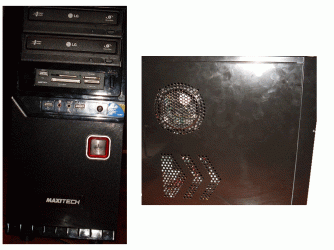
Here it is:

Front and left side. This time the pic came out horribly.
 

Attachments

  • 5.gif
    5.gif
    289 KB · Views: 9

My Computer My Computer

At a glance

Windows 7 Ultimate 32 bit
OS
Windows 7 Ultimate 32 bit
OK. See the area circled in red? This is the grill through which fresh air should be drawn....can you check to see thats its open/not blocked by anything? Can you feel air being drawn into the case from this grill?

Also, did you check to see that the CPU cooler is properly fixed to the motherboard with those black clips that sygnus21 mentioned?
 

Attachments

  • Capture.JPG
    Capture.JPG
    63.2 KB · Views: 4

My Computer My Computer

At a glance

Windows 10 Pro x64 ; Xubuntu x64Intel i7 860 @ 2.80 GHz O/C'ed to 4.0GHz16GB Corsair Vengance DDR3 @ 661 MHz Dual Cha...EVGA NVidia GTX 560 1024MB
Computer type
PC/Desktop
Computer Manufacturer/Model Number
Golden Mk. I.4
OS
Windows 10 Pro x64 ; Xubuntu x64
CPU
Intel i7 860 @ 2.80 GHz O/C'ed to 4.0GHz
Motherboard
Gigabyte P55A-UD3R Rev.1. Award BIOS F13
Memory
16GB Corsair Vengance DDR3 @ 661 MHz Dual Channel (9-9-9-24)
Graphics Card(s)
EVGA NVidia GTX 560 1024MB
Sound Card
Realtek Integrated
Monitor(s) Displays
Dual Samsung SyncMaster 2494HS
Screen Resolution
1920*1080 and 1920*1080
Hard Drives
1*Samsung 840 EVO 120GB SSD;
1*OCZ Vertex 2 60GB SSD;
2*Samsung F3 SpinPoint 1TB in RAID0;
1*Samsung F1 SpinPoint 1TB;
2*Western Digital 1TB External USB 3.0
1*Western Digital 500GB External USB 3.0
1*Seagate 500GB External USB 2.0
PSU
Thermaltake ToughPower QFan 750W
Case
Thermaltake Element S VK60001W2Z
Cooling
Corsair H60 Water Cooling, 2*230mm and 2*80mm case fans
Keyboard
Logitech G110
Mouse
Logitech MX518
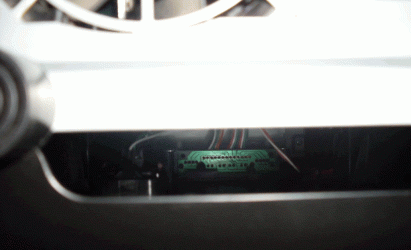
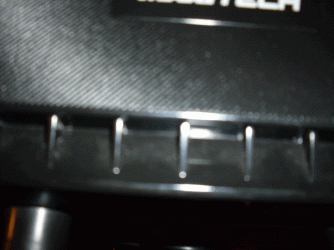
That's not a grill, there are no openings there. However, right under the area you marked is an opening. In this picture you can see that the opening is below what seems to be a grill (but is not).

The hardrive, along with some wires, can be seen in the picture.


I tried to pull out the cooler to see if it was not properly fixed and I ended up lifting up the entire computer, so it's properly seated.


Picture 7 shows that the area you marked is not a grill.


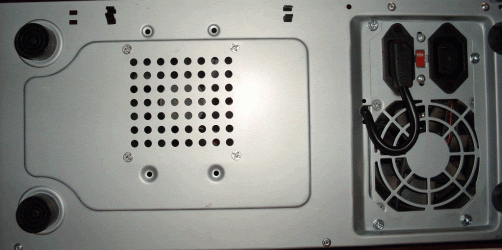
Picture 8 shows the position of the extra fan I added.
 

Attachments

  • 6.gif
    6.gif
    129.3 KB · Views: 1
  • 7.gif
    7.gif
    288.5 KB · Views: 2
  • 8.gif
    8.gif
    245.2 KB · Views: 1

My Computer My Computer

At a glance

Windows 7 Ultimate 32 bit
OS
Windows 7 Ultimate 32 bit
Back
Top