Print to file: Access denied

AllanP

New member
Power User
Local time
3:28 PM
Messages
79
Location
Nanoose Bay, B.C., Canada
I have done some searching around, but can't find a solution to this problem.
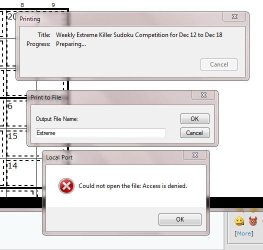
My printer is in for repairs and I want to print to file. I get "Could not open the file: Access denied."
 

Attachments

  • Error.JPG
    Error.JPG
    35.8 KB · Views: 27

My Computer My Computer

Computer Manufacturer/Model Number
Dell Studio Laptop 1747
OS
Windows 7
CPU
1.6GHz Intel Core i7 720
Motherboard
Dell 0J509P
Memory
6GB
Graphics Card(s)
ATI Radeon HD 4640
Sound Card
ATI High Def
Monitor(s) Displays
Generic PNP 17
Screen Resolution
1600 x 900
Hard Drives
500GB
Case
Laptop
Mouse
Synaptics Touchpad
Internet Speed
Hi Speed Cable

My Computer My Computer

Computer type
PC/Desktop
Computer Manufacturer/Model Number
Bruce ... somewhere in his 40's
OS
Windows 7 Ultimate 32bit SP1
CPU
Intel(R) Core(TM)2 Quad CPU @ 2.40GHz, 2400 MHz
Motherboard
INTEL/D975XBX2
Memory
4 GB
Graphics Card(s)
ATI Radeon HD 2600 Pro
Monitor(s) Displays
Samsung SyncMaster 914v
Screen Resolution
1280 x 1024
Hard Drives
2/500GB each ... ST3500630AS ATA Device.
One is not connected
PSU
Rocketfish 700 W
Case
G.Skill Gigabyte Chassis
Keyboard
Standard PS/2 Keyboard
Mouse
Microsoft PS/2 Mouse
Internet Speed
DSL
Antivirus
Avira Internet Security
Browser
IE 11
Other Info
ATI HDMI Audio

My Computer My Computer

Computer Manufacturer/Model Number
Dell Studio Laptop 1747
OS
Windows 7
CPU
1.6GHz Intel Core i7 720
Motherboard
Dell 0J509P
Memory
6GB
Graphics Card(s)
ATI Radeon HD 4640
Sound Card
ATI High Def
Monitor(s) Displays
Generic PNP 17
Screen Resolution
1600 x 900
Hard Drives
500GB
Case
Laptop
Mouse
Synaptics Touchpad
Internet Speed
Hi Speed Cable

My Computer My Computer

Computer Manufacturer/Model Number
HP, Dell, Gateway, Toshiba - 4 laptops and 2 desktops
OS
Vista, Windows7, Mint Mate, Zorin, Windows 8
CPU
from 1.6GHz Duo to i7
Monitor(s) Displays
2x HP w2207
Hard Drives
5x HDD, 7x SSD, 12x Externals
Keyboard
with trackball - no mices
Mouse
Trackball mice
Internet Speed
DSL 6000
Could it be because the printer is not attached? Sounds weird but I wonder if that is the cause. Use of a virtual PDF printer like doPDF that WHS mentioned would solve the problem for now.
 

My Computer My Computer

Computer type
PC/Desktop
Computer Manufacturer/Model Number
Lenovo IdeaCenter 450
OS
Windows 10 Pro X64
CPU
Intel Quad Core i7-4770 @ 3.4Ghz
Memory
16.0GB PC3-12800 DDR3 SDRAM 1600 MHz
Graphics Card(s)
Intel Integrated HD Graphics
Sound Card
Realtek HD Audio
Monitor(s) Displays
HP 22" LCD
Screen Resolution
1680 x 1050
Hard Drives
250GB Samsung EVO SATA-3 SSD
2TB Seagate ST2000DM001 SATA-2
1.5TB Seagate ST3150041AS SATA
Keyboard
Dell USB
Mouse
Lenovo USB
Internet Speed
Cable via Road Runner 3MB Upload, 30MB Download
Antivirus
Windows Defender, MBAM Pro, MBAE
Browser
Seamonkey
Other Info
UEFI/GPT
PLDS DVD-RW DH16AERSH
where you are trying to save the file to?
 

My Computer My Computer

OS
7 Pro
Could it be because the printer is not attached? Sounds weird but I wonder if that is the cause. Use of a virtual PDF printer like doPDF that WHS mentioned would solve the problem for now.
No the printer isn't on line. That's why I am trying to print to file; so that I can print the files later when printer is on line. Do you mean "print to file" doesn't work if a printer is not connected?

Thanks, Allan
 

My Computer My Computer

Computer Manufacturer/Model Number
Dell Studio Laptop 1747
OS
Windows 7
CPU
1.6GHz Intel Core i7 720
Motherboard
Dell 0J509P
Memory
6GB
Graphics Card(s)
ATI Radeon HD 4640
Sound Card
ATI High Def
Monitor(s) Displays
Generic PNP 17
Screen Resolution
1600 x 900
Hard Drives
500GB
Case
Laptop
Mouse
Synaptics Touchpad
Internet Speed
Hi Speed Cable
where you are trying to save the file to?
Well usually you are confronted with a file manger so that you can select where to save it. I did however try and save the file as Sudoku.prn in C:\Temp. It did that, but when I tried to open the file Windows didn't recognize it.
 

My Computer My Computer

Computer Manufacturer/Model Number
Dell Studio Laptop 1747
OS
Windows 7
CPU
1.6GHz Intel Core i7 720
Motherboard
Dell 0J509P
Memory
6GB
Graphics Card(s)
ATI Radeon HD 4640
Sound Card
ATI High Def
Monitor(s) Displays
Generic PNP 17
Screen Resolution
1600 x 900
Hard Drives
500GB
Case
Laptop
Mouse
Synaptics Touchpad
Internet Speed
Hi Speed Cable
I had the same issue, however I got around it by supplying the path I wanted to save the file to using the Microsoft XPS printer and selecting print to file. For instance I have a partition R: where I keep my personal records. In the "Output Filename" box I entered "R:/Personal Records/Output_Filename.xps" and saved. I was able to open and view the doc in XPS viewer as well without issue. Hope that helps anyone who comes across this post...Happy New Year :party:
 

My Computer My Computer

OS
Windows 7 Ultimate x64
CPU
Intel Q6600
Motherboard
EVGA Nvidia 750I-FTW
Memory
4gb Corsair Dominator
Graphics Card(s)
(2x) 8800GT Sli
Sound Card
Audigy LS
Monitor(s) Displays
Sharp 19"
Screen Resolution
1280x1024
Hard Drives
1TB Samsung F1
PSU
PC Power & Cooling 750w
Case
Cooler Master C690
Cooling
xigmatek Rifle cooler -- 2x accelero s1 rev. 2 for GPU
Keyboard
Dell Multimedia
Mouse
Logitech G5
Do you realize that this thread is from 2010. Hopefully the OP will still be alive and able to read your solution to the problem - LOL.
 

My Computer My Computer

Computer Manufacturer/Model Number
HP, Dell, Gateway, Toshiba - 4 laptops and 2 desktops
OS
Vista, Windows7, Mint Mate, Zorin, Windows 8
CPU
from 1.6GHz Duo to i7
Monitor(s) Displays
2x HP w2207
Hard Drives
5x HDD, 7x SSD, 12x Externals
Keyboard
with trackball - no mices
Mouse
Trackball mice
Internet Speed
DSL 6000
I do, however it's the top result when searching Google for that error message. I figured I'd share the fix for anyone who had the issue, regardless of the year or how old the thread was, since I doubt the error message was limited to 2010 :).
 

My Computer My Computer

OS
Windows 7 Ultimate x64
CPU
Intel Q6600
Motherboard
EVGA Nvidia 750I-FTW
Memory
4gb Corsair Dominator
Graphics Card(s)
(2x) 8800GT Sli
Sound Card
Audigy LS
Monitor(s) Displays
Sharp 19"
Screen Resolution
1280x1024
Hard Drives
1TB Samsung F1
PSU
PC Power & Cooling 750w
Case
Cooler Master C690
Cooling
xigmatek Rifle cooler -- 2x accelero s1 rev. 2 for GPU
Keyboard
Dell Multimedia
Mouse
Logitech G5
+1 slowmo

Thank you for adding your experience to help others with this...
I am no guru, but I do search for answers and solutions whenever I am trying to solve a problem.
Info like this helps me, no matter how "old" the question is.

Interestingly I just ran into the same issue!
I placed an order on Newegg and got the same message trying to "print to file"...
I worked around it and got the info I needed...meh

Seeing this thread, I was intrigued and curious...and had to try...
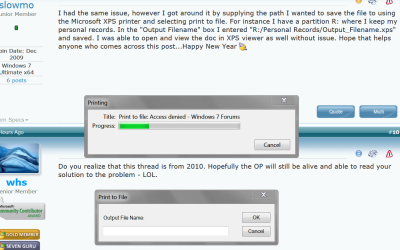
I tried printing to file from the SF page, and again got the access denied error!

I log into Win 7 with a Standard (non-Admin) account, and use Firefox.
I closed the FF Window I was using, then started FF with "Run as administrator".
Tried printing again, and it printed to a file with no errors !

fwiw, here's a screen print with the error I see when running FF without Admin authority...
PrtSP01.PNG
 

My Computer My Computer

Computer type
PC/Desktop
Computer Manufacturer/Model Number
home built
OS
Multi-Boot W7_Pro_x64 W8.1_Pro_x64 W10_Pro_x64 +Linux_VMs +Chromium_VM
CPU
AMD Athlon II x4 620
Motherboard
Gigabyte GA-MA785G-UD3H
Memory
6GB GSkill DDR2 800
Graphics Card(s)
AMD 4670 GPU + AMD 4200 IGP
Sound Card
on board Realtek ALC889A
Monitor(s) Displays
RCA 40" LCD TV, Insignia 32" LCD TV, HP 15" LCD monitor
Screen Resolution
1680 x 1050
Hard Drives
OCZ Vertex 3 120GB,
Samsung F3 1TB (3),
Several others - WD, Seagate, Hitachi, ...
PSU
Corsair 500 W
Case
Rosewill mid tower
Cooling
CM 90mm rifle
Keyboard
Gyration wireless, Logitech wireless, Dell USB wired
Mouse
Gyration wireless, Logitech wireless, V7 USB wired
Internet Speed
Spectrum - 100Mbps D / 10Mbps U
Antivirus
Avast, MBAM3, EMET, WinPatrol
Browser
Pale Moon, Firefox, IE
Other Info
2 multi-boot PC's
Mainly HTPC/Office/Gen purpose (no gaming).
Trendnet USB KVM.
LG DVD burner/Blue Ray Player.
Tray system for removable SATA backup drives.

Not currently OCd, under-volted.
I use Hybrid sleep, rarely re-boot or shutdown.

Hauppauge HD-PVR, Avermedia PCIe TV Tuner, Hauppauge PCI TV Tuner.
Also, fwiw, I used a complete file specification: c:\users\default\My Documents\test.txt and was able to print to my printer Generic/Text on FILE. Thanks for the tip.
 

My Computer My Computer

Computer type
Laptop
Computer Manufacturer/Model Number
HP G60
OS
Windows 7 Home Premium 32 bit
CPU
Pentium(R) Dual-Core CPU T4200 @ 2.00GHz
Memory
3.0 GB
Hard Drives
465 GB
Antivirus
Ad-Aware
Browser
IE, FF
XPS “Access is Denied” - Fix

My XPS (print to file) also was giving an “Access is denied” error when creating the file. I fixed it as follows.

——————————————————————
Summary: change the port to “XPSPort”.
——————————————————————

Note that you can probably just apply the below to the existing XPS device; to do that, skip the first section — within “ [ ] ”.
!! However … in the one I created, I can change the permissions; in the existing one I can not. (See the pertinent section below.)

[
• Open Control Panel/ Devices and Printers.
• “Add a printer”.
• Select “Add a local printer” and click “Next”.
• Select “Microsoft” from the list on the left, and then “Microsoft XPS Document Writer” from the list on the right. Click “Next”.
• I selected “Replace the current driver”, put it is probably fine to just “Use the driver that is currently installed (recommended)”. Click “Next”.
• Type a name for the printer. Click “Next”.
[Above, I have been retracing my steps; I have stopped here; just do whatever else may be required to finish creating this printer.]
]

Back in Control Panel/ Devices and Printers…
• Right-click on the “Microsoft XPS Document Writer” (or whatever you called yours); select “Printer properties” from the [contextual] menu that comes up.
• Click the “Ports” [3rd] tab.
• Select the port “XPSPort”. (You will have to scroll down to see it.) Click “Apply”.
Done (except see below)!

(I also changed • the paper size to A4 and • the Image format to Lossless Compression… in General/ Change Properties/ Preferences/ Advanced.)

————————

Note that, in addition to the above, it might be necessary to change the permissions. (See note above.)
• Click on the Security tab.
• Change permissions as desired; I gave “Everyone” the right to “Print”, and all rights (except Special Permissions, which is not accessible) to everyone else. This included my account, which I added using the “Add…” button (you have to *type in* the account name). (You do not have to click on Advanced; just change the settings in situ.)
 

My Computer My Computer

Computer type
PC/Desktop
Computer Manufacturer/Model Number
Custom Z68
OS
Windows 7 Home Premium
CPU
i7
Motherboard
Gigabyte Z68
Back
Top