I need help with my custom built pc not turning on please.....

jimb0616

New member
Local time
12:24 AM
Messages
39
Ok, i'll keep this short and simple because I don't have much time atm. I built this computer about 4yrs ago and within the past 1yr I've gone through 3 power supplies, 2 OCZ (bleh) and lately, as of lastnight) the 3rd one which is an ULTRA X4 750W atx psu. It was working GREAT, I left my computer on lastnight because I watch movies on my ipod touch while in bed from it. When I woke up the computer was off and we had no storms. So right away I was sniffing away at the PSU (the last one burnt out, it stunk of sucky psu) but it doesn't smell. When I try to turn the pc on the LED lights flicker just a tiny bit once and you can barely see it. However, the keyboard stays light (the LED's in it) and the green light on the mobo stays lit. I tried seating the ram but it still didn't work. I don't remember the EXACT specs but I'll try to post what I remember below...

AMD quad-core black edition cpu
The mobo i think is ASUS and it was espensive, made for crossfire ATI
4gb ram
2 internal 500g HD's (1TB total + 500g external 1.5TB total)
onboard sound HD
and 2 ATI HD3800's (the 3800 series) crossfire
PSU - Ultra X4 750W atx

I really can't afford to go buy ANOTHER psu, the wife knows I'm stressed out now because... yea i play wow, big deal, but I'm also the CEO of a small gaming community... my work is computers. This is the first time I've ever posted for help. I was going to go buy a new PSU and have it work for 4months but maybe it'll break again. The only thing I dread doing is taking it out of the case and seating it on a table to test everything because with 2 HUGE ATI cards and HD's... there's not much room at all lol. The 1st computer I ever built back when Quake 2 was awesome ... it still runs to this day, no issues. My friends always use to ask how I built my PC's to make them last so long with no issues. Well friends, :( I have this horrible issue. If its the mobo I'll be so sad. Hope I didn't bore any of you and I truely appreciate any help, opinions and more. Thanks!!

James
 

My Computer My Computer

At a glance

Windows 7 Ultimate x64
OS
Windows 7 Ultimate x64
PSU
ULTRA X4 750W atx psu
Is a 750 Watt power supply enough for your system? In my mind, it is bordering on just enough, and some power supplies have a percentage of wattage that they lose. You have crossfire, may need a hundred more watts or so, but I'm just guessing. Your system is set to High performance power right? That drains on the power supply too, check the power supplies specks compared to what you plugged into it to see if you overshot it.

Also, it may very well be that some hardware is wearing on the PSU to make them go out like that. It could either be that you always bought the wrong ones (need crossfire supported PSU), or some other hardware is messing with them. Someone else may need to troubleshoot with you, but These are my suggestions.
 

My Computer My Computer

At a glance

Microsoft Windows 8.1 Pro 64-bitIntel(R) Core(TM) i3-4130 CPU @ 3.40GHz8.00 GBNone
Computer type
PC/Desktop
Computer Manufacturer/Model Number
Custom Asus Build
OS
Microsoft Windows 8.1 Pro 64-bit
CPU
Intel(R) Core(TM) i3-4130 CPU @ 3.40GHz
Motherboard
B85M-E
Memory
8.00 GB
Graphics Card(s)
None
Sound Card
Realtek High Definition Audio
Monitor(s) Displays
Asus 23.6" Monitor
Screen Resolution
1920 x 1080 x 32 bits (4294967296 colors) @ 60 Hz
Hard Drives
INTEL SSDSC2BW180A4
Samsung SSD 840 PRO Series
PSU
Seasonic S12II-380Bronze
Case
Lian Li
Cooling
Fan, Passive
Keyboard
Logitech K120
Mouse
Microsoft Touch Mouse
Internet Speed
4ms Ping, 19.0 Mbps Download, 19.0 Mbps Upload
Antivirus
Eset Endpoint
Browser
Internet Explorer, Chrome
I was thinking the samething but, I made sure that this PSU was made to support crossfire and it was recommended to work best with my type of mobo. :(
 

My Computer My Computer

At a glance

Windows 7 Ultimate x64
OS
Windows 7 Ultimate x64
PSU
ULTRA X4 750W atx psu
I Always go a little more than recommended by an automated computer store, but I doubt that is your problem. PSUs should never need to be replaced so often, I would look at something else. You are positive it is connected correctly? I would check this again. Do you have power spikes despite storms, or rather is your computer directly plugged into the wall? Cause thats a bad idea. You need surge protection. check for loose wires also

Not sure what else I can recommend myself. Do you buy used PSUs? Does your computer run hot? That could effect other hardware. Are you sure its the PSU thats causing the problems, or messed up hardware? Make sure the motherboard is seated correctly, that the graphics card and all other hardware is fully connected to it.

I had a computer once that wouldn't work until I put folded paper behind the motherboard to bring it forward in order to connect with my graphics card. *Edit* Of course, that was a new computer, and rereading your post brings to attention that you've had your computer a long time. How long have you had Win 7? And if you have a fried PSU, try to get it replaced before you buy another one, that gets expensive
 
Last edited:

My Computer My Computer

At a glance

Microsoft Windows 8.1 Pro 64-bitIntel(R) Core(TM) i3-4130 CPU @ 3.40GHz8.00 GBNone
Computer type
PC/Desktop
Computer Manufacturer/Model Number
Custom Asus Build
OS
Microsoft Windows 8.1 Pro 64-bit
CPU
Intel(R) Core(TM) i3-4130 CPU @ 3.40GHz
Motherboard
B85M-E
Memory
8.00 GB
Graphics Card(s)
None
Sound Card
Realtek High Definition Audio
Monitor(s) Displays
Asus 23.6" Monitor
Screen Resolution
1920 x 1080 x 32 bits (4294967296 colors) @ 60 Hz
Hard Drives
INTEL SSDSC2BW180A4
Samsung SSD 840 PRO Series
PSU
Seasonic S12II-380Bronze
Case
Lian Li
Cooling
Fan, Passive
Keyboard
Logitech K120
Mouse
Microsoft Touch Mouse
Internet Speed
4ms Ping, 19.0 Mbps Download, 19.0 Mbps Upload
Antivirus
Eset Endpoint
Browser
Internet Explorer, Chrome
All my PSU's were new, everything was new. I don't buy used hardware. I've been running Win7 since beta with zero issues and now I have the retail version which has been running perfectly. Yes, my tower does run hot because of all the gaming I do. I'm pretty sure the PSU is connected correctly because it's been running for about 6 months with no issues at all. No storm either, just high winds outside. I never had power spikes either. I'm going to take the entire thing out of the case and set it up on the table to see if I can go over ALL connections and hopefully that will fix it. I forget the exact name of my mobo, but I know its something like "Asus something Deluxe" it comes with heatsink for the mobo proc and even heatsink for the ram which is allll copper. I thought 750w PSU that is made for SLI/Crossfire, PCI-e and SATA would be the best thing for my comp. I really hope we can figure this out. Thanks so much for your assistance, any opinions from anyone is greatly appreciated. Thx again, I'll keep in touch as much as possible.

Thanks,
James
 

My Computer My Computer

At a glance

Windows 7 Ultimate x64
OS
Windows 7 Ultimate x64
PSU
ULTRA X4 750W atx psu
Uh that 750 watt power supply is plenty powerful enough for that system. Period.

I'll tell you I ran my system on a 550 Watt power supply no problem. Check my specs. Now you'll notice I have an 850 watt now, but that's more to do with that power supply as I wanted it. Do I need a 850 for the current system? NO!

I will tell you that your 750 will power those two 3800 series cards you have. One thing to check though is your connections, and that you don't have one rail overloaded with other stuff like fans and hard drives on the same rail powering the video cards.
 

My Computer My Computer

At a glance

Windows 10 ProIntel Core i7-4770K (3.5Ghz)32 gig Corsair Dominator Platinum (4x8Gig)Sapphire Tri-X R9 Fury
Computer type
PC/Desktop
Computer Manufacturer/Model Number
Custom built by me.
OS
Windows 10 Pro
CPU
Intel Core i7-4770K (3.5Ghz)
Motherboard
Gigabyte G1 Sniper 5 (F10 Bios)
Memory
32 gig Corsair Dominator Platinum (4x8Gig)
Graphics Card(s)
Sapphire Tri-X R9 Fury
Sound Card
Soundblaster ZXR
Monitor(s) Displays
NEC PA242W 24" LCD Monitor
Screen Resolution
1920 x 1200
Hard Drives
Primary - Samsung 850 Pro (512gig), Samsung 840 Pro (256gig), 2TB WD Caviar Black.
PSU
EVGA Supernova 1000 G2
Case
Cooler Master HAF X
Cooling
Corsair H100i with Corsair Air Series SP120 Quiet Fans
Keyboard
Logitech Wireless Wave
Mouse
Logitech Performance MX
Internet Speed
High Speed Cable
Antivirus
Norton Security
Browser
IE11
Other Info
Memory Timings - 1866MHz @ 9-9-9-27-1T @ 1.5 volts
ATI Radeon™ HD 3800 Series System Requirements


  • PCI Express® based PC is required with one dual-width X16 lane graphics slot available on the motherboard
  • 550 Watt or greater power supply with two 2x3-pin PCIe® power connectors required (750 Watt and four 6-pin connectors for dual ATI CrossFireX™)
  • For enhanced performance with ATI Overdrive™1, a power supply with one 2x3-pin and one 2x4-pin PCIe ® power connector is required
  • Certified power supplies are strongly recommended
  • Certified system cases with good airflow and cooling are recommended
  • 1GB of system memory recommended
  • Installation software requires CD-ROM drive
  • DVD playback requires DVD drive
  • Blu-ray™ / HD DVD playback requires a Blu-ray / HD DVD drive

Then you add your 2 hard drives and whatever other power drawing peripherals and you've got that 750w supply running full tilt full time. It should be no surprise if they continually burn out.

When choosing a power supply you need to factor in "overhead", which includes the fact that the power output drops as it gets older.

For your rig you may want to look a PS's in the 1000w range that are 80 PLUS certified.
 

My Computer My Computer

At a glance

Windows 7 64 Bit Home Premium SP1i7-3820GSkill F3-14900CL9Q - 16GBEVGA GeForce GTX660 - Driver 352.86
Computer type
PC/Desktop
Computer Manufacturer/Model Number
Home Built - Jan 2013
OS
Windows 7 64 Bit Home Premium SP1
CPU
i7-3820
Motherboard
Asus P9X79-PRO - Bios 4608
Memory
GSkill F3-14900CL9Q - 16GB
Graphics Card(s)
EVGA GeForce GTX660 - Driver 352.86
Sound Card
On board Realtek ALC898
Monitor(s) Displays
Acer S271HL
Screen Resolution
1920 x 1080
Hard Drives
#1- Samsung 840 Pro Series
#2- Western Digital WD1002FAEX Sata3 Black
#3- Western Digital WD1002FAEX Sata3 Black
PSU
Corsair CMPSU-850TX-V2 - 850 watt (by Seasonic)
Case
Corsair Obsidian 550D
Cooling
Standard 3 120mm case fans, Cooler Master Hyper 212 EVO
Keyboard
MS KC-0405
Mouse
Intellimouse 5-button
Internet Speed
56 Mbits/Sec (on a good day)
Antivirus
Avast & Malwarebytes
Browser
Firefox
Other Info
Asus DVD - DRW-24B1ST 24X
If you have this power supply.... Ultra X4 750-Watt Modular Power Supply - 135mm Fan, ATX, Lifetime Warranty w/ Registration, 80+ Bronze, NVIDIA SLI & ATI Crossfire Certifications, Vibration Dampener Included at TigerDirect.com, that is more than enough for your system.

Again, check connections before trotting off and buying something you don't need.

I say again, no need to get anything bigger.

Info on power supplies …

- Recommended Power Supplies | silentpcreview.com
- Everything You Need to Know About Power Supplies | Hardware Secrets
- How to Buy a Power Supply - wikiHow

My two cents.
 

My Computer My Computer

At a glance

Windows 10 ProIntel Core i7-4770K (3.5Ghz)32 gig Corsair Dominator Platinum (4x8Gig)Sapphire Tri-X R9 Fury
Computer type
PC/Desktop
Computer Manufacturer/Model Number
Custom built by me.
OS
Windows 10 Pro
CPU
Intel Core i7-4770K (3.5Ghz)
Motherboard
Gigabyte G1 Sniper 5 (F10 Bios)
Memory
32 gig Corsair Dominator Platinum (4x8Gig)
Graphics Card(s)
Sapphire Tri-X R9 Fury
Sound Card
Soundblaster ZXR
Monitor(s) Displays
NEC PA242W 24" LCD Monitor
Screen Resolution
1920 x 1200
Hard Drives
Primary - Samsung 850 Pro (512gig), Samsung 840 Pro (256gig), 2TB WD Caviar Black.
PSU
EVGA Supernova 1000 G2
Case
Cooler Master HAF X
Cooling
Corsair H100i with Corsair Air Series SP120 Quiet Fans
Keyboard
Logitech Wireless Wave
Mouse
Logitech Performance MX
Internet Speed
High Speed Cable
Antivirus
Norton Security
Browser
IE11
Other Info
Memory Timings - 1866MHz @ 9-9-9-27-1T @ 1.5 volts
Jimbo0616,
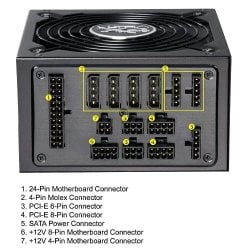
Welcome to SF. Sorry to hear of the PSU/System issues. I would take the system apart and assemble on the work bench. Clean all the connections with paint brush and air. Clean all the case fan blades, GPU's and the PSU. Clean the case and all filters. I recently up'd my PSU to the X4 1050 watt and when I reassembled my system it wouldn't go till I plugged the mobo's 12volt 8 pin into the proper rail on the PSU. This link has solid info on your PSU, see and review the connector layout !
Ultra X4 750-Watt Modular Power Supply - 135mm Fan, ATX, Lifetime Warranty w Registration, 80+ Bronze, NVIDIA SLI & ATI Crossfire Certifications, Vibration Dampener Included U12-40504 at UltraProducts.com
I'm also a firm believer in stable power and a APC power back up makes tons of sense for a computer as important as yours and one that's left on for long periods of time. Good luck and I hope you solve this mystery !
X4 connectors.jpg
 

My Computer My Computer

At a glance

Windows 7 Ultimate 64i7 3770k OC'd 4.6 @ 1.17v, also FX 8120 & i5 ...32 gb G.Skill Sniper DDR3 10-12-12-31 @ 2133XFX Radeon 7870 2GB DDR5
Computer type
PC/Desktop
Computer Manufacturer/Model Number
A blend of brains, brawn and dumb luck.
OS
Windows 7 Ultimate 64
CPU
i7 3770k OC'd 4.6 @ 1.17v, also FX 8120 & i5 miniITX
Motherboard
MSI P67A-GD80 b3
Memory
32 gb G.Skill Sniper DDR3 10-12-12-31 @ 2133
Graphics Card(s)
XFX Radeon 7870 2GB DDR5
Sound Card
Sound Blaster Z Series Card
Monitor(s) Displays
(2) LG LED 23" 1920 x 1080 2ms Monitors via mini d-port
Screen Resolution
1680 X 1050 p
Hard Drives
Samsung 256 gb 830 SSD sata III
(1) 1 tb WD Black
(2) 1 tb Hitachi deskmates/sata II
(2) 1 tb WD green/sata II
(2) 3 tb Seagate Barracuda
(1) 120 gb OCZ Vertex SS
(1) Drobo 5N w/5 Seagate 3tb
PSU
EVGA modular 1000G2 80% gold rating & APC 1200 RS
Case
CoolerMaster Storm Styker
Cooling
7 case fans 140mm & 120mm, NZXT Kraken X60
Keyboard
(2) Logitech Illuminated Keyboards (1) usb (1) wireless
Mouse
Logitech G700 & T-BC21 - nano nx for the laptop
Internet Speed
Basic 120mbps down
Antivirus
Trend Micro Titanium Max Security & Malwarebytes Premium
Browser
Chrome and IE 10
Other Info
5 Noctua case fans + 3 Noctua in p/p on NZXT cooler
Integrated hot swap drive bays for 2.5" Drives
(2) Lite-on dvd/cd/Blu Ray optical 22X
Integrated fan controller and led on/off
HP Officejet Pro 8630 all-n-one
Hot-swappable 3.5" hard drive bay
Netgear Nighthawk router
Asus USB 3 & sata 6 PCIe card
Vantec IDE to sata adptr./Ultra sata adptr
Lenovo L420 i5 lappy with m sata
Drobo 5N advanced NAS

My Computer My Computer

At a glance

Windows 7 64 Bit Home Premium SP1i7-3820GSkill F3-14900CL9Q - 16GBEVGA GeForce GTX660 - Driver 352.86
Computer type
PC/Desktop
Computer Manufacturer/Model Number
Home Built - Jan 2013
OS
Windows 7 64 Bit Home Premium SP1
CPU
i7-3820
Motherboard
Asus P9X79-PRO - Bios 4608
Memory
GSkill F3-14900CL9Q - 16GB
Graphics Card(s)
EVGA GeForce GTX660 - Driver 352.86
Sound Card
On board Realtek ALC898
Monitor(s) Displays
Acer S271HL
Screen Resolution
1920 x 1080
Hard Drives
#1- Samsung 840 Pro Series
#2- Western Digital WD1002FAEX Sata3 Black
#3- Western Digital WD1002FAEX Sata3 Black
PSU
Corsair CMPSU-850TX-V2 - 850 watt (by Seasonic)
Case
Corsair Obsidian 550D
Cooling
Standard 3 120mm case fans, Cooler Master Hyper 212 EVO
Keyboard
MS KC-0405
Mouse
Intellimouse 5-button
Internet Speed
56 Mbits/Sec (on a good day)
Antivirus
Avast & Malwarebytes
Browser
Firefox
Other Info
Asus DVD - DRW-24B1ST 24X

My Computer My Computer

At a glance

Windows 10 ProIntel Core i7-4770K (3.5Ghz)32 gig Corsair Dominator Platinum (4x8Gig)Sapphire Tri-X R9 Fury
Computer type
PC/Desktop
Computer Manufacturer/Model Number
Custom built by me.
OS
Windows 10 Pro
CPU
Intel Core i7-4770K (3.5Ghz)
Motherboard
Gigabyte G1 Sniper 5 (F10 Bios)
Memory
32 gig Corsair Dominator Platinum (4x8Gig)
Graphics Card(s)
Sapphire Tri-X R9 Fury
Sound Card
Soundblaster ZXR
Monitor(s) Displays
NEC PA242W 24" LCD Monitor
Screen Resolution
1920 x 1200
Hard Drives
Primary - Samsung 850 Pro (512gig), Samsung 840 Pro (256gig), 2TB WD Caviar Black.
PSU
EVGA Supernova 1000 G2
Case
Cooler Master HAF X
Cooling
Corsair H100i with Corsair Air Series SP120 Quiet Fans
Keyboard
Logitech Wireless Wave
Mouse
Logitech Performance MX
Internet Speed
High Speed Cable
Antivirus
Norton Security
Browser
IE11
Other Info
Memory Timings - 1866MHz @ 9-9-9-27-1T @ 1.5 volts
Wow, thanks all SO much for your feedback. Right now I have the computer on the table and I'm reconnecting all the wires etc... Also, I THINK I found what was wrong but I won't find out till I try to turn the comp on. I noticed the power cord connecting to the mobo was not completely clipped in. Even though I pushed it in and it clicked, I'm still going to look over all the feedback you all have given me before I try and fire it up. Yea, when I build a computer, I go all out... it's just me I guess lol. :) Thx again, I'll check in asap.

James
 

My Computer My Computer

At a glance

Windows 7 Ultimate x64
OS
Windows 7 Ultimate x64
PSU
ULTRA X4 750W atx psu
I tried all of that, it's all connected properly, however it's still not booting up. The first power supply I had in that pc was an 800w, then 700w and now this awesome 750w psu all crapped out. I'm hoping it's the psu because I'll admit I 'DO' oc my gpu's sometimes but I make sure they're staying cool. The only thing I saw in my BIOS that was in RED, was the speed of one of the mobo fans, I think it was the PSU fan but it wouldn't let me speed it up or down. I'm going to get a cheap 40 to 60$ psu tomorrow and hook it up to see if it works so I know what the issue is. But, any info you all have for me from here on out would be greatly appreciated. Thx!!

James
 

My Computer My Computer

At a glance

Windows 7 Ultimate x64
OS
Windows 7 Ultimate x64
PSU
ULTRA X4 750W atx psu

My Computer My Computer

At a glance

Windows 7 Ultimate 64i7 3770k OC'd 4.6 @ 1.17v, also FX 8120 & i5 ...32 gb G.Skill Sniper DDR3 10-12-12-31 @ 2133XFX Radeon 7870 2GB DDR5
Computer type
PC/Desktop
Computer Manufacturer/Model Number
A blend of brains, brawn and dumb luck.
OS
Windows 7 Ultimate 64
CPU
i7 3770k OC'd 4.6 @ 1.17v, also FX 8120 & i5 miniITX
Motherboard
MSI P67A-GD80 b3
Memory
32 gb G.Skill Sniper DDR3 10-12-12-31 @ 2133
Graphics Card(s)
XFX Radeon 7870 2GB DDR5
Sound Card
Sound Blaster Z Series Card
Monitor(s) Displays
(2) LG LED 23" 1920 x 1080 2ms Monitors via mini d-port
Screen Resolution
1680 X 1050 p
Hard Drives
Samsung 256 gb 830 SSD sata III
(1) 1 tb WD Black
(2) 1 tb Hitachi deskmates/sata II
(2) 1 tb WD green/sata II
(2) 3 tb Seagate Barracuda
(1) 120 gb OCZ Vertex SS
(1) Drobo 5N w/5 Seagate 3tb
PSU
EVGA modular 1000G2 80% gold rating & APC 1200 RS
Case
CoolerMaster Storm Styker
Cooling
7 case fans 140mm & 120mm, NZXT Kraken X60
Keyboard
(2) Logitech Illuminated Keyboards (1) usb (1) wireless
Mouse
Logitech G700 & T-BC21 - nano nx for the laptop
Internet Speed
Basic 120mbps down
Antivirus
Trend Micro Titanium Max Security & Malwarebytes Premium
Browser
Chrome and IE 10
Other Info
5 Noctua case fans + 3 Noctua in p/p on NZXT cooler
Integrated hot swap drive bays for 2.5" Drives
(2) Lite-on dvd/cd/Blu Ray optical 22X
Integrated fan controller and led on/off
HP Officejet Pro 8630 all-n-one
Hot-swappable 3.5" hard drive bay
Netgear Nighthawk router
Asus USB 3 & sata 6 PCIe card
Vantec IDE to sata adptr./Ultra sata adptr
Lenovo L420 i5 lappy with m sata
Drobo 5N advanced NAS
The 3870 uses about AC 84/DC 72watts of power at full load.
3850 is 64/55watts.
Idle watts for 3850 and 3870 cards are in the 11-20watt range.
 

My Computer My Computer

At a glance

Windows 7 Ultimate 64bitIntel i7 3770K16GB DDR3 1333 Corsair XMS3XFX HD6950 2GB EyeFinity
Computer Manufacturer/Model Number
HAL-9000
OS
Windows 7 Ultimate 64bit
CPU
Intel i7 3770K
Motherboard
Asus Sabertooth Z77
Memory
16GB DDR3 1333 Corsair XMS3
Graphics Card(s)
XFX HD6950 2GB EyeFinity
Sound Card
Logitech G35 & Sennheiser PC135 & VIA HD
Monitor(s) Displays
23" HP 2310e, 23" Samsung B2230, 21.5" Viewsonic
Screen Resolution
5760x1080
Hard Drives
16TB of Storage
128GB & 256GB Crucial M4 SSD's, 2X 1TB WD Black, 3x 2TB WD, 3x 2TB Samsung F4, 1.5TB Seagate, WD 500GB,
PSU
Antec True Power New 650watt
Case
Cooler Master HAF-932
Cooling
Corsair H60 Hydro Cooler, 3x 230mm Fans, 2x120mm Fan
Keyboard
Logitech G15 and G13
Mouse
Logitech G700 Gaming Mouse
Internet Speed
50/10 Mbit
Other Info
Speakers : Alesis M1 Active Mk2 Studio Monitors , APC RS 1200 UPS, HP 4500DN Color Laser, HP P1006 mono Laser, Kodak 8500 Dye-Sub, Epson 1280 inkjet, Epson Worforce 610 MFC
The only thing I saw in my BIOS that was in RED, was the speed of one of the mobo fans,

You either have somethig wrong with that power supply or something wrong with the connections.

Something you could try is hooking up items one at a time. This should help in telling you when the problem lays.

Good luck.
 

My Computer My Computer

At a glance

Windows 10 ProIntel Core i7-4770K (3.5Ghz)32 gig Corsair Dominator Platinum (4x8Gig)Sapphire Tri-X R9 Fury
Computer type
PC/Desktop
Computer Manufacturer/Model Number
Custom built by me.
OS
Windows 10 Pro
CPU
Intel Core i7-4770K (3.5Ghz)
Motherboard
Gigabyte G1 Sniper 5 (F10 Bios)
Memory
32 gig Corsair Dominator Platinum (4x8Gig)
Graphics Card(s)
Sapphire Tri-X R9 Fury
Sound Card
Soundblaster ZXR
Monitor(s) Displays
NEC PA242W 24" LCD Monitor
Screen Resolution
1920 x 1200
Hard Drives
Primary - Samsung 850 Pro (512gig), Samsung 840 Pro (256gig), 2TB WD Caviar Black.
PSU
EVGA Supernova 1000 G2
Case
Cooler Master HAF X
Cooling
Corsair H100i with Corsair Air Series SP120 Quiet Fans
Keyboard
Logitech Wireless Wave
Mouse
Logitech Performance MX
Internet Speed
High Speed Cable
Antivirus
Norton Security
Browser
IE11
Other Info
Memory Timings - 1866MHz @ 9-9-9-27-1T @ 1.5 volts
Disconnect ALL cables
Connect a fan or something similar to the a power supply molex
Using a wire connect the green wire on the 24 pin plug to one of the black ones.
Start the computer the fan will be the only thing connected if it runs the power supply is working
I will supply a link to a Tutorial on PSU's that was made by a team of experts
PSU TUTORIAL
 

My Computer My Computer

At a glance

Windows 10 Pro x64i7-4770K16Gig DDR3-2400Gigabyte GT740
Computer type
PC/Desktop
Computer Manufacturer/Model Number
Self Built Custom Computer.
OS
Windows 10 Pro x64
CPU
i7-4770K
Motherboard
Asus Z87 Sabertooth
Memory
16Gig DDR3-2400
Graphics Card(s)
Gigabyte GT740
Sound Card
Onboard
Monitor(s) Displays
Benq 27" - Dell 23' - Benq 22"
Screen Resolution
1680x1050
Hard Drives
Samsung 840 Pro 128g SSD
1xWestern Digital Caviar Green 1tb
2xWestern Digital Caviar Green 2 tb
PSU
Seasonic 760 watt Platinum
Case
Coolermaster Haf - X
Cooling
Noctua NH-C12P CPU Cooler
Keyboard
Logitech illuminated keyboard
Mouse
Logitech Perfomance MX
Internet Speed
Cable = speeds to 20Mbps downsteam and 512kbps upsteam
Antivirus
Avast Internet Security
Browser
Firefox
ADDED INFO: my mobo is Asus M3A32-MVP DELUXE.. just fyi..

Thanks everyone, I'll go ahead and try all that stuff later today. As for where I bought all the parts, I DID get every single part from CompUSA aka Tiger Direct and still have the receipt but I built this about 4 years ago or 3. I do have two 3870's, I've OC'd them and the fans on them many times but 90% of the time I had the PC on I had them at default settings. When I went through the pc and connected the HD's to 1 wire each instead of two on one and reseat everything, also checked to make sure the mobo wasn't making contact with the case, none of that seemed to fix the problem. God, I really hope it's not my mobo, it's expensive lol... well it use to be. It's an Asus Deluxe something, I'll get the spec info off the receipt and post it later. Thx for the links and info, I'll check in again later today. Take care everyone. This is a great site btw, lots of very educated info :) nice work. Later

PS - This is the only build of mine that I've had issues with, all my past builds still run to this day, even my very first build over 12yrs ago... I get upset with myself when I can't fix my own rig. Bringing it to the store to have them check it out is a huge downer for me because half the time they don't know what they're doing lol, and also charge you an arm and a leg just to do something as simple as adding ram!!... which only takes seconds. anyways, thx again :D

James
 
Last edited:

My Computer My Computer

At a glance

Windows 7 Ultimate x64
OS
Windows 7 Ultimate x64
PSU
ULTRA X4 750W atx psu
OMG!!! What I just did, was I took the 12v/8pin out of the mobo and I just tried to turn the pc on AND EVERYTHING TURNED ON!! but i quickly shut it off because the 8pin was unplugged and I didnt want to dmg anything.. but when I plugged it back into the (top left area of the mobo) mobo it wouldn't turn on. Please don't tell me my mobo is dead... I've never come across this type of thing. :(
 

My Computer My Computer

At a glance

Windows 7 Ultimate x64
OS
Windows 7 Ultimate x64
PSU
ULTRA X4 750W atx psu
Uh that 750 watt power supply is plenty powerful enough for that system. Period.

I'll tell you I ran my system on a 550 Watt power supply no problem. Check my specs. Now you'll notice I have an 850 watt now, but that's more to do with that power supply as I wanted it. Do I need a 850 for the current system? NO!

I will tell you that your 750 will power those two 3800 series cards you have. One thing to check though is your connections, and that you don't have one rail overloaded with other stuff like fans and hard drives on the same rail powering the video cards.

750 Watts -- I could probably heat my whole house for that.

What can happen sometimes is that the Power LED and Microswitch get burned out / corroded. If that happens then the computer won't turn on.

I suggest you look at the Power LED connections with your computer case and check at least if any of the fans start up when you switch on.

If you feel competant at Engineering short out or bypass the Computer switch so it powers on automatically from the mains when plugged in.

Check also that the RESET LED isn't also corroded / broken.

I've had a few computers over the years which were totally dead untiil I fixed the LED / switch problem.

Why on earth however you would need 750 WATTS for power -- you could Microwave a Sunday Dinner for 4 people with that amount of power.


Cheers

jimbo
 

My Computer My Computer

At a glance

Linux CENTOS 7 / various Windows OS'es and se...Intel i7 Intel i58GB, 16GBOn Motherboard
Computer type
PC/Desktop
Computer Manufacturer/Model Number
Custom built, several laptops HP/ASUS
OS
Linux CENTOS 7 / various Windows OS'es and servers
CPU
Intel i7 Intel i5
Memory
8GB, 16GB
Graphics Card(s)
On Motherboard
Sound Card
Realtek HD audio
Monitor(s) Displays
Apple Cinema display, Samsung LCD
Screen Resolution
1920 X 1080
Hard Drives
4 X 1TB SATA
Mouse
Toshiba wireless laser
Internet Speed
> 20MB up
Back
Top