Excel 2010 - Accessing data based on conditions from other sheets

DarkSnake

New member
Local time
6:21 AM
Messages
1
I've tried goggling this a bit and can't seem to find exactly what I'm looking for.

I'm trying to setup a sheet that can run calculations based upon what someone else enters (ex: if they select 'option1', preferably from a drop down list, then two values will be set to the corresponding values, ex: '5' and '6' or whatever they may be). This would preferably actually be within a formula, so say if they have selected an option, it will perform the calculation with the appropriate data, without having to display it on the current sheet.

I was also trying to keep all the data on another sheet so the one I was actually using looked a bit more organized. I've never had to do anything like this in excel before and was looking for some help or a push in the right direction.
 
Last edited:

My Computer My Computer

Computer Manufacturer/Model Number
Self Built
OS
Windows 7 Professional x64
CPU
Intel Core I7 930 2.8Ghz
Motherboard
ASUS P6X58D Premium
Memory
Patriot 1600EL 12GB DDR3
Graphics Card(s)
NVIDIA GeForce 480
Sound Card
Motherboard
Monitor(s) Displays
Acer G235H
Screen Resolution
1920X1080
Hard Drives
WD 1TB SATA 6.0Gb/s
PSU
1000W
Case
XCLIO
Keyboard
Logitec G15
Mouse
Logitc MX518
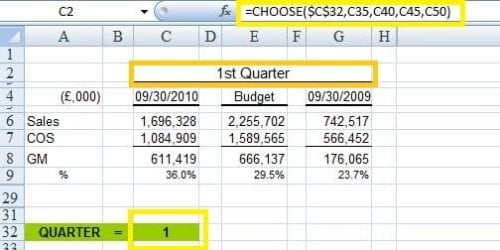
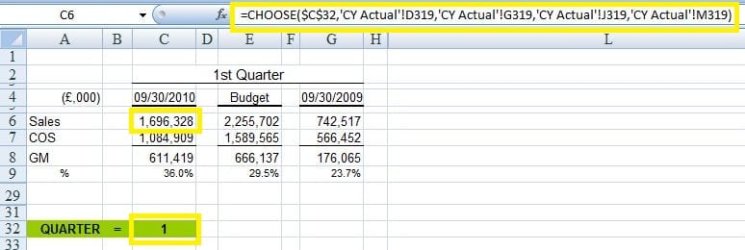
I have found the 'CHOOSE' function very useful.
Very difficult to explain, but here is Microsoft Office attempt... CHOOSE function - Excel - Microsoft Office

My scenario was to have a cell in which you would select Quarter 1, 2, 3 or 4. The values in the Profit & Loss Account would change accordingly. Here are examples of my scenario (the cells highlighted in the spreadsheet on the right refer to another sheet - CY Actual - in the workbook).

I hope this helps. :)
 

Attachments

  • Choose 1.JPG
    Choose 1.JPG
    31.2 KB · Views: 13
  • Choose 2.JPG
    Choose 2.JPG
    37.5 KB · Views: 16
Last edited:

My Computer My Computer

Computer type
PC/Desktop
Computer Manufacturer/Model Number
Packard Bell
OS
Windows 7 Home Premium 64bit
CPU
Intel(R) Core(TM) i3-2120 CPU @ 3.30GHz
Motherboard
Packard Bell IPISB-AG
Memory
3.00 GB
Graphics Card(s)
(1) Intel(R) HD Graphics (2) VNC Mirror Driver
Sound Card
Realtek High Definition Audio
Monitor(s) Displays
AIO LCD
Screen Resolution
1920 x 1080
Hard Drives
WDC WD10EADX-22TDHB0 ATA Device
Fixed hard disk media
4 partitions
931.51 GB
Keyboard
Wireless
Mouse
Wireless
Antivirus
Microsoft Security Essentials
Browser
IE; Firefox
Other Info
Also:
Samsung N220 Plus Netbook - Windows 7 Home
HP laptop
iPad 5
I've tried goggling this a bit and can't seem to find exactly what I'm looking for.

I'm trying to setup a sheet that can run calculations based upon what someone else enters (ex: if they select 'option1', preferably from a drop down list, then two values will be set to the corresponding values, ex: '5' and '6' or whatever they may be). This would preferably actually be within a formula, so say if they have selected an option, it will perform the calculation with the appropriate data, without having to display it on the current sheet.

I was also trying to keep all the data on another sheet so the one I was actually using looked a bit more organized. I've never had to do anything like this in excel before and was looking for some help or a push in the right direction.
Depending on the level of experience creating a pivot table for data selection would be an easy option.
 

My Computer My Computer

Computer Manufacturer/Model Number
Custom Build
OS
Windows 7 7600 1 X64
CPU
AMD PHENOM II X 550 PROCESSOR 3.1 ghz
Motherboard
ASUS M4A78-TE
Memory
Corsair 4 gig ddr 3
Graphics Card(s)
ati radeon 3300
Sound Card
ati hd
Monitor(s) Displays
syncmaster 2033sw
Screen Resolution
1600X900 60 hz refresh
Hard Drives
twin_seagates SATA's 1 TB & 500 Gig, hitachi_slimline 160 gig
PSU
antec_550 watt
Case
cooler master GLite
Cooling
stock_heat sink
Internet Speed
20mbs up/ 1.5mbs down
Other Info
favorite child "stewie"
favorite dog "brian"
Back
Top