How to search for a .sol file

Monsoon

Banned
Local time
7:44 AM
Messages
91
The search function in windows 7 sucks!
I wanted to see how many flash cookies are being stored on my computer, and i've been trying to search for the .sol files.

Well windows pulls up every single instance of the letters "sol" on my computer! I've got literally hundreds of guitar solos on my computer, and you guessed it, it pulls up every one of those links.
It pulls up solitaire...:sarc:

Is there any way to force windows to, you know, give me what I actually asked for??

I want .sol not sol.

oh, and sol files are checked in file types. it's not that.
 
Last edited by a moderator:

My Computer My Computer

OS
Win 7 Ultimate x64
I just used Everything to search for *.sol

It returned 131 hits in about 1 second flat.

You can get it here for nothing. It's recommended often on this forum by those who have grown frustrated with Windows built in tool.

voidtools.com

Very quick and easy to use. It does NOT search for file contents--only file names.
 

My Computer My Computer

Computer type
PC/Desktop
Computer Manufacturer/Model Number
Ignatz Special; 4 speed manual gearbox; factory air conditioning; one of one
OS
Windows 7 Home Premium SP1, 64-bit
CPU
Intel Skylake i5-6600K, not overclocked
Motherboard
AsRock Z170M Extreme 4, micro ATX
Memory
8 GB HyperX DDR4-2666 (2 x 4 GB)
Graphics Card(s)
none; graphics are integrated on CPU
Sound Card
onboard: Realtek ALC1150; external: USB Behringer UF0-202
Monitor(s) Displays
Dell S2340M 23 inch IPS
Screen Resolution
1600 x 900
Hard Drives
System: Crucial MX100 series SSD, 128 GB;
Data: Samsung Spinpoint 103SJ, 1 TB;
Backup: WD Caviar Green WD30EZRX-00D8PB0, 3 TB
PSU
Rosewill SilentNight 500 watt fanless, semi-modular
Case
Antec Solo II
Cooling
Noctua NH-U12S; Noctua F12 intake, Noctua S12A exhaust
Keyboard
Microsoft 200 6JH-00001 USB
Mouse
Dell or Microsoft optical wired; USB
Antivirus
Microsoft Security Essentials and Malwarebytes Premium
Browser
Pale Moon
Other Info
All fans PWM; speeds at idle: CPU circa 500 rpm; intake circa 600 rpm; exhaust circa 600 rpm; CPU temps 27 idle and 47 C load in a warm room (27 C/81 F) when running Intel Extreme Tuning Utility stress test.
I just used Everything to search for *.sol

It returned 131 hits in about 1 second flat.

You can get it here for nothing. It's recommended often on this forum by those who have grown frustrated with Windows built in tool.

voidtools.com

Very quick and easy to use. It does NOT search for file contents--only file names.
Thanks, i'll give that a try.

Oh and for what it's worth, those flash cookies all carry tracking capability. In fact, i'd venture to say that most of them do track you.
If you take a look at the install dates, you'll get an idea of how long they've been tracking your internet surfing.

Firefox has a good addon to delete those. Look for the firefox better privacy plugin.
 

My Computer My Computer

OS
Win 7 Ultimate x64
Monsoon:

Thanks back at ya--I just installed Better Privacy.

What's your best advice on configuration?
 

My Computer My Computer

Computer type
PC/Desktop
Computer Manufacturer/Model Number
Ignatz Special; 4 speed manual gearbox; factory air conditioning; one of one
OS
Windows 7 Home Premium SP1, 64-bit
CPU
Intel Skylake i5-6600K, not overclocked
Motherboard
AsRock Z170M Extreme 4, micro ATX
Memory
8 GB HyperX DDR4-2666 (2 x 4 GB)
Graphics Card(s)
none; graphics are integrated on CPU
Sound Card
onboard: Realtek ALC1150; external: USB Behringer UF0-202
Monitor(s) Displays
Dell S2340M 23 inch IPS
Screen Resolution
1600 x 900
Hard Drives
System: Crucial MX100 series SSD, 128 GB;
Data: Samsung Spinpoint 103SJ, 1 TB;
Backup: WD Caviar Green WD30EZRX-00D8PB0, 3 TB
PSU
Rosewill SilentNight 500 watt fanless, semi-modular
Case
Antec Solo II
Cooling
Noctua NH-U12S; Noctua F12 intake, Noctua S12A exhaust
Keyboard
Microsoft 200 6JH-00001 USB
Mouse
Dell or Microsoft optical wired; USB
Antivirus
Microsoft Security Essentials and Malwarebytes Premium
Browser
Pale Moon
Other Info
All fans PWM; speeds at idle: CPU circa 500 rpm; intake circa 600 rpm; exhaust circa 600 rpm; CPU temps 27 idle and 47 C load in a warm room (27 C/81 F) when running Intel Extreme Tuning Utility stress test.
Hey that little app worked perfectly, thanks.

As far as better privacy goes, I have it ask every single time I logoff. I like being able to get instant feedback about which sites are installing flash cookies.
I also have it delete the main Flashplayer cookie.

Oh, and the default settings on mine were Auto-delete the DOMstorage file, as well as the Disable Ping tracking. You want to check to see if those are pre-selected.
 

My Computer My Computer

OS
Win 7 Ultimate x64
You could always try this one
Flash Cookie Remover
It shows you what's installed and you can remove them right from there
Advantage; no installation plus it remove no matter which browser was used.
I keep getting 2 from Hulu and 1 from CBS.com
That's what I get for d/l their tv shows:roflmao::roflmao:
-DG
 

My Computer My Computer

Computer Manufacturer/Model Number
HP m8000n
OS
Windows 7 Ultimate x86
CPU
DualCore AMD Athlon 64 X2, 2600 MHz 5200+
Motherboard
Asus M2N68-LA (Narra)
Memory
Samsung 2GB DDR2
Graphics Card(s)
Onboard NVIDIA GeForce 6150SE nForce 430
Sound Card
Onboard nVIDIA nForce 6100-430 (MCP61P)
Monitor(s) Displays
Westinghouse 19" LED
Screen Resolution
1280x1024
Hard Drives
SATA II Seagate Barracuda 500GB
USB II WD Elements 500GB
USB II WD My Book 1TB
USB II WD My Book 2TB
PSU
Stock (HP)
Case
Stock (HP)
Cooling
Stock
Keyboard
Logitech Classic KB 200
Mouse
Standard HP opticle USB mouse
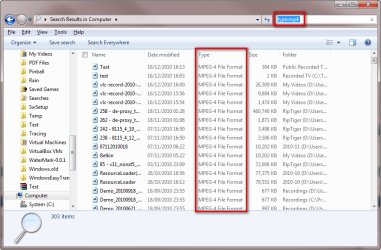
For future reference, search syntax when searching certain type of files is type:ext, where ext is the extension you are looking for.

Example: Searching computer for all files with an extension mp4:

Search_extension.png

Kari
 

My Computer My Computer

Computer type
Laptop
Computer Manufacturer/Model Number
HP ENVY 17-1150eg
OS
Windows 10 Pro x64 EN-GB
CPU
1.6 GHz Intel Core i7-720QM Processor
Memory
6 GB
Graphics Card(s)
ATI Mobility Radeon HD 5850 Graphics
Sound Card
Beats sound system with integrated subwoofer
Monitor(s) Displays
17" laptop display, 22" LED and 32" Full HD TV through HDMI
Screen Resolution
1600*900 (1), 1920*1080 (2&3)
Hard Drives
Internal: 2 x 500 GB SATA Hard Disk Drive 7200 rpm
External: 2TB for backups, 3TB USB3 network drive for media
Cooling
As Envy runs a bit warm, I have it on a Cooler Master pad
Keyboard
Logitech diNovo Media Desktop Laser (bluetooth)
Mouse
Logitech Performance Mouse MX
Internet Speed
50/10 Mbps VDSL
Antivirus
Windows Defender 4.3.9431.0
Browser
Maxthon 3.5.2., IE11
For future reference, search syntax when searching certain type of files is type:ext, where ext is the extension you are looking for.

Example: Searching computer for all files with an extension mp4:

View attachment 124012

Kari

using the plugin that ignatzatsonic posted, I find a couple of .sol files.

typing in type:sol pulls up nothing.
 

My Computer My Computer

OS
Win 7 Ultimate x64
Where did you search? Searching from Start Menu search field searches only the indexed locations, whereas searching from Explorer searches all locations, also non-indexed.

In Explorer search you have to remember it searches from current location and down, i.e. searching from Explorer when in Computer, the whole computer is searched, but searching in for instance Users\Kari searches only my user folder and its subfolders.

I found all .sol files directly when searching from Explorer (Computer).

Kari
 

My Computer My Computer

Computer type
Laptop
Computer Manufacturer/Model Number
HP ENVY 17-1150eg
OS
Windows 10 Pro x64 EN-GB
CPU
1.6 GHz Intel Core i7-720QM Processor
Memory
6 GB
Graphics Card(s)
ATI Mobility Radeon HD 5850 Graphics
Sound Card
Beats sound system with integrated subwoofer
Monitor(s) Displays
17" laptop display, 22" LED and 32" Full HD TV through HDMI
Screen Resolution
1600*900 (1), 1920*1080 (2&3)
Hard Drives
Internal: 2 x 500 GB SATA Hard Disk Drive 7200 rpm
External: 2TB for backups, 3TB USB3 network drive for media
Cooling
As Envy runs a bit warm, I have it on a Cooler Master pad
Keyboard
Logitech diNovo Media Desktop Laser (bluetooth)
Mouse
Logitech Performance Mouse MX
Internet Speed
50/10 Mbps VDSL
Antivirus
Windows Defender 4.3.9431.0
Browser
Maxthon 3.5.2., IE11

My Computer My Computer

Computer type
PC/Desktop
Computer Manufacturer/Model Number
Virtual Machine
OS
Windows 7 Professional 32-bit SP1
CPU
AMD A4/A6
Motherboard
Intel Corporation 440BX Desktop Reference Platform
Memory
3.00GB EDO
Graphics Card(s)
VMware SVGA 3D
Sound Card
High Definition Audio Device
Monitor(s) Displays
Generic Non-PnP Monitor on VMware SVGA 3D
Screen Resolution
1440x900
Hard Drives
1 x 60GB VMware Virtual SATA Hard Drive ATA Device
Antivirus
Kaspersky Total Security
Where did you search? Searching from Start Menu search field searches only the indexed locations, whereas searching from Explorer searches all locations, also non-indexed.

In Explorer search you have to remember it searches from current location and down, i.e. searching from Explorer when in Computer, the whole computer is searched, but searching in for instance Users\Kari searches only my user folder and its subfolders.

I found all .sol files directly when searching from Explorer (Computer).

Kari
Using the "type" search worked in C drive. But one thing that irritates me is that .sol is exactly that. ".sol".
Period. It's not solitaire, and it's not the three letters sol found inside a word. It's .sol.
Microsoft is hurting their operating system with every change they make.
I can easily see switching over to Ubuntu or Mac next time around. Because finding fixes for stuff like this is absurd.
I mean whatever happened to the old adage of if it ain't broke don't fix it?

This website is clear evidence that it's not just me who thinks the same way.
 

My Computer My Computer

OS
Win 7 Ultimate x64
Where did you search? Searching from Start Menu search field searches only the indexed locations, whereas searching from Explorer searches all locations, also non-indexed.

In Explorer search you have to remember it searches from current location and down, i.e. searching from Explorer when in Computer, the whole computer is searched, but searching in for instance Users\Kari searches only my user folder and its subfolders.

I found all .sol files directly when searching from Explorer (Computer).

Kari
Using the "type" search worked in C drive. But one thing that irritates me is that .sol is exactly that. ".sol".
Period. It's not solitaire, and it's not the three letters sol found inside a word. It's .sol.
Microsoft is hurting their operating system with every change they make.
I can easily see switching over to Ubuntu or Mac next time around. Because finding fixes for stuff like this is absurd.
I mean whatever happened to the old adage of if it ain't broke don't fix it?

This website is clear evidence that it's not just me who thinks the same way.

You'll willing to dump Windows in favor of Ubuntu or Mac OSX because you could not find a file after not using the correct search terms?

Windows Search is not lame "search-for-filenames-only" facility provided by most other operating systems, including previous versions of Windows, so naturally there will be a learning curve involved, as is the case with anything that is new...
 

My Computer My Computer

Computer type
PC/Desktop
Computer Manufacturer/Model Number
Virtual Machine
OS
Windows 7 Professional 32-bit SP1
CPU
AMD A4/A6
Motherboard
Intel Corporation 440BX Desktop Reference Platform
Memory
3.00GB EDO
Graphics Card(s)
VMware SVGA 3D
Sound Card
High Definition Audio Device
Monitor(s) Displays
Generic Non-PnP Monitor on VMware SVGA 3D
Screen Resolution
1440x900
Hard Drives
1 x 60GB VMware Virtual SATA Hard Drive ATA Device
Antivirus
Kaspersky Total Security
This website is clear evidence that it's not just me who thinks the same way.
This website is clear evidence that it's not just me who thinks Windows 7 is a stable, well functioning operating system.
 

My Computer My Computer

Computer type
Laptop
Computer Manufacturer/Model Number
HP ENVY 17-1150eg
OS
Windows 10 Pro x64 EN-GB
CPU
1.6 GHz Intel Core i7-720QM Processor
Memory
6 GB
Graphics Card(s)
ATI Mobility Radeon HD 5850 Graphics
Sound Card
Beats sound system with integrated subwoofer
Monitor(s) Displays
17" laptop display, 22" LED and 32" Full HD TV through HDMI
Screen Resolution
1600*900 (1), 1920*1080 (2&3)
Hard Drives
Internal: 2 x 500 GB SATA Hard Disk Drive 7200 rpm
External: 2TB for backups, 3TB USB3 network drive for media
Cooling
As Envy runs a bit warm, I have it on a Cooler Master pad
Keyboard
Logitech diNovo Media Desktop Laser (bluetooth)
Mouse
Logitech Performance Mouse MX
Internet Speed
50/10 Mbps VDSL
Antivirus
Windows Defender 4.3.9431.0
Browser
Maxthon 3.5.2., IE11
This website is clear evidence that it's not just me who thinks the same way.
This website is clear evidence that it's not just me who thinks Windows 7 is a stable, well functioning operating system.
The both of you are ignoring the fact that this site exists for the sole purpose of helping people figure out how to do things that have changed in windows 7.

They eliminated the way windows remembered size and position, which is why you have a thread for a shell fix.

They made it so you have to know a specific query to use with your search term. I'm sure the public at large was tired of being able to just type the specific term they were seeking, and instead were wishing for it to become much more of a hassle.

Oh and while i'm at it, lets talk about the "my pictures" folder. Something that gets deleted during my install procedure. Why? Because I have all the documents backed up to a 2nd drive, and I don't want the fuss of dealing with the popup of "this folder already exists" when I drag my documents over.
But guess what? Once you delete that folder, you can't recreate it. It says it already exists! Lovely. So from now on it's called simply "pictures". Why? Because some genius at microsoft couldn't care less what fuss that causes for the consumer.

In any normal walk of life, such foolishness is a deal breaker. But with windows, it's oh well it's still pretty great.

I expect far better for my money than "still pretty great". This is the ultimate license, and it wasn't cheap!
 

My Computer My Computer

OS
Win 7 Ultimate x64
But guess what? Once you delete that folder, you can't recreate it. It says it already exists!
Interesting observation. I was able to recreate my deleted C:\users\mike\My Pictures folder with ease. I didn't realize I had deleted it from a shared computer. I ran backup one day and got an error that backup couldn't find the "my pictures" folder and couldn't back it up. I simply recreated the folder in it's proper location with no issues whatsoever.

With a new operating system comes a new way of learning. The search feature in Windows 7 is nothing short of spectacular. It makes XP's search look pathetic in comparison. However, along with its brilliance comes a bit of a learning curve. Just like any other technology, the power is there if you learn how to use it. The search feature is so powerful that its nearly impossible to make it "easy". Microsoft has done a great job at making it as easy as possible, considering the power of this new feature.
 

My Computer My Computer

Computer Manufacturer/Model Number
Custom Build
OS
Windows 7 Pro/32 Academic. Build 7600
CPU
Intel 2.3 Duo core
Motherboard
EliteGroup G31T-M
Memory
4 GB DDR
Graphics Card(s)
Nvidia GeForce 9500 GT
Sound Card
Built in
Monitor(s) Displays
Viewsonic 15" 4:3
Screen Resolution
1280 x 1024
Hard Drives
WD Caviar Black 750 GB
WD 250 GB External
PSU
Antec 450w
Keyboard
Standard windows
Mouse
Logitech USB
Internet Speed
Bellsouth DSL 6.0
I'm thinking there should be instant bans given to people who whine and complain about the search feature, only because they still don't know how to use the proper syntax...that has been around for decades. Am I being rude here....probably, but even my non-tech savvy users understand the * switch in a search. It's been that way in ever version of Windows and DOS I can remember.

Here's my actual helpful suggestion. The Windows Search feature works wonderfully. Take a moment to learn how to use it. An ATM isn't going to work very well if you don't know how to use it...but that doesn't mean the ATM is broken. In the time it would have taken to create this thread ranting about the search feature...you could have googled the proper syntax.

I've seen and heard it many times, but it always holds true: 'Tis easier to complain than to learn.
 

My Computer My Computer

OS
Windows 7 Ultimate x64 SP1
CPU
Intel Core i7-2600
Motherboard
Gigabyte GA-P67A-UD3P-B3
Memory
12 GB Patriot Extreme DDR3-1333
Graphics Card(s)
Nvidia GTX 470
Monitor(s) Displays
Dell UltraSharp 2209WA
Hard Drives
OCZ Agility3 240 GB, WD5001AALS, WD7501AALS
PSU
OCZ ModStream 700W
Case
CoolerMaster HAF 912 Advanced
Cooling
CoolerMaster Hyper 212 Plus
I'm thinking there should be instant bans given to people who whine and complain about the search feature, only because they still don't know how to use the proper syntax...that has been around for decades. Am I being rude here....probably, but even my non-tech savvy users understand the * switch in a search. It's been that way in ever version of Windows and DOS I can remember.

Here's my actual helpful suggestion. The Windows Search feature works wonderfully. Take a moment to learn how to use it. An ATM isn't going to work very well if you don't know how to use it...but that doesn't mean the ATM is broken. In the time it would have taken to create this thread ranting about the search feature...you could have googled the proper syntax.

I've seen and heard it many times, but it always holds true: 'Tis easier to complain than to learn.
Being rude? No.
But you are most certainly being intellectually dishonest.

Let's go take a live poll somewhere, anywhere, where we ask the consumer to search for a .sol file on a windows 7 machine.

If more than 10% of the people have any clue whatsoever about how to find those files, you win.

If less than that, I win.

I would bet all my future wages that it wouldn't even be close to 10%.

What does that tell you? Maybe you're the one who should be banned for being so pretentious.

This is not everyday stuff. This is vastly over the head of the average consumer.

Those of us who even know to log onto a site like this are the ones who wind up fixing everything for friends and family, and all because of the arrogance of programmers who see the world through the same glasses you do.
 

My Computer My Computer

OS
Win 7 Ultimate x64
I'm thinking there should be instant bans given to people who whine and complain about the search feature, only because they still don't know how to use the proper syntax...that has been around for decades. Am I being rude here....probably, but even my non-tech savvy users understand the * switch in a search. It's been that way in ever version of Windows and DOS I can remember.

Here's my actual helpful suggestion. The Windows Search feature works wonderfully. Take a moment to learn how to use it. An ATM isn't going to work very well if you don't know how to use it...but that doesn't mean the ATM is broken. In the time it would have taken to create this thread ranting about the search feature...you could have googled the proper syntax.

I've seen and heard it many times, but it always holds true: 'Tis easier to complain than to learn.

After studying different documents and howtos on Win 7 Search, I will admit that I gave it much less credit than it deserves. Setting it up and learning the syntax does indeed go a long way in bolstering its usefulness. However, I still find that there are issues. For instance, WinKey + F, which is supposed to search across the entire index, finds nothing. GROD for as long as I wish to watch it. Whoopee. That aspect is unusable for me. I gain better results searching from Computer.

Also, I find that it doesn't always find all files under all conditions, and, if I just create a file, it will not find it for several hours. Perhaps the index needs to catch up. No excuse, IMO. Conceivably, you could chalk all of this up to my ignorance (of which I confess no shortage), but if you believe that Search is without flaw, you haven't thought it through.

I will soon start a thread asking about any possiblity to exclude drives from search. It's nice that one can exclude them from the index, but why no ability to eclude partitions and folders from the search process (AFAICT)?

Summed up, I am liking and enjoying the benefits of search to a much greater degree since my decision to commit myself to learning the ins and outs, but certainly, it's not perfect. It has its deficiencies.

Perhaps its biggest flaw is its failure to provide a 'middle ground' for those less technical than others. This is a big problem, as your frustrated responses reveal. That being the case, perhaps you should examine why you are so frustrated by this. Is it because those who don't understand how to functionally use search are idiots, as your berating responses in these cases seem to imply? I think it more likely that MS has failed to meet the needs of the largest share of its market by not providing a simple method of search (in addition to the advanced search) that works reasonably well for the uninitiated.

Again, I have a much greater respect for Search now. But surely you don't expect that the masses will comprehend the intricacies of search when often, just operating their computer is a challenge?

I suppose a good analogy would be to ponder a skill which is beyond your ability to understand, much less perform. Does this make you an idiot? Of course not. No more than those who fail to understand Win7 Search. Therefore, your suggestion to instantly ban those who have trouble with search is denied. :geek:

James
 

My Computer My Computer

OS
Win7U 64 RTM
CPU
Q9550
Motherboard
GA-EP45-UD3R
Memory
8GB Gskill
Graphics Card(s)
ASUS|EAH4850/HTDI/1GD3/A
Sound Card
xfi Plat
Monitor(s) Displays
Dell 2405fpw
Screen Resolution
1920x1200
Hard Drives
Seagate & WD sata Drives
PSU
Antec
Case
Antec
Keyboard
MS Natural Ergonomic 4000
Mouse
Logitech MX610 USB Cordless
Being rude? No.
But you are most certainly being intellectually dishonest.

Let's go take a live poll somewhere, anywhere, where we ask the consumer to search for a .sol file on a windows 7 machine.

If more than 10% of the people have any clue whatsoever about how to find those files, you win.

If less than that, I win.

I would bet all my future wages that it wouldn't even be close to 10%.

What does that tell you? Maybe you're the one who should be banned for being so pretentious.

This is not everyday stuff. This is vastly over the head of the average consumer.

Those of us who even know to log onto a site like this are the ones who wind up fixing everything for friends and family, and all because of the arrogance of programmers who see the world through the same glasses you do.
I could spend the time tearing apart so many of your comments, but what good would that do? You've already made up your mind to blame the programmers for your lack of understanding. As I said...this is a basic part of Windows...has been since the days BEFORE Windows. Nothing's new here, except the fact that the Search feature is now brought right in front of your face, simplifying the entire process.

Pretentious? No....realistic? Yes. My user base is the least tech savvy around, consisting mostly of women over the age of 50. No, that's not a sexist comment...it is realistic. They despise technology, and fight me every step of the way through any upgrade. Yet they mostly understood this.....or had the capacity to do a quick ten second Google search for the answer.

I've been doing some level of support for 15 years now, and I'd take the bet about 10% understanding or having the ability to quickly figure it out themselves.

If you think I'm being rude and pretentious, so be it...but let me explain. Take a wild guess how many threads we've had recently with the OP firing right off the bat at Microsoft for how bad their search feature is...only to later realize they just didn't know something basic. Do you realize some of those people didn't even know they now have a search box in EACH and EVERY Explorer Window??? It gets old real quick. It's snowing...blame Microsoft. I lost my job....blame Microsoft. McNabb was just benched by the Redskins...blame Microsoft. A teenage girl is pregnant.....blame Microsoft. Gets old quick.

Let's drop the attitude...admit you didn't know something but now you do....and move on from it. Learn from it...and learn that not everything is Microsoft's fault.
 

My Computer My Computer

OS
Windows 7 Ultimate x64 SP1
CPU
Intel Core i7-2600
Motherboard
Gigabyte GA-P67A-UD3P-B3
Memory
12 GB Patriot Extreme DDR3-1333
Graphics Card(s)
Nvidia GTX 470
Monitor(s) Displays
Dell UltraSharp 2209WA
Hard Drives
OCZ Agility3 240 GB, WD5001AALS, WD7501AALS
PSU
OCZ ModStream 700W
Case
CoolerMaster HAF 912 Advanced
Cooling
CoolerMaster Hyper 212 Plus
Again, I have a much greater respect for Search now. But surely you don't expect that the masses will comprehend the intricacies of search when often, just operating their computer is a challenge?
I agree completely with everything you said, with the exception of one point.

We are talking about the readers of this forum...a Windows 7 Enthusiasts Forum. We aren't talk about a group of people standing in line at Best Buy purchasing a computer for their kids of grandkids. The level of knowledge and understanding the readers of this forum have are FAR above the general populous.
 

My Computer My Computer

OS
Windows 7 Ultimate x64 SP1
CPU
Intel Core i7-2600
Motherboard
Gigabyte GA-P67A-UD3P-B3
Memory
12 GB Patriot Extreme DDR3-1333
Graphics Card(s)
Nvidia GTX 470
Monitor(s) Displays
Dell UltraSharp 2209WA
Hard Drives
OCZ Agility3 240 GB, WD5001AALS, WD7501AALS
PSU
OCZ ModStream 700W
Case
CoolerMaster HAF 912 Advanced
Cooling
CoolerMaster Hyper 212 Plus
Back
Top