Turn Of Double Tap? Please Help!!

InsomniacP

New member
VIP
Local time
1:07 AM
Messages
8
Hey there all,

The name is Paul, If you read this z3r010 I'm the guy that fitted your Airconditioning wanted to send you a PM but not able to yet...?

My question is just recently installed Win 7 and since I have I am unable to to turn off the double tap, now I know my way around a PC quite well but for the life of me I just can't find this pescy setting, Please help...

Regards,
Paul
 

My Computer My Computer

At a glance

Windows 7 ultimateTurion X2 644 GigATI Radieon
Computer Manufacturer/Model Number
Toshiba Salatlite
OS
Windows 7 ultimate
CPU
Turion X2 64
Memory
4 Gig
Graphics Card(s)
ATI Radieon

My Computer My Computer

At a glance

64-bit Windows 11 Pro for WorkstationsIntel i7-8700K OC'd to 5 GHz64 GB (4x16GB) G.SKILL TridentZ RGB DDR4 3600...ASUS ROG-STRIX-GTX1080TI-O11G-GAMING
Computer type
PC/Desktop
Computer Manufacturer/Model Number
Self built custom
OS
64-bit Windows 11 Pro for Workstations
CPU
Intel i7-8700K OC'd to 5 GHz
Motherboard
ASUS ROG Maximus XI Formula Z390
Memory
64 GB (4x16GB) G.SKILL TridentZ RGB DDR4 3600 MHz
Graphics Card(s)
ASUS ROG-STRIX-GTX1080TI-O11G-GAMING
Sound Card
Integrated
Monitor(s) Displays
2 x Samsung Odyssey G7 27"
Screen Resolution
2560x1440
Hard Drives
1TB Samsung 990 PRO M.2,
4TB Samsung 990 PRO PRO M.2,
TerraMaster F8 SSD Plus NAS
PSU
Seasonic Prime Titanium 850W
Case
Thermaltake Core P3
Cooling
Corsair Hydro H115i
Keyboard
Logitech wireless K800
Mouse
Logitech MX Master 4
Internet Speed
2 Gb/s Download and 100 Mb/s Upload
Antivirus
Malwarebyte Anti-Malware Premium
Browser
Google Chrome
Other Info
Logitech Z625 speaker system,
Logitech BRIO 4K Pro webcam,
HP Color LaserJet Pro MFP M477fdn,
APC SMART-UPS RT 1000 XL - SURT1000XLI,
Galaxy S23 Plus phone
Almost Shawn,

I have already tried this but to no prevail, the problem I have is this being a Laptop and when i move the cursor or slightly catch the pad it either jumps to another part of the text box, very frustrating! So what I am trying to achieve is to disable the Double tap from the mouse pad and not the actual mouse buttons...?
 

My Computer My Computer

At a glance

Windows 7 ultimateTurion X2 644 GigATI Radieon
Computer Manufacturer/Model Number
Toshiba Salatlite
OS
Windows 7 ultimate
CPU
Turion X2 64
Memory
4 Gig
Graphics Card(s)
ATI Radieon

My Computer My Computer

At a glance

Windows 8.1 Pro RTM x64Intel Core-i5-3570K 4-core @ 3.4GHz (Ivy Brid...4 x 4GB DDR3-1600 Corsair Vengeance CMZ8GX3M2...MSI GeForce GTX770 Gaming OC 2GB
Computer type
PC/Desktop
Computer Manufacturer/Model Number
Dwarf Dwf/11/2012 r09/2013
OS
Windows 8.1 Pro RTM x64
CPU
Intel Core-i5-3570K 4-core @ 3.4GHz (Ivy Bridge) (OC 4.4GHz)
Motherboard
ASRock Z77 Extreme4-M
Memory
4 x 4GB DDR3-1600 Corsair Vengeance CMZ8GX3M2A1600C9B (16GB)
Graphics Card(s)
MSI GeForce GTX770 Gaming OC 2GB
Sound Card
Realtek High Definition on board solution (ALC 898)
Monitor(s) Displays
ViewSonic VA1912w Widescreen (VGA)
Screen Resolution
1440x900
Hard Drives
OCZ Agility 3 SSD 120GB SATA III x2 (RAID 0)
Samsung HD501LJ 500GB SATA II x2
Hitachi HDS721010CLA332 1TB SATA II
Iomega 1.5TB Ext USB 2.0
WD 2.0TB Ext USB 3.0
PSU
XFX Pro Series 850W Semi-Modular
Case
Gigabyte IF233
Cooling
1 x 120mm Front Inlet 1 x 120mm Rear Exhaust
Keyboard
Microsoft Comfort Curve Keyboard 3000 (USB)
Mouse
Microsoft Comfort Mouse 3000 for Business (USB)
Internet Speed
NetGear DG834Gv3 ADSL Modem/Router (Ethernet) ~4.0 Mb/s (O2)
Antivirus
Avast! 8.0.1497
Browser
IE 11
Other Info
Optical Drive: HL-DT-ST BD-RE BH10LS30 SATA Bluray
Lexmark S305 Printer/Scanner/Copier (USB)
WEI Score: 8.1/8.1/8.5/8.5/8.25
Asus Eee PC 1011PX Netbook (Windows 7 x86 Starter)
Cheers Dwarf.... Will do.. ;)
 

My Computer My Computer

At a glance

Windows 7 ultimateTurion X2 644 GigATI Radieon
Computer Manufacturer/Model Number
Toshiba Salatlite
OS
Windows 7 ultimate
CPU
Turion X2 64
Memory
4 Gig
Graphics Card(s)
ATI Radieon
Paul,

Your touchpad settings may vary a bit from this, but this is how it's done with a Synaptics TouchPad.
  • Open Mouse in the Control Panel (icons view)
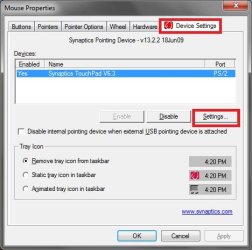
  • Click on the Device Settings tab, then the Settings tab below.
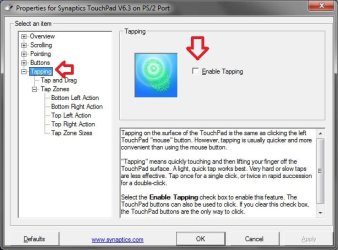
  • Select "Tapping" in the left pane, then unchec the "Enable Tapping" box as below.
  • OK your way out to apply.
1.jpg2.jpg
 

My Computer My Computer

At a glance

64-bit Windows 11 Pro for WorkstationsIntel i7-8700K OC'd to 5 GHz64 GB (4x16GB) G.SKILL TridentZ RGB DDR4 3600...ASUS ROG-STRIX-GTX1080TI-O11G-GAMING
Computer type
PC/Desktop
Computer Manufacturer/Model Number
Self built custom
OS
64-bit Windows 11 Pro for Workstations
CPU
Intel i7-8700K OC'd to 5 GHz
Motherboard
ASUS ROG Maximus XI Formula Z390
Memory
64 GB (4x16GB) G.SKILL TridentZ RGB DDR4 3600 MHz
Graphics Card(s)
ASUS ROG-STRIX-GTX1080TI-O11G-GAMING
Sound Card
Integrated
Monitor(s) Displays
2 x Samsung Odyssey G7 27"
Screen Resolution
2560x1440
Hard Drives
1TB Samsung 990 PRO M.2,
4TB Samsung 990 PRO PRO M.2,
TerraMaster F8 SSD Plus NAS
PSU
Seasonic Prime Titanium 850W
Case
Thermaltake Core P3
Cooling
Corsair Hydro H115i
Keyboard
Logitech wireless K800
Mouse
Logitech MX Master 4
Internet Speed
2 Gb/s Download and 100 Mb/s Upload
Antivirus
Malwarebyte Anti-Malware Premium
Browser
Google Chrome
Other Info
Logitech Z625 speaker system,
Logitech BRIO 4K Pro webcam,
HP Color LaserJet Pro MFP M477fdn,
APC SMART-UPS RT 1000 XL - SURT1000XLI,
Galaxy S23 Plus phone
Paul,

Your touchpad settings may vary a bit from this, but this is how it's done with a Synaptics TouchPad.
  • Open Mouse in the Control Panel (icons view)
  • Click on the Device Settings tab, then the Settings tab below.
  • Select "Tapping" in the left pane, then unchec the "Enable Tapping" box as below.
  • OK your way out to apply.
View attachment 124159View attachment 124160

Cheers for this Brink, this is also what Toshiba told me to do but as you can see from this image I don't have this option...??? :rolleyes:

proppan.png
 

My Computer My Computer

At a glance

Windows 7 ultimateTurion X2 644 GigATI Radieon
Computer Manufacturer/Model Number
Toshiba Salatlite
OS
Windows 7 ultimate
CPU
Turion X2 64
Memory
4 Gig
Graphics Card(s)
ATI Radieon
Being a practical guy I would disable the touchpad and work with a $12 mouse.
 

My Computer My Computer

At a glance

Vista, Windows7, Mint Mate, Zorin, Windows 8from 1.6GHz Duo to i7
Computer Manufacturer/Model Number
HP, Dell, Gateway, Toshiba - 4 laptops and 2 desktops
OS
Vista, Windows7, Mint Mate, Zorin, Windows 8
CPU
from 1.6GHz Duo to i7
Monitor(s) Displays
2x HP w2207
Hard Drives
5x HDD, 7x SSD, 12x Externals
Keyboard
with trackball - no mices
Mouse
Trackball mice
Internet Speed
DSL 6000
Paul,

Your touchpad settings may vary a bit from this, but this is how it's done with a Synaptics TouchPad.
  • Open Mouse in the Control Panel (icons view)
  • Click on the Device Settings tab, then the Settings tab below.
  • Select "Tapping" in the left pane, then unchec the "Enable Tapping" box as below.
  • OK your way out to apply.
View attachment 124159View attachment 124160

Cheers for this Brink, this is also what Toshiba told me to do but as you can see from this image I don't have this option...??? :rolleyes:

proppan.png
Do you install the touchpad drivers from Toshiba that may give you that option ? It looks like you are using standard windows drivers
Jerry
 

My Computer My Computer

At a glance

Win 7 Pro x64 / Win 10 ProIntel(R) Core(TM) i7-3630QM CPU @ 2.40GHz12 GB(1) Intel(R) HD Graphics 4000 (2) NVIDIA GeFo...
Computer type
Laptop
Computer Manufacturer/Model Number
Sager NP9170
OS
Win 7 Pro x64 / Win 10 Pro
CPU
Intel(R) Core(TM) i7-3630QM CPU @ 2.40GHz
Motherboard
CLEVO P170EM
Memory
12 GB
Graphics Card(s)
(1) Intel(R) HD Graphics 4000 (2) NVIDIA GeForce GTX 675M
Sound Card
(1) Realtek High Definition Audio (2) Intel(R) Display Aud
Monitor(s) Displays
17.3
Screen Resolution
1920x1080
Hard Drives
(1) Samsung 860 EVO 500GB(OS) (1) Samsung 860 EVO 500GB(Data)
Keyboard
Backlite
Antivirus
MSE, Malwarebytes Pro
Browser
Firefox
Other Info
DESKTOP: Custom-built.
OS: Win 10 Pro x64.
CASE: Rosewill R5.
CPU: Intel I5 4670K CPU @ 3.40GHz.
CPU COOLER: Cool Master Hyper 212 EVO.
MOTHERBOARD: Asus Z87-A.
MEMORY: Kingston HyperX 2x4 GB.
GPU: Nvidia Geforce 650 TI.
PSU: Corsair TX750.
DRIVES: (1) Samsung 840 120 GB SSD (2) Western Digital blue 500 GB 7200 RPM.
I have a Toshiba Laptop, and I have the double tap option. But, i've also read that there are a lot of people that have this same problem. I'm not sure a driver update would help or not, or if there would even be any drivers newer than what you already have. Going to the Toshiba site to see how much newer the drivers are than what you have installed at the moment might be an idea too.

The only, albeit, temporary thing that people have done is turning the double tap speed up to max so that the tapping would have to be quite fast for it to actually do anything.
 

My Computer My Computer

At a glance

Windows 7 Home PremiumAmd Semperon 2.10GHz2 GigATI Radeon 3100
Computer Manufacturer/Model Number
Toshiba Satellite L455D
OS
Windows 7 Home Premium
CPU
Amd Semperon 2.10GHz
Memory
2 Gig
Graphics Card(s)
ATI Radeon 3100
Sound Card
Realtek
Monitor(s) Displays
15.6 inch
Screen Resolution
1366x768
Hard Drives
250gig
Mouse
Logitech Wireless
Internet Speed
16/2 cable
Paul,

Your touchpad settings may vary a bit from this, but this is how it's done with a Synaptics TouchPad.
  • Open Mouse in the Control Panel (icons view)
  • Click on the Device Settings tab, then the Settings tab below.
  • Select "Tapping" in the left pane, then unchec the "Enable Tapping" box as below.
  • OK your way out to apply.
View attachment 124159View attachment 124160

Cheers for this Brink, this is also what Toshiba told me to do but as you can see from this image I don't have this option...??? :rolleyes:

proppan.png
Do you install the touchpad drivers from Toshiba that may give you that option ? It looks like you are using standard windows drivers
Jerry

I didn't notice that the first time I looked at it, but yes, it seems as if yours is using a generic driver to run it. This is mine (notice the highlighted area)
 

Attachments

  • Capture.PNG
    Capture.PNG
    37.3 KB · Views: 4

My Computer My Computer

At a glance

Windows 7 Home PremiumAmd Semperon 2.10GHz2 GigATI Radeon 3100
Computer Manufacturer/Model Number
Toshiba Satellite L455D
OS
Windows 7 Home Premium
CPU
Amd Semperon 2.10GHz
Memory
2 Gig
Graphics Card(s)
ATI Radeon 3100
Sound Card
Realtek
Monitor(s) Displays
15.6 inch
Screen Resolution
1366x768
Hard Drives
250gig
Mouse
Logitech Wireless
Internet Speed
16/2 cable
Paul,


Your touchpad settings may vary a bit from this, but this is how it's done with a Synaptics TouchPad.
  • Open Mouse in the Control Panel (icons view)
  • Click on the Device Settings tab, then the Settings tab below.
  • Select "Tapping" in the left pane, then unchec the "Enable Tapping" box as below.
  • OK your way out to apply.
View attachment 124159View attachment 124160

Cheers for this Brink, this is also what Toshiba told me to do but as you can see from this image I don't have this option...??? :rolleyes:

proppan.png

You might download and install the new 15.1.22 driver version that Synaptic just released to see if it may help. It has this option with mine.

Drivers | Synaptics
 
Last edited:

My Computer My Computer

At a glance

64-bit Windows 11 Pro for WorkstationsIntel i7-8700K OC'd to 5 GHz64 GB (4x16GB) G.SKILL TridentZ RGB DDR4 3600...ASUS ROG-STRIX-GTX1080TI-O11G-GAMING
Computer type
PC/Desktop
Computer Manufacturer/Model Number
Self built custom
OS
64-bit Windows 11 Pro for Workstations
CPU
Intel i7-8700K OC'd to 5 GHz
Motherboard
ASUS ROG Maximus XI Formula Z390
Memory
64 GB (4x16GB) G.SKILL TridentZ RGB DDR4 3600 MHz
Graphics Card(s)
ASUS ROG-STRIX-GTX1080TI-O11G-GAMING
Sound Card
Integrated
Monitor(s) Displays
2 x Samsung Odyssey G7 27"
Screen Resolution
2560x1440
Hard Drives
1TB Samsung 990 PRO M.2,
4TB Samsung 990 PRO PRO M.2,
TerraMaster F8 SSD Plus NAS
PSU
Seasonic Prime Titanium 850W
Case
Thermaltake Core P3
Cooling
Corsair Hydro H115i
Keyboard
Logitech wireless K800
Mouse
Logitech MX Master 4
Internet Speed
2 Gb/s Download and 100 Mb/s Upload
Antivirus
Malwarebyte Anti-Malware Premium
Browser
Google Chrome
Other Info
Logitech Z625 speaker system,
Logitech BRIO 4K Pro webcam,
HP Color LaserJet Pro MFP M477fdn,
APC SMART-UPS RT 1000 XL - SURT1000XLI,
Galaxy S23 Plus phone
Paul, I've got a Synaptics PS/2 also, and am wondering whether you're looking in the right place for the Tapping function. For example, in your screenshot, it looks like your options TREE ISN'T OPENED, so you can't see all of your options. Why don't you try following my directions below to see if they will lead you to the control for Tapping. There are some other controls that will also help your mousepad's sensitivity issues. I'll highlight them for you:

Right click Desktop to open Personalize
Scroll down and select: MOUSE POINTERS; this opens the TOUCHPAD and MOUSE PROPERTIES page.
Select DEVICE SETTINGS:
Click the Settings bar:
Double-Click on Overview to open the tree and read the list of the multiple controls. (Double click on the + icon to open tree.)
TAPPING: Set to ‘No.’
SENSITIVITY: Double click on Sensitivity to open the tree and set the controls: (Double click on the + icon to open tree.)
PALM CHECK: (You can leave the Palm Check at the default spot, near center but a little toward Maximum. If mouse gets erratic, increase toward Maximum. If mouse is not responsive to certain clicks, decrease toward Minimum)
TOUCH SENSITIVITY:
Light Touch – (You can start with having it in the center, and adjust as needed.)
Click on Apply, and then OK.
 

My Computer My Computer

At a glance

Vista 64 bit and 32 bit (SP2)Intel(R) Core(TM)2 Duo Processor T9400 (2.53 GHz4GB DDR2 System Memory (2 Dimm)512 MB NVIDIA GeForce 9600M GT
Computer Manufacturer/Model Number
HP Pavillion dv5t (generation 1)
OS
Vista 64 bit and 32 bit (SP2)
CPU
Intel(R) Core(TM)2 Duo Processor T9400 (2.53 GHz
Memory
4GB DDR2 System Memory (2 Dimm)
Graphics Card(s)
512 MB NVIDIA GeForce 9600M GT
Monitor(s) Displays
15.4" diagonal WSXGA+ High-Definition HP BrightView Widescre
Screen Resolution
1680 x 1050
Hard Drives
320GB 5400RPM SATA Hard Drive with HP ProtectSmart Hard Drive Protection
Keyboard
Built-in HP
Mouse
Built in - Synaptics TouchPad V6.5 on PS/2 Port
Internet Speed
Max
Other Info
~ Intel Next-Gen Wireless-N Mini-card w/Bluetooth ~ Blu-Ray ROM DVD+/-R/RW ~ Integ. HDTV Hybrid Tuner ~ 12 Cell Battery ~ MS Office (Home Premium) 2007 ~
Hey there fella's followed your advice and it seems worse lol... please check out these images....

MousePro.png


PS2Pro.png
 

My Computer My Computer

At a glance

Windows 7 ultimateTurion X2 644 GigATI Radieon
Computer Manufacturer/Model Number
Toshiba Salatlite
OS
Windows 7 ultimate
CPU
Turion X2 64
Memory
4 Gig
Graphics Card(s)
ATI Radieon
There's no way that merely opening the device options tree could have made the situation worse. It sounds like your Synaptics touchpad/mouse may have become corrupted, because you should have the Tapping option. Your driver clearly does not seem to be the most recent. (It would have helped if you had told us this earlier!) Perhaps that is the problem, and you need to download the most recent driver for your touchpad/mouse.
 

My Computer My Computer

At a glance

Vista 64 bit and 32 bit (SP2)Intel(R) Core(TM)2 Duo Processor T9400 (2.53 GHz4GB DDR2 System Memory (2 Dimm)512 MB NVIDIA GeForce 9600M GT
Computer Manufacturer/Model Number
HP Pavillion dv5t (generation 1)
OS
Vista 64 bit and 32 bit (SP2)
CPU
Intel(R) Core(TM)2 Duo Processor T9400 (2.53 GHz
Memory
4GB DDR2 System Memory (2 Dimm)
Graphics Card(s)
512 MB NVIDIA GeForce 9600M GT
Monitor(s) Displays
15.4" diagonal WSXGA+ High-Definition HP BrightView Widescre
Screen Resolution
1680 x 1050
Hard Drives
320GB 5400RPM SATA Hard Drive with HP ProtectSmart Hard Drive Protection
Keyboard
Built-in HP
Mouse
Built in - Synaptics TouchPad V6.5 on PS/2 Port
Internet Speed
Max
Other Info
~ Intel Next-Gen Wireless-N Mini-card w/Bluetooth ~ Blu-Ray ROM DVD+/-R/RW ~ Integ. HDTV Hybrid Tuner ~ 12 Cell Battery ~ MS Office (Home Premium) 2007 ~
Back
Top