How to search for a .sol file

Let me try to explain in simpler terms. Perhaps my comments were too harsh, but forgive me for being frustrated. When you do support for this long...it's easy to get frustrated.

If I don't know how to change my air filter or spark plugs...would it make sense for me to go on a rant to BMW about how much their cars suck? Is it their fault? No, not at all. Fault isn't a variable. I just need to learn how to do something, that's all.

What frustrated me wasn't that you didn't know about the proper switches....it's that you (as is the typical pattern) decided to throw logic and common sense out the Windows and start blaming Microsoft. There are plenty of things to ding Microsoft for....but this is not one of them.

So if I was too harsh, I apologize. My patience has been wearing thin lately. That happens when you get midnight phone calls from a user who can't figure out how to shut their laptop down. Yes...that's a true story.
 

My Computer My Computer

At a glance

Windows 7 Ultimate x64 SP1Intel Core i7-260012 GB Patriot Extreme DDR3-1333Nvidia GTX 470
OS
Windows 7 Ultimate x64 SP1
CPU
Intel Core i7-2600
Motherboard
Gigabyte GA-P67A-UD3P-B3
Memory
12 GB Patriot Extreme DDR3-1333
Graphics Card(s)
Nvidia GTX 470
Monitor(s) Displays
Dell UltraSharp 2209WA
Hard Drives
OCZ Agility3 240 GB, WD5001AALS, WD7501AALS
PSU
OCZ ModStream 700W
Case
CoolerMaster HAF 912 Advanced
Cooling
CoolerMaster Hyper 212 Plus
Being rude? No.
But you are most certainly being intellectually dishonest.

Let's go take a live poll somewhere, anywhere, where we ask the consumer to search for a .sol file on a windows 7 machine.

If more than 10% of the people have any clue whatsoever about how to find those files, you win.

If less than that, I win.

I would bet all my future wages that it wouldn't even be close to 10%.

What does that tell you? Maybe you're the one who should be banned for being so pretentious.

This is not everyday stuff. This is vastly over the head of the average consumer.

Those of us who even know to log onto a site like this are the ones who wind up fixing everything for friends and family, and all because of the arrogance of programmers who see the world through the same glasses you do.
I could spend the time tearing apart so many of your comments, but what good would that do? You've already made up your mind to blame the programmers for your lack of understanding. As I said...this is a basic part of Windows...has been since the days BEFORE Windows. Nothing's new here, except the fact that the Search feature is now brought right in front of your face, simplifying the entire process.

Pretentious? No....realistic? Yes. My user base is the least tech savvy around, consisting mostly of women over the age of 50. No, that's not a sexist comment...it is realistic. They despise technology, and fight me every step of the way through any upgrade. Yet they mostly understood this.....or had the capacity to do a quick ten second Google search for the answer.

I've been doing some level of support for 15 years now, and I'd take the bet about 10% understanding or having the ability to quickly figure it out themselves.

If you think I'm being rude and pretentious, so be it...but let me explain. Take a wild guess how many threads we've had recently with the OP firing right off the bat at Microsoft for how bad their search feature is...only to later realize they just didn't know something basic. Do you realize some of those people didn't even know they now have a search box in EACH and EVERY Explorer Window??? It gets old real quick. It's snowing...blame Microsoft. I lost my job....blame Microsoft. McNabb was just benched by the Redskins...blame Microsoft. A teenage girl is pregnant.....blame Microsoft. Gets old quick.

Let's drop the attitude...admit you didn't know something but now you do....and move on from it. Learn from it...and learn that not everything is Microsoft's fault.

Yes, I learned something rather simple. All by simply logging onto this site. A fact which you refuse to acknowledge the vast majority of the public will never do.

The fact that you think it is acceptable for the world's leading operating system to require that, puts you squarely in the camp I suggested earlier. And that's the software engineers who don't have a clue about the regular user.

But nevermind our disagreement on that point. Let's take this to another point of fact.

Microsoft will now find themselves in the position of fielding unnecessary tech support contacts either via email, live support, or phone calls, all because some software engineer decided there was no need to acknowledge something as basic as a "." at the start of a search query.
But i'm sure you don't mind that at all, after all, microsoft has deep pockets and they can afford to enlighten the other 90% of the inferior thinkers of the population.
On an issue like this it will probably only amount to a tiny fraction of a percentage of tech support. So why worry, right?
 

My Computer My Computer

At a glance

Win 7 Ultimate x64
OS
Win 7 Ultimate x64
Let me try to explain in simpler terms. Perhaps my comments were too harsh, but forgive me for being frustrated. When you do support for this long...it's easy to get frustrated.

If I don't know how to change my air filter or spark plugs...would it make sense for me to go on a rant to BMW about how much their cars suck? Is it their fault? No, not at all. Fault isn't a variable. I just need to learn how to do something, that's all.

What frustrated me wasn't that you didn't know about the proper switches....it's that you (as is the typical pattern) decided to throw logic and common sense out the Windows and start blaming Microsoft. There are plenty of things to ding Microsoft for....but this is not one of them.

So if I was too harsh, I apologize. My patience has been wearing thin lately. That happens when you get midnight phone calls from a user who can't figure out how to shut their laptop down. Yes...that's a true story.
That's a complete non sequitur.

A more accurate example would be for bmw to go from a vehicle that John Doe can walk up to and drive first time out of the box, to one that requires certification to operate.

And yes, that would upset the majority of bmw owners.
 

My Computer My Computer

At a glance

Win 7 Ultimate x64
OS
Win 7 Ultimate x64
A computer hardly requires a certificate to operate. Do you have any experience with OSX or Linux? If you are still hung up on the "impression" that the Search is hard to use, spend some time with those two OSes and get back to me on what's the easiest to use.

Let's take a look at some of your other points. Microsoft has had these search syntaxes for two decades now. This is nothing new. The VAST majority of Microsoft's user bases are familiar with it, so can you imagin the outcry if it was changed? Can you imagine the outcry if CTRL+C was changed to CTRL+Q or something different? Just because you didn't know it, doesn't mean Microsoft is at fault.

Lastly, no one in their right mind goes to Microsoft for support, unless you are an Enterprise customer with a support contract. That's why people Google for info, or come to a forum like this...where, as I said before, you could have simply asked about the proper syntax, rather than go on a wild, baseless rant directed at Microsoft.

This is a common point of knowledge for Windows users. I say that to be factual, not as an insult. You are following a very common pattern by directing anger towaards Microsoft to cover up something you didn't know. It's called deflection in psychology. Again, it isn't that you didn't know this that's the issue...it's that you still, for some unknown reason, blame Microsoft.

Seriously...spend some time with those other two OSes. I use two Linux machines, and maintain three OSX systems in my office. If you really think Microsoft is making Windows 7 hard to use....you will be blown away.
 

My Computer My Computer

At a glance

Windows 7 Ultimate x64 SP1Intel Core i7-260012 GB Patriot Extreme DDR3-1333Nvidia GTX 470
OS
Windows 7 Ultimate x64 SP1
CPU
Intel Core i7-2600
Motherboard
Gigabyte GA-P67A-UD3P-B3
Memory
12 GB Patriot Extreme DDR3-1333
Graphics Card(s)
Nvidia GTX 470
Monitor(s) Displays
Dell UltraSharp 2209WA
Hard Drives
OCZ Agility3 240 GB, WD5001AALS, WD7501AALS
PSU
OCZ ModStream 700W
Case
CoolerMaster HAF 912 Advanced
Cooling
CoolerMaster Hyper 212 Plus
Again, I have a much greater respect for Search now. But surely you don't expect that the masses will comprehend the intricacies of search when often, just operating their computer is a challenge?
I agree completely with everything you said, with the exception of one point.

We are talking about the readers of this forum...a Windows 7 Enthusiasts Forum. We aren't talk about a group of people standing in line at Best Buy purchasing a computer for their kids of grandkids. The level of knowledge and understanding the readers of this forum have are FAR above the general populous.

Deacon,
I understand your frustrations (stated in earlier posts) regarding those who automatically bash MS re; search, but I also understand that tendancy, given that many may not have the tech-inclination that others of us possess. In essence, those who have abilities other than tech are simply left out as far as an effective, simple win search is concerned. I understand the propensity to blame MS for that oversight. I also understand that Win7 search is a work in progress, and that MS will likely rectify the issue. And one more thing I understand...the frustrating dynamic of having to repeatedly address what, to you, seems simple.

I do, repectfully, disagree with your general assertion regarding the level of knowledge of those visiting or frequenting this forum. There are many members here who have a great deal of knowledge, and from whom I have learned (and will continue to learn) much. However, there are also many who do not possess or have yet to aqcuire the skills necessary to have the understanding you possess.

It seems to me that one of this site's primary purposes is to help those less knowledgeable than ourselves. The rep system (reward for providing good help), the tutorials, all are aspects of help for those lacking skills. I.E., how many advanced users here need a tut for System Restore, or Moving User Folders?

I think it beneficial to our mental well being to accept that there will be many issues, rants and questions regarding, amongst other things, Win 7 Search. :)

Highest regards,
James
 

My Computer My Computer

At a glance

Win7U 64 RTMQ95508GB GskillASUS|EAH4850/HTDI/1GD3/A
OS
Win7U 64 RTM
CPU
Q9550
Motherboard
GA-EP45-UD3R
Memory
8GB Gskill
Graphics Card(s)
ASUS|EAH4850/HTDI/1GD3/A
Sound Card
xfi Plat
Monitor(s) Displays
Dell 2405fpw
Screen Resolution
1920x1200
Hard Drives
Seagate & WD sata Drives
PSU
Antec
Case
Antec
Keyboard
MS Natural Ergonomic 4000
Mouse
Logitech MX610 USB Cordless
I understand what you are saying, James. But again, my issue isn't that someone didn't know this syntax or command....my frustrations are with the fact it's always Microsoft's fault. People toss common sense aside, and rather than do any reading or seeking of help, they just turn to the blame game. It's always Microsoft's fault for trying to screw the consumers. What is Microsoft thinking!?!?!

Truth of the matter is, Microsoft is the platform of choice because it IS the easiest to use. When Microsoft releases a new product, they have to consider the billions of users as a whole. You can't make an OS that everyone will love everything about. It's simply not possible. If Microsoft felt that keeping search syntax the same as it is has been all along to keep in what the majority of users are used to...why is that a bad thing? Just think of how much public outcry they'd face if they changed around some of the simple, basic commands we're all used to.

For example, what if they reversed the left-click and the right-click? What if several of the keyboard shortcuts were changed? Point is, Microsoft is not to blame for somehow making Windows 7 Search "hard to use". One person may feel that way because that one person didn't know how to use it in the first place....but that doesn't mean Microsoft is somehow at fault.

Yes, I understand computing issues are frustrating. No on in corporate IT would disagree with that. But how productive is it to skip over solutions and learning opportunities so you can go on ranting and raving about how a company and their products suck? That's the point I'm trying to make...that too many people jump to the anger side, rather than get excited about a learning opportunity.
 

My Computer My Computer

At a glance

Windows 7 Ultimate x64 SP1Intel Core i7-260012 GB Patriot Extreme DDR3-1333Nvidia GTX 470
OS
Windows 7 Ultimate x64 SP1
CPU
Intel Core i7-2600
Motherboard
Gigabyte GA-P67A-UD3P-B3
Memory
12 GB Patriot Extreme DDR3-1333
Graphics Card(s)
Nvidia GTX 470
Monitor(s) Displays
Dell UltraSharp 2209WA
Hard Drives
OCZ Agility3 240 GB, WD5001AALS, WD7501AALS
PSU
OCZ ModStream 700W
Case
CoolerMaster HAF 912 Advanced
Cooling
CoolerMaster Hyper 212 Plus
I just don't understand how anyone could call this difficult?

I want to find all music files on my computer where the word Blues appears in the name, is presented by Joe Cocker or Dire Straits, and which I have tagged as favorite. Syntax:
Code:
name:Blues kind:music artist:(Cocker OR Dire) tag:favorite

I need to find all email messages sent before 30th of June 2010 by [email protected] where phrase memo appears in subject. Syntax:
Code:
subject:memo type:email  before:30/6/2010 from:[email protected]

If this is difficult to learn, then IMO the problem is more in users learning capacity than in Windows.

Kari
 

My Computer My Computer

At a glance

Windows 10 Pro x64 EN-GB1.6 GHz Intel Core i7-720QM Processor6 GBATI Mobility Radeon HD 5850 Graphics
Computer type
Laptop
Computer Manufacturer/Model Number
HP ENVY 17-1150eg
OS
Windows 10 Pro x64 EN-GB
CPU
1.6 GHz Intel Core i7-720QM Processor
Memory
6 GB
Graphics Card(s)
ATI Mobility Radeon HD 5850 Graphics
Sound Card
Beats sound system with integrated subwoofer
Monitor(s) Displays
17" laptop display, 22" LED and 32" Full HD TV through HDMI
Screen Resolution
1600*900 (1), 1920*1080 (2&3)
Hard Drives
Internal: 2 x 500 GB SATA Hard Disk Drive 7200 rpm
External: 2TB for backups, 3TB USB3 network drive for media
Cooling
As Envy runs a bit warm, I have it on a Cooler Master pad
Keyboard
Logitech diNovo Media Desktop Laser (bluetooth)
Mouse
Logitech Performance Mouse MX
Internet Speed
50/10 Mbps VDSL
Antivirus
Windows Defender 4.3.9431.0
Browser
Maxthon 3.5.2., IE11
If this is difficult to learn, then IMO the problem is more in users learning capacity than in Windows.

Kari

Or perhaps better put (and certainly less attacking), user's abilities. Within our human limits, it's impossible to understand everything, yet I'm certain that the standard you set is not one you apply to yourself in those areas in which you are deficient.

The point being that expecting all others to fully and easily grasp what you consider to be a simple matter is not a problem with everyone else, but a problem with your expectations.

With a little studying, is AQS that difficult? I don't think so. My mother certainly would, yet she is quite an intelligent woman. Absolutely no discernible learning disabilities.

Also, believing that there won't be those who don't understand and who won't rant and rave against MS is futile. Evidence has shown that there will be. And there will continue to be. Perhaps the most helpful (and least frustrating) thing to do would be to simply post a link to Dzomlija's tutorial:

( http://www.sevenforums.com/tutorials/129437-windows-search-configure-use.html )

If they don't get it with the supplication of this and other links, then 'set them free' (and yourself in the process...)


James
 

My Computer My Computer

At a glance

Win7U 64 RTMQ95508GB GskillASUS|EAH4850/HTDI/1GD3/A
OS
Win7U 64 RTM
CPU
Q9550
Motherboard
GA-EP45-UD3R
Memory
8GB Gskill
Graphics Card(s)
ASUS|EAH4850/HTDI/1GD3/A
Sound Card
xfi Plat
Monitor(s) Displays
Dell 2405fpw
Screen Resolution
1920x1200
Hard Drives
Seagate & WD sata Drives
PSU
Antec
Case
Antec
Keyboard
MS Natural Ergonomic 4000
Mouse
Logitech MX610 USB Cordless
James, I used that phrase on purpose. I'm sure your mother would learn to use Windows Search in a day or two, as did my mother who only started computing at 70. It's almost normal language, with clear and easy to follow logics in syntax.
 

My Computer My Computer

At a glance

Windows 10 Pro x64 EN-GB1.6 GHz Intel Core i7-720QM Processor6 GBATI Mobility Radeon HD 5850 Graphics
Computer type
Laptop
Computer Manufacturer/Model Number
HP ENVY 17-1150eg
OS
Windows 10 Pro x64 EN-GB
CPU
1.6 GHz Intel Core i7-720QM Processor
Memory
6 GB
Graphics Card(s)
ATI Mobility Radeon HD 5850 Graphics
Sound Card
Beats sound system with integrated subwoofer
Monitor(s) Displays
17" laptop display, 22" LED and 32" Full HD TV through HDMI
Screen Resolution
1600*900 (1), 1920*1080 (2&3)
Hard Drives
Internal: 2 x 500 GB SATA Hard Disk Drive 7200 rpm
External: 2TB for backups, 3TB USB3 network drive for media
Cooling
As Envy runs a bit warm, I have it on a Cooler Master pad
Keyboard
Logitech diNovo Media Desktop Laser (bluetooth)
Mouse
Logitech Performance Mouse MX
Internet Speed
50/10 Mbps VDSL
Antivirus
Windows Defender 4.3.9431.0
Browser
Maxthon 3.5.2., IE11
For what it's worth, I have learned the new search syntax in Win 7 but I still would prefer the search interface that was in XP. And I do know a lot about computers.

If MS could come up with a simple GUI like they had in XP with the drop-down options for file types, locations, dates, size, contents, etc., it would be much simpler for all.

Don't flame me, I'm rather knowledgeable about the workings of Win 7, among other MS softwares; the above is my respectful, educated opinion regarding the new search methods implemented in Win 7.

No matter how one feels about Win 7 search, it should be noted that questions pertaining to it are among the most common issues presented here. There is a reason for that.
 

My Computer My Computer

At a glance

Windows 7 Ultimate x64 SP1Core2 Duo4 GBGM965 on-board
Computer Manufacturer/Model Number
Toshiba L355D
OS
Windows 7 Ultimate x64 SP1
CPU
Core2 Duo
Motherboard
Intel
Memory
4 GB
Graphics Card(s)
GM965 on-board
Sound Card
RealTek on-board
Monitor(s) Displays
19"+17"(laptop)
Screen Resolution
1440x900 (x 2)
Hard Drives
500GB Ext. 200GB Internal
PSU
N/A
Case
N/A
Cooling
N/A
I can see both sided of the argument. If Windows 7 search is so easy, then why are there so few that understand it? It's certainly not like XP's search (which was as easy as it gets) but then again, XP couldn't match the power and speed of 7's search. I find it easy to use, as do many here. The syntax has been around for years. The only problem with the Windows 7 syntax is that people never used it in Xp, and therefore, struggle with it in 7. I have to admit, if I had just installed Windows 7 and just started playing around with it, I would have had major issues with search. I did the smart thing, I picked up a book and learned how to use it properly. Then again, I read my cars' owners manual cover to cover. How many people do that? Working in a new car dealership, I can tell you, almost none. I can understand the frustrations but people, please, do yourself a favor and learn how to use this magnificent new feature in Windows 7. If not, I'm here to help. :D
 

My Computer My Computer

At a glance

Windows 7 Pro/32 Academic. Build 7600Intel 2.3 Duo core4 GB DDRNvidia GeForce 9500 GT
Computer Manufacturer/Model Number
Custom Build
OS
Windows 7 Pro/32 Academic. Build 7600
CPU
Intel 2.3 Duo core
Motherboard
EliteGroup G31T-M
Memory
4 GB DDR
Graphics Card(s)
Nvidia GeForce 9500 GT
Sound Card
Built in
Monitor(s) Displays
Viewsonic 15" 4:3
Screen Resolution
1280 x 1024
Hard Drives
WD Caviar Black 750 GB
WD 250 GB External
PSU
Antec 450w
Keyboard
Standard windows
Mouse
Logitech USB
Internet Speed
Bellsouth DSL 6.0
The problem as I see it: we "old farts" that grew up with MS-DOS and the likes had to read in order to do anything useful with a computer.Basically all you had was something similar to open CMD in fullscreen. A blinking prompt :

Saturday Dec 18 C:\ >

Just realize that your colorful clickable desktop is nothing but an extension for that prompt.
For some reason unbeknown to me people nowadays expect to unpack and start clicking left and right and whenever anything doesn't fit their train of logical thoughts it's the programmer's fault and ultimately the fault of Microsoft.
Somehow the necessity of learning, what you want to master, was left behind.
and people were overrun by the development of new shiny clickables.
What I complain about is not that people have gotten less intelligent over time but that advertising created an over-expectancy of some sort.
I clearly reach my limits where I have a hard time to relate my thoughts in a foreign language...so bear with me if it sounds too harsh. I don't intend to insult anybody.

My point being: People that have no problem to study manuals for hours to master their XBox or iPhone or even the guides for their tv-remote controls, seem to refuse to do so when it comes to computers.
I don't know...to me it seems perfectly logical to use a "." if I search for an file-extension or even a *.sol to limit the amount of "false positives".

Many come here and ask about things they don't grasp at first...and that is good.
It shows that they are willing to learn and understand.
Those people are the reason I'm here...not the few whiners who seek to blame their personal shortcomings on everybody else.
So let's get on with our lifes and help those who want to be helped.

-DG
 

My Computer My Computer

At a glance

Windows 7 Ultimate x86DualCore AMD Athlon 64 X2, 2600 MHz 5200+Samsung 2GB DDR2Onboard NVIDIA GeForce 6150SE nForce 430
Computer Manufacturer/Model Number
HP m8000n
OS
Windows 7 Ultimate x86
CPU
DualCore AMD Athlon 64 X2, 2600 MHz 5200+
Motherboard
Asus M2N68-LA (Narra)
Memory
Samsung 2GB DDR2
Graphics Card(s)
Onboard NVIDIA GeForce 6150SE nForce 430
Sound Card
Onboard nVIDIA nForce 6100-430 (MCP61P)
Monitor(s) Displays
Westinghouse 19" LED
Screen Resolution
1280x1024
Hard Drives
SATA II Seagate Barracuda 500GB
USB II WD Elements 500GB
USB II WD My Book 1TB
USB II WD My Book 2TB
PSU
Stock (HP)
Case
Stock (HP)
Cooling
Stock
Keyboard
Logitech Classic KB 200
Mouse
Standard HP opticle USB mouse
Also, I find that it doesn't always find all files under all conditions, and, if I just create a file, it will not find it for several hours. Perhaps the index needs to catch up. No excuse, IMO. Conceivably, you could chalk all of this up to my ignorance (of which I confess no shortage), but if you believe that Search is without flaw, you haven't thought it through.

If it takes so long to update the index, then perhaps yours is corrupted somehow and needs rebuilding (See Windows Search - Configure and Use)?

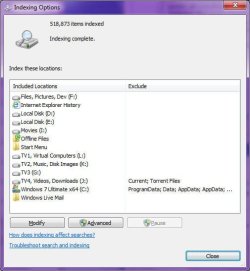
My own index covers 518,876 files...

Image1.jpg

...and if I create a new file, or modify an existing one, then the index updates within a matter of seconds. Usually around 4 to 5, which is ok, but could perhaps stand with a little more tweaking to get the update time to 2 seconds or less.
 

My Computer My Computer

At a glance

Windows 7 Professional 32-bit SP1AMD A4/A63.00GB EDOVMware SVGA 3D
Computer type
PC/Desktop
Computer Manufacturer/Model Number
Virtual Machine
OS
Windows 7 Professional 32-bit SP1
CPU
AMD A4/A6
Motherboard
Intel Corporation 440BX Desktop Reference Platform
Memory
3.00GB EDO
Graphics Card(s)
VMware SVGA 3D
Sound Card
High Definition Audio Device
Monitor(s) Displays
Generic Non-PnP Monitor on VMware SVGA 3D
Screen Resolution
1440x900
Hard Drives
1 x 60GB VMware Virtual SATA Hard Drive ATA Device
Antivirus
Kaspersky Total Security
If this is difficult to learn, then IMO the problem is more in users learning capacity than in Windows.

James, I used that phrase on purpose. I'm sure your mother would learn to use Windows Search in a day or two, as did my mother who only started computing at 70. It's almost normal language, with clear and easy to follow logics in syntax.

And therein lies the point, which seems to have gone unnoticed. Many of those who visit this forum are novices. If we can agree that a primary purpose of this board is to help those who don't understand certain aspects of Windows 7, we do them a disservice by responding as though they are of a diminished "learning capacity".

Secondly, not everyone will get it. That anyone believes that they should is incidental to the reality. Maybe with some research they will, maybe not. The world is made up of individuals with varying abilities. Inevitably, some will not understand what you may consider simple, just as you may not understand something that others consider simple. To state otherwise is a fallacy. This is a simple fact of life that most understand and accept.

By now, you may have some insight that the point does not pertain to how simple or how complicated search is.

James
 

My Computer My Computer

At a glance

Win7U 64 RTMQ95508GB GskillASUS|EAH4850/HTDI/1GD3/A
OS
Win7U 64 RTM
CPU
Q9550
Motherboard
GA-EP45-UD3R
Memory
8GB Gskill
Graphics Card(s)
ASUS|EAH4850/HTDI/1GD3/A
Sound Card
xfi Plat
Monitor(s) Displays
Dell 2405fpw
Screen Resolution
1920x1200
Hard Drives
Seagate & WD sata Drives
PSU
Antec
Case
Antec
Keyboard
MS Natural Ergonomic 4000
Mouse
Logitech MX610 USB Cordless
Also, I find that it doesn't always find all files under all conditions, and, if I just create a file, it will not find it for several hours. Perhaps the index needs to catch up. No excuse, IMO. Conceivably, you could chalk all of this up to my ignorance (of which I confess no shortage), but if you believe that Search is without flaw, you haven't thought it through.

If it takes so long to update the index, then perhaps yours is corrupted somehow and needs rebuilding (See Windows Search - Configure and Use)?


...and if I create a new file, or modify an existing one, then the index updates within a matter of seconds. Usually around 4 to 5, which is ok, but could perhaps stand with a little more tweaking to get the update time to 2 seconds or less.

Thanks for the comments. I have read much material, including at the link you provided (and authored...nicely done.) I have rebuilt the index on more than one occasion. But really, educating myself has gone a long way in resolving my complaints regarding search. There are some issues, but I think I can live with them for the moment.

The comments you quoted were really part of a larger point I was attempting to make. I am intrigued at your mention of 'tweaking', however. Could I impose on you to elaborate?

Thanks,
James
 

My Computer My Computer

At a glance

Win7U 64 RTMQ95508GB GskillASUS|EAH4850/HTDI/1GD3/A
OS
Win7U 64 RTM
CPU
Q9550
Motherboard
GA-EP45-UD3R
Memory
8GB Gskill
Graphics Card(s)
ASUS|EAH4850/HTDI/1GD3/A
Sound Card
xfi Plat
Monitor(s) Displays
Dell 2405fpw
Screen Resolution
1920x1200
Hard Drives
Seagate & WD sata Drives
PSU
Antec
Case
Antec
Keyboard
MS Natural Ergonomic 4000
Mouse
Logitech MX610 USB Cordless
The comments you quoted were really part of a larger point I was attempting to make. I am intrigued at your mention of 'tweaking', however. Could I impose on you to elaborate?

I'm think along the lines of Microsoft improving the Search index further, so that it update quicker than it already does. 4-5 seconds update time isn't bad, but I'd like to see that time improved...
 

My Computer My Computer

At a glance

Windows 7 Professional 32-bit SP1AMD A4/A63.00GB EDOVMware SVGA 3D
Computer type
PC/Desktop
Computer Manufacturer/Model Number
Virtual Machine
OS
Windows 7 Professional 32-bit SP1
CPU
AMD A4/A6
Motherboard
Intel Corporation 440BX Desktop Reference Platform
Memory
3.00GB EDO
Graphics Card(s)
VMware SVGA 3D
Sound Card
High Definition Audio Device
Monitor(s) Displays
Generic Non-PnP Monitor on VMware SVGA 3D
Screen Resolution
1440x900
Hard Drives
1 x 60GB VMware Virtual SATA Hard Drive ATA Device
Antivirus
Kaspersky Total Security
I'm think along the lines of Microsoft improving the Search index further, so that it update quicker than it already does. 4-5 seconds update time isn't bad, but I'd like to see that time improved...

OK. Thanks!
 

My Computer My Computer

At a glance

Win7U 64 RTMQ95508GB GskillASUS|EAH4850/HTDI/1GD3/A
OS
Win7U 64 RTM
CPU
Q9550
Motherboard
GA-EP45-UD3R
Memory
8GB Gskill
Graphics Card(s)
ASUS|EAH4850/HTDI/1GD3/A
Sound Card
xfi Plat
Monitor(s) Displays
Dell 2405fpw
Screen Resolution
1920x1200
Hard Drives
Seagate & WD sata Drives
PSU
Antec
Case
Antec
Keyboard
MS Natural Ergonomic 4000
Mouse
Logitech MX610 USB Cordless
I can see both sided of the argument. If Windows 7 search is so easy, then why are there so few that understand it?
That's our society. Ever go grocery shopping and get in the self-checkout lines...and happen to be beyond one of the geniuses who can't figure it out? How about the people who can't figure out how to use an ATM? Point is, when you try to make something easy...there will still be people who can't figure it out. You know the saying:

When something is made idiot proof, we'll build a better idiot.
 

My Computer My Computer

At a glance

Windows 7 Ultimate x64 SP1Intel Core i7-260012 GB Patriot Extreme DDR3-1333Nvidia GTX 470
OS
Windows 7 Ultimate x64 SP1
CPU
Intel Core i7-2600
Motherboard
Gigabyte GA-P67A-UD3P-B3
Memory
12 GB Patriot Extreme DDR3-1333
Graphics Card(s)
Nvidia GTX 470
Monitor(s) Displays
Dell UltraSharp 2209WA
Hard Drives
OCZ Agility3 240 GB, WD5001AALS, WD7501AALS
PSU
OCZ ModStream 700W
Case
CoolerMaster HAF 912 Advanced
Cooling
CoolerMaster Hyper 212 Plus
Back
Top