ASUS K50IJ-RBR7 Laptop: Wired Internet is SLOW

TravisD

New member
Local time
8:23 AM
Messages
2
Hi guys. I found this forum because I am having lots of frustrations dealing with my new laptop that I got yesterday. It is an ASUS K50IJ-RBR7 with Windows 7 Home Premium 64-Bit. Pentium dual core CPU T4500 2.30 GHz, 4 GB Ram. The Network adapters are Atheros AR8121/AR8113/AR8114 PCI-E Ethernet Controller and Atheros AR9285 Wireless Network Adapter.

Before I bought this laptop I had an 8 year old laptop with XP and my internet speed was blazing fast. Internet pages would load super fast and youtube videos would play just as soon as I hit play. I only had 1 GB of Ram on that laptop as well. I have charter communications cable internet and I am hard wired into a Linksys CM100 cable modem. As soon as I switched to my new ASUS laptop and got everything installed and setup, I noticed extremely slow download speeds and page loading speeds. It literally takes 2 minutes to navigate from website to website. I also noticed that when I was downloading Adobe flash player it was downloading at 10kbs??? Does anyone know what could possibly be the problem?

I already called charter and spent an hour on the phone with a troubleshooter and he said that my internet connection is testing and pinging great from his end. He even had me goto speedtest.net and test my speed and it was saying download speed was 7 MBs and upload 2 MBs and ping around 240. But when I physically try to load pages and download programs I am not getting those speeds to translate onto my PC. The troubleshooter then had me to log into Safe mode with networking and try a few things and he said that my speeds were testing even higher while in that mode, but as soon as we switch back to normal windows 7 64 bit mode my speeds decrease significantly. So he insists that I am having some sort of software problems on my end since the connection is testing great. Any suggestions?

Thanks,
Trav
 

My Computer My Computer

At a glance

Windows 7 Home Premium 64 Bit
Computer Manufacturer/Model Number
ASUS K50IJ-
OS
Windows 7 Home Premium 64 Bit
Hi guys. I found this forum because I am having lots of frustrations dealing with my new laptop that I got yesterday. It is an ASUS K50IJ-RBR7 with Windows 7 Home Premium 64-Bit. Pentium dual core CPU T4500 2.30 GHz, 4 GB Ram. The Network adapters are Atheros AR8121/AR8113/AR8114 PCI-E Ethernet Controller and Atheros AR9285 Wireless Network Adapter.

Before I bought this laptop I had an 8 year old laptop with XP and my internet speed was blazing fast. Internet pages would load super fast and youtube videos would play just as soon as I hit play. I only had 1 GB of Ram on that laptop as well. I have charter communications cable internet and I am hard wired into a Linksys CM100 cable modem. As soon as I switched to my new ASUS laptop and got everything installed and setup, I noticed extremely slow download speeds and page loading speeds. It literally takes 2 minutes to navigate from website to website. I also noticed that when I was downloading Adobe flash player it was downloading at 10kbs??? Does anyone know what could possibly be the problem?

I already called charter and spent an hour on the phone with a troubleshooter and he said that my internet connection is testing and pinging great from his end. He even had me goto speedtest.net and test my speed and it was saying download speed was 7 MBs and upload 2 MBs and ping around 240. But when I physically try to load pages and download programs I am not getting those speeds to translate onto my PC. The troubleshooter then had me to log into Safe mode with networking and try a few things and he said that my speeds were testing even higher while in that mode, but as soon as we switch back to normal windows 7 64 bit mode my speeds decrease significantly. So he insists that I am having some sort of software problems on my end since the connection is testing great. Any suggestions?

Thanks,
Trav


Often errant drivers can cause this sort of latency. Please download and run this checker. DPC Latency Checker


Ken J
 

My Computer My Computer

At a glance

Win 8 Release candidate 8400[email protected]4 gigsNvidia 9600M
Computer Manufacturer/Model Number
HP Pavillion dv-7 1005 Tx
OS
Win 8 Release candidate 8400
CPU
[email protected]
Memory
4 gigs
Graphics Card(s)
Nvidia 9600M
Sound Card
HD built-in
Monitor(s) Displays
17" Wxga
Screen Resolution
1440x900
Cooling
none
Internet Speed
45Mb down 5Mb up
Hi guys. I found this forum because I am having lots of frustrations dealing with my new laptop that I got yesterday. It is an ASUS K50IJ-RBR7 with Windows 7 Home Premium 64-Bit. Pentium dual core CPU T4500 2.30 GHz, 4 GB Ram. The Network adapters are Atheros AR8121/AR8113/AR8114 PCI-E Ethernet Controller and Atheros AR9285 Wireless Network Adapter.

Before I bought this laptop I had an 8 year old laptop with XP and my internet speed was blazing fast. Internet pages would load super fast and youtube videos would play just as soon as I hit play. I only had 1 GB of Ram on that laptop as well. I have charter communications cable internet and I am hard wired into a Linksys CM100 cable modem. As soon as I switched to my new ASUS laptop and got everything installed and setup, I noticed extremely slow download speeds and page loading speeds. It literally takes 2 minutes to navigate from website to website. I also noticed that when I was downloading Adobe flash player it was downloading at 10kbs??? Does anyone know what could possibly be the problem?

I already called charter and spent an hour on the phone with a troubleshooter and he said that my internet connection is testing and pinging great from his end. He even had me goto speedtest.net and test my speed and it was saying download speed was 7 MBs and upload 2 MBs and ping around 240. But when I physically try to load pages and download programs I am not getting those speeds to translate onto my PC. The troubleshooter then had me to log into Safe mode with networking and try a few things and he said that my speeds were testing even higher while in that mode, but as soon as we switch back to normal windows 7 64 bit mode my speeds decrease significantly. So he insists that I am having some sort of software problems on my end since the connection is testing great. Any suggestions?

Thanks,
Trav


Often errant drivers can cause this sort of latency. Please download and run this checker. DPC Latency Checker


Ken J

Thanks. I am trying it now. Oddly enough it seems like it is testing all green, no red. Im baffled here. Maybe I am just not used to Windows 7? I thought it would be blazingly faster than XP but maybe not?
 

My Computer My Computer

At a glance

Windows 7 Home Premium 64 Bit
Computer Manufacturer/Model Number
ASUS K50IJ-
OS
Windows 7 Home Premium 64 Bit
that DPC Latency Checker seems to be a fad that someone started... they tell you to run it but dont bother to explain what it's designed to do.

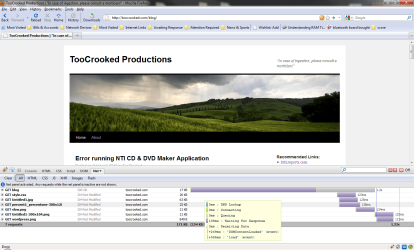
one thing i would suggest is installing firefox and getting the addon called "firebug". when installed, you can enable the console that allows you to see exactly how long it takes to load webpages, listing each piece of information (images, js files, etc) separately and showing you how long each file took to download in the grand scheme of things.

then, i'd grab your laptop and do the same thing. install firefox and get firebug. visit the exact same webpages to see if there's any marked difference in the download speeds.

see attachment for a screenshot of this in action. it's very simple to run. you go to the web page, enable firebug, and hit refresh. its "net panel" does the rest. you won't have to "guess" how long it takes pages and elements on a page to load anymore.
 

Attachments

  • Untitled.png
    Untitled.png
    126.7 KB · Views: 51

My Computer My Computer

At a glance

Win 7 Pro x64AMD Phenom II X6 1090T (3200 Mhz)Corsair DOMINATOR 8 GB PC310666 (1333Mhz) CAS...2x NVIDIA GeForce 9800 GTX/9800 GTX+ (in SLI ...
Computer Manufacturer/Model Number
N/A - Custom Rig
OS
Win 7 Pro x64
CPU
AMD Phenom II X6 1090T (3200 Mhz)
Motherboard
ASUS M4N98TD EVO
Memory
Corsair DOMINATOR 8 GB PC310666 (1333Mhz) CAS: 7-7-7-20
Graphics Card(s)
2x NVIDIA GeForce 9800 GTX/9800 GTX+ (in SLI Mode)
Sound Card
N/A; Onboard VIA VT1708S chipset is good enuff
Monitor(s) Displays
23" LG W2361V (2ms Response Time) / 20" ASUS VE205N (5ms)
Screen Resolution
1920x1080 & 1600x900 respectively
Hard Drives
3x crappy ~150gb 7200rpm drives in fakeraid 5
PSU
Ultra X3 1000-Watt ATX/Modular/SLI&SATA Ready PSU (ULT40311)
Case
SILVERSTONE TEMJIN TJ06S-W (Silver) ATX Full Tower Case
Cooling
Nothing special; no overclocking. Stock heatsink & case fans
Keyboard
Saitek Eclipse II [broken due to numerous RaGe qUiTs] >:(
Mouse
some iHome laser (not optical) mouse
Internet Speed
I can only get ~1MBps sustained
Other Info
A+/N+/Security+ Certified. I break a lot of computer equipment because i get FURIOUSLY ANGRY! The next time some moron gloats about his SSD, ask him if it's SLC or MLC. Not only will he not know, it WILL be MLC because that kid at BestBuy took him to the CLEANERS!! If you don't know the response time on your primary monitor, you got owned. If you do and it's 5ms, you owned yourself.
Back
Top