Solved Where is The Product Installation Key?

robertg

New member
Local time
9:20 AM
Messages
30
I have a thread going to try to make my system work correctly. I'm not getting anywhere with that. I recently upgraded to Windows 7 Pro from Home Premium. I never saw a product key when the upgrade happened. Where do I find that Key so I can restore to Factory out-of-the-box condition and then do the upgrade without having to pay another $90 for the same computer? Thanks for any help you can offer.
 

My Computer My Computer

At a glance

Windows 7 Professional 64bit
OS
Windows 7 Professional 64bit
I have a thread going to try to make my system work correctly. I'm not getting anywhere with that. I recently upgraded to Windows 7 Pro from Home Premium. I never saw a product key when the upgrade happened. Where do I find that Key so I can restore to Factory out-of-the-box condition and then do the upgrade without having to pay another $90 for the same computer? Thanks for any help you can offer.


Download and run jellybean key finder
 

My Computer My Computer

At a glance

Win 8 Release candidate 8400[email protected]4 gigsNvidia 9600M
Computer Manufacturer/Model Number
HP Pavillion dv-7 1005 Tx
OS
Win 8 Release candidate 8400
CPU
[email protected]
Memory
4 gigs
Graphics Card(s)
Nvidia 9600M
Sound Card
HD built-in
Monitor(s) Displays
17" Wxga
Screen Resolution
1440x900
Cooling
none
Internet Speed
45Mb down 5Mb up
Hi Robert,

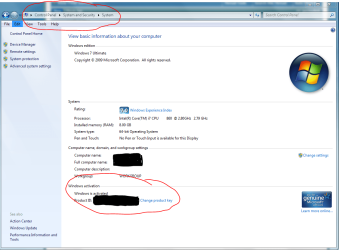
Are you reffering to your Windows activation key? Shown below.
 

Attachments

  • Capture2.PNG
    Capture2.PNG
    61.1 KB · Views: 44

My Computer My Computer

At a glance

Windows 10 Pro x64 ; Xubuntu x64Intel i7 860 @ 2.80 GHz O/C'ed to 4.0GHz16GB Corsair Vengance DDR3 @ 661 MHz Dual Cha...EVGA NVidia GTX 560 1024MB
Computer type
PC/Desktop
Computer Manufacturer/Model Number
Golden Mk. I.4
OS
Windows 10 Pro x64 ; Xubuntu x64
CPU
Intel i7 860 @ 2.80 GHz O/C'ed to 4.0GHz
Motherboard
Gigabyte P55A-UD3R Rev.1. Award BIOS F13
Memory
16GB Corsair Vengance DDR3 @ 661 MHz Dual Channel (9-9-9-24)
Graphics Card(s)
EVGA NVidia GTX 560 1024MB
Sound Card
Realtek Integrated
Monitor(s) Displays
Dual Samsung SyncMaster 2494HS
Screen Resolution
1920*1080 and 1920*1080
Hard Drives
1*Samsung 840 EVO 120GB SSD;
1*OCZ Vertex 2 60GB SSD;
2*Samsung F3 SpinPoint 1TB in RAID0;
1*Samsung F1 SpinPoint 1TB;
2*Western Digital 1TB External USB 3.0
1*Western Digital 500GB External USB 3.0
1*Seagate 500GB External USB 2.0
PSU
Thermaltake ToughPower QFan 750W
Case
Thermaltake Element S VK60001W2Z
Cooling
Corsair H60 Water Cooling, 2*230mm and 2*80mm case fans
Keyboard
Logitech G110
Mouse
Logitech MX518

My Computer My Computer

At a glance

W 7 64-bit UltimateIntel Q9550 Yorkfield8GB Dominator 8500C5DATI : XFX 5870
Computer Manufacturer/Model Number
* BFK Customs *
OS
W 7 64-bit Ultimate
CPU
Intel Q9550 Yorkfield
Motherboard
ASUS P5Q Pro
Memory
8GB Dominator 8500C5D
Graphics Card(s)
ATI : XFX 5870
Sound Card
Realtek HD Audio 7-1
Monitor(s) Displays
1x 47" LCD HDMI & 3x 26" LCD HDMI
Screen Resolution
1920x1080P & 1920x1200
Hard Drives
1x 80GB Intel X25-M G2 SSD : 1x 500GB & 1x 640GB WD Caviar Black(s)
PSU
Corsair 620HX
Case
Cooler Master RC-690
Cooling
Tuniq Tower 120, 2x 140mm and 3x 120mm case fans
Keyboard
Microsoft 500
Mouse
Razer Diamondback 3G
Internet Speed
14 Mb/s
Other Info
1x Koutech 3Gb/s SATA HDD Hot Swap Rack
Download and run jellybean key finder
Thanks for the good idea, ZZ. Will this catch the upgrade registration key?

Are you reffering to your Windows activation key? Shown below.
If the Windows activation key is the same as the upgrade key, then yes. I have that since it came with the computer. The original key is for Win 7 Home Prem. Will that 7HP key work with the upgrade or does it need to be identified separately? I've never done an upgrade without a disk and an installation key for that disk. I appreciate the information, Golden.

Hello robertg, welcome to Seven Forums!

Have a look at this tutorial at this link below.

Do a Clean Install with a Upgrade Windows 7 Version
Hi, BFK. I'm familiar with this procedure, but that requires an upgrade disk. I don't have that. I upgraded with the "Anytime Upgrade" online. So far, I'm not thrilled about it. Thanks for the welcome.

I appreciate all your help. These forums can be a real boost. It's nice to see a forum where newbies are treated well. I'm a moderator on a totally different type of forum and it takes some effort to keep the mood like this one. Cudos to you all.
 

My Computer My Computer

At a glance

Windows 7 Professional 64bit
OS
Windows 7 Professional 64bit
Hi Robert -

If you bought pre-installed Windows the Product Key for your Home Premium licensed version is on the COA sticker affixed to the machine. This is the key you would use if you clean reinstall using a Home Premium retail installer.

If you only want to run your Recovery Disks or Recovery partition to recover to full Factory Condition, then you don't need this key as it will auto-activate during recovery and start up just as it did when you brought it home.

If you use Anytime Upgrade to unlock Pro Features, the key it wants is an Anytime Upgrade Pro key, although the retail Win7 Pro key will work.

If you have decided you don't want Pro, then your options are to run your Recovery Disks or the Recovery Partition from boot, or find a retail Win7 installer to clean reinstall using these steps: http://www.sevenforums.com/installation-setup/125874-re-install-windows-7-a.html#post1086729

Only if you use the last option to clean reinstall do you need to give the Home Premium Product key during install.

I hope this answers you questions and feel free to ask any others. If you give your make/model computer we can help you do the recovery if needed.

 
If you bought pre-installed Windows the Product Key for your Home Premium licensed version is on the COA sticker affixed to the machine. This is the key you would use if you clean reinstall using a Home Premium retail installer.

If you only want to run your Recovery Disks or Recovery partition to recover to full Factory Condition, then you don't need this key as it will auto-activate during recovery and start up just as it did when you brought it home.

If you use Anytime Upgrade to unlock Pro Features, the key it wants is an Anytime Upgrade Pro key, although the retail Win7 Pro key will work.

If you have decided you don't want Pro, then your options are to run your Recovery Disks or the Recovery Partition from boot, or find a retail Win7 installer to clean reinstall using these steps: http://www.sevenforums.com/installation-setup/125874-re-install-windows-7-a.html#post1086729

Only if you use the last option to clean reinstall do you need to give the Home Premium Product key during install.

I hope this answers you questions and feel free to ask any others. If you give your make/model computer we can help you do the recovery if needed.
Thanks for the reply, Greg. Pro was not installed on the computer when new. What I need is the Anytime Upgrade Pro key. There was no retail one. The installation automatically got the key when I upgraded.

A factory recovery is not big deal, it just takes a little effort to put stuff back in. I've done it twice already but that was before I upgraded.

The computer is a Toshiba Satellite A665 (16"), i7 Q740 @1.73GHz, 4 GB RAM, 500 GB 7200 rpm SATA (it originally came with a 640 GB 5400 rpm one). 65-bit Win 7 Home Premium upgraded to Pro.

I'm not ready to go starting over yet, but the installation key is something I want on hand in case I have to go that way.
 

My Computer My Computer

At a glance

Windows 7 Professional 64bit
OS
Windows 7 Professional 64bit
What makes you think the installation "automatically got the key" when you upgraded? Did you purchase an Anytime Upgrade key and insert it? If so, you should have a copy or the documentation to retrieve it.

Otherwise you can run Belarc Advisor or Magic Jellybean to audit the Key from the hard drive.

If you didn't already buy and insert the Anytime Key, it shouldn't have upgraded to Pro.
 
FYI, this is another excellent app for viewing any program activation keys but also the complete system specs, it's free and will install/run from a USB stick which makes it extremely portable.


SIW - System Information for Windows
 

My Computer My Computer

At a glance

W 7 64-bit UltimateIntel Q9550 Yorkfield8GB Dominator 8500C5DATI : XFX 5870
Computer Manufacturer/Model Number
* BFK Customs *
OS
W 7 64-bit Ultimate
CPU
Intel Q9550 Yorkfield
Motherboard
ASUS P5Q Pro
Memory
8GB Dominator 8500C5D
Graphics Card(s)
ATI : XFX 5870
Sound Card
Realtek HD Audio 7-1
Monitor(s) Displays
1x 47" LCD HDMI & 3x 26" LCD HDMI
Screen Resolution
1920x1080P & 1920x1200
Hard Drives
1x 80GB Intel X25-M G2 SSD : 1x 500GB & 1x 640GB WD Caviar Black(s)
PSU
Corsair 620HX
Case
Cooler Master RC-690
Cooling
Tuniq Tower 120, 2x 140mm and 3x 120mm case fans
Keyboard
Microsoft 500
Mouse
Razer Diamondback 3G
Internet Speed
14 Mb/s
Other Info
1x Koutech 3Gb/s SATA HDD Hot Swap Rack
Greg, I was given the choice to manually put in the key if I had it, which I didn't, or to have the upgrade automatically retrieve the key. Now that I think about it, would that mean MS uses the same key and keeps a record of my installation so the original key for Home Premium would do if I need to restore in the future?

BFK, I downloaded Lansweeper and will copy it to a flash drive to see what it finds on the A665.

Thanks to both of you.
 

My Computer My Computer

At a glance

Windows 7 Professional 64bit
OS
Windows 7 Professional 64bit
Bare Foot Kid was telling you to download SIW ..system information for windows. ;)
 

My Computer My Computer

At a glance

Windows 7 Ultimate 32bit SP1Intel(R) Core(TM)2 Quad CPU @ 2.40GHz, 2400 MHz4 GBATI Radeon HD 2600 Pro
Computer type
PC/Desktop
Computer Manufacturer/Model Number
Bruce ... somewhere in his 40's
OS
Windows 7 Ultimate 32bit SP1
CPU
Intel(R) Core(TM)2 Quad CPU @ 2.40GHz, 2400 MHz
Motherboard
INTEL/D975XBX2
Memory
4 GB
Graphics Card(s)
ATI Radeon HD 2600 Pro
Monitor(s) Displays
Samsung SyncMaster 914v
Screen Resolution
1280 x 1024
Hard Drives
2/500GB each ... ST3500630AS ATA Device.
One is not connected
PSU
Rocketfish 700 W
Case
G.Skill Gigabyte Chassis
Keyboard
Standard PS/2 Keyboard
Mouse
Microsoft PS/2 Mouse
Internet Speed
DSL
Antivirus
Avira Internet Security
Browser
IE 11
Other Info
ATI HDMI Audio
You said you have the Home Premium key which came with the computer and should be on the COA sticker affixed to machine.

Did you buy an Anytime Upgrade Professional key before or during the Upgrade process? You should have it if you did. These are retail keys you purchase from MS or buy at a store. Anytime Upgrade will not activate without one.
 
Thanks, Jaycee. I had clicked on the wrong download link.

You said you have the Home Premium key which came with the computer and should be on the COA sticker affixed to machine.
Yep. Got that. It's on the sticker and in the paperwork.

Did you buy an Anytime Upgrade Professional key before or during the Upgrade process? You should have it if you did. These are retail keys you purchase from MS or buy at a store. Anytime Upgrade will not activate without one.
This is correct. I did buy an Anytime Upgrade. I bought it online from the MS download site. When I installed it directly from the download, I chose the option to have it automatically retrieve the key since at that time I didn't know what it was. Did I specifically buy a key? I assumed that was part of the upgrade and obviously it was since I now have pro on my computer. I expected to see the key shown on the screen so I could copy it down. I didn't see that key. If it was displayed, I missed it. All I'm saying is I don't have a clue what it is and would like to find that out so I can keep a record of it. If I decide to do a factory restore, I'll need it.
 

My Computer My Computer

At a glance

Windows 7 Professional 64bit
OS
Windows 7 Professional 64bit
Hi Robert,

When you purchased the Anytime Upgrade, did you receive a receipt from MS? Say an email receipt? If you did, and the key is not shown on that, can you use that receipt to get in touch with MS and ask them to send you the key?

Regards,
Golden
 

My Computer My Computer

At a glance

Windows 10 Pro x64 ; Xubuntu x64Intel i7 860 @ 2.80 GHz O/C'ed to 4.0GHz16GB Corsair Vengance DDR3 @ 661 MHz Dual Cha...EVGA NVidia GTX 560 1024MB
Computer type
PC/Desktop
Computer Manufacturer/Model Number
Golden Mk. I.4
OS
Windows 10 Pro x64 ; Xubuntu x64
CPU
Intel i7 860 @ 2.80 GHz O/C'ed to 4.0GHz
Motherboard
Gigabyte P55A-UD3R Rev.1. Award BIOS F13
Memory
16GB Corsair Vengance DDR3 @ 661 MHz Dual Channel (9-9-9-24)
Graphics Card(s)
EVGA NVidia GTX 560 1024MB
Sound Card
Realtek Integrated
Monitor(s) Displays
Dual Samsung SyncMaster 2494HS
Screen Resolution
1920*1080 and 1920*1080
Hard Drives
1*Samsung 840 EVO 120GB SSD;
1*OCZ Vertex 2 60GB SSD;
2*Samsung F3 SpinPoint 1TB in RAID0;
1*Samsung F1 SpinPoint 1TB;
2*Western Digital 1TB External USB 3.0
1*Western Digital 500GB External USB 3.0
1*Seagate 500GB External USB 2.0
PSU
Thermaltake ToughPower QFan 750W
Case
Thermaltake Element S VK60001W2Z
Cooling
Corsair H60 Water Cooling, 2*230mm and 2*80mm case fans
Keyboard
Logitech G110
Mouse
Logitech MX518

My Computer My Computer

At a glance

Win7 Enterprise, Win7 x86 (Ult 7600), Win7 x6...AMD fx8350 4ghz, AMD-32 2400mhz, AMD-64 3200m...2gb, 4gb on the Ult 7600, 4gb on Technet RTM,...Draw my own Graphics, several nVidia cards
Computer type
PC/Desktop
Computer Manufacturer/Model Number
Built them myself, Science Experiments !
OS
Win7 Enterprise, Win7 x86 (Ult 7600), Win7 x64 Ult 7600, TechNet RTM on AMD x64 (2.8Ghz)
CPU
AMD fx8350 4ghz, AMD-32 2400mhz, AMD-64 3200mhz, AMDx64 2.8G
Motherboard
SIS 755, ECS-K8M890M-M (Ult 7600), GigaByte & others
Memory
2gb, 4gb on the Ult 7600, 4gb on Technet RTM, 32gb on FX8350
Graphics Card(s)
Draw my own Graphics, several nVidia cards
Sound Card
on motherboard
Monitor(s) Displays
19" flat scr, 28" I-Inc widescr,22" Emprex Widescr, 23" Acer
Screen Resolution
1280 x 1024, 1440 x 900, 1920 x 1080
Hard Drives
6 pata Ide HD's & 2 Sata HD's
added 80gb external on Ult 7600 computer,
numerous extra 1tb, 2TB, 3Tb SATA HD's
A collection of ext HD Docks w/ HDs
PSU
430w, 550w, 600w, 700, 800, etc
Case
All Generic Full Towers
Cooling
Open Air & a few fans, some w/ colored LEDs
Keyboard
Compaq & Dell recycled from GoodWill
Mouse
Made in China Optical Wired Mouse
Internet Speed
Fast Cable InterNet
Antivirus
AVG Free on 24 different Desktops, NO Problems!
Browser
IE 8 is preferred, but use FireFox sometimes
Other Info
Linksys Routers, switches, & Hubs
Too Many USB Flash Drives to count, Biggest is 64GB !
Eight computers in my home network.
Sixteen computers at my business network.
Linked via TeamViewer !
Lots of old used spare computer parts everywhere!
Golden is correct: if you bought an Anytime Upgrade key you should have a receipt. If not, check your bank statement online to get the identifier from the purchase and call MS Customer Service to get a receipt and copy of the key to keep for your records.

Go to Computer>Properties, look at the installed Win7 version, then scroll down to see if it is activated. You'll need the Product ID (not the same as key) for Customer service, as well.

When you audit the Product Key using Belarc Advisor or one of the other free programs suggested, does it show an installed Professional Product key? If so, you can save that as it is almost certainly the actual key, although I would cross-check it with my receipt and MS.

Be sure to save a Win7 backup image so you never have to reinstall both OS's again: http://www.sevenforums.com/tutorials/663-backup-complete-computer-create-image-backup.html
 
Last edited:
Following up on gregrocker's post ... you'll find Belarc Advisor here Belarc Advisor - Free Personal PC Audit
Print out the report. This is so handy if and when you ever have to replace anything pertaining to hardware on your computer or purchased software keys.
 

My Computer My Computer

At a glance

Windows 7 Ultimate 32bit SP1Intel(R) Core(TM)2 Quad CPU @ 2.40GHz, 2400 MHz4 GBATI Radeon HD 2600 Pro
Computer type
PC/Desktop
Computer Manufacturer/Model Number
Bruce ... somewhere in his 40's
OS
Windows 7 Ultimate 32bit SP1
CPU
Intel(R) Core(TM)2 Quad CPU @ 2.40GHz, 2400 MHz
Motherboard
INTEL/D975XBX2
Memory
4 GB
Graphics Card(s)
ATI Radeon HD 2600 Pro
Monitor(s) Displays
Samsung SyncMaster 914v
Screen Resolution
1280 x 1024
Hard Drives
2/500GB each ... ST3500630AS ATA Device.
One is not connected
PSU
Rocketfish 700 W
Case
G.Skill Gigabyte Chassis
Keyboard
Standard PS/2 Keyboard
Mouse
Microsoft PS/2 Mouse
Internet Speed
DSL
Antivirus
Avira Internet Security
Browser
IE 11
Other Info
ATI HDMI Audio
When you purchased the Anytime Upgrade, did you receive a receipt from MS? Say an email receipt? If you did, and the key is not shown on that, can you use that receipt to get in touch with MS and ask them to send you the key?
Why is it the simplest solutions are often the best? I checked my spam filter and there it was. DUH! Thanks, Golden.

My thanks to all of you who have offered suggestions. You've been extremely helpful.

I did download SIW from BFK's link. What a great tool to have. I can see some very good uses for that one.

I'll fiddle some more with another issue I have, doing a full restore left as a last step.
 

My Computer My Computer

At a glance

Windows 7 Professional 64bit
OS
Windows 7 Professional 64bit
OH, Yeah, Greg. You bet I'll get some backup going. And some restore points along the way. Thanks.
 

My Computer My Computer

At a glance

Windows 7 Professional 64bit
OS
Windows 7 Professional 64bit
Good to see you found it and thanks for the update.
 

My Computer My Computer

At a glance

W 7 64-bit UltimateIntel Q9550 Yorkfield8GB Dominator 8500C5DATI : XFX 5870
Computer Manufacturer/Model Number
* BFK Customs *
OS
W 7 64-bit Ultimate
CPU
Intel Q9550 Yorkfield
Motherboard
ASUS P5Q Pro
Memory
8GB Dominator 8500C5D
Graphics Card(s)
ATI : XFX 5870
Sound Card
Realtek HD Audio 7-1
Monitor(s) Displays
1x 47" LCD HDMI & 3x 26" LCD HDMI
Screen Resolution
1920x1080P & 1920x1200
Hard Drives
1x 80GB Intel X25-M G2 SSD : 1x 500GB & 1x 640GB WD Caviar Black(s)
PSU
Corsair 620HX
Case
Cooler Master RC-690
Cooling
Tuniq Tower 120, 2x 140mm and 3x 120mm case fans
Keyboard
Microsoft 500
Mouse
Razer Diamondback 3G
Internet Speed
14 Mb/s
Other Info
1x Koutech 3Gb/s SATA HDD Hot Swap Rack
Back
Top