Does the edition of Windows7 effect performance?

IaskQuestions

New member
Member
Local time
3:18 PM
Messages
58
I know home, personal, ultimate etc, come with certain options that a user may or may not want.

But what i want to know is if there are any performance changes in using a specific edition.

For instance in my case, I'm a gamer, I run several programs at a time always, Stream media to my PS3 from my Windows 7 machine through my router, and most of the basics (email,etc)

If their IS an effect on performance, what would be best for me? Ultimate, Professional, Etc...

Thanks for all of your input
 
Last edited:

My Computer My Computer

Computer Manufacturer/Model Number
Dell Inspiron Q6600
OS
Windows 7 64 Bit
CPU
Intel Core2 Quad 2.4
Motherboard
Intel G33 Express
Memory
2GB
Graphics Card(s)
Will Update
Sound Card
Onboard
Monitor(s) Displays
Samsung SyncMaster181T
PSU
300w
Keyboard
Logitech G15
Mouse
Logitech G7
Internet Speed
Crappy (changing that soon)
Other Info
What other info could i possibly put? The other stuff i left out? Who cares. =)

My Computer My Computer

Computer type
PC/Desktop
Computer Manufacturer/Model Number
Golden Mk. I.4
OS
Windows 10 Pro x64 ; Xubuntu x64
CPU
Intel i7 860 @ 2.80 GHz O/C'ed to 4.0GHz
Motherboard
Gigabyte P55A-UD3R Rev.1. Award BIOS F13
Memory
16GB Corsair Vengance DDR3 @ 661 MHz Dual Channel (9-9-9-24)
Graphics Card(s)
EVGA NVidia GTX 560 1024MB
Sound Card
Realtek Integrated
Monitor(s) Displays
Dual Samsung SyncMaster 2494HS
Screen Resolution
1920*1080 and 1920*1080
Hard Drives
1*Samsung 840 EVO 120GB SSD;
1*OCZ Vertex 2 60GB SSD;
2*Samsung F3 SpinPoint 1TB in RAID0;
1*Samsung F1 SpinPoint 1TB;
2*Western Digital 1TB External USB 3.0
1*Western Digital 500GB External USB 3.0
1*Seagate 500GB External USB 2.0
PSU
Thermaltake ToughPower QFan 750W
Case
Thermaltake Element S VK60001W2Z
Cooling
Corsair H60 Water Cooling, 2*230mm and 2*80mm case fans
Keyboard
Logitech G110
Mouse
Logitech MX518
There is some ram limits between different 64 bit versions home basic 8 gig...home premium 16 gig....pro ultimate 192 gig
 

My Computer My Computer

Computer type
PC/Desktop
Computer Manufacturer/Model Number
Custom
OS
windows 10 pro 64 bit
CPU
i5 4690K@4500 COOLER MASTER Seidon 120M water cooler
Motherboard
ASUS SABERTOOTH Z87 LGA 1150 Intel
Memory
16gb Kingston HyperX DDR3 1600
Graphics Card(s)
EVGA GTX 1070 sc
Monitor(s) Displays
BenQ GL2760H Black 27" 2ms HDMI Widescreen LED 1920X1080
Screen Resolution
DSR 2103X1183
Hard Drives
ADATA 256 gig SSD + 4 junk
PSU
EVGA supernova 750
Case
coolermaster
Cooling
many...
Keyboard
z merc
Mouse
Logitech wireless G602
Internet Speed
2.5mbs cable
There is some ram limits between different 64 bit versions home basic 8 gig...home premium 16 gig....pro ultimate 192 gig

Good information from the last 2 replies.

Windows 7 system requirements - Microsoft Windows

They both show ass requiring 2GB of ram. When you say Basic 8gig, Home Premium 16-gig, pro/ultimate 192gig.... your talking about HDD space? I checked here

Windows 7 Home Premium Delivers Entertainment & Added Security

and there are no differences of HDD space unless your downloading it online instead of using the CD, even if your using the 64bit version.

Just trying to clarify what you mean. Or do you mean
.8GB ram for Home Basic?
1.6GB for Home Premium?
1.92 GB for Ultimate?

Thanks for your response.
 

My Computer My Computer

Computer Manufacturer/Model Number
Dell Inspiron Q6600
OS
Windows 7 64 Bit
CPU
Intel Core2 Quad 2.4
Motherboard
Intel G33 Express
Memory
2GB
Graphics Card(s)
Will Update
Sound Card
Onboard
Monitor(s) Displays
Samsung SyncMaster181T
PSU
300w
Keyboard
Logitech G15
Mouse
Logitech G7
Internet Speed
Crappy (changing that soon)
Other Info
What other info could i possibly put? The other stuff i left out? Who cares. =)
There is some ram limits between different 64 bit versions home basic 8 gig...home premium 16 gig....pro ultimate 192 gig
When you say Basic 8gig, Home Premium 16-gig, pro/ultimate 192gig.... your talking about HDD space?
What Ivan is mentioning are the maximum amounts of RAM each version can use. Depending on the programs you run, this can affect performance. However, for 99% of Win 7 users, currently, 8 GB will more than suffice. Obviously, it never hurts to have more RAM and some users do need it.

Heck, even if I didn't need it, and the motherboard and OS would use it, and I could afford it, I'd max the RAM out! :D

Naturally, if you're running a 32 bit OS, you'll only be able to use 3.5 GB maximum so the above figures apply to the 64 bit version. Even then, most Win 7 users find the 32 bit version to be just as equal, performance-wise, to the 64 bit version in most cases.

To answer your question, in short: in most cases the version will not affect performance. But then, there are variables and the link provided by Golden should guide you well. :)
 

My Computer My Computer

Computer Manufacturer/Model Number
Toshiba L355D
OS
Windows 7 Ultimate x64 SP1
CPU
Core2 Duo
Motherboard
Intel
Memory
4 GB
Graphics Card(s)
GM965 on-board
Sound Card
RealTek on-board
Monitor(s) Displays
19"+17"(laptop)
Screen Resolution
1440x900 (x 2)
Hard Drives
500GB Ext. 200GB Internal
PSU
N/A
Case
N/A
Cooling
N/A
Just trying to clarify what you mean. Or do you mean
.8GB ram for Home Basic?
1.6GB for Home Premium?
1.92 GB for Ultimate?

Thanks for your response.

Should be more like this (point confusing some):

Ram memory:
-8Gb for Home Basic
-16Gb for Home Premium
-192Gb for Pro & Ultimate.

No HDD Drive space here...Just the Ram Memory

Ram prices are going down lately and prices are now quite reasonable for grabbing 8Gb (2x4Gb) from Home Basic to Pro version on Laptop and for those Desktop based 16Gb should be nice...on all x64bits! :)

And in the same forum section:
http://www.sevenforums.com/general-discussion/86886-32-bit-vs-64-bit-comparison.html
 
Last edited:

My Computer My Computer

Computer type
PC/Desktop
Computer Manufacturer/Model Number
Custom Build
OS
Windows 7 Professional SP1 - x64 [Non-UEFI Boot]
CPU
Ivy Bridge Core i5 3570K (Delidded)
Motherboard
Asus P8Z77-V LE PLUS
Memory
G.Skill "Ares" DDR3 PC3-12800 - 1600MHz (16Gb)
Graphics Card(s)
Asus Dual-RX480-O4G
Sound Card
Creative Sound Blaster Z w/5.1 sound system
Monitor(s) Displays
Asus IPS 23"
Screen Resolution
16/9
Hard Drives
Internal:
500Go Sata 6Gb/s (x2)
500Go Sata 3Gb/s (x2)
SSD 60Go Sata 6Gb/s
PSU
In Win C 900W Series 80+ Platinum
Case
Thermaltake Chaser A71
Cooling
Custom Water Cooling Loop
Keyboard
Cooler Master QuickFire XTi
Mouse
Razer Imperator 2012 (4G)
Antivirus
MSE
Browser
IE 11.0.xxx Rtm
Other Info
"Raid0" with Intel Smart Response Technology (HDD/SSD)
I know home, personal, ultimate etc, come with certain options that a user may or may not want.

But what i want to know is if there are any performance changes in using a specific edition.

For instance in my case, I'm a gamer, I run several programs at a time always, Stream media to my PS3 from my Windows 7 machine through my router, and most of the basics (email,etc)

If their IS an effect on performance, what would be best for me? Ultimate, Professional, Etc...

Thanks for all of your input

No, performance will be the same. The OP asked a simple question. The answers have been anything but.
 
Last edited:

My Computer My Computer

Computer Manufacturer/Model Number
Custom
OS
Windows 7 Ultimate RTM (Technet)
CPU
3.00 gigahertz Intel Core2 Duo E8400
Motherboard
ASUSTeK Computer INC. P5K/EPU Rev 1.xx
Memory
4GB
Graphics Card(s)
ATI Radeon X1950 Pro
Sound Card
Built in HD Audio
Monitor(s) Displays
22" Gateway LCD
Screen Resolution
1920 x 1200
Hard Drives
ST3160023A [Hard drive] (160.04 GB) -- drive 0, rev 8.01, ST3500630AS [Hard drive] (500.11 GB) -- drive 2, rev 3.AAK
ST3500630AS [Hard drive] (500.11 GB) -- drive 1, rev 3.AAK
Keyboard
Logitech G11
Mouse
Microsoft Wireless Laser Mouse 5000
Internet Speed
13.44 Mbps
There is some ram limits between different 64 bit versions home basic 8 gig...home premium 16 gig....pro ultimate 192 gig

Good information from the last 2 replies.

Windows 7 system requirements - Microsoft Windows

They both show ass requiring 2GB of ram. When you say Basic 8gig, Home Premium 16-gig, pro/ultimate 192gig.... your talking about HDD space? I checked here

Windows 7 Home Premium Delivers Entertainment & Added Security

and there are no differences of HDD space unless your downloading it online instead of using the CD, even if your using the 64bit version.

Just trying to clarify what you mean. Or do you mean
.8GB ram for Home Basic?
1.6GB for Home Premium?
1.92 GB for Ultimate?

Thanks for your response.
What mikedl said.....ie You build a computer, having deep pockets, you instal 24 gigs of ram....you instal Windows home premium, boot up go to check your ram....bam!...16 gig???? What happened? It's a limit built in the os...it will not see more than 16 gig no matter what is really there...

I try to never download software especially critical stuff like the os. I like to have a nice shinny disk to lock in my fire box:).
 

My Computer My Computer

Computer type
PC/Desktop
Computer Manufacturer/Model Number
Custom
OS
windows 10 pro 64 bit
CPU
i5 4690K@4500 COOLER MASTER Seidon 120M water cooler
Motherboard
ASUS SABERTOOTH Z87 LGA 1150 Intel
Memory
16gb Kingston HyperX DDR3 1600
Graphics Card(s)
EVGA GTX 1070 sc
Monitor(s) Displays
BenQ GL2760H Black 27" 2ms HDMI Widescreen LED 1920X1080
Screen Resolution
DSR 2103X1183
Hard Drives
ADATA 256 gig SSD + 4 junk
PSU
EVGA supernova 750
Case
coolermaster
Cooling
many...
Keyboard
z merc
Mouse
Logitech wireless G602
Internet Speed
2.5mbs cable
There is some ram limits between different 64 bit versions home basic 8 gig...home premium 16 gig....pro ultimate 192 gig
When you say Basic 8gig, Home Premium 16-gig, pro/ultimate 192gig.... your talking about HDD space?
What Ivan is mentioning are the maximum amounts of RAM each version can use. Depending on the programs you run, this can affect performance. However, for 99% of Win 7 users, currently, 8 GB will more than suffice. Obviously, it never hurts to have more RAM and some users do need it.

Heck, even if I didn't need it, and the motherboard and OS would use it, and I could afford it, I'd max the RAM out! :D

Naturally, if you're running a 32 bit OS, you'll only be able to use 3.5 GB maximum so the above figures apply to the 64 bit version. Even then, most Win 7 users find the 32 bit version to be just as equal, performance-wise, to the 64 bit version in most cases.

To answer your question, in short: in most cases the version will not affect performance. But then, there are variables and the link provided by Golden should guide you well. :)

Man. These replies are awesome.

I have experienced an issue in the passed where the ram i had installed on an XP machine wasn't showing up, i was missing like a gig and half or something. Then after researching I realized it was a limitation of the operating system. I think i installed vista 64 or something...

I'm just a gamer so i think with pro or ultimate i will be fine for a LONG time. From my experience people who makes music need a lot of RAM but i'm not sure if even then it comes close to what ultimate can handle.

Now MacGyver stated there will be no performance difference but there are less features in the pro vs ultimate. Maybe the differences are so small no noticeable amount in performance will be noticed? Thats what i'm guessing...
 

My Computer My Computer

Computer Manufacturer/Model Number
Dell Inspiron Q6600
OS
Windows 7 64 Bit
CPU
Intel Core2 Quad 2.4
Motherboard
Intel G33 Express
Memory
2GB
Graphics Card(s)
Will Update
Sound Card
Onboard
Monitor(s) Displays
Samsung SyncMaster181T
PSU
300w
Keyboard
Logitech G15
Mouse
Logitech G7
Internet Speed
Crappy (changing that soon)
Other Info
What other info could i possibly put? The other stuff i left out? Who cares. =)
Windows 7 is Windows 7....the higher editions just have extra features.
 

My Computer My Computer

Computer Manufacturer/Model Number
Custom
OS
Windows 7 Ultimate RTM (Technet)
CPU
3.00 gigahertz Intel Core2 Duo E8400
Motherboard
ASUSTeK Computer INC. P5K/EPU Rev 1.xx
Memory
4GB
Graphics Card(s)
ATI Radeon X1950 Pro
Sound Card
Built in HD Audio
Monitor(s) Displays
22" Gateway LCD
Screen Resolution
1920 x 1200
Hard Drives
ST3160023A [Hard drive] (160.04 GB) -- drive 0, rev 8.01, ST3500630AS [Hard drive] (500.11 GB) -- drive 2, rev 3.AAK
ST3500630AS [Hard drive] (500.11 GB) -- drive 1, rev 3.AAK
Keyboard
Logitech G11
Mouse
Microsoft Wireless Laser Mouse 5000
Internet Speed
13.44 Mbps

My Computer My Computer

Computer type
PC/Desktop
Computer Manufacturer/Model Number
Custom Build
OS
Windows 7 Professional SP1 - x64 [Non-UEFI Boot]
CPU
Ivy Bridge Core i5 3570K (Delidded)
Motherboard
Asus P8Z77-V LE PLUS
Memory
G.Skill "Ares" DDR3 PC3-12800 - 1600MHz (16Gb)
Graphics Card(s)
Asus Dual-RX480-O4G
Sound Card
Creative Sound Blaster Z w/5.1 sound system
Monitor(s) Displays
Asus IPS 23"
Screen Resolution
16/9
Hard Drives
Internal:
500Go Sata 6Gb/s (x2)
500Go Sata 3Gb/s (x2)
SSD 60Go Sata 6Gb/s
PSU
In Win C 900W Series 80+ Platinum
Case
Thermaltake Chaser A71
Cooling
Custom Water Cooling Loop
Keyboard
Cooler Master QuickFire XTi
Mouse
Razer Imperator 2012 (4G)
Antivirus
MSE
Browser
IE 11.0.xxx Rtm
Other Info
"Raid0" with Intel Smart Response Technology (HDD/SSD)
If you plan gaming and need that extra ram memory installed i suggest you the Professional Edition. That will be far enough.

Nah Home Premium is just fine. Is one going to need more then 16 GBs on RAM at this time to play games? No? I didn't think so.
 

My Computer My Computer

Computer type
PC/Desktop
Computer Manufacturer/Model Number
Alienware Aurora ALX R4
OS
Windows 10 Pro (x64)
CPU
Intel Core i7-3930K (3.2GHz - 4.5GHz)
Motherboard
Alienware Aurora-R4 x79
Memory
4x Samsung 4GB PC3-12800 DDR3 (16GB 1600MHz)
Graphics Card(s)
Nvidia Geforce GTX 690
Sound Card
SteelSeries Siberia Elite
Monitor(s) Displays
Dell UltraSharp U3011
Screen Resolution
2560x1600
Hard Drives
Samsung 850 Pro 256 GB, Seagate 1TB Desktop Hybrid HDD, 2x Western Digital 4TB Green HDD
PSU
875W Some Dell PSU <.<
Case
Alienware Aurora ALX
Cooling
Custom Liquid Cooling (EK CPU & GPU blocks) dual EK 480RAD
Keyboard
Logitech G710+ Mechanical
Mouse
Logitech G700s
Internet Speed
Verizon Fios (50 mbps average)
Other Info
Server: Intel NUC D54250WYK: i5-4250U, 16GB, 256 GB mSATA, Windows Server 2012 R2
If you plan gaming and need that extra ram memory installed i suggest you the Professional Edition. That will be far enough.

Nah Home Premium is just fine. Is one going to need more then 16 GBs on RAM at this time to play games? No? I didn't think so.

I was really just wanting to know, not considering the RAM amount, if the difference of features in different editions of Windows 7 x64 would increase or decrease over all performance.

IF they did, can I completely disable features that I do not use in my current version to increase performance? Would it cause weird conflicts?

How would I know how much RAM or CPU usage i'm saving by doing so?

Thanks a lot for all responses.
 

My Computer My Computer

Computer Manufacturer/Model Number
Dell Inspiron Q6600
OS
Windows 7 64 Bit
CPU
Intel Core2 Quad 2.4
Motherboard
Intel G33 Express
Memory
2GB
Graphics Card(s)
Will Update
Sound Card
Onboard
Monitor(s) Displays
Samsung SyncMaster181T
PSU
300w
Keyboard
Logitech G15
Mouse
Logitech G7
Internet Speed
Crappy (changing that soon)
Other Info
What other info could i possibly put? The other stuff i left out? Who cares. =)
Most of the extra features are for Business users and bragging rights(extra ram excluded),however by the time 16+ ram is common people will say....Windows 7!?!? You Still Running THAT!?!?!?

Bad ideal to muck around disabling features on Windows 7...
 
Last edited:

My Computer My Computer

Computer type
PC/Desktop
Computer Manufacturer/Model Number
Custom
OS
windows 10 pro 64 bit
CPU
i5 4690K@4500 COOLER MASTER Seidon 120M water cooler
Motherboard
ASUS SABERTOOTH Z87 LGA 1150 Intel
Memory
16gb Kingston HyperX DDR3 1600
Graphics Card(s)
EVGA GTX 1070 sc
Monitor(s) Displays
BenQ GL2760H Black 27" 2ms HDMI Widescreen LED 1920X1080
Screen Resolution
DSR 2103X1183
Hard Drives
ADATA 256 gig SSD + 4 junk
PSU
EVGA supernova 750
Case
coolermaster
Cooling
many...
Keyboard
z merc
Mouse
Logitech wireless G602
Internet Speed
2.5mbs cable
Most of the extra features are for Business users and bragging rights(extra ram excluded),however by the time 16+ ram is common people will say....Windows 7!?!? You Still Running THAT!?!?!?

Bad ideal to muck around disabling features on Windows 7...

lol I completely agree with the "You still running THAT?!?" comment concerning win7 and that much RAM. Won't be long until that conversation occurs at the rate technology is moving now though.

I figured i'd ask about the removal of the features because i'm the type that, if i don't want it or won't need it in the near future, I don't want it on my computer. I kind of figured it wouldn't be a smart idea to remove 'em, still gotta ask though.

Thx for your reply
 

My Computer My Computer

Computer Manufacturer/Model Number
Dell Inspiron Q6600
OS
Windows 7 64 Bit
CPU
Intel Core2 Quad 2.4
Motherboard
Intel G33 Express
Memory
2GB
Graphics Card(s)
Will Update
Sound Card
Onboard
Monitor(s) Displays
Samsung SyncMaster181T
PSU
300w
Keyboard
Logitech G15
Mouse
Logitech G7
Internet Speed
Crappy (changing that soon)
Other Info
What other info could i possibly put? The other stuff i left out? Who cares. =)
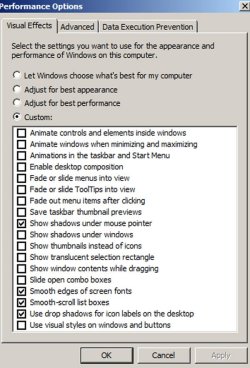
You can go to the location shown in the pic below and turn off some or all of the eye candy to gain some advantage. But I don't think that is version-dependent.

I have most of mine turned off.
 

Attachments

  • best perf.JPG
    best perf.JPG
    83.8 KB · Views: 8

My Computer My Computer

Computer type
PC/Desktop
Computer Manufacturer/Model Number
Ignatz Special; 4 speed manual gearbox; factory air conditioning; one of one
OS
Windows 7 Home Premium SP1, 64-bit
CPU
Intel Skylake i5-6600K, not overclocked
Motherboard
AsRock Z170M Extreme 4, micro ATX
Memory
8 GB HyperX DDR4-2666 (2 x 4 GB)
Graphics Card(s)
none; graphics are integrated on CPU
Sound Card
onboard: Realtek ALC1150; external: USB Behringer UF0-202
Monitor(s) Displays
Dell S2340M 23 inch IPS
Screen Resolution
1600 x 900
Hard Drives
System: Crucial MX100 series SSD, 128 GB;
Data: Samsung Spinpoint 103SJ, 1 TB;
Backup: WD Caviar Green WD30EZRX-00D8PB0, 3 TB
PSU
Rosewill SilentNight 500 watt fanless, semi-modular
Case
Antec Solo II
Cooling
Noctua NH-U12S; Noctua F12 intake, Noctua S12A exhaust
Keyboard
Microsoft 200 6JH-00001 USB
Mouse
Dell or Microsoft optical wired; USB
Antivirus
Microsoft Security Essentials and Malwarebytes Premium
Browser
Pale Moon
Other Info
All fans PWM; speeds at idle: CPU circa 500 rpm; intake circa 600 rpm; exhaust circa 600 rpm; CPU temps 27 idle and 47 C load in a warm room (27 C/81 F) when running Intel Extreme Tuning Utility stress test.
I was really just wanting to know, not considering the RAM amount, if the difference of features in different editions of Windows 7 x64 would increase or decrease over all performance.

IF they did, can I completely disable features that I do not use in my current version to increase performance? Would it cause weird conflicts?

How would I know how much RAM or CPU usage i'm saving by doing so?

Thanks a lot for all responses.

The difference features each one provides does not effect performance in the slightest. Most are disabled by default anyways.
 

My Computer My Computer

Computer type
PC/Desktop
Computer Manufacturer/Model Number
Alienware Aurora ALX R4
OS
Windows 10 Pro (x64)
CPU
Intel Core i7-3930K (3.2GHz - 4.5GHz)
Motherboard
Alienware Aurora-R4 x79
Memory
4x Samsung 4GB PC3-12800 DDR3 (16GB 1600MHz)
Graphics Card(s)
Nvidia Geforce GTX 690
Sound Card
SteelSeries Siberia Elite
Monitor(s) Displays
Dell UltraSharp U3011
Screen Resolution
2560x1600
Hard Drives
Samsung 850 Pro 256 GB, Seagate 1TB Desktop Hybrid HDD, 2x Western Digital 4TB Green HDD
PSU
875W Some Dell PSU <.<
Case
Alienware Aurora ALX
Cooling
Custom Liquid Cooling (EK CPU & GPU blocks) dual EK 480RAD
Keyboard
Logitech G710+ Mechanical
Mouse
Logitech G700s
Internet Speed
Verizon Fios (50 mbps average)
Other Info
Server: Intel NUC D54250WYK: i5-4250U, 16GB, 256 GB mSATA, Windows Server 2012 R2
Good info.

I like the default effects windows 7 has so i probably won't disable that. Knowing that the features in each edition doesn't effect performance is good to know as well.

I have heard that some features that come with different editions of windows usually networking features can cause vulnerabilities, but you can combat that by using stealth ports with your firewall, correct?
 
Last edited:

My Computer My Computer

Computer Manufacturer/Model Number
Dell Inspiron Q6600
OS
Windows 7 64 Bit
CPU
Intel Core2 Quad 2.4
Motherboard
Intel G33 Express
Memory
2GB
Graphics Card(s)
Will Update
Sound Card
Onboard
Monitor(s) Displays
Samsung SyncMaster181T
PSU
300w
Keyboard
Logitech G15
Mouse
Logitech G7
Internet Speed
Crappy (changing that soon)
Other Info
What other info could i possibly put? The other stuff i left out? Who cares. =)
I have heard that some features that come with different editions of windows usually networking features can cause vulnerabilities, but you can combat that by using stealth ports with your firewall, correct?
No, I'm not sure that is correct. All your router ports should be in stealth mode (in my opinion) anyway, regardless of which version of Windows 7 you are using.
 

My Computer My Computer

Computer type
PC/Desktop
Computer Manufacturer/Model Number
Golden Mk. I.4
OS
Windows 10 Pro x64 ; Xubuntu x64
CPU
Intel i7 860 @ 2.80 GHz O/C'ed to 4.0GHz
Motherboard
Gigabyte P55A-UD3R Rev.1. Award BIOS F13
Memory
16GB Corsair Vengance DDR3 @ 661 MHz Dual Channel (9-9-9-24)
Graphics Card(s)
EVGA NVidia GTX 560 1024MB
Sound Card
Realtek Integrated
Monitor(s) Displays
Dual Samsung SyncMaster 2494HS
Screen Resolution
1920*1080 and 1920*1080
Hard Drives
1*Samsung 840 EVO 120GB SSD;
1*OCZ Vertex 2 60GB SSD;
2*Samsung F3 SpinPoint 1TB in RAID0;
1*Samsung F1 SpinPoint 1TB;
2*Western Digital 1TB External USB 3.0
1*Western Digital 500GB External USB 3.0
1*Seagate 500GB External USB 2.0
PSU
Thermaltake ToughPower QFan 750W
Case
Thermaltake Element S VK60001W2Z
Cooling
Corsair H60 Water Cooling, 2*230mm and 2*80mm case fans
Keyboard
Logitech G110
Mouse
Logitech MX518
I have heard that some features that come with different editions of windows usually networking features can cause vulnerabilities, but you can combat that by using stealth ports with your firewall, correct?
No, I'm not sure that is correct. All your router ports should be in stealth mode (in my opinion) anyway, regardless of which version of Windows 7 you are using.

Of course, better safe than sorry. But is it indeed possible that some of the features windows comes with automatically end up making your system more vulnerable? Stealth Ports is something basic. Say for instance, putting java on your machine opens you up to all kinds of new threats. As far as im concerned the safest defense vs vulnerabilities is to run virtual machines? LoL. IDK i'm just speculating. Over here on cloud 9. :party:

Thanks for your response. All of 'em are always welcome.
 

My Computer My Computer

Computer Manufacturer/Model Number
Dell Inspiron Q6600
OS
Windows 7 64 Bit
CPU
Intel Core2 Quad 2.4
Motherboard
Intel G33 Express
Memory
2GB
Graphics Card(s)
Will Update
Sound Card
Onboard
Monitor(s) Displays
Samsung SyncMaster181T
PSU
300w
Keyboard
Logitech G15
Mouse
Logitech G7
Internet Speed
Crappy (changing that soon)
Other Info
What other info could i possibly put? The other stuff i left out? Who cares. =)
Back
Top