Recovering A User Account

Nordo

New member
Local time
4:15 AM
Messages
10
In trying to streamline my wifes Laptop (Win 7 64bit), I deleted her user account as she didn't like having to login and give herself permission for various actions all the time.
Obviously this was the wrong way to go about it.:o
However when I went to re-create the account, I managed to get most things back but she can't access her photos and other user items.

What can I do to fix this?:)
I'm not too sure if I know the exact User name she had.
Cheers
 
Last edited:

My Computer My Computer

OS
Windows 7 Home Premium 32bit
Welcome
If I understand correctly, your wife had photos and other documents in her account, which cannot now be found
The answer is that these items may have been in her account only and at deletion they disappeared into cyberspace.
The solution would be to download them again or if you have access, give her permissions.
http://www.sevenforums.com/tutorials/24232-sharing-permissions.html
 

My Computer My Computer

Computer type
PC/Desktop
Computer Manufacturer/Model Number
Dell XPS 420
OS
Windows 10, Home Clean Install
CPU
Intel Core2 processsor Q8200(2.33Ghz 1333FSB) Quad Core Tech
Motherboard
Dell
Memory
6 gb
Graphics Card(s)
ATI Radeon 256MB HD3650
Sound Card
Intergrated 7.1 Channel Audio
Monitor(s) Displays
Dell SP2009W 20"
Hard Drives
640 GB Serial ATA Hard drive
Cooling
Fan
Keyboard
Dell USB Keyboard
Mouse
Dell Premium Optical USB
Internet Speed
DSL 2.85
When you choose to delete a user, the option to save their files is best selected. If you still can't
get to them. then you might have to take ownership of the directories where the photos are stored.

right click on properties and see if you can't change the options for security to allow access.

Rich
 

My Computer My Computer

Computer type
Laptop
Computer Manufacturer/Model Number
Toshiba Laptop Qosimo X870
OS
Windows 7 Pro x64 SP1
CPU
Intel Core I7
Motherboard
Toshiba Qosmio
Memory
16 Gigs
Graphics Card(s)
NVIDIA GeForce GTX 670M
Monitor(s) Displays
17.7" laptop
Screen Resolution
1600 x 900
Hard Drives
256 Gig SanDisk SSD for C
256 Gig Intel SSD for D
Internet Speed
50/25 FIOS
Antivirus
Vipre (all you can eat for 10 machines)
Browser
IE and FF
Other Info
I have dos 6.22, wfwg 3.11, win98, 2000 and xp VHD's available for testing. MS's Virtual PC works great.
What's going on with all these "Rich" guys.;)

I hope richc46 isn't right. I am toast!!!
Most of the photos have long since been wiped off the camera's memory. I did make a backup disc a few years ago, but there have been heaps more photos added since then. Of course she has also lost all her other personal stuff including documents, favourites, etc.

The account only took a split second to delete so that's why I think everything is still there (including HD addresses), just can't be accessed by anyone.

As far as giving access via the security settings, surely the only person who can give access is the original User (who is now no more:cry:).

I have confirmed that the new account I created has the exact same name ("Cilla"), but windows treats it as a new account.

Please save me from a fate worse than death!!!!

PS I might add my original post into the General Discussion forum, if it doesn't contravene the rules.
 
Last edited:

My Computer My Computer

OS
Windows 7 Home Premium 32bit
You can try to get with disc digger, but use computer as little as possible until then.
You can also use my favorite recuva
http://www.piriform.com/recuva
 

My Computer My Computer

Computer type
PC/Desktop
Computer Manufacturer/Model Number
Dell XPS 420
OS
Windows 10, Home Clean Install
CPU
Intel Core2 processsor Q8200(2.33Ghz 1333FSB) Quad Core Tech
Motherboard
Dell
Memory
6 gb
Graphics Card(s)
ATI Radeon 256MB HD3650
Sound Card
Intergrated 7.1 Channel Audio
Monitor(s) Displays
Dell SP2009W 20"
Hard Drives
640 GB Serial ATA Hard drive
Cooling
Fan
Keyboard
Dell USB Keyboard
Mouse
Dell Premium Optical USB
Internet Speed
DSL 2.85
Deleting was that fast because nothing really was deleted (yet). Windows just declares the clusters involved as unoccupied and free for reuse.So you need a software to find those clusters and link the files back together. Recuva would have been my Tool of choice, too.Good call, rich46.
Best would be to get a portable version on a different computer and start it from a USB stick.
The less you write on that specific harddrive, the better the chances to retrieve those files. That involves also to save the found data to a different drive if possible (perhaps even the USB stick;)

As far as giving access via the security settings, surely the only person who can give access is the original User (who is now no more:cry:).

As can every account with admin privileges...but you need to find those files first.

I have confirmed that the new account I created has the exact same name ("Cilla"), but windows treats it as a new account.

That's just the way it is. Windows (as well as Unix and a few others) don't really care about accounts created with names identical to previously deleted ones .It's a safety precaution.

-DG
 

My Computer My Computer

Computer Manufacturer/Model Number
HP m8000n
OS
Windows 7 Ultimate x86
CPU
DualCore AMD Athlon 64 X2, 2600 MHz 5200+
Motherboard
Asus M2N68-LA (Narra)
Memory
Samsung 2GB DDR2
Graphics Card(s)
Onboard NVIDIA GeForce 6150SE nForce 430
Sound Card
Onboard nVIDIA nForce 6100-430 (MCP61P)
Monitor(s) Displays
Westinghouse 19" LED
Screen Resolution
1280x1024
Hard Drives
SATA II Seagate Barracuda 500GB
USB II WD Elements 500GB
USB II WD My Book 1TB
USB II WD My Book 2TB
PSU
Stock (HP)
Case
Stock (HP)
Cooling
Stock
Keyboard
Logitech Classic KB 200
Mouse
Standard HP opticle USB mouse
Thanks.:D
I've downloaded recuva portable onto another computer. However, I have already downloaded and installed Open Office on my wife's computer, so I may have already lost some of her files.

I'm a bit of a noob when it comes to Recuva. What do I do once I have found the files? How do I make them readable by her new account?
 

My Computer My Computer

OS
Windows 7 Home Premium 32bit
Once you have the files, copy them into your wife's Picture folder like
C:\Users\Cilla\Pictures

Depending on whatever rights were set you might have to take ownership over those files

http://www.sevenforums.com/tutorials/1911-take-ownership-shortcut.html

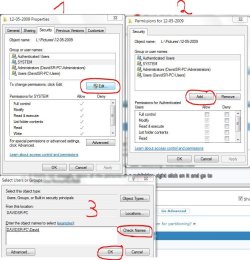
If that's not enough, move all the pictures in a sub folder, right click on it and go to
Properties/Security/Edit/Add put in your wife's new user name in the box, click on
check names and when it looks right
, click on OK
Capture.JPG

Capture1.JPG

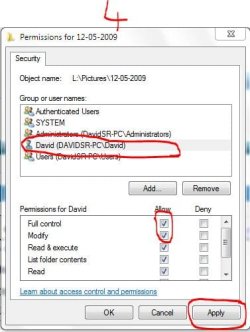
That brings you to #4...make sure the just added user name is highlighted
put a check mark in Full Control click Apply and close all remaining windows from that process with OK
That should do it

-DG
 

My Computer My Computer

Computer Manufacturer/Model Number
HP m8000n
OS
Windows 7 Ultimate x86
CPU
DualCore AMD Athlon 64 X2, 2600 MHz 5200+
Motherboard
Asus M2N68-LA (Narra)
Memory
Samsung 2GB DDR2
Graphics Card(s)
Onboard NVIDIA GeForce 6150SE nForce 430
Sound Card
Onboard nVIDIA nForce 6100-430 (MCP61P)
Monitor(s) Displays
Westinghouse 19" LED
Screen Resolution
1280x1024
Hard Drives
SATA II Seagate Barracuda 500GB
USB II WD Elements 500GB
USB II WD My Book 1TB
USB II WD My Book 2TB
PSU
Stock (HP)
Case
Stock (HP)
Cooling
Stock
Keyboard
Logitech Classic KB 200
Mouse
Standard HP opticle USB mouse
Thanks SledgeDG

I made a big blue by using Wizard and doing a deep scan looking for "pictures".
I got thousands of files, many which were repeated 3 or 4 times.:confused:

After transferring them to my 4GB USB stick, then burning them onto DVDs on my computer and using up 4 DVDs I realised I must have been doing something wrong. I had thousands of files without any folder structure.:confused:
I then tried the Advanced mode. In this mode I selected:
Normal Scan
Keep Folder Structure

I am currently recovering and saving this scan which doesn't seem to have any repeats, and I still have everything retained their correct folders. Also I haen't all the other crap I got the first time (gifs, etc of many other programs).
This will be less than two DVDs, and I'm hoping I can just add them to my wife's new account.
If I have any problems I'll follow your advice with your brilliant step-by step procedure.

I've been using CCleaner by Piriform for many years, but never knew about Recuva. Absolutely brilliant program for idiots like me.

Thanks so much for you help and patience. :D

PS Have left big ticks in your profile.;)
 

My Computer My Computer

OS
Windows 7 Home Premium 32bit
You are most welcome, Nordo
I'm glad you got your stuff back.
Right...if you see/feel you don't have everything back you could still try the deep scan (just bare in mind that some data might have been overwritten when you installed OpenOffice)
Thank you for the feedback

-DG
 

My Computer My Computer

Computer Manufacturer/Model Number
HP m8000n
OS
Windows 7 Ultimate x86
CPU
DualCore AMD Athlon 64 X2, 2600 MHz 5200+
Motherboard
Asus M2N68-LA (Narra)
Memory
Samsung 2GB DDR2
Graphics Card(s)
Onboard NVIDIA GeForce 6150SE nForce 430
Sound Card
Onboard nVIDIA nForce 6100-430 (MCP61P)
Monitor(s) Displays
Westinghouse 19" LED
Screen Resolution
1280x1024
Hard Drives
SATA II Seagate Barracuda 500GB
USB II WD Elements 500GB
USB II WD My Book 1TB
USB II WD My Book 2TB
PSU
Stock (HP)
Case
Stock (HP)
Cooling
Stock
Keyboard
Logitech Classic KB 200
Mouse
Standard HP opticle USB mouse
I initially did a deep scan and got heaps and heaps of rubbish and repeats. I think the normal scan has picked up most of her current folders of photos.
I have now scanned for documents and emails.
She doesn't think she had any documents and the scan reflects that.
However when scanning for emails I found (and saved) "Thunderbird emails. zip".

Today I and going to try to put all the recovered photos back onto her computer, and figure out if I need the email zip file.
I noticed when I gave her a new account with the same name, she had the last month or so of emails in her in box.:confused:

Just wish I hadn't installed Open Office before I realised the problem I had created.:o
Thanks again.
 

My Computer My Computer

OS
Windows 7 Home Premium 32bit
I haven't bothered to read this thread in detail, so it may have already been covered, but I'm wondering if there is an appropriate restore point, or backup image to use?
 

My Computer My Computer

Computer Manufacturer/Model Number
DIY
OS
W7x64 Pro, SuSe 12.1/** W7 x64 Pro, XP MCE
CPU
Phenom II 1090T w/Noctua NH-D14 /**4400+ X2 w/CM Hyper TX 3
Motherboard
ASRock 890FX Deluxe 4/**A8N-SLI
Memory
2 x 2GB Patriot PGS34g1600LLKA/**4x1GB Corsair VS
Graphics Card(s)
EVGA GTX460 SC/**EVGA 8800GTS
Sound Card
Asus Xonar D2X/**Xonar D1
Monitor(s) Displays
Acer X233H, Dell E152FPc /**LG M237-WD
Screen Resolution
1920x1080 & 1024x768/**1980x1080
Hard Drives
WDC 2TB, 1.5TB, 1TB, 500GB,Seagate 500GB , Maxtor 80GB /**500GB Seagate & WDC 1TB Black
PSU
CM RS600 w/ APC BX1000G/**Antec 500 TP w/ APC BX1000
Case
HAF922/**Antec 1040IIB
Cooling
3x200mm, 1x140 and 1x120mm/**5x80mm fans
Keyboard
Logitech Media USB/**Saitek Eclipse
Mouse
Cordless Trackman Wheel/**Ditto
Internet Speed
3.3Mbps
Other Info
SB 560 5.1 w/ Sennheiser RS140/**Creative T20 speakers, Dvico FusionHDTV7 Gold RT, Cisco E3000, HP 5510V AIO, Linksys E3000, Belkin F5U237 hub and **F5D8055 adapter
(** = 2nd rig)
I haven't bothered to read this thread in detail, so it may have already been covered, but I'm wondering if there is an appropriate restore point, or backup image to use?
I tried Restore. It undid all the other things I had done, but did not undo my deletion of a User account.:(
 

My Computer My Computer

OS
Windows 7 Home Premium 32bit
Back
Top