need excel vba help wtith making pdf files

mihael

New member
Local time
6:15 AM
Messages
7
Hi, I would like to save my excel sheet as PDF + print that sheet on my local printer (so changing default printer to Adobe PDF printer will not work)

I searched help database and I found two commands that by my logics could work - PRINTOUT and EXPORTASFIXEDFORMAT.
Now for the first comand I wrote:
Code:
Sub Macro1()
Application.Activate = "Adobe_PDF_Converter" 'that's how my pdf printer is labeld
ActiveSheet.PrintOut prewiew:=False, _
ActivePrinter:=Adobe_PDF_Converter, _
printofile:=True, _
PrToFileName:="C:\users\borut\desktop\primer.pdf"
End Sub

but I get the error
runtime error '438':
object doesn't support this property or method

and for the second:
Code:
Sub Macro2()
ActiveDocument.ExportAsFixedFormat OutputFileName:= _
"C:\Users\borut\Desktop\test.pdf", ExportFormat:=xlTypePDF
End Sub

but I got the error:
runtime error '424':
object required
 

My Computer My Computer

OS
win 7 x64
CPU
e6550
Motherboard
intel
Graphics Card(s)
gf8600gt

My Computer My Computer

Computer type
PC/Desktop
Computer Manufacturer/Model Number
Packard Bell
OS
Windows 7 Home Premium 64bit
CPU
Intel(R) Core(TM) i3-2120 CPU @ 3.30GHz
Motherboard
Packard Bell IPISB-AG
Memory
3.00 GB
Graphics Card(s)
(1) Intel(R) HD Graphics (2) VNC Mirror Driver
Sound Card
Realtek High Definition Audio
Monitor(s) Displays
AIO LCD
Screen Resolution
1920 x 1080
Hard Drives
WDC WD10EADX-22TDHB0 ATA Device
Fixed hard disk media
4 partitions
931.51 GB
Keyboard
Wireless
Mouse
Wireless
Antivirus
Microsoft Security Essentials
Browser
IE; Firefox
Other Info
Also:
Samsung N220 Plus Netbook - Windows 7 Home
HP laptop
iPad 5
I have an Excel macro that works, but I am far far from an authority or knowledgeable. I eventually got it to work through fumbling, trial and error, and googling.

Google generates 630,000 hits for "runtime error 438". I can only suggest you drill into some of them.

But only 47 for "runtime error 434". Hmmmm.......................

I'd look at 434 rather than 438.

Microsoft used to have a series of Excel newsgroups, but I think they have been replaced by online forums similar to this one.

Good luck. Put on your sheepskin chaps and put a knife in your teeth. You may be in for a long haul and a lot of frustration.

But they are very cool when finished and they work!!
 

My Computer My Computer

Computer type
PC/Desktop
Computer Manufacturer/Model Number
Ignatz Special; 4 speed manual gearbox; factory air conditioning; one of one
OS
Windows 7 Home Premium SP1, 64-bit
CPU
Intel Skylake i5-6600K, not overclocked
Motherboard
AsRock Z170M Extreme 4, micro ATX
Memory
8 GB HyperX DDR4-2666 (2 x 4 GB)
Graphics Card(s)
none; graphics are integrated on CPU
Sound Card
onboard: Realtek ALC1150; external: USB Behringer UF0-202
Monitor(s) Displays
Dell S2340M 23 inch IPS
Screen Resolution
1600 x 900
Hard Drives
System: Crucial MX100 series SSD, 128 GB;
Data: Samsung Spinpoint 103SJ, 1 TB;
Backup: WD Caviar Green WD30EZRX-00D8PB0, 3 TB
PSU
Rosewill SilentNight 500 watt fanless, semi-modular
Case
Antec Solo II
Cooling
Noctua NH-U12S; Noctua F12 intake, Noctua S12A exhaust
Keyboard
Microsoft 200 6JH-00001 USB
Mouse
Dell or Microsoft optical wired; USB
Antivirus
Microsoft Security Essentials and Malwarebytes Premium
Browser
Pale Moon
Other Info
All fans PWM; speeds at idle: CPU circa 500 rpm; intake circa 600 rpm; exhaust circa 600 rpm; CPU temps 27 idle and 47 C load in a warm room (27 C/81 F) when running Intel Extreme Tuning Utility stress test.
I have an Excel macro that works, but I am far far from an authority or knowledgeable. I eventually got it to work through fumbling, trial and error, and googling.

Google generates 630,000 hits for "runtime error 438". I can only suggest you drill into some of them.

But only 47 for "runtime error 434". Hmmmm.......................

I'd look at 434 rather than 438.

Microsoft used to have a series of Excel newsgroups, but I think they have been replaced by online forums similar to this one.

Good luck. Put on your sheepskin chaps and put a knife in your teeth. You may be in for a long haul and a lot of frustration.

But they are very cool when finished and they work!!

The answer should be simple and easy, of course for someone that knows where the problem is. I googled it, but as you mentioned did not help me, even with my knife beetwen my teeth.
 

My Computer My Computer

OS
win 7 x64
CPU
e6550
Motherboard
intel
Graphics Card(s)
gf8600gt

My Computer My Computer

Computer type
PC/Desktop
Computer Manufacturer/Model Number
Ignatz Special; 4 speed manual gearbox; factory air conditioning; one of one
OS
Windows 7 Home Premium SP1, 64-bit
CPU
Intel Skylake i5-6600K, not overclocked
Motherboard
AsRock Z170M Extreme 4, micro ATX
Memory
8 GB HyperX DDR4-2666 (2 x 4 GB)
Graphics Card(s)
none; graphics are integrated on CPU
Sound Card
onboard: Realtek ALC1150; external: USB Behringer UF0-202
Monitor(s) Displays
Dell S2340M 23 inch IPS
Screen Resolution
1600 x 900
Hard Drives
System: Crucial MX100 series SSD, 128 GB;
Data: Samsung Spinpoint 103SJ, 1 TB;
Backup: WD Caviar Green WD30EZRX-00D8PB0, 3 TB
PSU
Rosewill SilentNight 500 watt fanless, semi-modular
Case
Antec Solo II
Cooling
Noctua NH-U12S; Noctua F12 intake, Noctua S12A exhaust
Keyboard
Microsoft 200 6JH-00001 USB
Mouse
Dell or Microsoft optical wired; USB
Antivirus
Microsoft Security Essentials and Malwarebytes Premium
Browser
Pale Moon
Other Info
All fans PWM; speeds at idle: CPU circa 500 rpm; intake circa 600 rpm; exhaust circa 600 rpm; CPU temps 27 idle and 47 C load in a warm room (27 C/81 F) when running Intel Extreme Tuning Utility stress test.
Here is a MicroSoft add-in for that purpose in Office 2007...
Download details: 2007 Microsoft Office Add-in: Microsoft Save as PDF
Does anyone here read the questions???

Office 2007+ allow to save as PDF, plus I have adobe PDF printer. What I need is help with the macro code!
The answer should be simple and easy, of course for someone that knows where the problem is. I googled it, but as you mentioned did not help me, even with my knife beetwen my teeth.

I can certainly feel it!

Did anyone mention to you that this is the season of goodwill?
Attitude does not produce answers...

.
 

My Computer My Computer

Computer type
PC/Desktop
Computer Manufacturer/Model Number
Packard Bell
OS
Windows 7 Home Premium 64bit
CPU
Intel(R) Core(TM) i3-2120 CPU @ 3.30GHz
Motherboard
Packard Bell IPISB-AG
Memory
3.00 GB
Graphics Card(s)
(1) Intel(R) HD Graphics (2) VNC Mirror Driver
Sound Card
Realtek High Definition Audio
Monitor(s) Displays
AIO LCD
Screen Resolution
1920 x 1080
Hard Drives
WDC WD10EADX-22TDHB0 ATA Device
Fixed hard disk media
4 partitions
931.51 GB
Keyboard
Wireless
Mouse
Wireless
Antivirus
Microsoft Security Essentials
Browser
IE; Firefox
Other Info
Also:
Samsung N220 Plus Netbook - Windows 7 Home
HP laptop
iPad 5
Did anyone mention to you that this is the season of goodwill?
Attitude does not produce answers...

...answers like yours are not even answers since you don't read a question. I don't want to be rude, but if I don't know a thing about a topic in the question I don't give a useless advice.
 

My Computer My Computer

OS
win 7 x64
CPU
e6550
Motherboard
intel
Graphics Card(s)
gf8600gt

I tried to register on the VBA Express Forum but I don't get any confirmation email on my gmail, I aslo sended email to administrator that I dind't receive their confirmation email and I didn't get any reply (that was three days ago)

I aslo tried on VB.Forums and jet no answer...
 

My Computer My Computer

OS
win 7 x64
CPU
e6550
Motherboard
intel
Graphics Card(s)
gf8600gt
Did anyone mention to you that this is the season of goodwill?
Attitude does not produce answers...

...answers like yours are not even answers since you don't read a question. I don't want to be rude, but if I don't know a thing about a topic in the question I don't give a useless advice.
Hang on, mihael! I've got the answer you are seeking, I use it all of the time in conjunction with my AutoCad Architecture PDF files I create for clients. I use Access to do general billing but create complicated bids with Excel, convert to a PDF and then print. I also prepare an email for the client by starting a new mail and attaching the PDF in the same VBA code.

If you had been a little nicer I might have posted the code for you.
 

My Computer My Computer

Computer Manufacturer/Model Number
Toshiba L355D
OS
Windows 7 Ultimate x64 SP1
CPU
Core2 Duo
Motherboard
Intel
Memory
4 GB
Graphics Card(s)
GM965 on-board
Sound Card
RealTek on-board
Monitor(s) Displays
19"+17"(laptop)
Screen Resolution
1440x900 (x 2)
Hard Drives
500GB Ext. 200GB Internal
PSU
N/A
Case
N/A
Cooling
N/A
I did read the original question, so this is for the others who might be reading the posts.

There is another option. If you have the drive space for the program, Open Office has a nice tab that will quickly convert and save an Excel file as a PDF. Done it a few times and it takes about 5 seconds.
 

My Computer My Computer

OS
Windows 7 Home Premium 64 bit
Memory
4GB DDR3
I cannot see the reason to use VBA at all.

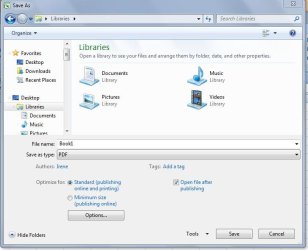
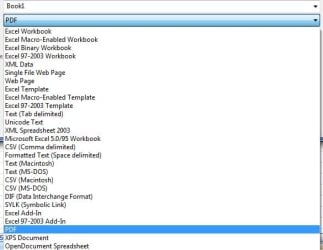
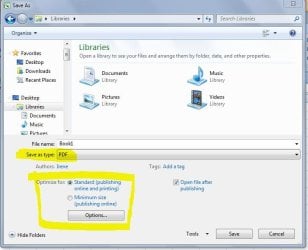
Save the spreadsheet as a PDF file, by selecting from the drop-down menu.
Open the pdf file and select the printer.

Am I really missing something here?
.
.
 

Attachments

  • Excel PDF save-as 1.JPG
    Excel PDF save-as 1.JPG
    49 KB · Views: 1
  • Excel PDF save-as.jpg
    Excel PDF save-as.jpg
    28.6 KB · Views: 4
  • Excel PDF save-as 2.JPG
    Excel PDF save-as 2.JPG
    52 KB · Views: 6

My Computer My Computer

Computer type
PC/Desktop
Computer Manufacturer/Model Number
Packard Bell
OS
Windows 7 Home Premium 64bit
CPU
Intel(R) Core(TM) i3-2120 CPU @ 3.30GHz
Motherboard
Packard Bell IPISB-AG
Memory
3.00 GB
Graphics Card(s)
(1) Intel(R) HD Graphics (2) VNC Mirror Driver
Sound Card
Realtek High Definition Audio
Monitor(s) Displays
AIO LCD
Screen Resolution
1920 x 1080
Hard Drives
WDC WD10EADX-22TDHB0 ATA Device
Fixed hard disk media
4 partitions
931.51 GB
Keyboard
Wireless
Mouse
Wireless
Antivirus
Microsoft Security Essentials
Browser
IE; Firefox
Other Info
Also:
Samsung N220 Plus Netbook - Windows 7 Home
HP laptop
iPad 5
Hi, Irene. I do it to save steps. One chunk of VBA code converts it to a PDF, saves it to a file, prints it and prepares a blank email with the file attached.
 

My Computer My Computer

Computer Manufacturer/Model Number
Toshiba L355D
OS
Windows 7 Ultimate x64 SP1
CPU
Core2 Duo
Motherboard
Intel
Memory
4 GB
Graphics Card(s)
GM965 on-board
Sound Card
RealTek on-board
Monitor(s) Displays
19"+17"(laptop)
Screen Resolution
1440x900 (x 2)
Hard Drives
500GB Ext. 200GB Internal
PSU
N/A
Case
N/A
Cooling
N/A
Hi, Irene. I do it to save steps. One chunk of VBA code converts it to a PDF, saves it to a file, prints it and prepares a blank email with the file attached.
Thanks for the explanation, Mike. I was beginning to think I was losing it. :D

At my time in life, the pressure for speed is significantly reduced.
Still, it's good to learn something new every day - and I certainly do on this forum. ;)
 

My Computer My Computer

Computer type
PC/Desktop
Computer Manufacturer/Model Number
Packard Bell
OS
Windows 7 Home Premium 64bit
CPU
Intel(R) Core(TM) i3-2120 CPU @ 3.30GHz
Motherboard
Packard Bell IPISB-AG
Memory
3.00 GB
Graphics Card(s)
(1) Intel(R) HD Graphics (2) VNC Mirror Driver
Sound Card
Realtek High Definition Audio
Monitor(s) Displays
AIO LCD
Screen Resolution
1920 x 1080
Hard Drives
WDC WD10EADX-22TDHB0 ATA Device
Fixed hard disk media
4 partitions
931.51 GB
Keyboard
Wireless
Mouse
Wireless
Antivirus
Microsoft Security Essentials
Browser
IE; Firefox
Other Info
Also:
Samsung N220 Plus Netbook - Windows 7 Home
HP laptop
iPad 5
Back
Top