Solved HAF X SHort/Static on front USB Panel

Oh Yeah - And CM's last note regarding the wait time...

CM:

Part Requests take roughly 2 to 7 business days to ship, I have given this to the parts department again though to make sure it goes out today or on Monday.

Respectfully,


Support Specialist
Cooler Master RPBU
4820 Schaefer Ave.

Chino CA, 91710
 

My Computer My Computer

At a glance

Windows 7 Home Premium x64AMD Phenom II X6 1090T Black Edition8 GbXFX Radeon 5870
Computer Manufacturer/Model Number
Myself
OS
Windows 7 Home Premium x64
CPU
AMD Phenom II X6 1090T Black Edition
Motherboard
Asus Crosshair IV
Memory
8 Gb
Graphics Card(s)
XFX Radeon 5870
Sound Card
MB Sound w/Sound Blaster Xfi Platinum Drivers and Console
Monitor(s) Displays
HP w2207
Screen Resolution
1680 x 1050
Hard Drives
2 WD 600 Mg SATA 6G Raptors - No Raid
PSU
Corsair - Pro 850W
Case
Cooler Master HAF X
Cooling
Cooler Master H50 - Push/Pull
Keyboard
Thin Backlit Logitech
Mouse
Logitech G9x Laser - Wired
Internet Speed
12mb
Me:

According to eRMA instructions, I would have to send in my I/O panel in order to receive a replacement part. Doing this would render my computer useless. How can I receive an I/O board for Haf X without sending in the original?

Hmmm. I don't remember being asked to ship anything back when I filled out the eRMA request. In fact when I called them I was that they would send my part out free of charge, and that I didn't even need to send them the old part, even after I get the new one. And as stated by their response, you don't have to send in anything either.

Cooler Master:
That is incorrect; you need to just send the request in. You don’t need to send anything back to us.

When I plug a memory stick into the front USB panel, I loose video and I can hear my sound system (which is plugged into the MB onboard sound jack) make a thump. Then I have to hold down the power button to get the system to completely turn off, then it restarts OK.

I have tried 2 separate/different brand USB memory sticks and it happens. If I discharge the stick by touching it to a grounded source, it does not happen. I also do not have to plug it in all the way, just brush the metal surrounding the USB memory stick to the metal outside of the USB 2.0 front panel port and it happens. I love this case, but I cannot deal with this issue as I am constantly using these USB ports.

You can either follow Coolermaster's advice untill your new part arrives....

Cooler Master:

I highly suggest you remove any cable coming from the top panel and connect only the Power SW for the time being. File a part request for the top panel under warranty here:

or, If you're confortable with electrical repairs, do an inspection and try my fix - http://www.sevenforums.com/overcloc...ort-static-front-usb-panel-2.html#post1115986 - your own risk of course.

Either way you go, I wouldn't use the front header until some remedy is found or taken. If you really need usb ports, use the ones on the back of the motherboard, or get a USB hub. No need in frying anything.

Good luck.
 

My Computer My Computer

At a glance

Windows 10 ProIntel Core i7-4770K (3.5Ghz)32 gig Corsair Dominator Platinum (4x8Gig)Sapphire Tri-X R9 Fury
Computer type
PC/Desktop
Computer Manufacturer/Model Number
Custom built by me.
OS
Windows 10 Pro
CPU
Intel Core i7-4770K (3.5Ghz)
Motherboard
Gigabyte G1 Sniper 5 (F10 Bios)
Memory
32 gig Corsair Dominator Platinum (4x8Gig)
Graphics Card(s)
Sapphire Tri-X R9 Fury
Sound Card
Soundblaster ZXR
Monitor(s) Displays
NEC PA242W 24" LCD Monitor
Screen Resolution
1920 x 1200
Hard Drives
Primary - Samsung 850 Pro (512gig), Samsung 840 Pro (256gig), 2TB WD Caviar Black.
PSU
EVGA Supernova 1000 G2
Case
Cooler Master HAF X
Cooling
Corsair H100i with Corsair Air Series SP120 Quiet Fans
Keyboard
Logitech Wireless Wave
Mouse
Logitech Performance MX
Internet Speed
High Speed Cable
Antivirus
Norton Security
Browser
IE11
Other Info
Memory Timings - 1866MHz @ 9-9-9-27-1T @ 1.5 volts
Ok - I couldn't wait to receive the new I/O board/panel from CM, just had to see if I could troubleshoot in light of not finding any frayed or punctured wires. Do not attept this unless you feel like rolling the dice on frying your MB. I started by using a usb stick freshely removed from another computer, used the "safely remove" feature, touched the metal housing around my front panel usb and BAM, screen went blank, thump coming from my bass unit. Sat there, as usual, in never never land. Powered it off. Extremely frustrated, I popped both covers and began removing front panel connections one by one from the MB. Naturally I started with the USB's, I removed the USB 2.0 from the MB USB header, turned it on, but this time entered the BIOS. I figured, if something is going to get fryed, no sense in crashing the HD and my OS install. Once ASUS bios was up, I tried it again, pulled it out of my laptop, plugged it in and BAM! Pissed doesn't even begin to describe it.

Next was the USB 3.0 (which is routing right out of the water cooling gromets and back into the MB USB 3.0 ports. Fully fresh USB, into the front.... BAM. Firewire, BAM!, LED for front FAN, BAM! I am now looking at the front panel lights/reset/PWR switch/HD light... Ummm Which one to try next. I thouht, when this happens, it closely approximates what happens when you press the reset button. So I pulled the reset wires off of the MB. Got the freshly charged USB and WAIT, no BAM. Nothing. It is still running as I write this. I put 3 different USB drives into mutiple laptops and desktops, and plugged in, nothing. Cannot get it to fail. For me, it looks like there may be something wrong with reset switch or the board to which it is soldered. When I get the new board, the problem shoudl be solved This may not be case for others, Sygnus21 for example, but it worked for me. I can leave the thread open if you guys are interested in finding out if CM's replacement I/O board fixes it and restores my reset function. You guys decide. I don't need my reset button anyway. If I am hard hung in an app, holding the power button down has nearly the same effect as a reset. Just have to turn it back on.
 

My Computer My Computer

At a glance

Windows 7 Home Premium x64AMD Phenom II X6 1090T Black Edition8 GbXFX Radeon 5870
Computer Manufacturer/Model Number
Myself
OS
Windows 7 Home Premium x64
CPU
AMD Phenom II X6 1090T Black Edition
Motherboard
Asus Crosshair IV
Memory
8 Gb
Graphics Card(s)
XFX Radeon 5870
Sound Card
MB Sound w/Sound Blaster Xfi Platinum Drivers and Console
Monitor(s) Displays
HP w2207
Screen Resolution
1680 x 1050
Hard Drives
2 WD 600 Mg SATA 6G Raptors - No Raid
PSU
Corsair - Pro 850W
Case
Cooler Master HAF X
Cooling
Cooler Master H50 - Push/Pull
Keyboard
Thin Backlit Logitech
Mouse
Logitech G9x Laser - Wired
Internet Speed
12mb
Man you must really be trying to fry your system :eek:

That is not the way to go about finding a short!!! That's the short way to frying your system!

I hate to say this but I wouldn't be surprised to hear you coming here later on telling us how you found something fried on your motherboard or some other component :o

Also be aware that what you did could also corrupt your data on the hard drives.

Good luck :shock:
 

My Computer My Computer

At a glance

Windows 10 ProIntel Core i7-4770K (3.5Ghz)32 gig Corsair Dominator Platinum (4x8Gig)Sapphire Tri-X R9 Fury
Computer type
PC/Desktop
Computer Manufacturer/Model Number
Custom built by me.
OS
Windows 10 Pro
CPU
Intel Core i7-4770K (3.5Ghz)
Motherboard
Gigabyte G1 Sniper 5 (F10 Bios)
Memory
32 gig Corsair Dominator Platinum (4x8Gig)
Graphics Card(s)
Sapphire Tri-X R9 Fury
Sound Card
Soundblaster ZXR
Monitor(s) Displays
NEC PA242W 24" LCD Monitor
Screen Resolution
1920 x 1200
Hard Drives
Primary - Samsung 850 Pro (512gig), Samsung 840 Pro (256gig), 2TB WD Caviar Black.
PSU
EVGA Supernova 1000 G2
Case
Cooler Master HAF X
Cooling
Corsair H100i with Corsair Air Series SP120 Quiet Fans
Keyboard
Logitech Wireless Wave
Mouse
Logitech Performance MX
Internet Speed
High Speed Cable
Antivirus
Norton Security
Browser
IE11
Other Info
Memory Timings - 1866MHz @ 9-9-9-27-1T @ 1.5 volts
As I said, curiosity got the better of me and I wouldn't recommend anyone else doing it this way. It is working properly now (without the reset button connected). So I guess I lucked out, nothing else on the motherboard seems to be affected, HD audio works fine, USB 2 and 3, light switch for front fan and power button. Ran Prime95 for 3 hours last night to stress the system and 3dMark Vantage twice and so far so good. Thanks everyone for comments and suggestions.
 

My Computer My Computer

At a glance

Windows 7 Home Premium x64AMD Phenom II X6 1090T Black Edition8 GbXFX Radeon 5870
Computer Manufacturer/Model Number
Myself
OS
Windows 7 Home Premium x64
CPU
AMD Phenom II X6 1090T Black Edition
Motherboard
Asus Crosshair IV
Memory
8 Gb
Graphics Card(s)
XFX Radeon 5870
Sound Card
MB Sound w/Sound Blaster Xfi Platinum Drivers and Console
Monitor(s) Displays
HP w2207
Screen Resolution
1680 x 1050
Hard Drives
2 WD 600 Mg SATA 6G Raptors - No Raid
PSU
Corsair - Pro 850W
Case
Cooler Master HAF X
Cooling
Cooler Master H50 - Push/Pull
Keyboard
Thin Backlit Logitech
Mouse
Logitech G9x Laser - Wired
Internet Speed
12mb
You would think they would have fixed that by now seeing as it looks to be an ongoing issue for close to a year, and not on just one model of case either. The OP here has a CM Storm Scout,

http://www.sevenforums.com/hardware-devices/66190-pc-reboots-if-someone-walk.html

is describing the same problem with the USB and ESATA ports. We didn't get as far as determining exactly what the cause was like 1strail did, but a new front panel from CM fixed for him as well.
 

My Computer My Computer

At a glance

Win 7 Ultimate x64FX-8350 @ 4.6 GHz so farADATA XPG V1 Series Black 8GB DDR3 1600Sapphire R9 270x Dual-X
Computer type
PC/Desktop
Computer Manufacturer/Model Number
Me
OS
Win 7 Ultimate x64
CPU
FX-8350 @ 4.6 GHz so far
Motherboard
Asus M5A97 EVO
Memory
ADATA XPG V1 Series Black 8GB DDR3 1600
Graphics Card(s)
Sapphire R9 270x Dual-X
Sound Card
Xonar DGX w/ Corsair Vengence 1300
Monitor(s) Displays
Acer S232HL Abid
Screen Resolution
1920x1080
Hard Drives
120 GB OCZ Vertex 3
500 GB Seagate 7200.12
PSU
Antec Earthwatts 650W Green
Case
Antec Three Hundred
Cooling
Cooler Master 212 EVO
Keyboard
Logitech G510
Mouse
Logitech G500s
Internet Speed
35000/3000
You would have also thought they'd be well stocked for this issue..... unless the issue is so bad they can't keep up with demands :eek:

Anyways all we have to do now is hold our breaths till Coolermaster sends them out. Let's just hope we don't die from oxygen deprivation :sarc:
 

My Computer My Computer

At a glance

Windows 10 ProIntel Core i7-4770K (3.5Ghz)32 gig Corsair Dominator Platinum (4x8Gig)Sapphire Tri-X R9 Fury
Computer type
PC/Desktop
Computer Manufacturer/Model Number
Custom built by me.
OS
Windows 10 Pro
CPU
Intel Core i7-4770K (3.5Ghz)
Motherboard
Gigabyte G1 Sniper 5 (F10 Bios)
Memory
32 gig Corsair Dominator Platinum (4x8Gig)
Graphics Card(s)
Sapphire Tri-X R9 Fury
Sound Card
Soundblaster ZXR
Monitor(s) Displays
NEC PA242W 24" LCD Monitor
Screen Resolution
1920 x 1200
Hard Drives
Primary - Samsung 850 Pro (512gig), Samsung 840 Pro (256gig), 2TB WD Caviar Black.
PSU
EVGA Supernova 1000 G2
Case
Cooler Master HAF X
Cooling
Corsair H100i with Corsair Air Series SP120 Quiet Fans
Keyboard
Logitech Wireless Wave
Mouse
Logitech Performance MX
Internet Speed
High Speed Cable
Antivirus
Norton Security
Browser
IE11
Other Info
Memory Timings - 1866MHz @ 9-9-9-27-1T @ 1.5 volts
Update on replacement part

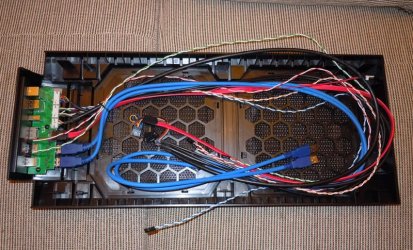
Well my replacement part arrived today... the entire top panel... wires and all.... Wow

HAF-X-Top-panel---1.jpg

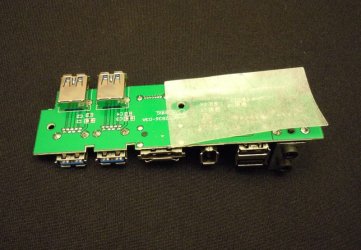
Disassembly and further examination of the header reveals Coolermaster's "fix".....

Header-with-protective-tape.jpg

a piece of heavy duty plastic tape seperating the solder joints from the switchs wire bundles.

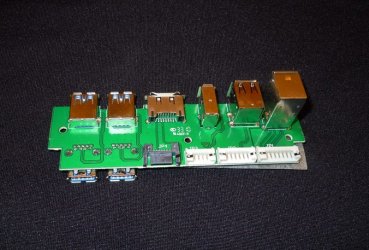
Header---no-wires.jpg

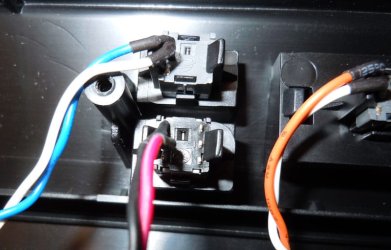
Inspecting the switch assembly itself shows a little improvement.... unused pins now removed....

LED-Switch.jpg

So, my assessment? Since I basically did the samething Coolermaster did, protect the wires with a piece of tape/padding there was no need to use what Coolermaster sent me. Oh well.... I now have extra parts :D

BTW from first phone call to arrival took about ten days. Not too bad.

Peace :cool:
 

My Computer My Computer

At a glance

Windows 10 ProIntel Core i7-4770K (3.5Ghz)32 gig Corsair Dominator Platinum (4x8Gig)Sapphire Tri-X R9 Fury
Computer type
PC/Desktop
Computer Manufacturer/Model Number
Custom built by me.
OS
Windows 10 Pro
CPU
Intel Core i7-4770K (3.5Ghz)
Motherboard
Gigabyte G1 Sniper 5 (F10 Bios)
Memory
32 gig Corsair Dominator Platinum (4x8Gig)
Graphics Card(s)
Sapphire Tri-X R9 Fury
Sound Card
Soundblaster ZXR
Monitor(s) Displays
NEC PA242W 24" LCD Monitor
Screen Resolution
1920 x 1200
Hard Drives
Primary - Samsung 850 Pro (512gig), Samsung 840 Pro (256gig), 2TB WD Caviar Black.
PSU
EVGA Supernova 1000 G2
Case
Cooler Master HAF X
Cooling
Corsair H100i with Corsair Air Series SP120 Quiet Fans
Keyboard
Logitech Wireless Wave
Mouse
Logitech Performance MX
Internet Speed
High Speed Cable
Antivirus
Norton Security
Browser
IE11
Other Info
Memory Timings - 1866MHz @ 9-9-9-27-1T @ 1.5 volts
Wow that's more parts than I thought they would send out. Overkill to say the least but a nice touch !
 

My Computer My Computer

At a glance

Windows 7 Ultimate 64i7 3770k OC'd 4.6 @ 1.17v, also FX 8120 & i5 ...32 gb G.Skill Sniper DDR3 10-12-12-31 @ 2133XFX Radeon 7870 2GB DDR5
Computer type
PC/Desktop
Computer Manufacturer/Model Number
A blend of brains, brawn and dumb luck.
OS
Windows 7 Ultimate 64
CPU
i7 3770k OC'd 4.6 @ 1.17v, also FX 8120 & i5 miniITX
Motherboard
MSI P67A-GD80 b3
Memory
32 gb G.Skill Sniper DDR3 10-12-12-31 @ 2133
Graphics Card(s)
XFX Radeon 7870 2GB DDR5
Sound Card
Sound Blaster Z Series Card
Monitor(s) Displays
(2) LG LED 23" 1920 x 1080 2ms Monitors via mini d-port
Screen Resolution
1680 X 1050 p
Hard Drives
Samsung 256 gb 830 SSD sata III
(1) 1 tb WD Black
(2) 1 tb Hitachi deskmates/sata II
(2) 1 tb WD green/sata II
(2) 3 tb Seagate Barracuda
(1) 120 gb OCZ Vertex SS
(1) Drobo 5N w/5 Seagate 3tb
PSU
EVGA modular 1000G2 80% gold rating & APC 1200 RS
Case
CoolerMaster Storm Styker
Cooling
7 case fans 140mm & 120mm, NZXT Kraken X60
Keyboard
(2) Logitech Illuminated Keyboards (1) usb (1) wireless
Mouse
Logitech G700 & T-BC21 - nano nx for the laptop
Internet Speed
Basic 120mbps down
Antivirus
Trend Micro Titanium Max Security & Malwarebytes Premium
Browser
Chrome and IE 10
Other Info
5 Noctua case fans + 3 Noctua in p/p on NZXT cooler
Integrated hot swap drive bays for 2.5" Drives
(2) Lite-on dvd/cd/Blu Ray optical 22X
Integrated fan controller and led on/off
HP Officejet Pro 8630 all-n-one
Hot-swappable 3.5" hard drive bay
Netgear Nighthawk router
Asus USB 3 & sata 6 PCIe card
Vantec IDE to sata adptr./Ultra sata adptr
Lenovo L420 i5 lappy with m sata
Drobo 5N advanced NAS
Yeah it does like like overkill but they did do some modifications to the switches switches on the top panel. However they probably could have kept a lot of the cables, especially the blue USB 3.0 cables. On the other hand not everyone is a handy man so they have to make sure everything is included just to be safe.

Good on Coolermaster.
 

My Computer My Computer

At a glance

Windows 10 ProIntel Core i7-4770K (3.5Ghz)32 gig Corsair Dominator Platinum (4x8Gig)Sapphire Tri-X R9 Fury
Computer type
PC/Desktop
Computer Manufacturer/Model Number
Custom built by me.
OS
Windows 10 Pro
CPU
Intel Core i7-4770K (3.5Ghz)
Motherboard
Gigabyte G1 Sniper 5 (F10 Bios)
Memory
32 gig Corsair Dominator Platinum (4x8Gig)
Graphics Card(s)
Sapphire Tri-X R9 Fury
Sound Card
Soundblaster ZXR
Monitor(s) Displays
NEC PA242W 24" LCD Monitor
Screen Resolution
1920 x 1200
Hard Drives
Primary - Samsung 850 Pro (512gig), Samsung 840 Pro (256gig), 2TB WD Caviar Black.
PSU
EVGA Supernova 1000 G2
Case
Cooler Master HAF X
Cooling
Corsair H100i with Corsair Air Series SP120 Quiet Fans
Keyboard
Logitech Wireless Wave
Mouse
Logitech Performance MX
Internet Speed
High Speed Cable
Antivirus
Norton Security
Browser
IE11
Other Info
Memory Timings - 1866MHz @ 9-9-9-27-1T @ 1.5 volts
I would give CoolerMaster major prop's !
 

My Computer My Computer

At a glance

Windows 7 Ultimate 64i7 3770k OC'd 4.6 @ 1.17v, also FX 8120 & i5 ...32 gb G.Skill Sniper DDR3 10-12-12-31 @ 2133XFX Radeon 7870 2GB DDR5
Computer type
PC/Desktop
Computer Manufacturer/Model Number
A blend of brains, brawn and dumb luck.
OS
Windows 7 Ultimate 64
CPU
i7 3770k OC'd 4.6 @ 1.17v, also FX 8120 & i5 miniITX
Motherboard
MSI P67A-GD80 b3
Memory
32 gb G.Skill Sniper DDR3 10-12-12-31 @ 2133
Graphics Card(s)
XFX Radeon 7870 2GB DDR5
Sound Card
Sound Blaster Z Series Card
Monitor(s) Displays
(2) LG LED 23" 1920 x 1080 2ms Monitors via mini d-port
Screen Resolution
1680 X 1050 p
Hard Drives
Samsung 256 gb 830 SSD sata III
(1) 1 tb WD Black
(2) 1 tb Hitachi deskmates/sata II
(2) 1 tb WD green/sata II
(2) 3 tb Seagate Barracuda
(1) 120 gb OCZ Vertex SS
(1) Drobo 5N w/5 Seagate 3tb
PSU
EVGA modular 1000G2 80% gold rating & APC 1200 RS
Case
CoolerMaster Storm Styker
Cooling
7 case fans 140mm & 120mm, NZXT Kraken X60
Keyboard
(2) Logitech Illuminated Keyboards (1) usb (1) wireless
Mouse
Logitech G700 & T-BC21 - nano nx for the laptop
Internet Speed
Basic 120mbps down
Antivirus
Trend Micro Titanium Max Security & Malwarebytes Premium
Browser
Chrome and IE 10
Other Info
5 Noctua case fans + 3 Noctua in p/p on NZXT cooler
Integrated hot swap drive bays for 2.5" Drives
(2) Lite-on dvd/cd/Blu Ray optical 22X
Integrated fan controller and led on/off
HP Officejet Pro 8630 all-n-one
Hot-swappable 3.5" hard drive bay
Netgear Nighthawk router
Asus USB 3 & sata 6 PCIe card
Vantec IDE to sata adptr./Ultra sata adptr
Lenovo L420 i5 lappy with m sata
Drobo 5N advanced NAS

My Computer My Computer

At a glance

windows 7 professional 64
OS
windows 7 professional 64
From phone call to delivery was about 10 days. That's in my post.

I'll say that the Coolermaster makes good cases and that they just had an issue that's being addressed. I'm sure the newer productions has this issue fixed. And for what it's worth Corsair had an issue with their front headers on their 800D as well, but it had to do with the head phone jack.

My only point is that all manufactures suffer issues at one time or another, it's how they handle them they makes them trustworthy. In this case (no pun intended) both companies addressed the issue in fine fashion and got on with business.

I think you'll find Coolermaster has some exceptional cases.

Hope this helps.

Peace :cool:


Just in case... 800D: noises when front panel headphones jack is used - The Corsair Support Forums ;)
 
Last edited:

My Computer My Computer

At a glance

Windows 10 ProIntel Core i7-4770K (3.5Ghz)32 gig Corsair Dominator Platinum (4x8Gig)Sapphire Tri-X R9 Fury
Computer type
PC/Desktop
Computer Manufacturer/Model Number
Custom built by me.
OS
Windows 10 Pro
CPU
Intel Core i7-4770K (3.5Ghz)
Motherboard
Gigabyte G1 Sniper 5 (F10 Bios)
Memory
32 gig Corsair Dominator Platinum (4x8Gig)
Graphics Card(s)
Sapphire Tri-X R9 Fury
Sound Card
Soundblaster ZXR
Monitor(s) Displays
NEC PA242W 24" LCD Monitor
Screen Resolution
1920 x 1200
Hard Drives
Primary - Samsung 850 Pro (512gig), Samsung 840 Pro (256gig), 2TB WD Caviar Black.
PSU
EVGA Supernova 1000 G2
Case
Cooler Master HAF X
Cooling
Corsair H100i with Corsair Air Series SP120 Quiet Fans
Keyboard
Logitech Wireless Wave
Mouse
Logitech Performance MX
Internet Speed
High Speed Cable
Antivirus
Norton Security
Browser
IE11
Other Info
Memory Timings - 1866MHz @ 9-9-9-27-1T @ 1.5 volts
Does this problem occur after installing second optional fan on the top?
 

My Computer My Computer

At a glance

Windows 7 Ultimate x64
Computer Manufacturer/Model Number
Dell Inspiron 15
OS
Windows 7 Ultimate x64
The problem can happen any time when you have exposed wires. So yeah, installing the second fan could cause a problem being that you have to remove the top panel (thus moving the wire bundles around) to install the fan.

But like I said before I'm confident the newer productions has this issue fixed. You can always do you own inspection though to put your mind at ease.
 

My Computer My Computer

At a glance

Windows 10 ProIntel Core i7-4770K (3.5Ghz)32 gig Corsair Dominator Platinum (4x8Gig)Sapphire Tri-X R9 Fury
Computer type
PC/Desktop
Computer Manufacturer/Model Number
Custom built by me.
OS
Windows 10 Pro
CPU
Intel Core i7-4770K (3.5Ghz)
Motherboard
Gigabyte G1 Sniper 5 (F10 Bios)
Memory
32 gig Corsair Dominator Platinum (4x8Gig)
Graphics Card(s)
Sapphire Tri-X R9 Fury
Sound Card
Soundblaster ZXR
Monitor(s) Displays
NEC PA242W 24" LCD Monitor
Screen Resolution
1920 x 1200
Hard Drives
Primary - Samsung 850 Pro (512gig), Samsung 840 Pro (256gig), 2TB WD Caviar Black.
PSU
EVGA Supernova 1000 G2
Case
Cooler Master HAF X
Cooling
Corsair H100i with Corsair Air Series SP120 Quiet Fans
Keyboard
Logitech Wireless Wave
Mouse
Logitech Performance MX
Internet Speed
High Speed Cable
Antivirus
Norton Security
Browser
IE11
Other Info
Memory Timings - 1866MHz @ 9-9-9-27-1T @ 1.5 volts
Yes - The problem did occur after installing the second fan for me or at least that is when I noticed it happening. The problem is that the replacement wires/panel I/O board (which equated to the whole top as Sygnus21's photo shows), even with modifications from CM, did not fix the problem. I even RMA'ed the box with Amazon and the brand new box had exactly the same problem. All signs pointed to the front panel I/O, finally removing the reset wire from the MB removed the problem as a workaround, but leading up to that, I did the following:

1.) Replaced the Power Supply from a new Corsair HX850 to an Antec 1000W PS - This wound up solving another video problem I was having, but the shorting problem still remained
2.) Replaced the XFX HD5870 video board for the same problem as above, but one less variable now on the shorting problem
3.) Upgraded the memory from Patriot sector 7 1300 to Corsair Dominator 1600 (just me wanting more juice), one less variable in the equation for the shorting problem
4.) Finally decided the MB was suspect, an ASUS Crosshair IV Formula with an AMD 1090T BE OC'ed to 3.83GHZ. I RMA'ed this with ASUS as my window with Amazon had closed. They overnighted a replacement.

To cover all varibles, I bought an NZXT Phantom case, put the replacement MB in with all other replacement parts (PS, Vid board, memory) and low and behold the problem was gone, for about 3 days. Pulled out my IPOD touch, just the connecting wire, I hadn't even connected the IPOD to it, touched the USB port on the new NZXT case as I was attempting to plug it in and it happened again. The only thing I could conclude at this point was that either the replacement MB had the same problem, or I partially screwed up my processor through all of the shorting or overclocking. I read a ton of posts in various forums on the shorting problem and I realized that this board has a rep for shorting in exactly the same way.

Taking it one step further, to eliminate either the CPU or the MB, I purchased a Gigabyte MB (890FX Chipset) and installed it while I RMA'ed the 2nd ASUS MB. It has been in the box for 2 days and no sign of shorting. So far it looks like in my case (no pun intended), the problem was the MB all along, but I will update in a week or so. I plan to put the ASUS board back in (it is far superior to the Gigabyte in terms of OC'ing).

So the bottom line is that the MB replacement ultimatly fixed the problem (so far). To get that second fan in, which I was hell bent on adding, I had to remove the blue USB wires and the eSATA cable to even get the top to seat properly (didn't use the front ports for those anyways) and it MAY have reduced my CPU temp by 1 or 2 degrees C.
 

My Computer My Computer

At a glance

Windows 7 Home Premium x64AMD Phenom II X6 1090T Black Edition8 GbXFX Radeon 5870
Computer Manufacturer/Model Number
Myself
OS
Windows 7 Home Premium x64
CPU
AMD Phenom II X6 1090T Black Edition
Motherboard
Asus Crosshair IV
Memory
8 Gb
Graphics Card(s)
XFX Radeon 5870
Sound Card
MB Sound w/Sound Blaster Xfi Platinum Drivers and Console
Monitor(s) Displays
HP w2207
Screen Resolution
1680 x 1050
Hard Drives
2 WD 600 Mg SATA 6G Raptors - No Raid
PSU
Corsair - Pro 850W
Case
Cooler Master HAF X
Cooling
Cooler Master H50 - Push/Pull
Keyboard
Thin Backlit Logitech
Mouse
Logitech G9x Laser - Wired
Internet Speed
12mb
So the bottom line is that the MB replacement ultimatly fixed the problem (so far). To get that second fan in, which I was hell bent on adding, I had to remove the blue USB wires and the eSATA cable to even get the top to seat properly (didn't use the front ports for those anyways) and it MAY have reduced my CPU temp by 1 or 2 degrees C.

Sorry but I'm not really seeing what this has to do with the shorting problem of the front panel. How does replacing the MB relieve the issue of the cut wires on the front header panel? Unless you've done something to alleviate that problem, it's still there…. no matter how many parts you’ve replaced.

Anyways you can get a replacement part as shown, which does have a fix, or you can do what I’ve done and fix it yourself. Either way the problem is gone.

My two cents.
 

My Computer My Computer

At a glance

Windows 10 ProIntel Core i7-4770K (3.5Ghz)32 gig Corsair Dominator Platinum (4x8Gig)Sapphire Tri-X R9 Fury
Computer type
PC/Desktop
Computer Manufacturer/Model Number
Custom built by me.
OS
Windows 10 Pro
CPU
Intel Core i7-4770K (3.5Ghz)
Motherboard
Gigabyte G1 Sniper 5 (F10 Bios)
Memory
32 gig Corsair Dominator Platinum (4x8Gig)
Graphics Card(s)
Sapphire Tri-X R9 Fury
Sound Card
Soundblaster ZXR
Monitor(s) Displays
NEC PA242W 24" LCD Monitor
Screen Resolution
1920 x 1200
Hard Drives
Primary - Samsung 850 Pro (512gig), Samsung 840 Pro (256gig), 2TB WD Caviar Black.
PSU
EVGA Supernova 1000 G2
Case
Cooler Master HAF X
Cooling
Corsair H100i with Corsair Air Series SP120 Quiet Fans
Keyboard
Logitech Wireless Wave
Mouse
Logitech Performance MX
Internet Speed
High Speed Cable
Antivirus
Norton Security
Browser
IE11
Other Info
Memory Timings - 1866MHz @ 9-9-9-27-1T @ 1.5 volts
There were no broken wires and as I mentioned, I replaced the entire case with another HAF X, replaced the I/O panel as you did with a modified one from CM, and finally changed case manufacturers and the problem followed the motherboard. Was that not clear?

What eactly would you have done differently?
 

My Computer My Computer

At a glance

Windows 7 Home Premium x64AMD Phenom II X6 1090T Black Edition8 GbXFX Radeon 5870
Computer Manufacturer/Model Number
Myself
OS
Windows 7 Home Premium x64
CPU
AMD Phenom II X6 1090T Black Edition
Motherboard
Asus Crosshair IV
Memory
8 Gb
Graphics Card(s)
XFX Radeon 5870
Sound Card
MB Sound w/Sound Blaster Xfi Platinum Drivers and Console
Monitor(s) Displays
HP w2207
Screen Resolution
1680 x 1050
Hard Drives
2 WD 600 Mg SATA 6G Raptors - No Raid
PSU
Corsair - Pro 850W
Case
Cooler Master HAF X
Cooling
Cooler Master H50 - Push/Pull
Keyboard
Thin Backlit Logitech
Mouse
Logitech G9x Laser - Wired
Internet Speed
12mb
To be honest I'm not clear on what your issue was. But you seem to have figured it out so in the end, that's all that counts.

I was just going with the flow of this thread which was a shorting problem in the front header of the top panel for the HAF X case.

Sorry.
 

My Computer My Computer

At a glance

Windows 10 ProIntel Core i7-4770K (3.5Ghz)32 gig Corsair Dominator Platinum (4x8Gig)Sapphire Tri-X R9 Fury
Computer type
PC/Desktop
Computer Manufacturer/Model Number
Custom built by me.
OS
Windows 10 Pro
CPU
Intel Core i7-4770K (3.5Ghz)
Motherboard
Gigabyte G1 Sniper 5 (F10 Bios)
Memory
32 gig Corsair Dominator Platinum (4x8Gig)
Graphics Card(s)
Sapphire Tri-X R9 Fury
Sound Card
Soundblaster ZXR
Monitor(s) Displays
NEC PA242W 24" LCD Monitor
Screen Resolution
1920 x 1200
Hard Drives
Primary - Samsung 850 Pro (512gig), Samsung 840 Pro (256gig), 2TB WD Caviar Black.
PSU
EVGA Supernova 1000 G2
Case
Cooler Master HAF X
Cooling
Corsair H100i with Corsair Air Series SP120 Quiet Fans
Keyboard
Logitech Wireless Wave
Mouse
Logitech Performance MX
Internet Speed
High Speed Cable
Antivirus
Norton Security
Browser
IE11
Other Info
Memory Timings - 1866MHz @ 9-9-9-27-1T @ 1.5 volts
Wow,that's really bad news! I was considering buying one and see what serious issues it has! So it doesn't happen to everybody it seems,but still...Is there a way to detect it without shocking the system?
 

My Computer My Computer

At a glance

Win 7 Home 32i7 870Kingston Hyperx 2 GB 1600 Mhz Cl9 (x2)Asus ENGTX 470
OS
Win 7 Home 32
CPU
i7 870
Motherboard
Asus P7P55DE Deluxe
Memory
Kingston Hyperx 2 GB 1600 Mhz Cl9 (x2)
Graphics Card(s)
Asus ENGTX 470
Monitor(s) Displays
Asus MS238H
Hard Drives
Seagate 500 GB
PSU
Thermaltake 650W
Case
Thermaltake Aguila
Back
Top