after batch file output to txt, the font not consistent?

beidog

New member
Local time
12:16 PM
Messages
25
I wrote a batch file to output my system infor to a txt file.
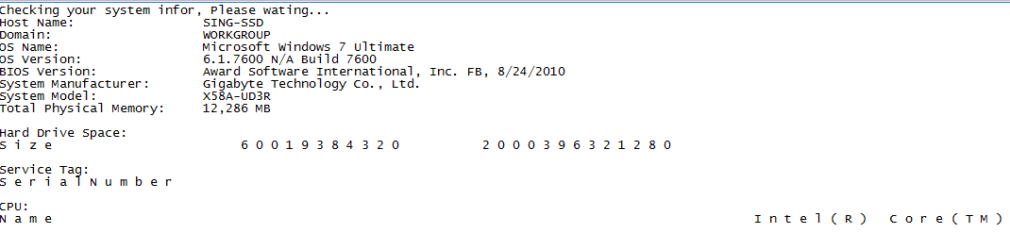
After I run it, I found that the fonts are not the same.
The output for "wmic" obviously are different than others (See attachment).
There is also a big gap for CPU infor. I tried to delete the "echo." but no luck.
However, while I run "wmic" alone, its output is normal. but while I put some commands before "wmic", the fonts look wired.
anyone know why? thanks!


Here is my code:


@echo off
echo Checking your system infor, Please wating...
systeminfo | findstr /c:"Host Name"
systeminfo | findstr /c:"Domain"
systeminfo | findstr /c:"OS Name"
systeminfo | findstr /c:"OS Version"
systeminfo | findstr /c:"System Manufacturer"
systeminfo | findstr /c:"System Model"
systeminfo | findstr /c:"System type"
systeminfo | findstr /c:"Total Physical Memory"

ipconfig | findstr /c:"IP Address"

echo.

echo Hard Drive Space:
wmic diskdrive get size

echo.
echo.

echo Service Tag:
wmic bios get serialnumber

echo.
echo.
echo CPU:
wmic cpu get name

echo Completed! Thank you!

pause
 

Attachments
  • tag.png
    tag.png
    7.6 KB · Views: 781

My Computer My Computer

At a glance

Windows 7 Ultimate x64
OS
Windows 7 Ultimate x64
Yeah, so I tried it myself and I didn't have any issues.

DOS_System_Info.JPG


If you want your system Information, download an awesome little app called Speccy from Piriform (Piriform - Download CCleaner, Defraggler, Recuva, Speccy - Millions of users worldwide!). It pulls from the hardware itself, not just what Windows thinks it is.
 

My Computer My Computer

At a glance

Windows 7 Ultimate 64-bitAMD Phenom II X6 1090T 3.2GHZG.SKILL RipJaw 3x2GB DDR3-10662x HIS Radeon HD 6850 1 GB
OS
Windows 7 Ultimate 64-bit
CPU
AMD Phenom II X6 1090T 3.2GHZ
Motherboard
MSI 890FXA-GD70
Memory
G.SKILL RipJaw 3x2GB DDR3-1066
Graphics Card(s)
2x HIS Radeon HD 6850 1 GB
Sound Card
VIA 8-channel
Monitor(s) Displays
2x 20 inch Acer LCDs, 1x 32" Sony LCD TV
Screen Resolution
4480x900
Hard Drives
1x Crucial 64GB SSD
3x 1TB HDDs (WD, Seagate, Hitatchi)
1x 500GB Seagate External
PSU
Kingwin 1000W Modular
Case
Coolermaster HAF 932
Cooling
1x 120mm, 3x 200mm, CoolerMaster Hyper 212+
Keyboard
Microsoft Wireless Keyboard 1000
Mouse
Microsoft Wiresless Mouse 5000
Internet Speed
20mbps
Other Info
Samsung BD-ROM/DVD-RW
In the attached batch script, I fixed your spacing problem, and I fixed the IP Address detection. Run it by typing info.bat > info.txt in Command Prompt. Please rep me if it works (the small scale in the upper right corner of this post), or tell me if it doesn't.
 

Attachments

Last edited:

My Computer My Computer

At a glance

Windows 7 Professional x64Intel Core i7-2720QM4GB (2 x 2GB)NVIDIA Quadro 2000M (with Optimus)
Computer Manufacturer/Model Number
Lenovo ThinkPad W520 (4270CT)
OS
Windows 7 Professional x64
CPU
Intel Core i7-2720QM
Memory
4GB (2 x 2GB)
Graphics Card(s)
NVIDIA Quadro 2000M (with Optimus)
Hard Drives
500 GB @ 7200 RPM
In the attached batch script, I fixed your spacing problem, and I fixed the IP Address detection. Run it by typing info.bat > info.txt in Command Prompt. Please rep me if it works (the small scale in the upper right corner of this post), or tell me if it doesn't.

Thank you for your help. so the "fixit.tmp" is for storing the info temporally?
It does work! but not work for all my cases.
I tested it on about 20 PCs, it worked perfectly on XP.
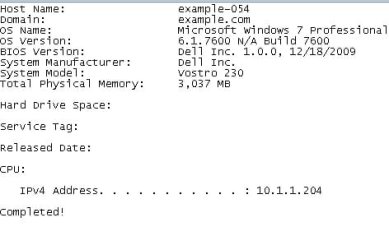
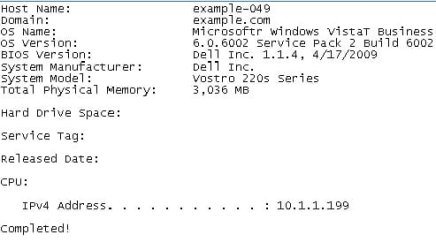
however, for vista and win7, no output show up for those commands with "fixit.tmp" in some computers.(see attachment)
I also tried different computer in the same model. only two win7 computers showed up all info, and other six missed some output.( like the pictures).
I don't know why this happen, but I use my original bat file for those six computers, the missed info showed up, but the fonts are off.
ANY CLUE?


My updated Code:


@echo off
systeminfo | findstr /c:"Host Name"
systeminfo | findstr /c:"Domain"
systeminfo | findstr /c:"OS Name"
systeminfo | findstr /c:"OS Version"
systeminfo | findstr /c:"System Manufacturer"
systeminfo | findstr /c:"System Model"
systeminfo | findstr /c:"System type"
systeminfo | findstr /c:"Total Physical Memory"

echo.
echo Hard Drive Space:
wmic diskdrive get size > fixit.tmp
type fixit.tmp

echo.
echo Service Tag:
wmic bios get serialnumber > fixit.tmp
type fixit.tmp

echo.
echo Released Date:
wmic bios get releasedate > fixit.tmp
type fixit.tmp

echo.
echo CPU:
wmic cpu get name > fixit.tmp
type fixit.tmp

del fixit.tmp

echo.
ipconfig | findstr /c:"IPv4 Address"

echo.
echo Completed!
 

Attachments

  • ex1.jpg
    ex1.jpg
    16.2 KB · Views: 20
  • ex2.jpg
    ex2.jpg
    18.1 KB · Views: 17
Last edited:

My Computer My Computer

At a glance

Windows 7 Ultimate x64
OS
Windows 7 Ultimate x64
On the machines that don't work, please try following the following steps and tell me if they work.
  1. Open Command Prompt
  2. cd Desktop
  3. echo This is a test > test.txt
  4. Open test.txt on your desktop and see if it says "This is a test".
  5. Back in cmd, try type test.txt and see if it correctly displays the content of test.txt.
 
Last edited:

My Computer My Computer

At a glance

Windows 7 Professional x64Intel Core i7-2720QM4GB (2 x 2GB)NVIDIA Quadro 2000M (with Optimus)
Computer Manufacturer/Model Number
Lenovo ThinkPad W520 (4270CT)
OS
Windows 7 Professional x64
CPU
Intel Core i7-2720QM
Memory
4GB (2 x 2GB)
Graphics Card(s)
NVIDIA Quadro 2000M (with Optimus)
Hard Drives
500 GB @ 7200 RPM
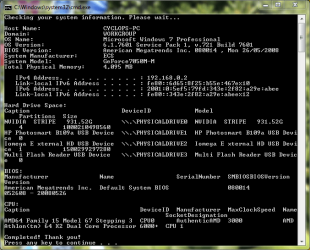
Here is my version of the code, and the output it produces:

Code:
@echo off
echo Checking your system information. Please wait...
echo.
systeminfo | findstr /c:"Host Name"
systeminfo | findstr /c:"Domain" 
systeminfo | findstr /c:"OS Name" 
systeminfo | findstr /c:"OS Version" 
systeminfo | findstr /c:"System Manufacturer" 
systeminfo | findstr /c:"System Model"
systeminfo | findstr /c:"System type" 
systeminfo | findstr /c:"Total Physical Memory"
echo. 
ipconfig | findstr /c:"IPv4 Address" 
ipconfig | findstr /c:"IPv6 Address"
echo.
echo Hard Drive Space: 
wmic diskdrive list brief 
echo BIOS: 
wmic bios list brief 
echo CPU: 
wmic cpu list brief
echo Completed! Thank you!
pause

Capture.PNG
 

My Computer My Computer

At a glance

Windows 8.1 Pro RTM x64Intel Core-i5-3570K 4-core @ 3.4GHz (Ivy Brid...4 x 4GB DDR3-1600 Corsair Vengeance CMZ8GX3M2...MSI GeForce GTX770 Gaming OC 2GB
Computer type
PC/Desktop
Computer Manufacturer/Model Number
Dwarf Dwf/11/2012 r09/2013
OS
Windows 8.1 Pro RTM x64
CPU
Intel Core-i5-3570K 4-core @ 3.4GHz (Ivy Bridge) (OC 4.4GHz)
Motherboard
ASRock Z77 Extreme4-M
Memory
4 x 4GB DDR3-1600 Corsair Vengeance CMZ8GX3M2A1600C9B (16GB)
Graphics Card(s)
MSI GeForce GTX770 Gaming OC 2GB
Sound Card
Realtek High Definition on board solution (ALC 898)
Monitor(s) Displays
ViewSonic VA1912w Widescreen (VGA)
Screen Resolution
1440x900
Hard Drives
OCZ Agility 3 SSD 120GB SATA III x2 (RAID 0)
Samsung HD501LJ 500GB SATA II x2
Hitachi HDS721010CLA332 1TB SATA II
Iomega 1.5TB Ext USB 2.0
WD 2.0TB Ext USB 3.0
PSU
XFX Pro Series 850W Semi-Modular
Case
Gigabyte IF233
Cooling
1 x 120mm Front Inlet 1 x 120mm Rear Exhaust
Keyboard
Microsoft Comfort Curve Keyboard 3000 (USB)
Mouse
Microsoft Comfort Mouse 3000 for Business (USB)
Internet Speed
NetGear DG834Gv3 ADSL Modem/Router (Ethernet) ~4.0 Mb/s (O2)
Antivirus
Avast! 8.0.1497
Browser
IE 11
Other Info
Optical Drive: HL-DT-ST BD-RE BH10LS30 SATA Bluray
Lexmark S305 Printer/Scanner/Copier (USB)
WEI Score: 8.1/8.1/8.5/8.5/8.25
Asus Eee PC 1011PX Netbook (Windows 7 x86 Starter)
BriceH,
Thanks, I figured it out. I need to output "wmic" commands to a actual file in the hard disk(such as C:\temp.txt) and then "type" it and "del" it. but i am still wondering why some PCs wouldn't work just like the others.
I appreciated your help.
 

My Computer My Computer

At a glance

Windows 7 Ultimate x64
OS
Windows 7 Ultimate x64
Back
Top