Show Us Your WEI (2)

Status
Not open for further replies.
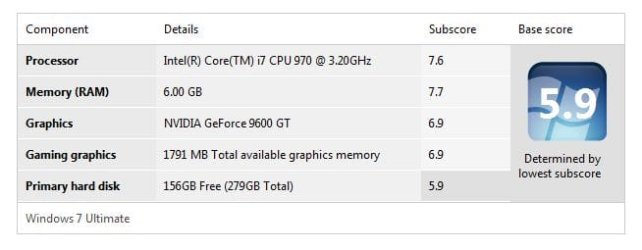
I've upgraded my two-year-old X58 based system with an i7-970. It even boots up faster.

Bye. :cool:
 

Attachments

  • DGSWEI.JPG
    DGSWEI.JPG
    27.2 KB · Views: 53

My Computer My Computer

Computer Manufacturer/Model Number
Home Brew
OS
Windows 7 Ultimate x64
CPU
i7 970
Motherboard
ASUS Rampage III GENE
Memory
9 GB
Graphics Card(s)
9600GT
Monitor(s) Displays
dual 24" Samsung
Screen Resolution
1920x1200
Hard Drives
VelociRaptor and 4TB of Hitachi RAID 0
PSU
Thermaltake toughpower W0104RU 650W
Case
Thermaltake LANBOX Lite
Internet Speed
30 Mbps Download 1 Mbps Upload (Speedtest.com)
With just a change of the BCLK to 160, leaving turbo and all power savings on, I get 7.4 with my i5, and 7.7 for my 4 Gig's ram now running natively at 1600MHz.

A Guy
Nice scores and thanks for the tip for the BIOS settings; your system would be really fast with an SSD drive, even with the SATA 2.0 ports.

I am actually considering moving the SSD to the SATA 2.0 port for two reasons. One is no TRIM support with the Marvell chip and the other is that occasionally the "mv91xx.sys" causes BSOD. The the disk performance WEI will probably drop to 7.5 or so, but the TRIM will work with the Intel driver and probably gets rid of the BSOD as well.
 

My Computer My Computer

Computer type
PC/Desktop
Computer Manufacturer/Model Number
Custom built at Home
OS
Windows 7 64-bit, Windows 8.1 64-bit, OSX El Capitan, Windows 10 (VMware)
CPU
Intel i5-3350P 3.1 GHz
Motherboard
Gigabyte GA-Z77X-UP5 TH
Memory
16 GBs GSkill Sniper
Graphics Card(s)
Radeon HD 7850
Sound Card
VIA HD Audio
Monitor(s) Displays
Dell U2410 24"
Screen Resolution
1920x1200
Hard Drives
1 x Intel 520 240 GBs
1 x Seagate 1TBs SATA 2.0,
1 x Seagate 1TBs eSATA 2.0
PSU
Thermaltake 850W
Case
Antec P183
Cooling
Noctua NH-D14 Heatsink 2 x 120mm fans, 4 x 120mm case fans
Keyboard
Dell Multimedia keyboard
Mouse
Logitech Trackball
Internet Speed
28.5 Mb/s
Is it true that getting a SSD will not improve frame rates in games? But will decrease load times in games?
 

My Computer My Computer

Computer type
PC/Desktop
Computer Manufacturer/Model Number
Acer M802
OS
Win 7 & 10 x64
CPU
Intel(R) Core(TM)2 Quad CPU Q8400 @ 2.66GHz (4 CPUs), ~2.7GH
Motherboard
MB.SCQ07.002 MB KIT G43 ICH10R HMII EUPLOT6 ECS R
Memory
8GB DDR2
Graphics Card(s)
HD 6970 2 GB
Sound Card
Realtek ALC 888s
Monitor(s) Displays
AOC
Screen Resolution
1920x1080 60hz
Hard Drives
WD Black 1 TB

WD My Book Essential 1 TB external HDD
PSU
Corsair TX650m
Case
CM 690 II Advanced mid tower
Cooling
fan
Is it true that getting a SSD will not improve frame rates in games? But will decrease load times in games?
Yes sir
 

My Computer My Computer

Computer Manufacturer/Model Number
Self built
OS
Windows 8 Pro x64
CPU
Intel Core i7 2600k @ 4.5GHz
Motherboard
ASRock Z68 Extreme4
Memory
16GB Corsair Vengeance 1600MHz
Graphics Card(s)
Palit GTX670 JetStream @1155MHz
Sound Card
Creative X-Fi Titanium PCI-E
Monitor(s) Displays
Iiyama ProLite E2773HDS
Screen Resolution
1920x1080
Hard Drives
Samsung 840 series 250GB,
Toshiba DT01ACA300 3TB (Data),
Western Digital Caviar Green WD30EZRX-00DC0B0 3TB (Backup)
PSU
Corsair TX850
Case
Silverstone Raven RV03
Cooling
Zalman CNPS9900MAX-B
Keyboard
Logitech G15 V2
Mouse
Logitech G500 + Steelseries QCK mat
Internet Speed
100Mbps/100Mbps unlimited
With just a change of the BCLK to 160, leaving turbo and all power savings on, I get 7.4 with my i5, and 7.7 for my 4 Gig's ram now running natively at 1600MHz.

A Guy
Nice scores and thanks for the tip for the BIOS settings; your system would be really fast with an SSD drive, even with the SATA 2.0 ports.

I am actually considering moving the SSD to the SATA 2.0 port for two reasons. One is no TRIM support with the Marvell chip and the other is that occasionally the "mv91xx.sys" causes BSOD. The the disk performance WEI will probably drop to 7.5 or so, but the TRIM will work with the Intel driver and probably gets rid of the BSOD as well.

This is what I call an "on demand" overclock. It idles at x9 multi, and averages 3.21GHz. All power savings, only high clock when needed.

"It actually makes so much sense to overclock the Core i5 from its 133 MHz base clock to a little more that we recommend this to every user who is interested in getting more risk-free performance at zero cost. Moving from a 133 MHz BCLK to 150 or 160 MHz, which was the maximum setting in our tests that didn’t require a voltage increase, does not increase your total system idle power. Apparently, the processor power saving features keep idle power in check very efficiently. Peak power, which would be our top reason against high overclocks, still doesn’t explode. We measured less than a 6% increase in peak power on the MSI P55-GD65 when going from a 133 to 160 MHz clock. This had the processor reaching 3.36/3.84 GHz maximum clock speeds in the two applicable Turbo Boost modes (one to two and three to four cores used)."

Efficiency Explored: What's The Perfect Clock Rate For Your Core i5? : Hunting Down The Perfect Clock Speed For Core i5

A Guy
 

My Computer My Computer

Computer type
PC/Desktop
OS
Windows 10 Home x64
CPU
INTEL Core i5-750 Quad-Core 3.37GHz
Motherboard
ASUS P7P55D
Memory
HyperX Fury Black Series 8GB (2 x 4GB) 1866Mhz
Graphics Card(s)
EVGA GeForce GTX 750 Superclocked 1GB 128-Bit GDDR5
Monitor(s) Displays
LG 32MA68HY 32" IPS
Screen Resolution
1920 x 1080
Hard Drives
Samsung 840 Evo 120GB, SEAGATE 500GB Barracuda® 7200.12, SATA 3 Gb/s, 7200 RPM, 16MB cache
PSU
ANTEC TruePower New TP-550, 80 PLUS, 550W
Case
ANTEC Three Hundred Illusion
Cooling
COOLER MASTER Hyper 212 Plus, 4 x 120mm 1 x 140mm Noctua's
Internet Speed
85 + Mbps
Antivirus
Avast
Browser
Vivaldi
Thanks...

If someone would've told me a year ego that the CPU will be the bottleneck in my home desktop, I would've laughed my lower, lower, back of...:roflmao:

Which i5 do you have?

A Guy's mild OC actually gives a very nice performance boost and with EIST enabled, you get a very cool running machine at idle.

Mine ildes at 1.44 GHz and max'ed out at 3.84 GHz, RAM at 1600 MHz.

My i5-750 gets a 7.6 WEI.
 

My Computer My Computer

Computer type
PC/Desktop
Computer Manufacturer/Model Number
76~2.0
OS
Windows 7 Ult x64 - SP1/ Windows 8 Pro x64
CPU
Intel Core i5-3570K 4.6GHz
Motherboard
Gigabyte GA-Z77X UD3H, f18
Memory
8GB (2X4GB) DDR3 1600 Corsair Vengeance CL8 1.5v
Graphics Card(s)
Sapphire HD 7770 Vapor-X OC 1GB DDR5
Sound Card
Onboard VIA VT2021
Monitor(s) Displays
22" LCD Dell
Screen Resolution
1680x1050
Hard Drives
Samsung 840Pro 128GB SSD,
Seagate Barracuda 500GB SATA2 7200rpm 32MB cache, Seagate Barracuda 1TB SATA2 7200rpm 32MB cache,
PSU
Corsair HX650W
Case
Cooler Master Storm Scout
Cooling
Corsair H80 2x12cm Noctua NF P12 , 2x14cm case fans
Keyboard
Logitech Wave
Mouse
CM Sentinel
Internet Speed
Dismal
Antivirus
Avast
Browser
Opera Next
Other Info
Haswell laptop: HP Envy 17t-j, i7-4700MQ, GeForce 740M 2GB DDR3, 17.3" Full HD 1920x1080, 16GB RAM, Samsung 840 Pro 128GB, 1TB Hitachi 7200 HDD,
Desktop: eSATA ports,
External eSATA Seagate 500GB SATA2 7200rpm,
External WD USB 500GB
My CPU is the i5-760 and my specs have been updated...

Guys, I appreciate the help; however...

I did not intend to build a machine that can be OC-d easily; it is just a coincidence that is due to how Asus and others build motherboards nowadays. The default 2.8GHz CPU speed is perfectly fine for me for what I do on this machine.

My intend had been is to build a new machine with the fastest storage sub-system currently available (back in November of 2010) at a relatively reasonable cost. The SATA 3.0 support and the Crucial C300 SSD fit this bill just just fine. Having WEI disk score of 7.9 made much more difference in the performance of this system than any OC-ing the CPU could in my opinion. At least for regular usage of the machine...

I just didn't think that doing so would result in a better WEI score for the storage sub-system than the WEI score for the CPU. While it seems that the CPU is the performance bottleneck, that certainly isn't the case. The memory, video, and disk performances are still lagging behind the the CPU performance, even if WEI says otherwise.

It just looked funny that the 2.8GHz quad CPU shows up as the lowest score in the Windows WEI...
 

My Computer My Computer

Computer type
PC/Desktop
Computer Manufacturer/Model Number
Custom built at Home
OS
Windows 7 64-bit, Windows 8.1 64-bit, OSX El Capitan, Windows 10 (VMware)
CPU
Intel i5-3350P 3.1 GHz
Motherboard
Gigabyte GA-Z77X-UP5 TH
Memory
16 GBs GSkill Sniper
Graphics Card(s)
Radeon HD 7850
Sound Card
VIA HD Audio
Monitor(s) Displays
Dell U2410 24"
Screen Resolution
1920x1200
Hard Drives
1 x Intel 520 240 GBs
1 x Seagate 1TBs SATA 2.0,
1 x Seagate 1TBs eSATA 2.0
PSU
Thermaltake 850W
Case
Antec P183
Cooling
Noctua NH-D14 Heatsink 2 x 120mm fans, 4 x 120mm case fans
Keyboard
Dell Multimedia keyboard
Mouse
Logitech Trackball
Internet Speed
28.5 Mb/s
With just a change of the BCLK to 160, leaving turbo and all power savings on, I get 7.4 with my i5, and 7.7 for my 4 Gig's ram now running natively at 1600MHz.

A Guy
Nice scores and thanks for the tip for the BIOS settings; your system would be really fast with an SSD drive, even with the SATA 2.0 ports.

I am actually considering moving the SSD to the SATA 2.0 port for two reasons. One is no TRIM support with the Marvell chip and the other is that occasionally the "mv91xx.sys" causes BSOD. The the disk performance WEI will probably drop to 7.5 or so, but the TRIM will work with the Intel driver and probably gets rid of the BSOD as well.

This is what I call an "on demand" overclock. It idles at x9 multi, and averages 3.21GHz. All power savings, only high clock when needed.

"It actually makes so much sense to overclock the Core i5 from its 133 MHz base clock to a little more that we recommend this to every user who is interested in getting more risk-free performance at zero cost. Moving from a 133 MHz BCLK to 150 or 160 MHz, which was the maximum setting in our tests that didn’t require a voltage increase, does not increase your total system idle power. Apparently, the processor power saving features keep idle power in check very efficiently. Peak power, which would be our top reason against high overclocks, still doesn’t explode. We measured less than a 6% increase in peak power on the MSI P55-GD65 when going from a 133 to 160 MHz clock. This had the processor reaching 3.36/3.84 GHz maximum clock speeds in the two applicable Turbo Boost modes (one to two and three to four cores used)."

Efficiency Explored: What's The Perfect Clock Rate For Your Core i5? : Hunting Down The Perfect Clock Speed For Core i5

A Guy

I'm running 3.7ghz @ 1.18v-1.21(auto), 177x21(turbo off-power savings on), this chip and board oc brilliantly. Could turn the screw higher but idle temps hit 40c @ 3.8 and I like to keep idle under that, at the minute idle is 38c.
 

My Computer My Computer

Computer Manufacturer/Model Number
Custom Build.
OS
Windows 7 Ultimate x64.
CPU
i5 760 @ 4.2Ghz. 1.18v
Motherboard
Gigabyte - H55M-USB3
Memory
4g Corsair xms3 ddr3, 1600Mhz.
Graphics Card(s)
Gigabyte GTX-560Ti soc edition
Sound Card
Asus Xonar Dx - Logitech Z5500.
Monitor(s) Displays
Acer 22" LCD Wide screen 1680-1050 -Samsung 42" Plasma....
Screen Resolution
1680/1050 -----1920/1080p.
Hard Drives
2x 2TB Seagate Go Flex,
1x 1TB Seagate,
1x 640WD Black,
x16 Gig sandisc flash drive,
1x8Gig sandisc flash drive.
PSU
XigmaTek 80plus NRP-PC702 - 700w dual 30a.
Case
Venus Gamers Midi Tower Case with LED Display
Cooling
Arctic Freezer 7 Pro Rev 2... x2 Arctic F8 case fans........
Keyboard
Logitech G15-v2 Gaming.
Mouse
Microsoft Sidewinder X8.
Internet Speed
Virgin Media - 50mb down- 8mb up.
Other Info
x2 Xbox 360 wireless controllers...

Dual layer optical disc drive...

Chrome 79million

A.V = MSE
My CPU is the i5-760 and my specs have been updated...

Guys, I appreciate the help; however...

I did not intend to build a machine that can be OC-d easily; it is just a coincidence that is due to how Asus and others build motherboards nowadays. The default 2.8GHz CPU speed is perfectly fine for me for what I do on this machine.

My intend had been is to build a new machine with the fastest storage sub-system currently available (back in November of 2010) at a relatively reasonable cost. The SATA 3.0 support and the Crucial C300 SSD fit this bill just just fine. Having WEI disk score of 7.9 made much more difference in the performance of this system than any OC-ing the CPU could in my opinion. At least for regular usage of the machine...

I just didn't think that doing so would result in a better WEI score for the storage sub-system than the WEI score for the CPU. While it seems that the CPU is the performance bottleneck, that certainly isn't the case. The memory, video, and disk performances are still lagging behind the the CPU performance, even if WEI says otherwise.

It just looked funny that the 2.8GHz quad CPU shows up as the lowest score in the Windows WEI...


If it's doing what you want then it's a great machine.

The SSD is the best performance upgrade you can do at this time.
You can get a noticable boost with a mild OC, if you feel it's needed, if not then enjoy the rig it's a very nice one ;)
 

My Computer My Computer

Computer type
PC/Desktop
Computer Manufacturer/Model Number
76~2.0
OS
Windows 7 Ult x64 - SP1/ Windows 8 Pro x64
CPU
Intel Core i5-3570K 4.6GHz
Motherboard
Gigabyte GA-Z77X UD3H, f18
Memory
8GB (2X4GB) DDR3 1600 Corsair Vengeance CL8 1.5v
Graphics Card(s)
Sapphire HD 7770 Vapor-X OC 1GB DDR5
Sound Card
Onboard VIA VT2021
Monitor(s) Displays
22" LCD Dell
Screen Resolution
1680x1050
Hard Drives
Samsung 840Pro 128GB SSD,
Seagate Barracuda 500GB SATA2 7200rpm 32MB cache, Seagate Barracuda 1TB SATA2 7200rpm 32MB cache,
PSU
Corsair HX650W
Case
Cooler Master Storm Scout
Cooling
Corsair H80 2x12cm Noctua NF P12 , 2x14cm case fans
Keyboard
Logitech Wave
Mouse
CM Sentinel
Internet Speed
Dismal
Antivirus
Avast
Browser
Opera Next
Other Info
Haswell laptop: HP Envy 17t-j, i7-4700MQ, GeForce 740M 2GB DDR3, 17.3" Full HD 1920x1080, 16GB RAM, Samsung 840 Pro 128GB, 1TB Hitachi 7200 HDD,
Desktop: eSATA ports,
External eSATA Seagate 500GB SATA2 7200rpm,
External WD USB 500GB
Here's my WEI, can't remember if I ever posted it before. :p

2mcyc0n.jpg
 

My Computer My Computer

Computer Manufacturer/Model Number
Custom
OS
Windows 8 x64
CPU
Intel Core i7 920 D0 @ 4 GHz, HT ON
Motherboard
EVGA X58 SLI E758
Memory
12 GB Corsair XMS3 DDR3 1600MHz (6x2GB)
Graphics Card(s)
EVGA GTX 570
Monitor(s) Displays
Dell 2407WFP + HP w2408h
Screen Resolution
3840 x 1200
Hard Drives
80 GB Intel X25-M Gen2 SSD | 2x 500 GB Western Digital Black RAID0 | 2x 1 TB Western Digital Green Power 7200RPM
PSU
Corsair HX1000
Case
Cooler Master ATCS 840 Black
Cooling
Noctua NH-D14
^Nice scores. :)
 

My Computer My Computer

Computer type
PC/Desktop
Computer Manufacturer/Model Number
Generic Homebuilt
OS
Windows 7 Home Premium 64bit
CPU
Int i7 950 [3.06] O.C @3.36ghz Quad Core (HT) = 7.6 WEI
Motherboard
ATX LGA1366 DDR3 Asus Rampage III Formula
Memory
DDR3 6GB/Kit PC3-16000 Patriot @ 1733 mhz = 7.9 WEI
Graphics Card(s)
NVIDIA GTS450 1GB PCI-E Zotac = 7.2 WEI
Sound Card
X-Fi 2 Built-in 8-Channel High Definition
Monitor(s) Displays
LG-27"
Screen Resolution
1920 x1200
Hard Drives
Kingston 2.5" 120GB SATA 3.x MLC Int. SSD. = 7.9 WEI, 1TB WD SATA 3.x 64MB Blue.
PSU
600W Coolermaster eXtremePower Plus
Case
Coolermaster Centurion 590
Cooling
Zalman CNPS10X Extreme
Keyboard
Multimedia USB Logitech Wave
Mouse
Team Scorpion (Wired)
Other Info
Windows Experience Index = 7.2 overall
My index number

:p THIS with OCZ REVO drive
 

Attachments

  • win index.png
    win index.png
    62 KB · Views: 77

My Computer My Computer

Computer Manufacturer/Model Number
Own made by parts
OS
Windows 7 Ultimate x64
CPU
Quad core 3.2 mhz
Motherboard
ASUS Sabertooth
Memory
6 G
Graphics Card(s)
2 * 5870
Monitor(s) Displays
II
Hard Drives
OCZ SSD 120 G
:p THIS with OCZ REVO drive
You got the cream of the crop. I wonder though whether that performs faster for the OS than a regular SSD because the access times are appr. the same.
 

My Computer My Computer

Computer Manufacturer/Model Number
HP, Dell, Gateway, Toshiba - 4 laptops and 2 desktops
OS
Vista, Windows7, Mint Mate, Zorin, Windows 8
CPU
from 1.6GHz Duo to i7
Monitor(s) Displays
2x HP w2207
Hard Drives
5x HDD, 7x SSD, 12x Externals
Keyboard
with trackball - no mices
Mouse
Trackball mice
Internet Speed
DSL 6000

My Computer My Computer

Computer type
PC/Desktop
OS
Windows 10 Home x64
CPU
INTEL Core i5-750 Quad-Core 3.37GHz
Motherboard
ASUS P7P55D
Memory
HyperX Fury Black Series 8GB (2 x 4GB) 1866Mhz
Graphics Card(s)
EVGA GeForce GTX 750 Superclocked 1GB 128-Bit GDDR5
Monitor(s) Displays
LG 32MA68HY 32" IPS
Screen Resolution
1920 x 1080
Hard Drives
Samsung 840 Evo 120GB, SEAGATE 500GB Barracuda® 7200.12, SATA 3 Gb/s, 7200 RPM, 16MB cache
PSU
ANTEC TruePower New TP-550, 80 PLUS, 550W
Case
ANTEC Three Hundred Illusion
Cooling
COOLER MASTER Hyper 212 Plus, 4 x 120mm 1 x 140mm Noctua's
Internet Speed
85 + Mbps
Antivirus
Avast
Browser
Vivaldi
did some updating with the holidays... old and new score
 

Attachments

  • newWEI.PNG
    newWEI.PNG
    28.2 KB · Views: 67
  • oldWEI.png
    oldWEI.png
    31.5 KB · Views: 53

My Computer My Computer

Computer type
PC/Desktop
Computer Manufacturer/Model Number
My First Build
OS
Windows 7 64-bit Home
CPU
Intel Core i7-870 Lynnfield 2.93 Ghz
Motherboard
Asus P7P55D-E Pro
Memory
8GB 4x2 A-Data 1333 Mhz
Graphics Card(s)
HIS Radeon HD 5850 1GB
Sound Card
Onboard
Monitor(s) Displays
Dell S2440L 24"
Screen Resolution
1080p
Hard Drives
120 GB Intel X25-M SATA Solid State Drive ///
1 TB Western Digital Caviar Black SATA 6gb/s 7200rpm Drive
PSU
Corsair 650TX 650 Watt
Case
Antec Three Hundred
Cooling
Stock Intel /// 4 Antec Case Fans /// NZXT Sentry-2
Keyboard
Logitech LX 710
Mouse
Logitech LX 710
Other Info
LG Blu-Ray Drive
did some updating with the holidays... old and new score


Congrats, nice scores.

Since you restored the OS from a HDD, did you change the basic settings for SSDs?

First thing I would do is make sure the Win7 Defrag is turned off for the SSD, it's not needed and not good for the SSD.

There are a few others that you should change.
 

My Computer My Computer

Computer type
PC/Desktop
Computer Manufacturer/Model Number
76~2.0
OS
Windows 7 Ult x64 - SP1/ Windows 8 Pro x64
CPU
Intel Core i5-3570K 4.6GHz
Motherboard
Gigabyte GA-Z77X UD3H, f18
Memory
8GB (2X4GB) DDR3 1600 Corsair Vengeance CL8 1.5v
Graphics Card(s)
Sapphire HD 7770 Vapor-X OC 1GB DDR5
Sound Card
Onboard VIA VT2021
Monitor(s) Displays
22" LCD Dell
Screen Resolution
1680x1050
Hard Drives
Samsung 840Pro 128GB SSD,
Seagate Barracuda 500GB SATA2 7200rpm 32MB cache, Seagate Barracuda 1TB SATA2 7200rpm 32MB cache,
PSU
Corsair HX650W
Case
Cooler Master Storm Scout
Cooling
Corsair H80 2x12cm Noctua NF P12 , 2x14cm case fans
Keyboard
Logitech Wave
Mouse
CM Sentinel
Internet Speed
Dismal
Antivirus
Avast
Browser
Opera Next
Other Info
Haswell laptop: HP Envy 17t-j, i7-4700MQ, GeForce 740M 2GB DDR3, 17.3" Full HD 1920x1080, 16GB RAM, Samsung 840 Pro 128GB, 1TB Hitachi 7200 HDD,
Desktop: eSATA ports,
External eSATA Seagate 500GB SATA2 7200rpm,
External WD USB 500GB
If it's doing what you want then it's a great machine.

The SSD is the best performance upgrade you can do at this time.
You can get a noticeable boost with a mild OC, if you feel it's needed, if not then enjoy the rig it's a very nice one ;)
While my new machine is doing what I needed for, it's been bugging me since I've red your and others' post couple of days ego about OC-ing "mildly". As such, I've done some test and the results are so-so at best that might be due to my lack of knowledge in the area of OC-ing. Anyway...

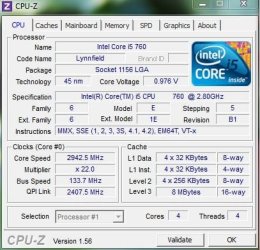
With default settings in the BIOS, no OC and running Passmark CPU benchmark, the CPU-Z shows this:

i5-760_CPU-Z.JPG

While "Bus Speed" and "QPI Link" are at default values, the CPU speed is about 140MHz faster than the default value. That's probably due to the Intel Turbo feature of the processor.
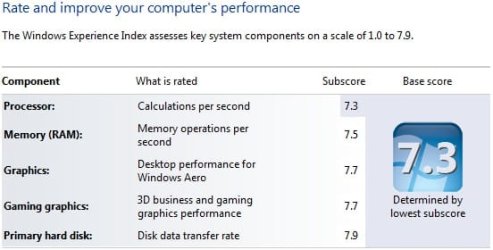
The WEI score is:

Win 7 performance.jpg

The one that actually makes the most difference is AS SSD benchmark:

AS P7P55D-E Pro_no OC.JPG

Changing the BIOS to "X.M.P" in the "AI Overcloker Tuner" and running Passmark; CPU-Z shows this:

i5_760_XMP.JPG

The "Bus Speed" increased to about 160MHz and the "QPI Link" 2,892. The CPU maxes out at 2,892; evidently, "X.M.P" disables the Intel Turbo feature.
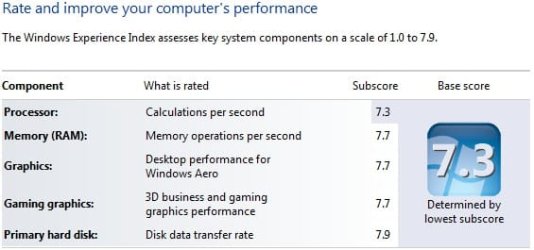
The WEI score is:

p7p55d-e_WEI.jpg

While the memory performance did increase, the CPU performance index did not change. Neither did the AS SSD benchmark results changed much:

AS P7P55D-E Pro_OC.JPG

The overall AS SSD score is actually lower than the non-OC-d scores.

The temperature of the CPU didn't change much in either case; the idle temperature for non-OC-d was between 33-35 Celcius, while the OC-d was between 37-40 Celsius. The difference between load temperatures were even less, one or two Celsius.

As mentioned earlier, my skills for OC-ing the system is rather limited and there's probably more "juice" in the my system than the limited AI OC-ing shows. Regardless how well the system is OC-d, the SSD drive (that is already pretty much at its maximum speed) is still the slowest subsystem in my machine and pretty much maxed out even without OC-ing the system.

Then there's the issue of the Marvell/PLX chip that is utilizing a PCIe x1 lane for the SATA 3.0 ports. In my previous board of P7P55D-E, the "mv91xx.sys" (Marvell driver) did cause numerous BSOD's. After replacing the board with the P7P55D-E Pro, I have not seen a BSOD event as of yet, even when the board was OC-d. OC-ing the board too much may just bring back BSOD because of the Marvell chip.

Thanks to you and others, I've learned more about my system than I've ever wanted to know...;)
 

Attachments

  • i5_760_XMP.JPG
    i5_760_XMP.JPG
    44.4 KB · Views: 16
  • i5-760_CPU-Z.JPG
    i5-760_CPU-Z.JPG
    44.8 KB · Views: 9
  • Win 7 performance.jpg
    Win 7 performance.jpg
    24 KB · Views: 8
  • AS P7P55D-E Pro_no OC.JPG
    AS P7P55D-E Pro_no OC.JPG
    48.9 KB · Views: 4
  • p7p55d-e_WEI.jpg
    p7p55d-e_WEI.jpg
    23.9 KB · Views: 9
  • AS P7P55D-E Pro_OC.JPG
    AS P7P55D-E Pro_OC.JPG
    48.6 KB · Views: 3

My Computer My Computer

Computer type
PC/Desktop
Computer Manufacturer/Model Number
Custom built at Home
OS
Windows 7 64-bit, Windows 8.1 64-bit, OSX El Capitan, Windows 10 (VMware)
CPU
Intel i5-3350P 3.1 GHz
Motherboard
Gigabyte GA-Z77X-UP5 TH
Memory
16 GBs GSkill Sniper
Graphics Card(s)
Radeon HD 7850
Sound Card
VIA HD Audio
Monitor(s) Displays
Dell U2410 24"
Screen Resolution
1920x1200
Hard Drives
1 x Intel 520 240 GBs
1 x Seagate 1TBs SATA 2.0,
1 x Seagate 1TBs eSATA 2.0
PSU
Thermaltake 850W
Case
Antec P183
Cooling
Noctua NH-D14 Heatsink 2 x 120mm fans, 4 x 120mm case fans
Keyboard
Dell Multimedia keyboard
Mouse
Logitech Trackball
Internet Speed
28.5 Mb/s
My Asus x51l :D
 

Attachments

  • Untitled.png
    Untitled.png
    28.8 KB · Views: 34

My Computer My Computer

Computer Manufacturer/Model Number
Asus X51L
OS
Windows 7 Pro x64
CPU
Intel T3200
Memory
3 GB
Graphics Card(s)
Intel X3100
Hard Drives
Crucial C300
System Update

WEIScore.jpg

WEIScore-1.jpg


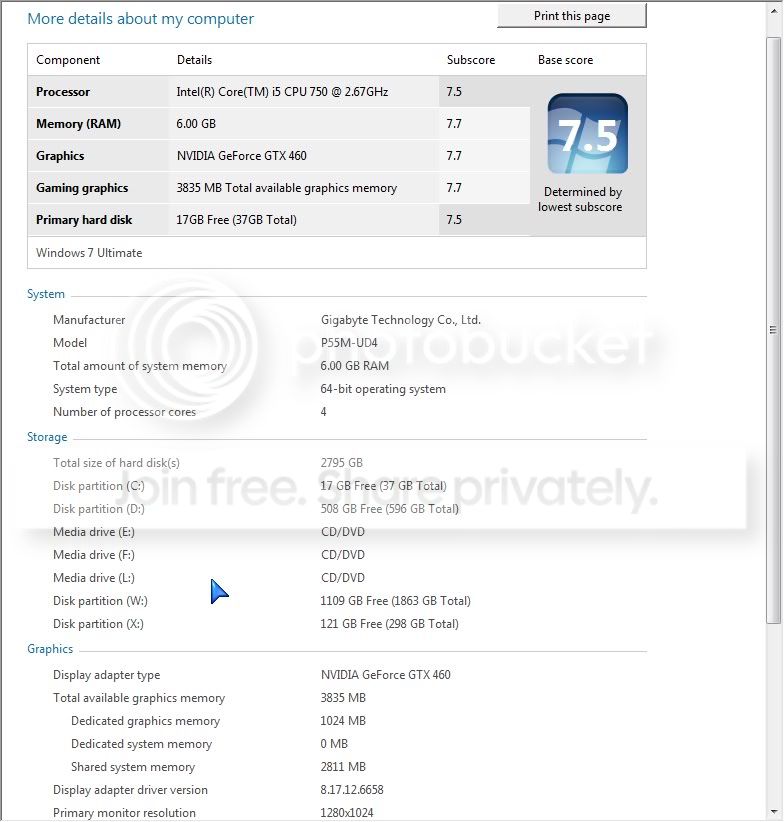
Hi Guys I have upgraded my graphics card from the HD5770 to a GTX 460 and here's my updated scores. I am planning to upgrade my ssd soon.
 

My Computer My Computer

Computer Manufacturer/Model Number
Bailez Custom Desktop PC
OS
Windows 7 Ultimate x64 SP1
CPU
Intel Core i7 2600K @ 4.4 GHz
Motherboard
Asus P8Z68-V PRO
Memory
8GB (2 x 4GB) Mushkin Redline Ridgeback @ 2133MHz CL9
Graphics Card(s)
EVGA GTX 570HD 1.28GB (@Stock)
Sound Card
Realtek® ALC 892 8-Channel High Definition Audio CODEC
Monitor(s) Displays
HP 2311X LED LCD MONITOR, 46" SHARP AQUOS LCD HDTV
Screen Resolution
1920x1080p
Hard Drives
Internal: 2 x Intel 520 Series 180GB RAID 0 (OS & Applications)
Crucial m4 SSD 256GB (Games) ;
WD Caviar Black 640GB (Storage); Seagate Barracuda LP 2TB (Video Library).
External: Seagate 320GB USB 2.0 External Hard Drive (Music)
PSU
Corsair 750HX
Case
CM 690 II Advanced
Cooling
Noctua NH-D14
Keyboard
Logitech Illuminated Keyboard
Mouse
Logitech G700
Internet Speed
Cable - 20 Mbps downstream / 2 Mbps upstream
Other Info
Case Cooling: Intake - 1x140mm fan (front)
Exhaust - 1 x 140mm fan (top) & 1 x 120mm fan (top).
Fan Controller: Zalman ZM-MFC1 6-Channel Fan Controller.

http://valid.canardpc.com/show_oc.php?id=2029207
Status
Not open for further replies.
Back
Top