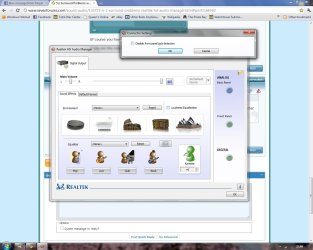
5.1 Surround Problems with Realtek HD Audio Manager

Xenophon

New member
Local time
7:52 PM
Messages
14
Hi everyone! First post on the forums =P

What the title says. Basically I have had to remove my soundcard (a Creative X-Fi Soundblaster) as it was completely blocking off the fan on my new graphics card (ATI Radeon HD 5850 - and yes there is no space left on my motherboard!). As a result I have to use my onboard sound. My motherboard is a Biostar A760G M2+ but the problem is that with Realtek HD Audio Manager installed my computer just wont play anything but stereo. I have 5.1 speakers but only the far left and far right speakers are playing, regardless of multiple configurations and switches between jack inputs ¬_¬

Im at a complete loss what to do; I know that my motherboard onboard sound supports 5.1 but its just a pain making it work =/
 

My Computer My Computer

OS
Windows 7 Ultimate (64-bit)
CPU
AMD Athlon X2 250 Processor (3GHZ)
Motherboard
Biostar A760G M2+
Memory
2x 2GB DDR2 RAM (667mhz)
Graphics Card(s)
ATI Radeon 5850
Sound Card
n/a
Hard Drives
2 x 500gb
PSU
500w (soon to be 600w)
Well, I am off to bed now. I don't know whether you read what I wrote, but here is some more info on that which causes people a lot of trouble.

AC97 Front Panel Audio Does Not Work with Onboard HD Audio

The onboard front panel audio connector provides microphone in and line out signals for the front panel. Many chassis manufacturers offer chassis with front panel audio ports and cabling. Those front panel solutions may support either AC97 audio or High Definition (HD) audio.

The onboard audio headers on Intel Desktop Boards with the Intel 945 chipset and later support HD audio.

Compatibility:

HD front panel audio solutions should be plugged into HD onboard headers.

AC97 front panel audio solutions should be plugged into AC97 onboard headers.
Some AC97 front panel audio solutions (but not all) may work with HD onboard headers.
If you want connect an AC97 front panel audio system to HD onboard headers, try these steps:

Connect Mic_IN (MIC) to MIC2_L.
Connect Audio_R (RIN) to OUT2_R
Connect Audio_L (LIN) to OUT2_L.
MIC_RET and OUT_RET are for HD audio only; you don't need to connect them for AC'97 audio.
Intel does not validate AC97 front panel audio solutions with boards using HD audio. If the steps above do not work, you will need to use an HD front panel audio solution for full compatibility with Intel Desktop Boards using Intel 945 chipsets and later.


Regards....Mike Connor
 
Last edited:

My Computer My Computer

OS
Several, including Windows 7 x64 Ultimate
Thanks for the reply. Yes im sure the BIOS has the onboard sound enabled (as I can hear actual stereo sound).
That is indeed the Audio Manager im using, and AFAIK my motherboard does not use the ac97 codecs. Cant be sure but I dont think it does anyway.

BIOSTAR :: A760G M2+ :: Specification <-- for mboard specs

I think the problem is that when I plug in one of the jacks (the orange one which I think is the subwoofer) the Audio manager detects and identifies it as a mic or line in. I do not know how to change this =/
 

My Computer My Computer

OS
Windows 7 Ultimate (64-bit)
CPU
AMD Athlon X2 250 Processor (3GHZ)
Motherboard
Biostar A760G M2+
Memory
2x 2GB DDR2 RAM (667mhz)
Graphics Card(s)
ATI Radeon 5850
Sound Card
n/a
Hard Drives
2 x 500gb
PSU
500w (soon to be 600w)
Yes, sorry, that was doubtless confusing. I have had a few cases where people were using the front panel line out and only getting stereo. This doesn't happen if you have a sound card of course, as you plug in to the sound card. But if you remove the sound card, then you are back to on board HD audio, and if you use the wrong line out you will only get stereo no matter what else you do! :)

Can you actually use the audio manager? Can you change the settings to 5.1 for instance? ( As in the screen shot I posted).

If you can change the settings but still only get stereo when you press the test button, then you are using the wrong line out.

If you "mouse-over" the jacks on your audio manager an info tip should pop up telling you what it is. Apart from that, you need to check the boxes on the left to set up your speakers after you have chosen the scheme you want, ( 5.1 is shown in the screen shot ).

Regards....Mike Connor
 

My Computer My Computer

OS
Several, including Windows 7 x64 Ultimate
Yep I can set it to 5.1 but only hear 2 of the speakers (the main left and main right).

I have 3 jacks in 3 inputs (only 3 audio inputs on the mboard in the 1st place ¬_¬)

Inputs are: Pink, Green and Light Blue

My Jacks are: Orange, Black and Green

I think the orange is at least the subwoofer but meh I'm terrible with audio =P
 

My Computer My Computer

OS
Windows 7 Ultimate (64-bit)
CPU
AMD Athlon X2 250 Processor (3GHZ)
Motherboard
Biostar A760G M2+
Memory
2x 2GB DDR2 RAM (667mhz)
Graphics Card(s)
ATI Radeon 5850
Sound Card
n/a
Hard Drives
2 x 500gb
PSU
500w (soon to be 600w)
At the top right of the audio manager is a yellow folder. "Mouse-over" pops up "connector settings". Click on it, and "enable auto pop-up when device is plugged in". This will tell you what you are plugging in to which jack.

Regards....Mike Connor
 

My Computer My Computer

OS
Several, including Windows 7 x64 Ultimate
This is an old picture but it shows the jackplugs and their colours with what they do;


Of course you have to have the right jacks in the right plugs, or things wont work! :)

If you set the connections sensor as described, it will tell you when you plug in the right jack.

Regards....Mike Connor
 

My Computer My Computer

OS
Several, including Windows 7 x64 Ultimate
At the top right of the audio manager is a yellow folder. "Mouse-over" pops up "connector settings". Click on it, and "enable auto pop-up when device is plugged in". This will tell you what you are plugging in to which jack.

Regards....Mike Connor

All it has is "disable front panel jack detection"

Thats all there is in the options ¬_¬
 

My Computer My Computer

OS
Windows 7 Ultimate (64-bit)
CPU
AMD Athlon X2 250 Processor (3GHZ)
Motherboard
Biostar A760G M2+
Memory
2x 2GB DDR2 RAM (667mhz)
Graphics Card(s)
ATI Radeon 5850
Sound Card
n/a
Hard Drives
2 x 500gb
PSU
500w (soon to be 600w)
OK, then you have to use the colour codes and try the jacks until it works properly. Turn your volume down as low as you can, and simply plug the jacks in as appropriate. Run the test ( Click on blue arrow ) from the audio manager after trying each jack.

These are the colour codes and what they correspond to;


My Computer My Computer

OS
Several, including Windows 7 x64 Ultimate
Heres a screenie of what I see atm:

Untitled.jpg

Meh maybe something isnt activated?

(btw yes everything is unplugged from the audio atm =P)
 

My Computer My Computer

OS
Windows 7 Ultimate (64-bit)
CPU
AMD Athlon X2 250 Processor (3GHZ)
Motherboard
Biostar A760G M2+
Memory
2x 2GB DDR2 RAM (667mhz)
Graphics Card(s)
ATI Radeon 5850
Sound Card
n/a
Hard Drives
2 x 500gb
PSU
500w (soon to be 600w)
You don't have the plugs for 5.1 sound. The only speaker output plug there is the green front speaker plug. That will only allow stereo sound.

What physical plugs do you have on your machine and what colour are they?

Regards....Mike Connor
 

My Computer My Computer

OS
Several, including Windows 7 x64 Ultimate
You don't have the plugs for 5.1 sound. The only speaker output plug there is the green front speaker plug. That will only allow stereo sound.

What physical plugs do you have on your machine and what colour are they?

Regards....Mike Connor

3 - One pink one green one light blue.

Problem is that I cant use my old soundcard as it completely blocks off the air intake of my GPUs fan.

Only alternative if this doesnt work is to try and find a slightly smaller soundcard that will not completely block off the card fan (seriously, there is 1mm distance between GPU and Soundcard).
 

My Computer My Computer

OS
Windows 7 Ultimate (64-bit)
CPU
AMD Athlon X2 250 Processor (3GHZ)
Motherboard
Biostar A760G M2+
Memory
2x 2GB DDR2 RAM (667mhz)
Graphics Card(s)
ATI Radeon 5850
Sound Card
n/a
Hard Drives
2 x 500gb
PSU
500w (soon to be 600w)
I understand your problem, what I don't understand is that there are two plugs missing from your machine. The motherboard supposedly supports 5.1 sound, but the plugs for 5.1 sound have apparently not been installed.

You can only use 5.1 sound if you have the physical plugs to support it.

The plugs are connected to the motherboard headers. It seems that whoever assembled your machine only installed three plugs. The only speaker output plug you have is the light green plug.

I will cjeck your motherboard specs again and get back to you.

Regards....Mike Connor
 

My Computer My Computer

OS
Several, including Windows 7 x64 Ultimate
Hmmm...it seems that your on-board audio chip supports 5.1 sound, but your motherboard does not. It only specifies 3 audio connectors. So it can not utilise 5.1 sound.

Seems very odd, and I have not come across this before, but unfortunately it means that without a sound card you can not use 5.1 sound.

I will have a further look at this in the morning.

Regards....Mike Connor
 

My Computer My Computer

OS
Several, including Windows 7 x64 Ultimate
OK. The only simple alternative I can see for you is to get an X-fi external sound blaster, or similar.

You don't say where you are located, this is Amazon US;

This is an external sound blaster, plugs in to a USB port;

Amazon.com: Creative Soundblaster X-Fi Surround 5.1 Pro USB Audio System with THX SB1095: Electronics

There are other external sound blasters;

http://www.google.de/search?q=exter...s=org.mozilla:en-GB:official&client=firefox-a

Look around to compare prices.

Regards....Mike Connor
 

My Computer My Computer

OS
Several, including Windows 7 x64 Ultimate
OK, I found your board and a picture of the headers. The board is only set up for stereo sound, there are only three audio plugs, and only one stereo speaker output.


The board has a 5.1 sound chip, but no plugs for using 5.1 sound.

Regards....Mike Connor
 

My Computer My Computer

OS
Several, including Windows 7 x64 Ultimate
OK. The only simple alternative I can see for you is to get an X-fi external sound blaster, or similar.

You don't say where you are located, this is Amazon US;

This is an external sound blaster, plugs in to a USB port;

Amazon.com: Creative Soundblaster X-Fi Surround 5.1 Pro USB Audio System with THX SB1095: Electronics

There are other external sound blasters;

external sound blaster - Google-Suche

Look around to compare prices.

Regards....Mike Connor

From Northern Ireland mate so amazon UK or something similar would do the trick.

I was looking at this: Creative SoundBlaster 5.1 OEM PCI Sound Card - Online Store

Its a relatively small soundcard which would do the trick so I'm considering slotting that in; it will only slightly block off some of the GPU's intake meaning tht it should run fine.

Problem is that with the external cards theyre costing £80 here, which is a complete ripoff (around $110-130 i think).

What do you think about that wee card there?
 

My Computer My Computer

OS
Windows 7 Ultimate (64-bit)
CPU
AMD Athlon X2 250 Processor (3GHZ)
Motherboard
Biostar A760G M2+
Memory
2x 2GB DDR2 RAM (667mhz)
Graphics Card(s)
ATI Radeon 5850
Sound Card
n/a
Hard Drives
2 x 500gb
PSU
500w (soon to be 600w)

My Computer My Computer

OS
Several, including Windows 7 x64 Ultimate
Back
Top