
7201 - Those running it, what's new?

I've noticed that the 'Picture' default as changed yet again.
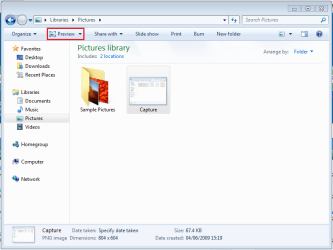
Capture1.PNG

The double-click action of Image files done the following;

7100 - Preview
7127 - Preview
7137 - Edit (MS Paint)
7201 - Preview

Also, in 7137, when opening files from within apps (e.g. MS Paint) you get the preview pane open by default, the same for anything being uploaded. Now the preview pane is gone again :p

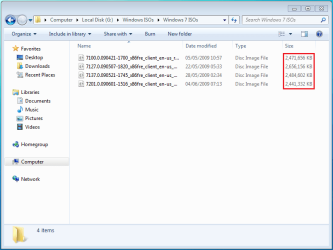
Another thing....Has any1 noticed the varying file sizes for the lates releases?
Capture.PNG

Only x86 screenshot, but 7201 is the smallest of the RC/pre-RTM releases.
 

My Computer

Computer Manufacturer/Model Number
Compaq Desktop
OS
Windows 7 Ultimate x64
CPU
AMD Sempron Dual Core
Memory
3GB
Graphics Card(s)
NVIDIA GeForce 6150SE nForce 430
Screen Resolution
1024x768
Hard Drives
150GB Sata
Maybe they are trying different things out, or some had more development code in them then the others? Strange to see some of them vary by 200mb+.
 

My Computer

Computer Manufacturer/Model Number
Custom Made
OS
Windows 7 Build 7600|16384- 64bit
CPU
AMD Phenom II X4 810 - 2.61ghz Deneb
Motherboard
Asus M4A79T Deluxe
Memory
4GB DDR3 Mushkin (1600 O.C. Rated)
Graphics Card(s)
ATI HD Radeon 4890 1GB
Sound Card
Realtek HD Onboard Audio
Monitor(s) Displays
AOC 912vwa-1
Screen Resolution
1440x900 (Max Monitor)
Hard Drives
10000RPM 150GB Western Digital Velociraptor
PSU
Corsair TSX750W
Case
Antec Nine Hundred
Cooling
Air Cooled
Keyboard
Logitech Elite
Mouse
Logitech MX518
Internet Speed
Comcast High-Speed (+Powerboost)
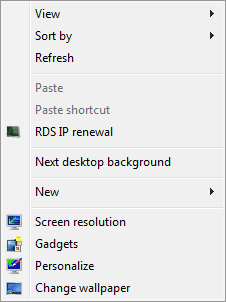
yes, the password for broadband connections is not remembered for 2 builds.
so, this is what solution i'm using.

attachment.php


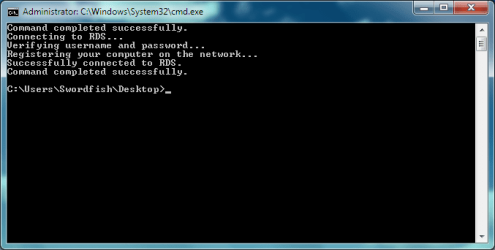
and when clicked

attachment.php


The way to do that is a simple .reg file that ads the batch info to desktop's context menu. Those who want the contents of the .reg file, pm. If i receive more than 5 pms, i'll post the contents here. :) hope this helps until the problem gets resolved.
 

Attachments

  • pppoe.png
    pppoe.png
    8 KB · Views: 664
  • cmd.png
    cmd.png
    58.1 KB · Views: 667

My Computer

OS
Windows 7 x86 build 7600
Those links no longer work. What exactly did you end up finding or searching to get your answer?
 

My Computer

Computer Manufacturer/Model Number
Custom Made
OS
Windows 7 Build 7600|16384- 64bit
CPU
AMD Phenom II X4 810 - 2.61ghz Deneb
Motherboard
Asus M4A79T Deluxe
Memory
4GB DDR3 Mushkin (1600 O.C. Rated)
Graphics Card(s)
ATI HD Radeon 4890 1GB
Sound Card
Realtek HD Onboard Audio
Monitor(s) Displays
AOC 912vwa-1
Screen Resolution
1440x900 (Max Monitor)
Hard Drives
10000RPM 150GB Western Digital Velociraptor
PSU
Corsair TSX750W
Case
Antec Nine Hundred
Cooling
Air Cooled
Keyboard
Logitech Elite
Mouse
Logitech MX518
Internet Speed
Comcast High-Speed (+Powerboost)
i didn't search for anything. i've just... invented it, or discovered it, when playing whit my registry trying to find a way to modify the context menus so i can REMOVE "share with" "previous versions" "send to" etc etc :)
 

My Computer

OS
Windows 7 x86 build 7600
Made sure there aren't any downsides to this? Will windows still gripe it can't connect, even though it is still connected?
 

My Computer

Computer Manufacturer/Model Number
Custom Made
OS
Windows 7 Build 7600|16384- 64bit
CPU
AMD Phenom II X4 810 - 2.61ghz Deneb
Motherboard
Asus M4A79T Deluxe
Memory
4GB DDR3 Mushkin (1600 O.C. Rated)
Graphics Card(s)
ATI HD Radeon 4890 1GB
Sound Card
Realtek HD Onboard Audio
Monitor(s) Displays
AOC 912vwa-1
Screen Resolution
1440x900 (Max Monitor)
Hard Drives
10000RPM 150GB Western Digital Velociraptor
PSU
Corsair TSX750W
Case
Antec Nine Hundred
Cooling
Air Cooled
Keyboard
Logitech Elite
Mouse
Logitech MX518
Internet Speed
Comcast High-Speed (+Powerboost)
in the cmd i've posted, the first line is "command completed successfully". that because the batch contains a "/disconnect" at the beginning, just in case an active connection exists.
 

My Computer

OS
Windows 7 x86 build 7600
Haven't got around to installing it yet but have a question for anyone who uses the Xbox as an extender. In every build up to 7077 (where I currently am) the audio had a choppiness to it, would cut out after a couples seconds then come back. This is when streaming a movie from an external hard drive hooked to my main computer. The video was OK but audio sucked. I figured it to be a WMP beta issue, has this been addressed in 7201?
 

My Computer

OS
7201 64 bit
I would try it out for you but I don't use an xbox or any console for that matter. The audio stutters could be a bad connection, your HDD is chugging, or possibly a problem with the program. Did you try any other program other then WMP and experience the same audio problems?
 

My Computer

Computer Manufacturer/Model Number
Custom Made
OS
Windows 7 Build 7600|16384- 64bit
CPU
AMD Phenom II X4 810 - 2.61ghz Deneb
Motherboard
Asus M4A79T Deluxe
Memory
4GB DDR3 Mushkin (1600 O.C. Rated)
Graphics Card(s)
ATI HD Radeon 4890 1GB
Sound Card
Realtek HD Onboard Audio
Monitor(s) Displays
AOC 912vwa-1
Screen Resolution
1440x900 (Max Monitor)
Hard Drives
10000RPM 150GB Western Digital Velociraptor
PSU
Corsair TSX750W
Case
Antec Nine Hundred
Cooling
Air Cooled
Keyboard
Logitech Elite
Mouse
Logitech MX518
Internet Speed
Comcast High-Speed (+Powerboost)
i recommend Media player classic, from the K-LITE codec package.
DXVA video acceleration should come as a bonus, of course depending on the type of video you are running.
 

My Computer

OS
Windows 7 x86 build 7600
Just running standard video not HD (.mpg) and have a solid "G" connection, also tried it wired with ethernet, no difference. It worked fine with Vista, just been a crap shoot with 7 though. Guess I'll have to just give it a go!
 

My Computer

OS
7201 64 bit
Not sure if this has already been covered, but can some1 please tell me if Punkbusters works in build 7201 with games like CoD 4 and especially CoD 5 World at War?

:cool:
 

My Computer

Computer Manufacturer/Model Number
Custom built by myself
OS
Windows 7 7137
CPU
Intel Core 2 Quad QX6700
Motherboard
EVGA nForce 680i SLi (122-CK-NF68-A1)
Memory
Corsair 2GB DDR2 XMS2 Dominator PC2-9136C5 TwinX (2x1GB)
Graphics Card(s)
Nvidia 8800 GTX (passive cooler:THERMALRIGHT HR-03)
Sound Card
XFi Titanium Fatal1ty Champion
Monitor(s) Displays
Apple Cinema 30"
Screen Resolution
2560x1600
Hard Drives
Raptor 150GB x 2 (Raid 0)
Segate 750GB
Maxtor 300GB x 2
PSU
Enermax Galaxy 1000W EGA1000EWL
Case
Lian LI PC-V2110B Aluminium Black
Cooling
Noctua NH-U12P CPU Heatpipe HS
Keyboard
Microsoft Natural Ergonomic 4000
Mouse
Logitech G9 Gaming mouse
Internet Speed
ADSL 8 MB
Does anyone know if Windows 7 will show thumbnail previews in Windows Explorer for Canon RAW images? I know under XP there was a separate Power Toy for this and it worked great. It would be a time saver to see previews of .CR2 files without having to run a specialized tool to view them.
 

My Computer

OS
Windows 7 Ultimate x64
CPU
Intel Core i7 920 D0 @ 4.0 GHz
Motherboard
Asus Rampage II Gene
Memory
Corsair XMS3 1600 MHz 6 x 2GB (12GB)
Graphics Card(s)
VisionTek ATI Radeon HD 4870 X2
Sound Card
Creative X-Fi XtremeGamer
Monitor(s) Displays
Eizo Nanao S2100 21"
Screen Resolution
1600 x 1200
Hard Drives
Western Digital VelociRaptor 150GB
Western Digital Cavier 500GB
PSU
Seasonic M12D 850 watt
Case
Antec Mini P180
Cooling
2 x Sanyo Denki 9G1212H101, 1 x Sanyo Denki 9G1212
Keyboard
Logitech Illuminated Keyboard
Mouse
Logitech MX-610
I have installed the x86 version. No apparent changes noticed.
 

My Computer

Computer Manufacturer/Model Number
Home Built
OS
Windows 7 SP1 x64
CPU
AMD 9850 X4
Motherboard
ASUS
Memory
Corsair
Graphics Card(s)
ATI Radeon
Sound Card
Sigmatel
Monitor(s) Displays
Dell
Screen Resolution
1600X900
Hard Drives
(1) WD 1TB
Cooling
Corsair H60
Internet Speed
UVerse 12MB
Here's an immediate difference:


Previously my aero and my gaming scores were 6.5 so that's quite a jump.
All the others remain the same.
Not sure how much these WEI scores mean but it's a difference at least.

Cheers, John:D

Your WEI score is old dated back to 4/6/09 ???

dg
 

My Computer

OS
Windows 7 64bit Ultimate
CPU
Intel i5 2500K 3.30 ghz overclocked to 4.8 ghz
Motherboard
Asus P8T867 EXT bios 2103 rev 1.03
Memory
G.SKILL DDR3 12GB PC3 1600 at 800mhz 8-9-8-24-1t
Graphics Card(s)
Zotac GeForce GTX 560 1GB non ti driver 290.53 beta
Sound Card
on-board realtek
Monitor(s) Displays
Asusr 23" LED
Screen Resolution
1980x1080 max
PSU
BFG-1000 watts
Your WEI score is old dated back to 4/6/09 ???

dg

its probably a different format of date. date/month/year instead of month/date/year
 

My Computer

OS
Windws 7 Ultimate 7100 RC X64
CPU
Inter Core i7 920
Motherboard
Asus P6T
Memory
6GB DDR31600 G.Skill
Graphics Card(s)
Radeon 4890
Sound Card
HD audio (motherboard)
Monitor(s) Displays
Dell 2405, LG 47inch 1080p LCD
Screen Resolution
1920*1080
Hard Drives
System: Seagate 7200.12 1tb Drobo 2nd gen with Hitachi 1tb*2 Seagate 1.5tb*2
PSU
Crosair HX 620w modular power supply
Case
Antec P183
Keyboard
Logtiech Dinovo
Mouse
Logitech Dinovo
Can I upgrade form 7100 to 7201?
Or If I do a system image backup with the built in backup util, will I be able to rollback without problems?
I don't want to reinstall all my programs and settings, but I want to try out this build.
 

My Computer

Computer Manufacturer/Model Number
home made
OS
Windows 7 RTM x64
CPU
AMD X2 5000+
Motherboard
Asrock
Memory
4GB
Graphics Card(s)
Nvidia 9400GT
Sound Card
onboard 6Ch
Monitor(s) Displays
Medion 22" + HannSpree 22"
Screen Resolution
1680X1050 + 1920X1080
Hard Drives
Intel SSD 80GB
WD 1.5 TB
WD 1 TB
Samsung 1TB X 3
PSU
noname
Case
noname
Cooling
Zalman
Keyboard
DeLUX multimedia keyboard
Mouse
Microsoft
Internet Speed
25MB/s
Can I upgrade form 7100 to 7201?
Or If I do a system image backup with the built in backup util, will I be able to rollback without problems?
I don't want to reinstall all my programs and settings, but I want to try out this build.

Yes, read the forums. Answered at least 20 times.
UPGRADE is FINE.
:rolleyes::rolleyes::rolleyes:
 

My Computer

OS
Windows 7
CPU
i5
Motherboard
Gigabyte P55-UD3R
Memory
4gb
Graphics Card(s)
8800GTS 512
Sound Card
Auzentech Prelude 7.1
Monitor(s) Displays
HP w2207
Keyboard
G15
Mouse
G5
Can I upgrade form 7100 to 7201?
Or If I do a system image backup with the built in backup util, will I be able to rollback without problems?
I don't want to reinstall all my programs and settings, but I want to try out this build.
You can first make an image of your current 7100 build then use windows easy transfer to make a copy of your settings and programs. Finally, you can do a clean install of 7201 and transfer your settings and programs back in. If you don't like it you can always use the image file you created and restore your HD.
 

My Computer

OS
Windws 7 Ultimate 7100 RC X64
CPU
Inter Core i7 920
Motherboard
Asus P6T
Memory
6GB DDR31600 G.Skill
Graphics Card(s)
Radeon 4890
Sound Card
HD audio (motherboard)
Monitor(s) Displays
Dell 2405, LG 47inch 1080p LCD
Screen Resolution
1920*1080
Hard Drives
System: Seagate 7200.12 1tb Drobo 2nd gen with Hitachi 1tb*2 Seagate 1.5tb*2
PSU
Crosair HX 620w modular power supply
Case
Antec P183
Keyboard
Logtiech Dinovo
Mouse
Logitech Dinovo
It still doesn't remember my login settings for my dial-up broadband connection! Not only that but it seems to forget other login settings for websites that require registration (firefox or IE doesn't matter) :mad:

Every time I have installed a new build, it has been a clean install. So, I always back up my profile for Firefox, and after installing Firefox in the new build, I replace my profile, and point the profiles.ini to the correct profile. I use a lot of websites that require a login/password and this works just fine for me. I don't use IE, so I can't comment on that, but I would imagine the process is remarkably similar.
 

My Computer

OS
Windows 7 7201, Backtrack 4
Back
Top