trouble recording from the desktop with Audacity

digiday

Banned
Local time
10:48 PM
Messages
99
Location
SF, Caleeforneea
Hi all,

I'm trying to figure out a problem that is keeping me from being able to record from the desktop with the application Audacity v1.3.12 beta, which was recommended to me on this site.

I've already posted this question on the Audacity forums website, but I'm not getting any feedback there on this issue, so I figured I'd try this question with the real experts here on W7F.

My computer is running on Windows 7 ULT and it has a Realtec ALC888 (7.1 Channel audio) sound card in it according to the Dell manual.

I, like many others, would like to record a streaming radio show broadcast for later listening that is not available as a Podcast.

I have explored all of the links in the Audacity help, tutorials, quick start guide, wiki page, forums "Click here before posting" links and done searches on this subject and I'm still not able to get Audacity v1.3.12 beta to show a recording device in the "Prefs>Devices>Recording Device" drop down menu... it still says "No Devices Found".

I've read all of the info about various settings, variations on sound drivers and sound cards, line-out to line-in patch cables, etc.

I'm a new Audacity user, but I'm pretty adept with new software, and within an hour of downloading and installing Audacity v1.3.12 on this Windows 7 ULT machine, I was able to import 3 different sound files, edit them down to the 3 segments that I wanted to combine, and adjust the volume on one part of my new compilation of audio segments, combine them and export to various final files sizes of mp3s after downloading and installing the LAME encoder... so I'm not completely dumb when it comes to this stuff... and Audacity seems great to me.

But I'm still not able to set Audacity to allow me to record desktop sound based on everything that I have read. One thing is that the stock "High Definition Audio Device" driver in Windows 7 ULT is not a Realtek driver any longer... it is a Microsoft v6.1.7600.16385 (win 7_rtm.090713-1255) audio driver, as described in the driver properties panel... it is dated 7/13/2009, and it was installed from a fresh copy of Windows 7 ULT via a full, clean installation only about three months ago in mid-October.

Changing or updating the audio driver to a Realtek driver is not an option based on a terrible experience that I had with Realtek in September when Windows auto update installed a new Realtek audio driver in Vista and the sound was never to return with literally weeks and weeks of troubleshooting, re-installing the audio driver, 60 or so hours on the phone with MS tech support and continued failures with updating everything and anything in a suicidal Vista OS... finally, thankfully, I was able to install Windows 7 ULT after everything that I went through... now I have a very stable, clean Windows computer that never crashes, not even once in almost 3 months of continued use and installations.

So after all the hassle, and terrible experiences with the Realtek tech support people, I will not change the audio driver on this computer for fear of never getting any sound back.

And I'd rather not do the thing where one runs a patch cord from the speaker output jacks to the line-in input jacks to make this machine able to record from the desktop... then I loose my speakers and I can't hear what I'm doing unless I have headphones on and I don't want to have to continually plug and unplug wires in and out of the back of this computer.

I feel confident that there is a way to do this by way of settings within the Windows 7 system and within Audacity, based on everything that I have read... I figure that I am just missing something somewhere here.

I've checked the audio mixer in my Windows 7 ULT and there is nothing called "stereo mixer" nor a little wrench icon that allows me to change any other settings as describe in some of the Audacity online info... I clicked on the speaker icon in the system mixer but that just takes me to speaker properties and nothing to do with audio device choices for the system.

On the Audacity webpage titled "Mixer toolbar issues" and elsewhere, there are continuous references to the "Audio I/O tab of Audacity Preferences (Devices tab in Audacity Beta 1.3.9 or later)" that I'm figuring is where the root of this dilemma partially is... I've tried every conceivable combination of settings there... with "MME" in the "Host" dropdown menu and "Speakers (High Definition Audio)" in the "Device" dropdown menu, NOT with "Microsoft Sound Mapper - Output" (which the Audacity webpages explicitly said not to use) and with "Windows DirectSound" in the "Host" dropdown menu in combination with "Primary Sound Driver" or with "Speakers (High Definition Audio Device)", I still have "No devices found" in the Audacity "Device" dropdown menu.

I've also made sure that "Software Playthrough" is unchecked in the Audacity preferences recording tab... that is noted somewhere on one of the many Audacity webpages that I have read through.

On the Audacity webpage titled "Recording audio playing on the computer", at this URL... Recording audio playing on the computer - Audacity Wiki it says, "...use the appropriate "stereo mix" or similar input source on the Audacity Mixer Toolbar dropdown selector. Note: on Windows Vista and Windows 7, you must choose the appropriate Recording Device at Edit > Preferences > Audio I/O (or Edit > Preferences > Devices in the current Beta version). If you have problems, use the Windows Control Panel to enable and select the correct source or device - see especially the green panel "HELP ON RECORDING COMPUTER PLAYBACK OR STREAMING AUDIO" in that section."

So it says to "use the Windows Control Panel to enable and select the correct source or device - see especially the green panel "HELP ON RECORDING COMPUTER PLAYBACK OR STREAMING AUDIO" in that section."

But I don't think it means that there is a "green panel" in the Windows Control Panel (though by the way that it is written it sounds that way) when it says "see especially the green panel "HELP ON RECORDING COMPUTER PLAYBACK OR STREAMING AUDIO"... but the only thing to do with sound in the Windows 7 Control Panel that I can find is "Sound" and the recording tab in that panel only has choices for two line-in mics and a line-in jack.

I also read about the "Freecoder Toolbar 4" but I'd rather not use something that takes over my web browser and adds a toolbar to it... and I read some info on Applian's own website about how Freecoder won't start recording if the sound is already playing on the desktop when the recorder is started... I'd rather just stick with Audacity since I just installed that and it is supposed to be able to record on the PC desktop.

So to finalize this question, does anyone know the solution to this problem?...maybe someone who has had the same dilemma when trying to record from the desktop with Audacity?

Thanks very much,

digiday
 
Last edited:

My Computer My Computer

At a glance

Windows 7 ULT 32 bit2 GHZ2 GB
Computer Manufacturer/Model Number
Dell 531
OS
Windows 7 ULT 32 bit
CPU
2 GHZ
Memory
2 GB
Other Info
Also use Macs, but don't tell anyone
Do you have something like this in your control panel?


Anyway, this should help you out;

http://www.youtube.com/watch?v=f9_pSLG0LZQ

<http://www.youtube.com/watch?v=f9_pSLG0LZQ>

If it doesn't, get back to me.................

Regards....Mike Connor
 

My Computer My Computer

At a glance

Several, including Windows 7 x64 Ultimate
OS
Several, including Windows 7 x64 Ultimate
Last edited:

My Computer My Computer

At a glance

Windows 7 Home Premium 64 bitIntel Core i7-4790G.SKILL 8GB (2 x 4GB) DDR3 F3-10666CL9D-8GBNTAMD Radeon R7 250
Computer type
PC/Desktop
Computer Manufacturer/Model Number
Custom Build
OS
Windows 7 Home Premium 64 bit
CPU
Intel Core i7-4790
Motherboard
GA-Z87X-D3H
Memory
G.SKILL 8GB (2 x 4GB) DDR3 F3-10666CL9D-8GBNT
Graphics Card(s)
AMD Radeon R7 250
Sound Card
Realtek ALC892
Monitor(s) Displays
Samsung UN32EH5000, Dell 1703FPT
Screen Resolution
1920 x 1080, 1280 x 1024
Hard Drives
WD5003AZEX
WD10EZEX
Samsung HD103SJ
Samsung 128 GB 840 PRO
PSU
SeaSonic M12II SS-500GM
Case
Fractal Design Define R4
Cooling
Zalman CNPS9900ALED
Keyboard
Logitech K800
Mouse
Logitech M705
Internet Speed
16 Mbps
Antivirus
Avast
Browser
Firefox
Other Info
Bose Companion 2 Multimedia Speakers
I will have to look and see what tutorials are available on the site here! :)

Just some notes from Audacity on RealTek;

QUOTE

HELP WITH RECORDING COMPUTER PLAYBACK OR STREAMING AUDIO There is often confusion over what source to use for recording sounds the computer is playing, and worse, this source is often hidden by default in the system mixer. The required source can go by various names such as: "Stereo Mix", "Wave Out", "Sum", "What U Hear" or "Loopback". The exact name (and even if you have such a source option) depends on the drivers of your sound device. Try to enable and select a suitable option in the system mixer as described below. Try updating the sound device drivers if there is still no suitable source.
Sometimes "Stereo Mix" can only be made to work by using the control panel supplied by the sound card manufacturer - this is often reported with RealTek inbuilt sound devices. Try launching the sound device control panel from the Windows Control Panel or the system tray (by the clock). If you see a volume control for Stereo Mix, try clicking to select it. Confusingly, some RealTek devices "select" an input by muting all but one, so in this case, mute everything except stereo mix. If you don't see Stereo Mix, click the wrench icon and enable Stereo Mix in the dialogue that pops up. In some RealTek versions the option to check is "Enabled recording multi-streaming". You should now see a volume control for Stereo Mix. Remember to select or unmute it as above. See this Forum topic for more help with RealTek.
Be aware that on some machines, the "Stereo Mix" option will never work because it is disabled internally by the driver settings due to copyright concerns. This is a known issue with Lenovo Thinkpad laptops, but sometimes editing the driver files can enable stereo mix.
If all else fails, you can connect a cable from the line-out (green) port of the computer to the line-in (blue), and choose the line-in as recording source. If you need to hear what you're recording, you can buy a single stereo to double stereo adaptor that will give you a spare jack to plug the speakers into. Alternatively, try Freecorder 3.0 which is a virtual sound driver distinct from your sound device. It installs as a browser plug-in. Note that later versions of Freecorder from the manufacturer's site do not record to WAV, forcing you to record to the lossy MP3 format. Or buy an external USB sound card, which normally offer a "stereo mix" type of option, such as the Trust Sound Expert External.
UNQUOTE


Anyway, that excellent tutorial posted by p5bdkw should help you out. If it doesn't, get back to us.........

Regards....Mike Connor
 
Last edited:

My Computer My Computer

At a glance

Several, including Windows 7 x64 Ultimate
OS
Several, including Windows 7 x64 Ultimate
By the way Digiday, this application will do what you want in e-mail. I have tested it on several mail programs and it worked on all of them;

Speak-A-Message - Home

<http://www.speak-a-message.com/en/index.html>

Regards....Mike Connor
 

My Computer My Computer

At a glance

Several, including Windows 7 x64 Ultimate
OS
Several, including Windows 7 x64 Ultimate
Audacity v1.3.12 beta... don't beta-gainst it

Hi Mike and "b5pdkw"... (sounds like you may know HAL 9000, r2d2 and c3po)

Wow, thanks for all of the info for me to get in to... I just woke up slumped over the computer screen (not really).

Until I can cover all that you have given me, here are all of the Audacity links that I was referring to that I poured over trying to figure this problem out... with the one's specifically about "recording audio playing on the computer" first...

Recording audio playing on the computer - Audacity Wiki
<http://wiki.audacityteam.org/wiki/Recording_audio_playing_on_the_computer>

Help talk:Contents - Audacity Wiki
<http://wiki.audacityteam.org/wiki/Help_talk:Contents>

Audacity Forum • View forum - Click here before posting
<http://forum.audacityteam.org/viewforum.php?f=37>

Audacity Forum • View topic - Recording in audacity
<http://forum.audacityteam.org/viewtopic.php?f=12&t=4594&p=17870#p17870>

Audacity Manual
<http://manual.audacityteam.org/man/Main_Page>

Audacity Wiki
<http://wiki.audacityteam.org/wiki/Audacity_Wiki_Home_Page>

Category:Tutorial - Audacity Wiki
<http://wiki.audacityteam.org/index.php?title=Tutorials>

Category:Tips - Audacity Wiki
<http://wiki.audacityteam.org/index.php?title=Tips>

Category talk:Tutorial - Audacity Wiki
<http://wiki.audacityteam.org/wiki/Category_talk:Tutorial>

Audacity v1.3.12 beta... don't beta-gainst it.

Thanks,

"Ill be buck"... quoting da formu failed Governator of Caleeforneea.

digi
 

My Computer My Computer

At a glance

Windows 7 ULT 32 bit2 GHZ2 GB
Computer Manufacturer/Model Number
Dell 531
OS
Windows 7 ULT 32 bit
CPU
2 GHZ
Memory
2 GB
Other Info
Also use Macs, but don't tell anyone
allot of info

Hi guys,

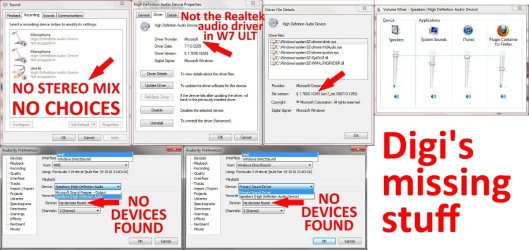
I know that sometimes when one writes allot of info on a topic, it's easy to miss some of that info, but if one leaves out info, then responders say, "what about this?"... so here are a few of the things from my original post, plus an attached image showing the state of my various system, driver and Audacity panels...

"My computer is running on Windows 7 ULT and it has a Realtec ALC888 (7.1 Channel audio) sound card in it according to the Dell manual."

"One thing is that the stock
"High Definition Audio Device" driver in Windows 7 ULT is not a Realtek driver any longer... it is a Microsoft v6.1.7600.16385 (win 7_rtm.090713-1255) audio driver, as described in the driver properties panel..."

"Changing or updating the audio driver to a Realtek driver is not an option based on a terrible experience that I had with Realtek
in September when Windows auto update installed a new Realtek audio driver in Vista and the sound was never to return... "

"I've checked the audio mixer in my Windows 7 ULT and there is nothing called
"stereo mixer" nor a little wrench icon that allows me to change any other settings as describe in some of the Audacity online info..."

" ... but the only thing to do with sound in the Windows 7 Control Panel that I can find is "Sound" and the recording tab in that panel only has choices for two line-in mics and a line-in jack."


I'm still checking all the info that you provided for me, and believe me, I really appreciate it... but I haven't found the answer yet.

Thanks very, very much,

digi
 

Attachments

  • collage.jpg
    collage.jpg
    117.1 KB · Views: 227

My Computer My Computer

At a glance

Windows 7 ULT 32 bit2 GHZ2 GB
Computer Manufacturer/Model Number
Dell 531
OS
Windows 7 ULT 32 bit
CPU
2 GHZ
Memory
2 GB
Other Info
Also use Macs, but don't tell anyone
other stuff

Hi again Mike and p5bdkw,

I'm still trying to figure this out, but I haven't made any progress past my initial limitation with this desktop audio recording issue in Audacity... and the Audacity forum hasn't responded... maybe they are at a concert recording the audio.

Thanks to Mike for the speak-a-message.com reference... I'm checking in to that... the voice in the sample message on that website sounds sort of like Mike Meyers on the SNL "Sprockets" show.

I'm also trying to edit a MIDI file in Audacity, which the Audacity people say it CAN do... and it DOES import the MIDI file and display it in a special MIDI format preview within Audacity with a little piano symbol, but then I can't get it to play or edit... this is whole other issue and probably warrants another thread, but if anyone knows anything about how Audacity handles MIDI files, please wake me up with an email alert.

Thanks again,

digi
 

My Computer My Computer

At a glance

Windows 7 ULT 32 bit2 GHZ2 GB
Computer Manufacturer/Model Number
Dell 531
OS
Windows 7 ULT 32 bit
CPU
2 GHZ
Memory
2 GB
Other Info
Also use Macs, but don't tell anyone
see that invisible devices are visibly invisible

Hi Mike,

Yes I did read that...

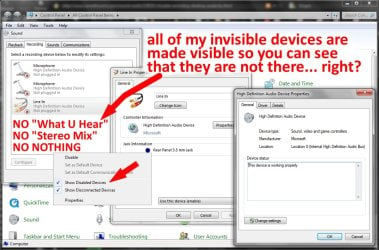
All of my invisible devices are visible so you an see that they are not there, right?

See this additionally attached screenshot...

In the attached screenshot, you can see that the invisible devices are visibly invisible... err... right.

digi
 

Attachments

  • SOUNDpanelCOLLAGE.jpg
    SOUNDpanelCOLLAGE.jpg
    132.9 KB · Views: 131

My Computer My Computer

At a glance

Windows 7 ULT 32 bit2 GHZ2 GB
Computer Manufacturer/Model Number
Dell 531
OS
Windows 7 ULT 32 bit
CPU
2 GHZ
Memory
2 GB
Other Info
Also use Macs, but don't tell anyone
OK I think I have found a solution for you that works with audacity and what you have. I have just tried it myself and it works.

http://windows7themes.net/how-to-record-what-you-hear-in-windows-7.html

It simply bypasses the problems you are having ( I hope! :) )

Read the posts at the bottom of the article as well!

Here you can find a large range of virtual audio tools and stuff along with the VST plugins for audacity;

http://www.vstplanet.com/Other_audio_tools/Audio_tools.htm

Complete description of the virtual cable, from the developer;

http://software.muzychenko.net/eng/vac.htm

Regards....Mike Connor
 
Last edited:

My Computer My Computer

At a glance

Several, including Windows 7 x64 Ultimate
OS
Several, including Windows 7 x64 Ultimate
The Virtual audio cable solution will work, Hal's problem stems from the fact that not all of the Realtek chips have the "Stereo Mix" hardware at the chip level. New drivers won't help as the hardware doesn't exist or has been disabled.

Ap
 

My Computer My Computer

At a glance

Windows 7 Home PremiumIntel Core 2 Duo @ 3.00gHz4 GBATI Radeon HD 2600 XT
Computer Manufacturer/Model Number
Assembled in my workshop
OS
Windows 7 Home Premium
CPU
Intel Core 2 Duo @ 3.00gHz
Motherboard
Gigabyte GA-P35-S3G
Memory
4 GB
Graphics Card(s)
ATI Radeon HD 2600 XT
Sound Card
RME 24/96 Card, Realtek Internal Audio PreSonus FireStudio
Monitor(s) Displays
Acer 1917 (x2)
Screen Resolution
1280 x 1024 on both monitors
Hard Drives
Three 250GB Seagate SATA Barracuda 7200rpm
PSU
Rosewill 500-watt
Case
Rosewill mid-tower
Cooling
Noctua NH-U9B (CPU), PwrSupply fan + single large case Fan
Keyboard
Macally w/2/USB ports.
Mouse
Trackman Wheel
Other Info
Event 20/20 bas studio monitors, Yamaha sub.
Rackmount Korg/Roland/Yamaha synthesizers,
Cubase MIDI/audio recording. Sony Soundforge audio/mastering software. CD Architect Mastering. RME & Presonus audio interfaces.
The Virtual audio cable solution will work, Hal's problem stems from the fact that not all of the Realtek chips have the "Stereo Mix" hardware at the chip level. New drivers won't help as the hardware doesn't exist or has been disabled.

Ap


Yes indeed, so it seems. Unfortunately we didn't know that to begin with. These things are usually disabled and hidden by default.

Regards....Mike Connor
 

My Computer My Computer

At a glance

Several, including Windows 7 x64 Ultimate
OS
Several, including Windows 7 x64 Ultimate
HAL and VAC

Thanks again Mike... you are the most thorough person that I don't know.

And Aphelion... HAL 9000 is only my fake picture... my real fake name is digi.

Aphelion said, "Hal's problem stems from the fact that not all of the Realtek chips have the "Stereo Mix" hardware at the chip level. New drivers won't help as the hardware doesn't exist or has been disabled."

Isn't that always the problem?... not having "Stereo Mix" hardware at the chip level has been my problem for years... come to think of it, that's why my wife divorced me.

Virtual Audio Cable sounds great, until you read down and find out that you can't hear what you are recording... how can I record what I'm not hearing if I can't hear what I'm recording? (?)

I mean, how would I know when to click "record" if I can't hear what I want to record?... then how would I know when to click "stop recording"?... it's the old chicken soup and the egg timer thing.

This, like sending sound on an email, has become like curing cancer as far as the research goes... and I'm metastisizing fast.

I'm not trying to fly to Jupiter, like the real HAL did, I'm just trying to get to the Radioshack down the street.

Then if you read further down, you find out that, by testimony of some of the people that used and reviewed VAC, that while using it, the words, "trial, trial, trial" comes out of your speakers... that sounds pleasant and it wouldn't be annoying at all... I haven't heard that phrase since that southern lynch mob of Baptists came to get me back in the '80s.

I figure getting an 8 track recorder and putting it next to my speakers will be easier and more efficient... that would be groovy.

I still have a Technics (by Panasonic) cassette deck that I bought when I was 12 in 1974, maybe that'll still work.

I'll check out all the other stuff that Mike provided me with... VST, VAC, VLC, VD, ETC, BFD, JFK and LBJ.

Maybe I could change my fake name to "analog-day".

Thanks again guys/gals... I'll "keep on truckin'."

digi
 
Last edited:

My Computer My Computer

At a glance

Windows 7 ULT 32 bit2 GHZ2 GB
Computer Manufacturer/Model Number
Dell 531
OS
Windows 7 ULT 32 bit
CPU
2 GHZ
Memory
2 GB
Other Info
Also use Macs, but don't tell anyone
You could also simply use a USB blaster that has the devices you need;

Amazon.com: external sound card usb

This should work fine, I do the same myself on another machine with no sound on board.

Just make sure the unit has the devices you need included. I use an X-fi on various machines;

http://www.amazon.com/s/ref=nb_sb_s...ywords=x-fi+card+usb&rh=i:aps,k:x-fi+card+usb

Also, a trip to Jupiter is probably boring, ( and dangerous if your computer doesn't do what you want! :) ). Look at all the fun we are having trying to get to Radio Shack.............


Regards....Mike Connor
 

My Computer My Computer

At a glance

Several, including Windows 7 x64 Ultimate
OS
Several, including Windows 7 x64 Ultimate
Didi.

What I think you need to do is......
Download Realtek HD Audio Codec R.256 Realtek
Granted you have gone into the BIOS and enabled HD audio, you should go to the device manager and Uninstall the windows driver and delete it if you see that option. Restart your PC. If windows re-installs the driver, that's fine. Install the Realtek driver right over it.

Following the previous enable instructions.
Then try to record your streaming audio.
 
Last edited:

My Computer My Computer

At a glance

Windows 7 Home Premium 64 bitIntel Core i7-4790G.SKILL 8GB (2 x 4GB) DDR3 F3-10666CL9D-8GBNTAMD Radeon R7 250
Computer type
PC/Desktop
Computer Manufacturer/Model Number
Custom Build
OS
Windows 7 Home Premium 64 bit
CPU
Intel Core i7-4790
Motherboard
GA-Z87X-D3H
Memory
G.SKILL 8GB (2 x 4GB) DDR3 F3-10666CL9D-8GBNT
Graphics Card(s)
AMD Radeon R7 250
Sound Card
Realtek ALC892
Monitor(s) Displays
Samsung UN32EH5000, Dell 1703FPT
Screen Resolution
1920 x 1080, 1280 x 1024
Hard Drives
WD5003AZEX
WD10EZEX
Samsung HD103SJ
Samsung 128 GB 840 PRO
PSU
SeaSonic M12II SS-500GM
Case
Fractal Design Define R4
Cooling
Zalman CNPS9900ALED
Keyboard
Logitech K800
Mouse
Logitech M705
Internet Speed
16 Mbps
Antivirus
Avast
Browser
Firefox
Other Info
Bose Companion 2 Multimedia Speakers
Thanks again Mike... you are the most thorough person that I don't know.

And Aphelion... HAL 9000 is only my fake picture... my real fake name is digi.

Digi,

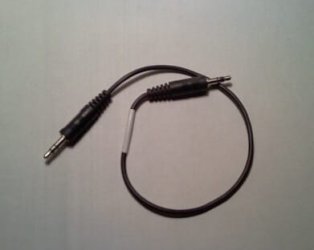
You could always go the old fashioned route... and get a cable like this one.

STCable.jpg

Line out to Line In, you could possibly monitor what you're recording through the front headphone jack. Not the most elegant solution but it might get you there.

Ap
 

My Computer My Computer

At a glance

Windows 7 Home PremiumIntel Core 2 Duo @ 3.00gHz4 GBATI Radeon HD 2600 XT
Computer Manufacturer/Model Number
Assembled in my workshop
OS
Windows 7 Home Premium
CPU
Intel Core 2 Duo @ 3.00gHz
Motherboard
Gigabyte GA-P35-S3G
Memory
4 GB
Graphics Card(s)
ATI Radeon HD 2600 XT
Sound Card
RME 24/96 Card, Realtek Internal Audio PreSonus FireStudio
Monitor(s) Displays
Acer 1917 (x2)
Screen Resolution
1280 x 1024 on both monitors
Hard Drives
Three 250GB Seagate SATA Barracuda 7200rpm
PSU
Rosewill 500-watt
Case
Rosewill mid-tower
Cooling
Noctua NH-U9B (CPU), PwrSupply fan + single large case Fan
Keyboard
Macally w/2/USB ports.
Mouse
Trackman Wheel
Other Info
Event 20/20 bas studio monitors, Yamaha sub.
Rackmount Korg/Roland/Yamaha synthesizers,
Cubase MIDI/audio recording. Sony Soundforge audio/mastering software. CD Architect Mastering. RME & Presonus audio interfaces.
from Didi

First I will address the response from C3PO (aka p5bdkw)... I think Didi could be a whole new identity for me... I loved Didi Conn in Greese (what a hottie)... see your new photo, and mine, attached.

Messing with my audio drivers is not an option, as I said... if you went through what I went through with messed up HD audio drivers from Realtek, and with Microsoft, then you'd probably understand why Microsoft didn't include any Realtek drivers in their current W7 ULT installer (I guess they started making their own audio drivers)... through that experience, I became so familiar with two Microsoft phone center tech support managers in India that we now are roommates in Delhi... these guys a crazy when it comes to partying.

I typed the name of one of these two MS call center tech support managers so many times, Ashish, that my spell check finally stopped trying to change that word in to "Hashish" because it learned by shear repetition... that's what HAL should have done.

And yes, also through that experience, I learned about flashing the BIOS, and so, thankfully, I stopped flashing old ladies in the park... my BIOS is set to HD audio. At the time, I also went through learning the "Pre-Boot System Assessment (PSA) Diagnostics and Error Codes For Dell Computers" routine so much that PC geek-techs in the area started taking classes from me.

I uninstalled and attempted to re-install the Realtek HD audio driver so many times, with and without the online and phone support guidance from "Hashish" that my old Vista system started refusing to restart... it just finally gave up and took an overdose of quaaludes... GRHS. The only good thing that came from that situation was getting a gratis copy of W7 ULT from Microsoft, which led me to this situation rambling back and forth with you, so you decide how lucky I was.

Anyway, Mike and Alphelion have already deemed the driver replacement method as useless on my machine.

As for Algernon (aka Alphelion), wouldn't you really rather have the fake identity of a lab mouse instead of the most distant point of a planet's orbit from the sun?... or a science-fictional webzine?

I did go the old fashioned route one time on my 3rd wife, but I think that's why she divorced me... we never had a great chemistry that way.

And Mike... sorry, I can't think of anything to say about your name and you've always addressed me by my proper fake name.

I once got hooked on USB blasters, but I ended up in Hoboken wearing nothing but a sombrero and a pancho... that's what led to my 4th wife divorcing me and I was in rehab for years... but that's a whole other story.

I think my feelings will be summed-up properly if you listen to the recording at this link... "www.digi's feelings summed-up in a song.html" .

Sorry, being such a success at failing on this two day odyssey makes me a little crazy, like HAL in the original 2001 Odyssey... "www.HAL 9000 goes zooey.com"

Thanks,

digi
 

Attachments

  • didiCONN.jpg
    didiCONN.jpg
    33.3 KB · Views: 16
  • C3PO.jpg
    C3PO.jpg
    18.7 KB · Views: 646
Last edited:

My Computer My Computer

At a glance

Windows 7 ULT 32 bit2 GHZ2 GB
Computer Manufacturer/Model Number
Dell 531
OS
Windows 7 ULT 32 bit
CPU
2 GHZ
Memory
2 GB
Other Info
Also use Macs, but don't tell anyone

Perhaps you should get some flowers for Algernon? :)

At least you got to go on an odyssey!


Regards....Mike Connor ( The well known input device!).
 

My Computer My Computer

At a glance

Several, including Windows 7 x64 Ultimate
OS
Several, including Windows 7 x64 Ultimate
I only scanned this thread and don't know if you got this resolved or not.

I assume you want to be able to record "what you hear" on Windows 7. It was easy on XP, somewhat more difficult on Vista, and considerably more difficult on Windows 7.

As far as I can tell, this is deliberate on the part of Microsoft and anyone who might make audio drivers. Probably a concession to Hollywood/RIAA and the powers that be.

You may or may not eventually fumble your way into the right configuration of old/new drivers that works. Some sound cards work very easily. Some are terminally exasperating. I eventually got Sigmatel sound going OK on Win 7.

The standard advice is to try all old drivers in as many ways as you can think of.

Confirm that you have disabled/disconnected devices shown in Sound control panel.

You may still fail in spite of all that.

It's all but certain your issues have nothing to do with Audacity. The Audacity forums are light on Windows 7 support at any rate.

I eventually bought a $30 external USB sound card (Behringer), which also has a turntable input.

Or you can buy an internal sound card known to not have any issues on Win 7. I bought USB because it is portable between PCs and is inexpensive. I can plug a turntable or conventional tape deck directly into it as well.

At one time, the HT Omega Striker 7.1 and the Asus Xonar internal cards both permitted "stereo mix" on Windows 7. I don't know if that is still true.
 

My Computer My Computer

At a glance

Windows 7 Home Premium SP1, 64-bitIntel Skylake i5-6600K, not overclocked8 GB HyperX DDR4-2666 (2 x 4 GB)none; graphics are integrated on CPU
Computer type
PC/Desktop
Computer Manufacturer/Model Number
Ignatz Special; 4 speed manual gearbox; factory air conditioning; one of one
OS
Windows 7 Home Premium SP1, 64-bit
CPU
Intel Skylake i5-6600K, not overclocked
Motherboard
AsRock Z170M Extreme 4, micro ATX
Memory
8 GB HyperX DDR4-2666 (2 x 4 GB)
Graphics Card(s)
none; graphics are integrated on CPU
Sound Card
onboard: Realtek ALC1150; external: USB Behringer UF0-202
Monitor(s) Displays
Dell S2340M 23 inch IPS
Screen Resolution
1600 x 900
Hard Drives
System: Crucial MX100 series SSD, 128 GB;
Data: Samsung Spinpoint 103SJ, 1 TB;
Backup: WD Caviar Green WD30EZRX-00D8PB0, 3 TB
PSU
Rosewill SilentNight 500 watt fanless, semi-modular
Case
Antec Solo II
Cooling
Noctua NH-U12S; Noctua F12 intake, Noctua S12A exhaust
Keyboard
Microsoft 200 6JH-00001 USB
Mouse
Dell or Microsoft optical wired; USB
Antivirus
Microsoft Security Essentials and Malwarebytes Premium
Browser
Pale Moon
Other Info
All fans PWM; speeds at idle: CPU circa 500 rpm; intake circa 600 rpm; exhaust circa 600 rpm; CPU temps 27 idle and 47 C load in a warm room (27 C/81 F) when running Intel Extreme Tuning Utility stress test.
Back
Top