Extremely low volume in headphones/speakers

Wulfrich

New member
Local time
7:54 PM
Messages
4
Good day,

I'm using a fairly new HP Mini netbook and ever since I got it I have this problem of low volume in plugged in headphones and speakers. The netbook speakers themselves are pretty fantastic, but if I plug in headphones or speakers, it seems that the computer lowers the volume substantially to the point that I can't even use speakers for listening to music or watching movies (on full blast, you might be able to make out speech on a film for example, but not from very far away; that's how low the volume is).

I've gone through everything I can think of, checked all the various levels in the volume mixer and audio hardware options, made sure everything is to the max, re-installed my IDT High Definition Audio CODEC driver, all with no results. I also have tried out the speakers both with the Loudness Equalization feature enabled and disabled with no noticeable effects. I've also tested the computer with different sets of headphones/speakers and so it must be some properties of the computer that are the issue here.

I appreciate your help.

Sincerely Wulfrich
 

My Computer My Computer

At a glance

Windows 7 Home Premium 32bit
OS
Windows 7 Home Premium 32bit
Welcome Wulfrich to SF,
When you insert the headphones and or external speakers the main speakers are supposed to mute.
 

My Computer My Computer

At a glance

Windows 7 Ultimate 64i7 3770k OC'd 4.6 @ 1.17v, also FX 8120 & i5 ...32 gb G.Skill Sniper DDR3 10-12-12-31 @ 2133XFX Radeon 7870 2GB DDR5
Computer type
PC/Desktop
Computer Manufacturer/Model Number
A blend of brains, brawn and dumb luck.
OS
Windows 7 Ultimate 64
CPU
i7 3770k OC'd 4.6 @ 1.17v, also FX 8120 & i5 miniITX
Motherboard
MSI P67A-GD80 b3
Memory
32 gb G.Skill Sniper DDR3 10-12-12-31 @ 2133
Graphics Card(s)
XFX Radeon 7870 2GB DDR5
Sound Card
Sound Blaster Z Series Card
Monitor(s) Displays
(2) LG LED 23" 1920 x 1080 2ms Monitors via mini d-port
Screen Resolution
1680 X 1050 p
Hard Drives
Samsung 256 gb 830 SSD sata III
(1) 1 tb WD Black
(2) 1 tb Hitachi deskmates/sata II
(2) 1 tb WD green/sata II
(2) 3 tb Seagate Barracuda
(1) 120 gb OCZ Vertex SS
(1) Drobo 5N w/5 Seagate 3tb
PSU
EVGA modular 1000G2 80% gold rating & APC 1200 RS
Case
CoolerMaster Storm Styker
Cooling
7 case fans 140mm & 120mm, NZXT Kraken X60
Keyboard
(2) Logitech Illuminated Keyboards (1) usb (1) wireless
Mouse
Logitech G700 & T-BC21 - nano nx for the laptop
Internet Speed
Basic 120mbps down
Antivirus
Trend Micro Titanium Max Security & Malwarebytes Premium
Browser
Chrome and IE 10
Other Info
5 Noctua case fans + 3 Noctua in p/p on NZXT cooler
Integrated hot swap drive bays for 2.5" Drives
(2) Lite-on dvd/cd/Blu Ray optical 22X
Integrated fan controller and led on/off
HP Officejet Pro 8630 all-n-one
Hot-swappable 3.5" hard drive bay
Netgear Nighthawk router
Asus USB 3 & sata 6 PCIe card
Vantec IDE to sata adptr./Ultra sata adptr
Lenovo L420 i5 lappy with m sata
Drobo 5N advanced NAS
Yes, of course, I'm not speaking about the permanent netbook speakers, I'm talking about headphones/speakers which I plug in. Those headphones/speakers have extremely low volume, such that I can't even really use my speakers-subwoofer set-up, because nothing is loud enough to be intelligible.
 

My Computer My Computer

At a glance

Windows 7 Home Premium 32bit
OS
Windows 7 Home Premium 32bit
Thanks for clarifying that. I imaging you've been completely though the sound cards setting and checked all levels to see if any are low? I'll likely have to bow out as I have zero knowledge of Netbooks only Laptops and I don't think they will be all that similar.
 

My Computer My Computer

At a glance

Windows 7 Ultimate 64i7 3770k OC'd 4.6 @ 1.17v, also FX 8120 & i5 ...32 gb G.Skill Sniper DDR3 10-12-12-31 @ 2133XFX Radeon 7870 2GB DDR5
Computer type
PC/Desktop
Computer Manufacturer/Model Number
A blend of brains, brawn and dumb luck.
OS
Windows 7 Ultimate 64
CPU
i7 3770k OC'd 4.6 @ 1.17v, also FX 8120 & i5 miniITX
Motherboard
MSI P67A-GD80 b3
Memory
32 gb G.Skill Sniper DDR3 10-12-12-31 @ 2133
Graphics Card(s)
XFX Radeon 7870 2GB DDR5
Sound Card
Sound Blaster Z Series Card
Monitor(s) Displays
(2) LG LED 23" 1920 x 1080 2ms Monitors via mini d-port
Screen Resolution
1680 X 1050 p
Hard Drives
Samsung 256 gb 830 SSD sata III
(1) 1 tb WD Black
(2) 1 tb Hitachi deskmates/sata II
(2) 1 tb WD green/sata II
(2) 3 tb Seagate Barracuda
(1) 120 gb OCZ Vertex SS
(1) Drobo 5N w/5 Seagate 3tb
PSU
EVGA modular 1000G2 80% gold rating & APC 1200 RS
Case
CoolerMaster Storm Styker
Cooling
7 case fans 140mm & 120mm, NZXT Kraken X60
Keyboard
(2) Logitech Illuminated Keyboards (1) usb (1) wireless
Mouse
Logitech G700 & T-BC21 - nano nx for the laptop
Internet Speed
Basic 120mbps down
Antivirus
Trend Micro Titanium Max Security & Malwarebytes Premium
Browser
Chrome and IE 10
Other Info
5 Noctua case fans + 3 Noctua in p/p on NZXT cooler
Integrated hot swap drive bays for 2.5" Drives
(2) Lite-on dvd/cd/Blu Ray optical 22X
Integrated fan controller and led on/off
HP Officejet Pro 8630 all-n-one
Hot-swappable 3.5" hard drive bay
Netgear Nighthawk router
Asus USB 3 & sata 6 PCIe card
Vantec IDE to sata adptr./Ultra sata adptr
Lenovo L420 i5 lappy with m sata
Drobo 5N advanced NAS

My Computer My Computer

At a glance

Windows 7 Ultimate 32bit SP1Intel(R) Core(TM)2 Quad CPU @ 2.40GHz, 2400 MHz4 GBATI Radeon HD 2600 Pro
Computer type
PC/Desktop
Computer Manufacturer/Model Number
Bruce ... somewhere in his 40's
OS
Windows 7 Ultimate 32bit SP1
CPU
Intel(R) Core(TM)2 Quad CPU @ 2.40GHz, 2400 MHz
Motherboard
INTEL/D975XBX2
Memory
4 GB
Graphics Card(s)
ATI Radeon HD 2600 Pro
Monitor(s) Displays
Samsung SyncMaster 914v
Screen Resolution
1280 x 1024
Hard Drives
2/500GB each ... ST3500630AS ATA Device.
One is not connected
PSU
Rocketfish 700 W
Case
G.Skill Gigabyte Chassis
Keyboard
Standard PS/2 Keyboard
Mouse
Microsoft PS/2 Mouse
Internet Speed
DSL
Antivirus
Avira Internet Security
Browser
IE 11
Other Info
ATI HDMI Audio
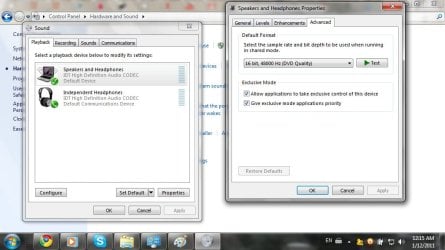
i am curious to see the sound settings window on your netbook. Goto Control Panel > Sound and post the screenshot. make sure you do this after connecting the external speakers. :D
 

My Computer My Computer

At a glance

Windows 7 Ultimate
OS
Windows 7 Ultimate
Hi Jacee, yes, they were set to DVD quality when I started to tackle this problem and I've tried them out on several different Hz (both with 16 and 24 bit) to little or no effect.
 

Attachments

  • Sound Settings.jpg
    Sound Settings.jpg
    69.2 KB · Views: 1,072

My Computer My Computer

At a glance

Windows 7 Home Premium 32bit
OS
Windows 7 Home Premium 32bit
I've seen this be an issue when the laptop is on battery power and not plugged in... does anyting change when plugging or unplugging your laptop?
 

My Computer My Computer

At a glance

7 Pro
OS
7 Pro
Hi Jacee, yes, they were set to DVD quality when I started to tackle this problem and I've tried them out on several different Hz (both with 16 and 24 bit) to little or no effect.

When you click Properties, what do your levels look like?
 

My Computer My Computer

At a glance

Windows 7 Home Premium 64 bitIntel Core i7-4790G.SKILL 8GB (2 x 4GB) DDR3 F3-10666CL9D-8GBNTAMD Radeon R7 250
Computer type
PC/Desktop
Computer Manufacturer/Model Number
Custom Build
OS
Windows 7 Home Premium 64 bit
CPU
Intel Core i7-4790
Motherboard
GA-Z87X-D3H
Memory
G.SKILL 8GB (2 x 4GB) DDR3 F3-10666CL9D-8GBNT
Graphics Card(s)
AMD Radeon R7 250
Sound Card
Realtek ALC892
Monitor(s) Displays
Samsung UN32EH5000, Dell 1703FPT
Screen Resolution
1920 x 1080, 1280 x 1024
Hard Drives
WD5003AZEX
WD10EZEX
Samsung HD103SJ
Samsung 128 GB 840 PRO
PSU
SeaSonic M12II SS-500GM
Case
Fractal Design Define R4
Cooling
Zalman CNPS9900ALED
Keyboard
Logitech K800
Mouse
Logitech M705
Internet Speed
16 Mbps
Antivirus
Avast
Browser
Firefox
Other Info
Bose Companion 2 Multimedia Speakers
Everything is fully maxed out, I'm sure of that. Also, my comment didn't seem to go through before. I've put it on and off battery power without any change. Thanks though.

From what I can tell in comparison with other laptops, for example on this Dell I have if I listen to it on speakers, I might have the volume at 75% for example, but when I switch to headphones, I have to turn it down to about 5% to 10%. On this computer, I can have the headphones up to 100% without deafening my ears. So, I believe it is programmed to lower for headphones so as to not require me to manually lower the volume so much, but of course with externally plugged in speakers I don't want that volume decrease. So, if that line of thinking is correct, this is an intentional feature, but I can't find anything in any of the settings that fully fits that description or makes such a difference (again Loudness Equalization has essentially no effect, possibly a slight volume difference). I'm stumped.
 

My Computer My Computer

At a glance

Windows 7 Home Premium 32bit
OS
Windows 7 Home Premium 32bit
Uncheck 'exclusive' mode and see what that does.
 

My Computer My Computer

At a glance

Windows 7 Ultimate 32bit SP1Intel(R) Core(TM)2 Quad CPU @ 2.40GHz, 2400 MHz4 GBATI Radeon HD 2600 Pro
Computer type
PC/Desktop
Computer Manufacturer/Model Number
Bruce ... somewhere in his 40's
OS
Windows 7 Ultimate 32bit SP1
CPU
Intel(R) Core(TM)2 Quad CPU @ 2.40GHz, 2400 MHz
Motherboard
INTEL/D975XBX2
Memory
4 GB
Graphics Card(s)
ATI Radeon HD 2600 Pro
Monitor(s) Displays
Samsung SyncMaster 914v
Screen Resolution
1280 x 1024
Hard Drives
2/500GB each ... ST3500630AS ATA Device.
One is not connected
PSU
Rocketfish 700 W
Case
G.Skill Gigabyte Chassis
Keyboard
Standard PS/2 Keyboard
Mouse
Microsoft PS/2 Mouse
Internet Speed
DSL
Antivirus
Avira Internet Security
Browser
IE 11
Other Info
ATI HDMI Audio
I am bumping this in the hopes that Wulfrich will get an e-mail message saying there was a reply to his thread.

Wulfrich, I have the same problem. Did you solve it? If so, how?
 

My Computer My Computer

At a glance

Windows 7 Ultimate x64AMD FX-8120 Zambezi 3.1 GHz Eight-CoreG.Skill Ripjaws 8GB DDR3 1600Nvidia 9800 GT
Computer Manufacturer/Model Number
Custom build
OS
Windows 7 Ultimate x64
CPU
AMD FX-8120 Zambezi 3.1 GHz Eight-Core
Motherboard
ASRock 960GM/U3S3 FX
Memory
G.Skill Ripjaws 8GB DDR3 1600
Graphics Card(s)
Nvidia 9800 GT
Sound Card
Realtek HD Audio
Screen Resolution
1400 x 900
PSU
[?] 700w
Case
Antec Super Lanboy
Internet Speed
5 Mbps
This is a very belated reply but I was having issues as well trying to hear with my headphones instead of speakers. What I've found to help is to do the following:

1. Right click the volume icon next to your time display
2. Click Open Volume Mixer
3. Adjust the volume of the program/application that you're watching/listening to media on. For my case it was Adobe Flash Player as I was having trouble hearing things on Youtube and other sites that run Adobe Flash Player.


Hope this helps someone.
 

My Computer My Computer

At a glance

Windows 7 Ultimate x64
Computer type
PC/Desktop
OS
Windows 7 Ultimate x64
Same problem

9470m
does this too
Can't find a fix, I disabled something and rebooted windows and it worked once and then went back to it's old ways next reboot. Don't have this problem in linux mint which works perfectly (dual boot) headphones volume is just too low in windows. Can't find a solution by changing drivers or maxxing out everything. Argh. Speakers are louder than my in ears lol.
 

My Computer My Computer

At a glance

winblows 7 paid a premium 16 nybblei5lotsintel
Computer type
PC/Desktop
Computer Manufacturer/Model Number
hach pee
OS
winblows 7 paid a premium 16 nybble
CPU
i5
Motherboard
awesome
Memory
lots
Graphics Card(s)
intel
Hard Drives
lots
Antivirus
none
Browser
none
I unplugged my dell laptop, took the battery out waited 30 seconds, put the battery back in. Once I booted back up the headphone volume was fixed.
 

My Computer My Computer

At a glance

Window 7 Professional 64bit
Computer type
PC/Desktop
Computer Manufacturer/Model Number
Dell E6520
OS
Window 7 Professional 64bit
Back
Top