
Set up simple network and ensure security

balm

New member
Local time
3:05 AM
Messages
58
i would like to do a simple home network.

at present i have a 2in1 wireless router/modem (2wire Gateway 2701) from my isp (Bell sympatico). I have my main use desktop computer (windows 7) wired to the 2in1, then i also use a laptop (windows 7) wirelessly connected to the 2in1.

i use the internet on both, but would like to set up a network for file/printer sharing between the 2 computers. i am concerned with the proper way to do this while ensuring decent internet security, as i understand it using a network opens more security risk?

thanks
 

My Computer My Computer

At a glance

Windows 7 Home Premium - Desktop 32 bit / Lap...AMD Athlon 64 Dualcore - 2.1 GHzRAM 2 G
Computer Manufacturer/Model Number
compaq
OS
Windows 7 Home Premium - Desktop 32 bit / Laptop HP (G62) 64 BIT
CPU
AMD Athlon 64 Dualcore - 2.1 GHz
Memory
RAM 2 G
Other Info
2 in 1, Bell Gateway 2-Wire 2701, wireless, modem, NAT router
setup WPA2 (wifi protected access) with a password, and while setting up the printer you can add the password for the printer to remember, and that will be enough security for home. I hope this helps
 

My Computer My Computer

At a glance

Windows 7 pro 64 bitIntel Core i7-870 Lynnfield 2.93GHzGskill 8 gig, 4x2gigASUS EAH5850
OS
Windows 7 pro 64 bit
CPU
Intel Core i7-870 Lynnfield 2.93GHz
Motherboard
MSI P55-GD80 LGA 1156
Memory
Gskill 8 gig, 4x2gig
Graphics Card(s)
ASUS EAH5850
Sound Card
built in HD
Monitor(s) Displays
HP 23 inch
Hard Drives
1tbHDD,500HDD,500HDD,30SSD no RAID...
Case
Cooler master HAF 932
Cooling
4 case fans, v6 cpu cooler
Keyboard
Logitech G110
Mouse
Razer Death Adder
Internet Speed
never fast enough
thank you, for the suggestions.

1.im trying to understand several aspects of it better, the WPA2 is one aspect, but i havent learned how to, yet.

2.im trying to understand why my ISP said that what im doing (home network) per my first post is not possible with the 2in1, and it is not a true network, what???

3.i beleive i can at a minimum can share files and printers and that is a network, no?

4.in general terms, am i more exposed to hackers being in this network, even with proper security measures etc, as opposed to before?

my understanding is the most effecient way to share the files/printers is to

a. Windows Private network
b. Turn on network discovery
c. Enable Public folders in private network settings
d. In LAN settings enable File / Printer sharing


thanks
 

My Computer My Computer

At a glance

Windows 7 Home Premium - Desktop 32 bit / Lap...AMD Athlon 64 Dualcore - 2.1 GHzRAM 2 G
Computer Manufacturer/Model Number
compaq
OS
Windows 7 Home Premium - Desktop 32 bit / Laptop HP (G62) 64 BIT
CPU
AMD Athlon 64 Dualcore - 2.1 GHz
Memory
RAM 2 G
Other Info
2 in 1, Bell Gateway 2-Wire 2701, wireless, modem, NAT router
if its a router and modem, i dont see how that wouldnt be possible... yes using a network opens more security risks.... log into your modem/ router, go to the web address given in the book , 192.168.1.1 and set up your WPA2 there, also change your router password... after that is done your security should be good, if you have wifi than it is already a network and you should be able to print share etc... you need to start a homegroup though.
 

My Computer My Computer

At a glance

Windows 7 pro 64 bitIntel Core i7-870 Lynnfield 2.93GHzGskill 8 gig, 4x2gigASUS EAH5850
OS
Windows 7 pro 64 bit
CPU
Intel Core i7-870 Lynnfield 2.93GHz
Motherboard
MSI P55-GD80 LGA 1156
Memory
Gskill 8 gig, 4x2gig
Graphics Card(s)
ASUS EAH5850
Sound Card
built in HD
Monitor(s) Displays
HP 23 inch
Hard Drives
1tbHDD,500HDD,500HDD,30SSD no RAID...
Case
Cooler master HAF 932
Cooling
4 case fans, v6 cpu cooler
Keyboard
Logitech G110
Mouse
Razer Death Adder
Internet Speed
never fast enough
Thank you bmcdevitt for your attention and help,


1. without setting up favorites and email client folders on BOTH computers, can i access these from each computer?

2. i think understand public folders default allow sharing, but can any other file/folder be shared just by using share in folder "properties", or can i share the whole C drive...?

3. do i need to modify any settings in the Windows Firewall - it shows all incoming not allowed except for those in inbound rules, all outgoing is allowed except for those in outbound rules....i dont fully understand the issues with various ports...?

4. My NAP is disabled, do i need to enable this?


thanks
 

My Computer My Computer

At a glance

Windows 7 Home Premium - Desktop 32 bit / Lap...AMD Athlon 64 Dualcore - 2.1 GHzRAM 2 G
Computer Manufacturer/Model Number
compaq
OS
Windows 7 Home Premium - Desktop 32 bit / Laptop HP (G62) 64 BIT
CPU
AMD Athlon 64 Dualcore - 2.1 GHz
Memory
RAM 2 G
Other Info
2 in 1, Bell Gateway 2-Wire 2701, wireless, modem, NAT router
i have following five options: WEP-Open, WEP-Shared, WPA-PSK, WPA2-PSK, or WPA-PSK and WPA2-PSK.

so i should use WPA2-PSK, correct?


also in the configure wireless network (settings) , should i change the network name and enable SSID broadcast?
 

My Computer My Computer

At a glance

Windows 7 Home Premium - Desktop 32 bit / Lap...AMD Athlon 64 Dualcore - 2.1 GHzRAM 2 G
Computer Manufacturer/Model Number
compaq
OS
Windows 7 Home Premium - Desktop 32 bit / Laptop HP (G62) 64 BIT
CPU
AMD Athlon 64 Dualcore - 2.1 GHz
Memory
RAM 2 G
Other Info
2 in 1, Bell Gateway 2-Wire 2701, wireless, modem, NAT router
Hi balm,
In answer to your questions above,
Yes, use WPA2-PSK as this is the most secure system which uses AES encryption on your wireless link.
Yes, I would change your network name.
With regard to SSID broadcast, it makes the discovery of your networks existence easy and if you have WPA2-PSK activated, does not make your network easier to "Hack". Even if you do not broadcast your SSID, a determined hacker can still find details on your network existence, but won't be able to break your security.

For a good tutorial on setting up your homegroup for file sharing etc. there is a good tutorial in these forums available here:- http://www.sevenforums.com/tutorials/43961-homegroup-create.html

In the other tutorials available you will find the answers to lots of questions you may have on Windows Seven or you can always come back and ask like you have done here!! Good Luck!!
 

My Computer My Computer

At a glance

win7
OS
win7
wily, thank you,

i think ive reconfigured the gateway properly now. i also used this advice (seemed quite good):

http://compnetworking.about.com/od/wirelesssecurity/tp/wifisecurity.htm

the only question is re. bullet7. static IP address - my Gateway set up has under private network, configure manual, enable DHCP checked (followed by 1st & last address in range), default DHCP pool, BUT then in current setting - edit address allocation it shows address assignment under device as "private fixed: (address)"...i assume this is the same as the STATIC addressing which is recommended... also do i need to manually configure static Ip in windows network settings...

ill study up more on the home network setup.
 
Last edited:

My Computer My Computer

At a glance

Windows 7 Home Premium - Desktop 32 bit / Lap...AMD Athlon 64 Dualcore - 2.1 GHzRAM 2 G
Computer Manufacturer/Model Number
compaq
OS
Windows 7 Home Premium - Desktop 32 bit / Laptop HP (G62) 64 BIT
CPU
AMD Athlon 64 Dualcore - 2.1 GHz
Memory
RAM 2 G
Other Info
2 in 1, Bell Gateway 2-Wire 2701, wireless, modem, NAT router
Private Fixed address is the same as STATIC address, in other words the address of your computer would remain as setup for your network connection ie fixed or static. In DHCP, your router dynamically assigns each connecting computer an address from the DHCP pool of addresses that is available. As your system has enable DHCP checked, you are using this method of address allocation. I would suggest that you adjust the range of available addresses to suit your own needs eg if you have 2 computers and 1 printer, only allow a range of say 5 addresses which will allow connection of all your present needs plus 2 spare (total 5) for occasional connections such as visiting friends laptops or wifi for a mobile phone.
As you can see from the above, as you have enable DHCP selected, you do not need to setup any static i/p addressing in Windows.
 

My Computer My Computer

At a glance

win7
OS
win7
wily, thank you, im learning a ton here!

sooooo, do i understand correctly that it perfectly safe to leave the Gateway DHCP checked, basically i still have a fixed address in terms of the security recommendation discussed as per the linked article, ?


also it is safer to REDUCE the range of addresses in DHCP on the Gateway?
 

My Computer My Computer

At a glance

Windows 7 Home Premium - Desktop 32 bit / Lap...AMD Athlon 64 Dualcore - 2.1 GHzRAM 2 G
Computer Manufacturer/Model Number
compaq
OS
Windows 7 Home Premium - Desktop 32 bit / Laptop HP (G62) 64 BIT
CPU
AMD Athlon 64 Dualcore - 2.1 GHz
Memory
RAM 2 G
Other Info
2 in 1, Bell Gateway 2-Wire 2701, wireless, modem, NAT router
in order to get get the laptop wireless internet connection to function with the broadcast SSID on the router UNCHECKED, the only way was to go to "manage wireless networks" on the laptop, click on the wireless network with the SSID showing, "wireless network properties", there in the "connection" tab, i HAD to check the "connect even if network not broadcasting SSID" option...

this raised another question, is it safer to have the "connect automatically when network in range" option checked or uncheked?

I noticed i never have to type in the "network security key" manually when connecting to network...is this because it was already entered once in the "wireless network properties", "security" tab?

secondly, i notice even though broadcast SSID is disabled, the SSID name still appears in the list of "available connections" in the tray icon?
 
Last edited:

My Computer My Computer

At a glance

Windows 7 Home Premium - Desktop 32 bit / Lap...AMD Athlon 64 Dualcore - 2.1 GHzRAM 2 G
Computer Manufacturer/Model Number
compaq
OS
Windows 7 Home Premium - Desktop 32 bit / Laptop HP (G62) 64 BIT
CPU
AMD Athlon 64 Dualcore - 2.1 GHz
Memory
RAM 2 G
Other Info
2 in 1, Bell Gateway 2-Wire 2701, wireless, modem, NAT router
Because you are connected to the network, the router and your computer trust each other on the network as you have supplied the security credentials already. If you then uncheck the broadcast SSID, the router and your computer still know each other, but your computer doesn't "know" if the router is on because its SSID isn't being broadcast. When you check the "connect even if network not broadcasting SSID" option is checked you are basically telling your computer that it should go ahead and try and connect to the network anyway.
When "connect automatically when network in range" is set then your computer will do exactly that ie connect to your network when in range. As far as I know, it shouldn't pose an additional threat to either your computer or your network as long as your network security is correctly setup.
With regard to `i never have to type in the "network security key"`, thats correct, your system and router has "remembered" your password for you.
With regard to "i notice even though broadcast SSID is disabled, the SSID name still appears in the list of "available connections" in the tray icon?" Thats because the SSID broadcast transmission is setup on the router and not your computer...remember, you setup the network and gave it the network name, setup the security etc at the beginning? :)
 

My Computer My Computer

At a glance

win7
OS
win7
Hi Balm,

Once you have sorted out your network, do yourself a favour and run the Port scanner from this site:

https://www.grc.com/x/ne.dll?bh0bkyd2

Choose the All service ports option. A good secure router/network will have all ports in Stealth Mode.

Good luck,
Golden
 

My Computer My Computer

At a glance

Windows 10 Pro x64 ; Xubuntu x64Intel i7 860 @ 2.80 GHz O/C'ed to 4.0GHz16GB Corsair Vengance DDR3 @ 661 MHz Dual Cha...EVGA NVidia GTX 560 1024MB
Computer type
PC/Desktop
Computer Manufacturer/Model Number
Golden Mk. I.4
OS
Windows 10 Pro x64 ; Xubuntu x64
CPU
Intel i7 860 @ 2.80 GHz O/C'ed to 4.0GHz
Motherboard
Gigabyte P55A-UD3R Rev.1. Award BIOS F13
Memory
16GB Corsair Vengance DDR3 @ 661 MHz Dual Channel (9-9-9-24)
Graphics Card(s)
EVGA NVidia GTX 560 1024MB
Sound Card
Realtek Integrated
Monitor(s) Displays
Dual Samsung SyncMaster 2494HS
Screen Resolution
1920*1080 and 1920*1080
Hard Drives
1*Samsung 840 EVO 120GB SSD;
1*OCZ Vertex 2 60GB SSD;
2*Samsung F3 SpinPoint 1TB in RAID0;
1*Samsung F1 SpinPoint 1TB;
2*Western Digital 1TB External USB 3.0
1*Western Digital 500GB External USB 3.0
1*Seagate 500GB External USB 2.0
PSU
Thermaltake ToughPower QFan 750W
Case
Thermaltake Element S VK60001W2Z
Cooling
Corsair H60 Water Cooling, 2*230mm and 2*80mm case fans
Keyboard
Logitech G110
Mouse
Logitech MX518
wiley, thank you for ongoing support, its most helpful.

so to confirm, it is perfectly safe to check "connect even if network is not broadcasting" , (even if windows puts a warning about this)....


heres where im at now. on router im using WPA2-PSK with new security key passphrase, enabled MAC, renamed ssid, disabled broadcast ssid, i did not alter the default IP addressing (still not clear i need to do this).

started over on the wireless laptop to match with router. i did a manually added network connection. entered the new SSID and security key.

i did not check "start connection automatically", and i did not check "connect even if network is not broadcasting" (even though now i understand it better thanks to your explanations).

i now connect to the network by clicking "connect" on the "other network" in list of available wireless network connections. if i leave the check in the "connect automatically" in the pop up dialog (in the list), then enter the ssid, and security key when asked, a new second network with the same ssid appears in the list ("ssid name_2") and new network connection is created in "manage wireless networks"...

i assume this normal, and this ssid_2 name would only appear on my laptop (as opposed to neighbors)?
 

My Computer My Computer

At a glance

Windows 7 Home Premium - Desktop 32 bit / Lap...AMD Athlon 64 Dualcore - 2.1 GHzRAM 2 G
Computer Manufacturer/Model Number
compaq
OS
Windows 7 Home Premium - Desktop 32 bit / Laptop HP (G62) 64 BIT
CPU
AMD Athlon 64 Dualcore - 2.1 GHz
Memory
RAM 2 G
Other Info
2 in 1, Bell Gateway 2-Wire 2701, wireless, modem, NAT router
Golden,

thanks for the advice, i think ive used it before, but yes ill try it again once set up
 

My Computer My Computer

At a glance

Windows 7 Home Premium - Desktop 32 bit / Lap...AMD Athlon 64 Dualcore - 2.1 GHzRAM 2 G
Computer Manufacturer/Model Number
compaq
OS
Windows 7 Home Premium - Desktop 32 bit / Laptop HP (G62) 64 BIT
CPU
AMD Athlon 64 Dualcore - 2.1 GHz
Memory
RAM 2 G
Other Info
2 in 1, Bell Gateway 2-Wire 2701, wireless, modem, NAT router
You may be better deleting your manually added network connection, re-enable broadcast SSID, then reboot. The computer should "see" your network as the router is broadcasting its SSID. You should be asked to suppy your security key and then the computer should connect to the network. You can then disable the broadcasting of your SSID on your router and check "start connection automatically", and "connect even if network is not broadcasting" This will save you having to go through the connection routine you have at present and automatically log you onto the network each time you boot up in range of the router.

Yes, you are correct in your assumption that any manually created (ssid_2) name would only appear on your laptop.

You do not need to change the default addressing setup by your router although it would make hacking your network harder as the default network settings are well known. It just depends how far you want to go with your network security.
 

My Computer My Computer

At a glance

win7
OS
win7
thank you,

my router/modem:


in "edit advanced home network settings" tab,

Sets the IP address range used by the home network. You can choose from three standard configuration options (the default is 192.168.1.0/255.255.255.0), or configure the network settings manually.


"settings - private network" section, Sets the IP address range used by the home network. You can choose from three standard configuration options (the default is 192.168.1.0/255.255.255.0), or configure the network settings manually.

"configure manually" radio button is on, "enable dhcp" is checked (and shows 1st and last dhcp address), also has "default dhcp pool" radio button on,

...in "current settings - device list" section, it shows the two computers with the 1st, & 2nd addresses from the dhcp range

in "edit adress allocation", "settings", "Specify Device Addressing and Public/WAN IP Address Mapping",
it shows each computer with "current address"m (1st, & 2nd address), and under "address assignment" there is drop down list with first item "private from pool: xxx.xxx.x.x" and all sequencial "private fixed: xxx.xxx.x.x" adresses (in dhcp range) following....


1. does the router use dhcp to assign static ips...?

2. if wanting more security what defaults need to be changed and to what?

3. if these addresses arent static, is it better to assign static addresses to the computers and if so how?

thank you
 

My Computer My Computer

At a glance

Windows 7 Home Premium - Desktop 32 bit / Lap...AMD Athlon 64 Dualcore - 2.1 GHzRAM 2 G
Computer Manufacturer/Model Number
compaq
OS
Windows 7 Home Premium - Desktop 32 bit / Laptop HP (G62) 64 BIT
CPU
AMD Athlon 64 Dualcore - 2.1 GHz
Memory
RAM 2 G
Other Info
2 in 1, Bell Gateway 2-Wire 2701, wireless, modem, NAT router
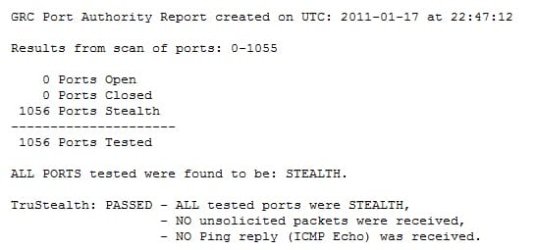
here the results
 

Attachments

  • stealth.jpg
    stealth.jpg
    20 KB · Views: 8

My Computer My Computer

At a glance

Windows 7 Home Premium - Desktop 32 bit / Lap...AMD Athlon 64 Dualcore - 2.1 GHzRAM 2 G
Computer Manufacturer/Model Number
compaq
OS
Windows 7 Home Premium - Desktop 32 bit / Laptop HP (G62) 64 BIT
CPU
AMD Athlon 64 Dualcore - 2.1 GHz
Memory
RAM 2 G
Other Info
2 in 1, Bell Gateway 2-Wire 2701, wireless, modem, NAT router
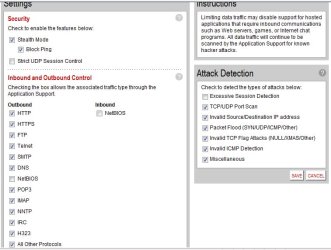
should i enable or disable which of these options (boxes) on my router firewall for increased security, ?

thanks
 

Attachments

  • firewall.jpg
    firewall.jpg
    52.6 KB · Views: 19

My Computer My Computer

At a glance

Windows 7 Home Premium - Desktop 32 bit / Lap...AMD Athlon 64 Dualcore - 2.1 GHzRAM 2 G
Computer Manufacturer/Model Number
compaq
OS
Windows 7 Home Premium - Desktop 32 bit / Laptop HP (G62) 64 BIT
CPU
AMD Athlon 64 Dualcore - 2.1 GHz
Memory
RAM 2 G
Other Info
2 in 1, Bell Gateway 2-Wire 2701, wireless, modem, NAT router
No further action required - the stealth and ping options hide you from the outside world, as seen in the GRC results :)
 

My Computer My Computer

At a glance

Windows 10 Pro x64 ; Xubuntu x64Intel i7 860 @ 2.80 GHz O/C'ed to 4.0GHz16GB Corsair Vengance DDR3 @ 661 MHz Dual Cha...EVGA NVidia GTX 560 1024MB
Computer type
PC/Desktop
Computer Manufacturer/Model Number
Golden Mk. I.4
OS
Windows 10 Pro x64 ; Xubuntu x64
CPU
Intel i7 860 @ 2.80 GHz O/C'ed to 4.0GHz
Motherboard
Gigabyte P55A-UD3R Rev.1. Award BIOS F13
Memory
16GB Corsair Vengance DDR3 @ 661 MHz Dual Channel (9-9-9-24)
Graphics Card(s)
EVGA NVidia GTX 560 1024MB
Sound Card
Realtek Integrated
Monitor(s) Displays
Dual Samsung SyncMaster 2494HS
Screen Resolution
1920*1080 and 1920*1080
Hard Drives
1*Samsung 840 EVO 120GB SSD;
1*OCZ Vertex 2 60GB SSD;
2*Samsung F3 SpinPoint 1TB in RAID0;
1*Samsung F1 SpinPoint 1TB;
2*Western Digital 1TB External USB 3.0
1*Western Digital 500GB External USB 3.0
1*Seagate 500GB External USB 2.0
PSU
Thermaltake ToughPower QFan 750W
Case
Thermaltake Element S VK60001W2Z
Cooling
Corsair H60 Water Cooling, 2*230mm and 2*80mm case fans
Keyboard
Logitech G110
Mouse
Logitech MX518
Back
Top