
How to make custom unattended Windows 7 installations?

WhiteHatHax0r

New member
Local time
2:47 AM
Messages
5
So as the title says, I really want to find out how to make a custom unattended Windows 7 installation with all those customizations like custom background, theme, mouse pointer, icons?

So what I mean is all this stuff to be there when the Windows is installed. Not to put the stuff after...
 

My Computer My Computer

At a glance

Windows 7 Ultimate 32bit + Ubuntu Linux
OS
Windows 7 Ultimate 32bit + Ubuntu Linux
There are softwares which slipstream softwares into windows installation. I once slipstreamed Service Pack 3 into Windows XP through nLite which creates a image ISO of the disc which i dont remember exactly it was several years ago :) there might be softwares which add softwares into the installation data by copying the original contents of the disc on the hard drive first than using some slipstreaming software to add your desired softwares, themes etc. (if that supports) im not sure either coz i never tried :) but i personally think after installing a fresh copy of OS and adding your favorite softwares, themes, icons etc creating a System Image must be a good way afterwards so in future you wont have to install each and everything again.
 

My Computer My Computer

At a glance

Windows 10 ProCore i5 9600KCorsair Vengeance Pro 2x 8GB (16GB) 3200MHz DDR4MSI GTX 1070 Gaming X 8GB
Computer type
PC/Desktop
Computer Manufacturer/Model Number
Self Built
OS
Windows 10 Pro
CPU
Core i5 9600K
Motherboard
ASUS ROG Strix Z390-F Gaming
Memory
Corsair Vengeance Pro 2x 8GB (16GB) 3200MHz DDR4
Graphics Card(s)
MSI GTX 1070 Gaming X 8GB
Sound Card
ASRock A-Style Purity Sound
Monitor(s) Displays
ASUS VX239H IPS
Screen Resolution
1920x1080
Hard Drives
XPG SPECTRIX S40G 2566GB M.2 NVMe | Patriot P210 512GB SSD | Seagate BarraCuda 4TB 5400RPM
PSU
Thermaltake Smart 600w RGB 80Plus
Case
NZXT H500 with 3x Corsair HD120 RGB w/Node Pro
Cooling
Cryorig H7
Keyboard
Corsair K70 RapidFire RGB (Cherry MX Speed)
Mouse
Logitech G402 Hyperion Fury
Internet Speed
20MB Cable Broadband
Browser
Chrome
Other Info
Corsair MM300 Extended Anti-Fray Mouse Pad | Edifier C2 2.1ch Sound System | XBOX One S Controller | XBOX 360 Wireless Controller for Windows | APC SUA1000i Smart-UPS | PS4 Slim 500GB [Region 1 - USA]
There are softwares which slipstream softwares into windows installation. I once slipstreamed Service Pack 3 into Windows XP through nLite which creates a image ISO of the disc which i dont remember exactly it was several years ago :) there might be softwares which add softwares into the installation data by copying the original contents of the disc on the hard drive first than using some slipstreaming software to add your desired softwares, themes etc. (if that supports) im not sure either coz i never tried :) but i personally think after installing a fresh copy of OS and adding your favorite softwares, themes, icons etc creating a System Image must be a good way afterwards so in future you wont have to install each and everything again.
Yes, that's what I want to achieve. I'm bored of installing all my favorite fonts, registry hacks, wallpapers, themes...
 

My Computer My Computer

At a glance

Windows 7 Ultimate 32bit + Ubuntu Linux
OS
Windows 7 Ultimate 32bit + Ubuntu Linux
So as the title says, I really want to find out how to make a custom unattended Windows 7 installation with all those customizations like custom background, theme, mouse pointer, icons?

So what I mean is all this stuff to be there when the Windows is installed. Not to put the stuff after...
You could also image your system after your initial installation is perfect. Then you can use this "master image" as often as required - but only on the same system.
 

My Computer My Computer

At a glance

Vista, Windows7, Mint Mate, Zorin, Windows 8from 1.6GHz Duo to i7
Computer Manufacturer/Model Number
HP, Dell, Gateway, Toshiba - 4 laptops and 2 desktops
OS
Vista, Windows7, Mint Mate, Zorin, Windows 8
CPU
from 1.6GHz Duo to i7
Monitor(s) Displays
2x HP w2207
Hard Drives
5x HDD, 7x SSD, 12x Externals
Keyboard
with trackball - no mices
Mouse
Trackball mice
Internet Speed
DSL 6000
So as the title says, I really want to find out how to make a custom unattended Windows 7 installation with all those customizations like custom background, theme, mouse pointer, icons?

So what I mean is all this stuff to be there when the Windows is installed. Not to put the stuff after...
You could also image your system after your initial installation is perfect. Then you can use this "master image" as often as required - but only on the same system.
So you think I should install a clean Windows release, modify it, and with those unattended Windows image making software make my own disk to use it for future purposes?
 
Last edited:

My Computer My Computer

At a glance

Windows 7 Ultimate 32bit + Ubuntu Linux
OS
Windows 7 Ultimate 32bit + Ubuntu Linux
So as the title says, I really want to find out how to make a custom unattended Windows 7 installation with all those customizations like custom background, theme, mouse pointer, icons?

So what I mean is all this stuff to be there when the Windows is installed. Not to put the stuff after...
You could also image your system after your initial installation is perfect. Then you can use this "master image" as often as required - but only on the same system.
So you think I should install a clean Windows release, modify it, and with those unattended Windows image making software make my own disk to use it for future purposes?
Correct - but I would place the image on an external disk rather than on DVDs (although that is possible, only a bit more messy).
 

My Computer My Computer

At a glance

Vista, Windows7, Mint Mate, Zorin, Windows 8from 1.6GHz Duo to i7
Computer Manufacturer/Model Number
HP, Dell, Gateway, Toshiba - 4 laptops and 2 desktops
OS
Vista, Windows7, Mint Mate, Zorin, Windows 8
CPU
from 1.6GHz Duo to i7
Monitor(s) Displays
2x HP w2207
Hard Drives
5x HDD, 7x SSD, 12x Externals
Keyboard
with trackball - no mices
Mouse
Trackball mice
Internet Speed
DSL 6000
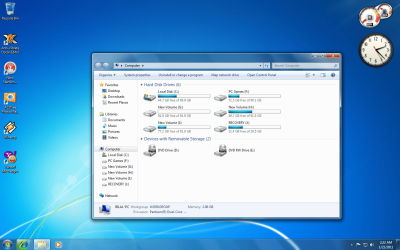
You can also create the system image right inside the hard drive you're using for your ease by creating a new drive named "Recovery" if you have or can spare some space out of your current drive... here's a example below the way i did. The size of the drive for recovery depends on the size of softwares and add-ons you want along with the actual size of the OS i.e. Windows 7 + Office 2007 + Nero 7 Essentials + few drivers takes around 9 to 10 Gigs hardly so the rest of the space needed for the softwares you want well you can do the math ;) and then adjust the size of recovery drive accordingly only if you want to make it short otherwise like whs mentioned that creating image on external drive rather than burning dvd's would be best also to prevent failure or any other problem that could happen to the system or hdd your using.
 

Attachments

  • example.png
    example.png
    254.5 KB · Views: 90

My Computer My Computer

At a glance

Windows 10 ProCore i5 9600KCorsair Vengeance Pro 2x 8GB (16GB) 3200MHz DDR4MSI GTX 1070 Gaming X 8GB
Computer type
PC/Desktop
Computer Manufacturer/Model Number
Self Built
OS
Windows 10 Pro
CPU
Core i5 9600K
Motherboard
ASUS ROG Strix Z390-F Gaming
Memory
Corsair Vengeance Pro 2x 8GB (16GB) 3200MHz DDR4
Graphics Card(s)
MSI GTX 1070 Gaming X 8GB
Sound Card
ASRock A-Style Purity Sound
Monitor(s) Displays
ASUS VX239H IPS
Screen Resolution
1920x1080
Hard Drives
XPG SPECTRIX S40G 2566GB M.2 NVMe | Patriot P210 512GB SSD | Seagate BarraCuda 4TB 5400RPM
PSU
Thermaltake Smart 600w RGB 80Plus
Case
NZXT H500 with 3x Corsair HD120 RGB w/Node Pro
Cooling
Cryorig H7
Keyboard
Corsair K70 RapidFire RGB (Cherry MX Speed)
Mouse
Logitech G402 Hyperion Fury
Internet Speed
20MB Cable Broadband
Browser
Chrome
Other Info
Corsair MM300 Extended Anti-Fray Mouse Pad | Edifier C2 2.1ch Sound System | XBOX One S Controller | XBOX 360 Wireless Controller for Windows | APC SUA1000i Smart-UPS | PS4 Slim 500GB [Region 1 - USA]
Create your base install the way you want it, and then run Sysprep before creating the image.
 

My Computer My Computer

At a glance

Windows 7 Ultimate x64 SP1Intel Core i7-260012 GB Patriot Extreme DDR3-1333Nvidia GTX 470
OS
Windows 7 Ultimate x64 SP1
CPU
Intel Core i7-2600
Motherboard
Gigabyte GA-P67A-UD3P-B3
Memory
12 GB Patriot Extreme DDR3-1333
Graphics Card(s)
Nvidia GTX 470
Monitor(s) Displays
Dell UltraSharp 2209WA
Hard Drives
OCZ Agility3 240 GB, WD5001AALS, WD7501AALS
PSU
OCZ ModStream 700W
Case
CoolerMaster HAF 912 Advanced
Cooling
CoolerMaster Hyper 212 Plus
Back
Top