Strange Intermittent reassignment of Hardrives

glennc

New member
Power User
VIP
Local time
5:50 AM
Messages
1,024
Hello,
Using W7 Ultimate 64-bit. This has happened in the past, stopped or was not noticed until yesterday. I have as physical Disk 0 a 500 GB WD. As Disk 1 I have a 1 TB WD. Initially I noted that with Windows Backup that the restore did not work because the drives became reassigned. Computer booted but couldn't find the file as the drives were swapped. Yesterday I was running Paragon to do system image and I noticed it again. The D0 became D1 and D1 became D0.
As I am afraid that this will cause me not to be able to restore from my last Paragon Backup, what should I do? What area is causing the problem? The OS, the Backup program? The Bios when ever I look shows the correct order.
Any assistance is appreciated.
glennc
 

My Computer My Computer

At a glance

Windows 7 UltimateAMD Phenom-II X4 9658192 MB DDR2-SDRAMATI Radeon HD 4200
Computer type
PC/Desktop
Computer Manufacturer/Model Number
Self-Built
OS
Windows 7 Ultimate
CPU
AMD Phenom-II X4 965
Motherboard
Gigabyte GA-MA785GM-US2H
Memory
8192 MB DDR2-SDRAM
Graphics Card(s)
ATI Radeon HD 4200
Sound Card
ATI Radeon HD 4200 High Definition Audo
Monitor(s) Displays
LG Electronics W1943
Screen Resolution
1360 X 768
Hard Drives
C: 500 GB Caviar Black SATA
E: 500 GB Caviar Black SATA
PSU
Ultra LSP 750
Case
Ultra XBlaster
Cooling
2 Fans, CPU Fan, PS Fan
Keyboard
Acer
Mouse
Logitech
Internet Speed
6 MB
Hello theog,
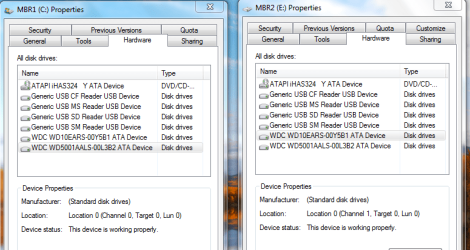
Does this count? I downloaded from the WD site the WinDlg.zip and ran the WinDlg.exe. Both drives show that they passed the SMART test and I ran a quick test on the 2nd drive and it passed again. But to my confusion it identified the drives as:

Capture.PNG

I built the computer and put the 500 GB SATA cable into the motherboard disk 0. Later when I added the 1000 GB drive I plugged into the next socket marked disk 1.
What next oh learned Sir?
glennc
 

My Computer My Computer

At a glance

Windows 7 UltimateAMD Phenom-II X4 9658192 MB DDR2-SDRAMATI Radeon HD 4200
Computer type
PC/Desktop
Computer Manufacturer/Model Number
Self-Built
OS
Windows 7 Ultimate
CPU
AMD Phenom-II X4 965
Motherboard
Gigabyte GA-MA785GM-US2H
Memory
8192 MB DDR2-SDRAM
Graphics Card(s)
ATI Radeon HD 4200
Sound Card
ATI Radeon HD 4200 High Definition Audo
Monitor(s) Displays
LG Electronics W1943
Screen Resolution
1360 X 768
Hard Drives
C: 500 GB Caviar Black SATA
E: 500 GB Caviar Black SATA
PSU
Ultra LSP 750
Case
Ultra XBlaster
Cooling
2 Fans, CPU Fan, PS Fan
Keyboard
Acer
Mouse
Logitech
Internet Speed
6 MB
Can you post a screen shot Disk management?
 

My Computer My Computer

At a glance

ME/XP/Vista/Win7
OS
ME/XP/Vista/Win7
Can you post a screen shot Disk management?

theog,
I'm not exactly sure what you want a picture of. I put these up till you can be more simple :).
This is self-evident

disks.PNG

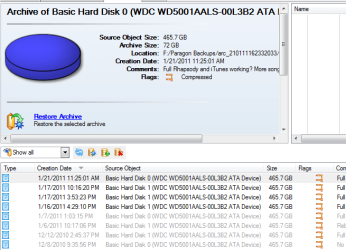
This is a list of Paragon Full Disk Backups- system area, MBR, data, all the same of the 500 GB drive to my 1000 GB drive, which is partitioned into to partitions. Notice that the Source Object (Basic Hard Drive Number changes) intermittently. I have done no repartitioning or adding any harddrives. It just changes apparently by it's own will.

para.PNG


I'll will attempt to supply you with any info that is explained how to (sorry) that I can. Thanks quite a lot!
glennc
 

My Computer My Computer

At a glance

Windows 7 UltimateAMD Phenom-II X4 9658192 MB DDR2-SDRAMATI Radeon HD 4200
Computer type
PC/Desktop
Computer Manufacturer/Model Number
Self-Built
OS
Windows 7 Ultimate
CPU
AMD Phenom-II X4 965
Motherboard
Gigabyte GA-MA785GM-US2H
Memory
8192 MB DDR2-SDRAM
Graphics Card(s)
ATI Radeon HD 4200
Sound Card
ATI Radeon HD 4200 High Definition Audo
Monitor(s) Displays
LG Electronics W1943
Screen Resolution
1360 X 768
Hard Drives
C: 500 GB Caviar Black SATA
E: 500 GB Caviar Black SATA
PSU
Ultra LSP 750
Case
Ultra XBlaster
Cooling
2 Fans, CPU Fan, PS Fan
Keyboard
Acer
Mouse
Logitech
Internet Speed
6 MB
He's asking for a screen shot from windows disk management using your snipping tool.

Disk 0, 1 ... is a Windows assignment
Sata port 0, 1, ... is a physical assignment
There is a one to one relationship and generally it is sata 0 to disk 0 etc. But not always - see here

The disk drive numbers may not correspond as expected to the SATA channel numbers when you set up Windows Vista, Windows Server 2008, Windows Server 2008 R2, or Windows 7 on a computer that has multiple SATA or RAID disks

After installation this relationship tends to be fixed.

When you boot from windows (eg. a rescue disk), drives letters can be anything since the boot disk doesn't know what your prior assignment with windows was.

I don't use Paragon but if you forget about prior assignments can you browse and find your images? If you can you haven't got a problem.
 

My Computer My Computer

At a glance

Windows 7x64 Home Premium SP1Intel i7 2600kG.Skill Ripjaws (DDR3-1600) 2x4GBNvidia GeForce GTS 450; Intel HD Graphics 300...
Computer type
PC/Desktop
Computer Manufacturer/Model Number
Own build
OS
Windows 7x64 Home Premium SP1
CPU
Intel i7 2600k
Motherboard
ASUS P8Z68 Deluxe
Memory
G.Skill Ripjaws (DDR3-1600) 2x4GB
Graphics Card(s)
Nvidia GeForce GTS 450; Intel HD Graphics 3000(GT2+)
Monitor(s) Displays
Dell Ultrasharp IPS panel U2311H, Samsung SyncMaster P2350
Screen Resolution
1920x1080
Hard Drives
Samsung 850 Pro SSD 256GB, Samsung SSD 840 120GB, Seagates 1TB Barracuda ST31000528AS x2
PSU
Seasonic M12II 520W
Case
Lian Li Lancool PC-K60
Cooling
Case: 1x120mm, 3x140mm CPU: Hyper 212+
Keyboard
Logitech MK520 (wireless)
Mouse
Logitech MK520
Internet Speed
6-7 Mbps
Antivirus
Norton Security Premium, Malwarebytes on 2 (MSE on 3rd PC)
Browser
FireFox
Other Info
Audio: Logitech Z523 2.1
He's asking for a screen shot from windows disk management using your snipping tool.

Disk 0, 1 ... is a Windows assignment
Sata port 0, 1, ... is a physical assignment
There is a one to one relationship and generally it is sata 0 to disk 0 etc. But not always - see here

The disk drive numbers may not correspond as expected to the SATA channel numbers when you set up Windows Vista, Windows Server 2008, Windows Server 2008 R2, or Windows 7 on a computer that has multiple SATA or RAID disks

After installation this relationship tends to be fixed.

When you boot from windows (eg. a rescue disk), drives letters can be anything since the boot disk doesn't know what your prior assignment with windows was.

I don't use Paragon but if you forget about prior assignments can you browse and find your images? If you can you haven't got a problem.

Howdy mjf,
Thanks for your assistance. I read the link to the MS Page. Does that mean it may change anytime at all or that only certain events may or may not cause it to change. I started out using MS Backup for System Image. When I went to restore from the image using the Windows restore CD the drives became changed and MS Backup couldn't find the image file as it wasn't on the same drive anymore. I know which drive is which, but it seems, unless I am missing something, that this is a stupid thing to have happen in W7. To restore a system image which from experience of trying system restore points that didn't work properly and trying to repair W7 from the Repair Disk which also didn't work, it is the only way I know how to make sure to get back to an already tested and updated, safe place!!
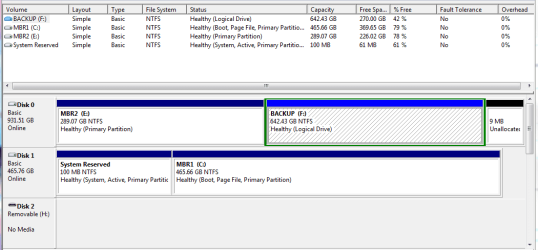
I immediately started using Macrium Free and it happened with that program, but I could manage to get it running. I tried and purchased Paragon which I thought would be more complete and reliable and had the ability to do intermittent backups. Know as you see in the Paragon Snippet, that the drive letter changes several times in the different backups. I also figured out how to get to the disk management page, so below is a view.
Does this mean I am stuck with this IMO vagrant behaviour forever? Thanks again for your help!!

Capture.PNG

glennc
 

My Computer My Computer

At a glance

Windows 7 UltimateAMD Phenom-II X4 9658192 MB DDR2-SDRAMATI Radeon HD 4200
Computer type
PC/Desktop
Computer Manufacturer/Model Number
Self-Built
OS
Windows 7 Ultimate
CPU
AMD Phenom-II X4 965
Motherboard
Gigabyte GA-MA785GM-US2H
Memory
8192 MB DDR2-SDRAM
Graphics Card(s)
ATI Radeon HD 4200
Sound Card
ATI Radeon HD 4200 High Definition Audo
Monitor(s) Displays
LG Electronics W1943
Screen Resolution
1360 X 768
Hard Drives
C: 500 GB Caviar Black SATA
E: 500 GB Caviar Black SATA
PSU
Ultra LSP 750
Case
Ultra XBlaster
Cooling
2 Fans, CPU Fan, PS Fan
Keyboard
Acer
Mouse
Logitech
Internet Speed
6 MB
Hello,
Using W7 Ultimate 64-bit. This has happened in the past, stopped or was not noticed until yesterday. I have as physical Disk 0 a 500 GB WD. As Disk 1 I have a 1 TB WD. Initially I noted that with Windows Backup that the restore did not work because the drives became reassigned. Computer booted but couldn't find the file as the drives were swapped. Yesterday I was running Paragon to do system image and I noticed it again. The D0 became D1 and D1 became D0.
As I am afraid that this will cause me not to be able to restore from my last Paragon Backup, what should I do? What area is causing the problem? The OS, the Backup program? The Bios when ever I look shows the correct order.
Any assistance is appreciated.
glennc

1) Your physical Disk 0 is a 1 TB WD.
2) Your physical Disk 1 is a 500 GB WD.

This can only change, if you have change the cables round.
 

My Computer My Computer

At a glance

ME/XP/Vista/Win7
OS
ME/XP/Vista/Win7
It's a windows bug.

Very rare.

The solution is to use backup software that can cope with it.

Paragon make excellent products , but as far as I know - they don't deal with this issue automatically.

However, you should be able to select the restore target manually with Paragon.

If you use windows system image GUI - you are out of luck ( as you found out )

I think Macrium is the only one that deals with it automatically.
 

My Computers My Computers

  • At a glance

    7 X64i5 84002x8gb 3200mhz
    Computer type
    PC/Desktop
    OS
    7 X64
    CPU
    i5 8400
    Motherboard
    gigabyte b365m ds3h
    Memory
    2x8gb 3200mhz
    Hard Drives
    various
    PSU
    pure power 11 400w cm
    Case
    Coolermaster
    Cooling
    cryorig m9i
  • At a glance

    7x64g54008gb ddr4 2400
    Computer type
    PC/Desktop
    OS
    7x64
    CPU
    g5400
    Motherboard
    ga b365m ds3h
    Memory
    8gb ddr4 2400
    PSU
    xfx pro 450w
Hello,
Using W7 Ultimate 64-bit. This has happened in the past, stopped or was not noticed until yesterday. I have as physical Disk 0 a 500 GB WD. As Disk 1 I have a 1 TB WD. Initially I noted that with Windows Backup that the restore did not work because the drives became reassigned. Computer booted but couldn't find the file as the drives were swapped. Yesterday I was running Paragon to do system image and I noticed it again. The D0 became D1 and D1 became D0.
As I am afraid that this will cause me not to be able to restore from my last Paragon Backup, what should I do? What area is causing the problem? The OS, the Backup program? The Bios when ever I look shows the correct order.
Any assistance is appreciated.
glennc

1) Your physical Disk 0 is a 1 TB WD.
2) Your physical Disk 1 is a 500 GB WD.

This can only change, if you have change the cables round.

Hey theog,
My physical disk is the 500 GB WD. It was installed as the only drive and plugged into SATA 0. Later I bought the 1 TB WD and installed it in the next available SATA port which was 1. Sometimes it shows up correct and sometimes it doesn't.
Pain in the posterior. Oh well....... Thanks Sir
glennc
 

My Computer My Computer

At a glance

Windows 7 UltimateAMD Phenom-II X4 9658192 MB DDR2-SDRAMATI Radeon HD 4200
Computer type
PC/Desktop
Computer Manufacturer/Model Number
Self-Built
OS
Windows 7 Ultimate
CPU
AMD Phenom-II X4 965
Motherboard
Gigabyte GA-MA785GM-US2H
Memory
8192 MB DDR2-SDRAM
Graphics Card(s)
ATI Radeon HD 4200
Sound Card
ATI Radeon HD 4200 High Definition Audo
Monitor(s) Displays
LG Electronics W1943
Screen Resolution
1360 X 768
Hard Drives
C: 500 GB Caviar Black SATA
E: 500 GB Caviar Black SATA
PSU
Ultra LSP 750
Case
Ultra XBlaster
Cooling
2 Fans, CPU Fan, PS Fan
Keyboard
Acer
Mouse
Logitech
Internet Speed
6 MB
It's a windows bug.

Very rare.

The solution is to use backup software that can cope with it.

Paragon make excellent products , but as far as I know - they don't deal with this issue automatically.

However, you should be able to select the restore target manually with Paragon.

If you use windows system image GUI - you are out of luck ( as you found out )

I think Macrium is the only one that deals with it automatically.

Hello SIW2,
Welcome to my problem. What you stated makes sense to me now. I tried to restore with Paragon and it wouldn't (don't remember exactly what it said now), but I had an older Macrium Disk backup. I may have missed something. It reinstalled successfully which somehow changed the drives and I then did the Paragon with a much newer backup. Time consuming and annoying. Maybe I should have bought Macrium, may still as the differential or incremental backups that I wanted from Paragon are not easily available. You have to make a Backup Capsule that partitions off a section and uses that. Then it will let you do the other partial backup types. The regular backup mode will not. Ah, shucks!
Thanks for joining the discussion.
glennc
 

My Computer My Computer

At a glance

Windows 7 UltimateAMD Phenom-II X4 9658192 MB DDR2-SDRAMATI Radeon HD 4200
Computer type
PC/Desktop
Computer Manufacturer/Model Number
Self-Built
OS
Windows 7 Ultimate
CPU
AMD Phenom-II X4 965
Motherboard
Gigabyte GA-MA785GM-US2H
Memory
8192 MB DDR2-SDRAM
Graphics Card(s)
ATI Radeon HD 4200
Sound Card
ATI Radeon HD 4200 High Definition Audo
Monitor(s) Displays
LG Electronics W1943
Screen Resolution
1360 X 768
Hard Drives
C: 500 GB Caviar Black SATA
E: 500 GB Caviar Black SATA
PSU
Ultra LSP 750
Case
Ultra XBlaster
Cooling
2 Fans, CPU Fan, PS Fan
Keyboard
Acer
Mouse
Logitech
Internet Speed
6 MB
glennc,
I'll continue to think about your issue and maybe ask the occasional question because it's puzzling.

I had Paragon at one stage but stopped using it because I was using Windows & Macrium and I thought 3 was being a bit paranoid.

Can you answer these questions:
1) Did Paragon successfully make images for you and store them on the 1TB drive?
2) When you boot from the Paragon boot CD can you browse whatever HDDs Paragon sees (forget IDs) and locate an image?
 
Last edited:

My Computer My Computer

At a glance

Windows 7x64 Home Premium SP1Intel i7 2600kG.Skill Ripjaws (DDR3-1600) 2x4GBNvidia GeForce GTS 450; Intel HD Graphics 300...
Computer type
PC/Desktop
Computer Manufacturer/Model Number
Own build
OS
Windows 7x64 Home Premium SP1
CPU
Intel i7 2600k
Motherboard
ASUS P8Z68 Deluxe
Memory
G.Skill Ripjaws (DDR3-1600) 2x4GB
Graphics Card(s)
Nvidia GeForce GTS 450; Intel HD Graphics 3000(GT2+)
Monitor(s) Displays
Dell Ultrasharp IPS panel U2311H, Samsung SyncMaster P2350
Screen Resolution
1920x1080
Hard Drives
Samsung 850 Pro SSD 256GB, Samsung SSD 840 120GB, Seagates 1TB Barracuda ST31000528AS x2
PSU
Seasonic M12II 520W
Case
Lian Li Lancool PC-K60
Cooling
Case: 1x120mm, 3x140mm CPU: Hyper 212+
Keyboard
Logitech MK520 (wireless)
Mouse
Logitech MK520
Internet Speed
6-7 Mbps
Antivirus
Norton Security Premium, Malwarebytes on 2 (MSE on 3rd PC)
Browser
FireFox
Other Info
Audio: Logitech Z523 2.1
glennc,
I'll continue to think about your issue and maybe ask the occasional question because it's puzzling.

I had Paragon at one stage but stopped using it because I was using Windows & Macrium and I thought 3 was being a bit paranoid.

Can you answer these questions:
1) Did Paragon successfully make images for you and store them on the 1TB drive?
2) When you boot from the Paragon boot CD can you browse whatever HDDs Paragon sees (forget IDs) and locate an image?

Howdy mjf,
I was going to stop using Macrium once I became satisfied with Paragon, still aren't and it may not be Paragon's fault. Yes it has made successful backups which have been used at times and has not, until a Macrium Restore was done first. Like right now it considers my 500 GB drive as drive 0. I just looked and it seems to restore by giving you a presented list of saved backups with the hardrive 0 or 1 assigned to each backup, depending on what state the OS was in at the time of the backup. This was from the system, will try with boot cd to check and report later. Double checked my BIOS and it is correct as always. Checking Macrium from the OS it gives you a tree of the computer and drives and lets you pick the location to restore from. Think about it, please.
I am hoping one of you brilliant people will be able to assist me. Loosing hope though.
glennc
 

My Computer My Computer

At a glance

Windows 7 UltimateAMD Phenom-II X4 9658192 MB DDR2-SDRAMATI Radeon HD 4200
Computer type
PC/Desktop
Computer Manufacturer/Model Number
Self-Built
OS
Windows 7 Ultimate
CPU
AMD Phenom-II X4 965
Motherboard
Gigabyte GA-MA785GM-US2H
Memory
8192 MB DDR2-SDRAM
Graphics Card(s)
ATI Radeon HD 4200
Sound Card
ATI Radeon HD 4200 High Definition Audo
Monitor(s) Displays
LG Electronics W1943
Screen Resolution
1360 X 768
Hard Drives
C: 500 GB Caviar Black SATA
E: 500 GB Caviar Black SATA
PSU
Ultra LSP 750
Case
Ultra XBlaster
Cooling
2 Fans, CPU Fan, PS Fan
Keyboard
Acer
Mouse
Logitech
Internet Speed
6 MB
MJ,

Yes , you can .

Paragon products allow you to browse to an image, then select the location restore it to.

I think Glenn was getting confused by the image labelling - it doesn't matter, Paragon will restore any image to any location, if you do it manually.

Even if the automatically generated archive database doesn't agree with windows drive assignment ( what Glenn refers to as
it seems to restore by giving you a presented list of saved backups
).
 

My Computers My Computers

  • At a glance

    7 X64i5 84002x8gb 3200mhz
    Computer type
    PC/Desktop
    OS
    7 X64
    CPU
    i5 8400
    Motherboard
    gigabyte b365m ds3h
    Memory
    2x8gb 3200mhz
    Hard Drives
    various
    PSU
    pure power 11 400w cm
    Case
    Coolermaster
    Cooling
    cryorig m9i
  • At a glance

    7x64g54008gb ddr4 2400
    Computer type
    PC/Desktop
    OS
    7x64
    CPU
    g5400
    Motherboard
    ga b365m ds3h
    Memory
    8gb ddr4 2400
    PSU
    xfx pro 450w
Back
Top