Where do I find User name and password ?

shumba

New member
Local time
4:15 AM
Messages
5
Location
Perth
Good afternoon,


I am trying to network a notebook with Windows 7 Home Premium and a notebook with Windows XP Home Edition operating systems. The settings in Windows 7 were done under Work network rather than Home network. The Windows 7 computer is able to see all the files that have been shared on Windows XP machine.

In My Network Places / View Workgroup Computers on the Windows XP machine the Windows 7 machine is visible. When right click to Open a dialogue box appears asking for a User name and Password. Please will someone tell me where I can find this information on the Windows 7 machine. I have tried my admin password.


Any help will be much appreciated.

Thank you.

Rob
 

My Computer My Computer

At a glance

Windows 7 Home Premium 64 bit
OS
Windows 7 Home Premium 64 bit
Good afternoon,


I am trying to network a notebook with Windows 7 Home Premium and a notebook with Windows XP Home Edition operating systems. The settings in Windows 7 were done under Work network rather than Home network. The Windows 7 computer is able to see all the files that have been shared on Windows XP machine.

In My Network Places / View Workgroup Computers on the Windows XP machine the Windows 7 machine is visible. When right click to Open a dialogue box appears asking for a User name and Password. Please will someone tell me where I can find this information on the Windows 7 machine. I have tried my admin password.


Any help will be much appreciated.

Thank you.

Rob


Usually if I need to use the User/Pass to access a machine remotely, I use my admin name and password...sometimes this doesn't work, in which case I just create another account on that remote machine (when I can get to it) and give myself admin access. That always has worked for me.
 

My Computer My Computer

At a glance

Windows 7 Ultimate x64Intel Core i7 9206gb DDR3 Patriot Viper w/ XMP supportNvidia Maxcore GTX295 (BFG Tech Overclocked)
Computer Manufacturer/Model Number
Custom
OS
Windows 7 Ultimate x64
CPU
Intel Core i7 920
Motherboard
Intel DX58SO
Memory
6gb DDR3 Patriot Viper w/ XMP support
Graphics Card(s)
Nvidia Maxcore GTX295 (BFG Tech Overclocked)
Sound Card
Creative XFi
Monitor(s) Displays
21" LCD
Hard Drives
Western Digital Blue 500GB
PSU
750 Watt Corsair
Case
Antec 900
Cooling
Stock Cooling for the CPU, 8" fan on top, (3) 5" case fans
Keyboard
Logitech Wave
Mouse
Logitech MX Revolution
Internet Speed
30mbps
Other Info
Water Cooled CPU w/ Corsair H60
Is the windows 7 a work machine?
you should be able to get in using your personal username / password that you use to log on to the machine. If you don't currently use one I suggest creating one for your primary account.
If it was setup by a IT at work, it will more than likely require their admin info to gain access.
 

My Computer My Computer

At a glance

Windows 7 x64Intel i7 2600kG.skill Ripjaw 16gigs @ 1866Nvidia gtx580 (evga)
Computer Manufacturer/Model Number
Insane hobo technologies. ;-)
OS
Windows 7 x64
CPU
Intel i7 2600k
Motherboard
Asrock z68 extreme 4 gen 3
Memory
G.skill Ripjaw 16gigs @ 1866
Graphics Card(s)
Nvidia gtx580 (evga)
Sound Card
Integrated HD audio + hdmi
Monitor(s) Displays
24" ASUS widescreen + 42" insignia
Screen Resolution
1080p (1920x1080)
Hard Drives
128 Samsung 830
256 Samsung 840
3 x 1tb storage drive (various)
1 western digital 1tb (eSATA)
1 Seagate 1tb (eSATA)
PSU
1 kilowatt SLI/Crossfire rated Silverstone modular
Case
NZXT Phantom + additional 220 fan
Cooling
Zalmann
Keyboard
Microsoft wireless 3000 (v2)
Mouse
MS - wireless 5000 (bluetrack)
Internet Speed
depends on if you ask me or my provider.
Other Info
The above information is provided as is, and the author assumes no responsibility for issues it may cause with your sanity or fanboyism.
Both machines need to have a User account in common.
 

My Computer My Computer

At a glance

Windows 7 Ultimate x64P4 3.2DDR 400ATI HD3850
OS
Windows 7 Ultimate x64
CPU
P4 3.2
Motherboard
Intel 815GM
Memory
DDR 400
Graphics Card(s)
ATI HD3850
Sound Card
C-Media 7.1
Monitor(s) Displays
SyncMaster 244T
Screen Resolution
1920*1200
Hard Drives
Several
PSU
500
Case
PowerSpec $24
Cooling
ThermalTake copper
Internet Speed
Blazing
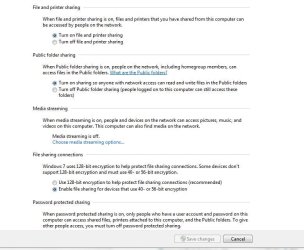
Do you have discovery, file & printer sharing Turned ON ?

Do you have folders you want shared set to share with "Everyone"
 

Attachments

  • network_options.JPG
    network_options.JPG
    73.4 KB · Views: 659
  • Network_Options2.JPG
    Network_Options2.JPG
    60.1 KB · Views: 332

My Computer My Computer

At a glance

Win7 Enterprise, Win7 x86 (Ult 7600), Win7 x6...AMD fx8350 4ghz, AMD-32 2400mhz, AMD-64 3200m...2gb, 4gb on the Ult 7600, 4gb on Technet RTM,...Draw my own Graphics, several nVidia cards
Computer type
PC/Desktop
Computer Manufacturer/Model Number
Built them myself, Science Experiments !
OS
Win7 Enterprise, Win7 x86 (Ult 7600), Win7 x64 Ult 7600, TechNet RTM on AMD x64 (2.8Ghz)
CPU
AMD fx8350 4ghz, AMD-32 2400mhz, AMD-64 3200mhz, AMDx64 2.8G
Motherboard
SIS 755, ECS-K8M890M-M (Ult 7600), GigaByte & others
Memory
2gb, 4gb on the Ult 7600, 4gb on Technet RTM, 32gb on FX8350
Graphics Card(s)
Draw my own Graphics, several nVidia cards
Sound Card
on motherboard
Monitor(s) Displays
19" flat scr, 28" I-Inc widescr,22" Emprex Widescr, 23" Acer
Screen Resolution
1280 x 1024, 1440 x 900, 1920 x 1080
Hard Drives
6 pata Ide HD's & 2 Sata HD's
added 80gb external on Ult 7600 computer,
numerous extra 1tb, 2TB, 3Tb SATA HD's
A collection of ext HD Docks w/ HDs
PSU
430w, 550w, 600w, 700, 800, etc
Case
All Generic Full Towers
Cooling
Open Air & a few fans, some w/ colored LEDs
Keyboard
Compaq & Dell recycled from GoodWill
Mouse
Made in China Optical Wired Mouse
Internet Speed
Fast Cable InterNet
Antivirus
AVG Free on 24 different Desktops, NO Problems!
Browser
IE 8 is preferred, but use FireFox sometimes
Other Info
Linksys Routers, switches, & Hubs
Too Many USB Flash Drives to count, Biggest is 64GB !
Eight computers in my home network.
Sixteen computers at my business network.
Linked via TeamViewer !
Lots of old used spare computer parts everywhere!
Thank you all for your help.

Regards,

Rob.
 

My Computer My Computer

At a glance

Windows 7 Home Premium 64 bit
OS
Windows 7 Home Premium 64 bit
Back
Top