Intel(R) WiFi Link 1000 BGN wireless internet won't work

dazednconfuzed

New member
Local time
9:12 AM
Messages
4
Location
Texas
I have an hp pavilion dv6 1355dx win 7 64bit intel core 2 duo. The wifi was working fine with my remembered connections and connected automatically within range. Then it started saying limited connection and would not let me browse the internet. After trouble shooting it said "There might be a problem with the driver for the Wireless Network Connection adapter" So I uninstalled reinstalled Intel(R) WiFi Link 1000 BGN it was listed under network adapter so I'm assuming that means it is the adapter but I was told it is the driver. Still confused on that. A friend suggested that I delete my remembered connections now it just says no connections available.

Under network adapter properties even tried changing the channel width for band 2.4 thats Value was set 20 MHz only to Auto, as I was instructed by my college IT guy. I've searched for the drivers installed the one on the hp support site. According to my model i have Atheros Wireless LAN Adapter, in the devices supported list nothing that I thought was the adapter or driver was listed. Downloaded the file they said contains the driver for that adapter...didn't seem to do anything other than install. Tried rebooting still nothing. Anyone have any ideas or is it just a lost cause?:mad::cry:

Thanks

Allison
 

My Computer My Computer

At a glance

Win 7 Home Premium 64bitIntel Core 2 Duo 2.20GHz4 GB
Computer Manufacturer/Model Number
Hp pavilion dv6 1355dx
OS
Win 7 Home Premium 64bit
CPU
Intel Core 2 Duo 2.20GHz
Memory
4 GB
You could try backing up your data and re-loading your system from your backup software or from a restore point from before the start of your problem? That way the network adaptor will have a working driver installed.
 

My Computer My Computer

At a glance

win7
OS
win7
thank you wilywombat. I did restore to the point before it stopped working, which was coincidentally the same time i installed a windows update but still the same. I do have my back up discs that came with my laptop.....but if the restore did not work, would the discs? If i do use the back up discs do I just save everything on an external hard drive same as if I was doing a clean install of my operating system? I've done that before but not used back up discs...

the best part is this problem happened a couple days before my warranty was up didn't check my receipt before it was too late. oooooh the irony.
 

My Computer My Computer

At a glance

Win 7 Home Premium 64bitIntel Core 2 Duo 2.20GHz4 GB
Computer Manufacturer/Model Number
Hp pavilion dv6 1355dx
OS
Win 7 Home Premium 64bit
CPU
Intel Core 2 Duo 2.20GHz
Memory
4 GB
I have an hp pavilion dv6 1355dx win 7 64bit intel core 2 duo. The wifi was working fine with my remembered connections and connected automatically within range. Then it started saying limited connection and would not let me browse the internet. After trouble shooting it said "There might be a problem with the driver for the Wireless Network Connection adapter" So I uninstalled reinstalled Intel(R) WiFi Link 1000 BGN it was listed under network adapter so I'm assuming that means it is the adapter but I was told it is the driver. Still confused on that. A friend suggested that I delete my remembered connections now it just says no connections available.

Under network adapter properties even tried changing the channel width for band 2.4 thats Value was set 20 MHz only to Auto, as I was instructed by my college IT guy. I've searched for the drivers installed the one on the hp support site. According to my model i have Atheros Wireless LAN Adapter, in the devices supported list nothing that I thought was the adapter or driver was listed. Downloaded the file they said contains the driver for that adapter...didn't seem to do anything other than install. Tried rebooting still nothing. Anyone have any ideas or is it just a lost cause?:mad::cry:

Thanks

Allison

Try running this batch file which will reset winsock, reset the TCP/IP stack and release renew your IP.


If you are still having problems after running the batch file please post a screen shot of your ipconfig /all and we can go from there. :)


My Computer My Computer

At a glance

Windows 7 Ult, Windows 8.1 Pro,Q9650-4.275GHz, E8600 4.5GHz, E6750-3.8GHzG.Skill PC2 9600 1200Mhz 5 5 5 15 2TGTX480
Computer type
PC/Desktop
Computer Manufacturer/Model Number
Home built
OS
Windows 7 Ult, Windows 8.1 Pro,
CPU
Q9650-4.275GHz, E8600 4.5GHz, E6750-3.8GHz
Motherboard
Evga 780i FTW
Memory
G.Skill PC2 9600 1200Mhz 5 5 5 15 2T
Graphics Card(s)
GTX480
Sound Card
Asus Xonar D2
Monitor(s) Displays
HannsG
Screen Resolution
1680X1050
Hard Drives
GSkill Phoenix Pro 120GB SSD
PSU
ThermalTake Toughpower 1000Watt modular
Case
ThermalTake XaserV
Cooling
Xigmatek S1283
Keyboard
Logitech G15
Mouse
Logitech G9
Internet Speed
T1
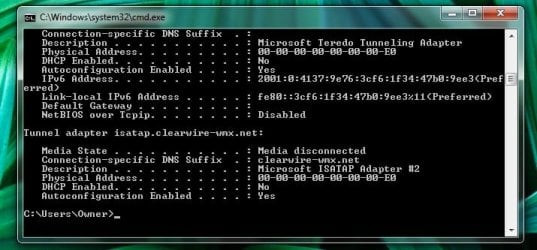
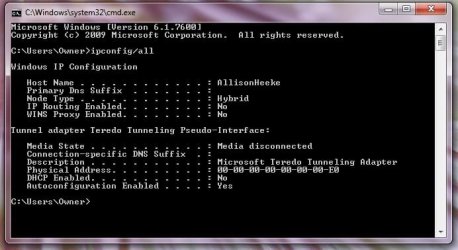
I actually had found a website that told me to reset winsock and I had already, but I downloaded what you gave me anyway. Here is my ipconfig/all..... didn't fit on one screen shot. Wanted to make sure I didn't leave anything important out. Thank you Chev65.

Allison
 

Attachments

  • screen shot 1.jpg
    screen shot 1.jpg
    79 KB · Views: 444
  • screenshot2.jpg
    screenshot2.jpg
    43.9 KB · Views: 199

My Computer My Computer

At a glance

Win 7 Home Premium 64bitIntel Core 2 Duo 2.20GHz4 GB
Computer Manufacturer/Model Number
Hp pavilion dv6 1355dx
OS
Win 7 Home Premium 64bit
CPU
Intel Core 2 Duo 2.20GHz
Memory
4 GB
I actually had found a website that told me to reset winsock and I had already, but I downloaded what you gave me anyway. Here is my ipconfig/all..... didn't fit on one screen shot. Wanted to make sure I didn't leave anything important out. Thank you Chev65.

Allison


The batch file does more than reset winsock, it also renews your IP and resets the TCP/IP stack.

Your ipconfig is interesting in that your default gateway is different than your DHCP host which is rather strange. I'm not familior with this type of connection. Are you using a router? If so what make model and version number?

Have you tried setting up your wireless connection again after delating the old one from "manage wireless connections"?

I only see the eithernet adaptor there which appears to be working but can't see the adaptor for the wireless connection at all?
 

My Computer My Computer

At a glance

Windows 7 Ult, Windows 8.1 Pro,Q9650-4.275GHz, E8600 4.5GHz, E6750-3.8GHzG.Skill PC2 9600 1200Mhz 5 5 5 15 2TGTX480
Computer type
PC/Desktop
Computer Manufacturer/Model Number
Home built
OS
Windows 7 Ult, Windows 8.1 Pro,
CPU
Q9650-4.275GHz, E8600 4.5GHz, E6750-3.8GHz
Motherboard
Evga 780i FTW
Memory
G.Skill PC2 9600 1200Mhz 5 5 5 15 2T
Graphics Card(s)
GTX480
Sound Card
Asus Xonar D2
Monitor(s) Displays
HannsG
Screen Resolution
1680X1050
Hard Drives
GSkill Phoenix Pro 120GB SSD
PSU
ThermalTake Toughpower 1000Watt modular
Case
ThermalTake XaserV
Cooling
Xigmatek S1283
Keyboard
Logitech G15
Mouse
Logitech G9
Internet Speed
T1
Intel (R) Wifi Link 1000 BGN wifi not working

I have clearwire internet. I do use a router at home connected to the home modem and my desktop, but to get on the internet on my laptop I have been using my aircard(usb modem not sure which is best term). I have a belkin router at home but do not have the model and version number with me.

I do not think it is a problem with my router considering I was still unable to connect at to my friends time warner with wifi modem and my college wifi connection. I am at the location with time warner modem and my connections lists just says no connections available.

The wireless internet will not show any connections available to connect to after I deleted them. Before I deleted them they would connect when I was in range but say limited access.

When I try manually create a network profile it gives the error "An unexpected error occurred."

I am not informed on how the adaptor for the wireless connection should look on the ipconfig as most of the things I do on my computer are self taught. I didn't how to take a screen shot until the other day when you asked for it.

I'll take another screen shot while my aircard is not connected and my WLAN is enabled just incase.


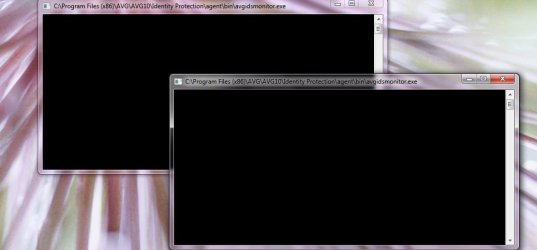
I also had a question about 2 windows popping up when I disconnect from the internet on my aircard. When the wireless adapter problem occured I thought it might have something to do with AVG so I attempted to remove it, it would say uninstalled but still showed in my programs. Had to use an app remover. And reinstalled it because it was my only AV. Just wondering if it may have something to do with all this... I'll attach a picture of this as well.
 

Attachments

  • avg black window.jpg
    avg black window.jpg
    32.8 KB · Views: 49
  • aircard unplugged.jpg
    aircard unplugged.jpg
    36.9 KB · Views: 144

My Computer My Computer

At a glance

Win 7 Home Premium 64bitIntel Core 2 Duo 2.20GHz4 GB
Computer Manufacturer/Model Number
Hp pavilion dv6 1355dx
OS
Win 7 Home Premium 64bit
CPU
Intel Core 2 Duo 2.20GHz
Memory
4 GB
Back
Top