Extract a part of video and save it as septate file

alibahaloo

New member
Local time
7:27 PM
Messages
18
Location
Gothenburg, Sweden
Hi people,
I want to do something but i had no idea how, didn't know where else to post. sorry if here's not right place.
I want to extract a part of a video clip, like a movie, and save as a separate file. how can i do it? name me some software that you may know, open source/free software preferred :)

cheers
 

My Computer My Computer

At a glance

Windows 7 x64 - Linux Mint 10 x64Intel Core2 Duo 2.534.00 GBATI Mobility Radeon HD 4500
Computer Manufacturer/Model Number
Dell D620
OS
Windows 7 x64 - Linux Mint 10 x64
CPU
Intel Core2 Duo 2.53
Motherboard
Intel
Memory
4.00 GB
Graphics Card(s)
ATI Mobility Radeon HD 4500
Sound Card
High Definition Audio Device
Monitor(s) Displays
Generic PnP Monitor
Screen Resolution
1280 x 800
Hard Drives
HDD
Cooling
VAIO Orginal
Keyboard
VAIO Orginal
Mouse
VAIO Orginal
Internet Speed
100 Mbps

My Computer My Computer

At a glance

Windows 7 Home Premium x64AMD Phenom II X6 1600T16GB PC3-10700 (1342MHz)ATI Radeon 5770 HD (x2) CrossFire
Computer Manufacturer/Model Number
OEM - Me
OS
Windows 7 Home Premium x64
CPU
AMD Phenom II X6 1600T
Motherboard
GigaByte GZ-990FXA-UD3
Memory
16GB PC3-10700 (1342MHz)
Graphics Card(s)
ATI Radeon 5770 HD (x2) CrossFire
Sound Card
On-board RealTek chipset
Monitor(s) Displays
3x Hanns-G 1920x1080 Monitors
Screen Resolution
3x Hanns-G 1920x1080 Monitors
Hard Drives
Intel 25-V SSD 40GB: 218 MB/s AT: 0.1ms
Intel X-25M SSD 80GB: 230MB/s AT: 0.1ms
Seagate 750GB: 133 MB/s AT: 13ms (perpendicular storage)
Buffalo HD-PCTU3 1TB External drive
PSU
OCZ Stealth X Stream 750W
Case
Cheap (unknown)
Cooling
Stock
Keyboard
HP USB
Mouse
LogiTech USB
Internet Speed
1.5 Mbps - Slow - At the tail-end of a rural network
Other Info
Printer: Epson Stylus C-84
Scanner: HP 3500C Flatbed
DVD-RW: Plextor
DVD-ROM: Unknown
WEI: 7.4
Hi people,
I want to do something but i had no idea how, didn't know where else to post. sorry if here's not right place.
I want to extract a part of a video clip, like a movie, and save as a separate file. how can i do it? name me some software that you may know, open source/free software preferred :)

cheers

Depending on your video format you can use Apples Quicktime Pro which will let you make and save "clips" (parts of a video) under Windows 7. But I think Quicktime Pro costs a few dollars - it isn't freeware.
 

My Computer My Computer

At a glance

Win 7 Ultimate x64Core I7 980X O.C. to 4.0 Ghz12GB 1600 mhz triple channel DDR3 - KingstonATI Radeon HD 5970 2GB Video Card
Computer Manufacturer/Model Number
Alienware Aurora
OS
Win 7 Ultimate x64
CPU
Core I7 980X O.C. to 4.0 Ghz
Motherboard
Custom Intel mATX (Bios ver A10)
Memory
12GB 1600 mhz triple channel DDR3 - Kingston
Graphics Card(s)
ATI Radeon HD 5970 2GB Video Card
Sound Card
Creative Labs Titanium sound blaster
Monitor(s) Displays
30" Dell LCD
Screen Resolution
2560 x 1600
Hard Drives
240 GB OCZ Vertex 2 SSD
256 GB Samsung V2 SSD
2TB WD Black Caviar 7200 rpm SATA3
600GB WD Velociraptor 10,000 rpm SATA3
3TB WD MyBook Essential USB 3.0 7200 rpm External
PSU
850 Watt
Case
Alienware Aurora
Cooling
Water
Keyboard
Logitech G15 (original version)
Mouse
Logitech MX1000 Laser - Wireless
Internet Speed
Cable 22 Mb/sec download
Other Info
USB 3.0,
Blue Ray DVD Read/Writer
Bose Companion 3 Speakers
WRT54G Wireless Router
That largely depends on the format your movie is in and the format you want the clip to be.

Let's say you have an AVI movie and want to cut out a sequence you could use the free VirtualDubMod

A Program that handles almost ALL types of videos would be TMPGENC 4 Xpress 14 day trial here

-DG
 

My Computer My Computer

At a glance

Windows 7 Ultimate x86DualCore AMD Athlon 64 X2, 2600 MHz 5200+Samsung 2GB DDR2Onboard NVIDIA GeForce 6150SE nForce 430
Computer Manufacturer/Model Number
HP m8000n
OS
Windows 7 Ultimate x86
CPU
DualCore AMD Athlon 64 X2, 2600 MHz 5200+
Motherboard
Asus M2N68-LA (Narra)
Memory
Samsung 2GB DDR2
Graphics Card(s)
Onboard NVIDIA GeForce 6150SE nForce 430
Sound Card
Onboard nVIDIA nForce 6100-430 (MCP61P)
Monitor(s) Displays
Westinghouse 19" LED
Screen Resolution
1280x1024
Hard Drives
SATA II Seagate Barracuda 500GB
USB II WD Elements 500GB
USB II WD My Book 1TB
USB II WD My Book 2TB
PSU
Stock (HP)
Case
Stock (HP)
Cooling
Stock
Keyboard
Logitech Classic KB 200
Mouse
Standard HP opticle USB mouse
The easiest way to do it is to play the video in VLC player and click record button to start recording when you want, then press the button again to stop recording.

The recorded clip is by default saved in your Documents folder, automatically named as
vlc-record-YYYY-MM-DD-TIME-NAME-.XXX

- YYYY-MM-DD is the date when recording is made, for instance today would be 2010-12-07
- TIME is the time when recording started
- NAME is the name of the original video
- XXX is the extension, telling the file type

Recordings are by default saved in same format as original, for instance recording from an AVI creates an .avi file and so on

VLC_recording.png

VLC free download: VideoLAN - VLC media player - Open Source Multimedia Framework and Player

Kari
 

My Computer My Computer

At a glance

Windows 10 Pro x64 EN-GB1.6 GHz Intel Core i7-720QM Processor6 GBATI Mobility Radeon HD 5850 Graphics
Computer type
Laptop
Computer Manufacturer/Model Number
HP ENVY 17-1150eg
OS
Windows 10 Pro x64 EN-GB
CPU
1.6 GHz Intel Core i7-720QM Processor
Memory
6 GB
Graphics Card(s)
ATI Mobility Radeon HD 5850 Graphics
Sound Card
Beats sound system with integrated subwoofer
Monitor(s) Displays
17" laptop display, 22" LED and 32" Full HD TV through HDMI
Screen Resolution
1600*900 (1), 1920*1080 (2&3)
Hard Drives
Internal: 2 x 500 GB SATA Hard Disk Drive 7200 rpm
External: 2TB for backups, 3TB USB3 network drive for media
Cooling
As Envy runs a bit warm, I have it on a Cooler Master pad
Keyboard
Logitech diNovo Media Desktop Laser (bluetooth)
Mouse
Logitech Performance Mouse MX
Internet Speed
50/10 Mbps VDSL
Antivirus
Windows Defender 4.3.9431.0
Browser
Maxthon 3.5.2., IE11
nice, thanks for all the replies,
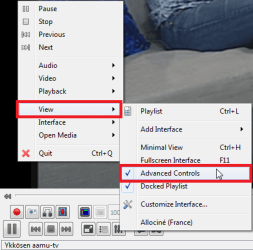
for me, i think the most practical one is using VLC, however, when i open a video (AVI) with it, there's no "record" button... Here's a snapshot, can anyone help?!
picture.php
 
Last edited:

My Computer My Computer

At a glance

Windows 7 x64 - Linux Mint 10 x64Intel Core2 Duo 2.534.00 GBATI Mobility Radeon HD 4500
Computer Manufacturer/Model Number
Dell D620
OS
Windows 7 x64 - Linux Mint 10 x64
CPU
Intel Core2 Duo 2.53
Motherboard
Intel
Memory
4.00 GB
Graphics Card(s)
ATI Mobility Radeon HD 4500
Sound Card
High Definition Audio Device
Monitor(s) Displays
Generic PnP Monitor
Screen Resolution
1280 x 800
Hard Drives
HDD
Cooling
VAIO Orginal
Keyboard
VAIO Orginal
Mouse
VAIO Orginal
Internet Speed
100 Mbps
Right click inside the VLC window. Choose View > Advanced Controls from context menu to show advanced control toolbar on VLC. Please notice the View menu option is available only when VLC is in windowed mode, not when in full screen mode.

VLC_Advanced_Controls.png

Kari
 

My Computer My Computer

At a glance

Windows 10 Pro x64 EN-GB1.6 GHz Intel Core i7-720QM Processor6 GBATI Mobility Radeon HD 5850 Graphics
Computer type
Laptop
Computer Manufacturer/Model Number
HP ENVY 17-1150eg
OS
Windows 10 Pro x64 EN-GB
CPU
1.6 GHz Intel Core i7-720QM Processor
Memory
6 GB
Graphics Card(s)
ATI Mobility Radeon HD 5850 Graphics
Sound Card
Beats sound system with integrated subwoofer
Monitor(s) Displays
17" laptop display, 22" LED and 32" Full HD TV through HDMI
Screen Resolution
1600*900 (1), 1920*1080 (2&3)
Hard Drives
Internal: 2 x 500 GB SATA Hard Disk Drive 7200 rpm
External: 2TB for backups, 3TB USB3 network drive for media
Cooling
As Envy runs a bit warm, I have it on a Cooler Master pad
Keyboard
Logitech diNovo Media Desktop Laser (bluetooth)
Mouse
Logitech Performance Mouse MX
Internet Speed
50/10 Mbps VDSL
Antivirus
Windows Defender 4.3.9431.0
Browser
Maxthon 3.5.2., IE11
great... thanks a lot... works perfectly :)
 

My Computer My Computer

At a glance

Windows 7 x64 - Linux Mint 10 x64Intel Core2 Duo 2.534.00 GBATI Mobility Radeon HD 4500
Computer Manufacturer/Model Number
Dell D620
OS
Windows 7 x64 - Linux Mint 10 x64
CPU
Intel Core2 Duo 2.53
Motherboard
Intel
Memory
4.00 GB
Graphics Card(s)
ATI Mobility Radeon HD 4500
Sound Card
High Definition Audio Device
Monitor(s) Displays
Generic PnP Monitor
Screen Resolution
1280 x 800
Hard Drives
HDD
Cooling
VAIO Orginal
Keyboard
VAIO Orginal
Mouse
VAIO Orginal
Internet Speed
100 Mbps
Sweden_small.png

Ingen problem. Fråga bara om du har mera frågor, det är därför vi är här! Det är kul att få mina med Skandinavier hit, jag har inte so många tillfällen for att använda Svenska språket.

US-UK.png

No problem. Ask if you have more questions, that's why we are here! It's nice to get my fellow Scandinavians here, I have not so many opportunities to use the Swedish language.

Kari
 

My Computer My Computer

At a glance

Windows 10 Pro x64 EN-GB1.6 GHz Intel Core i7-720QM Processor6 GBATI Mobility Radeon HD 5850 Graphics
Computer type
Laptop
Computer Manufacturer/Model Number
HP ENVY 17-1150eg
OS
Windows 10 Pro x64 EN-GB
CPU
1.6 GHz Intel Core i7-720QM Processor
Memory
6 GB
Graphics Card(s)
ATI Mobility Radeon HD 5850 Graphics
Sound Card
Beats sound system with integrated subwoofer
Monitor(s) Displays
17" laptop display, 22" LED and 32" Full HD TV through HDMI
Screen Resolution
1600*900 (1), 1920*1080 (2&3)
Hard Drives
Internal: 2 x 500 GB SATA Hard Disk Drive 7200 rpm
External: 2TB for backups, 3TB USB3 network drive for media
Cooling
As Envy runs a bit warm, I have it on a Cooler Master pad
Keyboard
Logitech diNovo Media Desktop Laser (bluetooth)
Mouse
Logitech Performance Mouse MX
Internet Speed
50/10 Mbps VDSL
Antivirus
Windows Defender 4.3.9431.0
Browser
Maxthon 3.5.2., IE11
:) cool, thanks... this forum is great.
i'll post my future in this forum without a doubt.

thanks again
 

My Computer My Computer

At a glance

Windows 7 x64 - Linux Mint 10 x64Intel Core2 Duo 2.534.00 GBATI Mobility Radeon HD 4500
Computer Manufacturer/Model Number
Dell D620
OS
Windows 7 x64 - Linux Mint 10 x64
CPU
Intel Core2 Duo 2.53
Motherboard
Intel
Memory
4.00 GB
Graphics Card(s)
ATI Mobility Radeon HD 4500
Sound Card
High Definition Audio Device
Monitor(s) Displays
Generic PnP Monitor
Screen Resolution
1280 x 800
Hard Drives
HDD
Cooling
VAIO Orginal
Keyboard
VAIO Orginal
Mouse
VAIO Orginal
Internet Speed
100 Mbps
Hi,
I download XMPGEnc and activated the license, however i can't load MKV files into it. When i select a MKV file to record a part from, it gives me a error message saying "can't load file, can only load the audio from file."
in the other hand, I tried the recording button in VLC. for some files, usually those that are not MKV, it goes great. like this:

For some MKV's, the sound and video are not sync, but the video quality is fine, like this:

For some MKV's nothing is good, sound and voice are not sync, and the video quality is crappy :( like this:

How can i fix this? i want to be able to take parts from videos and post them on youtube so i can use the youtube link on my blog.
 

My Computer My Computer

At a glance

Windows 7 x64 - Linux Mint 10 x64Intel Core2 Duo 2.534.00 GBATI Mobility Radeon HD 4500
Computer Manufacturer/Model Number
Dell D620
OS
Windows 7 x64 - Linux Mint 10 x64
CPU
Intel Core2 Duo 2.53
Motherboard
Intel
Memory
4.00 GB
Graphics Card(s)
ATI Mobility Radeon HD 4500
Sound Card
High Definition Audio Device
Monitor(s) Displays
Generic PnP Monitor
Screen Resolution
1280 x 800
Hard Drives
HDD
Cooling
VAIO Orginal
Keyboard
VAIO Orginal
Mouse
VAIO Orginal
Internet Speed
100 Mbps
Just a quick reply on one part of your post. the video clips you are looking to post on You Tube appear to be commercial content. I think you might be breaching a You Tube rule of copyright here!
This part in particular from the You Tube website:
Respect copyright. Only upload videos that you made or that you are authorised to use. This means don't upload videos you didn't make, or use content in your videos to which someone else owns the copyright, such as music tracks, snippets of copyrighted programmes or videos made by other users, without the requisite authorisations. Read our Copyright Tips for more information.
 

My Computer My Computer

At a glance

Microsoft Windows 7 Home Premium 64-bit 7601 ...Intel(R) Core(TM) i7-3770 CPU @ 3.40GHz8.00 GBIntel(R) HD Graphics 4000
Computer type
PC/Desktop
OS
Microsoft Windows 7 Home Premium 64-bit 7601 Multiprocessor Free Service Pack 1
CPU
Intel(R) Core(TM) i7-3770 CPU @ 3.40GHz
Motherboard
ASUSTeK COMPUTER INC. P8H77-M
Memory
8.00 GB
Graphics Card(s)
Intel(R) HD Graphics 4000
Sound Card
On Board
Monitor(s) Displays
Dell 24"
Screen Resolution
1920 x 1080
Hard Drives
(1) INTEL SSDSC2CT180A3 ATA Device (2) ST500DM002-1BD142 ATA Device (3) WDC WD3200AAKS-75L9A0 ATA Device (4) Generic- Compact Flash USB Device (5) Generic- MS/MS-Pro USB Device (6) Generic- SD/MMC USB Device (7) Generic- SM/xD-Picture USB
PSU
500w Corsair
Case
Cooler Master
Cooling
3 Fans
Keyboard
Logitech MK300
Mouse
Logitech WOM
Internet Speed
75Mb
Antivirus
Norton 360
Browser
Firefox, Opera, IE
Just a quick reply on one part of your post. the video clips you are looking to post on You Tube appear to be commercial content. I think you might be breaching a You Tube rule of copyright here!
This part in particular from the You Tube website:
Respect copyright. Only upload videos that you made or that you are authorised to use. This means don't upload videos you didn't make, or use content in your videos to which someone else owns the copyright, such as music tracks, snippets of copyrighted programmes or videos made by other users, without the requisite authorisations. Read our Copyright Tips for more information.

Mitchell is of course right on this copyright matter, but in this case it seems that Alibahaloo had just inserted the clips wrong.

For future reference, to add a Youtube video copy only the code after v= and paste it in between Youtube tags. If the video has additional playing information like embedding forbidden or such, then you should copy and paste the code what is between v= and &. The part you should copy and paste shown in bold red here:

http://www.youtube.com/watch?v=l3dxzRXADTQ

or

http://www.youtube.com/watch?v=l3dxzRXADTQ&feature=player_embedded

Here's Alibahaloo's post with corrected Youtube tags:

Hi,
I download XMPGEnc and activated the license, however i can't load MKV files into it. When i select a MKV file to record a part from, it gives me a error message saying "can't load file, can only load the audio from file."
in the other hand, I tried the recording button in VLC. for some files, usually those that are not MKV, it goes great. like this:

For some MKV's, the sound and video are not sync, but the video quality is fine, like this:

For some MKV's nothing is good, sound and voice are not sync, and the video quality is crappy :( like this:

How can i fix this? i want to be able to take parts from videos and post them on youtube so i can use the youtube link on my blog.
 

My Computer My Computer

At a glance

Windows 10 Pro x64 EN-GB1.6 GHz Intel Core i7-720QM Processor6 GBATI Mobility Radeon HD 5850 Graphics
Computer type
Laptop
Computer Manufacturer/Model Number
HP ENVY 17-1150eg
OS
Windows 10 Pro x64 EN-GB
CPU
1.6 GHz Intel Core i7-720QM Processor
Memory
6 GB
Graphics Card(s)
ATI Mobility Radeon HD 5850 Graphics
Sound Card
Beats sound system with integrated subwoofer
Monitor(s) Displays
17" laptop display, 22" LED and 32" Full HD TV through HDMI
Screen Resolution
1600*900 (1), 1920*1080 (2&3)
Hard Drives
Internal: 2 x 500 GB SATA Hard Disk Drive 7200 rpm
External: 2TB for backups, 3TB USB3 network drive for media
Cooling
As Envy runs a bit warm, I have it on a Cooler Master pad
Keyboard
Logitech diNovo Media Desktop Laser (bluetooth)
Mouse
Logitech Performance Mouse MX
Internet Speed
50/10 Mbps VDSL
Antivirus
Windows Defender 4.3.9431.0
Browser
Maxthon 3.5.2., IE11
I think the problem here is the MKV file. MKV is a container not a video format. There is a good article here explaining this.
How to play MKV files - AfterDawn: Guides
The samples on You Tube would indicate a codec problem. Perhaps Shark007 will come in here!
 

My Computer My Computer

At a glance

Microsoft Windows 7 Home Premium 64-bit 7601 ...Intel(R) Core(TM) i7-3770 CPU @ 3.40GHz8.00 GBIntel(R) HD Graphics 4000
Computer type
PC/Desktop
OS
Microsoft Windows 7 Home Premium 64-bit 7601 Multiprocessor Free Service Pack 1
CPU
Intel(R) Core(TM) i7-3770 CPU @ 3.40GHz
Motherboard
ASUSTeK COMPUTER INC. P8H77-M
Memory
8.00 GB
Graphics Card(s)
Intel(R) HD Graphics 4000
Sound Card
On Board
Monitor(s) Displays
Dell 24"
Screen Resolution
1920 x 1080
Hard Drives
(1) INTEL SSDSC2CT180A3 ATA Device (2) ST500DM002-1BD142 ATA Device (3) WDC WD3200AAKS-75L9A0 ATA Device (4) Generic- Compact Flash USB Device (5) Generic- MS/MS-Pro USB Device (6) Generic- SD/MMC USB Device (7) Generic- SM/xD-Picture USB
PSU
500w Corsair
Case
Cooler Master
Cooling
3 Fans
Keyboard
Logitech MK300
Mouse
Logitech WOM
Internet Speed
75Mb
Antivirus
Norton 360
Browser
Firefox, Opera, IE
If you choose to install the Shark007 Win7codecs, WMP and Media Center will be enabled to play all of your media files properly (choose to use the SUGGESTED settings checkbox). On the Misc TAB of the settings application is tool that will cut a 40MB sample from a much larger file and write the sample to the originating files directory. To use this sampler tool, the app needs to be started WITHOUT admin privileges.
 

My Computer My Computer

At a glance

Windows 7 Ultimate 64biti7 2600k16GB (4x4) corsair vengeanceIntel HD3000 iGPU / AMD HD6870 1024MB
Computer Manufacturer/Model Number
Selfbuilt
OS
Windows 7 Ultimate 64bit
CPU
i7 2600k
Motherboard
asus P8Z68-V LE
Memory
16GB (4x4) corsair vengeance
Graphics Card(s)
Intel HD3000 iGPU / AMD HD6870 1024MB
Sound Card
bitstreamed to an Onkyo 609
Monitor(s) Displays
Asus VE278 27" LED / Bravia EX7 60" LED
Screen Resolution
native 1080p x2
Hard Drives
4x 2TB int. + 2x 2TB external and a SSD for the boot drive.
PSU
650w Antec
Case
NZXT tempest evo
Cooling
air/stock
Keyboard
Dell
Mouse
logitech m505
Internet Speed
dual: cable/blackberry tether for travel use
Other Info
BD re-writer //
asus notebook G73Jw
Back
Top