Outlook 2007 Send/Receive stalls with Gmail

kitw

New member
Local time
8:38 PM
Messages
5
New on this forum so forgive me if I don't give all the info needed.:sick:

I'm trying to set up a new laptop (Windows 7 Home Premium 32 bit) for my husband who uses both Virgin and Google mail. I want to use Outlook 2007 and IMAP mail accounts for both of these as he also uses a desktop and occasionally works from internet cafe's etc. Outlook 2007 appears to have installed successfully and is working properly for Virgin mail and for Google Calendar but whenever I try to send/recieve it stalls at 81% during Google folders sync (which is where most of his emails are stored). Sent mail and Virgin folders sync appear to be working OK (most of the time). The only time the Gmail folders sync correctly is the first time on start up. I've tried using Google unlock link which tells me I've unlocked successfully but still no joy.

Both accounts are working fine as webmail and IMAP is enabled.

Has anyone else experienced this. I've checked and checked the settings and still no joy. I have the same set up on my own laptop but that's running XP and works without problem (most of the time). I'm in dispair and on the point of switching to Thunderbird. Would that be the best solution (or perhaps even go back to Outlook 2003 since the more recent versions appear bug-ridden? I don't want to revert to POP service.

Hope there's someone out there who can help. Thanks.
 

My Computer My Computer

At a glance

Windows 7 Home Premium 32-bitPentiium Dual Core3gb
Computer Manufacturer/Model Number
Samsung R530
OS
Windows 7 Home Premium 32-bit
CPU
Pentiium Dual Core
Motherboard
T4400 2.2ghz
Memory
3gb
Monitor(s) Displays
laptop
You have probably checked the set-up, but maybe one more time (it takes just one small 'error')...


To set up your Outlook 2007 client to work with Gmail:

  1. Enable IMAP in Gmail. Don't forget to click Save Changes when you're done.
  2. Open Outlook.
  3. For new setups, select Do not upgrade.
  4. Click Yes.
  5. Enter your display name, email address (including '@gmail.com'), and password. Google Apps users, enter your full email address, e.g. 'username@your_domain.com.'
  6. Select the 'Manually configure server settings or additional server types' checkbox.
    gmail_77689b_en.gif
  7. Select Internet E-mail.
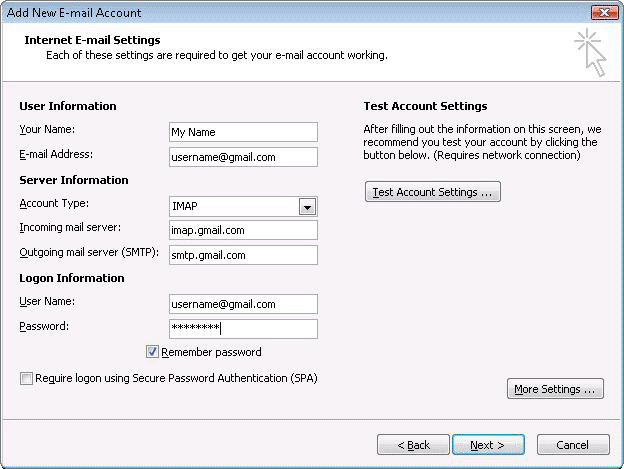
  8. Settings: name, full email address (including '@gmail.com' or '@your_domain.com')
    • In the Account Type dropdown menu, select IMAP; enter the incoming and outgoing server names shown below.
    • In the 'User Name' field, give your full Gmail address, including '@gmail.com' or '@your_domain.com.'
    • After creating these settings, clicking Next takes you to the end of the setup.

    gmail_77689c_en.gif
  9. In the Tools menu, select Options then Mail Setup. Under 'Email Accounts,' click E-mail Accounts.
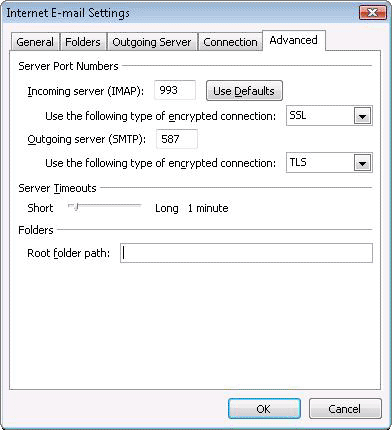
  10. Select an account, and click Change above the list of accounts. Click More Settings, then the Advanced tab.
    • Incoming server must be 993, and must use SSL encryption.
    • Outgoing server can use 587, TLS encryption.
      gmail_77689d_en.gif
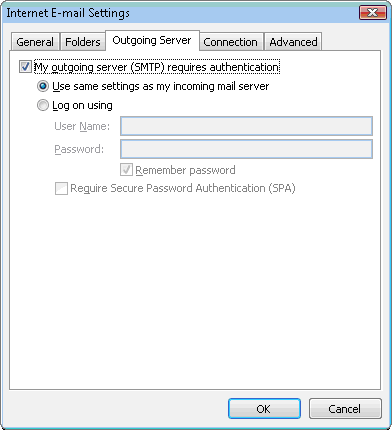
  11. Click the Outgoing Server tab. Make sure that 'My outgoing server (SMTP) requires authentication' is selected. The radio button 'Use same settings as my incoming mail server' should also be selected.
    gmail_77689e_en.gif
  12. Click OK > Next > Finish > Close > OK.
  13. Check our recommended client settings, and adjust your client's settings as needed.
 

My Computer My Computer

At a glance

Windows 7 Home Premium 64bitIntel(R) Core(TM) i3-2120 CPU @ 3.30GHz3.00 GB(1) Intel(R) HD Graphics (2) VNC Mirror Driver
Computer type
PC/Desktop
Computer Manufacturer/Model Number
Packard Bell
OS
Windows 7 Home Premium 64bit
CPU
Intel(R) Core(TM) i3-2120 CPU @ 3.30GHz
Motherboard
Packard Bell IPISB-AG
Memory
3.00 GB
Graphics Card(s)
(1) Intel(R) HD Graphics (2) VNC Mirror Driver
Sound Card
Realtek High Definition Audio
Monitor(s) Displays
AIO LCD
Screen Resolution
1920 x 1080
Hard Drives
WDC WD10EADX-22TDHB0 ATA Device
Fixed hard disk media
4 partitions
931.51 GB
Keyboard
Wireless
Mouse
Wireless
Antivirus
Microsoft Security Essentials
Browser
IE; Firefox
Other Info
Also:
Samsung N220 Plus Netbook - Windows 7 Home
HP laptop
iPad 5
Thanks for the reply, Irene. I have carefully checked through the instructions against my settings and haven't spotted anything amiss.

I have unsubscribed the "All Mail" folder and some of the other larger folders that are not in use on a daily basis (thinking that might reduce the sync time) and increased the time-out setting. Not massive folders in the scheme of things but large compared to the rest of them.

It seems to be working a bit better now- still stalls at 81% when it gets to sync-ing the subscribed folders for GMail, and the remaining time for that task goes up to 7 minutes but it does eventually complete after about 3 or 4 minutes - hurrah, but still much slower than on my 7yr old laptop running XP. It is at least allowing new mails to be composed or existing ones to be read, though.

Any thoughts on why it might be running so slowly and if/how it can be improved? It's a new laptop with very little installed on it so far.
 

My Computer My Computer

At a glance

Windows 7 Home Premium 32-bitPentiium Dual Core3gb
Computer Manufacturer/Model Number
Samsung R530
OS
Windows 7 Home Premium 32-bit
CPU
Pentiium Dual Core
Motherboard
T4400 2.2ghz
Memory
3gb
Monitor(s) Displays
laptop
The other thing to check is your anti virus settings. That can really slow things down. Which anti-virus are you using?
 

My Computer My Computer

At a glance

Windows 7 Home Premium 64bitIntel(R) Core(TM) i3-2120 CPU @ 3.30GHz3.00 GB(1) Intel(R) HD Graphics (2) VNC Mirror Driver
Computer type
PC/Desktop
Computer Manufacturer/Model Number
Packard Bell
OS
Windows 7 Home Premium 64bit
CPU
Intel(R) Core(TM) i3-2120 CPU @ 3.30GHz
Motherboard
Packard Bell IPISB-AG
Memory
3.00 GB
Graphics Card(s)
(1) Intel(R) HD Graphics (2) VNC Mirror Driver
Sound Card
Realtek High Definition Audio
Monitor(s) Displays
AIO LCD
Screen Resolution
1920 x 1080
Hard Drives
WDC WD10EADX-22TDHB0 ATA Device
Fixed hard disk media
4 partitions
931.51 GB
Keyboard
Wireless
Mouse
Wireless
Antivirus
Microsoft Security Essentials
Browser
IE; Firefox
Other Info
Also:
Samsung N220 Plus Netbook - Windows 7 Home
HP laptop
iPad 5
Hi, kitw, welcome to the Seven Forums! :)

I experienced this issue with the x64 version of Outlook. It was due to an incompatible add-in.

What add-ins are you using?

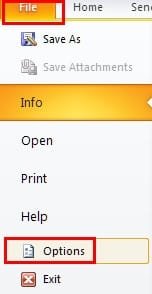
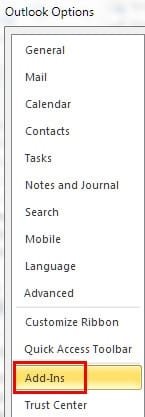
Go to the "File" ribbon then select "Options":

ScreenShot00479.jpg

After that, select "Add-Ins":

ScreenShot00480.jpg

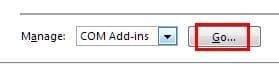
In the ensuing dialog, at the bottom of the page, click the "Manage: [COM Add-ins] Go" button:

ScreenShot00481.jpg

What do you see? Mine is pictured below. I had to disable the AVG add-in to alleviate the issue you are experiencing but you might have an add-in causing the problem that is different than what caused my issue:


ScreenShot00482.jpg
 

My Computer My Computer

At a glance

Windows 7 Ultimate x64 SP1Core2 Duo4 GBGM965 on-board
Computer Manufacturer/Model Number
Toshiba L355D
OS
Windows 7 Ultimate x64 SP1
CPU
Core2 Duo
Motherboard
Intel
Memory
4 GB
Graphics Card(s)
GM965 on-board
Sound Card
RealTek on-board
Monitor(s) Displays
19"+17"(laptop)
Screen Resolution
1440x900 (x 2)
Hard Drives
500GB Ext. 200GB Internal
PSU
N/A
Case
N/A
Cooling
N/A
Hi Irene and mikedl, thanks for the replies.

The laptop arrived with McAfee installed. Did wonder about turning off Real Time Scanning but it didn't seem to make any difference. Also wondered about switching to AVG which I run on my own laptop. Any thoughts?

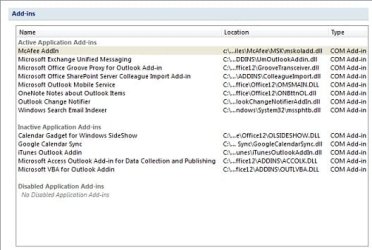
Here's the add-in screenshot:

add-ins.jpg

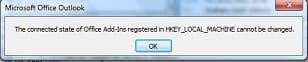
When I try to disable it I get this message:

add in msg.jpg

Any thoughts where I go from here much appreciated.
 

My Computer My Computer

At a glance

Windows 7 Home Premium 32-bitPentiium Dual Core3gb
Computer Manufacturer/Model Number
Samsung R530
OS
Windows 7 Home Premium 32-bit
CPU
Pentiium Dual Core
Motherboard
T4400 2.2ghz
Memory
3gb
Monitor(s) Displays
laptop

My Computer My Computer

At a glance

Windows 7 Home Premium 64bitIntel(R) Core(TM) i3-2120 CPU @ 3.30GHz3.00 GB(1) Intel(R) HD Graphics (2) VNC Mirror Driver
Computer type
PC/Desktop
Computer Manufacturer/Model Number
Packard Bell
OS
Windows 7 Home Premium 64bit
CPU
Intel(R) Core(TM) i3-2120 CPU @ 3.30GHz
Motherboard
Packard Bell IPISB-AG
Memory
3.00 GB
Graphics Card(s)
(1) Intel(R) HD Graphics (2) VNC Mirror Driver
Sound Card
Realtek High Definition Audio
Monitor(s) Displays
AIO LCD
Screen Resolution
1920 x 1080
Hard Drives
WDC WD10EADX-22TDHB0 ATA Device
Fixed hard disk media
4 partitions
931.51 GB
Keyboard
Wireless
Mouse
Wireless
Antivirus
Microsoft Security Essentials
Browser
IE; Firefox
Other Info
Also:
Samsung N220 Plus Netbook - Windows 7 Home
HP laptop
iPad 5
Thanks for trying Irene. Can't see any trace of that update having been installed. I followed the instructions from the link you gave and it doesn't appear in the list!

Any other thoughts, anyone? How do I disable the McAfee add-in ( or should I uninstall and use something else)?
 

My Computer My Computer

At a glance

Windows 7 Home Premium 32-bitPentiium Dual Core3gb
Computer Manufacturer/Model Number
Samsung R530
OS
Windows 7 Home Premium 32-bit
CPU
Pentiium Dual Core
Motherboard
T4400 2.2ghz
Memory
3gb
Monitor(s) Displays
laptop
Any other thoughts, anyone? How do I disable the McAfee add-in ( or should I uninstall and use something else)?

The extract below is taken from: https://kc.mcafee.com/corporate/index?page=content&id=KB52191


Outlook 2007
  1. Launch Microsoft Outlook 2007.
  2. Click Tools, Trust Center, Add-ins.
  3. From the Manage drop-down menu, select Exchange Client Extensions and click Go.
  4. In the Add In Manager window, deselect Exchange Scan and click OK.
  5. Exit and restart Outlook.
 

My Computer My Computer

At a glance

Windows 7 Home Premium 64bitIntel(R) Core(TM) i3-2120 CPU @ 3.30GHz3.00 GB(1) Intel(R) HD Graphics (2) VNC Mirror Driver
Computer type
PC/Desktop
Computer Manufacturer/Model Number
Packard Bell
OS
Windows 7 Home Premium 64bit
CPU
Intel(R) Core(TM) i3-2120 CPU @ 3.30GHz
Motherboard
Packard Bell IPISB-AG
Memory
3.00 GB
Graphics Card(s)
(1) Intel(R) HD Graphics (2) VNC Mirror Driver
Sound Card
Realtek High Definition Audio
Monitor(s) Displays
AIO LCD
Screen Resolution
1920 x 1080
Hard Drives
WDC WD10EADX-22TDHB0 ATA Device
Fixed hard disk media
4 partitions
931.51 GB
Keyboard
Wireless
Mouse
Wireless
Antivirus
Microsoft Security Essentials
Browser
IE; Firefox
Other Info
Also:
Samsung N220 Plus Netbook - Windows 7 Home
HP laptop
iPad 5
Thanks for this, Irene. There wasn't an "Exchange Scan" item in the Exchange Client Extensions screen, but there was something similar and a separate entry for McAfee so I disabled both. I also found on the McAfee website that if I opened Outlook as administrator I could deselect the McAfee COM add-on, so I did that too. And it made no difference at all!

So, in the end I've uninstalled McAfee and installed AVG Free, then disabled AVG add-ons. It's working better now, but still performance is poor when sync-ing the Gmail IMAP folders. Looks like I'll have to live with the fact that Outlook 2007 doesn't work that well with Windows 7.

Thanks again for all your help. Much appreciated.
 

My Computer My Computer

At a glance

Windows 7 Home Premium 32-bitPentiium Dual Core3gb
Computer Manufacturer/Model Number
Samsung R530
OS
Windows 7 Home Premium 32-bit
CPU
Pentiium Dual Core
Motherboard
T4400 2.2ghz
Memory
3gb
Monitor(s) Displays
laptop
Thanks for this, Irene. There wasn't an "Exchange Scan" item in the Exchange Client Extensions screen, but there was something similar and a separate entry for McAfee so I disabled both. I also found on the McAfee website that if I opened Outlook as administrator I could deselect the McAfee COM add-on, so I did that too. And it made no difference at all!

So, in the end I've uninstalled McAfee and installed AVG Free, then disabled AVG add-ons. It's working better now, but still performance is poor when sync-ing the Gmail IMAP folders. Looks like I'll have to live with the fact that Outlook 2007 doesn't work that well with Windows 7.

Thanks again for all your help. Much appreciated.

Very pleased to hear that, kitw :)

Another Free Anti-virus worth trying is http://www.microsoft.com/security_essentials/
I use it along with Windows Firewall... I have not experienced any problems whatsoever. ;)
 

My Computer My Computer

At a glance

Windows 7 Home Premium 64bitIntel(R) Core(TM) i3-2120 CPU @ 3.30GHz3.00 GB(1) Intel(R) HD Graphics (2) VNC Mirror Driver
Computer type
PC/Desktop
Computer Manufacturer/Model Number
Packard Bell
OS
Windows 7 Home Premium 64bit
CPU
Intel(R) Core(TM) i3-2120 CPU @ 3.30GHz
Motherboard
Packard Bell IPISB-AG
Memory
3.00 GB
Graphics Card(s)
(1) Intel(R) HD Graphics (2) VNC Mirror Driver
Sound Card
Realtek High Definition Audio
Monitor(s) Displays
AIO LCD
Screen Resolution
1920 x 1080
Hard Drives
WDC WD10EADX-22TDHB0 ATA Device
Fixed hard disk media
4 partitions
931.51 GB
Keyboard
Wireless
Mouse
Wireless
Antivirus
Microsoft Security Essentials
Browser
IE; Firefox
Other Info
Also:
Samsung N220 Plus Netbook - Windows 7 Home
HP laptop
iPad 5
Back
Top