SATA Drivers - Slipstream into Windows XP CD

How to slipstream SATA drivers into Windows XP setup CD, on your dual boot PC with Windows 7 or Vista

When you install Win XP, setup can not find your Hard Drive.

1.PNG

2.PNG


1) Download & Install nLite
nLite - Deployment Tool for the bootable Unattended Windows installation

2) Make a new folder for your Windows XP image.
Note: for this example, I am using the name Win XP Sata.

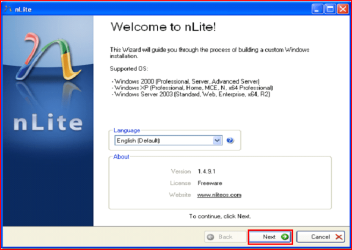
3) Insert XP CD & start nLite

4) Click Next.
3.PNG
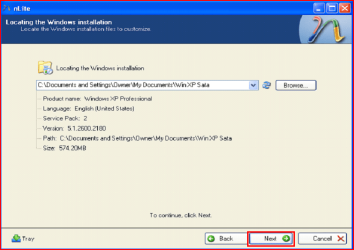
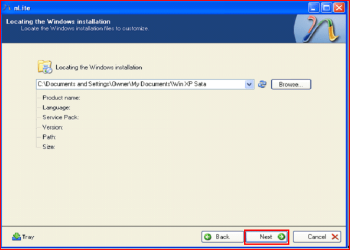
5) Choose your Windows XP image folder, & Click Next, than OK.
Note: nLite will put the image into your folder.
4.PNG

5.PNG
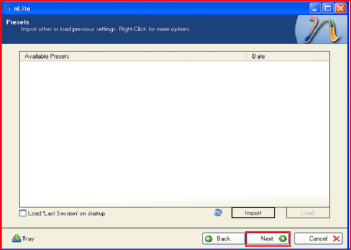
6) Click Next.
6.PNG
7) Click Next.
7.PNG
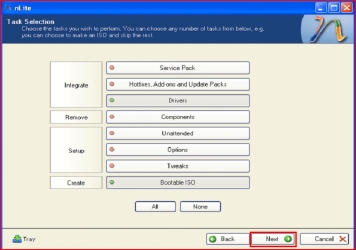
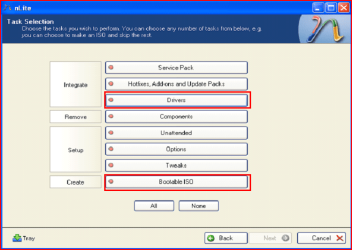
8) Choose Integrate Drivers & Create Bootable ISO
8.PNG
9) Click Next.
9.PNG
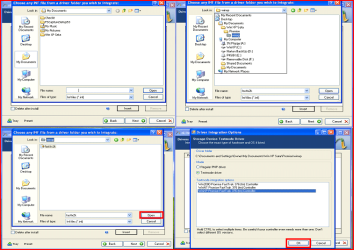
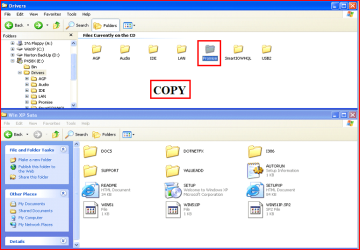
10) Copy & Paste your Sata Driver to your image folder.
Note: for this example, I am using Promise Fastrak 376.
10.PNG

11.PNG
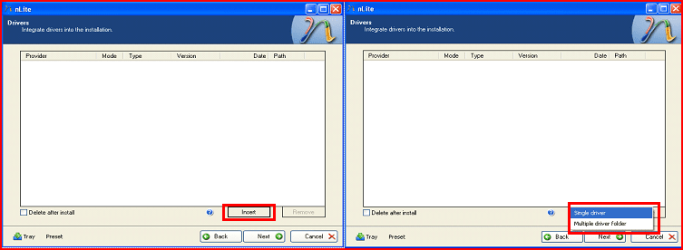
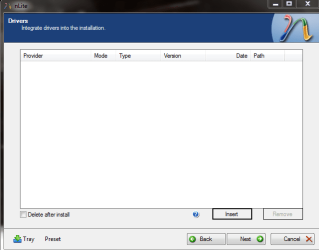
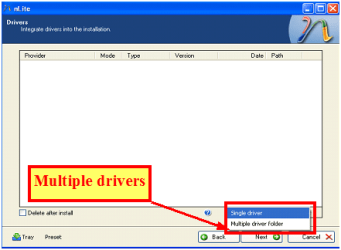
11) Click Insect, than Single Driver.
12.PNG
12) Locate your Sata Setup Inf file.
Click Open, than OK.
Note: for this example the file is called fasttx2k.
Note: for this example, I am using Promise Fastrak 376.
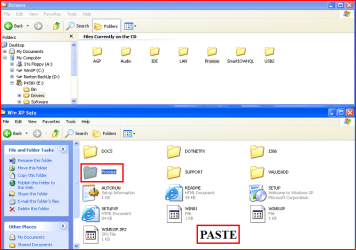
13.PNG
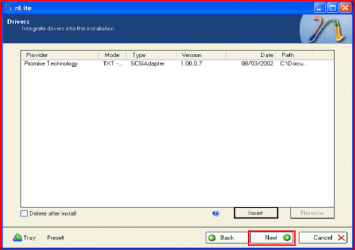
13) Click Next.
14.PNG
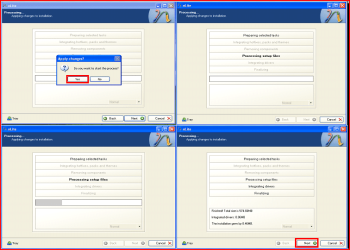
14) Click Yes, than Next.
15.PNG
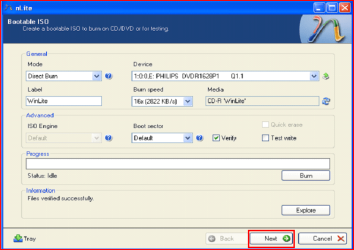
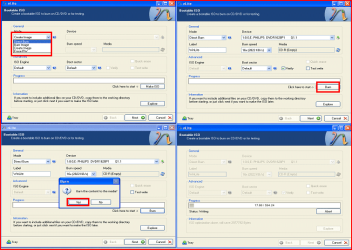
15) Choose Direct Burn.
Click Burn, than Yes.
Note: nLite will now burn your new CD.
16.PNG
16) Click Next.
17.PNG
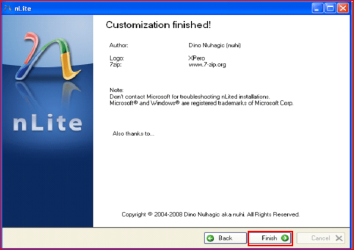
17) Click Finish.
18.PNG
Your Sata drive will now show up in setup.
19.PNG

 
Last edited by a moderator:
Well since you helped every body else, why not to try..

I am trying to install XP and i can't find the drivers.. i have read 8 pages here and still have no idea what to look for.

I have ASUS p5k and DigitalWestern hard drive but have no idea what model and what to download..

First check for all the Win XP drivers for your hardware.
If your Win XP CD, does not support your Sata Controller, you will need to load drivers to uses at F6.
Load Sata Controller drivers with a floppy disk is the best way.
http://www.sevenforums.com/tutorials/66010-sata-drivers-load-windows-xp-setup-dual-boot.html
OR
http://www.sevenforums.com/tutorials/72185-sata-drivers-slipstream-into-windows-xp-cd.html

Your ASUS P5K-E/WIF-AP & P5K-E both have a Intel Sata Controller.
You can download your F6 Sata Controller drivers from here:

http://www.asus.com/search.aspx?searchitem=1&searchkey=p5k-e

OR on driver CD, you will find a folder called ICH9R_IMSM_Makedisk.


You have five partition on your HD, delete the last 2, & have only 4 partitions.
 
Last edited:

My Computer My Computer

OS
ME/XP/Vista/Win7
But how to know if its support it?

And i have downloaded the Intel Sata and looked into my device manger and did not find what from that winrar file to choose.. in nLite.. which driver to choose.

Have i do it if only Windows does not discover ANY space? cause he is..
 

My Computer My Computer

OS
Windows 7 x64 ultimate
But how to know if its support it?

And i have downloaded the Intel Sata and looked into my device manger and did not find what from that winrar file to choose.. in nLite.. which driver to choose.

Have i do it if only Windows does not discover ANY space? cause he is..

Choose both setup inf files.
Choose all drivers.

Capture3-1.PNG
 

My Computer My Computer

OS
ME/XP/Vista/Win7
Still can't understand what to do.. can you explain in more details.. what to add and how to where?
 

My Computer My Computer

OS
Windows 7 x64 ultimate
What in Step4? when i load the driver to nLite it asks me which drivers to choose from a list in the software...
 

My Computer My Computer

OS
Windows 7 x64 ultimate
But how to know if its support it?

And i have downloaded the Intel Sata and looked into my device manger and did not find what from that winrar file to choose.. in nLite.. which driver to choose.

Have i do it if only Windows does not discover ANY space? cause he is..

Choose both setup inf files.
Choose all drivers.

View attachment 135858

Drivers above.
 

My Computer My Computer

OS
ME/XP/Vista/Win7
Well, again:

1.) i downloaded the file and insert in into the the CD the whole folder or only these 2 files?
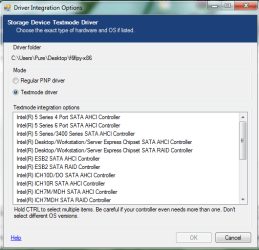
I can choose only a folder or 2 files from the folder and after i insert 1 file it opens me a window where there a lot of options..

Here are screens..

P.s. i have never found these drivers in my device manger..
 

Attachments

  • 13412341.PNG
    13412341.PNG
    12.4 KB · Views: 245
  • 1234123.PNG
    1234123.PNG
    17.4 KB · Views: 289

My Computer My Computer

OS
Windows 7 x64 ultimate
But how to know if its support it?

And i have downloaded the Intel Sata and looked into my device manger and did not find what from that winrar file to choose.. in nLite.. which driver to choose.

Have i do it if only Windows does not discover ANY space? cause he is..

Choose both setup inf files.
Choose all drivers.

View attachment 135858

Drivers above.

Look at Step 10, the folder.
Choose all sata controllers.
 

My Computer My Computer

OS
ME/XP/Vista/Win7
Ok, i know that i am annoying..
it is only let me choose 1 inf file and says that the other is already inside....

I will now follow the other steps.. hope this will do the job..
 

My Computer My Computer

OS
Windows 7 x64 ultimate
Ok, i know that i am annoying..
it is only let me choose 1 inf file and says that the other is already inside....

I will now follow the other steps.. hope this will do the job..


Capture222.PNG
 

My Computer My Computer

OS
ME/XP/Vista/Win7
And what about paste the folder into the windows sata folder? should i do it too?
 

My Computer My Computer

OS
Windows 7 x64 ultimate
Burned and tried .. not working. detects a :C whith 131 giga on it and thats it..
Think i did every thing right..
 

My Computer My Computer

OS
Windows 7 x64 ultimate
Burned and tried .. not working. detects a :C whith 131 giga on it and thats it..
Think i did every thing right..

How many drives are showing, Drive letters, & size?
 

My Computer My Computer

OS
ME/XP/Vista/Win7
Only that :C with ~131,000 giga on board ... flash drive out.. and thats it, no free space not even D,no nothing..
 

My Computer My Computer

OS
Windows 7 x64 ultimate
What do you mean? Only one drive (:C) with 131 giga on it and nothing else.
Drive C have usually 151 giga.

I have to go sleep now, its quite late here. so if it takes you long time to answer i will be tomorrow.
And thanks for the help..
 

My Computer My Computer

OS
Windows 7 x64 ultimate
What do you mean? Only one drive (:C) with 131 giga on it and nothing else.
Drive C have usually 151 giga.

I have to go sleep now, its quite late here. so if it takes you long time to answer i will be tomorrow.
And thanks for the help..

Make your F6 driver disk from your driver CD, you will find a folder called ICH9R_IMSM_Makedisk.
OR download from
http://www.asus.com/search.aspx?searchitem=1&searchkey=p5k-e

There are preset for your Sata Controller.
 
Last edited:

My Computer My Computer

OS
ME/XP/Vista/Win7
I took a look at the mother board driver CD and found that it has a folder named RAID with a jmb363 folder inside..
and a driver folder, may be this is what i need?
Your file i did not found, not i on the site and not in the disk..
 

My Computer My Computer

OS
Windows 7 x64 ultimate
Back
Top