SATA Drivers - Slipstream into Windows XP CD

How to slipstream SATA drivers into Windows XP setup CD, on your dual boot PC with Windows 7 or Vista

When you install Win XP, setup can not find your Hard Drive.

1.PNG

2.PNG


1) Download & Install nLite
nLite - Deployment Tool for the bootable Unattended Windows installation

2) Make a new folder for your Windows XP image.
Note: for this example, I am using the name Win XP Sata.

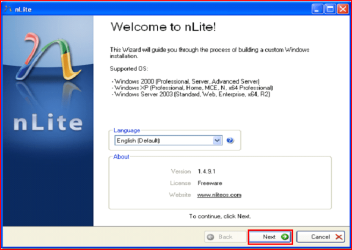
3) Insert XP CD & start nLite

4) Click Next.
3.PNG
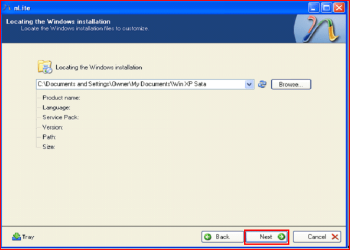
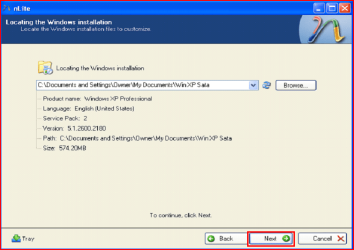
5) Choose your Windows XP image folder, & Click Next, than OK.
Note: nLite will put the image into your folder.
4.PNG

5.PNG
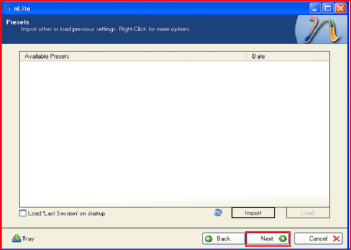
6) Click Next.
6.PNG
7) Click Next.
7.PNG
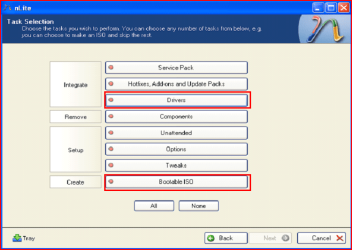
8) Choose Integrate Drivers & Create Bootable ISO
8.PNG
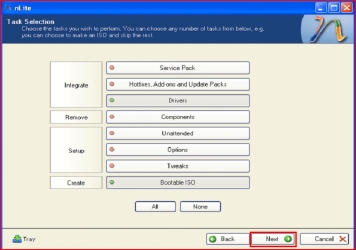
9) Click Next.
9.PNG
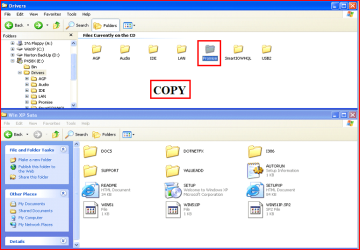
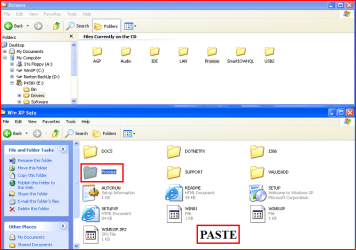
10) Copy & Paste your Sata Driver to your image folder.
Note: for this example, I am using Promise Fastrak 376.
10.PNG

11.PNG
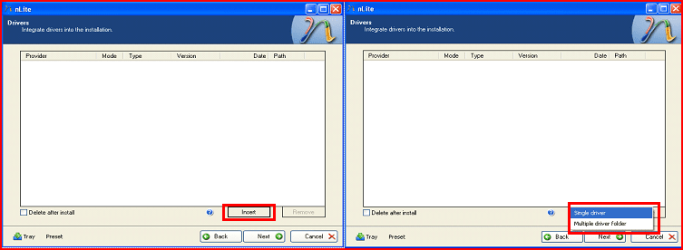
11) Click Insect, than Single Driver.
12.PNG
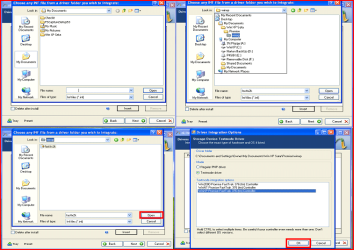
12) Locate your Sata Setup Inf file.
Click Open, than OK.
Note: for this example the file is called fasttx2k.
Note: for this example, I am using Promise Fastrak 376.
13.PNG
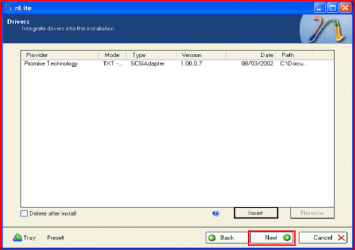
13) Click Next.
14.PNG
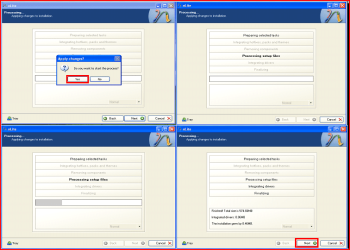
14) Click Yes, than Next.
15.PNG
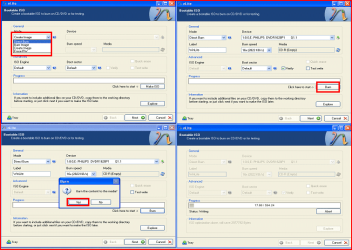
15) Choose Direct Burn.
Click Burn, than Yes.
Note: nLite will now burn your new CD.
16.PNG
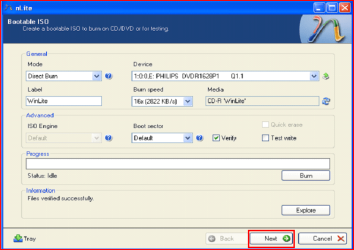
16) Click Next.
17.PNG
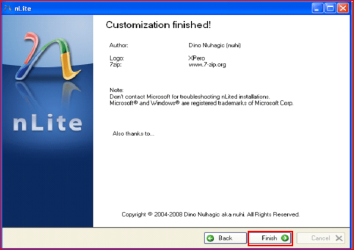
17) Click Finish.
18.PNG
Your Sata drive will now show up in setup.
19.PNG

 
Last edited by a moderator:
Running XP in Virtual Mode right now on W7 x64, but I'd like to have XP on its own partition (I also have Ubuntu 10.04).

Well, I've read this entire thread but have not seen much info on AMD.

My computer has an Aloe H-RS880-uATX motherboard. It's from an HP P6314F desktop which I have upgraded over time. Both the processor (AMD Phenom II X4 970 Black Edition) and chipset (AMD 785G) are made by AMD.

HP website says it has an integrated RAID controller, but I know that my hard drive uses SATA cables for data transfer to and from the motherboard.

Anyway, can anyone offer a suggestion where I can find the controller (SATA, RAID) for this hard drive (Seagate Barracuda) so that I can finally attempt the Slipstream installation?

Thank you
 

My Computer My Computer

Computer Manufacturer/Model Number
Hewlett Packard p6314f
OS
Windows 7 Professional x64; Ubuntu 10.04 lTS
CPU
AMD Phenom II X4 970 Black Edition 3.5 GHz
Motherboard
Aloe/ HP micro-ATX
Memory
G.Skill 16 GB DDR3 PC3-8600 1333 MHz
Graphics Card(s)
AMD Radeon HD 5870 Eyefinity 6
Sound Card
Integrated
Monitor(s) Displays
HP 2711x 27" LED
Hard Drives
Seagate Barracuda ST3750528AS 7200.12 7200 rpm 750 GB internal hard drive; Western Digital My Book Essential 500 GB external hard drive
PSU
Corsair TX750 750-watt non-modular
Case
Corsair Graphite 600T
Cooling
Corsair H70
Hi Diadem

No need for drivers, for Seagate HD.
You need the drivers for the SATA/RAID controller on your MOBO.

First check for all the Win XP drivers for your hardware.

If your Win XP CD, does not support your Sata Controller, you will need to load drivers to uses at F6.
Load Sata Controller drivers with a floppy disk is the best way.
http://www.sevenforums.com/tutorials/66010-sata-drivers-load-windows-xp-setup-dual-boot.html

You can check your HP PC here:
General XP Downgrade Guide for HP Laptops - HP Support Forum
 

My Computer My Computer

OS
ME/XP/Vista/Win7
I have a question.

If the current AMD SATA controller driver on my HP is for a 64-bit OS (W7 Pro x64), and XP is 32-bit, will it work? Or, do I need to find a 32-bit variant of the AMD SATA Controller driver?
 

My Computer My Computer

Computer Manufacturer/Model Number
Hewlett Packard p6314f
OS
Windows 7 Professional x64; Ubuntu 10.04 lTS
CPU
AMD Phenom II X4 970 Black Edition 3.5 GHz
Motherboard
Aloe/ HP micro-ATX
Memory
G.Skill 16 GB DDR3 PC3-8600 1333 MHz
Graphics Card(s)
AMD Radeon HD 5870 Eyefinity 6
Sound Card
Integrated
Monitor(s) Displays
HP 2711x 27" LED
Hard Drives
Seagate Barracuda ST3750528AS 7200.12 7200 rpm 750 GB internal hard drive; Western Digital My Book Essential 500 GB external hard drive
PSU
Corsair TX750 750-watt non-modular
Case
Corsair Graphite 600T
Cooling
Corsair H70
I have a question.

If the current AMD SATA controller driver on my HP is for a 64-bit OS (W7 Pro x64), and XP is 32-bit, will it work? Or, do I need to find a 32-bit variant of the AMD SATA Controller driver?

All drivers for x64 OS need to be x64.
All drivers for x86 OS need to be x86.
 

My Computer My Computer

OS
ME/XP/Vista/Win7
One final question,

In step 1, you insert the Windows XP CD.

In step 15, you burn the disc. In the screenshots of step 15, it says the disc is a CD-R.

Now, I have Windows XP on a CD-R. So, I would insert that CD-R into the CD/ DVD drive in step 1. Since it's CD-R, it can't be burned again.

So, in step 15, do I insert a CD-RW so nLite can burn a new disc? Or, do I need to have XP already on a CD-RW for step 1 so that nLite rewrites that same disc in step 15?
 

My Computer My Computer

Computer Manufacturer/Model Number
Hewlett Packard p6314f
OS
Windows 7 Professional x64; Ubuntu 10.04 lTS
CPU
AMD Phenom II X4 970 Black Edition 3.5 GHz
Motherboard
Aloe/ HP micro-ATX
Memory
G.Skill 16 GB DDR3 PC3-8600 1333 MHz
Graphics Card(s)
AMD Radeon HD 5870 Eyefinity 6
Sound Card
Integrated
Monitor(s) Displays
HP 2711x 27" LED
Hard Drives
Seagate Barracuda ST3750528AS 7200.12 7200 rpm 750 GB internal hard drive; Western Digital My Book Essential 500 GB external hard drive
PSU
Corsair TX750 750-watt non-modular
Case
Corsair Graphite 600T
Cooling
Corsair H70
Hi Diadem

No need for drivers, for Seagate HD.
You need the drivers for the SATA/RAID controller on your MOBO.

First check for all the Win XP drivers for your hardware.

If your Win XP CD, does not support your Sata Controller, you will need to load drivers to uses at F6.
Load Sata Controller drivers with a floppy disk is the best way.
http://www.sevenforums.com/tutorials/66010-sata-drivers-load-windows-xp-setup-dual-boot.html

You can check your HP PC here:
General XP Downgrade Guide for HP Laptops - HP Support Forum

Have you fully read the HP thread, I linked you to above?
 

My Computer My Computer

OS
ME/XP/Vista/Win7
Slipstreaming Win XP Pro 32 bit install disk

Hi ! I'm a complete novice (iro technical stuff) and in crisis mode, being in China and away from my usual PC support structures in my own country (and with no one around who can speak English, help is completely unavailable !).

Bought a brand new Toshiba L675-119 laptop and brought it with me. It's a 64 bit machine, running on Win 7 Home Premium 64 bit (pre-installed). I desperately need to dual boot it with Win XP Pro SP3, of which I have the install disk. I've read your slipstream tutorial (excellent !) as well as all 13 pages on this topic here. Alas, I am stuck, confused, and in desperate need of help.

I can't use the F6 method, since my laptop obviously hasn't got a floppy drive.

The other school of thought, in the early pages here, mentions disabling SATA support in the BIOS. Unfortunately, Toshiba has barred access to the BIOS in the normal way during bootup, but has provided an utility : "HWSetup"--this however only provides, under the tab for SATA, an option to 'disable eSATA' -- description given : "disables the SATA port in order to save battery life".

I get the feeling this is not the same thing as disabling SATA support, as per the method recommended on this forum ?

If not, this leaves me with the tutorial about slipstreaming SATA drivers into my existing Win XP Pro + SP3 install disc.

Since this would then be the obvious way to go for me, I have had enormous difficulty understanding where to find these drivers -- read all your replies to other 'posters' , but no joy for me (Intel website just serve to confuse me).

I found this website, which put up all Toshiba Satellite L675 Drivers For Windows 7 (64 Bit), and which I had now downloaded :

Toshiba Driver-Toshiba Laptop: Toshiba Satellite L675 Drivers For Windows 7 (64 Bit)

Could you please tell me if I should slipstream these drivers into my Win XP Pro 32 bit install disk, in order to use as the dual boot install disc ?

Or if this is not the right drivers, please provide me with a link to the actual page for SATA drivers for my laptop (I have no idea on how to search the Intel website, or even if my drivers are there -- don't even know if I should download 32 bit or 64 bit drivers).

Some more information on my hardware, from BelArc Advisor :

Hard drive :
TOSHIBA MK6465GSX [Hard drive] (640.13 GB) -- drive 0, s/n 40M1S0QPS, rev GJ003M, SMART Status: Healthy

Controllers :
Intel(R) 5 Series 4 Port SATA AHCI Controller

Bus Adaptors :
Intel(R) 5 Series/3400 Series Chipset Family USB Enhanced Host Controller - 3B34
Intel(R) 5 Series/3400 Series Chipset Family USB Enhanced Host Controller - 3B3C

Please help : Are these drivers on the toshiba blog website mentioned above the correct ones, or if not, can you provide me with a direct link to the correct web page from where I can download the correct SATA drivers ?

Apologies for the long post --- your help would be deeply appreciated, I think this is my last hope !!

 

My Computer My Computer

OS
Windows 7 Home Premium 64 bit
Hi dollardrand1

First check for all the Win XP drivers for your hardware on the manufacturer's web site.
Support :: Toshiba

If your Win XP CD, does not support your Sata Controller, you will need to load drivers to uses at F6.
Load Sata Controller drivers with a floppy disk is the best way.
http://www.sevenforums.com/tutorials/66010-sata-drivers-load-windows-xp-setup-dual-boot.html
OR
http://www.sevenforums.com/tutorials/72185-sata-drivers-slipstream-into-windows-xp-cd.html

You say your Toshiba Satellite L675 has a Intel Sata Controller.
You can download your F6 Sata Controller drivers from here:
Intel Sata Controller Drivers
 

My Computer My Computer

OS
ME/XP/Vista/Win7
This is all good stuff. but please can you explain how/where we actually find the SATA drivers for XP? Should it be somewhere on the XP CD? I have a laptop with no floppy drive so I will have to use the slipstreaming method. Thanks for your help :)
 

My Computer My Computer

Computer Manufacturer/Model Number
Novatech
OS
Windows 7 Home Premium SP1 64-bit
CPU
Celeron P4600 2.00GHz
Motherboard
MicroStar, model not known
Memory
2Gb
Graphics Card(s)
Intel HD Graphics
Sound Card
Realtek onboard HD Audio
Screen Resolution
1366 x 768 @ 60Hz
Hard Drives
250Gb Toshiba SATA
Hello Drax,

You would normally get the SATA driver from either your motherboard or your OEM computer manufacturer's driver download webpage for your specific model number.

Hope this helps,
Shawn
 

My Computer My Computer

Computer type
PC/Desktop
Computer Manufacturer/Model Number
Self built custom
OS
64-bit Windows 11 Pro for Workstations
CPU
Intel i7-8700K OC'd to 5 GHz
Motherboard
ASUS ROG Maximus XI Formula Z390
Memory
64 GB (4x16GB) G.SKILL TridentZ RGB DDR4 3600 MHz
Graphics Card(s)
ASUS ROG-STRIX-GTX1080TI-O11G-GAMING
Sound Card
Integrated
Monitor(s) Displays
2 x Samsung Odyssey G7 27"
Screen Resolution
2560x1440
Hard Drives
1TB Samsung 990 PRO M.2,
4TB Samsung 990 PRO PRO M.2,
TerraMaster F8 SSD Plus NAS
PSU
Seasonic Prime Titanium 850W
Case
Thermaltake Core P3
Cooling
Corsair Hydro H115i
Keyboard
Logitech wireless K800
Mouse
Logitech MX Master 4
Internet Speed
2 Gb/s Download and 100 Mb/s Upload
Antivirus
Malwarebyte Anti-Malware Premium
Browser
Google Chrome
Other Info
Logitech Z625 speaker system,
Logitech BRIO 4K Pro webcam,
HP Color LaserJet Pro MFP M477fdn,
APC SMART-UPS RT 1000 XL - SURT1000XLI,
Galaxy S23 Plus phone

My Computer My Computer

OS
ME/XP/Vista/Win7
Hello Drax,

You would normally get the SATA driver from either your motherboard or your OEM computer manufacturer's driver download webpage for your specific model number.

Hope this helps,
Shawn

Hi Shawn

Novatech is a local System Builder/ Supplies in Hampshire UK, just down the road from me. Supplies of parts, Barebones rigs, and full build rigs with/without OS.

Ray.
 

My Computer My Computer

OS
ME/XP/Vista/Win7
Ray and Shawn: Thanks :) I was also wondering, since my system is up and running nicely with just Win7, does this mean that the SATA drivers must already be in residence somewhere on my machine? If so, where to look?

Cheers
Tony
 

My Computer My Computer

Computer Manufacturer/Model Number
Novatech
OS
Windows 7 Home Premium SP1 64-bit
CPU
Celeron P4600 2.00GHz
Motherboard
MicroStar, model not known
Memory
2Gb
Graphics Card(s)
Intel HD Graphics
Sound Card
Realtek onboard HD Audio
Screen Resolution
1366 x 768 @ 60Hz
Hard Drives
250Gb Toshiba SATA
Ray and Shawn: Thanks :) I was also wondering, since my system is up and running nicely with just Win7, does this mean that the SATA drivers must already be in residence somewhere on my machine? If so, where to look?

Cheers
Tony

Have you looked on the drivers & app Disk for Win XP drivers?
 

My Computer My Computer

OS
ME/XP/Vista/Win7
Hi again :) Looked on drivers CD that came with the laptop, no SATA drivers spring immediately into view. But.....

In fact, something quite fundamental has just occurred to me. Last time I installed an OS on a naked SATA laptop HDD (Win7 on this one) and last time I installed XP on a naked SATA laptop HDD (my old one), I never needed SATA drivers. In fact I have installed XP onto machines with freshly-DBAN'ed hard drives; the drivers cannot have been on there yet still XP installed just fine.

In fact, the only reason I'm asking this thread title as a whole is because in the thread http://www.sevenforums.com/tutorials/8057-dual-boot-installation-windows-7-xp.html, it tells me that I will need to have the SATA drivers for XP.

But, is that always true? My experience with naked SATA HDDs as described above would suggest otherwise. Not to be disrespectful, of course, and I appreciate that you need to cover all eventualities, but I had to ask :)

What do you think?

Cheers
Tony
 
Last edited:

My Computer My Computer

Computer Manufacturer/Model Number
Novatech
OS
Windows 7 Home Premium SP1 64-bit
CPU
Celeron P4600 2.00GHz
Motherboard
MicroStar, model not known
Memory
2Gb
Graphics Card(s)
Intel HD Graphics
Sound Card
Realtek onboard HD Audio
Screen Resolution
1366 x 768 @ 60Hz
Hard Drives
250Gb Toshiba SATA
Hi again :) Looked on drivers CD that came with the laptop, no SATA drivers spring immediately into view. But.....

In fact, something quite fundamental has just occurred to me. Last time I installed an OS on a naked SATA laptop HDD (Win7 on this one) and last time I installed XP on a naked SATA laptop HDD (my old one), I never needed SATA drivers. In fact I have installed XP onto machines with freshly-DBAN'ed hard drives; the drivers cannot have been on there yet still XP installed just fine.

In fact, the only reason I'm asking this thread title as a whole is because in the thread http://www.sevenforums.com/tutorials/8057-dual-boot-installation-windows-7-xp.html, it tells me that I will need to have the SATA drivers for XP.

But, is that always true? My experience with naked SATA HDDs as described above would suggest otherwise. Not to be disrespectful, of course, and I appreciate that you need to cover all eventualities, but I had to ask :)

What do you think?

Cheers
Tony

Your Win XP CD may/may not have the Sata Controller Drivers you need.
As Win XP CD with NO SP's has a few Drivers, to Win XP with SP3 has most Drivers for Sata Controllers.
Can you post the MSI model No? (not the Novatech)
 

My Computer My Computer

OS
ME/XP/Vista/Win7
Good points - thanks! Yes, it's an MSI CR-620
 

My Computer My Computer

Computer Manufacturer/Model Number
Novatech
OS
Windows 7 Home Premium SP1 64-bit
CPU
Celeron P4600 2.00GHz
Motherboard
MicroStar, model not known
Memory
2Gb
Graphics Card(s)
Intel HD Graphics
Sound Card
Realtek onboard HD Audio
Screen Resolution
1366 x 768 @ 60Hz
Hard Drives
250Gb Toshiba SATA
Back
Top