Windows update and MS Security

Wiking

New member
Member
Local time
6:20 AM
Messages
37
Hi

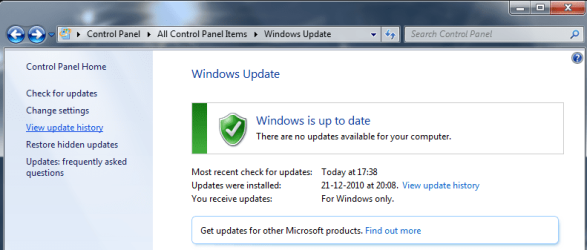
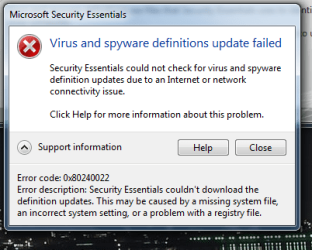
I have some strange problems with automatic updating. Windows update haven't found any new updates since last year. MS Essential cant update, it gives me this error.

Could It be a virus? I have scanned with essential and online scanners and found nothing. But it still concerns me, I need some updates :)

I have tried all the solutions in the forum here, but no luck so far.
 

Attachments
  • Capture.PNG
    Capture.PNG
    17.8 KB · Views: 6
  • 1.PNG
    1.PNG
    33.5 KB · Views: 8

My Computer

Computer Manufacturer/Model Number
Home made
OS
Win 7 64 bit home
CPU
Intel Core i7 Quad Processor i7-950
Motherboard
ASUS P6X58D-E, Socket-1366
Memory
Corsair Dominator DHX+ DDR3 1600MHz 6GB
Graphics Card(s)
ASUS GTX 770 DirectCU II OC 2 GB
Sound Card
Astro 40
Monitor(s) Displays
BenQ XL2420TE 144 hz 1 ms (GTG) Black eQualizer
Screen Resolution
1920*1080
Hard Drives
Main: Vertex 450 - 7mm SATA 3 SSD
BackUp: Samsung SpinPoint F3 1TB
PSU
Seasonic M12D Powersupply 750W
Case
Silverstone Fortress II Midi Tower Black
Cooling
CoolIT VANTAGE A.L.C. CPU Køler Water Cooling
Keyboard
Logitech Illuminated Keyboard
Mouse
Logitech G500 Gaming Mouse,
Internet Speed
60/12
Antivirus
Ofc
Browser
Chrome
Other Info
Plextor DVD±RW burner PX-880SA
Hello there.

Go to "Start" (the Orb) and write in search "cmd" without quotes, right click it and run as administrator.

on that screen write the following and press enter:

"sfc.exe /scannow" without quotes, again. That will determine if you have a missing system file on your OS and it'll try to repair.

Try that and report back, please :)
 

My Computer

Computer type
PC/Desktop
OS
Windows
I did the test. And it didn't find any errors :(
 

My Computer

Computer Manufacturer/Model Number
Home made
OS
Win 7 64 bit home
CPU
Intel Core i7 Quad Processor i7-950
Motherboard
ASUS P6X58D-E, Socket-1366
Memory
Corsair Dominator DHX+ DDR3 1600MHz 6GB
Graphics Card(s)
ASUS GTX 770 DirectCU II OC 2 GB
Sound Card
Astro 40
Monitor(s) Displays
BenQ XL2420TE 144 hz 1 ms (GTG) Black eQualizer
Screen Resolution
1920*1080
Hard Drives
Main: Vertex 450 - 7mm SATA 3 SSD
BackUp: Samsung SpinPoint F3 1TB
PSU
Seasonic M12D Powersupply 750W
Case
Silverstone Fortress II Midi Tower Black
Cooling
CoolIT VANTAGE A.L.C. CPU Køler Water Cooling
Keyboard
Logitech Illuminated Keyboard
Mouse
Logitech G500 Gaming Mouse,
Internet Speed
60/12
Antivirus
Ofc
Browser
Chrome
Other Info
Plextor DVD±RW burner PX-880SA
Try the MS tool first. Open the Windows Update troubleshooter by clicking the Start button , and then clicking Control Panel. In the search box, type troubleshooter, and then click Troubleshooting. Under System and Security, click Fix problems with Windows Update.
 

My Computer

Computer Manufacturer/Model Number
Too many to describe...
OS
Windows 7 x64 pro/ Windows 7 x86 Pro/ XP SP3 x86
Try the MS tool first. Open the Windows Update troubleshooter by clicking the Start button , and then clicking Control Panel. In the search box, type troubleshooter, and then click Troubleshooting. Under System and Security, click Fix problems with Windows Update.

Did that, and it did not find any problems.

I did the trick from another post, removing explorer.exe and start it again. Now I get 3 updates to show. But it wont update them.

MS Essential still wont work.
 

My Computer

Computer Manufacturer/Model Number
Home made
OS
Win 7 64 bit home
CPU
Intel Core i7 Quad Processor i7-950
Motherboard
ASUS P6X58D-E, Socket-1366
Memory
Corsair Dominator DHX+ DDR3 1600MHz 6GB
Graphics Card(s)
ASUS GTX 770 DirectCU II OC 2 GB
Sound Card
Astro 40
Monitor(s) Displays
BenQ XL2420TE 144 hz 1 ms (GTG) Black eQualizer
Screen Resolution
1920*1080
Hard Drives
Main: Vertex 450 - 7mm SATA 3 SSD
BackUp: Samsung SpinPoint F3 1TB
PSU
Seasonic M12D Powersupply 750W
Case
Silverstone Fortress II Midi Tower Black
Cooling
CoolIT VANTAGE A.L.C. CPU Køler Water Cooling
Keyboard
Logitech Illuminated Keyboard
Mouse
Logitech G500 Gaming Mouse,
Internet Speed
60/12
Antivirus
Ofc
Browser
Chrome
Other Info
Plextor DVD±RW burner PX-880SA
Sometime, if MSE is don'twork,so try switch to AVG, it is happened to me once.
 

My Computer

OS
Windows 7 64 bit
Wiking, flush the DNS cache and restore MS's original Hosts file by doing this...

Copy and paste these lines in Note pad.

@Echo on
pushd\windows\system32\drivers\etc
attrib -h -s -r hosts
echo 127.0.0.1 localhost>HOSTS
attrib +r +h +s hosts
popd
ipconfig /release
ipconfig /renew
ipconfig /flushdns
netsh winsock reset all
netsh int ip reset all
shutdown -r -t 1
del %0


Save as flush.bat to your desktop. Right click to run as Administrator. You Computer will reboot it self.

Next download TFC by Old Timer TFC - Temp File Cleaner by OldTimer - Geeks to Go Forums and save it to your desktop.

Save any unsaved work. TFC will close ALL open programs including your browser!
Double-click on TFC.exe to run it. If you are using Vista/Windows 7 right-click on the file and choose Run As Administrator.

Click the Start button to begin the cleaning process and let it run uninterrupted to completion.

***Important! If TFC prompts you to reboot, please do so immediately. If not prompted, manually reboot the machine anyway to ensure a complete clean.

Now see if you can update MSE and run a complete scan, then see about getting Windows updates.
 

My Computer

Computer type
PC/Desktop
Computer Manufacturer/Model Number
Bruce ... somewhere in his 40's
OS
Windows 7 Ultimate 32bit SP1
CPU
Intel(R) Core(TM)2 Quad CPU @ 2.40GHz, 2400 MHz
Motherboard
INTEL/D975XBX2
Memory
4 GB
Graphics Card(s)
ATI Radeon HD 2600 Pro
Monitor(s) Displays
Samsung SyncMaster 914v
Screen Resolution
1280 x 1024
Hard Drives
2/500GB each ... ST3500630AS ATA Device.
One is not connected
PSU
Rocketfish 700 W
Case
G.Skill Gigabyte Chassis
Keyboard
Standard PS/2 Keyboard
Mouse
Microsoft PS/2 Mouse
Internet Speed
DSL
Antivirus
Avira Internet Security
Browser
IE 11
Other Info
ATI HDMI Audio
Wiking, flush the DNS cache and restore MS's original Hosts file by doing this...

Copy and paste these lines in Note pad.

@Echo on
pushd\windows\system32\drivers\etc
attrib -h -s -r hosts
echo 127.0.0.1 localhost>HOSTS
attrib +r +h +s hosts
popd
ipconfig /release
ipconfig /renew
ipconfig /flushdns
netsh winsock reset all
netsh int ip reset all
shutdown -r -t 1
del %0


Save as flush.bat to your desktop. Right click to run as Administrator. You Computer will reboot it self.

Next download TFC by Old Timer TFC - Temp File Cleaner by OldTimer - Geeks to Go Forums and save it to your desktop.

Save any unsaved work. TFC will close ALL open programs including your browser!
Double-click on TFC.exe to run it. If you are using Vista/Windows 7 right-click on the file and choose Run As Administrator.

Click the Start button to begin the cleaning process and let it run uninterrupted to completion.

***Important! If TFC prompts you to reboot, please do so immediately. If not prompted, manually reboot the machine anyway to ensure a complete clean.

Now see if you can update MSE and run a complete scan, then see about getting Windows updates.

Sorry to say it, but it dont work. The situation is exactly the same.

Is there a site where I can get updates for win manually and install them myself?
 

My Computer

Computer Manufacturer/Model Number
Home made
OS
Win 7 64 bit home
CPU
Intel Core i7 Quad Processor i7-950
Motherboard
ASUS P6X58D-E, Socket-1366
Memory
Corsair Dominator DHX+ DDR3 1600MHz 6GB
Graphics Card(s)
ASUS GTX 770 DirectCU II OC 2 GB
Sound Card
Astro 40
Monitor(s) Displays
BenQ XL2420TE 144 hz 1 ms (GTG) Black eQualizer
Screen Resolution
1920*1080
Hard Drives
Main: Vertex 450 - 7mm SATA 3 SSD
BackUp: Samsung SpinPoint F3 1TB
PSU
Seasonic M12D Powersupply 750W
Case
Silverstone Fortress II Midi Tower Black
Cooling
CoolIT VANTAGE A.L.C. CPU Køler Water Cooling
Keyboard
Logitech Illuminated Keyboard
Mouse
Logitech G500 Gaming Mouse,
Internet Speed
60/12
Antivirus
Ofc
Browser
Chrome
Other Info
Plextor DVD±RW burner PX-880SA
Why not just uninstall MSE and reinstall it then update it from inside MSE
 

My Computer

Computer Manufacturer/Model Number
Dell XPS 730
OS
Windows 7 Home Premium 64 bit
CPU
Intel Core 2 quad Extreme Q9770 @ 3.2 GHz
Memory
4x2 GB Muskin 1600 MHz ram
Graphics Card(s)
NVidia GTX 250
Sound Card
Soundblaster X-Fi Fatality Champion
Monitor(s) Displays
2 Dell 2007WFP Ultrascans
Screen Resolution
3360 x 1050
Hard Drives
WD Black 1TB sata, 2-WD Black 500 sata, 2-Seagate 500 Go external
PSU
1000 Watt
Cooling
air
Keyboard
MS Natrual Keyboard Pro
Mouse
Logitech Wireless Trackball
Internet Speed
DSL Elite
I have reinstalled both Essential and WinUpdate. WinUpdate still dosent work. Essential works now..

Is there a place to get Win updates manually and install by myself?
 

My Computer

Computer Manufacturer/Model Number
Home made
OS
Win 7 64 bit home
CPU
Intel Core i7 Quad Processor i7-950
Motherboard
ASUS P6X58D-E, Socket-1366
Memory
Corsair Dominator DHX+ DDR3 1600MHz 6GB
Graphics Card(s)
ASUS GTX 770 DirectCU II OC 2 GB
Sound Card
Astro 40
Monitor(s) Displays
BenQ XL2420TE 144 hz 1 ms (GTG) Black eQualizer
Screen Resolution
1920*1080
Hard Drives
Main: Vertex 450 - 7mm SATA 3 SSD
BackUp: Samsung SpinPoint F3 1TB
PSU
Seasonic M12D Powersupply 750W
Case
Silverstone Fortress II Midi Tower Black
Cooling
CoolIT VANTAGE A.L.C. CPU Køler Water Cooling
Keyboard
Logitech Illuminated Keyboard
Mouse
Logitech G500 Gaming Mouse,
Internet Speed
60/12
Antivirus
Ofc
Browser
Chrome
Other Info
Plextor DVD±RW burner PX-880SA

My Computer

Computer type
PC/Desktop
Computer Manufacturer/Model Number
Bruce ... somewhere in his 40's
OS
Windows 7 Ultimate 32bit SP1
CPU
Intel(R) Core(TM)2 Quad CPU @ 2.40GHz, 2400 MHz
Motherboard
INTEL/D975XBX2
Memory
4 GB
Graphics Card(s)
ATI Radeon HD 2600 Pro
Monitor(s) Displays
Samsung SyncMaster 914v
Screen Resolution
1280 x 1024
Hard Drives
2/500GB each ... ST3500630AS ATA Device.
One is not connected
PSU
Rocketfish 700 W
Case
G.Skill Gigabyte Chassis
Keyboard
Standard PS/2 Keyboard
Mouse
Microsoft PS/2 Mouse
Internet Speed
DSL
Antivirus
Avira Internet Security
Browser
IE 11
Other Info
ATI HDMI Audio

My Computer

Computer Manufacturer/Model Number
Home made
OS
Win 7 64 bit home
CPU
Intel Core i7 Quad Processor i7-950
Motherboard
ASUS P6X58D-E, Socket-1366
Memory
Corsair Dominator DHX+ DDR3 1600MHz 6GB
Graphics Card(s)
ASUS GTX 770 DirectCU II OC 2 GB
Sound Card
Astro 40
Monitor(s) Displays
BenQ XL2420TE 144 hz 1 ms (GTG) Black eQualizer
Screen Resolution
1920*1080
Hard Drives
Main: Vertex 450 - 7mm SATA 3 SSD
BackUp: Samsung SpinPoint F3 1TB
PSU
Seasonic M12D Powersupply 750W
Case
Silverstone Fortress II Midi Tower Black
Cooling
CoolIT VANTAGE A.L.C. CPU Køler Water Cooling
Keyboard
Logitech Illuminated Keyboard
Mouse
Logitech G500 Gaming Mouse,
Internet Speed
60/12
Antivirus
Ofc
Browser
Chrome
Other Info
Plextor DVD±RW burner PX-880SA
You're welcome :D
 

My Computer

Computer type
PC/Desktop
Computer Manufacturer/Model Number
Bruce ... somewhere in his 40's
OS
Windows 7 Ultimate 32bit SP1
CPU
Intel(R) Core(TM)2 Quad CPU @ 2.40GHz, 2400 MHz
Motherboard
INTEL/D975XBX2
Memory
4 GB
Graphics Card(s)
ATI Radeon HD 2600 Pro
Monitor(s) Displays
Samsung SyncMaster 914v
Screen Resolution
1280 x 1024
Hard Drives
2/500GB each ... ST3500630AS ATA Device.
One is not connected
PSU
Rocketfish 700 W
Case
G.Skill Gigabyte Chassis
Keyboard
Standard PS/2 Keyboard
Mouse
Microsoft PS/2 Mouse
Internet Speed
DSL
Antivirus
Avira Internet Security
Browser
IE 11
Other Info
ATI HDMI Audio
Back
Top