Windows 7 Toolbar Color

chrishouse

New member
Local time
10:58 AM
Messages
1
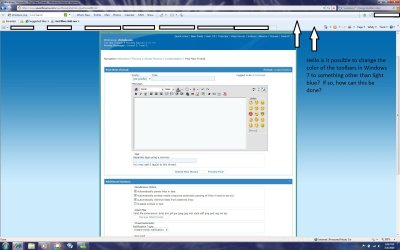
Is it possible to change the color of the toolbars in Windows 7 explorer & other programs to something other than light blue? I would like to continue to use the Aero Glass theme but I do not like the light blue color of all the toolbars. Thanks
 

Attachments

  • tool-bar.jpg
    tool-bar.jpg
    162.7 KB · Views: 5,272

My Computer My Computer

OS
Windows 7
I don't think that is possible without using a custom theme, sorry "Shell Style" would be more appropriate.
 

My Computer My Computer

OS
Win 7
Is it possible to change the color of the toolbars in Windows 7 explorer & other programs to something other than light blue? I would like to continue to use the Aero Glass theme but I do not like the light blue color of all the toolbars. Thanks

It is, although not by conventional means. Not recommended for those who aren't comfortable with HEX. In my case, I like the darker 'steel' appearance of the title bars but much prefer the blue for the task bar.
 

Attachments

  • Desk.jpg
    Desk.jpg
    200 KB · Views: 4,269

My Computer My Computer

Computer type
PC/Desktop
Computer Manufacturer/Model Number
Custom Build/Mod
OS
Windows 7 Home Premium x64
CPU
Intel QX9650 Extreme 4.0 GHz
Motherboard
ASUS Rampage Extreme Rev2
Memory
8GB (4x2) Corsair Dominator DDR3
Graphics Card(s)
2x Radeon R390X [8GB]
Sound Card
SupremeFX X-Fi
Monitor(s) Displays
Dell 2408WFP 26" Panel
Screen Resolution
1920x1200
Hard Drives
4x WD 2TB (8TB+ Total)
2x Crucial SSD 128GB (RAID-0)
1x LG Blu-ray read/write
1x Phillips LightScribe DVD read/write
PSU
Corsair HX1000
Case
CoolerMaster - Cosmos S
Cooling
Custom Liquid - 320mm rad w/ 3x 80mm fans, CPU/NB/SB Blocks
Keyboard
Logitech Illuminater Pro
Mouse
Logitech
Internet Speed
Fractional T1 - 125Mbps
Antivirus
ESET Security Suite / Microsoft Security Essentials
Browser
Cyberfox Intel x64
Other Info
OC'd to 5.0GHz @ 44c under full load
It is, although not by conventional means. Not recommended for those who aren't comfortable with HEX. In my case, I like the darker 'steel' appearance of the title bars but much prefer the blue for the task bar.

Modifying hex values would be the definition of "custom", but what you did was not what the OP was asking for.
 

My Computer My Computer

OS
Win 7
Modifying hex values would be the definition of "custom", but what you did was not what the OP was asking for.

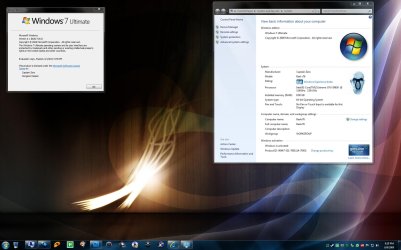
Yeah I see that, I was simply making the point that it could be done but that it wouldn't be advisable for the novice. ;)

My example is just to illustrate that (like I said, "In my case"). So yes, it could be done by modifying the corresponding resource. I just haven't tackled that one yet.
 

My Computer My Computer

Computer type
PC/Desktop
Computer Manufacturer/Model Number
Custom Build/Mod
OS
Windows 7 Home Premium x64
CPU
Intel QX9650 Extreme 4.0 GHz
Motherboard
ASUS Rampage Extreme Rev2
Memory
8GB (4x2) Corsair Dominator DDR3
Graphics Card(s)
2x Radeon R390X [8GB]
Sound Card
SupremeFX X-Fi
Monitor(s) Displays
Dell 2408WFP 26" Panel
Screen Resolution
1920x1200
Hard Drives
4x WD 2TB (8TB+ Total)
2x Crucial SSD 128GB (RAID-0)
1x LG Blu-ray read/write
1x Phillips LightScribe DVD read/write
PSU
Corsair HX1000
Case
CoolerMaster - Cosmos S
Cooling
Custom Liquid - 320mm rad w/ 3x 80mm fans, CPU/NB/SB Blocks
Keyboard
Logitech Illuminater Pro
Mouse
Logitech
Internet Speed
Fractional T1 - 125Mbps
Antivirus
ESET Security Suite / Microsoft Security Essentials
Browser
Cyberfox Intel x64
Other Info
OC'd to 5.0GHz @ 44c under full load
How did you go about doing that please Captain Zero ? Did you do it using res hacker or something similar . I'm curious as id love to get into making custom s-styles for w7.
 
how do i change this ugly blue color? same as vista HEX?
thx in advance!
 
Back
Top