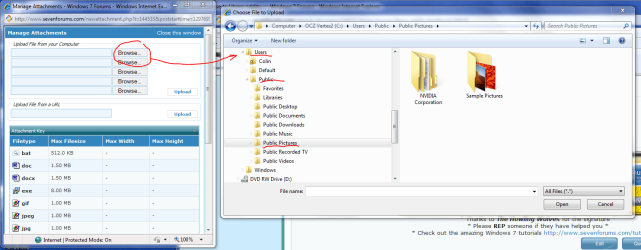
Hi,
This is kind of an odd issue I have just discovered, and I'm not sure how to describe it properly.
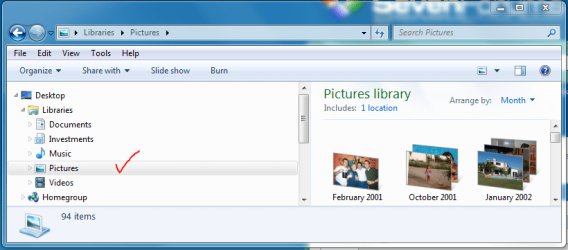
In my Pictures Library, I have one location with several pictures - all OK, no problem.
--- > see the attachement with the red tick
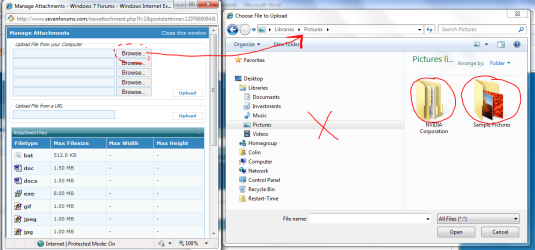
If I want to add an attachment to this post using these forums (the paper-clip icon), and I use the browse option to go to my Pictures Library, I see a completely different structure to my Pictures Library.
--- > see the attachement with the red cross
My location with my photo's doesn't appear to exist, and instead I see the two default folders that come with the Windows 7 installation. Infact, its very strange : I physically deleted the nVidia Corporation and Sample Pictures folders, and they do not exist when I view the Libraries in Windows Explorer.
To double-check this, I opened a blank Word document, and inserted an image by browsing to Pictures Library : the library contents display correctly as I expect.
If I browse to my other Libraries (e.g. Music or Investments), then I see the correct file structure -- its just the Pictures Library that is behaving oddly (too many files possibly and the browse window cannot refresh???).
So.....I'm puzzled. Why does browsing from the forum attachement option show a different folder/file structure to the one in Windows Explorer?
Can anyone shed light on this?
Regards,
Golden
This is kind of an odd issue I have just discovered, and I'm not sure how to describe it properly.
In my Pictures Library, I have one location with several pictures - all OK, no problem.
--- > see the attachement with the red tick
If I want to add an attachment to this post using these forums (the paper-clip icon), and I use the browse option to go to my Pictures Library, I see a completely different structure to my Pictures Library.
--- > see the attachement with the red cross
My location with my photo's doesn't appear to exist, and instead I see the two default folders that come with the Windows 7 installation. Infact, its very strange : I physically deleted the nVidia Corporation and Sample Pictures folders, and they do not exist when I view the Libraries in Windows Explorer.
To double-check this, I opened a blank Word document, and inserted an image by browsing to Pictures Library : the library contents display correctly as I expect.
If I browse to my other Libraries (e.g. Music or Investments), then I see the correct file structure -- its just the Pictures Library that is behaving oddly (too many files possibly and the browse window cannot refresh???).
So.....I'm puzzled. Why does browsing from the forum attachement option show a different folder/file structure to the one in Windows Explorer?
Can anyone shed light on this?
Regards,
Golden
Attachments
Last edited:
My Computer
- Computer type
- PC/Desktop
- Computer Manufacturer/Model Number
- Golden Mk. I.4
- OS
- Windows 10 Pro x64 ; Xubuntu x64
- CPU
- Intel i7 860 @ 2.80 GHz O/C'ed to 4.0GHz
- Motherboard
- Gigabyte P55A-UD3R Rev.1. Award BIOS F13
- Memory
- 16GB Corsair Vengance DDR3 @ 661 MHz Dual Channel (9-9-9-24)
- Graphics Card(s)
- EVGA NVidia GTX 560 1024MB
- Sound Card
- Realtek Integrated
- Monitor(s) Displays
- Dual Samsung SyncMaster 2494HS
- Screen Resolution
- 1920*1080 and 1920*1080
- Hard Drives
- 1*Samsung 840 EVO 120GB SSD;
1*OCZ Vertex 2 60GB SSD;
2*Samsung F3 SpinPoint 1TB in RAID0;
1*Samsung F1 SpinPoint 1TB;
2*Western Digital 1TB External USB 3.0
1*Western Digital 500GB External USB 3.0
1*Seagate 500GB External USB 2.0
- PSU
- Thermaltake ToughPower QFan 750W
- Case
- Thermaltake Element S VK60001W2Z
- Cooling
- Corsair H60 Water Cooling, 2*230mm and 2*80mm case fans
- Keyboard
- Logitech G110
- Mouse
- Logitech MX518