Any ideas what has happenned

skostro

New member
Member
VIP
Local time
7:59 AM
Messages
182
I recently d/l a rule book on a sports website. After the d/l it opened up just fine. Now, a couple days later, I went to open it again and here's what I'm getting. See below.
Any ideas what has happenned?

%PDF-1.6
%âãÏÓ
289 0 obj
<</Linearized 1/L 654104/O 292/E 22383/N 96/T 648260/H [ 877 1087]>>
endobj

xref
289 28
0000000016 00000 n
0000001964 00000 n
0000002101 00000 n
0000002186 00000 n
0000002530 00000 n
0000003058 00000 n
 

My Computer My Computer

Computer type
PC/Desktop
Computer Manufacturer/Model Number
hp
OS
windows 7 Home Premium 32bit.
Antivirus
avast
Browser
ie, chrome
I recently d/l a rule book on a sports website. After the d/l it opened up just fine. Now, a couple days later, I went to open it again and here's what I'm getting. See below.
Any ideas what has happenned?

%PDF-1.6
%âãÏÓ
289 0 obj
<</Linearized 1/L 654104/O 292/E 22383/N 96/T 648260/H [ 877 1087]>>
endobj

xref
289 28
0000000016 00000 n
0000001964 00000 n
0000002101 00000 n
0000002186 00000 n
0000002530 00000 n
0000003058 00000 n

Seems like a corrupted PDF file, download a fresh copy
 

My Computer My Computer

Computer type
PC/Desktop
Computer Manufacturer/Model Number
Custom Build
OS
Windows 10 Pro x64, Arch Linux
CPU
Intel Core 2 Quad Q8200 OC'd 3.08GHz
Motherboard
Asus Rampage formula LGA775
Memory
8GB DDR2 900Mhz
Graphics Card(s)
MSI GT730 2GB GDDR5 (Kepler)
Sound Card
Supreme FX2
Monitor(s) Displays
Samsung LS22F350 LED
Screen Resolution
1080P
Hard Drives
Kingston SSDNow UV400 120GB, 500GB Hitachi, 2TB Samsung, 500GB Seagate FreeAgent, 640GB Samsung, 160GB Toshiba (Arch)
PSU
AeroCool 500W Bronze
Cooling
Cooler Master V6 + 3X fans
Keyboard
Prolink keyboard
Mouse
Logitech M705
Internet Speed
1MiB/s
Browser
Chrome Beta
I use Foxit Reader instead of Adobe Reader. It is less bloated and to date I have had no issues with it. IMHO
 

My Computer My Computer

Computer Manufacturer/Model Number
HP M9077c
OS
Windows 7 Home Premium 64bit
CPU
Intel(R)Core(TM)2 quad [email protected] 2.39GHz
Motherboard
ASUSeK
Memory
6GB DDR2 6400
Graphics Card(s)
GeForce 8500/512MB
Sound Card
Realtek High Def Audio
Monitor(s) Displays
HP w2408 LCD 24" widescreen
Screen Resolution
1920x1200
Cooling
6 pack of Bud
Keyboard
MS wireless Inteli
Mouse
MS wireless Inteli
PDF files sometimes get corrupted. I doubt this has anything to do with the reader. Once the file is corrupted, all you can do is to replace it. I am not aware of anything that would "recover" the text out of a corrupted PDF file.
 

My Computer My Computer

Computer Manufacturer/Model Number
Dell Inspiron 530
OS
Windows 7 Ultimate (x64)
CPU
Q6600
Memory
8 GB
Graphics Card(s)
ATI Radeon HD 2600 XT
Monitor(s) Displays
Samsung Syncmaster P2450
Screen Resolution
1920x1080
Hard Drives
Samsung HD103UJ
Samsung HD501LJ
Internet Speed
25 Mb/s
How do I set what program opens the pdf file.
I think that's my problem
 

My Computer My Computer

Computer type
PC/Desktop
Computer Manufacturer/Model Number
hp
OS
windows 7 Home Premium 32bit.
Antivirus
avast
Browser
ie, chrome
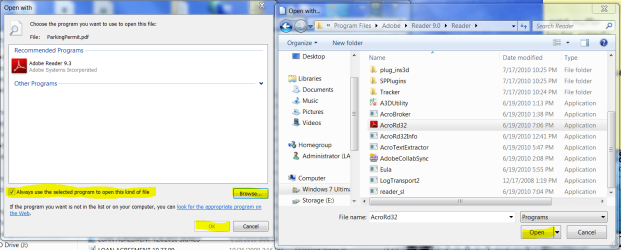
Rightclick on the file, select Open With, highlight Adobe Reader, tick box to always open this type of file with Adobe.

If Adobe or your .pdf reader isn't listed in Open With box, browse to its .exe to select it in Program Files:
 

Attachments

  • Capture.PNG
    Capture.PNG
    90.8 KB · Views: 4
ok, I did that & it works, but it's not 'defaulting' to Adobe reader32.
ie when I close the file, then reopen it, I get the same jibberish.
I need it to default to adobe reader32 every time I go to open the file.
Any more suggestions?
 

My Computer My Computer

Computer type
PC/Desktop
Computer Manufacturer/Model Number
hp
OS
windows 7 Home Premium 32bit.
Antivirus
avast
Browser
ie, chrome
Right-Click on the file, Open With > Choose Default Program.
 

My Computer My Computer

OS
Windows 7 Ultimate x64 SP1
CPU
Intel Core i7-2600
Motherboard
Gigabyte GA-P67A-UD3P-B3
Memory
12 GB Patriot Extreme DDR3-1333
Graphics Card(s)
Nvidia GTX 470
Monitor(s) Displays
Dell UltraSharp 2209WA
Hard Drives
OCZ Agility3 240 GB, WD5001AALS, WD7501AALS
PSU
OCZ ModStream 700W
Case
CoolerMaster HAF 912 Advanced
Cooling
CoolerMaster Hyper 212 Plus
Right-Click on the file, Open With > Choose Default Program.
It's still not defaulting to Adobe. After choosing Adobe, it opens in Adobe all right. But next time I go to open the same file....jibberish :confused:
ok, I did that & it works, but it's not 'defaulting' to Adobe reader32.
ie when I close the file, then reopen it, I get the same jibberish.
I need it to default to adobe reader32 every time I go to open the file.
Any more suggestions?
 

My Computer My Computer

Computer type
PC/Desktop
Computer Manufacturer/Model Number
hp
OS
windows 7 Home Premium 32bit.
Antivirus
avast
Browser
ie, chrome
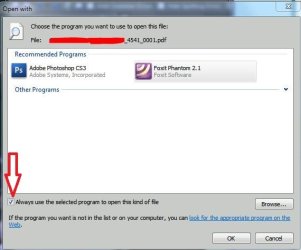
Do you have the following check box checked?:

Open With File association.JPG
 

My Computer My Computer

OS
Win7U 64 RTM
CPU
Q9550
Motherboard
GA-EP45-UD3R
Memory
8GB Gskill
Graphics Card(s)
ASUS|EAH4850/HTDI/1GD3/A
Sound Card
xfi Plat
Monitor(s) Displays
Dell 2405fpw
Screen Resolution
1920x1200
Hard Drives
Seagate & WD sata Drives
PSU
Antec
Case
Antec
Keyboard
MS Natural Ergonomic 4000
Mouse
Logitech MX610 USB Cordless
I'm not too sure what I did, (if anything), but it's now working.
Thanks to all who replied.
 

My Computer My Computer

Computer type
PC/Desktop
Computer Manufacturer/Model Number
hp
OS
windows 7 Home Premium 32bit.
Antivirus
avast
Browser
ie, chrome
Back
Top