Games won't run on Win7 x64 ANY of them

Tlakoyo

New member
Please some one help me, I got this new laptop with Win7 RTM x64, it has all the drivers, I successfully downloaded and installed the latest version of Catallyst, I'm positive that it's not a cooling or GPU compatibility issue. I just downloaded and installed the SP1 but it didn't help at all. Games crash after 5 min of gameplay, I'm still able to open the task manager and kill the game without further problems though.

When it crashes I get the infamous "Display driver stopped responding and has recovered" message.

Anyone know how I can fix this? :sarc:

The games I've tried to Play are: Resident Evil 5, Age of empires III, Call of Duty World at War.

My specs:

Sandy Bridge Intel Core i7 2630QM (quad core @ 2.0 Ghz, 2.6Ghz with turbo boost), AMD Radeon HD 6850M 2Gb, 12Gb DDR3 RAM.
*DirectX 11, Windows Experience Index of 5.9 (if such information helps)

Thanx in advance!
 

My Computer

Computer Manufacturer/Model Number
Acer Aspire 5950g
OS
Windows 7 Home Premium x64 SP1
CPU
Sandy Bridge Intel Core i7 (quad core) 2630QM 2.0Ghz
Memory
12Mb DDR3 RAM
Graphics Card(s)
AMD Radeon HD 6850M 2Gb
Screen Resolution
1366x768
Hard Drives
750 Gb HDD
Can you tell us the games that are crashing?

Also have a look at this, especailly step #5 - Tips on Troubleshooting Game Issues

Edit: I see the games. Not sure how old those games are but some older games struggle under Windows 7, especially a 64-bit edition. Updating your DirectX file "might" help. Again see step 5 in my guide.
 

My Computer

Computer type
PC/Desktop
Computer Manufacturer/Model Number
Custom built by me.
OS
Windows 10 Pro
CPU
Intel Core i7-4770K (3.5Ghz)
Motherboard
Gigabyte G1 Sniper 5 (F10 Bios)
Memory
32 gig Corsair Dominator Platinum (4x8Gig)
Graphics Card(s)
Sapphire Tri-X R9 Fury
Sound Card
Soundblaster ZXR
Monitor(s) Displays
NEC PA242W 24" LCD Monitor
Screen Resolution
1920 x 1200
Hard Drives
Primary - Samsung 850 Pro (512gig), Samsung 840 Pro (256gig), 2TB WD Caviar Black.
PSU
EVGA Supernova 1000 G2
Case
Cooler Master HAF X
Cooling
Corsair H100i with Corsair Air Series SP120 Quiet Fans
Keyboard
Logitech Wireless Wave
Mouse
Logitech Performance MX
Internet Speed
High Speed Cable
Antivirus
Norton Security
Browser
IE11
Other Info
Memory Timings - 1866MHz @ 9-9-9-27-1T @ 1.5 volts
Please some one help me, I got this new laptop with Win7 RTM x64, it has all the drivers, I successfully downloaded and installed the latest version of Catallyst, I'm positive that it's not a cooling or GPU compatibility issue. I just downloaded and installed the SP1 but it didn't help at all. Games crash after 5 min of gameplay, I'm still able to open the task manager and kill the game without further problems though.

When it crashes I get the infamous "Display driver stopped responding and has recovered" message.

Anyone know how I can fix this? :sarc:

The games I've tried to Play are: Resident Evil 5, Age of empires III, Call of Duty World at War.

My specs:

Sandy Bridge Intel Core i7 2630QM (quad core @ 2.0 Ghz, 2.6Ghz with turbo boost), AMD Radeon HD 6850M 2Gb, 12Gb DDR3 RAM.
*DirectX 11, Windows Experience Index of 5.9 (if such information helps)

Thanx in advance!

Hi,

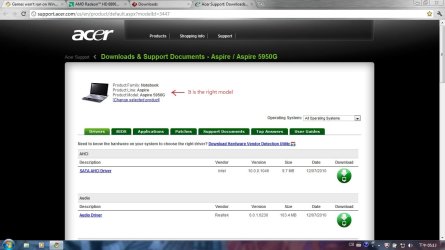
Have you tried the driver found on the Acer website? (See screenshot)

Acer Support: Downloads & Support Documents - Notebook / Aspire / Aspire 5950G

The page shown can be found above.

It does sound like a driver problem and may just be a case of finding the 'right' one for your system. Another tip is to try compatibility mode. Just right click on the game 'exe', choose properties and then compatibility. You'll then be able to choose the os of choice ..
 

Attachments

  • driver.jpg
    driver.jpg
    225.9 KB · Views: 78

My Computer

Computer Manufacturer/Model Number
Custom Build
OS
Windows 7 Ultimate 64Bit SP1
CPU
AMD Phenom II [email protected] (19*200)
Motherboard
GA-MA790X-DS4
Memory
3GB XMS2 PC6400
Graphics Card(s)
ATI/Powercolor HD5870 PCS+ OC
Sound Card
Realtek HD
Monitor(s) Displays
EMC 19'' LCD
Screen Resolution
1280x1024
Hard Drives
500GB RAID 0 (2x250GB Seagate Barracuda) 1x75GB SATA2
PSU
OCZ 600W Modular
Case
Thermaltake Armour Jr
Cooling
Air
Keyboard
Logitech Media 600
Mouse
RAT 3
Internet Speed
Broadband 8MB
Other Info
Case has been resprayed internally to a black finish. Custom cooling added to VRMs as well as chipset.
3x120mm Fans on case
Ok now, how do I get the DirectX 9 necessary components without installing the whole package, which would be overwritten and thus "erasing" the DirectX 11 install? I know I sound pretty n00b, but I'd really appreciate your help :D

is it the DirectX 9 Runtime thing??
 

My Computer

Computer Manufacturer/Model Number
Acer Aspire 5950g
OS
Windows 7 Home Premium x64 SP1
CPU
Sandy Bridge Intel Core i7 (quad core) 2630QM 2.0Ghz
Memory
12Mb DDR3 RAM
Graphics Card(s)
AMD Radeon HD 6850M 2Gb
Screen Resolution
1366x768
Hard Drives
750 Gb HDD
OK, this may or may not help.

First of all, I am still using Win 7 Ultimate 64 RTM w/o a single issue and I have played almost all the FPS games out there... with the exception of a couple that I have had to use Compt mode.

Every time you install a game you should install with Elevated Admin Rights (Right click exe and use Run as Admin) and if the game asks you to install Directx, do so, it won't break or do any damage to your Dx10/11. Being said this, some games do no like to be install from the exe file but they do install correctly if you do Autorun... YMMV.

Now, one thing I have noticed when it comes to ATI Catalyst is that is SUCKS big time. I thought it was just me because I almost always use Nvidia video cards so I don't know much about ATI but I see more and more that it may not be the case.

I just finished a new office built PC, the board came with integrated ATI card. I install the drivers that came with the Board CD then, I went to ATI and downloaded the latest drivers for the card and after doing this (I also kept installing apps and software I needed for my office work), all Hell broke loose... Blue Screens every so often and all had to do with the ATI video driver.

How I solved the issue (at least for my problem)? I uninstall the Catalyst from Control Panel, restarted in safe mode, used CCleaner to get rid of any instances on the registry, restarted again, went to windows Device Manager/Display Adapter/Drivers and clicked on the Uninstall tab. Restarted again, and use the drivers that came with the CD.

Now I have only the video drivers w/o the whole Catalyst crap and I have not had 1 instance of the blue screen problem. Hold on... looking for wood to knock on! :p

Again, understand that it may very well be me doing something wrong when installing the Catalyst but since I don't know any other way to install it (I assume that it should be the same way you install Nvidia Control Panel software), I just kicked it to the curve (so to speak) ;)

Hope that helps. :D
 

My Computer

Computer type
PC/Desktop
Computer Manufacturer/Model Number
Custom Built... Intel/Nvidia/ASRock
OS
Windows 7 x64 (Ultimate)
CPU
Intel i5-4670K
Motherboard
ASRock Z87 Extreme 6
Memory
8GBs Ripjaws 2133Mhz
Graphics Card(s)
Asus GTX660 (2GBs)
Sound Card
Onboard Realtek HD
Monitor(s) Displays
Acer AL2216W
Screen Resolution
1680 x 1050
Hard Drives
Samsung 840 SSD 120GBs
Samsung 750GB 32MB cache
1.5 TB
PSU
PC Cooling 750w Silencer
Case
Thermaltake Spedo Advance
Cooling
Std Cooler
Keyboard
Logitech G15
Mouse
Logitech G9
Internet Speed
Comcast 20Mbit
Antivirus
Avast
Browser
Firefox
Hi,

Have you tried the driver found on the Acer website? (See screenshot)

Acer Support: Downloads & Support Documents - Notebook / Aspire / Aspire 5950G

The page shown can be found above.

It does sound like a driver problem and may just be a case of finding the 'right' one for your system. Another tip is to try compatibility mode. Just right click on the game 'exe', choose properties and then compatibility. You'll then be able to choose the os of choice ..

I downloaded and installed that file, it seems to be the same driver that is already installed when I got the notebook since that driver download was posted on december last year, and yeah reinstalling it didn't change anything, the games still crash after 5 min, thanks for the reply though :)

Now, one thing I have noticed when it comes to ATI Catalyst is that is SUCKS big time. I thought it was just me because I almost always use Nvidia video cards so I don't know much about ATI but I see more and more that it may not be the case.

I just finished a new office built PC, the board came with integrated ATI card. I install the drivers that came with the Board CD then, I went to ATI and downloaded the latest drivers for the card and after doing this (I also kept installing apps and software I needed for my office work), all Hell broke loose... Blue Screens every so often and all had to do with the ATI video driver.

How I solved the issue (at least for my problem)? I uninstall the Catalyst from Control Panel, restarted in safe mode, used CCleaner to get rid of any instances on the registry, restarted again, went to windows Device Manager/Display Adapter/Drivers and clicked on the Uninstall tab. Restarted again, and use the drivers that came with the CD.

Something tells me that it indeed is the Catalyst driver that is creating some sort of conflict with the games, since it has its own anti aliasing and anisotropic filtering settings, why would I want that? Each game has its own settings, forcing any other would create conflicts! (I'm so pissed off XD maybe that isn't even the problem) But yeah, even if I disable everything on Catalyst the game still crashes. I tried uninstalling Catalyst but then I had no driver for the GPU, I even lost the aero and everything, how can I get rid of Catalyst but still be able to use my GPU?? I have no installation CD's, I asked for them but they told me everything was on the Acer website ... but it's the same, it doesn't work

heeelp :D
 

My Computer

Computer Manufacturer/Model Number
Acer Aspire 5950g
OS
Windows 7 Home Premium x64 SP1
CPU
Sandy Bridge Intel Core i7 (quad core) 2630QM 2.0Ghz
Memory
12Mb DDR3 RAM
Graphics Card(s)
AMD Radeon HD 6850M 2Gb
Screen Resolution
1366x768
Hard Drives
750 Gb HDD
Ok now, how do I get the DirectX 9 necessary components without installing the whole package, which would be overwritten and thus "erasing" the DirectX 11 install? I know I sound pretty n00b, but I'd really appreciate your help :D

is it the DirectX 9 Runtime thing??

Web installer - DirectX End-User Runtime

The whole package - DirectX Redist (June 2010)

Try the first link. If you have issues use the second one. Yeah it't the whole package but it will only update what needed as well.
 

My Computer

Computer type
PC/Desktop
Computer Manufacturer/Model Number
Custom built by me.
OS
Windows 10 Pro
CPU
Intel Core i7-4770K (3.5Ghz)
Motherboard
Gigabyte G1 Sniper 5 (F10 Bios)
Memory
32 gig Corsair Dominator Platinum (4x8Gig)
Graphics Card(s)
Sapphire Tri-X R9 Fury
Sound Card
Soundblaster ZXR
Monitor(s) Displays
NEC PA242W 24" LCD Monitor
Screen Resolution
1920 x 1200
Hard Drives
Primary - Samsung 850 Pro (512gig), Samsung 840 Pro (256gig), 2TB WD Caviar Black.
PSU
EVGA Supernova 1000 G2
Case
Cooler Master HAF X
Cooling
Corsair H100i with Corsair Air Series SP120 Quiet Fans
Keyboard
Logitech Wireless Wave
Mouse
Logitech Performance MX
Internet Speed
High Speed Cable
Antivirus
Norton Security
Browser
IE11
Other Info
Memory Timings - 1866MHz @ 9-9-9-27-1T @ 1.5 volts
Now, one thing I have noticed when it comes to ATI Catalyst is that is SUCKS big time. I thought it was just me because I almost always use Nvidia video cards so I don't know much about ATI but I see more and more that it may not be the case.

Other than people having driver issues like any other driver issue they may experience with a whole host of hardware including Nvidia, or cough cough Windows itself. Where is proof that CCC "sucks" other then your conjecture???

Yes, ATI's CCC/drivers can be problematic.... but so can every other driver in existence!!!

BTW I could make the same arguments about Windows itself based on the complaints posted here!

The OP needs real world help with a real world issue..... not an opinion on a piece of software you don't use.

My two cents.
 
Last edited:

My Computer

Computer type
PC/Desktop
Computer Manufacturer/Model Number
Custom built by me.
OS
Windows 10 Pro
CPU
Intel Core i7-4770K (3.5Ghz)
Motherboard
Gigabyte G1 Sniper 5 (F10 Bios)
Memory
32 gig Corsair Dominator Platinum (4x8Gig)
Graphics Card(s)
Sapphire Tri-X R9 Fury
Sound Card
Soundblaster ZXR
Monitor(s) Displays
NEC PA242W 24" LCD Monitor
Screen Resolution
1920 x 1200
Hard Drives
Primary - Samsung 850 Pro (512gig), Samsung 840 Pro (256gig), 2TB WD Caviar Black.
PSU
EVGA Supernova 1000 G2
Case
Cooler Master HAF X
Cooling
Corsair H100i with Corsair Air Series SP120 Quiet Fans
Keyboard
Logitech Wireless Wave
Mouse
Logitech Performance MX
Internet Speed
High Speed Cable
Antivirus
Norton Security
Browser
IE11
Other Info
Memory Timings - 1866MHz @ 9-9-9-27-1T @ 1.5 volts
Web installer - DirectX End-User Runtime

The whole package - DirectX Redist (June 2010)

Try the first link. If you have issues use the second one. Yeah it't the whole package but it will only update what needed as well.

Ok, I downloaded and installed both now buy they didn't work, any more ideas of what it could be? I've googled it several times, and this indeed seems to be a widespread problem, games and windows 7 x64 certainly don't like each other, why is that? What should I do? wait until AMD or Microsoft release some patch or actualization? or install Windows XP or win7 32 bit? But if I install WinXP I won't be able to install DirectX 11 right? Therefore I won't be able to fully squeeze the juice out of my GPU and the quad core right?? (I do know it has to be a directx 11 enabled game too though) ...
 

My Computer

Computer Manufacturer/Model Number
Acer Aspire 5950g
OS
Windows 7 Home Premium x64 SP1
CPU
Sandy Bridge Intel Core i7 (quad core) 2630QM 2.0Ghz
Memory
12Mb DDR3 RAM
Graphics Card(s)
AMD Radeon HD 6850M 2Gb
Screen Resolution
1366x768
Hard Drives
750 Gb HDD
Hi,

Have you tried the driver found on the Acer website? (See screenshot)

Acer Support: Downloads & Support Documents - Notebook / Aspire / Aspire 5950G

The page shown can be found above.

It does sound like a driver problem and may just be a case of finding the 'right' one for your system. Another tip is to try compatibility mode. Just right click on the game 'exe', choose properties and then compatibility. You'll then be able to choose the os of choice ..

I downloaded and installed that file, it seems to be the same driver that is already installed when I got the notebook since that driver download was posted on december last year, and yeah reinstalling it didn't change anything, the games still crash after 5 min, thanks for the reply though :)

Now, one thing I have noticed when it comes to ATI Catalyst is that is SUCKS big time. I thought it was just me because I almost always use Nvidia video cards so I don't know much about ATI but I see more and more that it may not be the case.

I just finished a new office built PC, the board came with integrated ATI card. I install the drivers that came with the Board CD then, I went to ATI and downloaded the latest drivers for the card and after doing this (I also kept installing apps and software I needed for my office work), all Hell broke loose... Blue Screens every so often and all had to do with the ATI video driver.

How I solved the issue (at least for my problem)? I uninstall the Catalyst from Control Panel, restarted in safe mode, used CCleaner to get rid of any instances on the registry, restarted again, went to windows Device Manager/Display Adapter/Drivers and clicked on the Uninstall tab. Restarted again, and use the drivers that came with the CD.

Something tells me that it indeed is the Catalyst driver that is creating some sort of conflict with the games, since it has its own anti aliasing and anisotropic filtering settings, why would I want that? Each game has its own settings, forcing any other would create conflicts! (I'm so pissed off XD maybe that isn't even the problem) But yeah, even if I disable everything on Catalyst the game still crashes. I tried uninstalling Catalyst but then I had no driver for the GPU, I even lost the aero and everything, how can I get rid of Catalyst but still be able to use my GPU?? I have no installation CD's, I asked for them but they told me everything was on the Acer website ... but it's the same, it doesn't work

heeelp :D
Ok first of all what driver version is being used ?

Second since the 6800 series came out the drivers have been nothing but trouble .

From experience ,I think you should choose the 11.1 and install the hotfix that pretty much will make it stable .

I might add did you OC your rig ? If not it is the driver the best worst case scenerio here is to push drivers back to the 10.10 which is the first driver that was made for this series .

One more thing please don't blame the program all together as nothing ever trully works like it should all the time ,you should be open to all sorts of issues especially when putting together a machine like your's.

Finally ..........If you let windows select the driver for you that is probally why it doesn't work ,I know you are asking us for help but i would do a little more reseach on the drivers before blasting the whole thing to hell ,just a little advice from someone with issues with the ATI drivers :cool:


By the way any of these games happen to be steam games ?

you can right click on the game and verify integrity game cache ...this also crashes alot of games if your files are corrupted but only if you use steam to launch the games though
 

My Computer

Computer type
PC/Desktop
Computer Manufacturer/Model Number
CoreI7-6700K MrFingerIII Special Builds
OS
Windows 10 Home Premium 64bit sp1
CPU
Intel I7-6700K @ 4.6 Ghz 1.344 volts everyday OC
Motherboard
Asrock Fatality K6 Z170 Socket 1151
Memory
32GB G-Skill TridentZ 3200mhz 16-18-18-38 DDR4
Graphics Card(s)
Sli Gigabyte Windforce GTX 980 G1
Sound Card
AC97 Creative Rage Tactic 3D Headphones Bluetooth
Monitor(s) Displays
27" Asus ROG Swift PG278Q G-Sync 48" Vizio Smart HD TV
Screen Resolution
2560x1440p 27"- 48" Currently Gaming at 2560x1440p Res 2K
Hard Drives
250GB Samsung Evo840SSD Seagate baracuda 500 GB WD Mybook 500Gb 1TB Seagate Barracuda
PSU
HX1050w Corsair Silver 80plus certified crosfire/sli
Case
Enthod Pro Full Tower
Cooling
Corsair H110i GT 280 mm High Performance WaterBlock
Keyboard
Logitech wireless keyboard
Mouse
Logitech wireless mouse
Internet Speed
Cox Cable 100+ mb
Antivirus
WebRoot Spysweeper with Antivirus
Browser
IE-10, Chrome, Opera
Other Info
My Other Rig is a AMD FX8320E @4.6Ghz 16GB Ballistic Sport Ram
Mobo Asrock Fatality 990FX 120GB OCZ SSD 1TB Seagate Barracuda Corsair H75 Cooling PSU Corsair CX750
GPU GTX Gigabyte 970G1
I run in 64bit and games run fine..
Is your machine running the latest bios update? Also drivers such as chipset, networking and sound are all equally as important as the gpu version so please make sure these are updated. (apologies if you have already done so).

Lastly I know you said you were sure it wasn't a heat problem but do you know what your actual temps are?
 

My Computer

Computer Manufacturer/Model Number
Custom Build
OS
Windows 7 Ultimate 64Bit SP1
CPU
AMD Phenom II [email protected] (19*200)
Motherboard
GA-MA790X-DS4
Memory
3GB XMS2 PC6400
Graphics Card(s)
ATI/Powercolor HD5870 PCS+ OC
Sound Card
Realtek HD
Monitor(s) Displays
EMC 19'' LCD
Screen Resolution
1280x1024
Hard Drives
500GB RAID 0 (2x250GB Seagate Barracuda) 1x75GB SATA2
PSU
OCZ 600W Modular
Case
Thermaltake Armour Jr
Cooling
Air
Keyboard
Logitech Media 600
Mouse
RAT 3
Internet Speed
Broadband 8MB
Other Info
Case has been resprayed internally to a black finish. Custom cooling added to VRMs as well as chipset.
3x120mm Fans on case
Other than people having driver issues like any other driver issue they may experience with a whole host of hardware including Nvidia, or cough cough Windows itself. Where is proof that CCC "sucks" other then your conjecture???

The OP needs real world help with a real world issue..... not an opinion on a piece of software you don't use.
I thought I was giving him real world help since I just had the issue. :eek:
I didn't want to type or post the many sites I visited and read on that problem so I thought I just shortened it a bit but you are right, Nvidia has had issues as well but I find it easier than ATI to find stand-alone drivers instead of having to download the whole Catalyst thing from the ATI site. Again, this could be because I hardly ever use ATI so I was hoping you guys would jump in and point him to the driver only ;)

If you have a direct link, I would also like to have it as I would like to update my own drivers w/o the need to install the CCC. :p
 

My Computer

Computer type
PC/Desktop
Computer Manufacturer/Model Number
Custom Built... Intel/Nvidia/ASRock
OS
Windows 7 x64 (Ultimate)
CPU
Intel i5-4670K
Motherboard
ASRock Z87 Extreme 6
Memory
8GBs Ripjaws 2133Mhz
Graphics Card(s)
Asus GTX660 (2GBs)
Sound Card
Onboard Realtek HD
Monitor(s) Displays
Acer AL2216W
Screen Resolution
1680 x 1050
Hard Drives
Samsung 840 SSD 120GBs
Samsung 750GB 32MB cache
1.5 TB
PSU
PC Cooling 750w Silencer
Case
Thermaltake Spedo Advance
Cooling
Std Cooler
Keyboard
Logitech G15
Mouse
Logitech G9
Internet Speed
Comcast 20Mbit
Antivirus
Avast
Browser
Firefox

My Computer

Computer type
PC/Desktop
Computer Manufacturer/Model Number
Custom built by me.
OS
Windows 10 Pro
CPU
Intel Core i7-4770K (3.5Ghz)
Motherboard
Gigabyte G1 Sniper 5 (F10 Bios)
Memory
32 gig Corsair Dominator Platinum (4x8Gig)
Graphics Card(s)
Sapphire Tri-X R9 Fury
Sound Card
Soundblaster ZXR
Monitor(s) Displays
NEC PA242W 24" LCD Monitor
Screen Resolution
1920 x 1200
Hard Drives
Primary - Samsung 850 Pro (512gig), Samsung 840 Pro (256gig), 2TB WD Caviar Black.
PSU
EVGA Supernova 1000 G2
Case
Cooler Master HAF X
Cooling
Corsair H100i with Corsair Air Series SP120 Quiet Fans
Keyboard
Logitech Wireless Wave
Mouse
Logitech Performance MX
Internet Speed
High Speed Cable
Antivirus
Norton Security
Browser
IE11
Other Info
Memory Timings - 1866MHz @ 9-9-9-27-1T @ 1.5 volts
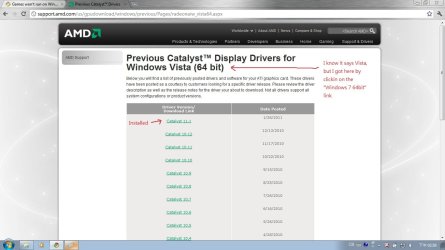
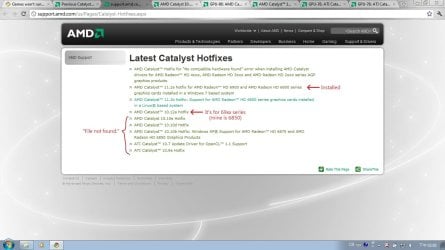
From experience ,I think you should choose the 11.1 and install the hotfix that pretty much will make it stable .

Ok let's see, no, I'm not doing OC'ing or any other fancy maneuver whatsoever :), the stock frequency of my processor is 2.0 Ghz and it goes up to 2.6 Ghz with the Turbo boost thing (it does it by it self and that seems to be how it works on default settings). I've been looking for a suitable driver by myself, I'm not relying on windows to do it itself, and these are not steam games.

Yeah I've been doing research and tried many drivers, patches for the games, actualizations (windows', the games' and catalyst's), and compatibility modes, but none have proved efficient :(

Btw I downloaded and installed the 11.1 Catalyst install and the hotfix but it does not work :D what should I do now?
 

Attachments

  • AMD1.jpg
    AMD1.jpg
    189 KB · Views: 12
  • AMD2.jpg
    AMD2.jpg
    200.4 KB · Views: 7

My Computer

Computer Manufacturer/Model Number
Acer Aspire 5950g
OS
Windows 7 Home Premium x64 SP1
CPU
Sandy Bridge Intel Core i7 (quad core) 2630QM 2.0Ghz
Memory
12Mb DDR3 RAM
Graphics Card(s)
AMD Radeon HD 6850M 2Gb
Screen Resolution
1366x768
Hard Drives
750 Gb HDD
Since you have a laptop you need to go to your laptop manufacturer and get the Windows 7 drivers for your AMD Radeon HD 6850M video card. This whole issue you are having is because you are trying to use the wrong drivers!

"M" is for Mobility thus you need the "mobility" drivers. None of the drivers listed below will work for your card!


Bottom line is you need to first try and get the drivers from Acer. If that doesn't work you could try here.... AMD Radeon - though I didn't see the 6800 Mobility series drivers.

Good luck.
 

My Computer

Computer type
PC/Desktop
Computer Manufacturer/Model Number
Custom built by me.
OS
Windows 10 Pro
CPU
Intel Core i7-4770K (3.5Ghz)
Motherboard
Gigabyte G1 Sniper 5 (F10 Bios)
Memory
32 gig Corsair Dominator Platinum (4x8Gig)
Graphics Card(s)
Sapphire Tri-X R9 Fury
Sound Card
Soundblaster ZXR
Monitor(s) Displays
NEC PA242W 24" LCD Monitor
Screen Resolution
1920 x 1200
Hard Drives
Primary - Samsung 850 Pro (512gig), Samsung 840 Pro (256gig), 2TB WD Caviar Black.
PSU
EVGA Supernova 1000 G2
Case
Cooler Master HAF X
Cooling
Corsair H100i with Corsair Air Series SP120 Quiet Fans
Keyboard
Logitech Wireless Wave
Mouse
Logitech Performance MX
Internet Speed
High Speed Cable
Antivirus
Norton Security
Browser
IE11
Other Info
Memory Timings - 1866MHz @ 9-9-9-27-1T @ 1.5 volts
Bottom line is you need to first try and get the drivers from Acer. If that doesn't work you could try here.... AMD Radeon - though I didn't see the 6800 Mobility series drivers.

Good luck.

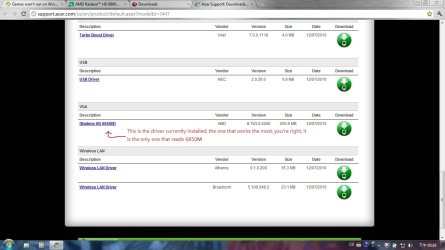
You're so right, the driver provided by Acer is the one that works the most , it is also the one that I had from the beginning and brought me to this forum looking for help :) this 6850M driver provided by Acer is the one that leads to my games crashing after 5min of gameplay, any other driver, catalyst version or hotfix proposed through this post led to my games not even starting up, so I'm here again after all this installs and uninstalls just where I begun :D

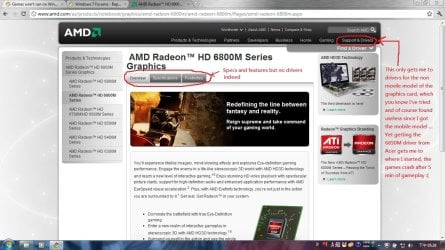
About the AMD website, they indeed just show you the mobility graphic cards specs and features, but no driver whatsoever...

Looks like I'm having no luck so far...


I run in 64bit and games run fine..
Is your machine running the latest bios update? Also drivers such as chipset, networking and sound are all equally as important as the gpu version so please make sure these are updated. (apologies if you have already done so).

Lastly I know you said you were sure it wasn't a heat problem but do you know what your actual temps are?

You got 64bit and your games run fine.. what is you GPU? is it AMD (mobile version)? cuz I think that's the problem, these drivers don't work properly and there seems to be no update or patch for it so far... I now updated the BIOS but the problem persists, thanx for the advice though

And yeah, I may be wrong since I don't actually know the current temp nor do I know what temp it should be, but I have done no modifications to the hardware so it has the manufacturers default config, and I got the notebook 2 weeks ago. I mean, I don't do any CPU or GPU intensive tasks for hours and then jump into gaming right after ... the laptop belly doesn't feel specially hot (I know I'm being too subjective, but c'mon I don't think that's the problem)... I'd say its a drivers problem.. right?

Needless to say, the games crash after 5 min of gameplay, is that enough for it to overheat? I hear the fan working with a consistent and smooth bsssssss like a whisper in your ear XD
 

Attachments

  • Ac1.jpg
    Ac1.jpg
    177.5 KB · Views: 9
  • Ac2.jpg
    Ac2.jpg
    169 KB · Views: 6
  • Ac3.jpg
    Ac3.jpg
    340.8 KB · Views: 7
Last edited:

My Computer

Computer Manufacturer/Model Number
Acer Aspire 5950g
OS
Windows 7 Home Premium x64 SP1
CPU
Sandy Bridge Intel Core i7 (quad core) 2630QM 2.0Ghz
Memory
12Mb DDR3 RAM
Graphics Card(s)
AMD Radeon HD 6850M 2Gb
Screen Resolution
1366x768
Hard Drives
750 Gb HDD
You're so right, the driver provided by Acer is the one that works the most , it is also the one that I had from the beginning and brought me to this forum looking for help :) this 6850M driver provided by Acer is the one that leads to my games crashing after 5min of gameplay, any other driver, catalyst version or hotfix proposed through this post led to my games not even starting up, so I'm here again after all this installs and uninstalls just where I begun :D

About the AMD website, they indeed just show you the mobility graphic cards specs and features, but no driver whatsoever...

As for video card drivers if Acer is the only one that has the 6850M drivers for your card you'll have to use them. Why there are giving you problems I don't know. But if you'll suffering heating issues ie card overheating after five minutes you could have a cooling issue. Notebooks do tend to get hot but I don't understand why you shouldn't be able to play a game for more than 5 minutes. You might give Acer tech support a call.

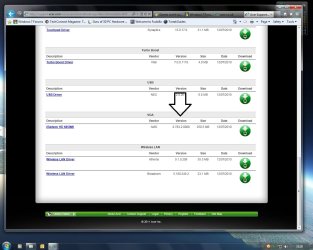
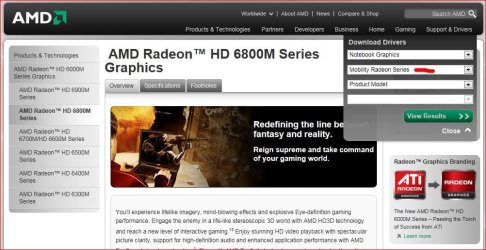
As for not finding Mobility Drivers at AMD's site.... did you click any of the drop down boxes? cause this clearly shows mobility drivers.....

Capture.JPG

Unfortunately they don't show the 6800 series drivers though :confused:


I run in 64bit and games run fine..
Is your machine running the latest bios update? Also drivers such as chipset, networking and sound are all equally as important as the gpu version so please make sure these are updated. (apologies if you have already done so).

Lastly I know you said you were sure it wasn't a heat problem but do you know what your actual temps are?
You got 64bit and your games run fine.. what is you GPU? is it AMD (mobile version)? cuz I think that's the problem, these drivers don't work properly and there seems to be no update or patch for it so far... I now updated the BIOS but the problem persists, thanx for the advice though

As for gaming on Windows 7 64-bit..... I game just fine with my ATI 6950 using the latest Catalyst drivers (11.2). Most gamers here are using the 64-bit version just fine for gaming.

Some of the older games played on the OS.....
Deus EX - (though graphics need tweaking)
Far Cry (the original)
All the FEAR games
Half-Life 1 & 2 series (steam versions)
Crysis

New(er) games
Dead Space 1 & 2
Fallout 3/Fallout New Vegas
Mass Effect 1 & 2
Bioshock 1 & 2
Dragon Age/Dragon Age 2 demo

Point???? Windows 7 handles games just fine if you have the right hardware. See my system specs.

Anyways I have no other suggestions for you at this moment but you can check this site/forum here - Radeon Mobility support - Rage3D Discussion Area. Maybe they can help. I'm also registered there but I don't visit that section since I don't have a laptop.

BTW have you looked through my tips guide? - Tips on Troubleshooting Game Issues

Good luck
 

My Computer

Computer type
PC/Desktop
Computer Manufacturer/Model Number
Custom built by me.
OS
Windows 10 Pro
CPU
Intel Core i7-4770K (3.5Ghz)
Motherboard
Gigabyte G1 Sniper 5 (F10 Bios)
Memory
32 gig Corsair Dominator Platinum (4x8Gig)
Graphics Card(s)
Sapphire Tri-X R9 Fury
Sound Card
Soundblaster ZXR
Monitor(s) Displays
NEC PA242W 24" LCD Monitor
Screen Resolution
1920 x 1200
Hard Drives
Primary - Samsung 850 Pro (512gig), Samsung 840 Pro (256gig), 2TB WD Caviar Black.
PSU
EVGA Supernova 1000 G2
Case
Cooler Master HAF X
Cooling
Corsair H100i with Corsair Air Series SP120 Quiet Fans
Keyboard
Logitech Wireless Wave
Mouse
Logitech Performance MX
Internet Speed
High Speed Cable
Antivirus
Norton Security
Browser
IE11
Other Info
Memory Timings - 1866MHz @ 9-9-9-27-1T @ 1.5 volts
Bottom line is you need to first try and get the drivers from Acer. If that doesn't work you could try here.... AMD Radeon - though I didn't see the 6800 Mobility series drivers.

Good luck.

You're so right, the driver provided by Acer is the one that works the most , it is also the one that I had from the beginning and brought me to this forum looking for help :) this 6850M driver provided by Acer is the one that leads to my games crashing after 5min of gameplay, any other driver, catalyst version or hotfix proposed through this post led to my games not even starting up, so I'm here again after all this installs and uninstalls just where I begun :D

About the AMD website, they indeed just show you the mobility graphic cards specs and features, but no driver whatsoever...

Looks like I'm having no luck so far...


I run in 64bit and games run fine..
Is your machine running the latest bios update? Also drivers such as chipset, networking and sound are all equally as important as the gpu version so please make sure these are updated. (apologies if you have already done so).

Lastly I know you said you were sure it wasn't a heat problem but do you know what your actual temps are?

You got 64bit and your games run fine.. what is you GPU? is it AMD (mobile version)? cuz I think that's the problem, these drivers don't work properly and there seems to be no update or patch for it so far... I now updated the BIOS but the problem persists, thanx for the advice though

And yeah, I may be wrong since I don't actually know the current temp nor do I know what temp it should be, but I have done no modifications to the hardware so it has the manufacturers default config, and I got the notebook 2 weeks ago. I mean, I don't do any CPU or GPU intensive tasks for hours and then jump into gaming right after ... the laptop belly doesn't feel specially hot (I know I'm being too subjective, but c'mon I don't think that's the problem)... I'd say its a drivers problem.. right?

Needless to say, the games crash after 5 min of gameplay, is that enough for it to overheat? I hear the fan working with a consistent and smooth bsssssss like a whisper in your ear XD

It is not unknown for temps to be high even with new machines and so just for peace of mind I'd rather know than not.
Try this free app:
MSI Afterburner

This will allow you to monitor temps as well as a whole host of other features.

Lastly, if this machine is only two weeks old I would ask if it has a warranty? If so, why not return it and let them sort it out... After all you've paid good money for what should be a working machine.
 

My Computer

Computer Manufacturer/Model Number
Custom Build
OS
Windows 7 Ultimate 64Bit SP1
CPU
AMD Phenom II [email protected] (19*200)
Motherboard
GA-MA790X-DS4
Memory
3GB XMS2 PC6400
Graphics Card(s)
ATI/Powercolor HD5870 PCS+ OC
Sound Card
Realtek HD
Monitor(s) Displays
EMC 19'' LCD
Screen Resolution
1280x1024
Hard Drives
500GB RAID 0 (2x250GB Seagate Barracuda) 1x75GB SATA2
PSU
OCZ 600W Modular
Case
Thermaltake Armour Jr
Cooling
Air
Keyboard
Logitech Media 600
Mouse
RAT 3
Internet Speed
Broadband 8MB
Other Info
Case has been resprayed internally to a black finish. Custom cooling added to VRMs as well as chipset.
3x120mm Fans on case
Hi

I may not help but- I was reading thinking. All you guys talk about is the gpu. What about the min cpu specs for them games. Would not most older or newer games min be like 2.4 or 2.7gig. Is turbo boosts meant to run for hours of gaming- if so how long can a lap top put up with the heat. Folks have heat probs in full tower cases 100 fans or wet cooling when gaming. how much more of a prob can heat be for a lap top?

I mean no harm- I am just asking my self and trying to help maybe- but I have never had a lap top- maybe they are special or something min specs do not matter so much, but again you are talking about gaming on a lap top and not just cards 5 card draw what ever. I do know mobile stuff uses less power- less heat etc. My lap top would be like a large phone for surfing the net. maybe play hl2 if need be but thats it.

I use amd intel ati nv what ever is best for my money budget- I prefer nv vid cards mostly for physx maybe- nv seems to have less game problems in general. I think the largest prob is gaming on lap tops, maybe if the cpu was 2.7 gig or more would help- All the other specs seem nice- great for general web surfing what ever- not a real game machine.

Have you tried maybe a valave game like hl2- it has low system specs- you can try it just to see if it works- Maybe you can lower game quality settings in them games- Google- maybe you can start the games in dx9 just to see if they work. I am not sure if you can right click the game exe' or not and get them to start in dx9 maybe- but you can google or some here might know.

Maybe you can tweak the game' from its main file before trying to run it. Check for some tweak guides for the games- might be the best for fastest way to find to the right files and line to change with note pad what ever. Lower shadows to medium lower other settings to medium if need be. It might not start at all if your cpu is not powerful enough?

It could be as simple as your cpu is not enough for the games- maybe turbo does not kick in or count until after the game has started- maybe it is seeing just 2gig and does not even try- I dont know. I would also guess drivers- chip set- or sound maybe.

I hope you get it going- seems near half the game probs are lap tops. Good luck.
 

My Computer

OS
w7
@ ezeht, I would agree. However the OP has stated he has a GPU drivers issue.

Anyways if you look through my tips guide - Tips on Troubleshooting Game Issues (which was linked) systems requirements are at the top of the list ;)

Now, a word about Minimum Vs Recommended system specs for games. Most gamers are aware that in order to get the best possible performance out of a game they need to "exceed" the "Recommended" requirements of said game. Notice I said "exceed the Recommended". Check out Fallout 3's System requirements. Really??? I think we can all agree that Minimum means barely plays at the lowest settings. Honestly….Don’t expect too much out of today’s games using "Minimum" System Requirements. My opinion :)

Whether the games the OP is trying to play meets the minimum system requirements or not is something they need to check out for themselves. If you are going to buy a game you should know if your system can run it.... before hand.

The other thing you bring up is the load put on a laptop during a gaming session. I've never had a laptop myself, but if you're going to do some intensive tasks like gaming, then you need to make sure the PC is properly cooled. Since we don't physically have the machine we can't say if the machine is properly cooled or not.... If the OP says the system is cooled, then we have to take his/her word for it.

Anyways I'm of the mind that if the machine is designed to game, then it should be designed with cooling in mind. Since the OP has a 6850M GPU I'm of the opinion that cooling isn't an issue, and that the machine should be able to game longer than an hour.

My two cents.
 

My Computer

Computer type
PC/Desktop
Computer Manufacturer/Model Number
Custom built by me.
OS
Windows 10 Pro
CPU
Intel Core i7-4770K (3.5Ghz)
Motherboard
Gigabyte G1 Sniper 5 (F10 Bios)
Memory
32 gig Corsair Dominator Platinum (4x8Gig)
Graphics Card(s)
Sapphire Tri-X R9 Fury
Sound Card
Soundblaster ZXR
Monitor(s) Displays
NEC PA242W 24" LCD Monitor
Screen Resolution
1920 x 1200
Hard Drives
Primary - Samsung 850 Pro (512gig), Samsung 840 Pro (256gig), 2TB WD Caviar Black.
PSU
EVGA Supernova 1000 G2
Case
Cooler Master HAF X
Cooling
Corsair H100i with Corsair Air Series SP120 Quiet Fans
Keyboard
Logitech Wireless Wave
Mouse
Logitech Performance MX
Internet Speed
High Speed Cable
Antivirus
Norton Security
Browser
IE11
Other Info
Memory Timings - 1866MHz @ 9-9-9-27-1T @ 1.5 volts
Back
Top