7, I Hate!

hmm, i agree with the GIF complaint, but other than that, nope. Libraries are a great thing. I share folders with many computers at home, and having a library with different directories is perfect.
 

My Computer My Computer

Computer type
PC/Desktop
Computer Manufacturer/Model Number
HP
OS
Windows Seven Ultimate x64 SP1
CPU
Intel Core i7 x980 @ 3.33GHz
Memory
12.0 GB
Graphics Card(s)
Nvidia GeForce GTX 260
A moron's opinion:

I would rather switch completely to Linux than go back to XP if Seven for one or another reason was suddenly taken away from me. My 74 year old mother, after getting an hour or so help in the beginning from me remotely with Teamviewer tells me how fun computing now is, with Seven Home Premium and Windows Live Essentials. Her old OS was Windows 2000.

My 10 and 11 year old nieces got interested in computing because of new computers equipped with Seven, the old family computer in my sister's family only had Windows 2000 and girls shared an old IBM with Windows 98. Sometimes I help changing a setting or showing something but mostly they all, my sister and her husband and their two daughters, as well as my mother, they all find Windows 7 so easy it's really fun to use it. Venla and Aino, my nieces make movies with Live Movie Maker about their pony riding and scout camps and meetings, my mother moderates our family forums with me and has a photo blog.

Seems to me that to some people learning new things is a bit more difficult than to others. But I would not panic yet, I'm sure you are going to learn. Keep asking questions, I'm sure sometime in the near future you will notice how much better and user friendly Seven is than any earlier Microsoft OS. Remembering your rant here now might then even make you laugh.

Kari
 

My Computer My Computer

Computer type
Laptop
Computer Manufacturer/Model Number
HP ENVY 17-1150eg
OS
Windows 10 Pro x64 EN-GB
CPU
1.6 GHz Intel Core i7-720QM Processor
Memory
6 GB
Graphics Card(s)
ATI Mobility Radeon HD 5850 Graphics
Sound Card
Beats sound system with integrated subwoofer
Monitor(s) Displays
17" laptop display, 22" LED and 32" Full HD TV through HDMI
Screen Resolution
1600*900 (1), 1920*1080 (2&3)
Hard Drives
Internal: 2 x 500 GB SATA Hard Disk Drive 7200 rpm
External: 2TB for backups, 3TB USB3 network drive for media
Cooling
As Envy runs a bit warm, I have it on a Cooler Master pad
Keyboard
Logitech diNovo Media Desktop Laser (bluetooth)
Mouse
Logitech Performance Mouse MX
Internet Speed
50/10 Mbps VDSL
Antivirus
Windows Defender 4.3.9431.0
Browser
Maxthon 3.5.2., IE11
A moron's opinion:

I would rather switch completely to Linux than go back to XP if Seven for one or another reason was suddenly taken away from me. My 74 year old mother, after getting an hour or so help in the beginning from me remotely with Teamviewer tells me how fun computing now is, with Seven Home Premium and Windows Live Essentials. Her old OS was Windows 2000.

My 10 and 11 year old nieces got interested in computing because of new computers equipped with Seven, the old family computer in my sister's family only had Windows 2000 and girls shared an old IBM with Windows 98. Sometimes I help changing a setting or showing something but mostly they all, my sister and her husband and their two daughters, as well as my mother, they all find Windows 7 so easy it's really fun to use it. Venla and Aino, my nieces make movies with Live Movie Maker about their pony riding and scout camps and meetings, my mother moderates our family forums with me and has a photo blog.

Seems to me that to some people learning new things is a bit more difficult than to others. But I would not panic yet, I'm sure you are going to learn. Keep asking questions, I'm sure sometime in the near future you will notice how much better and user friendly Seven is than any earlier Microsoft OS. Remembering your rant here now might then even make you laugh.

Kari


You sound like a Windows 7 commercial.

Windows 7 was my idea!

...


How much you getting paid to say this stuff?

Just kidding.

/NewQuestion

So pinning you items to your Taskbar makes it like a QuickLaunch icon?
 

My Computer My Computer

OS
7 Ultimate 64Bit
So pinning you items to your Taskbar makes it like a QuickLaunch icon?
It does on mine. Just click it and go. Not even administrator prompts from the Taskbar launch- yet - for programs I have pinned.

Mike
 

My Computer My Computer

Computer Manufacturer/Model Number
Hopalong/ Godzilla
OS
Windows7 Pro 64bit SP-1; Windows XP Pro 32bit
CPU
Intel Core i7-870 Lynnfield 2.93GHz LGA 1156 95W Quad-Core
Motherboard
ASUS P7P55D-E PRO
Memory
8GB@1400MHz Crucial Ballistix DDR3-1600 4x2GB
Graphics Card(s)
ASUS ENGTX460 DirectCU/2DI/1GD5 1GB 256-bit GDDR5
Sound Card
VIA Onboard
Monitor(s) Displays
Asus VS248H-P 24"; Samsung SyncMaster 941BW 19"ws
Screen Resolution
1920x1080; 1440x900
Hard Drives
Samsung 830 120GB SSD
Intel 320 120GB SSD
Western Digital Caviar Black WD7501AALS 750GB 7200 RPM SATA 3.0Gb/s
Western Digital Caviar Black WD6401AALS 640GB 7200 RPM SATA 3.0Gb/s
PSU
COOLER MASTER Silent Pro RS850-AMBAJ3-US 850W Modular
Case
COOLER MASTER HAF 932 RC-932-KKN5-GP Black
Cooling
Scythe "Mugen-2 Rev.B" (2 ScytheKaze-Jyuni PWM fans)
Keyboard
Logitech K-320
Mouse
Kensington
Antivirus
Avast Inernet Suite
Browser
IE 9 ; Chrome
...So pinning you items to your Taskbar makes it like a QuickLaunch icon?
Exactly.

And just so you don't think that the only people around here are those who think Win 7 is perfect and XP stunk, the QuickLaunch bar is something I really missed at first. In the XP days I could go weeks without ever having to click the Start Button.

I guess the broader point is that, once I made the adjustment, I found a lot to like about the "new and improved" way of doing things. Maybe a good rule of thumb would be to ask "If I had been using Win 7 for the past ten years and then switched to XP, would I be happy about it? Or would I find the differences troublesome at first?"

For what it's worth, in nearly every case I found the rationale for the changes between XP and Win 7 to be worthwhile and well thought out once I got used to them. :)
 

My Computer My Computer

Computer Manufacturer/Model Number
Self
OS
Main - Windows 7 Pro SP1 64-Bit; 2nd - Windows Server 2008 R2
CPU
Main - Core i7 2600K; 2nd - Core i7 920
Motherboard
Main - Asus P8Z68-V Pro/Gen3; 2nd - Gigabyte GA-EX58-UDR3
Memory
Main - 16GB Corsair Vengeance; 2nd - 12GB Corsair Vengeance
Graphics Card(s)
Main - XFX Radeon 6870 1GB; 2nd - XFX Radeon 4870 1GB
Sound Card
Both: Onboard Realtek Azalia
Monitor(s) Displays
Main - Hann 25" + I-INC 25" + Acer 23"; 2nd - Upgrading Soon
Screen Resolution
Main - 1920x1080 (All Three Monitors); 2nd - Upgrading Soon
Hard Drives
Main - (1) Crucial M4 128GB (Boot)
Main - (1) Seagate 2TB 64MB Cache (Data)
Main - (1) Seagate 2TB 64MB Cache (Data Backup)
2nd - (1) Intel X25-M SSD 80GB (Boot)
2nd - (3) Seagate 1TB 32MB Cache (Data Backup)
2nd - (1) Seagate 320GB (Because)
PSU
Main - OCZ 600W Modular; 2nd - OCZ 600W
Case
Main - Thermaltake Element G; 2nd - NZXT something or other
Cooling
Main - Corsair H80; 2nd - Prolimatech Megahalems
Keyboard
Main - Razer Reclusa; 2nd - Old MS Keyboard
Mouse
Main - Logitech MX Revolution; 2nd - Old MS Mouse
Internet Speed
20Mbps Time-Warner Cable
So pinning you items to your Taskbar makes it like a QuickLaunch icon?
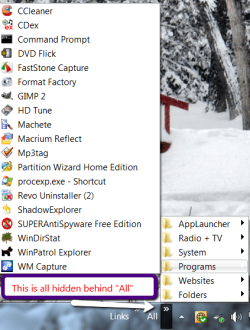
I never really cared for Quick Launch because you cannot properly organize your stuff. And the teskbar is nice for the essentials, but if you have a lot of shortcuts (50 or more), neither the Quick Launch nor the taskbar will do. For that I suggest to use the toolbars. They are so much more flexible, very easy to maintain and you can stuff anything into them: http://www.sevenforums.com/tutorials/72092-toolbars-how-use-windows-7-vista.html

But for the really quick access items, I use Rocket Dock. And if you "hide" it, it is not even in the way. It takes any shortcut (files, folders, URLs, devices, etc.)

Example:
 

Attachments

  • 2011-03-05_2037.png
    2011-03-05_2037.png
    61 KB · Views: 5

My Computer My Computer

Computer Manufacturer/Model Number
HP, Dell, Gateway, Toshiba - 4 laptops and 2 desktops
OS
Vista, Windows7, Mint Mate, Zorin, Windows 8
CPU
from 1.6GHz Duo to i7
Monitor(s) Displays
2x HP w2207
Hard Drives
5x HDD, 7x SSD, 12x Externals
Keyboard
with trackball - no mices
Mouse
Trackball mice
Internet Speed
DSL 6000
So pinning you items to your Taskbar makes it like a QuickLaunch icon?
It does on mine. Just click it and go. Not even administrator prompts from the Taskbar launch- yet - for programs I have pinned.

Mike

Cool Cool. But when I click to open a program, Chrome for example, the "Quick Launch" "disappears" and becomes a task bar tab. Now I have to Right Click->Open New Browser..

Not to get technical or anything, but it kinda defeats the purpose after... I go from 1 click to 2 clicks. It's 0.50 faster..

It's things like this that I have a hard time taking in. I find it hard that the people at MS tried to find a way to open things faster when it was already just a click away :sarc:

/NewFrustration

Windows Live Installer. F**K off MS with all that damn bloat-ware you try to make me install when all I want it a damn MSN Messenger. It's small things like this that make me rage about MS. Always trying to force things onto you. It's hella annoying. Then not to make matters works, you have to "Compability hack" msnmsgr.exe to make it a tray icon. Why on earth would they leave a dormant program like MSN stay cluttered in my taskbar when I "x-out" the window. They invented the Icon Tray and look past it now :huh:
 

My Computer My Computer

OS
7 Ultimate 64Bit
I'm just blown away at how few complaints for W7 there are. I'm sorry the thread starter isn't happy but we all know that W7 represents a huge step forward and for this I can't wait for 8. That being said I too enjoyed XP in it's day but after acquainting myself with W7 it's a no brainier....Go forward, move ahead, try to detect it, it's not too late.....to whip it, whip it good !
LOL. All I needed was the rhythm of "Go forward..." and I knew the rest. The song began playing in my head.

Thanks for the laugh. I needed it. :)
 

My Computer My Computer

Computer type
PC/Desktop
Computer Manufacturer/Model Number
Wordsworth 5000
OS
Windows 10 Pro 64 bit
CPU
Core i7 6700K Skylake 4.0GHz
Motherboard
Asus Z170 Pro
Memory
Corsair Vengeance LPX DDR4 32GB 3000MHz
Graphics Card(s)
Asus Radeon RX480 Strix 8GB
Sound Card
Asus Xonar DSX
Monitor(s) Displays
HP 2709m
Screen Resolution
1920x1080
Hard Drives
Intel 600p M.2 PCIe NVMe SSD 512GB; Intel 335 SSD 240GB ;Western Digital Caviar Black 1TB
PSU
Thermaltake Toughpower Grand Platinum 850W
Case
Lian Li PC-B70
Cooling
CPU-Noctua NH D15, GPU-Stock, Case-Noctua 2x140, 2x120
Keyboard
Microsoft Natural Ergo 4000
Mouse
Microsoft Wireless Optical 1000
Internet Speed
Cable
Other Info
HP bd 340,
HP bd 240,
Klipsch Promedia 5.1 THX
Sp3c5, give it time and I expect you'll like it. I too came to Seven from XP, having skipped Vista, and there is a learning curve; but I quickly came to forget XP.
 

My Computer My Computer

Computer type
PC/Desktop
Computer Manufacturer/Model Number
Wordsworth 5000
OS
Windows 10 Pro 64 bit
CPU
Core i7 6700K Skylake 4.0GHz
Motherboard
Asus Z170 Pro
Memory
Corsair Vengeance LPX DDR4 32GB 3000MHz
Graphics Card(s)
Asus Radeon RX480 Strix 8GB
Sound Card
Asus Xonar DSX
Monitor(s) Displays
HP 2709m
Screen Resolution
1920x1080
Hard Drives
Intel 600p M.2 PCIe NVMe SSD 512GB; Intel 335 SSD 240GB ;Western Digital Caviar Black 1TB
PSU
Thermaltake Toughpower Grand Platinum 850W
Case
Lian Li PC-B70
Cooling
CPU-Noctua NH D15, GPU-Stock, Case-Noctua 2x140, 2x120
Keyboard
Microsoft Natural Ergo 4000
Mouse
Microsoft Wireless Optical 1000
Internet Speed
Cable
Other Info
HP bd 340,
HP bd 240,
Klipsch Promedia 5.1 THX
I disagree with a lot of your statements. If you got to the Default program settings, you can just set Windows Media Player 12 to open up your .gif images. Trust me, I tried it and the .gif pictures move on Windows Media Player 12 or better yet like what someone else suggested, get a third party program to do that for you. There is a ton of advantage on Windows 7 over XP and I find XP's interface kind of antique when I use it. I suggest you watch tutorials of Windows 7 on Youtube so you get an better picture of how its done. And yes, read manuals, guides and tutorials. There's a lot of them on the Internet which you can read or watch for free. Youtube for example. Discover for yourself before you immediately arrive to such conclusions and rants.

GIF pictures play at light speed. Useless

Did you even read carefully what I was saying?? Read a manual, watch tutorials and stuff and I am beginning to think you are rather being offensive on this forum. Sorry for that. And the Aero snap features are cool too. You can drag a Window into the top of the screen and it would maximize, drag it to the side, it will fill half of the screen. Click on the rectangular button on the furthest right side of the taskbar and all your Windows get minimized and the Desktop is shown. Looking at the Control Panel alone, you see far more control choices than that on old Windows XP, a testimony of how much better Windows 7 is. The taskbar and Start Menu jumplists let you see and open recently opened files. And the Search function on the Start Menu can help you locate programs and files in your computer. Of course there are so much more new things in it that are helpful in one way or another. I actually find those as very helpful and a ton of improvements than Windows XP.
 

My Computer My Computer

Computer Manufacturer/Model Number
Custom Built
OS
Windows 7 Ultimate 32 Bit, Windows Developer Preview, Linux Mint 9 Gnome 32 Bit
CPU
Intel Pentium Dual CPU E2180@2GHz
Motherboard
Elitegroup 671T-M3
Graphics Card(s)
NVIDIA GeForce 7200 GS
Monitor(s) Displays
AOC TFT1560 15" LCD Monitor
Screen Resolution
1024x768
Keyboard
Logitech USB Keyboard
So pinning you items to your Taskbar makes it like a QuickLaunch icon?
I never really cared for Quick Launch because you cannot properly organize your stuff. And the teskbar is nice for the essentials, but if you have a lot of shortcuts (50 or more), neither the Quick Launch nor the taskbar will do. For that I suggest to use the toolbars. They are so much more flexible, very easy to maintain and you can stuff anything into them

But for the really quick access items, I use. And if you "hide" it, it is not even in the way. It takes any shortcut (files, folders, URLs, devices, etc.)

Thanks for the tip. Upon watching the video it just makes me wonder more. You have two essential items that have always been around with Windows. That is the desktop ,obviously, and the great Start Menu (Not being sarcastic). In the video you showed me, it "bypasses" the Start Menu by create toolbars. Which XP has FYI. Telling me to use it now it like Apple and "Facetime". Video calls have been around way before "Facetime". No need to put old techniques on a silver platter. Every time I had a fresh install of XP, the first things I would always do is remove that damn "Links" bar beside the Icon Tray. It's what my Start Menu is for.

Second thing he mentions is he always likes to have a clean desktop. I respect that. He then continues to say that he never has more then two Icons on it. I beg your pardon but what are you using for then? The desktop that is.

I'm sorry, but I find that more people show me newer techniques, I can't help but ask myself; What makes this "Y" technique different or that much better from the previous "X" technique?

On another note, I don't want anybody thinking I actually hate Windows 7. My thread might be misleading, but it was more for; "7, I hate because of..."

I think the new OS from MS is fantastic and a great upgrade. Smooth and very appealing to use. Just a lot of the stuff out there makes wonder what they were thinking.

 
Last edited:

My Computer My Computer

OS
7 Ultimate 64Bit
I disagree with a lot of your statements. If you got to the Default program settings, you can just set Windows Media Player 12 to open up your .gif images. Trust me, I tried it and the .gif pictures move on Windows Media Player 12 or better yet like what someone else suggested, get a third party program to do that for you. There is a ton of advantage on Windows 7 over XP and I find XP's interface kind of antique when I use it. I suggest you watch tutorials of Windows 7 on Youtube so you get an better picture of how its done. And yes, read manuals, guides and tutorials. There's a lot of them on the Internet which you can read or watch for free. Youtube for example. Discover for yourself before you immediately arrive to such conclusions and rants.

GIF pictures play at light speed. Useless

Did you even read carefully what I was saying?? Read a manual, watch tutorials and stuff and I am beginning to think you are rather being offensive on this forum. Sorry for that. And the Aero snap features are cool too. You can drag a Window into the top of the screen and it would maximize, drag it to the side, it will fill half of the screen. Click on the rectangular button on the furthest right side of the taskbar and all your Windows get minimized and the Desktop is shown. Looking at the Control Panel alone, you see far more control choices than that on old Windows XP, a testimony of how much better Windows 7 is. The taskbar and Start Menu jumplists let you see and open recently opened files. And the Search function on the Start Menu can help you locate programs and files in your computer. Of course there are so much more new things in it that are helpful in one way or another. I actually find those as very helpful and a ton of improvements than Windows XP.


I guess I should of cut the quote early, my main focus was about WMP. I agree with reading and everything but telling me Windows Media Player is a solution was almost a joke. I have been using the Aero functions. They are great. However, this is not what I am complaining about. There are many things I have found fun. Like running command lines straight from the Start Menu in the "always to be displayed" search bar. Something I never got to experience since I'm a straight from XP to 7 OS.
Don't get me wrong. There are great improvements, just some a very questionable.
 

My Computer My Computer

OS
7 Ultimate 64Bit
WHOOOOOOOSHHHHHHHHHHHHH!

The Wind blow my hair...loved that XP since before SP1....i can only love 7 more than nobody can think! It's still a MS Windows OS and you can't get lost with it!

I beat MS:

It wasn't my idea!
 

My Computer My Computer

Computer type
PC/Desktop
Computer Manufacturer/Model Number
Custom Build
OS
Windows 7 Professional SP1 - x64 [Non-UEFI Boot]
CPU
Ivy Bridge Core i5 3570K (Delidded)
Motherboard
Asus P8Z77-V LE PLUS
Memory
G.Skill "Ares" DDR3 PC3-12800 - 1600MHz (16Gb)
Graphics Card(s)
Asus Dual-RX480-O4G
Sound Card
Creative Sound Blaster Z w/5.1 sound system
Monitor(s) Displays
Asus IPS 23"
Screen Resolution
16/9
Hard Drives
Internal:
500Go Sata 6Gb/s (x2)
500Go Sata 3Gb/s (x2)
SSD 60Go Sata 6Gb/s
PSU
In Win C 900W Series 80+ Platinum
Case
Thermaltake Chaser A71
Cooling
Custom Water Cooling Loop
Keyboard
Cooler Master QuickFire XTi
Mouse
Razer Imperator 2012 (4G)
Antivirus
MSE
Browser
IE 11.0.xxx Rtm
Other Info
"Raid0" with Intel Smart Response Technology (HDD/SSD)

My Computer My Computer

Computer type
Laptop
Computer Manufacturer/Model Number
HP ENVY 17-1150eg
OS
Windows 10 Pro x64 EN-GB
CPU
1.6 GHz Intel Core i7-720QM Processor
Memory
6 GB
Graphics Card(s)
ATI Mobility Radeon HD 5850 Graphics
Sound Card
Beats sound system with integrated subwoofer
Monitor(s) Displays
17" laptop display, 22" LED and 32" Full HD TV through HDMI
Screen Resolution
1600*900 (1), 1920*1080 (2&3)
Hard Drives
Internal: 2 x 500 GB SATA Hard Disk Drive 7200 rpm
External: 2TB for backups, 3TB USB3 network drive for media
Cooling
As Envy runs a bit warm, I have it on a Cooler Master pad
Keyboard
Logitech diNovo Media Desktop Laser (bluetooth)
Mouse
Logitech Performance Mouse MX
Internet Speed
50/10 Mbps VDSL
Antivirus
Windows Defender 4.3.9431.0
Browser
Maxthon 3.5.2., IE11
Cool Cool. But when I click to open a program, Chrome for example, the "Quick Launch" "disappears" and becomes a task bar tab. Now I have to Right Click->Open New Browser..
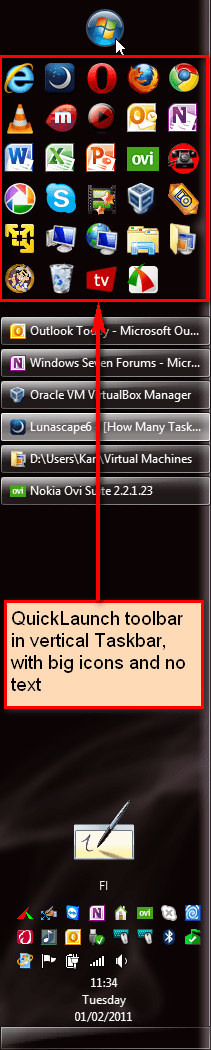
If you prefer the traditional QuickLaunch toolbar, it's still present in Seven, it's just not enabled by default. http://www.sevenforums.com/tutorials/888-quick-launch-enable-disable.html?ltr=Q

Here's mine, in my vertical taskbar on the left side of the desktop:

View attachment 141955

Kari

Thanks for the tut man! Although Iv'e managed to make a partial blend of XP and 7 that suits my needs. On the other, the side Taskbar made me realize I could have longer titles on the Taskbar tabs...great for multiple opened browsers.
 

My Computer My Computer

OS
7 Ultimate 64Bit
So pinning you items to your Taskbar makes it like a QuickLaunch icon?
I never really cared for Quick Launch because you cannot properly organize your stuff. And the teskbar is nice for the essentials, but if you have a lot of shortcuts (50 or more), neither the Quick Launch nor the taskbar will do. For that I suggest to use the toolbars. They are so much more flexible, very easy to maintain and you can stuff anything into them

But for the really quick access items, I use. And if you "hide" it, it is not even in the way. It takes any shortcut (files, folders, URLs, devices, etc.)

Thanks for the tip. Upon watching the video it just makes me wonder more. You have two essential items that have always been around with Windows. That is the desktop ,obviously, and the great Start Menu (Not being sarcastic). In the video you showed me, it "bypasses" the Start Menu by create toolbars. Which XP has FYI. Telling me to use it now it like Apple and "Facetime". Video calls have been around way before "Facetime". No need to put old techniques on a silver platter. Every time I had a fresh install of XP, the first things I would always do is remove that damn "Links" bar beside the Icon Tray. It's what my Start Menu is for.

Second thing he mentions is he always likes to have a clean desktop. I respect that. He then continues to say that he never has more then two Icons on it. I beg your pardon but what are you using for then? The desktop that is.

I'm sorry, but I find that more people show me newer techniques, I can't help but ask myself; What makes this "Y" technique different or that much better from the previous "X" technique?

On another note, I don't want anybody thinking I actually Windows 7. My thread might be misleading, but it was more for; "7, I hate because of..."

I think the new OS from MS is fantastic and a great upgrade. Smooth and very appealing to use. Just a lot of the stuff out there makes wonder what they were thinking.
I think you did not catch that I made this video tutorial and that I implemented it that way. But you are probably best advised to go back to XP and drive a Ford Model T.
 

My Computer My Computer

Computer Manufacturer/Model Number
HP, Dell, Gateway, Toshiba - 4 laptops and 2 desktops
OS
Vista, Windows7, Mint Mate, Zorin, Windows 8
CPU
from 1.6GHz Duo to i7
Monitor(s) Displays
2x HP w2207
Hard Drives
5x HDD, 7x SSD, 12x Externals
Keyboard
with trackball - no mices
Mouse
Trackball mice
Internet Speed
DSL 6000
I never really cared for Quick Launch because you cannot properly organize your stuff. And the teskbar is nice for the essentials, but if you have a lot of shortcuts (50 or more), neither the Quick Launch nor the taskbar will do. For that I suggest to use the toolbars. They are so much more flexible, very easy to maintain and you can stuff anything into them

But for the really quick access items, I use. And if you "hide" it, it is not even in the way. It takes any shortcut (files, folders, URLs, devices, etc.)

Thanks for the tip. Upon watching the video it just makes me wonder more. You have two essential items that have always been around with Windows. That is the desktop ,obviously, and the great Start Menu (Not being sarcastic). In the video you showed me, it "bypasses" the Start Menu by create toolbars. Which XP has FYI. Telling me to use it now it like Apple and "Facetime". Video calls have been around way before "Facetime". No need to put old techniques on a silver platter. Every time I had a fresh install of XP, the first things I would always do is remove that damn "Links" bar beside the Icon Tray. It's what my Start Menu is for.

Second thing he mentions is he always likes to have a clean desktop. I respect that. He then continues to say that he never has more then two Icons on it. I beg your pardon but what are you using for then? The desktop that is.

I'm sorry, but I find that more people show me newer techniques, I can't help but ask myself; What makes this "Y" technique different or that much better from the previous "X" technique?

On another note, I don't want anybody thinking I actually Windows 7. My thread might be misleading, but it was more for; "7, I hate because of..."

I think the new OS from MS is fantastic and a great upgrade. Smooth and very appealing to use. Just a lot of the stuff out there makes wonder what they were thinking.
I think you did not catch that I made this video tutorial and that I implemented it that way. But you are probably best advised to go back to XP and drive a Ford Model T.


My grandfather owns a Model T, I take your advise and enjoy every second of it. Something you won't be experiencing now will you?
 

My Computer My Computer

OS
7 Ultimate 64Bit
Well here is my desktop as of now. I thank Kari for the wonderful help!
 

Attachments

  • MyDesktop.png
    MyDesktop.png
    414.7 KB · Views: 49

My Computer My Computer

OS
7 Ultimate 64Bit
Take it easy, here are some enjoyed guys whilling to help you find windows 7 easier & attractive.

Your desktop: that's a start, no?
 

My Computer My Computer

Computer type
PC/Desktop
Computer Manufacturer/Model Number
Custom Build
OS
Windows 7 Professional SP1 - x64 [Non-UEFI Boot]
CPU
Ivy Bridge Core i5 3570K (Delidded)
Motherboard
Asus P8Z77-V LE PLUS
Memory
G.Skill "Ares" DDR3 PC3-12800 - 1600MHz (16Gb)
Graphics Card(s)
Asus Dual-RX480-O4G
Sound Card
Creative Sound Blaster Z w/5.1 sound system
Monitor(s) Displays
Asus IPS 23"
Screen Resolution
16/9
Hard Drives
Internal:
500Go Sata 6Gb/s (x2)
500Go Sata 3Gb/s (x2)
SSD 60Go Sata 6Gb/s
PSU
In Win C 900W Series 80+ Platinum
Case
Thermaltake Chaser A71
Cooling
Custom Water Cooling Loop
Keyboard
Cooler Master QuickFire XTi
Mouse
Razer Imperator 2012 (4G)
Antivirus
MSE
Browser
IE 11.0.xxx Rtm
Other Info
"Raid0" with Intel Smart Response Technology (HDD/SSD)
Back
Top