7, I Hate!

Well here is my desktop as of now.
One thing I would change: I assume you recognize the icons of apps you put in QuickLaunch, so explaining name strings are not needed. De-selecting Show Text in QuickLaunch gives you more space to use for icons, showing only the icons without name strings.

Right click an empty spot of QuicLaunch to show context menu, choose View submenu and uncheck Show Text. Notice that View menu item in QuickLaunch context menu is not visible if Taskbar is locked.

Kari
 

My Computer My Computer

Computer type
Laptop
Computer Manufacturer/Model Number
HP ENVY 17-1150eg
OS
Windows 10 Pro x64 EN-GB
CPU
1.6 GHz Intel Core i7-720QM Processor
Memory
6 GB
Graphics Card(s)
ATI Mobility Radeon HD 5850 Graphics
Sound Card
Beats sound system with integrated subwoofer
Monitor(s) Displays
17" laptop display, 22" LED and 32" Full HD TV through HDMI
Screen Resolution
1600*900 (1), 1920*1080 (2&3)
Hard Drives
Internal: 2 x 500 GB SATA Hard Disk Drive 7200 rpm
External: 2TB for backups, 3TB USB3 network drive for media
Cooling
As Envy runs a bit warm, I have it on a Cooler Master pad
Keyboard
Logitech diNovo Media Desktop Laser (bluetooth)
Mouse
Logitech Performance Mouse MX
Internet Speed
50/10 Mbps VDSL
Antivirus
Windows Defender 4.3.9431.0
Browser
Maxthon 3.5.2., IE11
Well here is my desktop as of now.
One thing I would change: I assume you recognize the icons of apps you put in QuickLaunch, so explaining name strings are not needed. De-selecting Show Text in QuickLaunch gives you more space to use for icons, showing only the icons without name strings.

Right click an empty spot of QuicLaunch to show context menu, choose View submenu and uncheck Show Text. Notice that View menu item in QuickLaunch context menu is not visible if Taskbar is locked.

Kari

Thanks Alot Again! I took away the text and sported Larger Icons. Looks really clean.
 

My Computer My Computer

OS
7 Ultimate 64Bit
I like it with big icons, too, without name strings. You can see in the screenshot I posted a few posts ago that I have 29 apps in QuickLaunch; it makes the QL toolbar quite a big but using a vertical Taskbar it still leaves me more space for open apps than most users using Taskbar traditionally at bottom have. It also eliminates need for a third party dock, leaving more space on desktop.

Kari
 

My Computer My Computer

Computer type
Laptop
Computer Manufacturer/Model Number
HP ENVY 17-1150eg
OS
Windows 10 Pro x64 EN-GB
CPU
1.6 GHz Intel Core i7-720QM Processor
Memory
6 GB
Graphics Card(s)
ATI Mobility Radeon HD 5850 Graphics
Sound Card
Beats sound system with integrated subwoofer
Monitor(s) Displays
17" laptop display, 22" LED and 32" Full HD TV through HDMI
Screen Resolution
1600*900 (1), 1920*1080 (2&3)
Hard Drives
Internal: 2 x 500 GB SATA Hard Disk Drive 7200 rpm
External: 2TB for backups, 3TB USB3 network drive for media
Cooling
As Envy runs a bit warm, I have it on a Cooler Master pad
Keyboard
Logitech diNovo Media Desktop Laser (bluetooth)
Mouse
Logitech Performance Mouse MX
Internet Speed
50/10 Mbps VDSL
Antivirus
Windows Defender 4.3.9431.0
Browser
Maxthon 3.5.2., IE11
I like it with big icons, too, without name strings. You can see in the screenshot I posted a few posts ago that I have 29 apps in QuickLaunch; it makes the QL toolbar quite a big but using a vertical Taskbar it still leaves me more space for open apps than most users using Taskbar traditionally at bottom have. It also eliminates need for a third party dock, leaving more space on desktop.

Kari

I could not have said it better myself!
 

My Computer My Computer

OS
7 Ultimate 64Bit
I'm wondering how long it will be until these threads end up with an instant ban for the thread starter.

Just because some things have changed from XP, doesn't suddenly make Windows 7 bad. Microsoft has to make an OS for hundreds of millions of people...not just you. If you want an OS that is fully customized out of the box exactly the way you like it, no one, I repeat, no one is stopping you from recompiling your own Linux kernel.

I'll borrow your car analogy. If you buy an Accord, and 8 years later you buy a new one...many things will change. New features and technology are added, so naturally the dashboard will change. So will the ride feel in the car. Is that a reason to get your underoos all in a bunch....or does it just mean you need to get used to what's new? That "what's new" is what makes Windows 7 so great.

We're here to help, for free, volunteering our time...so please don't insult us by asking how much we are paid to defend a great product. If you truly don't like Windows 7, then there's no reason why you can't create your own Linux distro...and I'm being completely serious.

Sorry for the rant, but you've been one in a long line of people to play this card. Nothing riles me up on here except people getting made over points that don't warrant the anger, and then making it difficult for those volunteering to provide assistance. Hopefully, now that you've been told about those threads, we can dispense with the crap and get all your questions answered. If you have more, keep asking.

Ah, there goes my blood pressure...falling.
 

My Computer My Computer

OS
Windows 7 Ultimate x64 SP1
CPU
Intel Core i7-2600
Motherboard
Gigabyte GA-P67A-UD3P-B3
Memory
12 GB Patriot Extreme DDR3-1333
Graphics Card(s)
Nvidia GTX 470
Monitor(s) Displays
Dell UltraSharp 2209WA
Hard Drives
OCZ Agility3 240 GB, WD5001AALS, WD7501AALS
PSU
OCZ ModStream 700W
Case
CoolerMaster HAF 912 Advanced
Cooling
CoolerMaster Hyper 212 Plus
Hey guys,

I just came from XP to 7 Ultimate 64Bit to be able to utilize my 6GB of RAM. As of now, 7 is making me made nuts as there are a few things that drive to the point where I feel like I'm using a Mac because it simply just does not make any sense!

First thing I realized, I can't view GIFs in Photo Viewer no more and instead opens up IE (kind alike a Mac). WTFFFF. I have Chrome installed FFS. I don't want to be launching IE and even less just to view a bloody GIF image. So I right click it, Open With... I use the Search Box to find Chrome and yields no results. So then I try Photo Viewer and it's just a still image. At this point, I'm ready to throw the F*****G thing out the window. Dumbest thing I have ever seen!

Next in line; when I have Windows Explorer open and I want to navigate to a new destination, I click the drop down menu and... THERE IS NOTHING! Instead I got to open that Navigation Pane which is a total eye sore! Why include a F*****G drop down box and not include any relevant directories? Instead it's a very few list of recently opened, not important folders! What happened to XP style? That was functional!

The weirdest thing by far is the whole "Libraries" thing. What's the damn point? It's so annoying and I see it to be completely useless. Was it made for morons who can't properly find the desired folders so they go and mash em' up in some "virtual" folder? If I want my X and Y folder in the same directory ill just put em' together! What's the problem? You don't want your X and Y folder to be in the same directory? Move em'! It's like a "loop" folder.. I just really don't get it... Your Windows Explorer IS your library! Is the tool you use to organize your folders! So why would I need "Libraries"??

At this very moment, I've never raged so hard about an OS. I feel like Microsoft went to Mac route and screwed up even harder. That damn Windows Explorer icon beside the Start button is like Macs "Finder". Useless Junk icon. I open it up and brings me right to Libraries.. I'm going to throw this machine out onto a busy highway.

Now where did I put my XP CD... Damnit..

/EndRage

/Begin Question

If someone can please help me out with the Drop Down menu in Windows Explorer to show relevant locations it would be greatly appreciated!

And a way to view GIFs "normally".


/Thanks guys!

Hello Sp3c5,

I too came to Win 7 x64 directly from XP. At first I was "horrified" with what appeared to be unnecessary features, tons of overhead and complications, and I wasn't a happy camper.

But 6 Months later, after a little practice and studying, I now think the Win 7 X64 operating system is the best OS in the world (just my opinion). I will admit that to enjoy Win 7 x64 you will need to load a few useful (and usually free) utilities and I will admit that in general the "hardware requirements" for a nice Win 7 system are greater than what was required for an XP System, the REWARDS, once you get over the "hurdle" are very well worth it.

At first, I felt lost, going from XP to Win 7 x64 but now I don't want to use anything else. Trust me on this - it just takes time and a bit of effort. There is a lot of free help on this forum. Good Luck and I hope you stick with it :):):)
 

My Computer My Computer

Computer Manufacturer/Model Number
Alienware Aurora
OS
Win 7 Ultimate x64
CPU
Core I7 980X O.C. to 4.0 Ghz
Motherboard
Custom Intel mATX (Bios ver A10)
Memory
12GB 1600 mhz triple channel DDR3 - Kingston
Graphics Card(s)
ATI Radeon HD 5970 2GB Video Card
Sound Card
Creative Labs Titanium sound blaster
Monitor(s) Displays
30" Dell LCD
Screen Resolution
2560 x 1600
Hard Drives
240 GB OCZ Vertex 2 SSD
256 GB Samsung V2 SSD
2TB WD Black Caviar 7200 rpm SATA3
600GB WD Velociraptor 10,000 rpm SATA3
3TB WD MyBook Essential USB 3.0 7200 rpm External
PSU
850 Watt
Case
Alienware Aurora
Cooling
Water
Keyboard
Logitech G15 (original version)
Mouse
Logitech MX1000 Laser - Wireless
Internet Speed
Cable 22 Mb/sec download
Other Info
USB 3.0,
Blue Ray DVD Read/Writer
Bose Companion 3 Speakers
WRT54G Wireless Router
...I will admit that to enjoy Win 7 x64 you will need to load a few useful (and usually free) utilities...
I wonder how many of us loved XP right out of the box?

I can remember dreading doing a clean install because it seemed to take two weeks before I had every single last thing back the way I wanted it. (I didn't deal with disc images much in those days, though I don't know why.) To me, any untweaked OS wears like an off-the-rack suit; it'll do, but it's not so darn comfortable. :p
 

My Computer My Computer

Computer Manufacturer/Model Number
Self
OS
Main - Windows 7 Pro SP1 64-Bit; 2nd - Windows Server 2008 R2
CPU
Main - Core i7 2600K; 2nd - Core i7 920
Motherboard
Main - Asus P8Z68-V Pro/Gen3; 2nd - Gigabyte GA-EX58-UDR3
Memory
Main - 16GB Corsair Vengeance; 2nd - 12GB Corsair Vengeance
Graphics Card(s)
Main - XFX Radeon 6870 1GB; 2nd - XFX Radeon 4870 1GB
Sound Card
Both: Onboard Realtek Azalia
Monitor(s) Displays
Main - Hann 25" + I-INC 25" + Acer 23"; 2nd - Upgrading Soon
Screen Resolution
Main - 1920x1080 (All Three Monitors); 2nd - Upgrading Soon
Hard Drives
Main - (1) Crucial M4 128GB (Boot)
Main - (1) Seagate 2TB 64MB Cache (Data)
Main - (1) Seagate 2TB 64MB Cache (Data Backup)
2nd - (1) Intel X25-M SSD 80GB (Boot)
2nd - (3) Seagate 1TB 32MB Cache (Data Backup)
2nd - (1) Seagate 320GB (Because)
PSU
Main - OCZ 600W Modular; 2nd - OCZ 600W
Case
Main - Thermaltake Element G; 2nd - NZXT something or other
Cooling
Main - Corsair H80; 2nd - Prolimatech Megahalems
Keyboard
Main - Razer Reclusa; 2nd - Old MS Keyboard
Mouse
Main - Logitech MX Revolution; 2nd - Old MS Mouse
Internet Speed
20Mbps Time-Warner Cable
Windows Live Installer. F**K off MS with all that damn bloat-ware you try to make me install when all I want it a damn MSN Messenger. It's small things like this that make me rage about MS.
I find it quite hysterical that your threat was no move away from MS and go to Apple then.

All in all, Windows is a commercial operating system there to satisfy millions. There is more or less 1 way and 1 standard. While you do have ability to modify it somewhat, you don't have complete and total control of the environment. For those who want complete and total control, there are many linux distros out there and they don't decide a whole heck of a lot for you. But then again, there are hundreds of distros, with multiple desktop managers, and no standards. Which makes it a bit confusing and difficult to use when everybody is doing or using something completely different.

Overall, I like Windows 7 a lot better than XP. It looks nicer, it's far more stable and it doesn't seem to fall apart after weeks, months, years of use. Does this mean that I adore every single aspect???....no. But I can deal with a few annoyances for the whole lot of improvements that I feel that I get.

The Libraries feature I actually like. I use it, I find it convenient. It allows me to easily aggregate a few different areas together in one view so that I don't have to navigate all over.
 

My Computer My Computer

Computer Manufacturer/Model Number
Self-Built in July 2009
OS
Windows 7 Ultimate x64
CPU
Intel Q9550 2.83Ghz OC'd to 3.40Ghz
Motherboard
Gigabyte GA-EP45-UD3R rev. 1.1, F12 BIOS
Memory
8GB G.Skill PI DDR2-800, 4-4-4-12 timings
Graphics Card(s)
EVGA 1280MB Nvidia GeForce GTX570
Sound Card
Realtek ALC899A 8 channel onboard audio
Monitor(s) Displays
23" Acer x233H
Screen Resolution
1920x1080
Hard Drives
Intel X25-M 80GB Gen 2 SSD
Western Digital 1TB Caviar Black, 32MB cache. WD1001FALS
PSU
Corsair 620HX modular
Case
Antec P182
Cooling
stock
Keyboard
ABS M1 Mechanical
Mouse
Logitech G9 Laser Mouse
Internet Speed
15/2 cable modem
Other Info
Windows and Linux enthusiast. Logitech G35 Headset.
Well here is my desktop as of now. I thank Kari for the wonderful help!
I'd also recommend you to change your desktop background. Personalize>>Desktop Background and from the drop down list, you can choose to set image folders as wallpaper slideshows.
 

My Computer My Computer

Computer Manufacturer/Model Number
Custom Built
OS
Windows 7 Ultimate 32 Bit, Windows Developer Preview, Linux Mint 9 Gnome 32 Bit
CPU
Intel Pentium Dual CPU E2180@2GHz
Motherboard
Elitegroup 671T-M3
Graphics Card(s)
NVIDIA GeForce 7200 GS
Monitor(s) Displays
AOC TFT1560 15" LCD Monitor
Screen Resolution
1024x768
Keyboard
Logitech USB Keyboard
I Like your point of view.

Hey guys,

I just came from XP to 7 Ultimate 64Bit to be able to utilize my 6GB of RAM. As of now, 7 is making me made nuts as there are a few things that drive to the point where I feel like I'm using a Mac because it simply just does not make any sense!

First thing I realized, I can't view GIFs in Photo Viewer no more and instead opens up IE (kind alike a Mac). WTFFFF. I have Chrome installed FFS. I don't want to be launching IE and even less just to view a bloody GIF image. So I right click it, Open With... I use the Search Box to find Chrome and yields no results. So then I try Photo Viewer and it's just a still image. At this point, I'm ready to throw the F*****G thing out the window. Dumbest thing I have ever seen!

Next in line; when I have Windows Explorer open and I want to navigate to a new destination, I click the drop down menu and... THERE IS NOTHING! Instead I got to open that Navigation Pane which is a total eye sore! Why include a F*****G drop down box and not include any relevant directories? Instead it's a very few list of recently opened, not important folders! What happened to XP style? That was functional!

The weirdest thing by far is the whole "Libraries" thing. What's the damn point? It's so annoying and I see it to be completely useless. Was it made for morons who can't properly find the desired folders so they go and mash em' up in some "virtual" folder? If I want my X and Y folder in the same directory ill just put em' together! What's the problem? You don't want your X and Y folder to be in the same directory? Move em'! It's like a "loop" folder.. I just really don't get it... Your Windows Explorer IS your library! Is the tool you use to organize your folders! So why would I need "Libraries"??

At this very moment, I've never raged so hard about an OS. I feel like Microsoft went to Mac route and screwed up even harder. That damn Windows Explorer icon beside the Start button is like Macs "Finder". Useless Junk icon. I open it up and brings me right to Libraries.. I'm going to throw this machine out onto a busy highway.

Now where did I put my XP CD... Damnit..

/EndRage

/Begin Question

If someone can please help me out with the Drop Down menu in Windows Explorer to show relevant locations it would be greatly appreciated!

And a way to view GIFs "normally".


/Thanks guys!

Great stuff!
I have wanted to lash out at this Windows shit!
its F........g ridiculous!
 

My Computer My Computer

Computer Manufacturer/Model Number
Custom Built
OS
Windows 7 Ultimate 32bit
CPU
Intel Dual-Core 5200
Motherboard
Asus
Memory
4096
Graphics Card(s)
nVidia 9600GT
Sound Card
Asus Xonar D1
Monitor(s) Displays
HP w1907v
Screen Resolution
1440X900
Hard Drives
Samsung 500Gb
WD Caviar 250Gb
PSU
AeroCool
Case
AeroCool i-Curve
Keyboard
Logitech
Mouse
Microsoft Wireless
Internet Speed
iBurst Wireless
Other Info
Hauppauge TV Tuner
Gigabit LAN to Lounge Media Pc
Well here is my desktop as of now. I thank Kari for the wonderful help!
I'd also recommend you to change your desktop background. Personalize>>Desktop Background and from the drop down list, you can choose to set image folders as wallpaper slideshows.

Thanks for the tip but I actually like the default color tone it gives to Windows aero. I also like this forum for how appealling it is. The blues and whites blend nicely.
 

My Computer My Computer

OS
7 Ultimate 64Bit
Great stuff!
I have wanted to lash out at this Windows shit!
its F........g ridiculous!

Lol thanks for agreeing to my point of views. Most stuff is fixable by bypassing it in some weird manner. Like trying to pin a folder to the taskar. It frustrated me alot. I would make a shorcut, drag it to the taskbar to pin it, open it and... Back to the god damned libraries folder. Lol. It was not making any sense to me. :shock:

Cheers
 

My Computer My Computer

OS
7 Ultimate 64Bit
Great stuff!
I have wanted to lash out at this Windows shit!
its F........g ridiculous!

Lol thanks for agreeing to my point of views. Most stuff is fixable by bypassing it in some weird manner. Like trying to pin a folder to the taskar. It frustrated me alot. I would make a shorcut, drag it to the taskbar to pin it, open it and... Back to the god damned libraries folder. Lol. It was not making any sense to me. :shock:

Cheers
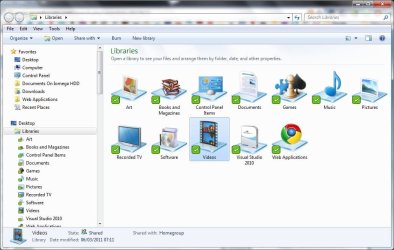
I think the Libraries function is a very good feature if you learn how to use it. It puzzled me a bit at first but one good summary of that it is one place you can go to check a collection of similar files or data which are stored in different locations of the computer at the same time be it pictures, videos, documents, etc.. But of course you have to modify this yourself but believe me, its very easy and I thank God, they put this function.

In my case, I have a folder in my drive D: called "Videos" where I keep my video files of course but its a separate location from the "My Videos" area on the user folder. The solution: add both the "My Videos" folder and the "Videos" folder from my drive D: to the Videos Library so I can view them all as an organized list at the same time. And I still have the option to add even more locations to this library. You can do the same thing for your other libraries such as music, pictures and documents. You even have the option to make new libraries. If you wanna make it neat, you should store similar or relevant files on the folders you add into your library. Here is a screenshot demo I have for you. In my case, all the files you can see on the list are all videos, I keep my other files on their designated libraries.
 

Attachments

  • Library System.png
    Library System.png
    125.8 KB · Views: 21

My Computer My Computer

Computer Manufacturer/Model Number
Custom Built
OS
Windows 7 Ultimate 32 Bit, Windows Developer Preview, Linux Mint 9 Gnome 32 Bit
CPU
Intel Pentium Dual CPU E2180@2GHz
Motherboard
Elitegroup 671T-M3
Graphics Card(s)
NVIDIA GeForce 7200 GS
Monitor(s) Displays
AOC TFT1560 15" LCD Monitor
Screen Resolution
1024x768
Keyboard
Logitech USB Keyboard
I think the Libraries function is a very good feature if you learn how to use it. It puzzled me a bit at first but one good summary of that it is one place you can go to check a collection of similar files or data which are stored in different locations of the computer at the same time be it pictures, videos, documents, etc.. But of course you have to modify this yourself but believe me, its very easy and I thank God, they put this function.

In my case, I have a folder in my drive D: called "Videos" where I keep my video files of course but its a separate location from the "My Videos" area on the user folder. The solution: add both the "My Videos" folder and the "Videos" folder from my drive D: to the Videos Library so I can view them all as an organized list at the same time. And I still have the option to add even more locations to this library. You can do the same thing for your other libraries such as music, pictures and documents. You even have the option to make new libraries. If you wanna make it neat, you should store similar files on the folders you add into your library. Here is a screenshot demo I have for you. In my case, all the files you can see on the list are all videos, I keep my other files on their designated libraries.

Not only that. You are not stuck with the ones W7 provides you can create your own libraries with whatever you want in them.

Capture.jpg
 

My Computer My Computer

Computer type
Laptop
Computer Manufacturer/Model Number
Hewlett-Packard/G62-107SA Notebook
OS
Microsoft Windows 7 Home Premium 64-bit Service Pack 1
CPU
Intel(R) Core(TM) i3 CPU M 330 @ 2.13GHz
Motherboard
Hewlett-Packard 1425
Memory
8 GB DDR3
Graphics Card(s)
Intel(R) HD Graphics
Sound Card
Realtek High Definition Audio
Monitor(s) Displays
Builtin
Screen Resolution
1366 x 768 x 32 bits (4294967296 colors) @ 60 Hz
Hard Drives
250 GB SATA Hard Disk Drive 7200 rpm
2TB Seagate GoFlex USB 2 Drive
1TB Iomega Prestige USB 2 Drive
1.5TB Iomega Prestige USB 2 Drive (Samsung)
2TB WD MyBook Live NAS.
Mouse
Logitech Anywhere MX
Internet Speed
152 Mbs download 10 Mbs upload
Antivirus
Norton 360
Browser
Chrome
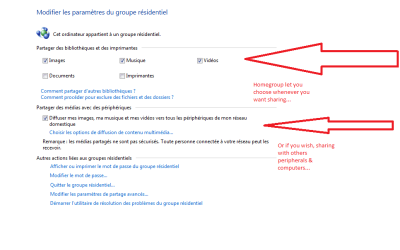
I like those librairies because i can allocate them to a special folder then store my datas in them.
I can split datas between places on my computer. i do use them to grab two places to store files. The only thing is that you'll have to use homegroup settings.

C:\users\user is mine, datas docs only
C:\users\public, is shared/loaded with heavy files as videos and music.

That's a great improvement, I can extract where i want, splits, move to copy to, ect...to organize
 

Attachments

  • Capture.PNG
    Capture.PNG
    13.9 KB · Views: 17
Last edited:

My Computer My Computer

Computer type
PC/Desktop
Computer Manufacturer/Model Number
Custom Build
OS
Windows 7 Professional SP1 - x64 [Non-UEFI Boot]
CPU
Ivy Bridge Core i5 3570K (Delidded)
Motherboard
Asus P8Z77-V LE PLUS
Memory
G.Skill "Ares" DDR3 PC3-12800 - 1600MHz (16Gb)
Graphics Card(s)
Asus Dual-RX480-O4G
Sound Card
Creative Sound Blaster Z w/5.1 sound system
Monitor(s) Displays
Asus IPS 23"
Screen Resolution
16/9
Hard Drives
Internal:
500Go Sata 6Gb/s (x2)
500Go Sata 3Gb/s (x2)
SSD 60Go Sata 6Gb/s
PSU
In Win C 900W Series 80+ Platinum
Case
Thermaltake Chaser A71
Cooling
Custom Water Cooling Loop
Keyboard
Cooler Master QuickFire XTi
Mouse
Razer Imperator 2012 (4G)
Antivirus
MSE
Browser
IE 11.0.xxx Rtm
Other Info
"Raid0" with Intel Smart Response Technology (HDD/SSD)
Hey guys,

I just came from XP to 7 Ultimate 64Bit to be able to utilize my 6GB of RAM. As of now, 7 is making me made nuts as there are a few things that drive to the point where I feel like I'm using a Mac because it simply just does not make any sense!

First thing I realized, I can't view GIFs in Photo Viewer no more and instead opens up IE (kind alike a Mac). WTFFFF. I have Chrome installed FFS. I don't want to be launching IE and even less just to view a bloody GIF image. So I right click it, Open With... I use the Search Box to find Chrome and yields no results. So then I try Photo Viewer and it's just a still image. At this point, I'm ready to throw the F*****G thing out the window. Dumbest thing I have ever seen!

Next in line; when I have Windows Explorer open and I want to navigate to a new destination, I click the drop down menu and... THERE IS NOTHING! Instead I got to open that Navigation Pane which is a total eye sore! Why include a F*****G drop down box and not include any relevant directories? Instead it's a very few list of recently opened, not important folders! What happened to XP style? That was functional!

The weirdest thing by far is the whole "Libraries" thing. What's the damn point? It's so annoying and I see it to be completely useless. Was it made for morons who can't properly find the desired folders so they go and mash em' up in some "virtual" folder? If I want my X and Y folder in the same directory ill just put em' together! What's the problem? You don't want your X and Y folder to be in the same directory? Move em'! It's like a "loop" folder.. I just really don't get it... Your Windows Explorer IS your library! Is the tool you use to organize your folders! So why would I need "Libraries"??

At this very moment, I've never raged so hard about an OS. I feel like Microsoft went to Mac route and screwed up even harder. That damn Windows Explorer icon beside the Start button is like Macs "Finder". Useless Junk icon. I open it up and brings me right to Libraries.. I'm going to throw this machine out onto a busy highway.

Now where did I put my XP CD... Damnit..

/EndRage

/Begin Question

If someone can please help me out with the Drop Down menu in Windows Explorer to show relevant locations it would be greatly appreciated!

And a way to view GIFs "normally".


/Thanks guys!

Great stuff!
I have wanted to lash out at this Windows shit!
its F........g ridiculous!

I completely understand both of you being upset with certain decisions made by Microsoft. But why take it out and rant at US? We're just the posters on Sevens Forum. We have no power to make any changes at Microsoft. Why don't you contact Microsoft and TELL THEM what upsets you???? Who knows, you might even help to get some changes made!!!
 

My Computer My Computer

Computer Manufacturer/Model Number
HP Pavillion dv5t (generation 1)
OS
Vista 64 bit and 32 bit (SP2)
CPU
Intel(R) Core(TM)2 Duo Processor T9400 (2.53 GHz
Memory
4GB DDR2 System Memory (2 Dimm)
Graphics Card(s)
512 MB NVIDIA GeForce 9600M GT
Monitor(s) Displays
15.4" diagonal WSXGA+ High-Definition HP BrightView Widescre
Screen Resolution
1680 x 1050
Hard Drives
320GB 5400RPM SATA Hard Drive with HP ProtectSmart Hard Drive Protection
Keyboard
Built-in HP
Mouse
Built in - Synaptics TouchPad V6.5 on PS/2 Port
Internet Speed
Max
Other Info
~ Intel Next-Gen Wireless-N Mini-card w/Bluetooth ~ Blu-Ray ROM DVD+/-R/RW ~ Integ. HDTV Hybrid Tuner ~ 12 Cell Battery ~ MS Office (Home Premium) 2007 ~
Imperfect1, you are absolutely right. We are an all volunteer technical forum who try to help people solve technical problems. We are not a social rant forum and I think the mods should close this thread. It is getting ridiculous.
 

My Computer My Computer

Computer Manufacturer/Model Number
HP, Dell, Gateway, Toshiba - 4 laptops and 2 desktops
OS
Vista, Windows7, Mint Mate, Zorin, Windows 8
CPU
from 1.6GHz Duo to i7
Monitor(s) Displays
2x HP w2207
Hard Drives
5x HDD, 7x SSD, 12x Externals
Keyboard
with trackball - no mices
Mouse
Trackball mice
Internet Speed
DSL 6000
Imperfect1, you are absolutely right. We are an all volunteer technical forum who try to help people solve technical problems. We are not a social rant forum and I think the mods should close this thread. It is getting ridiculous.
I think having rants is necessary, in fact it presents a balanced view of Windows 7 in general. If everything here is just sunshine and rainbows, it doesn't seem like it's accurate. You gotta take the good with the bad.
 

My Computer My Computer

Computer Manufacturer/Model Number
Self-Built in July 2009
OS
Windows 7 Ultimate x64
CPU
Intel Q9550 2.83Ghz OC'd to 3.40Ghz
Motherboard
Gigabyte GA-EP45-UD3R rev. 1.1, F12 BIOS
Memory
8GB G.Skill PI DDR2-800, 4-4-4-12 timings
Graphics Card(s)
EVGA 1280MB Nvidia GeForce GTX570
Sound Card
Realtek ALC899A 8 channel onboard audio
Monitor(s) Displays
23" Acer x233H
Screen Resolution
1920x1080
Hard Drives
Intel X25-M 80GB Gen 2 SSD
Western Digital 1TB Caviar Black, 32MB cache. WD1001FALS
PSU
Corsair 620HX modular
Case
Antec P182
Cooling
stock
Keyboard
ABS M1 Mechanical
Mouse
Logitech G9 Laser Mouse
Internet Speed
15/2 cable modem
Other Info
Windows and Linux enthusiast. Logitech G35 Headset.
Why don't you contact Microsoft and TELL THEM what upsets you???? Who knows, you might even help to get some changes made!!!
I will guarantee you that not one of these weekly ranters we have participated in the Windows 7 beta program and gave their feedback and comments. Not one.
 

My Computer My Computer

OS
Windows 7 Ultimate x64 SP1
CPU
Intel Core i7-2600
Motherboard
Gigabyte GA-P67A-UD3P-B3
Memory
12 GB Patriot Extreme DDR3-1333
Graphics Card(s)
Nvidia GTX 470
Monitor(s) Displays
Dell UltraSharp 2209WA
Hard Drives
OCZ Agility3 240 GB, WD5001AALS, WD7501AALS
PSU
OCZ ModStream 700W
Case
CoolerMaster HAF 912 Advanced
Cooling
CoolerMaster Hyper 212 Plus
Back
Top