what if i don't have a windows 7 setup dvd?

williamwclee

New member
Local time
7:16 AM
Messages
15
what if i don't have a windows 7 setup dvd?
mine is an OEM shipped with the notebook.

what files do i have to rebuild? any workaround?

William,
Hongkong
9.3.2011
 

My Computer My Computer

At a glance

windows 7 ultimate
OS
windows 7 ultimate
Hello William and welcome to Seven Forums. If your computer shipped with an OEM disk you can use that instead of a retail disk. Make sure your BIOS is set to boot from the CD/DVD drive and you should get all the same options on the OEM disk as you would with a retail disk. If you have no disk at all, your computer manufacturer might have a hidden recovery partition that can restore your machine to factory settings.
 

My Computer My Computer

At a glance

Win 7 Pro 64-bitIntel i5 2.4 Ghz8GB DDR3Intel HD 3000
Computer type
Laptop
Computer Manufacturer/Model Number
Sony Vaio VPCEB47GM Laptop
OS
Win 7 Pro 64-bit
CPU
Intel i5 2.4 Ghz
Memory
8GB DDR3
Graphics Card(s)
Intel HD 3000
Sound Card
IDT High Definition
Monitor(s) Displays
15.6 WGXA Anti-Glare LED
Screen Resolution
1280x800
Hard Drives
640Gb 7200rpm
Antivirus
MSE
Browser
Opera (primary) with IE9 backup
Hello William and welcome to Seven Forums. If your computer shipped with an OEM disk you can use that instead of a retail disk. Make sure your BIOS is set to boot from the CD/DVD drive and you should get all the same options on the OEM disk as you would with a retail disk. If you have no disk at all, your computer manufacturer might have a hidden recovery partition that can restore your machine to factory settings.

Correct. What you'll find is there'll be an OEM installd Recovery application in the start menu.

Additional:
With some OEM Recovery Managers it's advisable to maually backup your user/personal files. Some do offer a Non Destructive factory restore which will automatically backup your files and reinstate them in your new factory restore.
 

My Computer My Computer

At a glance

Windows 7 Ultimate x64AMD Sempron Dual Core3GBNVIDIA GeForce 6150SE nForce 430
Computer Manufacturer/Model Number
Compaq Desktop
OS
Windows 7 Ultimate x64
CPU
AMD Sempron Dual Core
Memory
3GB
Graphics Card(s)
NVIDIA GeForce 6150SE nForce 430
Screen Resolution
1024x768
Hard Drives
150GB Sata
Hello williamwclee, welcome to Seven Forums!


Have a look at this information below and be sure to post back with any further questions you may have and to keep us informed.


After you have copied out or made back-ups of the data you need to save to external media; if you can find an exact Windows version that the PC shipped with you can do a clean install using the activation key on the COA sticker attached to the PC though it may require a robo-call to MS to sort the OEM batch-key.

How to Activate Windows 7 by Phone


If you can't find an exact same version, you could use the info in this tutorial to create an "all versions" installer of any version Windows installer, to install using the same method I posted above.

Windows 7 Universal Installation Disc - Create


After you have made backups of everything you care to save, the best method is to do a complete wipe (secure erase) of the entire Hard Disk Drive first, it over-writes everything, all the old Windows code including all the old drivers/programs, giving you the best possible space to install Windows to.

SSD / HDD : Optimize for Windows Reinstallation

DISKPART : At PC Startup
 

My Computer My Computer

At a glance

W 7 64-bit UltimateIntel Q9550 Yorkfield8GB Dominator 8500C5DATI : XFX 5870
Computer Manufacturer/Model Number
* BFK Customs *
OS
W 7 64-bit Ultimate
CPU
Intel Q9550 Yorkfield
Motherboard
ASUS P5Q Pro
Memory
8GB Dominator 8500C5D
Graphics Card(s)
ATI : XFX 5870
Sound Card
Realtek HD Audio 7-1
Monitor(s) Displays
1x 47" LCD HDMI & 3x 26" LCD HDMI
Screen Resolution
1920x1080P & 1920x1200
Hard Drives
1x 80GB Intel X25-M G2 SSD : 1x 500GB & 1x 640GB WD Caviar Black(s)
PSU
Corsair 620HX
Case
Cooler Master RC-690
Cooling
Tuniq Tower 120, 2x 140mm and 3x 120mm case fans
Keyboard
Microsoft 500
Mouse
Razer Diamondback 3G
Internet Speed
14 Mb/s
Other Info
1x Koutech 3Gb/s SATA HDD Hot Swap Rack
i am not sure whether there is a boot recovery offered by that OEM installation
but i don't think so.

i guess that OEM copy is a proprietory one specially written by HP.

any further suggestions?


William,
Hong Kong.
2011.3.10
 

My Computer My Computer

At a glance

windows 7 ultimate
OS
windows 7 ultimate
Last edited:
i am not sure whether there is a boot recovery offered by that OEM installation
but i don't think so.

i guess that OEM copy is a proprietory one specially written by HP.

any further suggestions?


William,
Hong Kong.
2011.3.10

Every HP I have used, had a program group entry for creating the System Restore Disks.
 

My Computer My Computer

At a glance

Windows 7 Ultimate x64Intel Q9550 2.83Ghz OC'd to 3.40Ghz8GB G.Skill PI DDR2-800, 4-4-4-12 timingsEVGA 1280MB Nvidia GeForce GTX570
Computer Manufacturer/Model Number
Self-Built in July 2009
OS
Windows 7 Ultimate x64
CPU
Intel Q9550 2.83Ghz OC'd to 3.40Ghz
Motherboard
Gigabyte GA-EP45-UD3R rev. 1.1, F12 BIOS
Memory
8GB G.Skill PI DDR2-800, 4-4-4-12 timings
Graphics Card(s)
EVGA 1280MB Nvidia GeForce GTX570
Sound Card
Realtek ALC899A 8 channel onboard audio
Monitor(s) Displays
23" Acer x233H
Screen Resolution
1920x1080
Hard Drives
Intel X25-M 80GB Gen 2 SSD
Western Digital 1TB Caviar Black, 32MB cache. WD1001FALS
PSU
Corsair 620HX modular
Case
Antec P182
Cooling
stock
Keyboard
ABS M1 Mechanical
Mouse
Logitech G9 Laser Mouse
Internet Speed
15/2 cable modem
Other Info
Windows and Linux enthusiast. Logitech G35 Headset.
Another option for reinstalling at a later time would be via imaging. That is less painful than an installation from scratch. I recommend free Macrium or free Paragon.
 

My Computer My Computer

At a glance

Vista, Windows7, Mint Mate, Zorin, Windows 8from 1.6GHz Duo to i7
Computer Manufacturer/Model Number
HP, Dell, Gateway, Toshiba - 4 laptops and 2 desktops
OS
Vista, Windows7, Mint Mate, Zorin, Windows 8
CPU
from 1.6GHz Duo to i7
Monitor(s) Displays
2x HP w2207
Hard Drives
5x HDD, 7x SSD, 12x Externals
Keyboard
with trackball - no mices
Mouse
Trackball mice
Internet Speed
DSL 6000
Another option for reinstalling at a later time would be via imaging. That is less painful than an installation from scratch. I recommend free Macrium or free Paragon.
Yeah that works good as long as the computer is still working and functional and isn't completely littered and full of extraneous garbage that you might not actually want to restore.
 

My Computer My Computer

At a glance

Windows 7 Ultimate x64Intel Q9550 2.83Ghz OC'd to 3.40Ghz8GB G.Skill PI DDR2-800, 4-4-4-12 timingsEVGA 1280MB Nvidia GeForce GTX570
Computer Manufacturer/Model Number
Self-Built in July 2009
OS
Windows 7 Ultimate x64
CPU
Intel Q9550 2.83Ghz OC'd to 3.40Ghz
Motherboard
Gigabyte GA-EP45-UD3R rev. 1.1, F12 BIOS
Memory
8GB G.Skill PI DDR2-800, 4-4-4-12 timings
Graphics Card(s)
EVGA 1280MB Nvidia GeForce GTX570
Sound Card
Realtek ALC899A 8 channel onboard audio
Monitor(s) Displays
23" Acer x233H
Screen Resolution
1920x1080
Hard Drives
Intel X25-M 80GB Gen 2 SSD
Western Digital 1TB Caviar Black, 32MB cache. WD1001FALS
PSU
Corsair 620HX modular
Case
Antec P182
Cooling
stock
Keyboard
ABS M1 Mechanical
Mouse
Logitech G9 Laser Mouse
Internet Speed
15/2 cable modem
Other Info
Windows and Linux enthusiast. Logitech G35 Headset.
i am not sure whether there is a boot recovery offered by that OEM installation
but i don't think so.

i guess that OEM copy is a proprietory one specially written by HP.

any further suggestions?


William,
Hong Kong.
2011.3.10

Every HP I have used, had a program group entry for creating the System Restore Disks.

system restore is different from boot restore.

i have an OEM disc but that is not an original installation. It is more a system imaging copy.

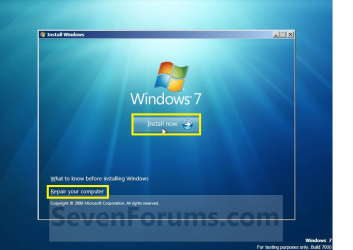
after booting up with that OEM disc, there is the option "INSTALL NOW" but i am not sure whether there is another option "BOOT REPAIR".

i will check that out later.
 

My Computer My Computer

At a glance

windows 7 ultimate
OS
windows 7 ultimate
You have an OEM installation DVD which is a full Win7 installer with Repair Console, and SLP activation files for your model computer. This is very valuable as most manufacturers dont' include them any longer in order to enforce the sponsors' bloatware which provides much of their consumer profit margin.

You should have the Repair console on the same screen as Install Now:
Untitled.png

You can clean reinstall using these tips to get a purrfect reinstall based on hundreds done here: http://www.sevenforums.com/installation-setup/125874-re-install-windows-7-a.html#post1086729
http://www.sevenforums.com/attachments/tutorials/2437d1231630431-clean-install-windows-7-step4.jpg
 
You have an OEM installation DVD which is a full Win7 installer with Repair Console, and SLP activation files for your model computer. This is very valuable as most manufacturers dont' include them any longer in order to enforce the sponsors' bloatware which provides much of their consumer profit margin.

You should have the Repair console on the same screen as Install Now:
View attachment 142955

You can clean reinstall using these tips to get a purrfect reinstall based on hundreds done here: http://www.sevenforums.com/installation-setup/125874-re-install-windows-7-a.html#post1086729

thanks for your reply.

i check that out later.

i recall that the screenshot looks quite different from yours.
 

My Computer My Computer

At a glance

windows 7 ultimate
OS
windows 7 ultimate
Back
Top