SSD Drive Filling Up Fast

r00ploi

New member
VIP
Local time
5:20 PM
Messages
269
Hi,

I have recently bought an SSD Drive for my pc to run Windows 7 Home Premium 64bit on. The drive size is 32GB All I have installed on the drive is Windows and its showing as 9gb free space the other day it was 12gb. Has anyone got any ideas as to why the space is filling up so quickly I have disabled system restore and deleted any restore points. Could this issue be linked to the Windows Index file?


Many thanks for your help
 

My Computer My Computer

Computer type
Laptop
Computer Manufacturer/Model Number
HP
OS
Windows 7
Run something like WindirStat or TreeSize free on the drive to see which folders are large.
 

My Computer My Computer

Computer Manufacturer/Model Number
Self-Built in July 2009
OS
Windows 7 Ultimate x64
CPU
Intel Q9550 2.83Ghz OC'd to 3.40Ghz
Motherboard
Gigabyte GA-EP45-UD3R rev. 1.1, F12 BIOS
Memory
8GB G.Skill PI DDR2-800, 4-4-4-12 timings
Graphics Card(s)
EVGA 1280MB Nvidia GeForce GTX570
Sound Card
Realtek ALC899A 8 channel onboard audio
Monitor(s) Displays
23" Acer x233H
Screen Resolution
1920x1080
Hard Drives
Intel X25-M 80GB Gen 2 SSD
Western Digital 1TB Caviar Black, 32MB cache. WD1001FALS
PSU
Corsair 620HX modular
Case
Antec P182
Cooling
stock
Keyboard
ABS M1 Mechanical
Mouse
Logitech G9 Laser Mouse
Internet Speed
15/2 cable modem
Other Info
Windows and Linux enthusiast. Logitech G35 Headset.
just guessing i'd say ( Hibernate and pagefile) you can disable both or one or the other and its going to give you back maybe 6 to 10gb.

ps. you have more then 1 drive so desable Hibernate and put the pagefile on a other drive .
if you need help at doing this just look in the tutorials.
scrooge
 
Last edited:

My Computer My Computer

Computer Manufacturer/Model Number
home build
OS
win 7 ( 64 bit)
CPU
Intel Core i7-870 Lynnfield 2.93GHz 8MB L3 Cache LGA 1156 95
Motherboard
ASUS P7P55 LX LGA 1156
Memory
G.SKILL Sniper Series 16GB (4 x 4GB) 240-Pin DDR3 SDRAM
Graphics Card(s)
ATI Radeon HD6800 Series
Sound Card
hdmi
Monitor(s) Displays
42" lg 3d tv
Screen Resolution
1920 x 1080
Hard Drives
1 ssd pci-e revodrive
4 seagate 1.5 tb
PSU
Rosewill BRONZE Series RBR1000-M 1000W Continuous@40°C, 80Pl
Case
CoolMaster 922
Cooling
CORSAIR CWCH60 Hydro Series H60 High Performance Liquid CPU
Keyboard
logtech
Mouse
logitect
Internet Speed
5 mbit
Hi

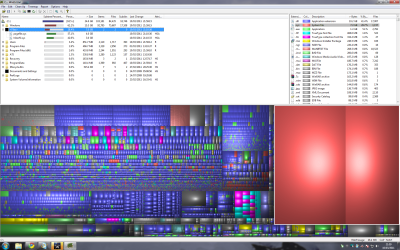
Please see attached picture that shows the files that are taking a lot of space on the SSD drive.

Cheers,
 

Attachments

  • SSD DRIVE.png
    SSD DRIVE.png
    510.8 KB · Views: 296

My Computer My Computer

Computer type
Laptop
Computer Manufacturer/Model Number
HP
OS
Windows 7
Your Pagefile.sys and hiberfil.sys files are taking over 7GB. That's about 1/4 of your total drive space.

Move the pagefile.sys to your spinner drive.

Turn off hibernation with this;
cmd as admin
powercfg -h off
 

My Computer My Computer

Computer Manufacturer/Model Number
Self-Built in July 2009
OS
Windows 7 Ultimate x64
CPU
Intel Q9550 2.83Ghz OC'd to 3.40Ghz
Motherboard
Gigabyte GA-EP45-UD3R rev. 1.1, F12 BIOS
Memory
8GB G.Skill PI DDR2-800, 4-4-4-12 timings
Graphics Card(s)
EVGA 1280MB Nvidia GeForce GTX570
Sound Card
Realtek ALC899A 8 channel onboard audio
Monitor(s) Displays
23" Acer x233H
Screen Resolution
1920x1080
Hard Drives
Intel X25-M 80GB Gen 2 SSD
Western Digital 1TB Caviar Black, 32MB cache. WD1001FALS
PSU
Corsair 620HX modular
Case
Antec P182
Cooling
stock
Keyboard
ABS M1 Mechanical
Mouse
Logitech G9 Laser Mouse
Internet Speed
15/2 cable modem
Other Info
Windows and Linux enthusiast. Logitech G35 Headset.
just guessing i'd say ( Hibernate and pagefile) you can disable both or one or the other and its going to give you back
maybe 6 to 10gb.

scrooge

depending on your own personal usage, i would recommend disabling hibernation:

How to Enable or Disable Hibernate in Windows 7

BUT i wouldn't disable the pagefile, i would make it smaller. if you've got 4 gigs of ram, you can probably get away with a pagefile of 512 megs on your ssd, or move it to another drive.

to change size of pagefile (also called swapfile):

click start button/orb >> right-click 'computer' >> properties >> advanced system settings >> settings button under 'performance' >> advanced >> change ... phew!

*oops* pparks1 got there first!
 

My Computer My Computer

Computer Manufacturer/Model Number
mickey megabyte 1234
OS
ultimate 64 sp1
CPU
i5 2500K [email protected]
Motherboard
MSI P67A-GD53
Memory
8 gigs GSkill Ripjaws 1600
Graphics Card(s)
amd hd6950
Sound Card
creative x-fi gamer
Monitor(s) Displays
samsung 24"
Screen Resolution
1920x1080
Hard Drives
ocz vertex 2e 60 gig, samsung f3 1tb, buffalo 2tb ext
PSU
antec 550
Case
antec three hundred
Cooling
i'm a cooling fan
Keyboard
saitek eclipse ii
Mouse
logitech g3
Internet Speed
about 4 Mbps
Other Info
i love win7
also if you installed (sp1) for your updates theres a cleaner that will give you back 1.5gb .
not sure where i found it before but i'm sure someone here will link it for you.
scrooge
 

My Computer My Computer

Computer Manufacturer/Model Number
home build
OS
win 7 ( 64 bit)
CPU
Intel Core i7-870 Lynnfield 2.93GHz 8MB L3 Cache LGA 1156 95
Motherboard
ASUS P7P55 LX LGA 1156
Memory
G.SKILL Sniper Series 16GB (4 x 4GB) 240-Pin DDR3 SDRAM
Graphics Card(s)
ATI Radeon HD6800 Series
Sound Card
hdmi
Monitor(s) Displays
42" lg 3d tv
Screen Resolution
1920 x 1080
Hard Drives
1 ssd pci-e revodrive
4 seagate 1.5 tb
PSU
Rosewill BRONZE Series RBR1000-M 1000W Continuous@40°C, 80Pl
Case
CoolMaster 922
Cooling
CORSAIR CWCH60 Hydro Series H60 High Performance Liquid CPU
Keyboard
logtech
Mouse
logitect
Internet Speed
5 mbit
Hi

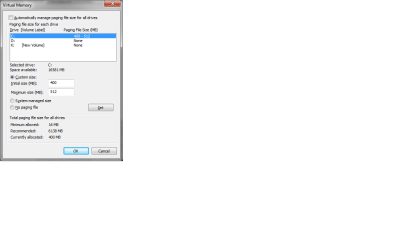
Please see attached picture showing what I've set the page file size to

I now have 15.7gb free.


Thanks :)
 

Attachments

  • page file.png
    page file.png
    13.4 KB · Views: 179

My Computer My Computer

Computer type
Laptop
Computer Manufacturer/Model Number
HP
OS
Windows 7

My Computer My Computer

Computer Manufacturer/Model Number
mickey megabyte 1234
OS
ultimate 64 sp1
CPU
i5 2500K [email protected]
Motherboard
MSI P67A-GD53
Memory
8 gigs GSkill Ripjaws 1600
Graphics Card(s)
amd hd6950
Sound Card
creative x-fi gamer
Monitor(s) Displays
samsung 24"
Screen Resolution
1920x1080
Hard Drives
ocz vertex 2e 60 gig, samsung f3 1tb, buffalo 2tb ext
PSU
antec 550
Case
antec three hundred
Cooling
i'm a cooling fan
Keyboard
saitek eclipse ii
Mouse
logitech g3
Internet Speed
about 4 Mbps
Other Info
i love win7
Hi

Thanks for your reply

Just to confirm all drivers are installed on the SSD drive and then all my games are installed on another drive. If the page file size is in correct will the system start to crash?

I will run the service pack clean up tool now
 

My Computer My Computer

Computer type
Laptop
Computer Manufacturer/Model Number
HP
OS
Windows 7
personally i've got 4 gigs of ram, and have set my pagefile to 512 megs.

i've often got lots of apps open, including biggies like photoshop, dreamweaver etc, and loads of browser tabs.

not had a problem yet. *crosses fingers*

if you start seeing 'not enough virtual memory' error messages, then you'll need to make it bigger.
 

My Computer My Computer

Computer Manufacturer/Model Number
mickey megabyte 1234
OS
ultimate 64 sp1
CPU
i5 2500K [email protected]
Motherboard
MSI P67A-GD53
Memory
8 gigs GSkill Ripjaws 1600
Graphics Card(s)
amd hd6950
Sound Card
creative x-fi gamer
Monitor(s) Displays
samsung 24"
Screen Resolution
1920x1080
Hard Drives
ocz vertex 2e 60 gig, samsung f3 1tb, buffalo 2tb ext
PSU
antec 550
Case
antec three hundred
Cooling
i'm a cooling fan
Keyboard
saitek eclipse ii
Mouse
logitech g3
Internet Speed
about 4 Mbps
Other Info
i love win7
Hi

Thanks for your reply

Just to confirm all drivers are installed on the SSD drive and then all my games are installed on another drive. If the page file size is in correct will the system start to crash?

I will run the service pack clean up tool now


i'd move the pagefile to the (d drive)
 

My Computer My Computer

Computer Manufacturer/Model Number
home build
OS
win 7 ( 64 bit)
CPU
Intel Core i7-870 Lynnfield 2.93GHz 8MB L3 Cache LGA 1156 95
Motherboard
ASUS P7P55 LX LGA 1156
Memory
G.SKILL Sniper Series 16GB (4 x 4GB) 240-Pin DDR3 SDRAM
Graphics Card(s)
ATI Radeon HD6800 Series
Sound Card
hdmi
Monitor(s) Displays
42" lg 3d tv
Screen Resolution
1920 x 1080
Hard Drives
1 ssd pci-e revodrive
4 seagate 1.5 tb
PSU
Rosewill BRONZE Series RBR1000-M 1000W Continuous@40°C, 80Pl
Case
CoolMaster 922
Cooling
CORSAIR CWCH60 Hydro Series H60 High Performance Liquid CPU
Keyboard
logtech
Mouse
logitect
Internet Speed
5 mbit
Hi

Thanks for your reply

Just to confirm all drivers are installed on the SSD drive and then all my games are installed on another drive. If the page file size is in correct will the system start to crash?

I will run the service pack clean up tool now


i'd move the pagefile to the (d drive)


Hi
Thanks for your reply

If I move it over to the other drive shall I leave the page file size at default?
 

My Computer My Computer

Computer type
Laptop
Computer Manufacturer/Model Number
HP
OS
Windows 7
Hi

Thanks for your reply

Just to confirm all drivers are installed on the SSD drive and then all my games are installed on another drive. If the page file size is in correct will the system start to crash?

I will run the service pack clean up tool now


i'd move the pagefile to the (d drive)


Hi
Thanks for your reply

If I move it over to the other drive shall I leave the page file size at default?

there's a setting for (system manage size) try that.

scrooge
 

My Computer My Computer

Computer Manufacturer/Model Number
home build
OS
win 7 ( 64 bit)
CPU
Intel Core i7-870 Lynnfield 2.93GHz 8MB L3 Cache LGA 1156 95
Motherboard
ASUS P7P55 LX LGA 1156
Memory
G.SKILL Sniper Series 16GB (4 x 4GB) 240-Pin DDR3 SDRAM
Graphics Card(s)
ATI Radeon HD6800 Series
Sound Card
hdmi
Monitor(s) Displays
42" lg 3d tv
Screen Resolution
1920 x 1080
Hard Drives
1 ssd pci-e revodrive
4 seagate 1.5 tb
PSU
Rosewill BRONZE Series RBR1000-M 1000W Continuous@40°C, 80Pl
Case
CoolMaster 922
Cooling
CORSAIR CWCH60 Hydro Series H60 High Performance Liquid CPU
Keyboard
logtech
Mouse
logitect
Internet Speed
5 mbit
OK,

I am trying to find the tutorial which shows how to change it over to the other drive but can't seem to find it.
 

My Computer My Computer

Computer type
Laptop
Computer Manufacturer/Model Number
HP
OS
Windows 7
if you really do want to move it:

set 'no paging file' on C - press 'set', then make a custom or system-managed-size pagefile on D (or E...).

it's up to you, but i've kept mine on C - as it's faster than D!
 

My Computer My Computer

Computer Manufacturer/Model Number
mickey megabyte 1234
OS
ultimate 64 sp1
CPU
i5 2500K [email protected]
Motherboard
MSI P67A-GD53
Memory
8 gigs GSkill Ripjaws 1600
Graphics Card(s)
amd hd6950
Sound Card
creative x-fi gamer
Monitor(s) Displays
samsung 24"
Screen Resolution
1920x1080
Hard Drives
ocz vertex 2e 60 gig, samsung f3 1tb, buffalo 2tb ext
PSU
antec 550
Case
antec three hundred
Cooling
i'm a cooling fan
Keyboard
saitek eclipse ii
Mouse
logitech g3
Internet Speed
about 4 Mbps
Other Info
i love win7
if you really do want to move it:

set 'no paging file' on C - press 'set', then make a custom or system-managed-size pagefile on D (or E...).

it's up to you, but i've kept mine on C - as it's faster than D!


will it make that much of a difference in speed ? i always put it on the d and e drives
never thought about speed difference.

scrooge
 

My Computer My Computer

Computer Manufacturer/Model Number
home build
OS
win 7 ( 64 bit)
CPU
Intel Core i7-870 Lynnfield 2.93GHz 8MB L3 Cache LGA 1156 95
Motherboard
ASUS P7P55 LX LGA 1156
Memory
G.SKILL Sniper Series 16GB (4 x 4GB) 240-Pin DDR3 SDRAM
Graphics Card(s)
ATI Radeon HD6800 Series
Sound Card
hdmi
Monitor(s) Displays
42" lg 3d tv
Screen Resolution
1920 x 1080
Hard Drives
1 ssd pci-e revodrive
4 seagate 1.5 tb
PSU
Rosewill BRONZE Series RBR1000-M 1000W Continuous@40°C, 80Pl
Case
CoolMaster 922
Cooling
CORSAIR CWCH60 Hydro Series H60 High Performance Liquid CPU
Keyboard
logtech
Mouse
logitect
Internet Speed
5 mbit
Thanks for your further replies,

I've decided to leave it on C for the time being, if I start to experience issues then I will probably move it over to the other drive.

Thanks for your help
 

My Computer My Computer

Computer type
Laptop
Computer Manufacturer/Model Number
HP
OS
Windows 7
Thanks for your further replies,

I've decided to leave it on C for the time being, if I start to experience issues then I will probably move it over to the other drive.

Thanks for your help


well mickey megabyte maybe right about the speed so maybe just leave it. after all
you did get back alot of the space .
 

My Computer My Computer

Computer Manufacturer/Model Number
home build
OS
win 7 ( 64 bit)
CPU
Intel Core i7-870 Lynnfield 2.93GHz 8MB L3 Cache LGA 1156 95
Motherboard
ASUS P7P55 LX LGA 1156
Memory
G.SKILL Sniper Series 16GB (4 x 4GB) 240-Pin DDR3 SDRAM
Graphics Card(s)
ATI Radeon HD6800 Series
Sound Card
hdmi
Monitor(s) Displays
42" lg 3d tv
Screen Resolution
1920 x 1080
Hard Drives
1 ssd pci-e revodrive
4 seagate 1.5 tb
PSU
Rosewill BRONZE Series RBR1000-M 1000W Continuous@40°C, 80Pl
Case
CoolMaster 922
Cooling
CORSAIR CWCH60 Hydro Series H60 High Performance Liquid CPU
Keyboard
logtech
Mouse
logitect
Internet Speed
5 mbit
Back
Top